-
Auto Face Enhancer [Commercial]
After a lot of messing around, G8F taking forever to load, scenes that were using the old AFE not opening at all, I've finally got it all working correctly.
It seems that DIM (in my case anyway) refuses to uninstall the old version so here is what I did to fix it;Firstly I used DIM to uninstall ALL the AFE products (make and females just to be certain).
Second. I the searched my content folder for D.master and deleted every file I could find that was in any way related to AFE or face enhancer.
Thirdly. I manually downloaded all the AFE products, 6 in total, 3 for each male and female and manually extracted the files into my content folder (also downloaded and manually installed the update link listed further up this page).
Restart Daz studio and everything seems to be working fine now.
As expected, loading old scenes that used the old AFE will bring up a ton of missing file callouts. Re-saving the file will fix this for future needs.
Shame about the smoothing only working on selected characters and not custom characters, luckily I have zbrush so was able to do a smoothing morph for a custom character. Unluckily, almost every character I use is custom, so have to go through what was a quite long winded and steep learning curve to do this and will have to do it for every character I need to use the AFE attachment on.It is not easy to create a universal HD Detail to conform to all characters. Like any conforming clothing or geometry, it will fit certain characters until it reaches its limits. If you really need to smooth things out, for a fee, I can do a custom smoothing for you.
Auto Face Enhancer [Commercial]After a lot of messing around, G8F taking forever to load, scenes that were using the old AFE not opening at all, I've finally got it all working correctly.
It seems that DIM (in my case anyway) refuses to uninstall the old version so here is what I did to fix it;Firstly I used DIM to uninstall ALL the AFE products (make and females just to be certain).
Second. I the searched my content folder for D.master and deleted every file I could find that was in any way related to AFE or face enhancer.
Thirdly. I manually downloaded all the AFE products, 6 in total, 3 for each male and female and manually extracted the files into my content folder (also downloaded and manually installed the update link listed further up this page).
Restart Daz studio and everything seems to be working fine now.
As expected, loading old scenes that used the old AFE will bring up a ton of missing file callouts. Re-saving the file will fix this for future needs.
Shame about the smoothing only working on selected characters and not custom characters, luckily I have zbrush so was able to do a smoothing morph for a custom character. Unluckily, almost every character I use is custom, so have to go through what was a quite long winded and steep learning curve to do this and will have to do it for every character I need to use the AFE attachment on.Star 2.0 and Star1 clothing?To create a basic clone to fit figure A clothes to figure B, you need to create a morph for figure B which gives it the shape of figure A. That morph will be saved in property group "Hidden/Clones", and its type needs to be set to "Modifier/Clone".
There's a tutorial here on how to create a V4 clone for G8F, which could be adapted to create one for Laura if you have a Laura morph for an earlier Genesis figure (you could create one for Genesis if you have GenX2 and the Gen3 Kids add-on, for example).
How to make morphs correctly?Is "autofollow" turned on in the parameters for your morph? (use the gear near the dial name to open the parameters window)
How to make morphs correctly?I'm using a 3d modelling software to make morphs as .obj files, it preserves the vertex order, I can load them into daz using the morph loader and they work as morphs.
However when I make a geograft, the graft doesn't follow the morph, it works correctly with other morphs I have downloaded, but not my own. So what information am I missing that will make the geograft follow my morphs like it does with other morphs?
Auto Face Enhancer [Commercial]Alright when we all waiting for a fix i notice the following "problem" on the nose area. see the screenshot for what i mean.
How can we delete that wrinkle? its unnatural and i cant get it out from my character. Its appear on all my female characters..
Best regards.
here are some 9 of the 50 characters that do works. adding custom blend morphs can give unwanted normal. At the detail level, you are at you do not need the AFE Skin. I do see the details. You can remove the AFE and just use the Expression and Power pose.
Leonides02 said:
DMaster - Any way for us to smooth the mesh for a character? I want to add extra skin details on a character you haven't smoothed the mesh for...
you have to export out G8 figure at sub-d 3. Then export only the AFE out at sub-d-0
in ZBrush, you project the AFE on to the G8 to create the custom smooth AFE
import AFE back onto AFE as a morph.
AIUTO...CHI CONOSCE L’ITALIANO? PARTE DODICIPer il clone/morph volevo saperlo perchè ho ritrovato un vacchio metodo per passare i morph dalla G5 a Genesis solo se si è in possesso delle Shspe relative. E il clone è una sorta di shape, se si attiva.
Mentre per l'importo in Face Transfer, secondo te se qualcun altro crea il morph e tu lo importi solo, lo calcola come utilizzo?
KHImage studio does it again, now for GENESIS 8!Old thread, but...
I've been testing this product vs. the Victoria 8 version, and it doesn't seem like the Collar Fwd / Back morph is doing anything.
The first is the Vicky 8 version, the second is the general G8.
Also, when I move the master controller, nothing happens in that area when I'm using the G8 slider, but does for the Vicky version.
Auto Face Enhancer [Commercial]DMaster - Any way for us to smooth the mesh for a character? I want to add extra skin details on a character you haven't smoothed the mesh for...
you have to export out G8 figure at sub-d 3. Then export only the AFE out at sub-d-0
in ZBrush, you project the AFE on to the G8 to create the custom smooth AFE
import AFE back onto AFE as a morph.
Hey, thank you for this, DMaster! I'll give it a try.
 Auto Face Enhancer [Commercial]
DMaster - Any way for us to smooth the mesh for a character? I want to add extra skin details on a character you haven't smoothed the mesh for...
you have to export out G8 figure at sub-d 3. Then export only the AFE out at sub-d-0
in ZBrush, you project the AFE on to the G8 to create the custom smooth AFE
import AFE back onto AFE as a morph.
3D Art Freebie Challenge-February 2020-Winners Announced"Natural Love" -Entries Thread OnlyThe Tree Hugger
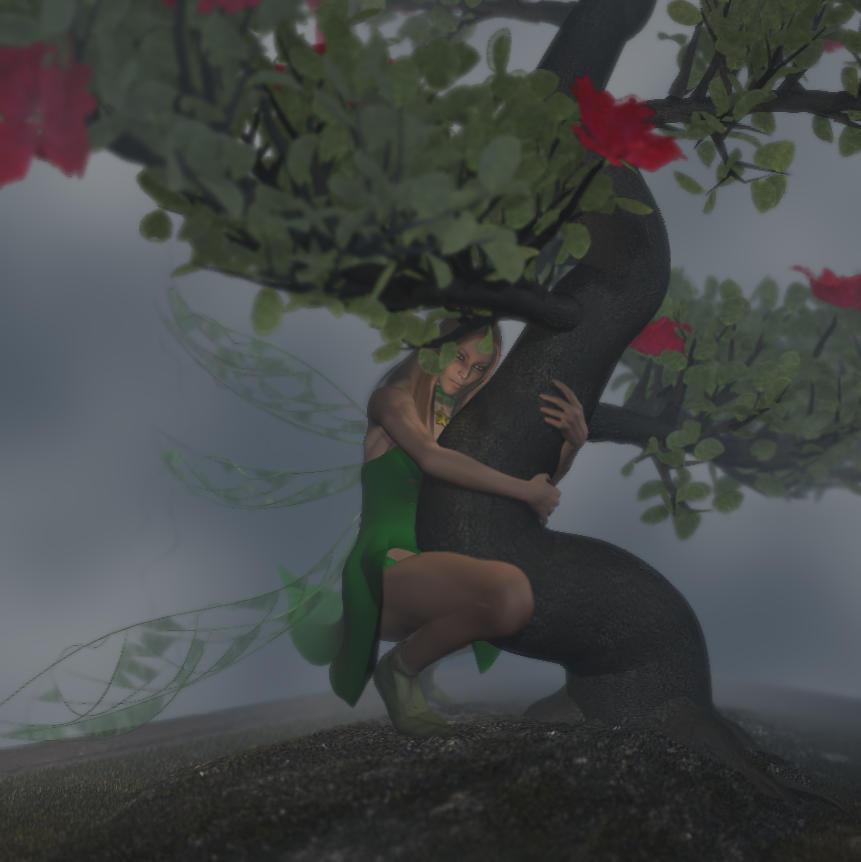
Freebies:
1) Tink Dress for V4 (FaerieDreams/Mada3D) - http://www.mada3d.com/Freebies1.html row 8, first item
2) Leafy Boots For V4 (FaerieDreams/Mada3D) - http://www.mada3d.com/Freebies1.html row 2, middle (2nd) item
3) Broken Wings (AprilYSH) - http://shop.aprilsvanity.com/free-items/broken-wings-model-textures.html
4) Choker from The Magical Dress Platinum for A4 (redviper2012) - http://www.sharecg.com/v/59422/View/11/Poser/The-Magical-Dress-Platinum-for-A4 (+ redviper's platinum cloth morph++ (Anymatter) - https://sharecg.com/v/60149/browse/11/Poser/redvipers-platinum-cloth-morph++ )
5) Valens Hair For V4/A4 (dyald) - https://www.sharecg.com/v/36166/favorite/21/DAZ-Studio/Valens-Hair-For-V4-A4Paid:
The bonsai was a freebie from XFrog in the past, but not any more. So I'm listing it as paid.Growing Up breast ugly removeWhen creating young females without breasts with Growing Up, it is easiest to use just the base G8F body and dial in only the specific character's head morph. For young males, just use the G8M body to avoid extra muscles.
When I use one of the Growing Up presets with a character, I generally mix in the full strength of the character head morph and half or less of the character body morph. Also, if you're setting up multiple characters in a scene, different levels of the basic Genesis body morphs, e.g. a bit of Heavy in one, a bit of Pear in another. Doesn't have to be much, just enough to end up with visibly different body types.
[Released] ManFriday's Mesh Grabber [Commercial]Hey ManFriday,
I have the problem here on the socks, that the green slider is kinda missing, its very low visible bot not useable, any idea why? I wanna fix this socks :/
That is strange indeed. Have you tried selecting something else in the scene and then selecting the sock again? Maybe the mesh grabber got confused with its selections. Also you could try switching to vertex selection in the mesh grabber tool settings.
It happens to me too when zooming "too much". I posted about it some time ago.
Little question about the gizmo placement: isn't better place it in the center of the selected group, like in any other 3D modeling stuff? This way the gizmo won't jump around.
I don't mind if the gizmo jumps around, as long as it's where I need it for the angle I'm viewing the object at. I would mind having it deep within an object, so it's out of frame if I zoom in close.
Here's a tip to make it a bit easier to see when the mesh of one object stops poking through another one, (works with morph sliders, dforms, etc., as well as with the Mesh Grabber.)
- Set Draw Mode to Smooth Shaded.
- Change the Base Color of the surface poking through to something unmistakable, like hot pink or lime green. (If necessary, note the original color in the Base Color.)
- If necessary, change the Base Color of the outer surface to white. (Also making note of the original color.)
- Adjust the mesh of either object, or both, until the obnoxious color doesn't show.
- Change the Base Colors of your objects back to their original colors.
Simulate a second time a objectHere's a good tutorial I have had success with;
https://thinkdrawart.com/how-to-save-a-daz-studio-dforce-frame-as-a-morph
Question about morphs and posesIt depends on how the morph was made and for which purpose.
Some morphs are setup to apply automatically when the figure is posed, like joint controlled morphs which correct the joint pose when bend, for example.
Other morphs are not intended to be applied automatically, and you will need to apply them yourself.
Thank you the for explainstion. How do I check to see if morphs are used by poses automatically? For freebies I have the files but how about comerical products?
Things like bend fixers will usually make a thing of that - it's their whole raison d'etre (sorry, Leana - I know there are at least some accents missing there).
So bend fixers like Auto Shape Enhancer will use all available morphs and not just vanilla Daz3D ones? How does it know what third party morphs do?
EDIT:
So can something like Shape Shift improve poses with a bend fixer like Auto Shape Enhancer even if I don't touch any of the Shape Shift's dial?
I don't understand the question - AutoShape Enhancer has a series of correction morphs that improve bends, with an on-off switch. I'm not clear what you expect it to do with other morphs (though I wouldn't try mixing multiple bend enhancer products active at the same time).
Sorry about that. I am not familar with the terminology with Daz. In deciding what morphs to get, I am trying to understand if there is a benefit, i.e. making characters more natural looking in poses, of adding morphs even if I don't touch the dial.
Some bend fixers seem to significantly alter the body shape of the character, which is not what I want.
EDIT: My background in 3D hobby is mostly from Skyrim so I thought morph is more akin to mesh. I did try the first edition of Poser when it first came out but that was a long time ago and I gave up right away.
TritiumCG Freebie ThreadJust 0.02 from someone who has zero experience in 3D sculpting. The only one I've tried is Kate Mara since I don't know the othe people or game characters. The morph is very good at capturing the outline of her face but it does not say Kate Mara IMHO. I think the reason is that the morph is missing her two most prominent features: the chin dimple and the nose (the tip and philtrum?).
It's still a very pretty and unique face though and thank you for sharing them.
I tried so hard to get Kate's nose right, I really did. I literally spent hours. It's hard to admit defeat but at some point I just had to call it (I want to blame it on a lack of geometry in G8F's face, but that may just be an excuse for my lack of skill). :,( All I can hope is it'll serve as a good base to start from or at least as another pretty face for the genepool.
Here's the latest three, Julia Kyoka came out really nice though I think (she has such a smooth body it was a delight sculpting her features):
https://www.deviantart.com/tritiumcg/art/Lexi-Sindel-Head-Morph-for-G8F-829403352 | https://www.deviantart.com/tritiumcg/art/Julia-Kyoka-Head-and-Body-Morphs-for-G8F-829620669 | https://www.deviantart.com/tritiumcg/art/Kate-Mara-Head-Morph-for-G8F-830230704
Simulate a second time a objectI haven't actually tried it yet, but my understanding is that you can save the draped shape out as a morph for the item, then load it onto the item with morph loader. From there the process should be to start from zero, apply the newly created morph, and then simulate.
Someone who's done it may hopefully chime in and confirm/correct/go into more detail. I'd try it out myself and walk you through it, but I'm not at my home computer.
Use poses for G3 with G8I use this all the time just for that purpose - https://www.daz3d.com/ultimate-pose-mixer
It also does so much more, such as the on-the-fly ability to lock joints/joint combinations so you can mix poses to your heart's desire...but what I love is the menu interface so you can convert poses on the fly without having to run a separate script.
Funny - I use this a lot for mixing poses and locking body parts but had completely forgotten that it converts from one generation to another. For that I have batch converted lots of G3 (and G2) poses to G8 using that standalone converter suggested by @Hylas (above). I also have the Agent Unawares converter.
I have numerous converters...one from Zev0 and now RSSY's newest props/pose converter and I do like those because it adds everything to Smart Content (poses are one of the few things I do like using Smart Content for...otherwise I'd never find any). But the Pose Mixer's menu-added one-click is amazingly convenient to just load a pose in and *poof* it's converted. Another useful trick I found is that when I manually convert clothing from G3 to G8 (or vice versa), that one-click *poof* is very nice to have for poofing the clothing to the right position before the rigging transfer.
Mixing head morphs -- lips become strangeI've done some mixing and matching of character heads to make some unique characters. 40% this, 10% that, another 10% that, etc. The character looks almost okay in the end, except for their lips. This happens no matter which characters I mix. Usually their lower lip becomes bigger than usual. I added a morph to reduce the lip size, that looks okay with no poses and expressions, but as soon as I start adding expressions, the mouth becomes catastrophic.
What's the trick to not mess up the mouth area when mixing multiple head morphs? :)Skin and hair ID...Hi, I was wondering if anyone knew what skin is used on this character (don't really care about the morph if it is separate,) and what Hair is used in the promo. Thanks.
https://www.daz3d.com/casually-poses-for-genesis-8-female

Daz 3D is part of

Connect
DAZ Productions, Inc.
7533 S Center View Ct #4664
West Jordan, UT 84084Licensing Agreement | Terms of Service | Privacy Policy | EULA
© 2026 Daz Productions Inc. All Rights Reserved.