-
Daz Studio 4.23[.0.x], General Release!
wargis said:
Hello to all! Recently I updated DS to 4.23.0.1 and encountered a couple of issues with rendering and Genesis 9. The one with IRAY render is the famous pink or purple renders problem, which was reported several times at the forum. When I try to run render in IRAY with my CPU, I get pink textures instead of regular image (I have not any Nvidia GPU, but formerly my CPU was workable for simple Iray renders, when I used DS 4.20 beta). But the solution was to find missing freeimage.dll and put it into DAZ 3D>DAZStudio64>libs>iray. I haven't found any freeimage.dll in the setup package of the general DS 4.23.0.1. How to fix it?
If you go to https://www.daz3d.com/forums/discussion/666011/daz-studio-4-23-0-x-nvidia-iray and search for freeimage you shoild find an explaantion - though I think still being on Windows 7 may limit your options.
The other unusual problem appeared when I tested Face Transfer 2 with Genesis 9 figures. Formerly in DS 4.20 it worked flawlessly with Genesis 8, but in DS 4.23, when I run this plugin on G9, I get constant crashes with an error message like "DAZStudio.exe caused ILLEGAL_INSTRUCTION in module "C:\Program Files\DAZ 3D\DAZStudio4\avatar_sdk_metaperson_daz3d.dll". I have the latest update of Genesis 9, with all clothes and necessary presets. The crash happens when this plugin reaches the stage of generating shapes and textures. What's the issue? Maybe it requires a larger photo to generate a compatible texture with Genesis 9 base head image? The last one I used was about 1500x2000 px and I got a crash all the same. I can attach the last log, here is it. When I use Genesis 8, I don't see such a problem, and I wonder why old Genesis 8 does not require any clothing for the plugin to work.
Genesis 9 is supported by FaceTransfer 2, on which you get three free goes and then are limnited to previews (with a watermark on the maps) - again, I have a feeling being on Windows 7 still may be part of the issue.
My system is Windows 7 x64, with AMD CPU and double AMD GPUs, about 6 GB of RAM, it it's important. Can it be linked to my hardware?
Daz Studio 4.23[.0.x], General Release!Hello to all! Recently I updated DS to 4.23.0.1 and encountered a couple of issues with rendering and Genesis 9. The one with IRAY render is the famous pink or purple renders problem, which was reported several times at the forum. When I try to run render in IRAY with my CPU, I get pink textures instead of regular image (I have not any Nvidia GPU, but formerly my CPU was workable for simple Iray renders, when I used DS 4.20 beta). But the solution was to find missing freeimage.dll and put it into DAZ 3D>DAZStudio64>libs>iray. I haven't found any freeimage.dll in the setup package of the general DS 4.23.0.1. How to fix it?
The other unusual problem appeared when I tested Face Transfer 2 with Genesis 9 figures. Formerly in DS 4.20 it worked flawlessly with Genesis 8, but in DS 4.23, when I run this plugin on G9, I get constant crashes with an error message like "DAZStudio.exe caused ILLEGAL_INSTRUCTION in module "C:\Program Files\DAZ 3D\DAZStudio4\avatar_sdk_metaperson_daz3d.dll". I have the latest update of Genesis 9, with all clothes and necessary presets. The crash happens when this plugin reaches the stage of generating shapes and textures. What's the issue? Maybe it requires a larger photo to generate a compatible texture with Genesis 9 base head image? The last one I used was about 1500x2000 px and I got a crash all the same. I can attach the last log, here is it. When I use Genesis 8, I don't see such a problem, and I wonder why old Genesis 8 does not require any clothing for the plugin to work.
My system is Windows 7 x64, with AMD CPU and double AMD GPUs, about 6 GB of RAM, it it's important. Can it be linked to my hardware?
Breast Utilities for Genesis 9 - where did they go upon install?SOLVED partially)CES3D said:
Shaping Morphs can be found under Parameters > Actor > Chest > Feminine (or Masculine) > Breast Utilities.
thanks..I'll check there. I know the other morph package that went lost is not in there...
The Sky is Falling Complaint ThreadNon-complaint: I haven't had a bloody nose for several weeks now.
 So, yesterday I cancelled my otolaryngologist(I just love that word), i.e nose-doctor appointment, and with the saved money, treated myself to a delightful mini-adventure of an 8:00AM bus ride for a restaurant breakfast at my favorite hole-in-the-wall beanery in a decrepit mini-mall.
 Then a trip to WalMart(wheee... WalMart!) at the other side of the city, where I did some grocery shopping and checked on the prices of TVs bigger than any wall in my house.
 (Do they even make TVs smaller than a refrigerator anymore?) Checked the prices of clothes (I still need a new flannel shirt)
 . Looked at kitchen tools, just as easily bought through Amazon. And stopped in the Subway sandwich shop there to get a foot-long sub from a non-English speaking person who left out the meat, and when I pointed that out, she didn't remake the sandwich, she just shoved the lettuce and tomato & peppers aside to try to squeeze in the wrong meat.
 Then a trip back to the decrepit mini-mall to the Chinese take-out(doesn't open until 11:00AM) there for two lunch Szechuan Chicken w/fried rice & eggroll meals to take home (I'll make four meals of it). And I got home before noon, for the first of those meals.
Non-complaint: I've been collecting cardboard boxes from Amazon, and elsewhere, for almost a year. I break them down and fold them flat and store them in a loose pile in the least inconvient spot in my apartment (the landing on my stairway to my bedroom, partially blocking my way from two directions). I've been squeezing around them for months.
I finally talked to my neighbor in the other half of the house and he'll be taking them to the trash "Transfer Station"(what we used to call "the dump") to be recycled. I spent the better part of an hour sorting the sizes, and wrapping bundles of them with string, and have the pile now sitting in my living room next to the door(partially blocking my path from three directions) waiting to go out "soon". Yay!Complaint: Still nothing worthwhile to complain about.
 Except perhaps that after all the good food yesterday I gained 2.3 pounds by the next morning.
I'm Confused: When did a visit to WalMart become a highlight of my year?
Converting a G8F character to G9, help neededSkins:
To use G8F skins on G9 there are 2 options:
- https://www.daz3d.com/legacy-uvs-for-genesis-9-genesis-3-8-and-81-female : modifies your G9 figure using geografts so it can use G8 textures
- https://www.daz3d.com/rssy-genesis-8-and-81-female-material-suit-for-genesis-9 : adds an "external layer" on your G9 figure which can take G8 textures
It's also possible to convert textures manually, here's a tutorial: https://www.versluis.com/2022/11/converting-skin-textures-for-use-with-genesis-9/
Morphs :
- If you're a premier member, there's a shape conversion plugin included among the Premier plugins (it used to be available as a separate plugin before).
- Otherwise there's this product: https://www.daz3d.com/rssy-character-converter-genesis-8-and-81-female-to-genesis-9
- It's also possible to do it manually, here's a tutorial: https://www.versluis.com/2022/11/how-to-convert-genesis-8-characters-to-genesis-9-using-the-fit-suit-method/
Note: it's not possible to convert HD morphs.
Poses :
There are many options for poses. A few examples:
Free ones:
- https://www.daz3d.com/forums/discussion/605941/genesis-1-2-3-8-9-to-genesis-3-8-9-pose-converter-updated-2023-04-28/p1
- https://www.renderosity.com/freestuff/items/93219/g8fm-pose-transfer-to-g9
Commercial ones:
- https://www.daz3d.com/genesis-3-and-8-to-9-pose-converter
- https://www.daz3d.com/bone-minion-for-genesis-8-and-81-poses-for-genesis-9
- IIRC there's also one among the Premier plugins
Clothes and hair:
You can already have G9 wear G8F clothes and hair via autofit, the base G9 includes autofit clones for earlier Genesis figures. If you want batch converter, there are these:
Converting a G8F character to G9, help neededI used Figure Converter for Genesis 9 to get acceptable results transferring my G8.1F main character. Unfortunately, that product is only available as part of a Premier subscription. It only did the morph, and does not convert HD either. As far as skin goes, unless your most used character uses Victoria 8.1, Kala 8, Jada 8.1, or Clara 8.1 skin, then you will have to switch to a G9 skin. There is Legacy UVs, but I haven't used it yet, because except for a few exceptions I prefer G9 skin.
Breast Utilities for Genesis 9 - where did they go upon install?SOLVED partially)I purchased and installed this package this evening and I have no idea where the installation ended up, or I cannot find them. There are 2 scripts in utilities for randomizing, and a material entry, but no shaping morphs or anything. This is not the first package that has ened up lost somewhere that I have installed. I have another couple morph utility packages that are not anywhere to be found as well
Breast Utilities for Genesis 9 | Daz 3D
According to dim they are located in
/data/DAZ 3D/Genesis 9/Base/Morphs/Soto/Breast Utilities but that is not within Smart Content or Content Library.
Where are they and why not showing up anywhere?
Dolved partially, The other package is still AWOL -Genesis 9 Essential Shapes Bundle | Daz 3DToggle Visibility from Scene Pane and Parameters becomes unresponsive. Is there a workaround?suffo85 said:
crosswind said:
Now... since you've Ctrl + clicked to hide them, you have to Ctrl + click to show them again... otherwise their children nodes are still hidden.
Hey @crosswind thanks for the reply. :)
Unfortunately I tried to toggle the setting as you suggest, but it made no difference and was still unresponsive. When using control + toggle you always have to untoggle the same way, or you won't untoggle all the children. :)
The only way I've found to circumvent this problem so far is to save my scene and restart it. Then DS allowed me to toggle visibility on and off. I was hesitant to do that before on other large scenes I was working on--worried I would be "saving" the problem along with the scene so I would just reload my last saved file that did not have any of my recent changes in it, so I would lose work but ensure my save file would not have problems. Since I was in a much smaller scene and had just finished making my morph I was pretty much done with what I was doing there and felt okay with experimenting a little bit with the issue, nothing I tried worked, but as I mentioned it did let me save and reload the scene without a problem.
Some folks ever reported the similar issue of being not able to toggle visibility back... well then, the culprit was either Lock was turned On on Visible property or there's another control property linked which prevented Visible from being "clicked back". The culprit on your side seems a bit weird though...
The reason why I was toggling those items in the first place was because I wasn't exporting the default G9 (I would have used a Dev version if so), but a PA character which I had attached a custom geograft to and I was customizing and modifying that geograft in Blender both using edit mode and sculpture mode but without adding any vertices so I could just bring it back as a morph with reverse deformations, then using morph loader on the geograft instead of the character. I'm not sure if that's the "correct" way to go about it but it works for my intended purposes.
Yup, better use Dev Load in most of the cases. And if with a geo-graft, the method is the same: still use Filter Objects option when exporting OBJ. Then you'll get a merged OBJ of G9 + geo-graft(s), which'll be easily for you to edit / sculpt the mesh in Blender as a whole. Then when importing OBJ back to DS with Morph Loader Pro, use the option: Primary Figure from Graft (Facet Order). Then you're able to either update G9 figure per se or the geo-graft(s) as per what you select in Scene pane ~~
Toggle Visibility from Scene Pane and Parameters becomes unresponsive. Is there a workaround?crosswind said:
Now... since you've Ctrl + clicked to hide them, you have to Ctrl + click to show them again... otherwise their children nodes are still hidden.
Hey @crosswind thanks for the reply. :)
Unfortunately I tried to toggle the setting as you suggest, but it made no difference and was still unresponsive. When using control + toggle you always have to untoggle the same way, or you won't untoggle all the children. :)
The only way I've found to circumvent this problem so far is to save my scene and restart it. Then DS allowed me to toggle visibility on and off. I was hesitant to do that before on other large scenes I was working on--worried I would be "saving" the problem along with the scene so I would just reload my last saved file that did not have any of my recent changes in it, so I would lose work but ensure my save file would not have problems. Since I was in a much smaller scene and had just finished making my morph I was pretty much done with what I was doing there and felt okay with experimenting a little bit with the issue, nothing I tried worked, but as I mentioned it did let me save and reload the scene without a problem.
The reason why I was toggling those items in the first place was because I wasn't exporting the default G9 (I would have used a Dev version if so), but a PA character which I had attached a custom geograft to and I was customizing and modifying that geograft in Blender both using edit mode and sculpture mode but without adding any vertices so I could just bring it back as a morph with reverse deformations, then using morph loader on the geograft instead of the character. I'm not sure if that's the "correct" way to go about it but it works for my intended purposes.
Baking IK rig animation to FK rig?Hi,
In Motionbuilder, I can select a character's rig and then bake its IK animation down to the rigs FK bones (Skeleton) and back.
However, I can't for the live of me figure out how to do that in Blender.I've tried MHX > Animation > Transfer IK => FK, but that is not the same as baking down the position of the IK limbs to FK bones.
When I play the animation back with Set FK All, the limbs are moving. When I set them back to Set IK All, they once again stay in place.I'd like to have the FK bones follow the IK bones and any constraints that where used, plotted down to a simple bone animation, playing
back the same but without the need for IK or other bone constraints.I'm assuming that this is somehow possible in Blender as well?
Genesis 1-3 bugs in more recent versions of DazI couldn't reproduce the issue...with 4.23. Which morph property you dialed on G3M to be exactly ?
You can easily check if there's any culprit morphs unexpectedly dialed on G2/G3 in Parameters pane. (I never use G1...)
Accessories Distort when attached to charactern.aspros123 said:
crosswind said:
Distortion comes from the Auto Follow full body morph and partial body morphs from the figure... it's a commonly-seen issue. You can zero out the Auto Follow morph properties on the accessory (Show Hidden Property... firstly in Parameters pane...)
Thanks for replying. @crosswind.
I clicked where the arrow is and 4 lines. Preferences > Show Hidden Properties. I could not find Auto Follow morph...? See revs Equip 6 Param.
Select Currently Used, if the equipment is fitted on the figure - Jill, you should be able to see Auto Follow morphs.
Genesis 1-3 bugs in more recent versions of DazThese figures have some morph issues that only occur in newer versions of Daz. Tested in older versions like 4.11, and they were fine.
1) Genesis 1 gloves will bug out if you increase the character's chest depth. This also happens if the gloves are autofitted to newer Genesis models.
2) Genesis 2 and 3 hair will also bug out if you increase the character's head scale.
There may be more bugs that I haven't come across yet. Is there a way to fix these issues besides hoping Daz does it themselves, or installing older versions of the program?
Accessories Distort when attached to charactercrosswind said:
Distortion comes from the Auto Follow full body morph and partial body morphs from the figure... it's a commonly-seen issue. You can zero out the Auto Follow morph properties on the accessory (Show Hidden Property... firstly in Parameters pane...)
Thanks for replying. @crosswind.
I clicked where the arrow is and 4 lines. Preferences > Show Hidden Properties. I could not find Auto Follow morph...? See revs Equip 6 Param.
Accessories Distort when attached to characterDistortion comes from the Auto Follow full body morph and partial body morphs from the figure... it's a commonly-seen issue. You can zero out the Auto Follow morph properties on the accessory (Show Hidden Property... firstly in Parameters pane...)
You can fix it by using Rigidity Group.. better plus Blender (or Mesh Grabber) if possible to move the parts to have a perfect fitting.
How-to: https://www.daz3d.com/forums/discussion/comment/8765141/#Comment_8765141
Or, cut that distorted part from the original suit / gear, make it as a Smart Prop.
Toggle Visibility from Scene Pane and Parameters becomes unresponsive. Is there a workaround?I was working on a scene, well, working on things I am putting in a scene and had the need to export a character to make a custom morph in Blender so I hold control (to automatically toggle all the children), and toggled visibility on G9's eyes/mouth/lashes etc by clicking the eye icon in the scene pane, so they would not be included in my export. After importing my finished morph I went to put the character's stuff back to visible and I can't? Control toggling isn't letting me toggle the eye in the scene pane, nor can I toggle the children individually, and if I select the objects that refuse to toggle and try to turn on Visibility in parameters it *says* it turned on but it doesn't. If I go to another pane and back to Parameters it has reset back to visibility off. This has happened to me before so I'd like to know if there's a workaround anyone knows of, or if I'm triggering this to occur somehow without knowing it. Or if it's a bug, how to avoid it... so I don't have to keep re-creating the things it happens to. I can't reproduce the problem all the time but it happens once in a while seemingly spontaneously, with no output to the logfile to reference.
Any insight would be appreciated.. :)
Edit to add this happened just now on the current stable release of DS 4.23.0.1, nvidia drivers 561.09
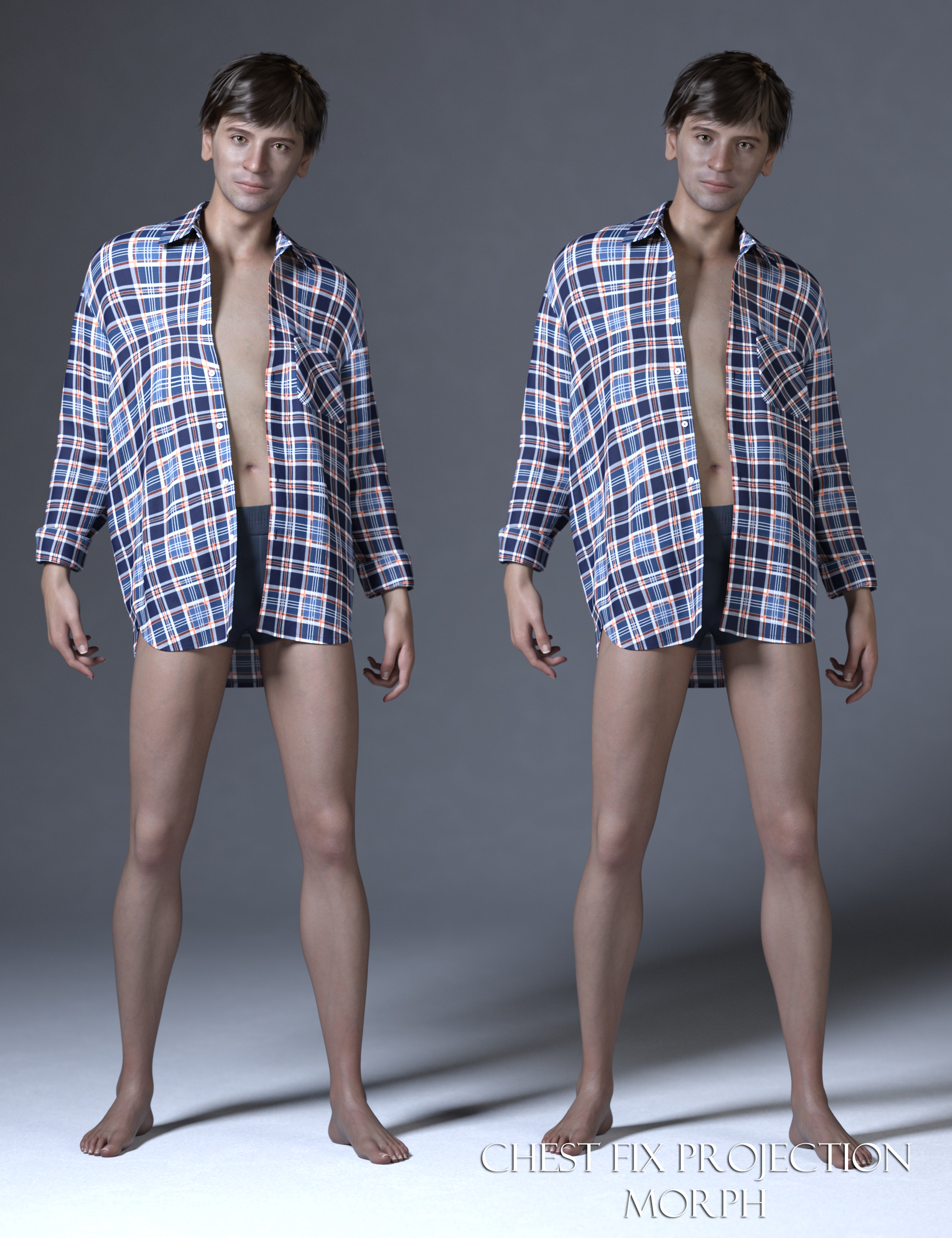
Let's appreciate/discuss today's new releases - more ongoinger threadThanks to Phoenix1966 for giving us the long-needed Chest Projection Fix Morph in the PHX Wally HD package.
 Is it possible to put an alias of a control morph into the main body of Genesis?[solved]
Richard Haseltine said:
A is Alias and M is Morph, P is anything else - not just a pose. Names must be disctinct for each proeprty on a given element, not just the root node.
Yeah, that was a brain fart on my part.
Best i've come up with is that P is either Parameter, or Property, but i have yet to find anything difinitive in the wiki.
Wouldn't happen to have a link?
As for Names(not labels), that's not true for alias's(A type), based on M type.
Hence why i asked my original question, as i was able to move Alias's, as long as they were from M type, but P type wouldn't move.
I was using 4.22.0.16 and 4.23.1.36(beta) for testing this.
Is it possible to put an alias of a control morph into the main body of Genesis?[solved]...The reason for the confusion, you seem to keep missing i'm working with ALIAS parameters.
You don't have anything in the hip node, because you haven't created a new ALIAS and put it there, unlike i did.
You did, inadvertantly, solve my problem though.
An Alias(A designation parameter) cannot have the same Name(not label) as a P designation parameter in the root node.
By changing the Name(not label) of the ALIAS, i was able to put it back in the root node, create a new DSF and it works as intended.
Thanks.
Right ~ I didn't thought of that you wanted to Move an Alias back to Root Node... Usually, all control or morph properties are 1stly created on Root Node before cloning Alias on other Nodes, though the workflow can be done reversely...
But yes, editable Node Names of the properties that have same Owner must be distinct, e.g. in your case, A and P have the same Owner... while if with different Owner, Node Names can be identical, e.g. M and P(or A, R).
A couple minor corrections though.
As i understand it, P is "Pose parameter", M is "Morph Parameter" and A is "Alias parameter".
P for "Property" (General Purpose), and R for "Rigging", I just know these 4 types.
P and M type will load from a dsf created for them, even if they don't do anything, but A type won't, if there's no association with a parent parameter..
In regards to Presentation Type(modifier, modifier/shape, etc) this has no real correlation to the P, M or A designation, nor does changing it change the designation.
Basically, it's upto the PA/creator what type is used, if anything, as None is an option by deafult
As a couple of examples, G8F's Chest Scale has a P designation, but a type of Modifier/shape and Breast Control's Center shift is M type with Modifier/Pose.
Content Type of Properties are mainly related to Saving Preset filters and some DS built-in functions... so reasonably and correctly setting Content Type really matters, for instance:
1) Saving Shaping Preset dialogue only lists properties with Modifier/Shape. Restore / Zero figure's Shape only deals with the properties with Modifier/Shape.
2) Saving Pose Preset dialogue only lists properties with Modifier/Pose. Restore / Zero figure's Pose only deals with the properties with Modifier/Pose.
3) Clear Generated Morphs only clear the morph properties with the designated setting of Modifiers, yada yada ~As for the example you mentioned. Chest Scale is a property ERC Freezed with Scales of some sub-Nodes of the figure... rather than a real Morph, so P just works fine.
Center Shift has delta vertices embedded, so it has to be M first of all, otherwise Morph Loader Pro cannot import OBJ to it or update it. Since Breast Controls deal with the breast shapes for posed figures, when Restoring / Zeroing poses, the stacked "morphs" need to be restored / zeroed, so the Content Type of those properties have to be Modifier/Pose.
It's also possible to make a custom type, by ediing the "type" under "presentation" in the DSF. Though, this doesn't appear to carry over to the drop down for other parameters.
You can only modify Type in DSF files according to the values in enum list of Content Type of a property. They're built in DS application and cannot be customized (create new...)
The Leprechaun for Barnabus RagwortPhoenix1966 said:
RCDeschene said:
Though, I'd love to see the outfit on a regular Genesis 9 human.
Keep in mind that this is an original figure, not a morph built off G9. It will take a little work to fit the clothes to Genesis 9.
I made a rough clone but sadly that cannot be shared
(don't have this outfit yet but I can swap out clothing between Ragwort and Genesis 9 with it)
Daz 3D is part of

Connect
DAZ Productions, Inc.
7533 S Center View Ct #4664
West Jordan, UT 84084Licensing Agreement | Terms of Service | Privacy Policy | EULA
© 2026 Daz Productions Inc. All Rights Reserved.