-
Making renders but using other people's assets....
We are more than artists. If you use a filmmaking analogy, we are the producer, director, cinematographer, set designer/decorator, gaffer, makeup artist (if we use LIE makeup or SkinBuilder), wardrobe & hair person, choreographer, (P.A. when we fetch our own coffee, craft service when we eat lol,) still photographer, post production supervisor and PR agency. A lot of work goes into what we do. Way more than a photographer. We have to pose and morph the models too (assuming you don't use products out of the box.)
Nida 8 new galAs a person of color, I think this is a great addition to the Genesis 8 family. A middle-age African-American woman is a very nice surprise. Soon, since Daz has shown interest in testing the waters of diversity, I'm sure we will get elderly and more middle-age people of color (like the middle-age Asian woman someone just mention).
While it can be argued that you can probably take Darcy 8 and dial an age morph at 50%, it is nice to see that Daz, as a company, does recognize that some of us like the diversity and representation within their Pro Bundles.
So, thank you Daz for another wonderful base character.
Morphs only affecting clothing?Hello!
I'm a new user and am working on building a "crowd" of diverse figures, and I have installed the Genesis 8 Female & Male Body Morphs (http://docs.daz3d.com/doku.php/public/read_me/index/42073/start).The morphs worked for me last week, but when I opened a new file to create a new figure today, some my morph controls affect the clothing but not the figure and others won't affect the clothing or the figure (see attached). I have uninstsalled and reinstalled using the DAZ Install Manager, restarted the program, and restarted my computer. All to no avail.
I have also opened up some of the figures I saved previously and none of those body morphs are showing up either. However, the clothes on those models are still morphed.
Does anyone know what is causing this or how I can fix it? I have googled it, but I'm not seeing anything that matches the issue I'm having.
Thank you for any help you can provide!
Also, I'd like to mention that all of my Genesis 8 Male morphs still work!
Best method to get G3 wearing the 'skin' of a G8 character?G3 and G8 have the same base UV, so as long as your character is using that, it will transfer over just fine. If the character you want to use has an hierarchical preset blocking you, save it as a material preset first and then it will load fine. I honestly don't get why some skin sets are hierarchical...it's annoying af.
Morphs only affecting clothing?Hello!
I'm a new user and am working on building a "crowd" of diverse figures, and I have installed the Genesis 8 Female & Male Body Morphs (http://docs.daz3d.com/doku.php/public/read_me/index/42073/start).The morphs worked for me last week, but when I opened a new file to create a new figure today, some my morph controls affect the clothing but not the figure and others won't affect the clothing or the figure (see attached). I have uninstsalled and reinstalled using the DAZ Install Manager, restarted the program, and restarted my computer. All to no avail.
I have also opened up some of the figures I saved previously and none of those body morphs are showing up either. However, the clothes on those models are still morphed.
Does anyone know what is causing this or how I can fix it? I have googled it, but I'm not seeing anything that matches the issue I'm having.
Thank you for any help you can provide!
Best method to get G3 wearing the 'skin' of a G8 character?So we have products to transfer/convert the morphs across generations.
I also see UV products to get G8 to wear the G3 textures/skins/materials.
What's the best method to get a G3 character to use the Materials of a G8 character?
--------------
And after reading about the models using the same UV sets, is there any way to bypass and get the G3 character to load the materials right from the Smart Content pane?
Like, as in, double-clicking different materials and have them load or apply them to the surface- in the surface pane.....
OR load a materials preset from a different generation?
Hmmmm, how are we doing this?
Making renders but using other people's assets....I'm confused if I am allowed to call a render my own work if I am using a skin from a premade character, hair that someone else made, clothes that someone else made. Even the Genesis 8 Figure belongs to DAZ. When I show people some renders they are impressed but I also feel like a sham because I didn't make the assets used in it (though I sometimes make custom morphs, but I still end up using skin textures, eye textures from premade characters).
Yes, I put this all together and rendered it, but this skin is from a Mousso Character, the eyes from a Merchants' resource, clothes from this bundle, even the HDRI lighting is from a bundle.
I feel like I am deceiving people. I don't even know how to feel. Am I allowed to call myself an artist if this is what I do? Forget about whether or not something has artistic value. At the very base of it, can one call their renders their own art if they use premade assets?
I have people now asking for commissions and I can do them. When I advertise my service for commissions, people can be impressed with my portfolio, but I wonder, am I deceiving them? Sometimes people want custom characters that I can make with the aid of Face Transfer. But I wonder if this can be considered my own work too.
Now when I advertise my commission work I'm always afraid someone will call me out and say that I'm not making any art, that I'm just "putting stuff together". I guess that's why I made this post in the first place.PS: Of course I do not mean taking other people's characters and creations and passing them off as my own. For example, I'd never claim I made an OOT hair. But I would use it in a render that I have uniquely made. The render is mine, the assets are not.
So where do we draw the line here?
AIUTO...CHI CONOSCE L’ITALIANO? PARTE DODICICol coupon JUST-THANKS danno 20$ di free Daz Originals :D
Poca roba davvero interessante... Quasi solo textures per prodotti che non possiedo, materiali e shader per lo scassatisimo IRay, pose da contorsionista, morph per morph di morph e altri oggetti che non saprei come usare.

Ma come? Ci sono tanti outfit per G8 per esempio!
AIUTO...CHI CONOSCE L’ITALIANO? PARTE DODICICol coupon JUST-THANKS danno 20$ di free Daz Originals :D
Poca roba davvero interessante... Quasi solo textures per prodotti che non possiedo, materiali e shader per lo scassatisimo IRay, pose da contorsionista, morph per morph di morph e altri oggetti che non saprei come usare.
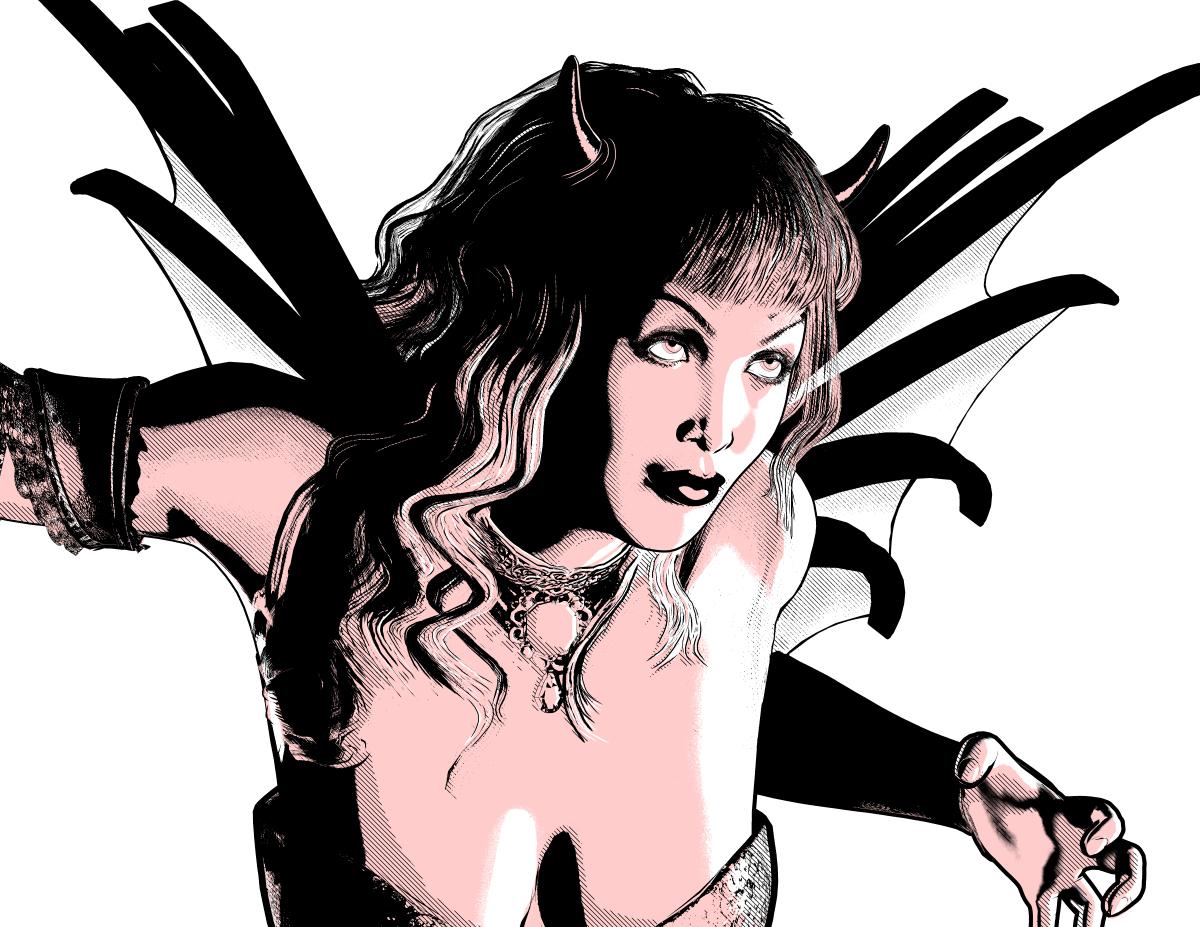
More Non-photorealisitic Renders (NPR II)We started an image in the class I taught yesterday. After it ended, I completed my post work and this is what I came up with. Figure is V4 with the Bettie Page morph and hair. Can't recall where I got the devil wings and horns, though.
Congrats for your class !! your approach really cool
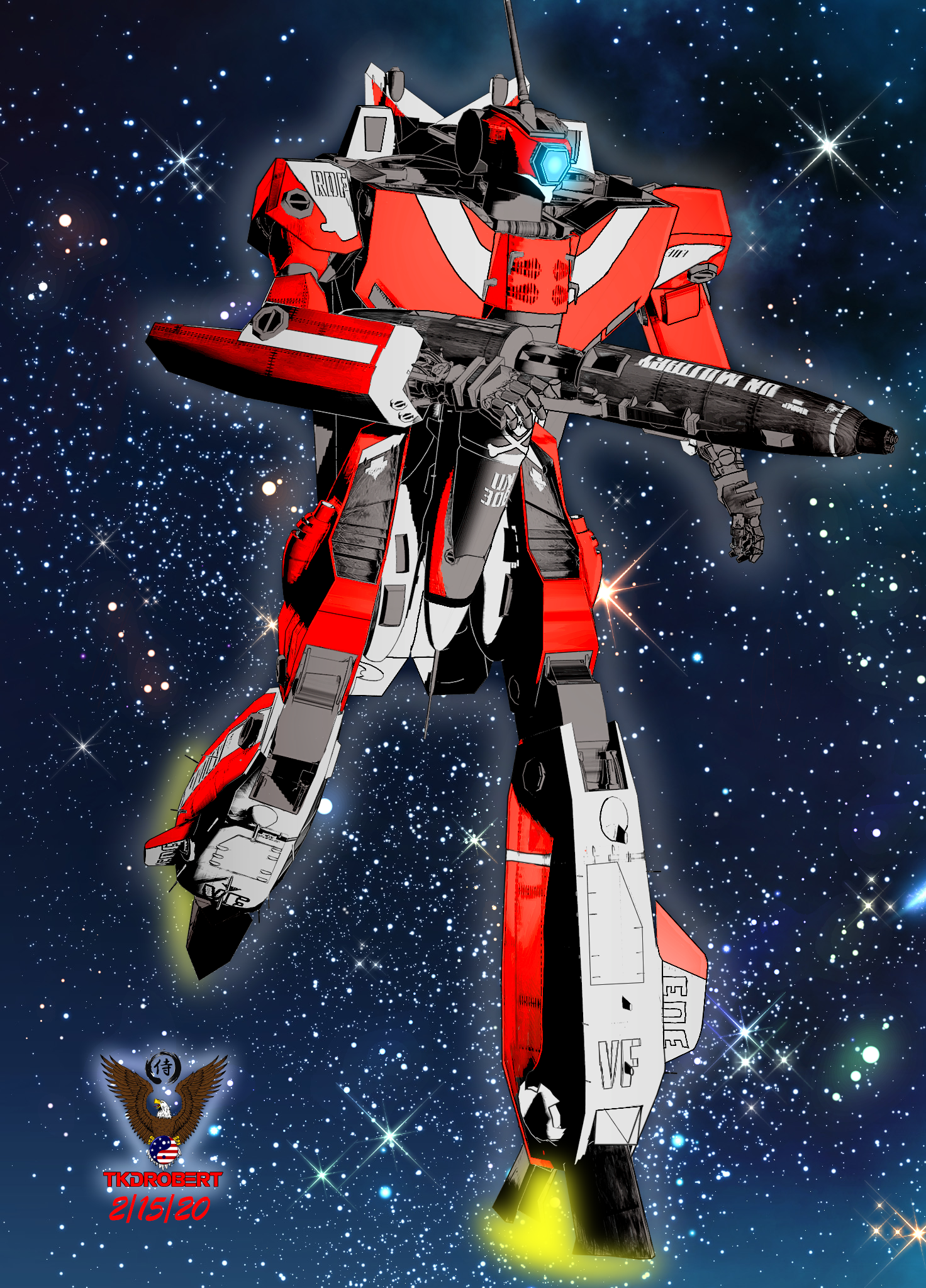
This was done using Poser's Real-Time Comic Book feature. The line-work and shadows were rendered in Poser. I did touch ups and coloring manually on my iPad. I did some post-work in Photoshop as well. Its not perfect, there are some micro mistakes I'm sure. I'm just trying to see if I should bring Poser into my work-flow. That do you all think of the Shadows? I know my highlights suck, I'm working on that.
Like Always ..you always bring awesome to epic type NPR
Yasss! Feed us more Robotech!
Here's a scene featuring both of the anime-style G2 characters I threw together today.
Cool , yeah G2M surprisingly still good for stylized type render
And this is my last experiment using IRAY and Photoshop . Waiting for Outline work
Cool CAP
More Non-photorealisitic Renders (NPR II)We started an image in the class I taught yesterday. After it ended, I completed my post work and this is what I came up with. Figure is V4 with the Bettie Page morph and hair. Can't recall where I got the devil wings and horns, though.
Congrats for your class !! your approach really cool
This was done using Poser's Real-Time Comic Book feature. The line-work and shadows were rendered in Poser. I did touch ups and coloring manually on my iPad. I did some post-work in Photoshop as well. Its not perfect, there are some micro mistakes I'm sure. I'm just trying to see if I should bring Poser into my work-flow. That do you all think of the Shadows? I know my highlights suck, I'm working on that.
Like Always ..you always bring awesome to epic type NPR
Yasss! Feed us more Robotech!
Here's a scene featuring both of the anime-style G2 characters I threw together today.
Cool , yeah G2M surprisingly still good for stylized type render
And this is my last experiment using IRAY and Photoshop . Waiting for Outline work
mat or texture files Face Transfer and HeadshopI use FaceGen, Face Transfer and Headshop and old FaceShop 8 to create new characters. FaceGen actually specifies a path for accessing and applying the mat or texture files to the model. Do Face Transfer and Headshop create similar files and if so, where do I find them?
Roger the old guy in Tucson.
photosIf you are wanting to take a photo and animate elemnts of it, that isn't what Daz Studio does - it is a 3D staging and rendering application, starting from 3D models and (mainly) producing 2D output in the form of images or animations.
Don't forget, there's a few face transfer tools available which may be what they're after.
Note to OP, there's a couple face transfer tools available, though I don't have any experience outside of the free-but-limited one that appears to be included by default, so you're mileage will vary depending on which one you decide to use.Cloud renderingSince searching these forums is about useless, I'll ask maybe a repeat question. Any info about cloud rendering would be nice. Recommendation, sites, pricing, is it worth it, other alternatives, those types of things. Thanks!check out this site it has a whole list of render farms, https://rentrender.com/all-render-farms-list/ just look for the icon to match the software your looking to use. some of the farms will work with daz studio .
Also you might try contacting a PA here. his named is Jack Tomalin He has a render farm as well though, i am not sure fo his requirments or prices though.
Thank you for this, I've been looking into render farms too, but none of these have the Daz logo that I can see. Does anyone know if any of these work with DS? I will try contacting Jack too.
Related question. Could I do the same thing from home, for instance if I have 2 computers? can I render on one without having to have all but daz information and products equally on both computers? Just being able to transfer the sceen file like one would to a cloud server.I can't speak for anyone else here. But for my work flow I use external Hard drives and external GPU's connected a usb3 super hub. so I can connect 2 desk top pc's and 1 lap top. to the hard drive hub. I use the big system with 120 gig ram for rendering, which allows me free so I can make and test render new scenes on another computer, I use another hard drive as a shared project drive, By using external hard drives it allow me to access my main daz content folders with as many computers as I have connected to the main usb3 super hub I am up to 5 -2tb HDD content hard drives and 2- 1TB SSD shared project drives that I can access with 3 computers all at the same time.. each computer has their own, but the same versions of daz studio on them. that is how use my system for creating and rendering daz animation on a home computer system. not really a rendr farm more like a storage farm. for my usb3 hub I just use a simple Anker 7-Port USB 3.0 Data Hub with 36W Power Adapter for the hard drive you connect to it
Most of those render farms on the list use a virtual desk top app which pretty much connects any software anyway, it really depends on how much you want to spend. I have used rev render render farm a few times for large projects and they work well with daz Studio4. because you connect daz to their iray servers using a virtual desktop app , they give you to download & install. which will virtually allow you to connect any 3d software that uses iray not just daz. the best thing all the daz content remains on your system so no fear of violating the daz TOS. plus Revrender support is very good kind of expansive though at a $1 a core hour, when you need 80 cores for 3 or 4 hours.
Thanks Ivy. I have all my Daz content on a external drive, but I've heard you can't actually connect multiple computers to the same harddrive. At least that's what searching the internet has suggested, I know nothing about computers besides how to use Daz.lol. so I can just switch the drive to my other computer, load scene and render, but it's kinda a pain. If we pretend money isn't an issue, any help setting up a home system would be great. Right now I have a sinker MSI stealth, i7-8759 1060 geforce laptop. It works fine as a hobbyist, but I'm way past hobbyist at this point. Thanks again!I have a similar setup at home - I do the scenes on my i7 laptop with 1050ti and render them on a desktop-ish computer (a NUC with a 2080ti eGPU connected to it). In order to do that, you'll need to either attach your external drive to the rendering machine, share it on the network and mount it as an network drive on your laptop or you can get a NAS (I have the most basic Synology box at home - cost me around 100 euro) and put your daz library on it and mount it both on the laptop and the rendering machine. I did some research on iRay servers but it turns out there are many restrictions regarding what you can render on those (e.g. you can't render animations), so I gave up on the idea of running a iRay server on my NUC. I do the scenes on my laptop, connect to my NUC via remote desktop, start DAZ and either schedule a batch rendering for the static scenes, or if it's an animation, just open it and start the render. This way I can continue to work on my laptop while the renders are running on the NUC, effectively saving time which otherwise would be wasted waiting on the render to complete.
Poser figures in DAZI thought most legacy Poser content worked perfectly well as is loaded from a runtime library
just pmd morphs an issue in DS4
you certainly can save duf versions, scene subsets for convenience
doing Genesis 8 versions is another matter but with Blender Shrinkwrap and Zbrush Zproject a morph shape would not be impossible just a fair bit of work, you can even transfer textures abd fit clothes that way once you have your shapes
Lana for Genesis 8 Femalehttps://www.daz3d.com/forums/discussion/comment/4946356/#Comment_4946356

Nope. Already checked. I've checked the "currently used", hidden, non zero values. Nothing is activated except for the intended morphs.
Did you really checked not only the "currently used" section, but all morphs for non zero values? And did you check for "Erevan Airy"? I bet that's the active morph. And it will NOT be shown under "currently used".
Genesis 8 to Maya not exporting favorite morphs as shapesI just got this product and am having the same problem. I have a morph that's a combination of like four characters, I favorite everything but when it gets brought into Maya, she looks just like a Gen 8 character. I tried with two characters, one was with Girl 8 and I exported in the girl 8 section of the script, but the other had Kanade and she's not listed so I clicked gen 8 female, so I don't know what to do. I posted on his website my question, hopefully I can get a response, or if you've figured it out, please let me know.
Dumb IM Download Question (Asking for a friend ????)Sorry, this basically true of the newer products, if you are buying something "vintage" back when Daz3d mainly produced content for Poser and pre-Genesis, you might need both. I problably would only download the Studio version if it is post Genesis. Something I will point out is that every product (with some few exceptions) has an item number (SKU) associated with it; you can look up the product in daz3d.com > Help > product read me's . There you should find a page that has the product information including any instructional pdf, a file list which is wonderful if you are trying to figure out where a morph is or whether the hair is included, sometime detailed instructions and videos etc... You can check to see via the file list if the poser files just duplicates the studio files (lacking a data folder element for example).
3D Art Freebie Challenge-February 2020-"Natural Love" -Main Thread OnlyAwesome render @Hylas! Really beautiful!
But I wonder (and not for the first time) why the G8M Head Morphs (https://www.daz3d.com/genesis-8-male-head-morphs) and G8M Body Morphs (https://www.daz3d.com/genesis-8-male-body-morphs) are listed under No-Count items? Or do you mean the Body and Head morphs that come with the Genesis 8 Male base figure? (The (paid) Genesis 8 Male Body Morphs are required by the Rex for Genesis 8 Male character...)
Thanks!
As I understand it, the basic morph packs are No Counts... when I use further morph packs (such as SWOLE or 200 Plus) I list them under purchased.
3. Base figures (All Gen 2,3,4, and Genesis 1,2,3) as well as their general morphs packs (Morphs++ and similar) do not count as a purchased item or a freebie and may be used as needed
The Victoria 4.2 and Michael 4 Shapes++ (Head and Body Morphs++) have been freebies occasionally, as well as the Victoria 4.2 and Michael 4 Creature Creator Morphs but I'm not sure whether they (the C.C.M.) fall under 'similar'. I also own the Genesis Evolution: Head Morphs and the Genesis Evolution: Body Morphs but they came with the Michael 5 Pro Suite so they are purchased. What I am saying is that none of the Head or Body Morph packages for Genesis, Genesis 2, Genesis 3 and Genesis 8 has ever been a freebie and therefor I think it's very strange that they do not count as purchased. @Saphirewild, can you please clarify on this?
I wanted to answer this question first before I checked over your links @Hylas!
To answer this question I went to a higher rank then myself and here is her answer:
Chohole8:02PM
occasional freebies will only count if they are free during the month of the contest.
Thank you @Saphirewild and @Chohole!
The actual (first) question is, are purchased/paid-for Head or Body Morph packages for Genesis, Genesis 2, Genesis 3 and Genesis 8 like the Genesis Evolution: Head Morphs and Genesis Evolution: Body Morphs or the Genesis 8 Male Head Morphs and Genesis 8 Male Body Morphs, which are all additional to the Head and Body Morphs that come with the base figures, No-Count or Purchased/Paid-For items? And why? :)
Second question, do the Victoria 4.2 and Michael 4 Creature Creator Morphs fall under 'similar' (Morphs++ and similar) and therefor are No-Count items?
More Non-photorealisitic Renders (NPR II)We started an image in the class I taught yesterday. After it ended, I completed my post work and this is what I came up with. Figure is V4 with the Bettie Page morph and hair. Can't recall where I got the devil wings and horns, though.
Daz 3D is part of

Connect
DAZ Productions, Inc.
7533 S Center View Ct #4664
West Jordan, UT 84084Licensing Agreement | Terms of Service | Privacy Policy | EULA
© 2026 Daz Productions Inc. All Rights Reserved.