-
BJ Misumi HD question
Yeah the alias_head is what was missing. It's a special empty morph that serves only that one purpose to make the smile also appear when the head is selected. The Smile2 thing as far as I remember is just having had two probably similiar smiles and then deciding to use the second one and being too lazy to rename it, or I wanted to keep the other one around for a bit.
Still can't get it to work for some reason. Weird...
Ivan 8?He was an update of George 3. I read the original post as a request for either Ivan 8 or a new George for Genesis 8 Male, which was released. Ivan, well, with all the older character actors released, there may be a slot that was filled by him but not using his name, but thinking of the morph transfer programs, he could be moved up to Genesis 8.
I see, yes, the OP mentioned George too. I must have misunderstood youŕ post.
I would like to see Ivan 8 too. Pehaps we will be lucky in the future.
 Ivan 8?
He was an update of George 3. I read the original post as a request for either Ivan 8 or a new George for Genesis 8 Male, which was released. Ivan, well, with all the older character actors released, there may be a slot that was filled by him but not using his name, but thinking of the morph transfer programs, he could be moved up to Genesis 8.
Genesis 8 eye lashes do not follow face morph (updated/solved)I finally got this to work. If you complete steps 1-10 it works but for some reason Daz Studio does not update/refresh what you have done and gives you the impression there is an issue. The revised steps:
1. Load Genesis 8 model
2. delete everything in scene including eye lashes. (will not import into 3ds Max correctly if you keep the eyelashes. I even tried settting the Genesis 8 and the eyelashes each to base resolution and the model is a mess).
3. set Genesis 8 to base resolution.
4. export to .obj file
5. import into modeling program (3ds max).
6. make modifications while keeping vertex order.
7. export model to daz (.obj)
8. open DAZ in empty scene, load genesis 8 model
9. using either of the morph loaders in DAZ apply morph
10. using new morph slider in parameters, verify morph works.11. go to the "parameter settings" (i usually right click on the sprocket of the morph slider) and set the model to "auto follow". you can also go into the parameters of the model and set it there.
12. "save" the scene
13. "open"/reload the scene and daz updates the eyelashes to follow genesis 8.
this process works for any morph. if the morph is severe where I need to move the bones, then I will add the"adjust rigging to shape". if I like the morph and want to tie it all together a little better, i add the ERC freeze step. I usually only do this when the model is "finished" and I want to change it from a morph to a dialable parameter.
StrangeFate's stuff: Wild Kelpie Battle Outfit!So, been working on finishing up one of the armours I had started a while back, while Roguey works on 2 other things, but will also be helping with the rigging of the armor etc so we can get it done faster.
It's not an epic style armor like Kadis and more of a simple... 'army builder' style that should also go well with the good old Brutal weapons :)

...and I seem to start armours by the boots so, here the boot.
It's built a bit smarter than the Kadis armour. You'll be able to hide parts of the armour with a click and the underlying parts will look decent (unlike it was the case with Kadis). The rope around the armor will have a morph to wrap around the leather boot when you hide the armour too (or you can just hide the rops too).
WIP, some parts not textured yet, was just playing around to see what materials worked for the metals mainly. May or may not include a version without all the dirt (but not as clean as shown below), but I think once the armour is complete, the dirt at the bottom will give a nice break from the otherwise cleaner armour.
 3D Art Freebie Challenge-February 2020-Winners Announced"Natural Love" -Entries Thread Only
Title: The Dance
DAZ Studio, Adobe Photoshop
Version before postwork: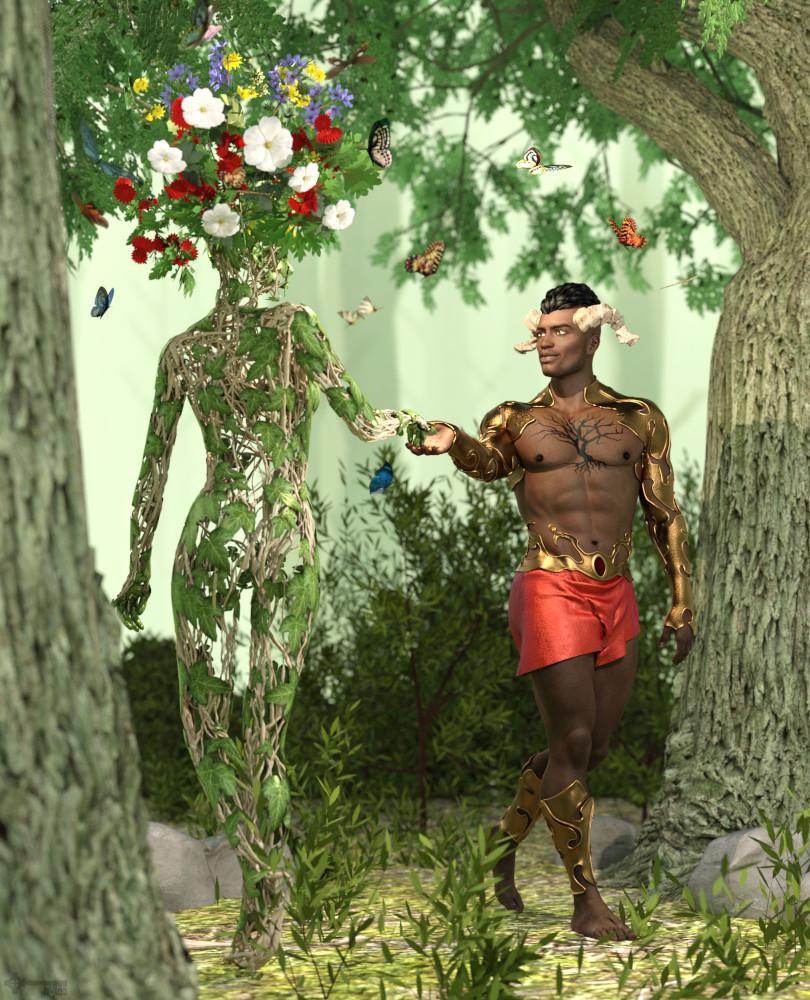
Freebies:
1) Dryad by Aboran Tourist Council: https://www.renderosity.com/mod/freestuff/v4-dryad-conforming-figure-forposer/75975
2) Tree by Design Anvil: https://www.daz3d.com/forums/discussion/379371/da-super-morphing-tree-2020-cherry-blossom-and-oak-tree/p1
3) HDRI by valzheimer: https://gumroad.com/l/DXEPj
4) Flower by printable_models: https://free3d.com/3d-model/anemone-flower-v1--764792.html
5) Flower by dacosta: https://free3d.com/3d-model/flower-25-99404.html
6) Flower by dacosta: https://free3d.com/3d-model/plant-04-58791.html
7) Hair by April's Vanity: http://shop.aprilsvanity.com/free-items/ciri-hair.html
8) Morph by bu_es: https://www.renderosity.com/mod/freestuff/saud-for-g3m-g8m/78849
9) Hair Texture from Mane Concern: Allessa (DAZ Bi-Weekly Freebie)
10) Outfit from Lion War Bundle (DAZ Bi-Weekly Freebie)
11) Shrub by Tyro Smith: https://free3d.com/3d-model/bush-84314.html
12) Shrub by Yughues aka Nobiax: https://www.sharecg.com/v/76031/related/5/3D-Model/Free-Hedges
13) Boulder by 3-d-c: https://sharecg.com/v/46789/gallery/11/Poser/Morphable-Boulder
14) Ground Texture by StruffelProductions (Lennart Demes): https://cc0textures.com/view?tex=Ground37
Purchased:
1) Rex for G8M
2) Horns from Primordial Barbarian
3) Atmocam 2
4) Flutter of ButterfliesNo Count Items:
- G8M Head Morphs
- G8M Body Morphs
- Victoria 4.2
- Monochromatic Shader (2018 XMas Freebie)
- Sakura Blossom (2019 XMas Freebie)3D Art Freebie Challenge-February 2020-"Natural Love" -Main Thread OnlyP.S. Here's a list of the first few morphs from V4 Shapes++ (I think?):

Peronally, if the Genesis 1, 3, and 8 head and body morphs that Hylas linked to aren't considered 'similar' to these, then I think the dictionary definition of 'similar' needs changing*.

Sir Smuggley Smuggins: "Cheapskate ! Who invited you here, you ugly troll ! I said 'sit down and have a nice cup of tea', not 'come in all you ugly trolls'. And how many times have I told you, you need to leave the tea to brew. You don't stir..."
*I wonder if that can be done seemlessly...
Rule three specifically says
3. Base figures (All Gen 2,3,4, and Genesis 1,2,3) as well as their general morphs packs (Morphs++ and similar) do not count as a purchased item or a freebie and may be used as needed
Morphs ++ are the general Morphs packs for V4,M4, and other Generation 4 figures. The Genesis Evolution Head and Body Morphs packs are the general morph packs for Genesis, and the general morphs packs for later figures are just called the "Head and Body Morphs" for each respective figure (Genesis 2 M/F, Genesis3 M/F, Genesis 8 M/F). Each set of morphs packs (Morphs ++, Genesis Evolution Head and Body, Genesis 2 M/F Head and Body, Genesis3 M/F Head and Body, Genesis 8 M/F Head and Body) are the respective "general morph packs" for that figure.
I was personally involved in the original discussion that resulted in that rules change. In fact, it was one of my specfic suggestions to the new rules. The other being an increase in the maximum Paid-for items from 3 to 5.
I think this solves the issue of Morphs, don't you all think?
This is also my interpretation of rule 3.
I'll continue to run with it then, barring word from "above" saying otherwise.
OT, Mornington Crescent: Round 8 :- (Tudor Court Rules)Bugger! bloody autocorrect - that should have been
Blackhorse Lane..
We need a restart!
So does one jump off that track then from Blackstone Lane and transfer over to:
Lebreton Flats
"Ey'up lad ! Dos tha' mean Black'orse Road bah gum !"
Catherine3678ab said:
So does one jump off that track then from Blackstone Lane and transfer over to:
Lebreton Flats
"Ey'up lass ! Dos tha' mean Pimisi bah gum !"
(does Lord Knaresborough's Yorkshire variation allow an international move this early in the game ? In fact does it allow international moves at all ? Come to think of it, does it even allow moves south of the river ?)
Dynamic clothing wont move on figurePretty sure I was 100% wrong on my gravity theory (maybe even 110%, I dunno.You'd have to ask a professional athlete they're the experts on that).
Yeah just figured out I have an issue with the skirt as well, it just looked like it was simulating when the legs moved against it. I was trying to get an effect with the floor length skirt slid up the leg above the knee. I set up my figure in the Mrs. Robinson pose from the "I think your trying to seduce me" scene in the graduate with her thigh horizontal knee bent 90 degrees foot on a chair. Then to get the skirt to drape over the thigh with her shin sticking out I flipped the character to a steep enough angle to get the skirt to slide upwards then animated her around till into the right pose to let the skirt drape over the thigh.
It worked beautifully with an old save file of the same scene, so I had to have changed something (it's not in the simulation surface settings is the one thing I know for certain) that caused the problem. I'd like to know what it is rather then just revert.
Aaand typing that out gave it to me I think. Pretty sure it's a morph I created in blender and added in to help with the attempt I was making to get the strap to slide down the arm.
Yup that was it, set morph to 0 and blamo no problem.
"So, what is wrong with my morph?" is the actual question I wanted to ask in my first post. Man you guys suck at helping. Learn to read minds or GTFO of trying to help with tech support stuff.
OT, Mornington Crescent: Round 8 :- (Tudor Court Rules)Bugger! bloody autocorrect - that should have been
Blackhorse Lane..
We need a restart!
So does one jump off that track then from Blackstone Lane and transfer over to:
Lebreton Flats
OT, Mornington Crescent: Round 8 :- (Tudor Court Rules)So does one jump off that track then from Blackstone Lane and transfer over to:
Lebreton Flats
3D Art Freebie Challenge-February 2020-"Natural Love" -Main Thread OnlyP.S. Here's a list of the first few morphs from V4 Shapes++ (I think?):
Peronally, if the Genesis 1, 3, and 8 head and body morphs that Hylas linked to aren't considered 'similar' to these, then I think the dictionary definition of 'similar' needs changing*.
Sir Smuggley Smuggins: "Cheapskate ! Who invited you here, you ugly troll ! I said 'sit down and have a nice cup of tea', not 'come in all you ugly trolls'. And how many times have I told you, you need to leave the tea to brew. You don't stir..."
*I wonder if that can be done seemlessly...
Rule three specifically says
3. Base figures (All Gen 2,3,4, and Genesis 1,2,3) as well as their general morphs packs (Morphs++ and similar) do not count as a purchased item or a freebie and may be used as needed
Morphs ++ are the general Morphs packs for V4,M4, and other Generation 4 figures. The Genesis Evolution Head and Body Morphs packs are the general morph packs for Genesis, and the general morphs packs for later figures are just called the "Head and Body Morphs" for each respective figure (Genesis 2 M/F, Genesis3 M/F, Genesis 8 M/F). Each set of morphs packs (Morphs ++, Genesis Evolution Head and Body, Genesis 2 M/F Head and Body, Genesis3 M/F Head and Body, Genesis 8 M/F Head and Body) are the respective "general morph packs" for that figure.
I was personally involved in the original discussion that resulted in that rules change. In fact, it was one of my specfic suggestions to the new rules. The other being an increase in the maximum Paid-for items from 3 to 5.
I think this solves the issue of Morphs, don't you all think?
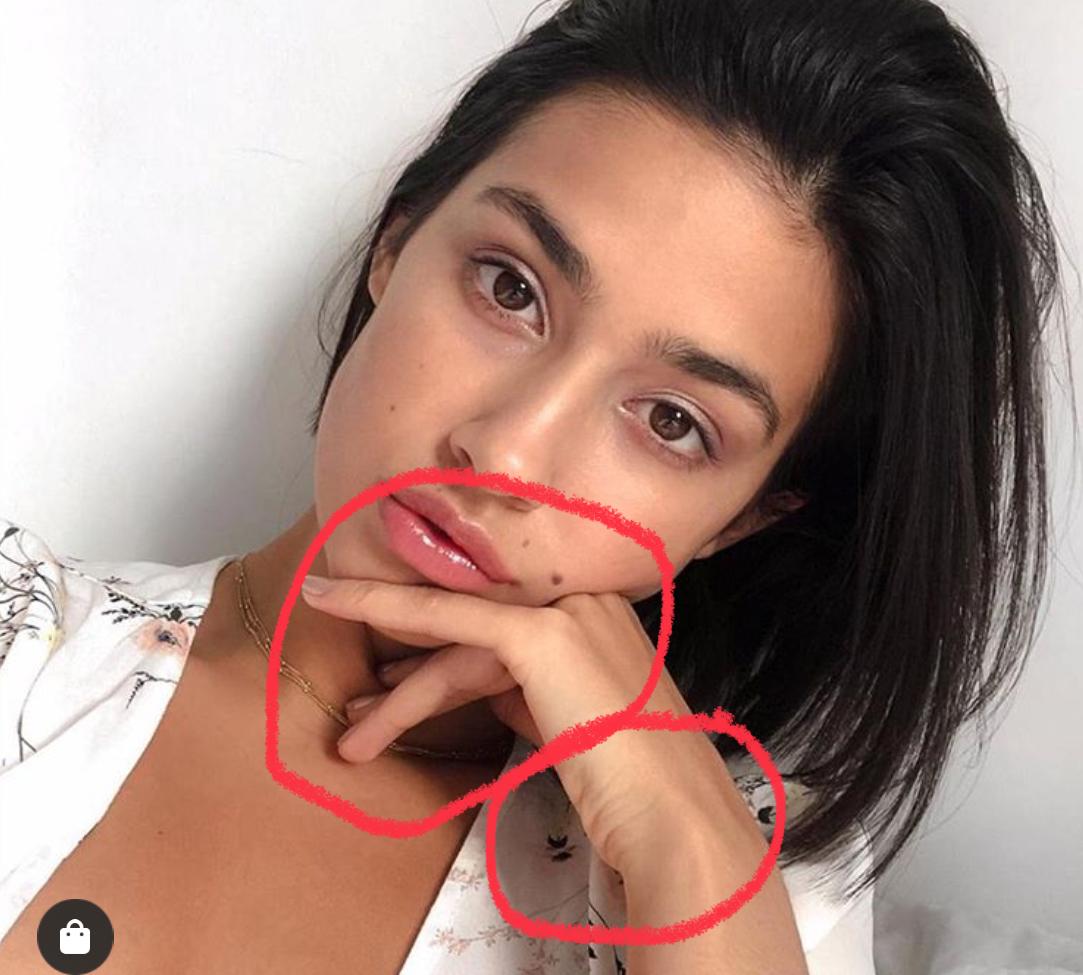
What does the evolution of daz "Realism" look like?There are many details that still aren't possible or easy to implement. Like the folds on the wrist here or the indentation on the cheek. It would be great if there was a way to just click a body party and then have a scalable indent slider and click on a body part and have a morphable wrinkle creator slider. I'm not techie, so not sure if this is possible. But several years ago at the Smith Micro booth at Siggraph I met a new employee who was supposedly creating a new Poser figure. I described the ideal figure I would like and he told me it was impossible. And then G3 came out at Daz and it was exactly what I described (minus a few things that were mostly covered by PA addons.) But rather than a new G9 figure, I'd love it if they could add this to G8. I know there are things like the push modifier which seems complicated and I do have mesh grabber which I haven't tried yet, but I'd love a simple way of doing these things so I can create art rather than deal with time spent learning complicated undocumented aspects of the software. I know Zevo has some skin wrinkle morphs which I will get when on sale but I didn't see wrinkles for wrists or ankles/feet listed and there are so many other tiny wrinkle morphs that happen with bends even on young people and children and some of the wrinkle morphs in the promos look too pronounced for younger people.
Also, the hand and wrist bends on G8 are still awful, really hard to make something as simple as holding a glass realistic. The skin I think is very close and can look good with the right shaders, but bends are still bad. I do have some PA addons that help but it's still not possible to truly get poses to look realistic in some positions. So many people use Instagram filters or whatever so skin has not been a big problem with the uncanny valley, it's the poses that give it away, especially hand and feet poses. (And hair of course.)
I rendered this foot from mei lin 8 (with hd morph on)

the wrinkles pretty good looking to me so i have confidence they can apply this to hands too.
WinterMoon Wants Attention.Which hair is that? That looks really good.
Casual Spikes with Sloshwerks' hair shaders.
Overall, this is the most lifelike render I've seen from you, aside from the waxiness of the character's skin.
Thanks! Both the morph and the textures are by Angel Wings (on Rendo), who does amazing child characters.
Why does setting a white (255,255,255) grayscale cutout opacity map cause G8Fs skin to darken a bit?Out of curiosity, what were you trying to accomplish by doing that?
I'm in the painful process of coming up with various ways to reduce texture stretching in a private area of G8F, in which anatomical elements are present.
I've figured out how to change G8F's UV's reliably, but the anatomical elements use G8F's original UV's. I can't transfer the new UV's to the anatomical elements, so now I'm coming up with ways to eliminate as much of the outer areas of the anatomical elements as possible. Sadly, the cutout opacity doesn't work with these anatomical elements when a map is set, it literally ignores the channel. I have no idea why. I've tried deleting the geometry, but that seems to break the anatomical element and the base mesh no longer has that certain area hidden. Sorry for being cryptic. I don't want to say anything that might get me in trouble! :)
I've now abandoned this transparency idea, especially since using cutout opacity messes with the appearance of the skin.
I've now figured out another way to eliminate texture stretching, but it's a tedious process, but the results are great.
Making part of the skin transparent turns on the Thin Walled property, as I recall (something like that, anyway) as it is no longer a closed volume.
I see, good to know.
JCM terrible at 50%Thanks Richard I did make a separate morph for the +ve and -ve values. It was only after hooking some of the them that I thought about how I would do it. The movement back didn't actually need correcting at first so didn't worry about it until I added in the Delta Add values you suggested. Sorry I'm not pointing the fingure just trying to be clear. :) I'll think about it tomorrow. Thanks again.
JCM terrible at 50%1st Stage , ERC DeltaAdd is probably the one you want. That gives a multiplier (to turn bend angle into morph values) and a constant (to handle delayed start).
Ah, I've got it now. The bend is a minus figure so I need to add. Cool. Thanks, Richard, that work great. :)
JCM terrible at 50%Oh, I tried that one, I probably didn't put the right values in but, I just tried it again and it is doing something. It addedd the morph to 100% at 50% bend so I'm sure I can work it out. Thanks Richard
What does the evolution of daz "Realism" look like?This product has cheek squish morphs.
https://www.daz3d.com/z-high-impact--morphs-poses-and-expressions-for-genesis-8
That doesn’t look very realistic to me and it’s only in certain places. I would like to click on a spot and be able to easily morph it without having to go into modeling software or undocumented aspects of Studio software.That's where it becomes impossible, because at the very least, you would need to communicate to the model what needs to be squished and by how much and in what shape was the object doing the squishing? Collision objects can achieve this somewhat in very specific situations...but so far we can only have one collision per object, and objects cannot be set to collide with each other...and an object can't collide with itself. These are all things I hope we can see in the future.
What does the evolution of daz "Realism" look like?
That doesn’t look very realistic to me and it’s only in certain places. I would like to click on a spot and be able to easily morph it without having to go into modeling software or undocumented aspects of Studio software.This product has cheek squish morphs.
https://www.daz3d.com/z-high-impact--morphs-poses-and-expressions-for-genesis-8
Daz 3D is part of

Connect
DAZ Productions, Inc.
7533 S Center View Ct #4664
West Jordan, UT 84084Licensing Agreement | Terms of Service | Privacy Policy | EULA
© 2026 Daz Productions Inc. All Rights Reserved.