-
interactive license, model assembly and rigging
Interactive licences specifically mention that the "User may not in any case: publish, market, distribute, transfer, sell or sublicense any renderings, animations, software applications, data or any other product from which any CRT Content, or any part thereof, or any substantially similar version of the CRT Content can be separately exported, extracted, or de-compiled into any re-distributable form or format".
What you wish to do is in breach of that - you would be providing something that is a substantially similar part of the content in a re-distributable format.
Short answer: No, you may not do that.
Auto Face Enhancer [Commercial]So my project with some 2000+ scenes must all be reloaded one at a time and resaved? WTH? I Rely heavily on batch processing and automation, I'll have to write a new script to either open each and resave or go in and parse out each reference. I already wasted all last night trying to get this corrected. I am looking for original morph set and just downgrade to it, which would be the easiest thing to do.
Hi Charles.
If I were you. I would keep 2000+ scenes. If it is working keep it and let it go on.
Are you saying a 2000+ frame of the same file? if 2000+ scene then that is way too much work.
let me know if you need the old AFE. send me a private message and give me a dropbox to get it to you.
Note: The AFE old and the AFE new is much the same. I have updated the geometry to the AFE to capture HD SKIN Details.
Thus the morphs on the geometry are different. It is a new set.
3D Art Freebie Challenge-February 2020-"Natural Love" -Main Thread OnlyAwesome render @Hylas! Really beautiful!
But I wonder (and not for the first time) why the G8M Head Morphs (https://www.daz3d.com/genesis-8-male-head-morphs) and G8M Body Morphs (https://www.daz3d.com/genesis-8-male-body-morphs) are listed under No-Count items? Or do you mean the Body and Head morphs that come with the Genesis 8 Male base figure? (The (paid) Genesis 8 Male Body Morphs are required by the Rex for Genesis 8 Male character...)
Thanks!
As I understand it, the basic morph packs are No Counts... when I use further morph packs (such as SWOLE or 200 Plus) I list them under purchased.
3. Base figures (All Gen 2,3,4, and Genesis 1,2,3) as well as their general morphs packs (Morphs++ and similar) do not count as a purchased item or a freebie and may be used as needed
The Victoria 4.2 and Michael 4 Shapes++ (Head and Body Morphs++) have been freebies occasionally, as well as the Victoria 4.2 and Michael 4 Creature Creator Morphs but I'm not sure whether they (the C.C.M.) fall under 'similar'. I also own the Genesis Evolution: Head Morphs and the Genesis Evolution: Body Morphs but they came with the Michael 5 Pro Suite so they are purchased. What I am saying is that none of the Head or Body Morph packages for Genesis, Genesis 2, Genesis 3 and Genesis 8 has ever been a freebie and therefor I think it's very strange that they do not count as purchased. @Saphirewild, can you please clarify on this?
I wanted to answer this question first before I checked over your links @Hylas!
To answer this question I went to a higher rank then myself and here is her answer:
Chohole8:02PM
occasional freebies will only count if they are free during the month of the contest.
Auto Face Enhancer [Commercial]Hi DMaster I get these messages in my log file:
..
2020-02-17 14:17:07.737 WARNING: ..\..\..\..\..\src\sdksource\fileinput\dzassetdaz.cpp(5818): Could not find target property for formula: Genesis8Female:/data/DAZ%203D/Genesis%208/Female/Morphs/Mousso/Zsazsa/Zsazsa%20Head.dsf#Zsazsa%20Head?value in file : /data/DAZ%203D/Genesis%208/Female/Morphs/D.Master/Auto%20Face%20Enhancer%20Female/G8Female%20Character%20Links/AFEG8F_184.dsf
2020-02-17 14:17:07.742 WARNING: ..\..\..\..\..\src\sdksource\fileinput\dzassetdaz.cpp(5818): Could not find target property for formula: Genesis8Female:/data/DAZ%203D/Genesis%208/Female/Morphs/PedroFurtadoArts/Zoey/Zoey%20Head.dsf#Zooy%20Head?value in file : /data/DAZ%203D/Genesis%208/Female/Morphs/D.Master/Auto%20Face%20Enhancer%20Female/G8Female%20Character%20Links/AFEG8F_183.dsf
2020-02-17 14:17:07.742 WARNING: ..\..\..\..\..\src\sdksource\fileinput\dzassetdaz.cpp(5818): Could not find target property for formula: Genesis8Female:/data/DAZ%203D/Genesis%208/Female/Morphs/N2/Linh/Linh.dsf#Linh?value in file : /data/DAZ%203D/Genesis%208/Female/Morphs/D.Master/Auto%20Face%20Enhancer%20Female/G8Female%20Character%20Links/AFEG8F_182.dsf
2020-02-17 14:17:07.747 WARNING: ..\..\..\..\..\src\sdksource\fileinput\dzassetdaz.cpp(5818): Could not find target property for formula: Genesis8Female:/data/DAZ%203D/Genesis%208/Female/Morphs/gravureboxing/Eunju%20G8F/G3F_ABC_Eunju_Face.dsf#G3F_ABC_Eunju_Face?value in file : /data/DAZ%203D/Genesis%208/Female/Morphs/D.Master/Auto%20Face%20Enhancer%20Female/G8Female%20Character%20Links/AFEG8F_179.dsf
2020-02-17 14:17:07.747 WARNING: ..\..\..\..\..\src\sdksource\fileinput\dzassetdaz.cpp(5818): Could not find target property for formula: Genesis8Female:/data/DAZ%203D/Genesis%208/Female/Morphs/3D%20Universe/ToonGenerations8/ctrl3duG8FTG_Base.dsf#ctrl3duG8FTG_Base?value in file : /data/DAZ%203D/Genesis%208/Female/Morphs/D.Master/Auto%20Face%20Enhancer%20Female/G8Female%20Character%20Links/AFEG8F_178.dsf
2020-02-17 14:17:07.751 WARNING: ..\..\..\..\..\src\sdksource\fileinput\dzassetdaz.cpp(5818): Could not find target property for formula: Genesis8Female:/data/DAZ%203D/Genesis%208/Female/Morphs/Pixeluna/Pix%20Zharien/ctrlZharienHD.dsf#ctrlZharienHD?value in file :
...Is these normal? I don't own the characters mentioned in the Log, like Pixeluna, Zsaza,gravureboxing, Zoey
This is normal. These are morph files that only load if you have the character. These morphs help smooth out the AFE.
Cloud renderingRelated question. Could I do the same thing from home, for instance if I have 2 computers? can I render on one without having to have all but daz information and products equally on both computers? Just being able to transfer the sceen file like one would to a cloud server.You don't just transfer the scene file to a iRay server. The scene file basically just tells DS where to find everything the file contains.
To do rendering on one machine qand scene setup on another you need the same content at the same path on both machines. You can do this by sharing your content directories over the network or having a NAS where all your content is stored.
Also you're not looking for a server farm that supports Daz Studio but one that supports iRay. DS knows how top connect to an iRay server and transfer all the data required.
@Ivy once you're storing 11Tb of data on external drives and a powered USB hub it might be worth looking at building a NAS. It will be far less hassle than your setup and not nearly as failure prone, Plus USB 3 is 5 Gbits/sec while 10Gbit ethernet is, obviously, twice as fast.
good advice . I will look into that set up :)
Cloud rendering
Thanks Ivy. I have all my Daz content on a external drive, but I've heard you can't actually connect multiple computers to the same harddrive. At least that's what searching the internet has suggested, I know nothing about computers besides how to use Daz.lol. so I can just switch the drive to my other computer, load scene and render, but it's kinda a pain. If we pretend money isn't an issue, any help setting up a home system would be great. Right now I have a sinker MSI stealth, i7-8759 1060 geforce laptop. It works fine as a hobbyist, but I'm way past hobbyist at this point. Thanks again!Since searching these forums is about useless, I'll ask maybe a repeat question. Any info about cloud rendering would be nice. Recommendation, sites, pricing, is it worth it, other alternatives, those types of things. Thanks!check out this site it has a whole list of render farms, https://rentrender.com/all-render-farms-list/ just look for the icon to match the software your looking to use. some of the farms will work with daz studio .
Also you might try contacting a PA here. his named is Jack Tomalin He has a render farm as well though, i am not sure fo his requirments or prices though.
Thank you for this, I've been looking into render farms too, but none of these have the Daz logo that I can see. Does anyone know if any of these work with DS? I will try contacting Jack too.
Related question. Could I do the same thing from home, for instance if I have 2 computers? can I render on one without having to have all but daz information and products equally on both computers? Just being able to transfer the sceen file like one would to a cloud server.I can't speak for anyone else here. But for my work flow I use external Hard drives and external GPU's connected a usb3 super hub. so I can connect 2 desk top pc's and 1 lap top. to the hard drive hub. I use the big system with 120 gig ram for rendering, which allows me free so I can make and test render new scenes on another computer, I use another hard drive as a shared project drive, By using external hard drives it allow me to access my main daz content folders with as many computers as I have connected to the main usb3 super hub I am up to 5 -2tb HDD content hard drives and 2- 1TB SSD shared project drives that I can access with 3 computers all at the same time.. each computer has their own, but the same versions of daz studio on them. that is how use my system for creating and rendering daz animation on a home computer system. not really a rendr farm more like a storage farm. for my usb3 hub I just use a simple Anker 7-Port USB 3.0 Data Hub with 36W Power Adapter for the hard drive you connect to it
Most of those render farms on the list use a virtual desk top app which pretty much connects any software anyway, it really depends on how much you want to spend. I have used rev render render farm a few times for large projects and they work well with daz Studio4. because you connect daz to their iray servers using a virtual desktop app , they give you to download & install. which will virtually allow you to connect any 3d software that uses iray not just daz. the best thing all the daz content remains on your system so no fear of violating the daz TOS. plus Revrender support is very good kind of expansive though at a $1 a core hour, when you need 80 cores for 3 or 4 hours.
Cloud renderingRelated question. Could I do the same thing from home, for instance if I have 2 computers? can I render on one without having to have all but daz information and products equally on both computers? Just being able to transfer the sceen file like one would to a cloud server.You don't just transfer the scene file to a iRay server. The scene file basically just tells DS where to find everything the file contains.
To do rendering on one machine qand scene setup on another you need the same content at the same path on both machines. You can do this by sharing your content directories over the network or having a NAS where all your content is stored.
Also you're not looking for a server farm that supports Daz Studio but one that supports iRay. DS knows how top connect to an iRay server and transfer all the data required.
@Ivy once you're storing 11Tb of data on external drives and a powered USB hub it might be worth looking at building a NAS. It will be far less hassle than your setup and not nearly as failure prone, Plus USB 3 is 5 Gbits/sec while 10Gbit ethernet is, obviously, twice as fast.
Cloud renderingSince searching these forums is about useless, I'll ask maybe a repeat question. Any info about cloud rendering would be nice. Recommendation, sites, pricing, is it worth it, other alternatives, those types of things. Thanks!check out this site it has a whole list of render farms, https://rentrender.com/all-render-farms-list/ just look for the icon to match the software your looking to use. some of the farms will work with daz studio .
Also you might try contacting a PA here. his named is Jack Tomalin He has a render farm as well though, i am not sure fo his requirments or prices though.
Thank you for this, I've been looking into render farms too, but none of these have the Daz logo that I can see. Does anyone know if any of these work with DS? I will try contacting Jack too.
Related question. Could I do the same thing from home, for instance if I have 2 computers? can I render on one without having to have all but daz information and products equally on both computers? Just being able to transfer the sceen file like one would to a cloud server.I can't speak for anyone else here. But for my work flow I use external Hard drives and external GPU's connected a usb3 super hub. so I can connect 2 desk top pc's and 1 lap top. to the hard drive hub. I use the big system with 120 gig ram for rendering, which allows me free so I can make and test render new scenes on another computer, I use another hard drive as a shared project drive, By using external hard drives it allow me to access my main daz content folders with as many computers as I have connected to the main usb3 super hub I am up to 5 -2tb HDD content hard drives and 2- 1TB SSD shared project drives that I can access with 3 computers all at the same time.. each computer has their own, but the same versions of daz studio on them. that is how use my system for creating and rendering daz animation on a home computer system. not really a rendr farm more like a storage farm. for my usb3 hub I just use a simple Anker 7-Port USB 3.0 Data Hub with 36W Power Adapter for the hard drive you connect to it
Most of those render farms on the list use a virtual desk top app which pretty much connects any software anyway, it really depends on how much you want to spend. I have used rev render render farm a few times for large projects and they work well with daz Studio4. because you connect daz to their iray servers using a virtual desktop app , they give you to download & install. which will virtually allow you to connect any 3d software that uses iray not just daz. the best thing all the daz content remains on your system so no fear of violating the daz TOS. plus Revrender support is very good kind of expansive though at a $1 a core hour, when you need 80 cores for 3 or 4 hours.
Cloud renderingRelated question. Could I do the same thing from home, for instance if I have 2 computers? can I render on one without having to have all but daz information and products equally on both computers? Just being able to transfer the sceen file like one would to a cloud server.Auto Face Enhancer [Commercial]Hmmmm. Am getting this problem though now, since I installed the smoother:

You load a file that is looking for the old AFE morphs. just save the file and reopen to remove the error message.
Yes, Sorry. You will have to redo the animation again.
So my project with some 2000+ scenes must all be reloaded one at a time and resaved? WTH? I Rely heavily on batch processing and automation, I'll have to write a new script to either open each and resave or go in and parse out each reference. I already wasted all last night trying to get this corrected. I am looking for original morph set and just downgrade to it, which would be the easiest thing to do.
Are regular clothes adjusted to "Growip Up" figures?Hi everyone!
I need to render a child / pre-teen.... I'm going to purchase the Growing Up for G8 but I noticed that there's basically no clothing for children.
Am I doing the search all wrong or do regular adult clothes automatically morph / adjust to the child's body?
I'm just scared to spend the money and then having no clothes for the Growing up children.
Thank you so much for your time and help! :)
Face Transfer plugin fails to loadWhere is it supposed to be at in Daz Studio?
Only available for PC - Windows 64-bit.
To launch the pane, go from the top Windows > Panes > Face Transfer, then dock it where you want it.
Its not there, thanks anyway. Im not sure what to do now
Another question, i upgraded to Windows 10 since i needed to do that anyway but now the Daz viewport is all gray, how do i get it back to the blue with the perspective lines?
any experience with Janna original figure?Speaking of making clones, does anyone have a link to a "How to" for making clones? I know there are several free tutorials, but I don't remember where. My guess would be SickleYield.
Here is a 2017 thread by mtl1 on creating V4 / G8F clone. https://www.daz3d.com/forums/discussion/193296/freebie-how-to-create-a-v4-clone-and-transfer-other-figures-for-g8f-now-with-video/p1
There may be something more recent, or more general.
I used the old tutes along with shrinkwrap in Blender and Zproject in Zbrush for mine
we cannot redistribute clones though and if not DAZ figures Autofit doesn't work but you can shape the clothes then make it a prop and use the transfer utility
any experience with Janna original figure?Speaking of making clones, does anyone have a link to a "How to" for making clones? I know there are several free tutorials, but I don't remember where. My guess would be SickleYield.
Here is a 2017 thread by mtl1 on creating V4 / G8F clone. https://www.daz3d.com/forums/discussion/193296/freebie-how-to-create-a-v4-clone-and-transfer-other-figures-for-g8f-now-with-video/p1
There may be something more recent, or more general.
any experience with Janna original figure?The transfer utility is not limited to Genesis figures. I have made my own silly toon stand-alone figures for personal use, and have used the transfer utility as an aid in making the accompanying clothing. Likewise, I have used the transfer utility to make some conforming clothes for VYusur's figures. I've also used DForce. No bigger deal than it is to make custom items for a Genesis type figure.
However much time it takes to make compatible clothing for a new generation genesis figure, it should take about the same time for a new stand alone figure, whether VYusur's or Raw Art's or mine. If you plan to use the stand-alone figure regularly, just make a couple of mesh starter envelopes.
I Need Some Help With The New Face Transfer In DazCan someone please help me real quick? I'm getting a orange figure in my iray option after face trasfer, the trasfer is good but when i switch to iray my figure is orange. So confused why. I only loaded a figure, did a face trasfer, came out clean, switch to iray to see results and he's orange. I still have the unpaid version, testing it out. Can someone tell me how to fix this, will be high appreciated. Thanxs.. No where on the purchase page it says this will happen, I haven't used my 3 transfer saves yet.
any experience with Janna original figure?As a Content creator, I commend anyone who can create /rig an entire figure ......for their personal use...... I only question its commercial viability in this Genesis base frame work/ecosystem. ......The majority will have to depend on one merchant for products and support ( ask the poser people how that has worked for them over the years).... And us minority of content creators have little incentive to abandon the transfer utility and perform extra labor to make clothing for a Model with looks I could quite easily "Dial in"with the G2 females many morphs in less than an hour.Blender Bridge for Daz StudioAnd, successfully ported to Blender 2.81...
I really hate all this new Depsgraph crap - that took the longest to figure out how to get the Shape Key morph targets to export correctly as they do for 2.79.
I was surprised how small and simple his scripts were (no modules with multiple script linking) -- I am both impressed, and not impressed at the same time.
He wrote a custom importer and exporter instead of utilizing one of the included I/O such as OBJ (like I use for my DS/Blender bridge and all my other bridges). The magic is in his DSA import script which auto-sets up the newly created morph target within DS. I'm still going through the Morph Loader Pro with mine, but I am going to look into adopting his approach. It's quite good.
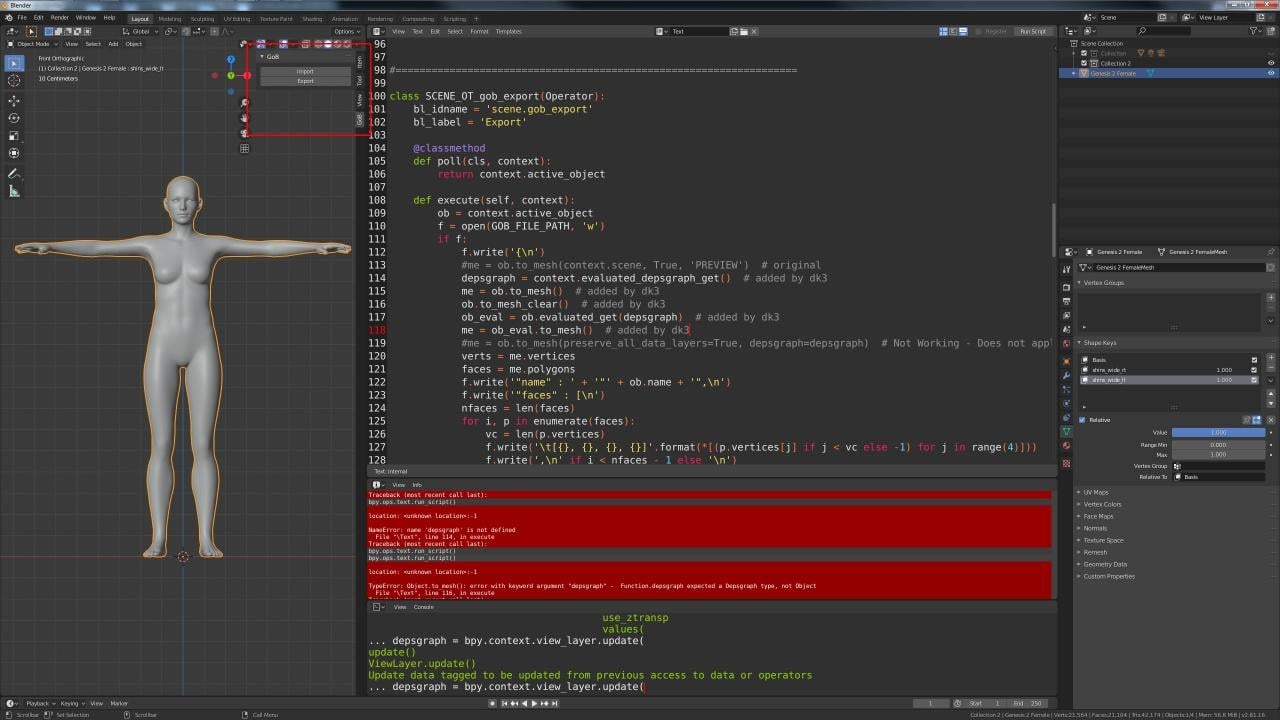
Did anyone try it with 2.79?
If you did, were you able to get it to work?
He hard-coded the file path to what his is, and/or what he believes everyones is, so I had to change it to mine (created custom bridge folder instead).
If you don't have the same file path, it won't work for you unless you edit the Blender Python script to your file path.
When I get some other free time, I'm going to rectify that nonsense...
problem with a producthttps://www.daz3d.com/jw-hd-microphone-and-singing-poses-for-genesis-8
How well do you know Daz Studio- the interface and working with products and the Parameters tab?
Pardon me for asking, but it does say adjustable microphone stand and the image shows it in multiple positions.So there's probably a morph (or setting) in the parameters tab that adjusts the length.
You select the stand in the main scene and edit it in the Tab.
 Geometry does not match???
Are you able to export the base G8 figure as obj and then immediately import it back with morph loader without attempting to modify it in any way with other programs?
Daz 3D is part of

Connect
DAZ Productions, Inc.
7533 S Center View Ct #4664
West Jordan, UT 84084Licensing Agreement | Terms of Service | Privacy Policy | EULA
© 2026 Daz Productions Inc. All Rights Reserved.