-
Let's appreciate/discuss today's new releases - more ongoinger thread
joanna said:
I really like DAV Gemma's looks, but it seems that her makeup is already painted on, so it's a big no for me. I would have also appreciated a non-posed full body shot with minimal clothing, so that I could get better idea of the body shape. Promo pictures are nice, sure, but I also need non-makeup shot (especially that makeup options for Gen 9 figures are often horrible; as if you gave a makeup kit to a five year old) and a body shot.
That's right. I would also always like a profile picture of the face. I recently discovered an interesting character here, but when I saw the profile, with such an extreme snub nose that it reminded me of a certain animal, the purchase was cancelled. Even the best morph programme can't correct something like that.
How to apply poses from Battle Cat to avoid the figures being appart ?Is there scaling applied? Do the poses require that one figure be parented to the other and if so is it (or conversely, poses require not parented and it is)? Edit: the product page says
Also includes a special morph that scales the cat up
is that applied? If not it wouild explain why there is a mismatch.
Autofit not showing!Obsi said:
CES3D said:
Let's troubleshoot to pinpoint the cause of the problem.
- First, open a new scene.
- Load Genesis 9 Dev Load into the scene and select it in the Scene Pane.
- In the Parameters Pane, check Preferences > Show Hidden Properties from the hamburger button (or the right-click menu of the Parameters Pane tab).
- In the Parameters Pane, select Currently Used and check the Properties currently applied to Genesis 9, and see if any unnecessary Properties are applied.
- From Daz Studio's Menu bar, select Help > Troubleshooting > View Log File, and check the latest timestamp of the log at this point.
- Load the problematic clothing (MEGA Wardrobe SuperJeans) onto Genesis 9.
- Check the log again and review the logs after the timestamp you checked earlier. There might be a clue to solving the problem.
My friend manage to fixed it! Thank you so much tho
My sister was doing something with the jeans last night then daz crash and my friend suspected that it might have something to do with it.She was trying to do this when daz crash
https://www.daz3d.com/forums/discussion/698211/create-or-transfer-open-fly-morph-for-g8-male-mega-wardrobe-jeans?srsltid=AfmBOoo22bVkjo384Fwe6dwMEmKg6v9Q5_ZOtvKuBV0EDAqePrk2_pb3I'm happy you got it fixed! You're lucky to have such a good friend.
K-Pop Female Charactercrosswind said:
More or less just a Base head morph needs to be generated, it doesn't have to be perfect. Blending / tweaking with partial head morphs (or plus the head morphs from other characters) as per the idol picture is the key ~~
Here's an example of my Korean characters that I ever made with the similar way. Well... plus some sculpting I have to say ~~
Looks really good!!!
SNSD Genie fan art ? ?
Autofit not showing!CES3D said:
Let's troubleshoot to pinpoint the cause of the problem.
- First, open a new scene.
- Load Genesis 9 Dev Load into the scene and select it in the Scene Pane.
- In the Parameters Pane, check Preferences > Show Hidden Properties from the hamburger button (or the right-click menu of the Parameters Pane tab).
- In the Parameters Pane, select Currently Used and check the Properties currently applied to Genesis 9, and see if any unnecessary Properties are applied.
- From Daz Studio's Menu bar, select Help > Troubleshooting > View Log File, and check the latest timestamp of the log at this point.
- Load the problematic clothing (MEGA Wardrobe SuperJeans) onto Genesis 9.
- Check the log again and review the logs after the timestamp you checked earlier. There might be a clue to solving the problem.
For reference, the log from my environment where Auto-Fit completed successfully is as follows:
2025-03-23 10:08:57.694 [INFO] :: Prepare asset load (merge): /People/Genesis 8 Male/Clothing/OOT MEGA Wardrobe Male/MEGA Wardrobe SuperJeans.duf
2025-03-23 10:08:57.694 [INFO] :: Locking viewport redraw...
2025-03-23 10:08:57.694 [INFO] :: Viewport redraw locked.
2025-03-23 10:08:58.083 [VERBOSE] :: Native format content directories: 10
2025-03-23 10:08:58.083 [VERBOSE] :: Poser format content directories: 4
2025-03-23 10:08:58.083 [VERBOSE] :: Other import format content directories: 0
2025-03-23 10:08:58.083 [INFO] :: Begin asset load (merge): /People/Genesis 8 Male/Clothing/OOT MEGA Wardrobe Male/MEGA Wardrobe SuperJeans.duf
2025-03-23 10:08:58.087 [INFO] :: Determining missing assets...
2025-03-23 10:08:58.137 [INFO] :: Setting textures...
2025-03-23 10:08:58.177 [INFO] :: Scanning for addons...
2025-03-23 10:08:58.185 [INFO] :: Creating node geometry...
2025-03-23 10:08:58.188 [INFO] :: Creating UV sets...
2025-03-23 10:08:58.188 [INFO] :: Creating materials...
2025-03-23 10:08:58.189 [INFO] :: Resolving legacy figures...
2025-03-23 10:08:58.189 [INFO] :: Preparing modifiers...
2025-03-23 10:08:58.189 [INFO] :: Creating modifiers...
2025-03-23 10:08:58.238 [INFO] :: Finalizing modifiers...
2025-03-23 10:08:58.238 [INFO] :: Sorting property groups...
2025-03-23 10:08:58.238 [INFO] :: Setting up follow targets...
2025-03-23 10:08:58.238 [INFO] :: Start following: Genesis 9 << MEGA Wardrobe SuperJeans
2025-03-23 10:08:58.238 [INFO] :: Following started: Genesis 9 << MEGA Wardrobe SuperJeans
2025-03-23 10:08:58.254 [INFO] :: Finished asset load (merge): 0m 0.170s - /People/Genesis 8 Male/Clothing/OOT MEGA Wardrobe Male/MEGA Wardrobe SuperJeans.duf
2025-03-23 10:08:58.659 [INFO] :: Unlocking viewport redraw...
2025-03-23 10:08:58.659 [INFO] :: Viewport redraw unlocked.
2025-03-23 10:08:58.673 [INFO] :: Loaded morph deltas: 0m 0.6s - /data/outoftouch/MEGA Wardrobe G8M/MEGA Wardrobe SuperJeans/Morphs/outoftouch/Base/Fix.dsf
2025-03-23 10:08:59.129 [INFO] :: Retrieving conversion options...
2025-03-23 10:09:24.470 [INFO] :: Starting conversion: MEGA Wardrobe SuperJeans >> Genesis 9 :
2025-03-23 10:09:24.485 [INFO] :: Loaded morph deltas: 0m 0.12s - /data/Daz 3D/Genesis 9/Base/Morphs/Daz 3D/Clones/CloneGenesis8Male.dsf
2025-03-23 10:09:24.505 [INFO] :: Loaded morph deltas: 0m 0.7s - /data/outoftouch/MEGA Wardrobe G8M/MEGA Wardrobe SuperJeans/Morphs/outoftouch/Base/Pull-R.dsf
2025-03-23 10:09:24.584 [INFO] :: Loaded morph deltas: 0m 0.7s - /data/outoftouch/MEGA Wardrobe G8M/MEGA Wardrobe SuperJeans/Morphs/outoftouch/Base/Pull-L.dsf
2025-03-23 10:09:24.608 [INFO] :: Loaded morph deltas: 0m 0.8s - /data/outoftouch/MEGA Wardrobe G8M/MEGA Wardrobe SuperJeans/Morphs/outoftouch/Base/Pull-Front.dsf
2025-03-23 10:09:24.620 [INFO] :: Loaded morph deltas: 0m 0.7s - /data/outoftouch/MEGA Wardrobe G8M/MEGA Wardrobe SuperJeans/Morphs/outoftouch/Base/Pull-Back.dsf
2025-03-23 10:09:24.632 [INFO] :: Loaded morph deltas: 0m 0.7s - /data/outoftouch/MEGA Wardrobe G8M/MEGA Wardrobe SuperJeans/Morphs/outoftouch/Base/Pockets-FrontOpen2R.dsf
2025-03-23 10:09:24.643 [INFO] :: Loaded morph deltas: 0m 0.6s - /data/outoftouch/MEGA Wardrobe G8M/MEGA Wardrobe SuperJeans/Morphs/outoftouch/Base/Pockets-FrontOpen2L.dsf
2025-03-23 10:09:24.655 [INFO] :: Loaded morph deltas: 0m 0.7s - /data/outoftouch/MEGA Wardrobe G8M/MEGA Wardrobe SuperJeans/Morphs/outoftouch/Base/Pockets-FrontOpen1R.dsf
2025-03-23 10:09:24.667 [INFO] :: Loaded morph deltas: 0m 0.7s - /data/outoftouch/MEGA Wardrobe G8M/MEGA Wardrobe SuperJeans/Morphs/outoftouch/Base/Pockets-FrontOpen1L.dsf
2025-03-23 10:09:24.679 [INFO] :: Loaded morph deltas: 0m 0.7s - /data/outoftouch/MEGA Wardrobe G8M/MEGA Wardrobe SuperJeans/Morphs/outoftouch/Base/Pockets-FrontFilledR.dsf
2025-03-23 10:09:24.692 [INFO] :: Loaded morph deltas: 0m 0.7s - /data/outoftouch/MEGA Wardrobe G8M/MEGA Wardrobe SuperJeans/Morphs/outoftouch/Base/Pockets-FrontFilledL.dsf
2025-03-23 10:09:24.704 [INFO] :: Loaded morph deltas: 0m 0.7s - /data/outoftouch/MEGA Wardrobe G8M/MEGA Wardrobe SuperJeans/Morphs/outoftouch/Base/Pockets-BackFilledR.dsf
2025-03-23 10:09:24.716 [INFO] :: Loaded morph deltas: 0m 0.7s - /data/outoftouch/MEGA Wardrobe G8M/MEGA Wardrobe SuperJeans/Morphs/outoftouch/Base/Pockets-BackFilledL.dsf
2025-03-23 10:09:24.730 [INFO] :: Loaded morph deltas: 0m 0.8s - /data/outoftouch/MEGA Wardrobe G8M/MEGA Wardrobe SuperJeans/Morphs/outoftouch/Base/pJCMThighSide_85_R.dsf
2025-03-23 10:09:24.743 [INFO] :: Loaded morph deltas: 0m 0.8s - /data/outoftouch/MEGA Wardrobe G8M/MEGA Wardrobe SuperJeans/Morphs/outoftouch/Base/pJCMThighSide_85_L.dsf
2025-03-23 10:09:24.758 [INFO] :: Loaded morph deltas: 0m 0.8s - /data/outoftouch/MEGA Wardrobe G8M/MEGA Wardrobe SuperJeans/Morphs/outoftouch/Base/pJCMThighFwd_57_R.dsf
2025-03-23 10:09:24.771 [INFO] :: Loaded morph deltas: 0m 0.8s - /data/outoftouch/MEGA Wardrobe G8M/MEGA Wardrobe SuperJeans/Morphs/outoftouch/Base/pJCMThighFwd_57_L.dsf
2025-03-23 10:09:24.785 [INFO] :: Loaded morph deltas: 0m 0.7s - /data/outoftouch/MEGA Wardrobe G8M/MEGA Wardrobe SuperJeans/Morphs/outoftouch/Base/pJCMThighBack_35_R.dsf
2025-03-23 10:09:24.811 [INFO] :: Loaded morph deltas: 0m 0.8s - /data/outoftouch/MEGA Wardrobe G8M/MEGA Wardrobe SuperJeans/Morphs/outoftouch/Base/pJCMThighBack_35_L.dsf
2025-03-23 10:09:24.825 [INFO] :: Loaded morph deltas: 0m 0.9s - /data/outoftouch/MEGA Wardrobe G8M/MEGA Wardrobe SuperJeans/Morphs/outoftouch/Base/Open-6.dsf
2025-03-23 10:09:24.838 [INFO] :: Loaded morph deltas: 0m 0.7s - /data/outoftouch/MEGA Wardrobe G8M/MEGA Wardrobe SuperJeans/Morphs/outoftouch/Base/Open-5.dsf
2025-03-23 10:09:24.850 [INFO] :: Loaded morph deltas: 0m 0.7s - /data/outoftouch/MEGA Wardrobe G8M/MEGA Wardrobe SuperJeans/Morphs/outoftouch/Base/Open-4.dsf
2025-03-23 10:09:24.863 [INFO] :: Loaded morph deltas: 0m 0.7s - /data/outoftouch/MEGA Wardrobe G8M/MEGA Wardrobe SuperJeans/Morphs/outoftouch/Base/Open-3.dsf
2025-03-23 10:09:24.875 [INFO] :: Loaded morph deltas: 0m 0.7s - /data/outoftouch/MEGA Wardrobe G8M/MEGA Wardrobe SuperJeans/Morphs/outoftouch/Base/Open-2.dsf
2025-03-23 10:09:24.886 [INFO] :: Loaded morph deltas: 0m 0.7s - /data/outoftouch/MEGA Wardrobe G8M/MEGA Wardrobe SuperJeans/Morphs/outoftouch/Base/Open-1.dsf
2025-03-23 10:09:24.905 [INFO] :: Loaded morph deltas: 0m 0.10s - /data/outoftouch/MEGA Wardrobe G8M/MEGA Wardrobe SuperJeans/Morphs/outoftouch/Base/FitStyle-Tapered.dsf
2025-03-23 10:09:24.922 [INFO] :: Loaded morph deltas: 0m 0.11s - /data/outoftouch/MEGA Wardrobe G8M/MEGA Wardrobe SuperJeans/Morphs/outoftouch/Base/FitStyle-Loose.dsf
2025-03-23 10:09:24.936 [INFO] :: Loaded morph deltas: 0m 0.9s - /data/outoftouch/MEGA Wardrobe G8M/MEGA Wardrobe SuperJeans/Morphs/outoftouch/Base/FitStyle-Foldy.dsf
2025-03-23 10:09:24.949 [INFO] :: Loaded morph deltas: 0m 0.8s - /data/outoftouch/MEGA Wardrobe G8M/MEGA Wardrobe SuperJeans/Morphs/outoftouch/Base/FitStyle-CrotchDown.dsf
2025-03-23 10:09:24.966 [INFO] :: Loaded morph deltas: 0m 0.12s - /data/outoftouch/MEGA Wardrobe G8M/MEGA Wardrobe SuperJeans/Morphs/outoftouch/Base/FBMPortly.dsf
2025-03-23 10:09:24.982 [INFO] :: Loaded morph deltas: 0m 0.12s - /data/outoftouch/MEGA Wardrobe G8M/MEGA Wardrobe SuperJeans/Morphs/outoftouch/Base/FBMMichael8.dsf
2025-03-23 10:09:25.000 [INFO] :: Loaded morph deltas: 0m 0.12s - /data/outoftouch/MEGA Wardrobe G8M/MEGA Wardrobe SuperJeans/Morphs/outoftouch/Base/FBMEmaciated.dsf
2025-03-23 10:09:25.017 [INFO] :: Loaded morph deltas: 0m 0.12s - /data/outoftouch/MEGA Wardrobe G8M/MEGA Wardrobe SuperJeans/Morphs/outoftouch/Base/FBMBodybuilderSize.dsf
2025-03-23 10:09:25.034 [INFO] :: Loaded morph deltas: 0m 0.12s - /data/outoftouch/MEGA Wardrobe G8M/MEGA Wardrobe SuperJeans/Morphs/outoftouch/Base/FBMBodybuilderDetails.dsf
2025-03-23 10:09:25.046 [INFO] :: Loaded morph deltas: 0m 0.7s - /data/outoftouch/MEGA Wardrobe G8M/MEGA Wardrobe SuperJeans/Morphs/outoftouch/Base/Down-R.dsf
2025-03-23 10:09:25.058 [INFO] :: Loaded morph deltas: 0m 0.7s - /data/outoftouch/MEGA Wardrobe G8M/MEGA Wardrobe SuperJeans/Morphs/outoftouch/Base/Down-L.dsf
2025-03-23 10:09:25.069 [INFO] :: Loaded morph deltas: 0m 0.6s - /data/outoftouch/MEGA Wardrobe G8M/MEGA Wardrobe SuperJeans/Morphs/outoftouch/Base/Down-Front.dsf
2025-03-23 10:09:25.092 [INFO] :: Loaded morph deltas: 0m 0.8s - /data/outoftouch/MEGA Wardrobe G8M/MEGA Wardrobe SuperJeans/Morphs/outoftouch/Base/Down-Back.dsf
2025-03-23 10:09:25.104 [INFO] :: Loaded morph deltas: 0m 0.7s - /data/outoftouch/MEGA Wardrobe G8M/MEGA Wardrobe SuperJeans/Morphs/outoftouch/Base/Bulge.dsf
2025-03-23 10:09:25.116 [INFO] :: Loaded morph deltas: 0m 0.7s - /data/outoftouch/MEGA Wardrobe G8M/MEGA Wardrobe SuperJeans/Morphs/outoftouch/Base/Adjust-ThighR.dsf
2025-03-23 10:09:25.138 [INFO] :: Loaded morph deltas: 0m 0.7s - /data/outoftouch/MEGA Wardrobe G8M/MEGA Wardrobe SuperJeans/Morphs/outoftouch/Base/Adjust-ThighL.dsf
2025-03-23 10:09:25.149 [INFO] :: Loaded morph deltas: 0m 0.6s - /data/outoftouch/MEGA Wardrobe G8M/MEGA Wardrobe SuperJeans/Morphs/outoftouch/Base/Adjust-ShinR.dsf
2025-03-23 10:09:25.161 [INFO] :: Loaded morph deltas: 0m 0.6s - /data/outoftouch/MEGA Wardrobe G8M/MEGA Wardrobe SuperJeans/Morphs/outoftouch/Base/Adjust-ShinL.dsf
2025-03-23 10:09:25.172 [INFO] :: Loaded morph deltas: 0m 0.6s - /data/outoftouch/MEGA Wardrobe G8M/MEGA Wardrobe SuperJeans/Morphs/outoftouch/Base/Adjust-KneeR.dsf
2025-03-23 10:09:25.182 [INFO] :: Loaded morph deltas: 0m 0.6s - /data/outoftouch/MEGA Wardrobe G8M/MEGA Wardrobe SuperJeans/Morphs/outoftouch/Base/Adjust-KneeL.dsf
2025-03-23 10:09:25.195 [INFO] :: Loaded morph deltas: 0m 0.7s - /data/outoftouch/MEGA Wardrobe G8M/MEGA Wardrobe SuperJeans/Morphs/outoftouch/Base/Adjust-Hips.dsf
2025-03-23 10:09:25.206 [INFO] :: Loaded morph deltas: 0m 0.6s - /data/outoftouch/MEGA Wardrobe G8M/MEGA Wardrobe SuperJeans/Morphs/outoftouch/Base/Adjust-HipR.dsf
2025-03-23 10:09:25.219 [INFO] :: Loaded morph deltas: 0m 0.7s - /data/outoftouch/MEGA Wardrobe G8M/MEGA Wardrobe SuperJeans/Morphs/outoftouch/Base/Adjust-HipL.dsf
2025-03-23 10:09:25.231 [INFO] :: Loaded morph deltas: 0m 0.7s - /data/outoftouch/MEGA Wardrobe G8M/MEGA Wardrobe SuperJeans/Morphs/outoftouch/Base/Adjust-Glutes.dsf
2025-03-23 10:09:25.245 [INFO] :: Loaded morph deltas: 0m 0.6s - /data/outoftouch/MEGA Wardrobe G8M/MEGA Wardrobe SuperJeans/Morphs/outoftouch/Base/Adjust-GluteR.dsf
2025-03-23 10:09:25.257 [INFO] :: Loaded morph deltas: 0m 0.6s - /data/outoftouch/MEGA Wardrobe G8M/MEGA Wardrobe SuperJeans/Morphs/outoftouch/Base/Adjust-GluteL.dsf
2025-03-23 10:09:25.268 [INFO] :: Loaded morph deltas: 0m 0.5s - /data/outoftouch/MEGA Wardrobe G8M/MEGA Wardrobe SuperJeans/Morphs/outoftouch/Base/Adjust-FootR-Width.dsf
2025-03-23 10:09:25.279 [INFO] :: Loaded morph deltas: 0m 0.5s - /data/outoftouch/MEGA Wardrobe G8M/MEGA Wardrobe SuperJeans/Morphs/outoftouch/Base/Adjust-FootR-Outer.dsf
2025-03-23 10:09:25.290 [INFO] :: Loaded morph deltas: 0m 0.6s - /data/outoftouch/MEGA Wardrobe G8M/MEGA Wardrobe SuperJeans/Morphs/outoftouch/Base/Adjust-FootR-Inner.dsf
2025-03-23 10:09:25.301 [INFO] :: Loaded morph deltas: 0m 0.5s - /data/outoftouch/MEGA Wardrobe G8M/MEGA Wardrobe SuperJeans/Morphs/outoftouch/Base/Adjust-FootR-Height.dsf
2025-03-23 10:09:25.316 [INFO] :: Loaded morph deltas: 0m 0.5s - /data/outoftouch/MEGA Wardrobe G8M/MEGA Wardrobe SuperJeans/Morphs/outoftouch/Base/Adjust-FootR-Front.dsf
2025-03-23 10:09:25.326 [INFO] :: Loaded morph deltas: 0m 0.5s - /data/outoftouch/MEGA Wardrobe G8M/MEGA Wardrobe SuperJeans/Morphs/outoftouch/Base/Adjust-FootR-Back.dsf
2025-03-23 10:09:25.338 [INFO] :: Loaded morph deltas: 0m 0.6s - /data/outoftouch/MEGA Wardrobe G8M/MEGA Wardrobe SuperJeans/Morphs/outoftouch/Base/Adjust-FootL-Width.dsf
2025-03-23 10:09:25.350 [INFO] :: Loaded morph deltas: 0m 0.5s - /data/outoftouch/MEGA Wardrobe G8M/MEGA Wardrobe SuperJeans/Morphs/outoftouch/Base/Adjust-FootL-Outer.dsf
2025-03-23 10:09:25.361 [INFO] :: Loaded morph deltas: 0m 0.5s - /data/outoftouch/MEGA Wardrobe G8M/MEGA Wardrobe SuperJeans/Morphs/outoftouch/Base/Adjust-FootL-Inner.dsf
2025-03-23 10:09:25.372 [INFO] :: Loaded morph deltas: 0m 0.6s - /data/outoftouch/MEGA Wardrobe G8M/MEGA Wardrobe SuperJeans/Morphs/outoftouch/Base/Adjust-FootL-Height.dsf
2025-03-23 10:09:25.384 [INFO] :: Loaded morph deltas: 0m 0.5s - /data/outoftouch/MEGA Wardrobe G8M/MEGA Wardrobe SuperJeans/Morphs/outoftouch/Base/Adjust-FootL-Front.dsf
2025-03-23 10:09:25.395 [INFO] :: Loaded morph deltas: 0m 0.5s - /data/outoftouch/MEGA Wardrobe G8M/MEGA Wardrobe SuperJeans/Morphs/outoftouch/Base/Adjust-FootL-Back.dsf
2025-03-23 10:09:25.407 [INFO] :: Loaded morph deltas: 0m 0.7s - /data/outoftouch/MEGA Wardrobe G8M/MEGA Wardrobe SuperJeans/Morphs/outoftouch/Base/Adjust-CrotchWidth.dsf
2025-03-23 10:09:25.419 [INFO] :: Loaded morph deltas: 0m 0.7s - /data/outoftouch/MEGA Wardrobe G8M/MEGA Wardrobe SuperJeans/Morphs/outoftouch/Base/Adjust-CrotchHeight.dsf
2025-03-23 10:09:25.436 [INFO] :: Loaded morph deltas: 0m 0.11s - /data/outoftouch/MEGA Wardrobe G8M/MEGA Wardrobe SuperJeans/Morphs/outoftouch/Base/Adjust-All.dsf
2025-03-23 10:09:34.377 [INFO] :: Finished conversion: MEGA Wardrobe SuperJeans >> Genesis 9 :
2025-03-23 10:09:34.377 [INFO] :: Connect base morphs: Genesis 9 << MEGA Wardrobe SuperJeans
2025-03-23 10:09:34.402 [INFO] :: Base morphs connected: Genesis 9 << MEGA Wardrobe SuperJeans
2025-03-23 10:09:34.402 [INFO] :: Creating morph projection map: Genesis 9 << MEGA Wardrobe SuperJeans
My friend manage to fixed it! Thank you so much tho
My sister was doing something with the jeans last night then daz crash and my friend suspected that it might have something to do with it.She was trying to do this when daz crash
https://www.daz3d.com/forums/discussion/698211/create-or-transfer-open-fly-morph-for-g8-male-mega-wardrobe-jeans?srsltid=AfmBOoo22bVkjo384Fwe6dwMEmKg6v9Q5_ZOtvKuBV0EDAqePrk2_pb3Autofit not showing!Let's troubleshoot to pinpoint the cause of the problem.
- First, open a new scene.
- Load Genesis 9 Dev Load into the scene and select it in the Scene Pane.
- In the Parameters Pane, check Preferences > Show Hidden Properties from the hamburger button (or the right-click menu of the Parameters Pane tab).
- In the Parameters Pane, select Currently Used and check the Properties currently applied to Genesis 9, and see if any unnecessary Properties are applied.
- From Daz Studio's Menu bar, select Help > Troubleshooting > View Log File, and check the latest timestamp of the log at this point.
- Load the problematic clothing (MEGA Wardrobe SuperJeans) onto Genesis 9.
- Check the log again and review the logs after the timestamp you checked earlier. There might be a clue to solving the problem.
For reference, the log from my environment where Auto-Fit completed successfully is as follows:
2025-03-23 10:08:57.694 [INFO] :: Prepare asset load (merge): /People/Genesis 8 Male/Clothing/OOT MEGA Wardrobe Male/MEGA Wardrobe SuperJeans.duf
2025-03-23 10:08:57.694 [INFO] :: Locking viewport redraw...
2025-03-23 10:08:57.694 [INFO] :: Viewport redraw locked.
2025-03-23 10:08:58.083 [VERBOSE] :: Native format content directories: 10
2025-03-23 10:08:58.083 [VERBOSE] :: Poser format content directories: 4
2025-03-23 10:08:58.083 [VERBOSE] :: Other import format content directories: 0
2025-03-23 10:08:58.083 [INFO] :: Begin asset load (merge): /People/Genesis 8 Male/Clothing/OOT MEGA Wardrobe Male/MEGA Wardrobe SuperJeans.duf
2025-03-23 10:08:58.087 [INFO] :: Determining missing assets...
2025-03-23 10:08:58.137 [INFO] :: Setting textures...
2025-03-23 10:08:58.177 [INFO] :: Scanning for addons...
2025-03-23 10:08:58.185 [INFO] :: Creating node geometry...
2025-03-23 10:08:58.188 [INFO] :: Creating UV sets...
2025-03-23 10:08:58.188 [INFO] :: Creating materials...
2025-03-23 10:08:58.189 [INFO] :: Resolving legacy figures...
2025-03-23 10:08:58.189 [INFO] :: Preparing modifiers...
2025-03-23 10:08:58.189 [INFO] :: Creating modifiers...
2025-03-23 10:08:58.238 [INFO] :: Finalizing modifiers...
2025-03-23 10:08:58.238 [INFO] :: Sorting property groups...
2025-03-23 10:08:58.238 [INFO] :: Setting up follow targets...
2025-03-23 10:08:58.238 [INFO] :: Start following: Genesis 9 << MEGA Wardrobe SuperJeans
2025-03-23 10:08:58.238 [INFO] :: Following started: Genesis 9 << MEGA Wardrobe SuperJeans
2025-03-23 10:08:58.254 [INFO] :: Finished asset load (merge): 0m 0.170s - /People/Genesis 8 Male/Clothing/OOT MEGA Wardrobe Male/MEGA Wardrobe SuperJeans.duf
2025-03-23 10:08:58.659 [INFO] :: Unlocking viewport redraw...
2025-03-23 10:08:58.659 [INFO] :: Viewport redraw unlocked.
2025-03-23 10:08:58.673 [INFO] :: Loaded morph deltas: 0m 0.6s - /data/outoftouch/MEGA Wardrobe G8M/MEGA Wardrobe SuperJeans/Morphs/outoftouch/Base/Fix.dsf
2025-03-23 10:08:59.129 [INFO] :: Retrieving conversion options...
2025-03-23 10:09:24.470 [INFO] :: Starting conversion: MEGA Wardrobe SuperJeans >> Genesis 9 :
2025-03-23 10:09:24.485 [INFO] :: Loaded morph deltas: 0m 0.12s - /data/Daz 3D/Genesis 9/Base/Morphs/Daz 3D/Clones/CloneGenesis8Male.dsf
2025-03-23 10:09:24.505 [INFO] :: Loaded morph deltas: 0m 0.7s - /data/outoftouch/MEGA Wardrobe G8M/MEGA Wardrobe SuperJeans/Morphs/outoftouch/Base/Pull-R.dsf
2025-03-23 10:09:24.584 [INFO] :: Loaded morph deltas: 0m 0.7s - /data/outoftouch/MEGA Wardrobe G8M/MEGA Wardrobe SuperJeans/Morphs/outoftouch/Base/Pull-L.dsf
2025-03-23 10:09:24.608 [INFO] :: Loaded morph deltas: 0m 0.8s - /data/outoftouch/MEGA Wardrobe G8M/MEGA Wardrobe SuperJeans/Morphs/outoftouch/Base/Pull-Front.dsf
2025-03-23 10:09:24.620 [INFO] :: Loaded morph deltas: 0m 0.7s - /data/outoftouch/MEGA Wardrobe G8M/MEGA Wardrobe SuperJeans/Morphs/outoftouch/Base/Pull-Back.dsf
2025-03-23 10:09:24.632 [INFO] :: Loaded morph deltas: 0m 0.7s - /data/outoftouch/MEGA Wardrobe G8M/MEGA Wardrobe SuperJeans/Morphs/outoftouch/Base/Pockets-FrontOpen2R.dsf
2025-03-23 10:09:24.643 [INFO] :: Loaded morph deltas: 0m 0.6s - /data/outoftouch/MEGA Wardrobe G8M/MEGA Wardrobe SuperJeans/Morphs/outoftouch/Base/Pockets-FrontOpen2L.dsf
2025-03-23 10:09:24.655 [INFO] :: Loaded morph deltas: 0m 0.7s - /data/outoftouch/MEGA Wardrobe G8M/MEGA Wardrobe SuperJeans/Morphs/outoftouch/Base/Pockets-FrontOpen1R.dsf
2025-03-23 10:09:24.667 [INFO] :: Loaded morph deltas: 0m 0.7s - /data/outoftouch/MEGA Wardrobe G8M/MEGA Wardrobe SuperJeans/Morphs/outoftouch/Base/Pockets-FrontOpen1L.dsf
2025-03-23 10:09:24.679 [INFO] :: Loaded morph deltas: 0m 0.7s - /data/outoftouch/MEGA Wardrobe G8M/MEGA Wardrobe SuperJeans/Morphs/outoftouch/Base/Pockets-FrontFilledR.dsf
2025-03-23 10:09:24.692 [INFO] :: Loaded morph deltas: 0m 0.7s - /data/outoftouch/MEGA Wardrobe G8M/MEGA Wardrobe SuperJeans/Morphs/outoftouch/Base/Pockets-FrontFilledL.dsf
2025-03-23 10:09:24.704 [INFO] :: Loaded morph deltas: 0m 0.7s - /data/outoftouch/MEGA Wardrobe G8M/MEGA Wardrobe SuperJeans/Morphs/outoftouch/Base/Pockets-BackFilledR.dsf
2025-03-23 10:09:24.716 [INFO] :: Loaded morph deltas: 0m 0.7s - /data/outoftouch/MEGA Wardrobe G8M/MEGA Wardrobe SuperJeans/Morphs/outoftouch/Base/Pockets-BackFilledL.dsf
2025-03-23 10:09:24.730 [INFO] :: Loaded morph deltas: 0m 0.8s - /data/outoftouch/MEGA Wardrobe G8M/MEGA Wardrobe SuperJeans/Morphs/outoftouch/Base/pJCMThighSide_85_R.dsf
2025-03-23 10:09:24.743 [INFO] :: Loaded morph deltas: 0m 0.8s - /data/outoftouch/MEGA Wardrobe G8M/MEGA Wardrobe SuperJeans/Morphs/outoftouch/Base/pJCMThighSide_85_L.dsf
2025-03-23 10:09:24.758 [INFO] :: Loaded morph deltas: 0m 0.8s - /data/outoftouch/MEGA Wardrobe G8M/MEGA Wardrobe SuperJeans/Morphs/outoftouch/Base/pJCMThighFwd_57_R.dsf
2025-03-23 10:09:24.771 [INFO] :: Loaded morph deltas: 0m 0.8s - /data/outoftouch/MEGA Wardrobe G8M/MEGA Wardrobe SuperJeans/Morphs/outoftouch/Base/pJCMThighFwd_57_L.dsf
2025-03-23 10:09:24.785 [INFO] :: Loaded morph deltas: 0m 0.7s - /data/outoftouch/MEGA Wardrobe G8M/MEGA Wardrobe SuperJeans/Morphs/outoftouch/Base/pJCMThighBack_35_R.dsf
2025-03-23 10:09:24.811 [INFO] :: Loaded morph deltas: 0m 0.8s - /data/outoftouch/MEGA Wardrobe G8M/MEGA Wardrobe SuperJeans/Morphs/outoftouch/Base/pJCMThighBack_35_L.dsf
2025-03-23 10:09:24.825 [INFO] :: Loaded morph deltas: 0m 0.9s - /data/outoftouch/MEGA Wardrobe G8M/MEGA Wardrobe SuperJeans/Morphs/outoftouch/Base/Open-6.dsf
2025-03-23 10:09:24.838 [INFO] :: Loaded morph deltas: 0m 0.7s - /data/outoftouch/MEGA Wardrobe G8M/MEGA Wardrobe SuperJeans/Morphs/outoftouch/Base/Open-5.dsf
2025-03-23 10:09:24.850 [INFO] :: Loaded morph deltas: 0m 0.7s - /data/outoftouch/MEGA Wardrobe G8M/MEGA Wardrobe SuperJeans/Morphs/outoftouch/Base/Open-4.dsf
2025-03-23 10:09:24.863 [INFO] :: Loaded morph deltas: 0m 0.7s - /data/outoftouch/MEGA Wardrobe G8M/MEGA Wardrobe SuperJeans/Morphs/outoftouch/Base/Open-3.dsf
2025-03-23 10:09:24.875 [INFO] :: Loaded morph deltas: 0m 0.7s - /data/outoftouch/MEGA Wardrobe G8M/MEGA Wardrobe SuperJeans/Morphs/outoftouch/Base/Open-2.dsf
2025-03-23 10:09:24.886 [INFO] :: Loaded morph deltas: 0m 0.7s - /data/outoftouch/MEGA Wardrobe G8M/MEGA Wardrobe SuperJeans/Morphs/outoftouch/Base/Open-1.dsf
2025-03-23 10:09:24.905 [INFO] :: Loaded morph deltas: 0m 0.10s - /data/outoftouch/MEGA Wardrobe G8M/MEGA Wardrobe SuperJeans/Morphs/outoftouch/Base/FitStyle-Tapered.dsf
2025-03-23 10:09:24.922 [INFO] :: Loaded morph deltas: 0m 0.11s - /data/outoftouch/MEGA Wardrobe G8M/MEGA Wardrobe SuperJeans/Morphs/outoftouch/Base/FitStyle-Loose.dsf
2025-03-23 10:09:24.936 [INFO] :: Loaded morph deltas: 0m 0.9s - /data/outoftouch/MEGA Wardrobe G8M/MEGA Wardrobe SuperJeans/Morphs/outoftouch/Base/FitStyle-Foldy.dsf
2025-03-23 10:09:24.949 [INFO] :: Loaded morph deltas: 0m 0.8s - /data/outoftouch/MEGA Wardrobe G8M/MEGA Wardrobe SuperJeans/Morphs/outoftouch/Base/FitStyle-CrotchDown.dsf
2025-03-23 10:09:24.966 [INFO] :: Loaded morph deltas: 0m 0.12s - /data/outoftouch/MEGA Wardrobe G8M/MEGA Wardrobe SuperJeans/Morphs/outoftouch/Base/FBMPortly.dsf
2025-03-23 10:09:24.982 [INFO] :: Loaded morph deltas: 0m 0.12s - /data/outoftouch/MEGA Wardrobe G8M/MEGA Wardrobe SuperJeans/Morphs/outoftouch/Base/FBMMichael8.dsf
2025-03-23 10:09:25.000 [INFO] :: Loaded morph deltas: 0m 0.12s - /data/outoftouch/MEGA Wardrobe G8M/MEGA Wardrobe SuperJeans/Morphs/outoftouch/Base/FBMEmaciated.dsf
2025-03-23 10:09:25.017 [INFO] :: Loaded morph deltas: 0m 0.12s - /data/outoftouch/MEGA Wardrobe G8M/MEGA Wardrobe SuperJeans/Morphs/outoftouch/Base/FBMBodybuilderSize.dsf
2025-03-23 10:09:25.034 [INFO] :: Loaded morph deltas: 0m 0.12s - /data/outoftouch/MEGA Wardrobe G8M/MEGA Wardrobe SuperJeans/Morphs/outoftouch/Base/FBMBodybuilderDetails.dsf
2025-03-23 10:09:25.046 [INFO] :: Loaded morph deltas: 0m 0.7s - /data/outoftouch/MEGA Wardrobe G8M/MEGA Wardrobe SuperJeans/Morphs/outoftouch/Base/Down-R.dsf
2025-03-23 10:09:25.058 [INFO] :: Loaded morph deltas: 0m 0.7s - /data/outoftouch/MEGA Wardrobe G8M/MEGA Wardrobe SuperJeans/Morphs/outoftouch/Base/Down-L.dsf
2025-03-23 10:09:25.069 [INFO] :: Loaded morph deltas: 0m 0.6s - /data/outoftouch/MEGA Wardrobe G8M/MEGA Wardrobe SuperJeans/Morphs/outoftouch/Base/Down-Front.dsf
2025-03-23 10:09:25.092 [INFO] :: Loaded morph deltas: 0m 0.8s - /data/outoftouch/MEGA Wardrobe G8M/MEGA Wardrobe SuperJeans/Morphs/outoftouch/Base/Down-Back.dsf
2025-03-23 10:09:25.104 [INFO] :: Loaded morph deltas: 0m 0.7s - /data/outoftouch/MEGA Wardrobe G8M/MEGA Wardrobe SuperJeans/Morphs/outoftouch/Base/Bulge.dsf
2025-03-23 10:09:25.116 [INFO] :: Loaded morph deltas: 0m 0.7s - /data/outoftouch/MEGA Wardrobe G8M/MEGA Wardrobe SuperJeans/Morphs/outoftouch/Base/Adjust-ThighR.dsf
2025-03-23 10:09:25.138 [INFO] :: Loaded morph deltas: 0m 0.7s - /data/outoftouch/MEGA Wardrobe G8M/MEGA Wardrobe SuperJeans/Morphs/outoftouch/Base/Adjust-ThighL.dsf
2025-03-23 10:09:25.149 [INFO] :: Loaded morph deltas: 0m 0.6s - /data/outoftouch/MEGA Wardrobe G8M/MEGA Wardrobe SuperJeans/Morphs/outoftouch/Base/Adjust-ShinR.dsf
2025-03-23 10:09:25.161 [INFO] :: Loaded morph deltas: 0m 0.6s - /data/outoftouch/MEGA Wardrobe G8M/MEGA Wardrobe SuperJeans/Morphs/outoftouch/Base/Adjust-ShinL.dsf
2025-03-23 10:09:25.172 [INFO] :: Loaded morph deltas: 0m 0.6s - /data/outoftouch/MEGA Wardrobe G8M/MEGA Wardrobe SuperJeans/Morphs/outoftouch/Base/Adjust-KneeR.dsf
2025-03-23 10:09:25.182 [INFO] :: Loaded morph deltas: 0m 0.6s - /data/outoftouch/MEGA Wardrobe G8M/MEGA Wardrobe SuperJeans/Morphs/outoftouch/Base/Adjust-KneeL.dsf
2025-03-23 10:09:25.195 [INFO] :: Loaded morph deltas: 0m 0.7s - /data/outoftouch/MEGA Wardrobe G8M/MEGA Wardrobe SuperJeans/Morphs/outoftouch/Base/Adjust-Hips.dsf
2025-03-23 10:09:25.206 [INFO] :: Loaded morph deltas: 0m 0.6s - /data/outoftouch/MEGA Wardrobe G8M/MEGA Wardrobe SuperJeans/Morphs/outoftouch/Base/Adjust-HipR.dsf
2025-03-23 10:09:25.219 [INFO] :: Loaded morph deltas: 0m 0.7s - /data/outoftouch/MEGA Wardrobe G8M/MEGA Wardrobe SuperJeans/Morphs/outoftouch/Base/Adjust-HipL.dsf
2025-03-23 10:09:25.231 [INFO] :: Loaded morph deltas: 0m 0.7s - /data/outoftouch/MEGA Wardrobe G8M/MEGA Wardrobe SuperJeans/Morphs/outoftouch/Base/Adjust-Glutes.dsf
2025-03-23 10:09:25.245 [INFO] :: Loaded morph deltas: 0m 0.6s - /data/outoftouch/MEGA Wardrobe G8M/MEGA Wardrobe SuperJeans/Morphs/outoftouch/Base/Adjust-GluteR.dsf
2025-03-23 10:09:25.257 [INFO] :: Loaded morph deltas: 0m 0.6s - /data/outoftouch/MEGA Wardrobe G8M/MEGA Wardrobe SuperJeans/Morphs/outoftouch/Base/Adjust-GluteL.dsf
2025-03-23 10:09:25.268 [INFO] :: Loaded morph deltas: 0m 0.5s - /data/outoftouch/MEGA Wardrobe G8M/MEGA Wardrobe SuperJeans/Morphs/outoftouch/Base/Adjust-FootR-Width.dsf
2025-03-23 10:09:25.279 [INFO] :: Loaded morph deltas: 0m 0.5s - /data/outoftouch/MEGA Wardrobe G8M/MEGA Wardrobe SuperJeans/Morphs/outoftouch/Base/Adjust-FootR-Outer.dsf
2025-03-23 10:09:25.290 [INFO] :: Loaded morph deltas: 0m 0.6s - /data/outoftouch/MEGA Wardrobe G8M/MEGA Wardrobe SuperJeans/Morphs/outoftouch/Base/Adjust-FootR-Inner.dsf
2025-03-23 10:09:25.301 [INFO] :: Loaded morph deltas: 0m 0.5s - /data/outoftouch/MEGA Wardrobe G8M/MEGA Wardrobe SuperJeans/Morphs/outoftouch/Base/Adjust-FootR-Height.dsf
2025-03-23 10:09:25.316 [INFO] :: Loaded morph deltas: 0m 0.5s - /data/outoftouch/MEGA Wardrobe G8M/MEGA Wardrobe SuperJeans/Morphs/outoftouch/Base/Adjust-FootR-Front.dsf
2025-03-23 10:09:25.326 [INFO] :: Loaded morph deltas: 0m 0.5s - /data/outoftouch/MEGA Wardrobe G8M/MEGA Wardrobe SuperJeans/Morphs/outoftouch/Base/Adjust-FootR-Back.dsf
2025-03-23 10:09:25.338 [INFO] :: Loaded morph deltas: 0m 0.6s - /data/outoftouch/MEGA Wardrobe G8M/MEGA Wardrobe SuperJeans/Morphs/outoftouch/Base/Adjust-FootL-Width.dsf
2025-03-23 10:09:25.350 [INFO] :: Loaded morph deltas: 0m 0.5s - /data/outoftouch/MEGA Wardrobe G8M/MEGA Wardrobe SuperJeans/Morphs/outoftouch/Base/Adjust-FootL-Outer.dsf
2025-03-23 10:09:25.361 [INFO] :: Loaded morph deltas: 0m 0.5s - /data/outoftouch/MEGA Wardrobe G8M/MEGA Wardrobe SuperJeans/Morphs/outoftouch/Base/Adjust-FootL-Inner.dsf
2025-03-23 10:09:25.372 [INFO] :: Loaded morph deltas: 0m 0.6s - /data/outoftouch/MEGA Wardrobe G8M/MEGA Wardrobe SuperJeans/Morphs/outoftouch/Base/Adjust-FootL-Height.dsf
2025-03-23 10:09:25.384 [INFO] :: Loaded morph deltas: 0m 0.5s - /data/outoftouch/MEGA Wardrobe G8M/MEGA Wardrobe SuperJeans/Morphs/outoftouch/Base/Adjust-FootL-Front.dsf
2025-03-23 10:09:25.395 [INFO] :: Loaded morph deltas: 0m 0.5s - /data/outoftouch/MEGA Wardrobe G8M/MEGA Wardrobe SuperJeans/Morphs/outoftouch/Base/Adjust-FootL-Back.dsf
2025-03-23 10:09:25.407 [INFO] :: Loaded morph deltas: 0m 0.7s - /data/outoftouch/MEGA Wardrobe G8M/MEGA Wardrobe SuperJeans/Morphs/outoftouch/Base/Adjust-CrotchWidth.dsf
2025-03-23 10:09:25.419 [INFO] :: Loaded morph deltas: 0m 0.7s - /data/outoftouch/MEGA Wardrobe G8M/MEGA Wardrobe SuperJeans/Morphs/outoftouch/Base/Adjust-CrotchHeight.dsf
2025-03-23 10:09:25.436 [INFO] :: Loaded morph deltas: 0m 0.11s - /data/outoftouch/MEGA Wardrobe G8M/MEGA Wardrobe SuperJeans/Morphs/outoftouch/Base/Adjust-All.dsf
2025-03-23 10:09:34.377 [INFO] :: Finished conversion: MEGA Wardrobe SuperJeans >> Genesis 9 :
2025-03-23 10:09:34.377 [INFO] :: Connect base morphs: Genesis 9 << MEGA Wardrobe SuperJeans
2025-03-23 10:09:34.402 [INFO] :: Base morphs connected: Genesis 9 << MEGA Wardrobe SuperJeans
2025-03-23 10:09:34.402 [INFO] :: Creating morph projection map: Genesis 9 << MEGA Wardrobe SuperJeans
2025 - New Freebies from CEFCatherine3678ab said:
To start off this year's new treasures whatever they all might be, here is a very basic pose for the beautiful cat skeleton. I used it to test out the concept of making it into a skeleton to fit inside the Daz House Cat, turning the skeleton into a clothing piece and thusly enabling it to pose along with the Daz House Cat. The transparency of the house cat was turned down to enable seeing the skeleton inside the cat.
Required products:
https://www.daz3d.com/cat-skeleton-mr-rattlepaws
https://www.daz3d.com/daz-house-cat-with-dforce-hair
Required program: Daz Studio
Some knowledge to get an .obj file out of and back into D/S. I use Hexagon.Step1: Apply Pose to Skeleton, somehow get the .obj out of D/S.
Delete skeleton from scene.
Somehow get .obj back into D/S.
Load into the scene the Daz House Cat.
Unselect everything. Use the Transfer Utility to turn the skeleton obj into a clothing figure. For bones I tried the Actor:Follower which seems to work just fine. Use whichever option you find works for you.
Yes to "remove the prop" IF your edition of D/S has that.When done, BEFORE messing around with the cat, select the skeleton clothing and save it to your own 'private' folders. {one cannot share such derivative products}
Providing that one has not renamed the surfaces etc, the original mats can be used on your skeleton clothing.
The pose attached to this post is very basic. You can tweak it as desired BEFORE exporting out the .obj file.
n.b. The importance of deleting the skeleton from the scene after export, is to prevent the incoming .obj file having "(2)" added to the name and surface areas ;-)
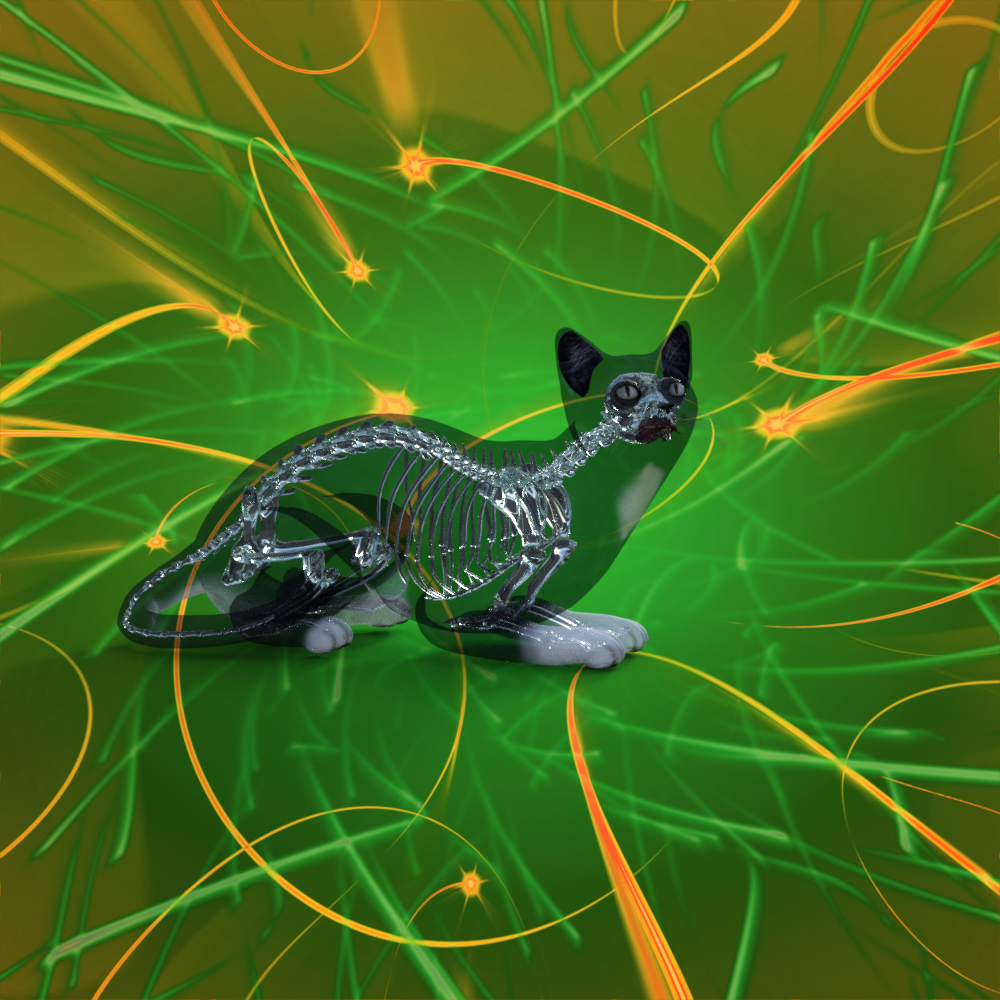
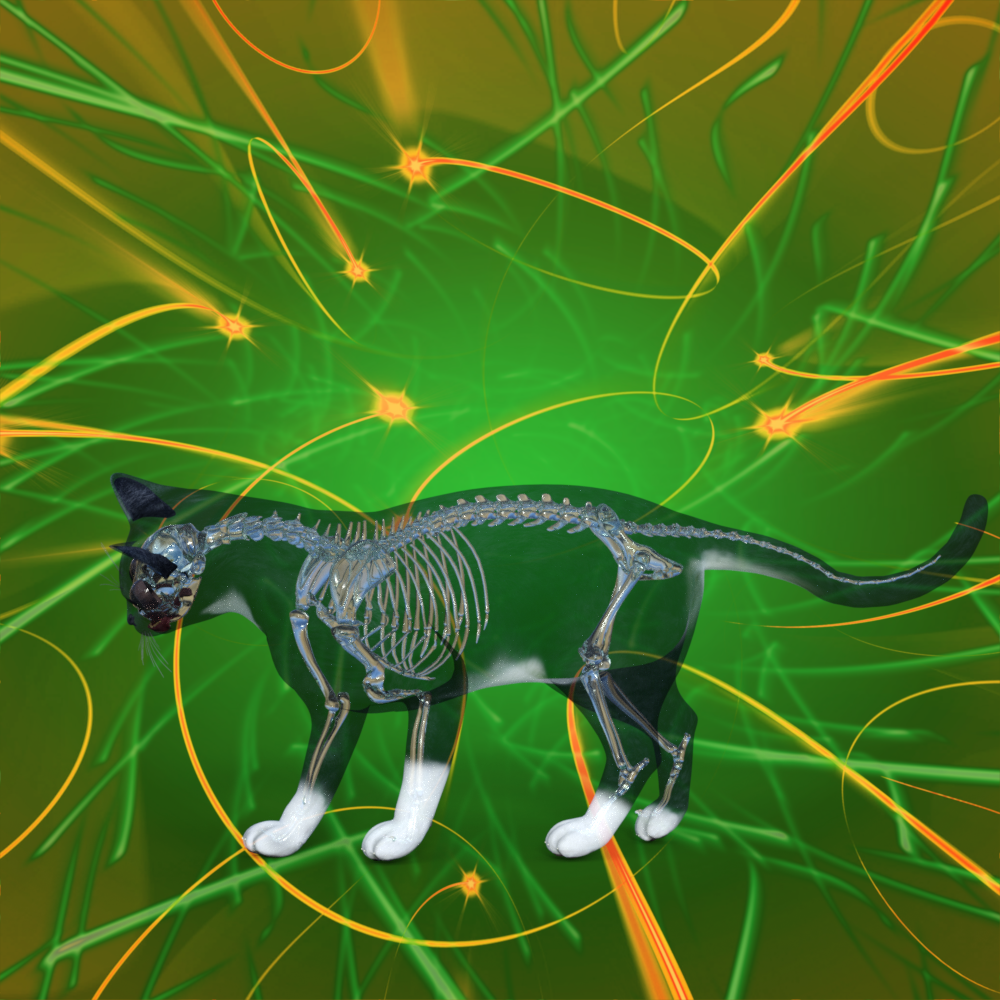
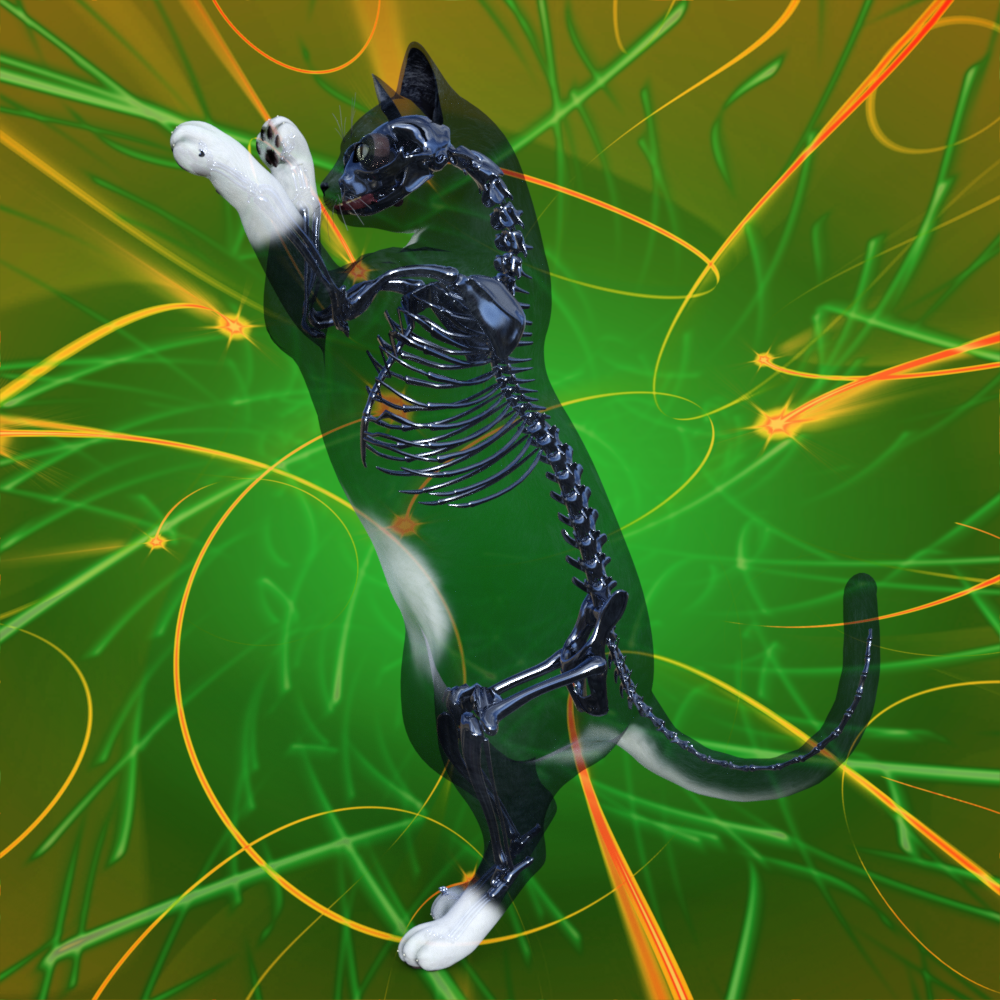
This is a great way to illustrate Schrödinger's cat, being both alive & dead at the same time!
 Face Transfer 2
GRFK DSGN Unlimited said:
I'm probably not much help either. I did have issues with the plugin earlier this week but not like that. Studio was refusing to realize that I had a serial # for the plugin. I had to log out of my account and log back in for it finally not put the watermark on transfers.
Thanks, but it wasn't a lifehack in my case. I tested logging out and back but with no result. But I deciphered the moment of crash - every time it happens just when FT2 starts to write down new textures to DAZ Temp folder (C:\Users\Public\DAZ_Temp). When it makes first three texture plates for G9 eyes, the plugin stops and DS crashes immediately. Working with G8, the plugin creates textures very fast, but in another folder - C:\Users\Public\DAZ_Temp\Face Transfer\Generate. It looks like a lack of memory (RAM or GPU RAM) but I have a strong feeling that the plugin looks for a specific missing file in the runtime folder for G9 and cannot find it. I have no idea what this missing thing may be, because I installed all 3 latest packages for Starter Essentials, including even Toon content (I'm not sure, does FT2 need it really?). How much RAM should I have to use this plugin? Maybe there is something specific in the geometry of G9 itself, that is more complex than G8?
Mesh Grabber- can't find it after installMesh Grabber has no serial number no matter it's 3.x or 4.x... but strongly suggest you install them via Install Manager rather than intallers. (ss1)
Mesh Grabber can be found under Tool menu and on the Toolbar. (ss2)
Rotation and Morph Loader functions can be found in Tool Settings when Mesh Grabber is activated. (ss3)
Mesh Grabber- can't find it after installHi folks,
Any of you who use Mesh Grabber, after I run the installer, I can't find it anywhere after opening DS. Anyone here know how to get it running? Any help would be greatly appreciated. Also, I bought the Rotations and Morph Loader add-ons and I can't find any information on where to download or how to install.
The Sky is Falling Complaint ThreadNon-complaint: Yay! My boxes are gone.
 I stacked them on the porch this morning. Later I saw the neighbor guy pack them into his car and send his wife to the dump(aka: "Transfer Station") with them.
Complaint: Snow here again.
 It's almost time for April showers, and still no Daffodils. Also, no ducks. But we hardly ever have ducks around here anyway.Muscle morph for G8F?What a useful add-on! I don't have it yet but I'm definitely getting it. Thanks!
CES3D said:
Do you have the Daz Deals add-on installed in your web browser? If you do, you can see actual artworks using each muscle morph product directly from their respective product pages (provided the artist who posted the artwork linked the muscle morph product as an item used in their creation). This might be helpful in selecting the right muscle morph for your project.
Muscle morph for G8F?Do you have the Daz Deals add-on installed in your web browser? If you do, you can see actual artworks using each muscle morph product directly from their respective product pages (provided the artist who posted the artwork linked the muscle morph product as an item used in their creation). This might be helpful in selecting the right muscle morph for your project.
Muscle morph for G8F?Hi guys,
I know that there are several morph sets that allow you to create some muscles on your characters. But I'd like to get the best one for a specific goal. Which is to make a character "a bit over 40" look like a warrior who's not a female Schwarzenegger but a professional who cares about her battle efficiency. I.e. the muscles I'm looking for have to be pronounced but not overly large. Something in the valley of Emily Blunt in The Edge of Tomorrow, maybe a tiny bit smaller. But pronounced. So that one glance at the character would create an impression of, "That's a pro-warrior... or a bodyguard."
Any good advice on this? :)
Let's appreciate/discuss today's new releases - more ongoinger threadThanks for replying @Phoenix1966. I can (and have) adjusted his head more to my taste. I often adjust characters, so no big deal. I also applied some "younger" head morphs, again, more to my taste. I don't intend to return Wally.
I have another question about the projection morphs. I was surprised that I had to dial them in and that they were under Morphs/Morph Loader in the Parameters pane. Normally, projection morphs autofollw into the clothing automatically, with no action required on the part of the user (or so I thought). I only stumbled upon these morphs accidently in Morphs/Morph Loader. Is this an error, or is then a reason that you implemented them this way? I would have expected the projection morph to follow the character's body morph automatically.
I attached a render of my tweaked Wally Tween.Functional AssetsWindows that don't open.
Apartments not speciofically in an earlier time period, with cord phones, or radiators for God's sake. then again, I've been told of homes and apartments built without air conditioning.
Button-up shirts with no open-shirt morph. Really?
Same with pants. I don't think there is a single pair of pants with rolled up cuffs. Very, very few shirts with rolled sleeves that are nor permanently rolled.
How to solve a random textures bug with Tara 2Hello,
I’m speaking about this product: https://www.daz3d.com/tara-2-hd-for-victoria-7-victoria-8
And I have a texture problem on the arms surfaces, mostly visible right at the limits between the body and the arms surfaces (the arms are slightly darker than the rest of her skin).
I first saw it recently, and looking back at various renders (like this one) I did with her I didn’t see any showing the problem (it’s pretty obvious so I think I would have seen it much sooner).
Render without the problem (created on the last public beta, on my Mac):
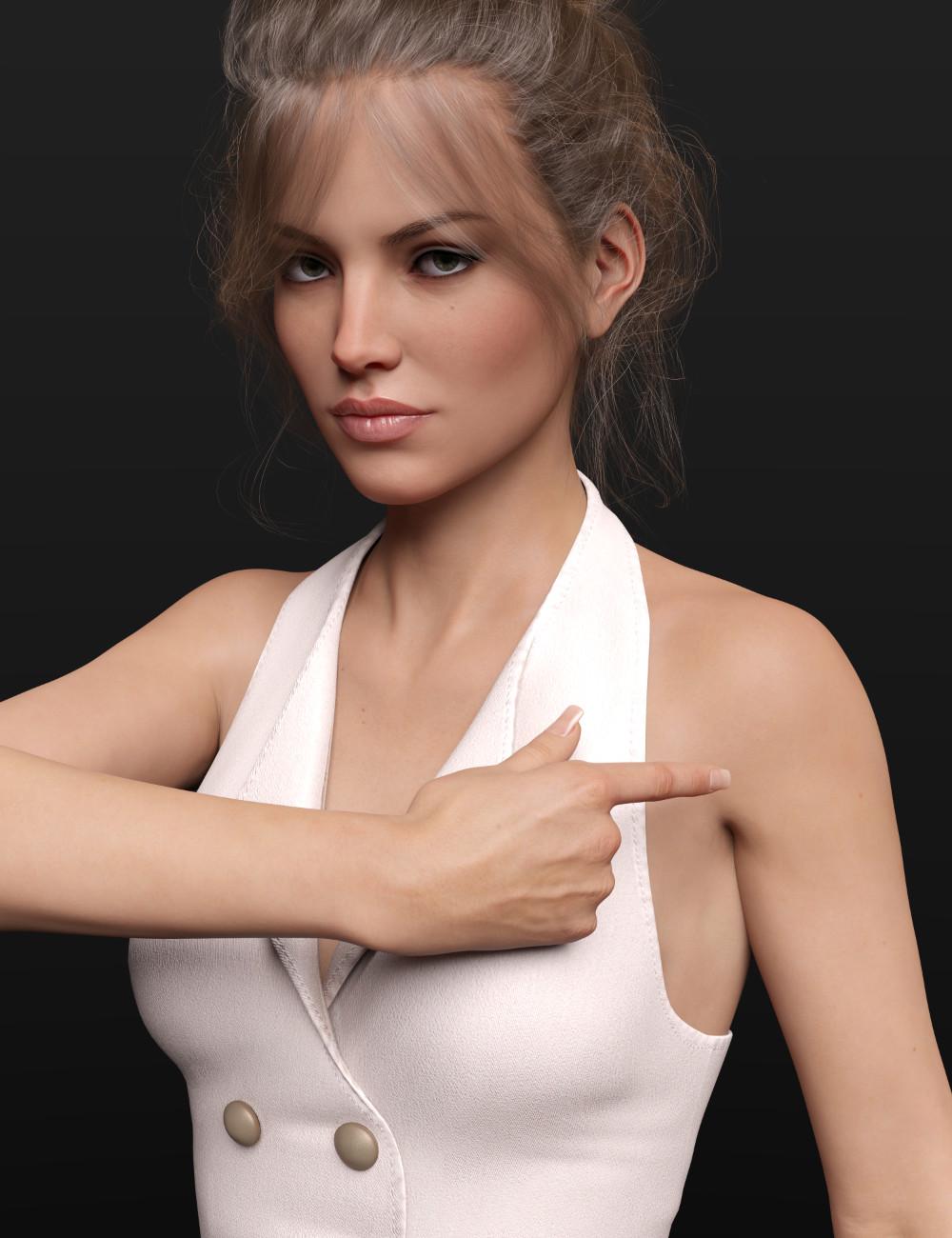
Render with the problem (created on the last public beta but on my Windows machine but I don't think it matters):
Both renders are made with the base character, as it’s loaded, with a dress, hairs and an HDRI loaded with some change on the tone-mapping settings (but it’s also visible with the default render settings).
The bug is only active on her human skin, not on her demon skin: if I’m loading her demon skin, no problem in sight, even on a scene with the problem on her human skin. Reloading the human skin shows the problem again. An example:
All this renders were done with the Genesis 8 version, but the problem is active on the Genesis 3 version too (I thought I did some renders but apparently, I forgot to save them, well, too bad but it’s the same problem on Genesis 3).
I now have two scene files: one with the bug active, one without it. Loading the bugged scene shows the bug, loading the non-bugged scene doesn’t show it, even when the scene are loaded back to back.
Merging the bugged scene while the non-bugged scene is loaded shows no sign of the bug and vice versa.
Here is what I also tested:
- Closing Daz and deleting temporary files. Sometime it worked (no bug), sometimes it didn’t, so it’s likely not the root of the problem.
- Reinstalling Tara 2 didn't solve the problem.
- Using the last General Release, but, like what I did in 1, sometime it did work, sometimes it didn’t.
- Reloading the scene doesn’t work at all: if a scene is saved without the bug, it’ll stay without the bug. Same if a scene is saved with the bug.
Sadly, that same rule (save without the bug means loading without the bug) doesn’t apply to character preset: I created one when I converted Tara 2 skin to PBR Skin, using Texture Booster, and I just tested that using it could lead to both outcomes: a non-bugged Tara or a bugged one. I don’t know yet if Personas are immune or not.
Regarding the use of beta or general release, I saw the problem happens on both on Mac and Windows so I don't think it's a problem related to the beta version.
I checked with other characters and I didn’t see any problem with them: even a character loaded in the same scene as a bugged Tara 2 didn’t exhibit the same problem (loading Tara 2 mats on them did show the problem on them too though).
If it’s useful, my setup is the following.
I’m using DIM on my Mac to download and install everything on it, then I transfer the packaged products download by DIM through my local network on my Windows machine on I’m now also using DIM to install them on it (in offline mode with a made-up account, because I don’t intend to go online with this machine).
Before doing that (no idea if it could be the cause of the problem), I simply synchronised ‘My DAZ 3D Library’ between the two computers, installing the product on my Mac then asked the Windows computer to update the metadata from within Daz Studio.
I changed the way I’m doing it because it could take half an hour to update the metadata on the Windows machine (I could ask it only to update products I just purchased, but there is no search function in the Reimport metadata UI so I would have to search each of them manually, which would likely take as much time after a big purchase).
If someone has an idea on how to solve that problem, I’m all ears, because I would like a lot to go back to the previous state of affairs: not having the bug happening.
How to make morphs for clothes with simulation object typecrosswind said:
Nope... the culprit is the Button on the the back and the knot in the middle of the Dress on which there're tris/n-gons that GoZ cannot correctly handle.
If you delete the geometry of the button and the knot, GoZ will work but that'll break the dress ~~
So, you may either Triangulate the Dress geometry in DS before GoZ or directly Export the subtool of Dress to OBJ in ZB rather than GoZ back to DS ~~ Then import OBJ as a morph to the Dress with Morph Loader Pro.
I see, thank you so much!
How to make morphs for clothes with simulation object typeNope... the culprit is the Button on the the back and the knot in the middle of the Dress on which there're tris/n-gons that GoZ cannot correctly handle.
If you delete the geometry of the button and the knot, GoZ will work but that'll break the dress ~~
So, you may either Triangulate the Dress geometry in DS before GoZ or directly Export the subtool of Dress to OBJ in ZB rather than GoZ back to DS ~~ Then import OBJ as a morph to the Dress with Morph Loader Pro.
Willow 9I enlarged her pupils and made a custom morph for her mouth, to fit her head better than the autogenerated mouth morph (at least in my opinion.)


Daz 3D is part of

Connect
DAZ Productions, Inc.
7533 S Center View Ct #4664
West Jordan, UT 84084Licensing Agreement | Terms of Service | Privacy Policy | EULA
© 2026 Daz Productions Inc. All Rights Reserved.