-
MimicMolly's Renders & WIPs
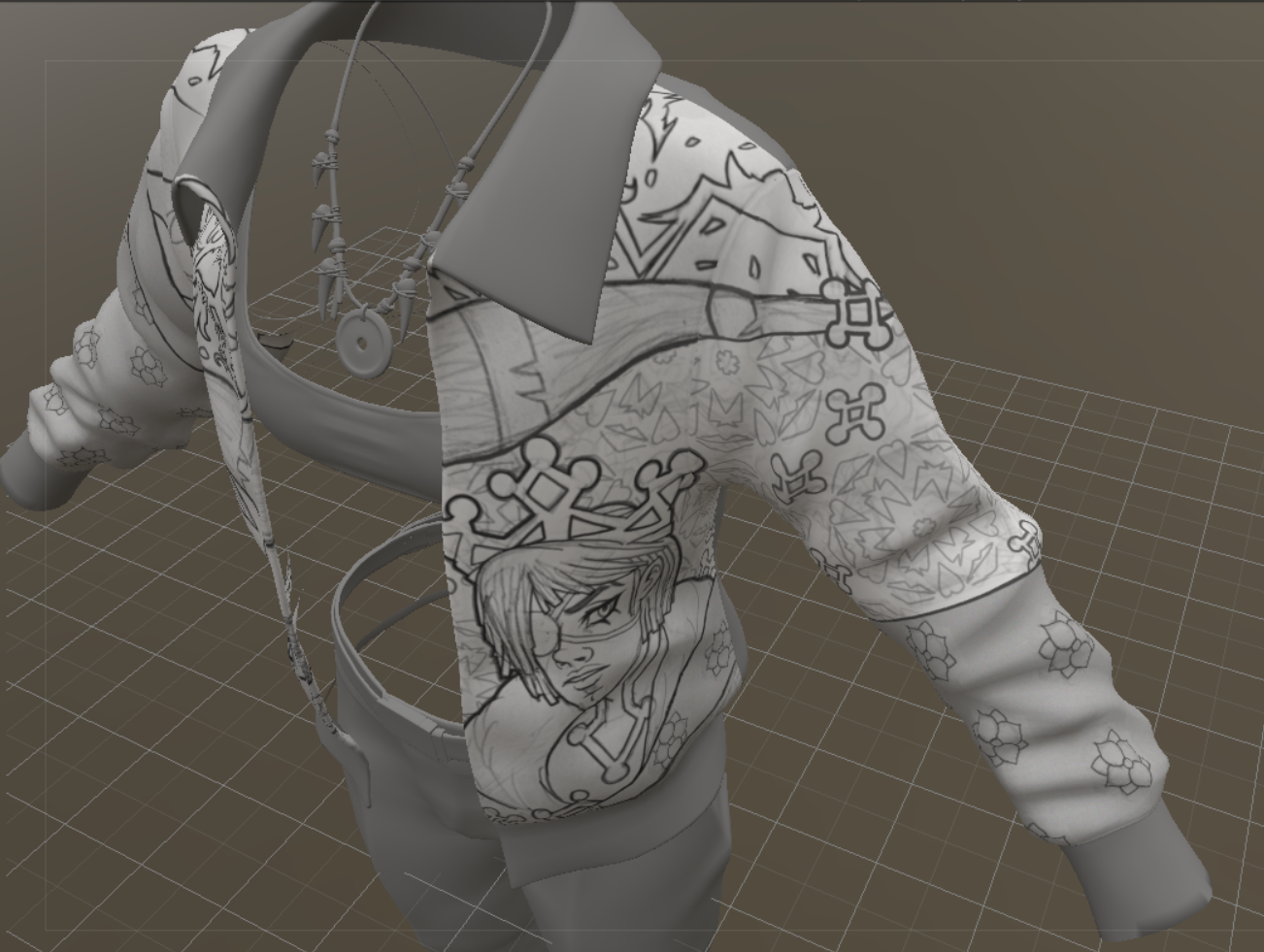
Here is the completed design of Ernie, Gina's brother, and the sleeve. My intention is for the design to look like it's continously printed along the jacket, except for a top panel.
The bottom that I have "rectangled" is where I must make up a random pattern that merges Gina's birds with Ernie's...whatever is going on with him.
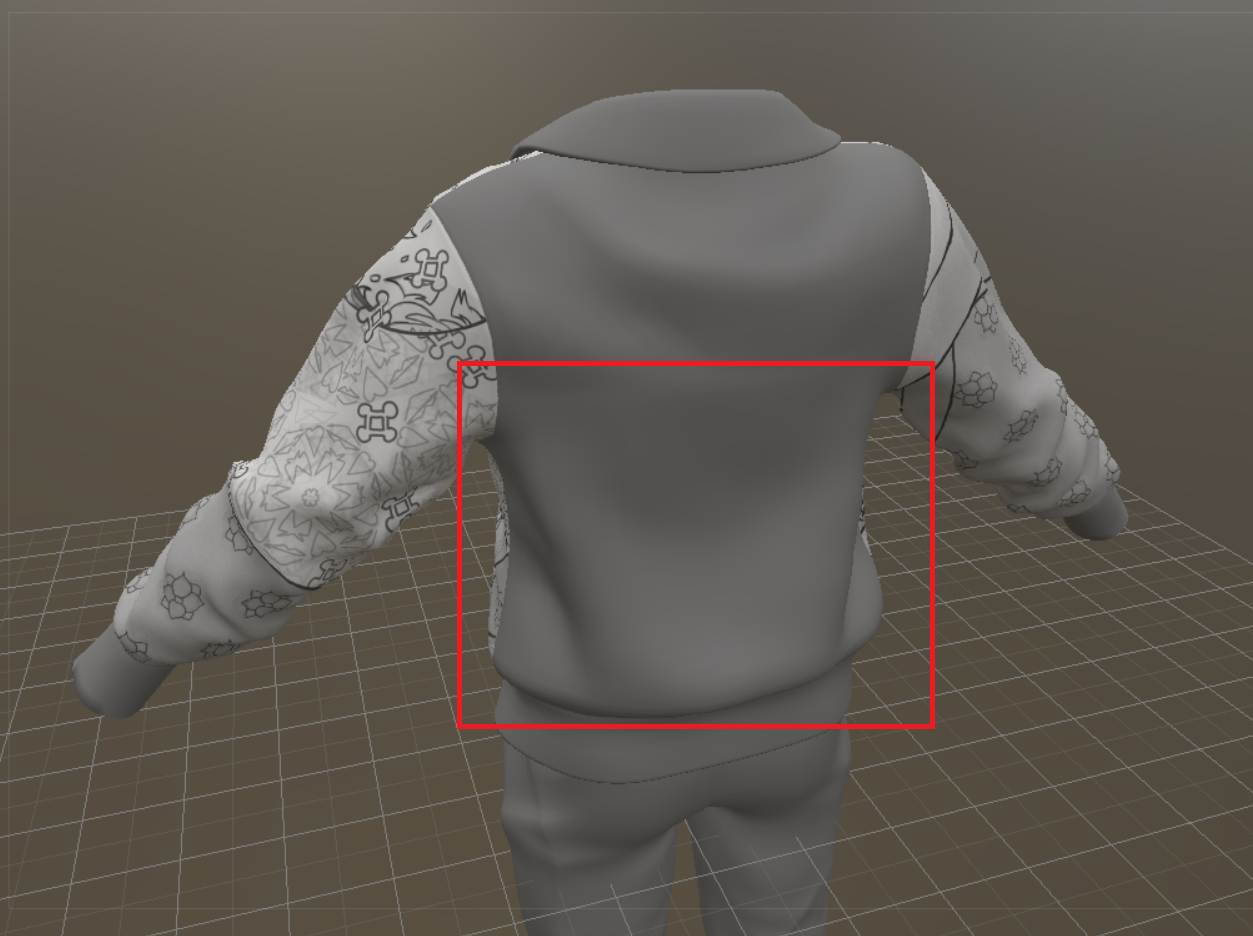
I have not decided what to do with the pants. Ernie's default color palette for his clothes is based off of Mickey Mouse, meaning that his pants must be red and his shoes must be mostly yellow. Gina doesn't strictly stick to a color palette because she's poor, so I can do whatever with her. But, she loves black, so I will have to incorporate this with the red.
I will add on here, because I only want to "bump" my thread when I have relevant art project pics (the WIPs), but I don't think we can post art in the DAZ Galleries anymore. I need to look through what I have there and see if it somehow made it to my DAZ renders DeviantART. As always, DeviantART has proven itself to be the most reliable art site to archive my work and I'm thankful that the good strangers of Yahoo! Answers [RIP] told me about it.
Good news, DAZ Studio 6 can do the Map Transfer again! But it's quite laggy, so I'll stick to DS 4, for the time being.
I have some older Merchant Resource Make-Ups that I go back and forth with, with other UVs that are not G9. I did this a lot with G8F and an old V4 set. It's easier for me to convert a test skin than to manually convert all the images in the .PSD layers that have these makeups. ^^;
Products inspired by existing franchisesRichard Haseltine said:
when people submit products to daz theya re required to state that they own the rights (much like kpr's comment on commisioners and the artists they hire) so saying "This is from X" is accusing them of misrepresenting the product, and we do not allow accusations in general.
A PA might earnestly believe they own the rights to their product, but that doesn't necessarily mean they're correct. If a PA creates a morph that is their own original work but is based on an existing person or character, where does that lie? They legitimately created the morph themself, and would own the right to their creation, but whether they actually have the right to distribute it is a little trickier.
MimicMolly's Renders & WIPsMost of my June and July art projects involved hand drawing or writing, so nothing I'd consider DAZ-related.
In fact, yesterday I finally downloaded DAZ Studio 6 because I'm curious about the Map Transfer feature. In DS 4.24, it is irreparably broken because it may've been tied to 3Delight to generate maps. (It stopped working after the 3Delight render engine was retired/removed.) When I tried it, it just gave me back a black image. I do have an older version of DS 4 that works as intended. Unfortunately, I haven't had time to check if this was "resolved" in DS 6. I don’t think it has because most people don't edit their textures like I do. The "proper" texture artists stick to their specialized apps, and everyone else...they're DAZ artists because they want to make illustrations without having to draw or paint by hand.
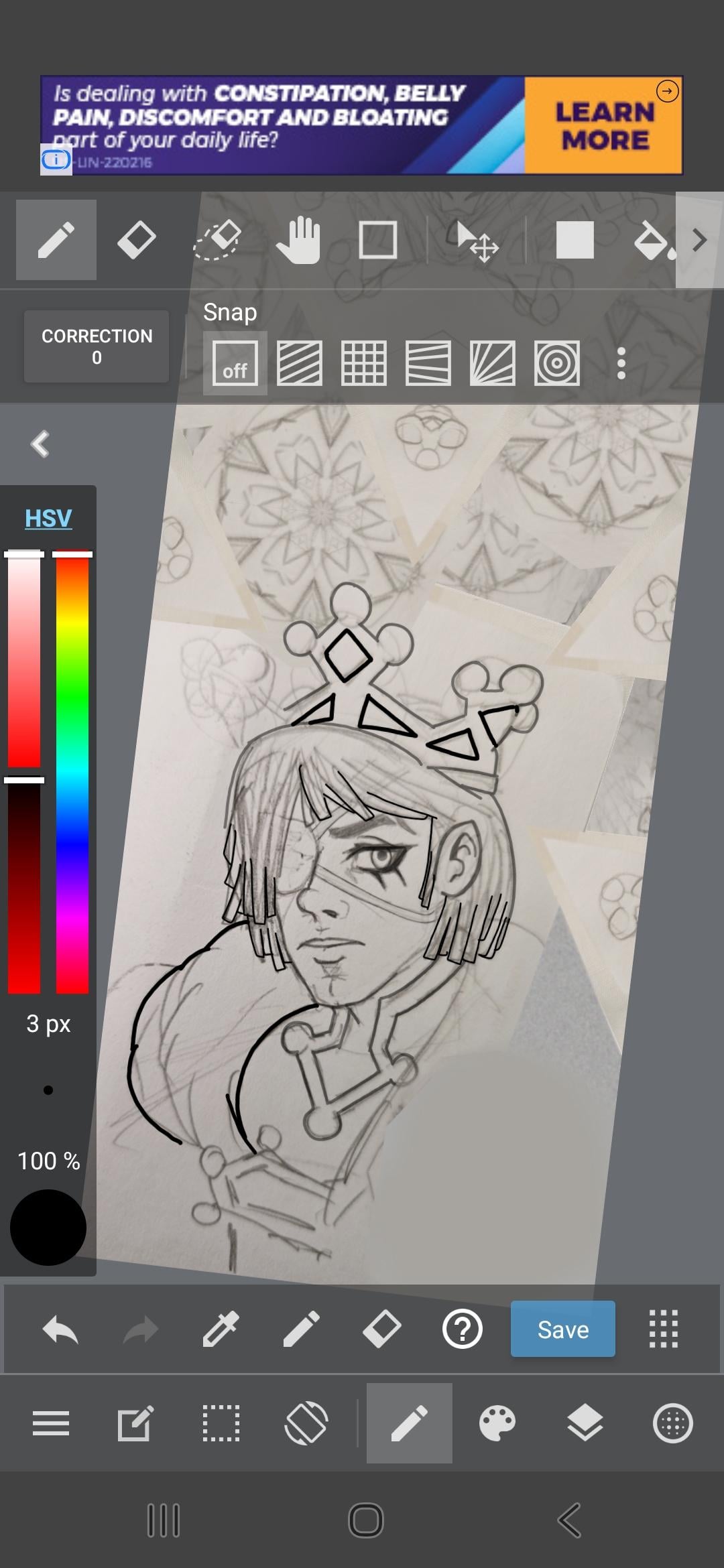
Right now, I'm still working on my jacket texture that has my OCs featured in it. I have sketched Gina's brother on paper, and now digitally lining the art. I did do some "mixed media" in making the kaleidoscope effect as the background, since the jacket design is supposed to be abstract/random. I did want to draw Gina’s cousin instead but I do not have any drawings of the brother wearing his crown. He is usually wearing a beret or other soft hats. (The character is weakened by his psychic powers, which allow him to have extremely accurate visions of things that will happen, and perfect/flawless aim, so he is extremely dangerous with guns or bows or darts, etc.)
Also, the store has been updated like...2 weeks ago? It's very laggy on my phone, so I don't really window shop here anymore or visit the forums much. Before, I just wishlisted the items that caught my attention, then logged into my laptop to look into them further. I also liked RenderHub a lot, because it's a competitor site, I shouldn't speak of it much here. But due to a sudden policy change, that didn't affect me but affected many vendors I liked, it was finally enough for me to register to another competitor site. (I will just buy the last items from vendors I can't find anywhere else, and download everything.)
I will not name, names, but this competitor site I joined feels so...hostile and unwelcoming, that I'm not even sure if I should buy anything from them. Some RH vendors I like are on there and not Renderosity. There are other vendors that I've been wanting to buy stuff from but they seem to be only on this unwelcoming site.
Speaking of hostility, the updated Product Library...it finally has advanced search options...but the search options are...not good. Last week, there were several freebies by the vendor, Censored. So when I search "Censored" or "DAZ Originals," in the Artists section (the freebies had both listed as their creators), nothing comes up. I must type "CIJ" in order to find these freebies. So even that is annoying enough for me not to stop by often. -_-
Older version of DAZ StudioI can't help you with obtaining Daz Studio 4.12 (I don't think anyone legally can share it with you aside from Daz themselves)... But are you sure you can't save a custom G1 character as a morph asset?
Using Daz3D version 4.24.3... I've just loaded a Genesis 1 female character into the scene... Changed her Resolution Level to Base, then exported to Obj, imported her into Blender (keeping vert order) and morphed her nose to be more like pinnokio as a test, then exported her to obj (keeping vert order in tact). Then used Morph Loader Pro to import her (with Reverse Deformations: YES, since the G1 female is already an active morph, but if you just use the base G1 model then you might not need that)... Then I went to: "File -> Save As -> Support Asset -> Modifier Asset", checked the morph I had just imported with Morph Loader pro and saved it.
Starting a new scene and loading the G1 female model, makes the morph available (I hadn't changed anything so it was under "Morphs -> Morph Loader"), and when I open GenX and select the Genesis figure the morph is visible under the "(geometry) geometry" group and I can check it...
I'll admit I haven't actually tested a conversion to Genesis 3... But GenX at least sees the morph and Daz3D also let's me dial the morph in. So the morph seems to be working inside of Daz3D at the very least.
Older version of DAZ StudioHi, does anyone have access to a download for DAZ Studio 4.12? I need to install this version because subsequent versions do not allow you to save custom Genesis 1 characters as Morph Assets, without which Genx2 cannot convert them to later models such as Genesis 3. The custom characters were only saved as scene files.
Regards
Abe
Freaky Fingers?Daz Studio 4 Scene Tools 4 - Morph Tools makes the process of selecting and removing unwanted vertices from a morph, pretty easy. Of course it costs money, and the task can be done with a little more effort, with the built in tools (as Richard described), for free.
Freaky Fingers?barbult said:
Are finger nails rigged? I thought the problem might be body morph deltas incorrectly included on the head morph.
Could be, I was reading it as misplaced joint centres but you are right that it seems limit in effect. Assuming it is a non-Daz, and therefore non-HD morph then you can work around unwanted deltas fairly easily - from memory:
- make the morph a favourite (click the ehart icon on the slider) and make sure no other morphs are favourited.
- Tools>Geometry Editor
- In the Tool settings pane switch to Vertex mode, and marquee selection
- Drag around to select the problem vertices (in this case getting extras won't hurt).
- Right-click>Morph Editing>Remove Selected Deltas from Favourites
You can use File>Save As>Support Assets>Save Modified Assets to save just the problem morph (make sure nothing else is checked, and make sure the morph iss et to 0 before doing so) if this works.
Freaky Fingers?Are finger nails rigged? I thought the problem might be body morph deltas incorrectly included on the head morph.Golden Palace G9 Bonus MorphIf you go to Meipe's Golden Palace Bonus Morph on the Rotica forums you can get one he just re-uploaded.
How do I fix this??It looks like some type of corrective morph is firing before it should.
Select your figure, go to the parameters tab and from the hamburger menu in the corner, under preferences, turn on show hidden properties. Filter by currently used. Now you will have to go through the active properties and zero them to see which one is causing the problem. I'd suggest start with any that have "cbs_" as a starting label.
Need Help Fine-Tuning a Custom Genesis 9 Morph...I'm pretty happy with the result in the neutral pose, but that's where the good news ends.
Yeah, the figure in default A-Pose also looks fine to me but it merely means that you successfully got the job done in Faceform Wrap, i.e. you got the correct head / body shapes on G9 by having wrapped the source character. Then you need to do follow a key workflow in terms of morphing:
1) Check and fix Auto Follow Head morphs on the anatomical attachments on G9, e.g: Eyes, Mouth, Tears, Eyelashes, Brows...as they're separate wearables. This is the primary step before doing adjust rigging, fix corrective morphs, etc...
For Eyes and Tears, make sure they well fit in eyesockets, with no obvious distortion on irises, pupils.... For Mouth, make sure they well fit in mouth cavity, with no obvious distortion on gums & teeth.
lilweep showed you the key steps above, just a trick: Export OBJ (no matter from DS or Blender) by using the Name of Auto Follow head morph...so that you can more easily updating Deltas by using Morph Loader Pro.
Do the same check as well as fix on Tears / Eyelashes / Mouth nodes ~
2) Adjust Rigging to Shape and ERC Freeze on character's Head / Body morphs
3) Check and make necessary joint corrective morphs ( _body_cbs_ ) for the key bones (e.g. spines, head, necks, shoulders, upperarms, thighs and shins ) and set up ERC links
4) Check and make necessary facial corrective morphs ( _facs_cbs_ ) for key FACS properties (e.g Jaw, Mouth, Lips, Eyes, Eyelids... related... ) and setup ERC linksIf each key FACS property works well, most of the expressional Pose Control properties should be able to work well. A trick, when dialing or mixing expressional Pose Control properties, don't dial the values to 100% ~ Dialing or mixing with high values might make you character looks ugly or weird, or a bit "Frankenstein " lol ~
If some Pose Controls don't work well, you have to make dedicated corrective morph(s) (i.e. eJCMs / MCMs) to the existing ones.
As for using Faceform Wrap, I couldn't tell more as you didn't share the graph of nodes that you used but as per my experience of the workflow in Wrap, the below graph that I've been using works pretty well in most of the cases.
Besides, personally I don't think the above issues you mentioned came from wrapping process ~~ most likely you just need to adjust rigging and make some corrective morphs.
Edit: No worry ~ even the officially well-made Victoria 9 cannot 100% well handle all expressional properties lol ~~ Any more issues, just feel free to let us know.
Character Splitter@stefan.hums, I'll patch v3 to fix skeleton pruning (in case of split neck, only the upper one was included, not the root) and fix the region display in the Shaping pane.
I am currently developing a script to allow morphs transfer between any figures (one version optimized for characters, and one for targeted morphs, such as ears, nose...), so I don't have time available to make v4 backward compatible (and I have removed my Studio 4 installation).
To fix your issues with v3 without waiting for the patch :
- put some '//' at the beginning of lines 391 & 392 :
//	if (step >= 0)
//		adjuster.setExcludedBones(GetBonesToExclude(step));
- replace line 568 by :
		prop.setLabel(mLabel);
		helper.setPropertyPath(prop, mPath.text); // Set path & region - Note: must be called once property has been added to oNode
		prop.setIsClamped(true); // Use Limits
Brow Remover (Commercial)TaphneM said:
Leana said:
A lot of scripts need to be updated to work in DS6.
Thank you very much, Leana!
I wanted to add that after reading a topic: Genesis 3 and 8 to 9 Pose Converter (Commercial) - Page 12 - Daz 3D Forums where Richard and you are assisting someone and Richard mentioned the conversion:
 Richard HaseltinePosts: 110,955
emilynoelle said:
Hi! Very interested in the product, but can only use Daz Studio 6 due to my card; will the products in the bundle work?
Thank you!You could convert the poses in DS 4, then use them in DS 6. It's only GPU acceleration for Iray that is blocked in DS 4 if you have a 50x0 card.
It dawned on me to try that with the Brow Remover. Naturally, it still works in Daz 4 (I'm still learning new things}. I saved the brow results under the Material Preset and Scene Subset. I opened up Daz 6 and this process worked perfectly. One thing though, at first I tried to save as a Character Preset in Daz 4, but I am guessing due to morph reset or temp files, it did not transfer over the face files.
Male character ID in promobutterflyfish said:
He reminds me of TMA Kade, but with different eyebrows. More the texture than the morph.
I think you're right on the skin, great call - TMA also has TMA Zeke which appears to use the same skin reference and is a bit closer to the morph, which has then been mixed with some Lawrence perhaps? Hopefully VW will see my last message and pop in and confirm some day!
There's Always Another Sale Thread -- Discussions Only Pt 6Cybersox said:
memcneil70 said:
Today there is https://www.daz3d.com/golden-years-shapes-for-genesis-9 for $2.99 which is a morph pack of six older females by @Virtual_World. With the G9 Base Essentials that are free with Daz Studio non-adopters might have a product that could give them a product that could still be useful and not break the bank. And with older people, it is easy to adjust them to the other sex.
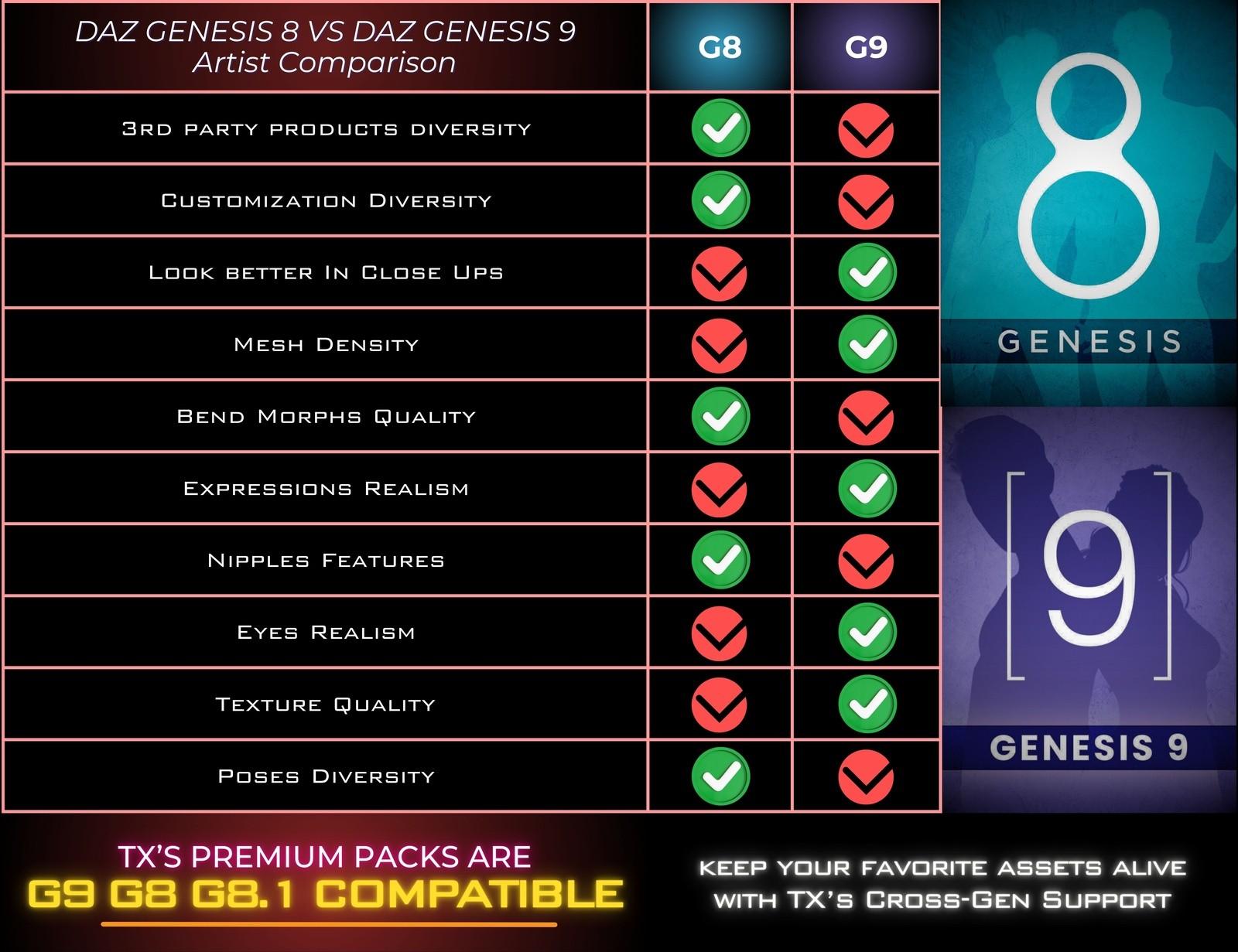
That's fine if budget is the only reason for for not using G9. However, a lot of us have plenty of other reasons for not using G9, most notably due to the onging issues with bend morphs. I'm not a ludite when it comes to 3D products, and I've spent a lot money on G9 products, but despite that I very rarely use the G9 figures themselves. One of the PAs who sells both here and at Rendo, Tri-X, is well known for making all of his characters in multi-figure versions over at Rendo and I think he rather nailed most of the common issues by printing a chaart on his product pages there explaining the positives/negatives of each figure system and why he makes duplicate figures:
I have only been around for 10 years, joining half-way through Genesis 7 so I am no way an expert on bend morphs or on figures. I do look for PAs at the DAZ store that have addressed those bend morphs though. But some of those items listed are non-starters for me. With Bone Minion I have all the poses available for G9 and backwards for other generations on the fly, without clogging up my drive with duplicates. Nipples (or other private areas of the body) are worthless to me, I don't render nudes or sexual images. If others do, it is their own business.
If I have a quibble with G9 is the lack of diversity that we had in G8 and G8.1. But I have those characters if I need them. There are times I feel we are back in Generation 7's days of white women/men all the time with a colorized version of another race thrown in as a bone. This is not 100% as there are some wonderful characters out there.
My post was simply to highlight an item for those on a limited budget who may not use G9 because of that budget and that it could be a help to expand their options. And that it was from a PA with an excellent reputation for her characters.
I understand that those with a great deal of experience in 3D have a better understanding and that is fine. We live in a world where we can shop as we can afford and prefer the products.
There's Always Another Sale Thread -- Discussions Only Pt 6memcneil70 said:
Today there is https://www.daz3d.com/golden-years-shapes-for-genesis-9 for $2.99 which is a morph pack of six older females by @Virtual_World. With the G9 Base Essentials that are free with Daz Studio non-adopters might have a product that could give them a product that could still be useful and not break the bank. And with older people, it is easy to adjust them to the other sex.
That's fine if budget is the only reason for for not using G9. However, a lot of us have plenty of other reasons for not using G9, most notably due to the onging issues with bend morphs. I'm not a ludite when it comes to 3D products, and I've spent a lot money on G9 products, but despite that I very rarely use the G9 figures themselves. One of the PAs who sells both here and at Rendo, Tri-X, is well known for making all of his characters in multi-figure versions over at Rendo and I think he rather nailed most of the common issues by printing a chaart on his product pages there explaining the positives/negatives of each figure system and why he makes duplicate figures:
 Need Help Fine-Tuning a Custom Genesis 9 Morph
frisquet said:
Richard Haseltine said:
You may well need to adjusty the rigging to match the shape for the eyes and expression bones, which means moving the joint centres and possibly the end points and changing the alignment to match (DS does have an Adjust Rigging to Shape command, but don't expect it to be a one-click fix). You may also need additional morphs that will correct the shape when you have your morph applied and some other bone rotation or shape. Once you have all of those you will need to link them to your morph, and to the other rotation/shape in the case of corrections, which usually invovles using the property Hierarchy pane and putting the Parametrs pane in Edit mode so that you can drag-and-drop to build the basic links.
Thank you for the reply! Just to clarify, I have already successfully run Adjust Rigging to Shape and completed the ERC Freeze for my custom shape. The bone alignment itself seems correct.
However, the result is still unsatisfactory. When I apply a base expression like a smile, the geometry completely breaks: the gums clip through the lips, and the mesh tears badly.
I understand your point about needing "additional morphs" (JCMs/MCMs) to correct the shape when the expression is dialed in. This is exactly where I am stuck due to a lack of specific, step-by-step information. Since standard expressions use complex FACS morphs, how exactly do I approach creating and linking a corrective morph specifically for this torn smile? Are there any specific tutorials or step-by-step workflows you could point me to for fixing mouth/teeth clipping during expressions on a heavily customized shape?
If you want custom correctives for FACS, you make one per FACS shape.
E.g., if you want a corrective for Blink, you make a corrective for Blink Left and then a separate for Blink Right.To manually set up the controllers for your correctives, you do this in Property Heirarchy. E.g., the original FACs Blink Left would set up as controller for your corrective shape by putting it as 1st Stage Controller (DeltaAdd type). I explained this recently in a seperate thread so just read this. Unfortunately my diagram is in english... https://www.daz3d.com/forums/discussion/comment/9599431/#Comment_9599431
Need Help Fine-Tuning a Custom Genesis 9 Morphfrisquet said:
The first problem is the eyes. I created custom eye morphs as well, but when I make the character look at the camera, the gaze never feels quite right. No matter what I try, I can't get the eyes to look naturally at the camera. The result is still far from acceptable.
There needs to be a page we can link to with all steps fully written out for cases like this - it would save explaining it every time.
There are steps you need to do in order.
Fitting the eyes
Load G9 Devload (i.e., Resting Focus should be off)
Load your Head morph only
Load the Eyes onto the figure
Export the eyes at base res and position them in your modelling software so they are perfectly aligned
Bring them back into Daz as an autofollow morph, following standard process for creating autofollow morph (i.e., loading onto the eyes while the head shape is active, loading with reverse deformations set to "Yes", and "Deltas only", and the eyes morph should have the exact same Name as the Head morph)
Save your eyes autofllow morph to directory
Now the head morph and the eyes are all in position, you can proceed with rigging.
Rigging the Head morph and Eyes bones
If you have already done Adjust Rigging to Shape and ERC - please just delete whatever you already did and start from scratch. (In theory, you could go to "ERC Bake..." to remove the ERC links for your head morph but if you run into complications doing this im not helping you so it is easier to just start over)Run Adjust Rigging to Shape but DO NOT check the boxes for Right Eye, Left Eye, and the four Eyelid bones
Once you have Adjusted Rigging of evertyhing but the Eye and Eyelids, you can do ERC Freeze. Scan through the list of bone adjustments before committing to ensure you are not ERC freezing anything stupid. It should just be the face bones without the eyes and eyelids
Run the "Adjust Eye Rigging" Script for G9, under the G9 Starter Essentials Utility
If you look at your ERC'd subcomponents, you see you now have the Head bones you manually ERC Freezed plus the eye bones and eyelids that the "Adjust Eye Rigging" script completed.
You can now save the Head morph to your directory.
The second problem is facial expressions. As soon as I apply expressions, the character starts looking unnatural and ugly.
Do those expressions look ghastly on G9 default anyway? They might just be awful expressions. Check each FACS expression individually to troubleshoot and ensure your head morph and ERC'd bone adjustments arent messed up.
My goal isn't to create a Frankenstein character—I want the morph to work well with Genesis 9 expressions.
At this point I'm not even sure what I should be learning next. Is there a proper workflow for fine-tuning custom Genesis 9 morphs so they behave correctly with eye poses and facial expressions?
When you did Faceform wrap, did you use latest Faceform with the option to wrap with splines? Did you do wrapping/alignment using the splines or old point pairs method?
Whichever method you used, did you ensure the geometry follows G9 geometry? Did you use the Landmarks texture map that comes with G9 utility to ensure you are following landmarks and preserving topology flow? If you didnt, then topology for expressions could potentially become weird. You can look at the wireframe for your morph vs default g9 and see if the topology flow looks off.
There doesn't seem to be much information on this topic, or maybe I'm just searching for the wrong terms since English isn't my native language. If anyone could point me toward tutorials, documentation, or explain the correct workflow, I'd really appreciate it.
Many tutorials for setting up G9 characters are just generally bad or they are good until they decide to just completely miss out steps concerning ERC or saving.
Faceform wrapping concepts about preserving topology etc are universal so those tutorials should apply to all software.
Need Help Fine-Tuning a Custom Genesis 9 MorphRichard Haseltine said:
You may well need to adjusty the rigging to match the shape for the eyes and expression bones, which means moving the joint centres and possibly the end points and changing the alignment to match (DS does have an Adjust Rigging to Shape command, but don't expect it to be a one-click fix). You may also need additional morphs that will correct the shape when you have your morph applied and some other bone rotation or shape. Once you have all of those you will need to link them to your morph, and to the other rotation/shape in the case of corrections, which usually invovles using the property Hierarchy pane and putting the Parametrs pane in Edit mode so that you can drag-and-drop to build the basic links.
Thank you for the reply! Just to clarify, I have already successfully run Adjust Rigging to Shape and completed the ERC Freeze for my custom shape. The bone alignment itself seems correct.
However, the result is still unsatisfactory. When I apply a base expression like a smile, the geometry completely breaks: the gums clip through the lips, and the mesh tears badly.
I understand your point about needing "additional morphs" (JCMs/MCMs) to correct the shape when the expression is dialed in. This is exactly where I am stuck due to a lack of specific, step-by-step information. Since standard expressions use complex FACS morphs, how exactly do I approach creating and linking a corrective morph specifically for this torn smile? Are there any specific tutorials or step-by-step workflows you could point me to for fixing mouth/teeth clipping during expressions on a heavily customized shape?
Need Help Fine-Tuning a Custom Genesis 9 MorphYou may well need to adjusty the rigging to match the shape for the eyes and expression bones, which means moving the joint centres and possibly the end points and changing the alignment to match (DS does have an Adjust Rigging to Shape command, but don't expect it to be a one-click fix). You may also need additional morphs that will correct the shape when you have your morph applied and some other bone rotation or shape. Once you have all of those you will need to link them to your morph, and to the other rotation/shape in the case of corrections, which usually invovles using the property Hierarchy pane and putting the Parametrs pane in Edit mode so that you can drag-and-drop to build the basic links.
Daz 3D is part of

Connect
DAZ Productions, Inc.
7533 S Center View Ct #4664
West Jordan, UT 84084Licensing Agreement | Terms of Service | Privacy Policy | EULA
© 2026 Daz Productions Inc. All Rights Reserved.