-
MimicMolly's Renders & WIPs
I did this render of Penny 8. She's pretty, but it's a shame that she came with such ugly skin. This skin is from TaliDesade's Mei Head Morph for Genesis 8 from deviantART which includes a skin too. She is using Victoria 8's eyebrows. Here is the DAZ Galleries link [x]
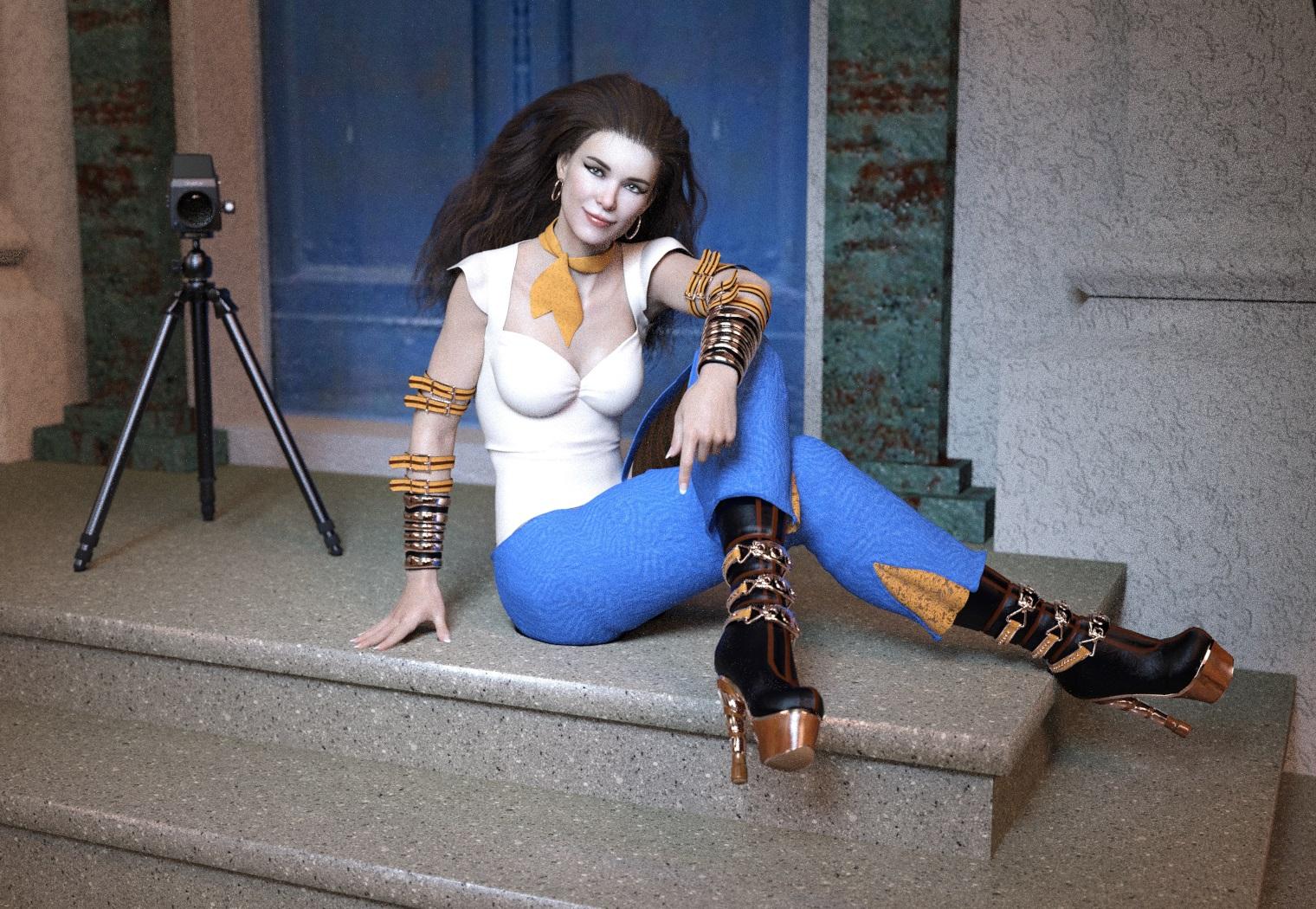
I have no idea how I made that sepia vignette effect. It happened in render. I know I did use a spotlight, so that's probably it. I love this hair. Might need to pick up the other dForce/strand hairs that Linday has. I don't like the dForce cloths hairs because my laptop is too weak for them, but it sims these strand ones just fine.
Her eyes are from Mousso's Macarena. The pants are from Powerage's Desdemone REMIX. Then I applied a combination of Mec4D's and Fisty & Darc's Iray shaders to the rest to unify my kitbashing. I also threw in a left stocking from an Aeon Soul set. I don't remember which one, but I wanted to cover up that hole on the inner thighs of the pants.
We need The Kids 8Not to mention that a release of Kids 8 would spur on the creation of a bunch of new kids' clothes.
Not if they don't sell well.
The option of having them hurts nothing.
depends, this is a very small market with finite resources and creators and as such PAs need to carefully decide what they are going to create and having to create a KIDS 8 package would take away from development of something else, maybe something that more users would be interested in, thus limiting sales and income.
Even though I have zero use for any kids figures, I am not against having them in the store, but with so many other things I would be more interested in having instead I can't help but wonder if creating a kids package would take away from the items i would be more intersted in, guess we'll see in the future.
But... the amount of content available for current (and older) figures, especially females is ridiculous. So many clothing items, morphs, hair etc. What ELSE can you wish for? We have converters for poses, clothing, morphs, heck; there is even utility to transfer morohs from one generation to another. And there we have different addons or plugins for daz to create faces or animations.... Sure it's nice to have plenty of content to choose from, but do you *REALLY* need more? I think once in a while people need to think what minority of people might need/want. Give them a chance. And let's say *potentially* K8 comes out from DazOriginals, yes, it's gonna be a hot topic for a while for content creators but at worst, it will delay developement of regular content by weeks, latest month or so. That's just my opinion, but feel free to criticise me...You kind of have it backwards. It's not a question of what anyone NEEDS more. It's a question of what people will actually PAY for. And that is not the same thing. The majority of people who get into this hobby don't buy a tremendous amount of product, but there are category types that people are far more likely to buy, and for a PA, most of whom put out a single product a month or less, you're far more likely to get a bunch of purchases if you're working in those categories. PAs don't make that much per sale, so they have to sell a lot of something to keep doing it. Remember, when DAZ started out they did make a full lines of figures ranging from kids to adults for several generations of product, and the same was true of several generations of Poser figures. Given that BOTH companies stopped doing that, and that Hivewire hasn't picked up the ball, I'd say that's a pretty good indication that there's just not enough track record of people actually buying the products that do get made to make it a priority.
Dear DAZ, please give us at least one subdivision level for use with Zbrush GOZNicely chiseled cheeks and features can easily be done with Normals and displacement.
To get stuff that sticks out and curves and whatnot, use geograft.
HD will not help you.
Can you take an already morphed character...a character dialspun from G8M...and then build the geograft from that, or do you have to start with base G8M? I was told that you can't sculpt a geograft from a deformed character, that you have to start from G8M in ZBrush...and that's another problem.
And out of curiousity, what is the purpose of an HD morph if everything can be done with maps and geografts? I just have to ask...I prefer using HD morphs because I can use their sliders and mix and match across characters, but it seems to be the discussion is going in the direction of it not being needed when so many people want access to it. I'm not trying to be a smartass or anything...I'm just wondering how/why.
From a very old post: "The one real advantage HD morphs have is as jcms and mcms (ie the hd expressions where they dial in in response to something else)
For full body morphs, the benefits are pretty marginal over normal maps imo (somewhat more useful for things like monsters, but even then dramatically changing the shape can create massive texture stretching issues if you don't get the underlying base morphs close enough and at that point that, again, normal maps will probably do you.)
But honestly for full body people I find normal maps way more useful, particularly to get the same level of detail as the normal maps you have to set your figure to subd level 4 which even just for rendering makes my poor computer cry. (And then if you're exporting at that res to render somewhere else.... Lordy. Pls no)"
I don't remember exactly but I think the also help in making a smaller and more efficient product.We need The Kids 8
But... the amount of content available for current (and older) figures, especially females is ridiculous. So many clothing items, morphs, hair etc. What ELSE can you wish for? We have converters for poses, clothing, morphs, heck; there is even utility to transfer morohs from one generation to another. And there we have different addons or plugins for daz to create faces or animations.... Sure it's nice to have plenty of content to choose from, but do you *REALLY* need more? I think once in a while people need to think what minority of people might need/want. Give them a chance. And let's say *potentially* K8 comes out from DazOriginals, yes, it's gonna be a hot topic for a while for content creators but at worst, it will delay developement of regular content by weeks, latest month or so. That's just my opinion, but feel free to criticise me...Not to mention that a release of Kids 8 would spur on the creation of a bunch of new kids' clothes.
Not if they don't sell well.
The option of having them hurts nothing.
depends, this is a very small market with finite resources and creators and as such PAs need to carefully decide what they are going to create and having to create a KIDS 8 package would take away from development of something else, maybe something that more users would be interested in, thus limiting sales and income.
Even though I have zero use for any kids figures, I am not against having them in the store, but with so many other things I would be more interested in having instead I can't help but wonder if creating a kids package would take away from the items i would be more intersted in, guess we'll see in the future.
Exporting Custom Character Presets (Shapes Not Loading)Hello all,
Going to put my Daz Studio version up here so it's easy to find: BETA 4.12.1
I've been learning to export various elements that constitue a custom character (i.e. shader presets, shape presets, actors, and morph assets). It was going smooth until I saved off the shapes and character. For some reason only 1 would store on the Actor or Shape saves. I'm hoping I'm just doing something wrong and it isn't some sort of bug in my system because this is quite time consuming. Here is my process:
1) I applied morphs to the custom character, then saved an OBJ to later return via Morph Loader Pro as a slider. This worked perfectly.
2) I used Skin Builder to make some custom maps and then saved them off as shaders. This also worked perfectly.
3) I Saved my various morph sliders by saving them as Morph Assests and confirmed all 4 files exist in the "artist" folder I designated. Yes, they were set at 100% accordingly. Yes I made sure all the sliders were checked as part of the saving process. I've even deleted the files and done it 3 additional times.
4) I saved off the character as a Character Asset. Yes, all morphs were at 100%.
When I load the character a single morph loads (quite possibly the most useless "nipples"). All the sliders still work, but I have to set them to 100% manually as the shapes presets don't work either.
I'm new to doing this, but must say it seems quite the undertaking. Convenient when jumping between scenes to just drop a character and get going, but I can't say I've had the pleasure of doing so because I haven't got it to work yet. LOL
Any tips/advice would be much appreciated because most documents I've found apply to a different version than mine.
[Released] ManFriday's Mesh Grabber [Commercial]I have so many questions, but don't know how to ask them. I see you can pull and bend vertices, but can you modify in the opposite way? For example, can I make someone's nose smaller versus making it bigger? Can I push in without it looking pushed in?
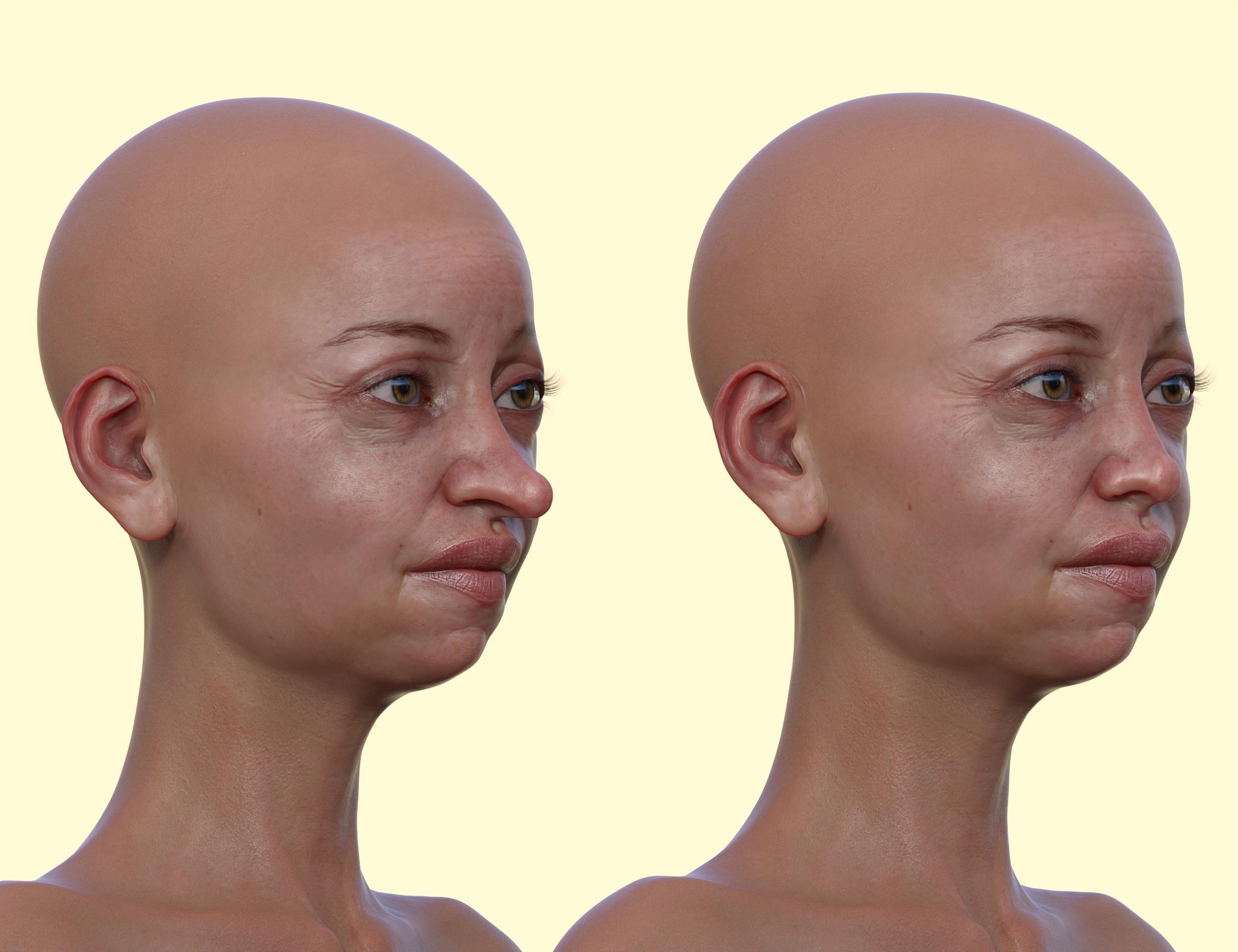
It is pretty easy to make a nose smaller. This is Edie 8, which I tried, because she has a very long nose. She has her own morph for a small nose, but I didn't use that. I just used Mesh Grabber to make her nose smaller. Original Edie 8 is on the left. My modified Edie 8 is on the right. There is no symmetry capability in Mesh Grabber, so to make the nose narrower, you have to work on each side individually. That can add some asymmetry, because it is pretty impossible to make the same changes on each side (there is no way to translate or rotate by a numeric value, you just move a gizmo on the screen). Faces are usually somewhat asymmetric anyway, so that doesn't bother me with the modification of a nose.
 The "Powered by Hot Pockets" Complaint Thread
Complaint: Old age. Bah, humbug. I've spent several hours over the last two days trying to resolve my bank checkbook, my bank checking summary, and my personal financial spreadsheet. I finally got the two bank records to agree on a number but I wasn't sure it was the right number. Also, after much weeping and gnashing of teeth, my spreadsheet finally resolved to being off by exactly 2 x $57.96 where $57.96 was a Paypal transaction where I had received money into my Paypal account and then I transferred that amount into my checking account. Simple, right? Arghhh.
 My spreadsheet had been setup to automatically deduct outgoing Paypal payments from my credit card. I also manually entered the transfer from Paypal into my checking account, but I put in the wrong sign (- instead of +) and I also put it into the savings deposit fields instead of the checking deposit fields. I had wrong numbers all over the place and because of the confusion with Paypal and thinking that I had mistakenly pulled the money from Paypal's website twice by being impatient and mashing the transfer button again I was all confused. Add that to doing this in the morning before the coffee has woken everything up, and my brain is prone to wandering, and the fact that I had recently reorganized my spreadsheet to accomodate more paypal fields and wasn't sure the new spreadsheet algorithms were 100% accurate again. I was tearing my hair out. Arghhhh.
Non-complaint: But another sleepless night of worrying about my clumsy bookkeeping I resolved to figure it out this morning. And yes Virginia, there is a happing ending. I methodically examined my entries and compared the algorithm of the old spreadsheet with the new and when all the values were put into the right fields, the numbers all matched. Checkbook, Bank Statement, and Spreadsheet. Go Figure!
 Science is wonderful. Ageing biology sucks!
...I'll drink to that.
 MimicMolly's Renders & WIPs
This was an attempt to covert DeviousDolls' Frankie Von Stein for V4 and Genesis' green skin into the G3F/G8F UV because I need an actual green skin to use.
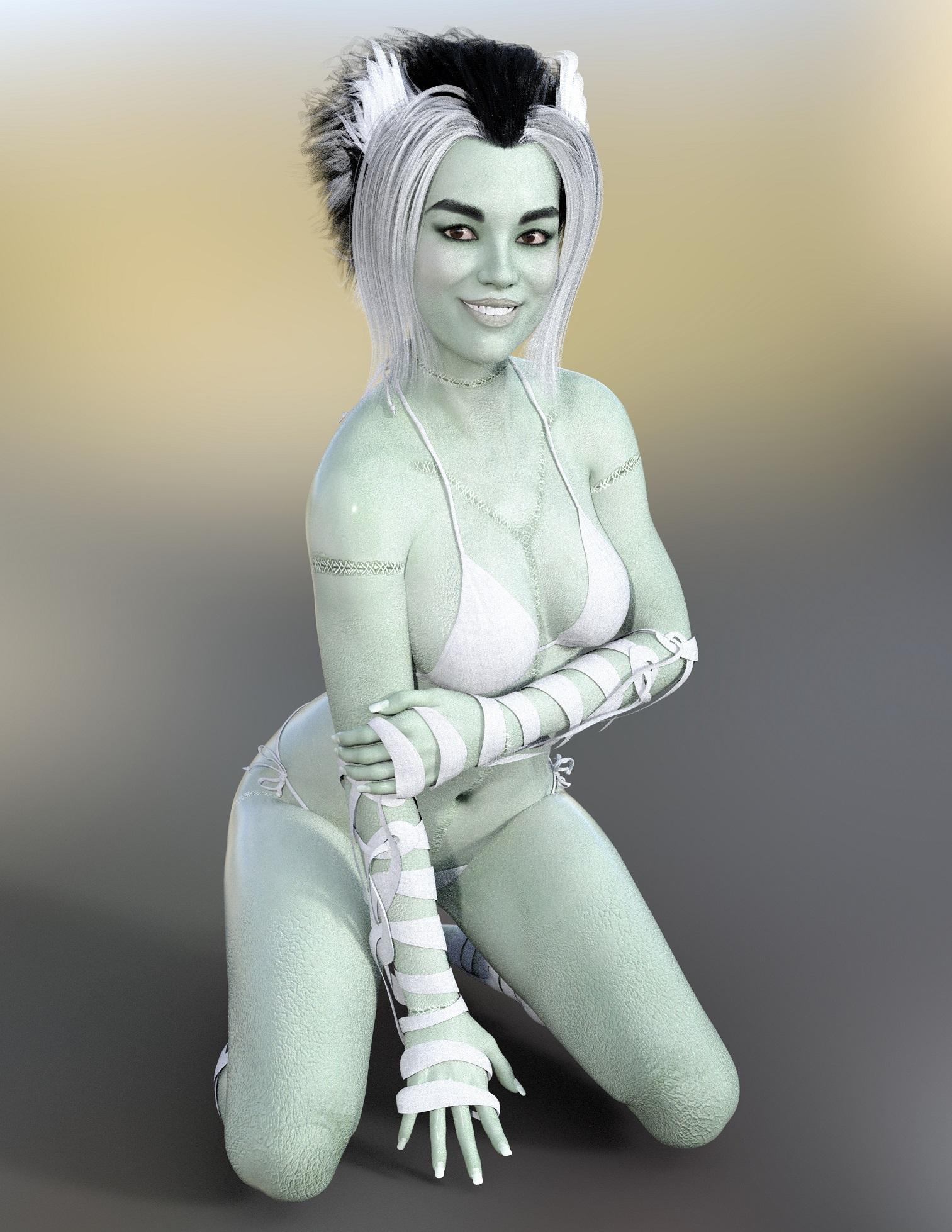
However, in this example. I attempted to mix the solid green skin I got from Frankie with Monsters Bride for G8F, hence the stitches. The skin just looks so horribly cracked because I applied the green diffuse texture over Bride's maps and bumps. I think the head shape I used for this was Olympia 8 Head 50%, Zelara 8 Head 25%, and Teen Josie 8 Head 25%.
Something happened with the eyes, so I ended up replacing them with Raiya's Look At Me eye props, that had come with her characters. (I believe RY Kian for G8M was the last one. The other characters after that do not mention this in their description.) I like these eye props because if the eye morph is messed up, I just swap it out with these other eyes. A lot of characters I tried to transfer had such messed up eyes. -_-'
Dear DAZ, please give us at least one subdivision level for use with Zbrush GOZNicely chiseled cheeks and features can easily be done with Normals and displacement.
To get stuff that sticks out and curves and whatnot, use geograft.
HD will not help you.
Can you take an already morphed character...a character dialspun from G8M...and then build the geograft from that, or do you have to start with base G8M? I was told that you can't sculpt a geograft from a deformed character, that you have to start from G8M in ZBrush...and that's another problem.
And out of curiousity, what is the purpose of an HD morph if everything can be done with maps and geografts? I just have to ask...I prefer using HD morphs because I can use their sliders and mix and match across characters, but it seems to be the discussion is going in the direction of it not being needed when so many people want access to it. I'm not trying to be a smartass or anything...I'm just wondering how/why.
Dear DAZ, please give us at least one subdivision level for use with Zbrush GOZNormals and displacement could easily handle the details you are talking about.
If displacement can only handle "up" or "down" by varying degrees of the greyscale map, how can that tell the mesh to deform into a curved shape or any shape that isn't completely straight? For example, it can't tell something to hang over something else, like a roof overhang, etc. The points on his chin are a prime example. They are three spines that curve around each other (picture your middle three fingers bunched together into a point)...I was able to sculpt them at a higher subdivision in ZBrush...baked maps...then brought the subdivision down so I could import via morph loader...but even with the maps I ended up with just one rounded nub on his chin.
How many levels of division did it need in ZBrush?
DAZ needs tangent space displacement
People were able to do that with a Shader Mixer network in 3Delight, I don't know if anyone has tried in Iray
It's been a while, but I think I sculpted at 4 or 5.
Dear DAZ, please give us at least one subdivision level for use with Zbrush GOZNormals and displacement could easily handle the details you are talking about.
If displacement can only handle "up" or "down" by varying degrees of the greyscale map, how can that tell the mesh to deform into a curved shape or any shape that isn't completely straight? For example, it can't tell something to hang over something else, like a roof overhang, etc. The points on his chin are a prime example. They are three spines that curve around each other (picture your middle three fingers bunched together into a point)...I was able to sculpt them at a higher subdivision in ZBrush...baked maps...then brought the subdivision down so I could import via morph loader...but even with the maps I ended up with just one rounded nub on his chin.
How many levels of division did it need in ZBrush?
DAZ needs tangent space displacement
People were able to do that with a Shader Mixer network in 3Delight, I don't know if anyone has tried in Iray
very nice InstrumentsThe instruments look very nice, but as a semi-pro trombonist, there ain't no way in Hades you get 6th and 7th position (or even flat 5th) on that inner slide. (Also, the inner slide tubes should be the same length. And no slide stockings? WTH?) Just sayin'.
Thanks for the comment. I modeled it after my trombone. You are right, the inner slide is too short. I noticed it too late. But if you have the product I could make a fixing morph for it. The inner slide tubes are the same length, it's about the perspective, just like in the photo attached here.
-P-
Dear DAZ, please give us at least one subdivision level for use with Zbrush GOZNormals and displacement could easily handle the details you are talking about.
If displacement can only handle "up" or "down" by varying degrees of the greyscale map, how can that tell the mesh to deform into a curved shape or any shape that isn't completely straight? For example, it can't tell something to hang over something else, like a roof overhang, etc. The points on his chin are a prime example. They are three spines that curve around each other (picture your middle three fingers bunched together into a point)...I was able to sculpt them at a higher subdivision in ZBrush...baked maps...then brought the subdivision down so I could import via morph loader...but even with the maps I ended up with just one rounded nub on his chin.
Dear DAZ, please give us at least one subdivision level for use with Zbrush GOZCreating tentacles and whatnot is like 100x harder than sculpting a face, so... yeah. My advice, if you want to do more, is to just practice doing faces and such.
Things like HD and other stuff are tools; there's no substitute to putting in the time to polish skills.
I was able to sculpt him just fine...using a subdivided mesh in ZBrush. What put a halt on everything was not being able to bring that back into Daz without all the details being smoothed right back out. As I said, I could bake displacement for some of it, but that won't work for the ridges that are curved or the point of his chin where ther are actually three ridges that kind of twist around each other to a point. Baking normal and displacement maps can only do so much. Thus, I was at a juncture...turn the entire face into a geograft that I could subdivide and sculpt on (provided the graft points remained unchanged)(but I wound up with other issues...the main one being that you have to sculpt the graft from an unaltered base whereas I would prefer to sculpt from the base face shape I'd already created)...or forget the whole thing...and I unfortunately chose to forget the whole thing for now.
A face like that could properly be made with geografts for all the tentacles along the chin and side of the mouth, then you could achieve the rest of the face morph with LD morphs and displacment. Yes you could add even more details with HD, but the look in that picture you have show coudl easily be done LD.
Thanks, but I already said above that the picture is from the in-game cartoon-based model. My fanart is photoreal (as close as I can manage) recreations/interpretations of those cartoon characters...so I would need much more detail.
And are you saying separate geografts for each spine, or just one (the entire lower face)? The issue I have with geografts is that I was told that you have to sculpt them from a non-deformed/modified base figure...so G8M. But, I already have a base dialspun figure that I want to sculpt off of...in other words I'm trying to say that G8M out of the box has too round/pudgy of a face and I've dialspun myself a nice chiseled/cheekboned face to start from that I could sculpt those spines much easier from...rather than trying to eyeball where they'd end up if I were to sculpt from the round/poochy G8M base face. I hope that makes sense.
*OK, for example of what I mean when I say my fanart is a reinterpretation of the in-game characters...I've attached a shot of one of my pieces...alongside that corresponding in-game cartoon character...so yes, much more detail is needed*
Dear DAZ, please give us at least one subdivision level for use with Zbrush GOZCreating tentacles and whatnot is like 100x harder than sculpting a face, so... yeah. My advice, if you want to do more, is to just practice doing faces and such.
Things like HD and other stuff are tools; there's no substitute to putting in the time to polish skills.
I was able to sculpt him just fine...using a subdivided mesh in ZBrush. What put a halt on everything was not being able to bring that back into Daz without all the details being smoothed right back out. As I said, I could bake displacement for some of it, but that won't work for the ridges that are curved or the point of his chin where ther are actually three ridges that kind of twist around each other to a point. Baking normal and displacement maps can only do so much. Thus, I was at a juncture...turn the entire face into a geograft that I could subdivide and sculpt on (provided the graft points remained unchanged)(but I wound up with other issues...the main one being that you have to sculpt the graft from an unaltered base whereas I would prefer to sculpt from the base face shape I'd already created)...or forget the whole thing...and I unfortunately chose to forget the whole thing for now.
A face like that could properly be made with geografts for all the tentacles along the chin and side of the mouth, then you could achieve the rest of the face morph with LD morphs and displacment. Yes you could add even more details with HD, but the look in that picture you have show coudl easily be done LD.
Dear DAZ, please give us at least one subdivision level for use with Zbrush GOZYou can bake the higher resolution sculpt to displacement, normals, or a mix in ZBrush - not ideal but it is an option (and for Iray you need the same level of division in the mesh sent to the render engine either way).
It's not really an option for stuff that requires actual 3D sculpting, such as tentacles, etc. Geografts are a thing, but like I mentioned above, that's a whole other can of pain-in-the-pattoo that could be avoided entirely by being able to import an HD morph...especially when it would involve needing to geograft pretty much...everything.
I wouldn't think an HD morph could handle tentacles very well, but if you want something like that a mix of morph and displacement might work.
I've honestly considered becoming a PA just to get access to the tools.
Not that I would not like to become a PA in the future, but right now it really isn't in my plan but if it gave me access to the PA tools if I build an environment or a prop than I would do it.
Note that PAs get the tool to create content for the store, not just to do with as they wish.
I wouldn't create content for other people, just for personal use. I have some projects where I would really love the PA tools.
I would still create tools for the store from time to time, but I couldn't focus on it yet like I imagine most of PAs do.
Dear DAZ, please give us at least one subdivision level for use with Zbrush GOZWell, yeah, there's no point geografting the entire face if you don't have to; you'd do a regular morph approach for the face, then a geograft added to it.
...and that's where I wish I could do that. I've tried to sclupt his face using the suggestions of maps and whatnot and it just doesn't fly. There's too much detail lost. I've been wanting to create this guy for a couple years now and on the backburner he sits.
Dear DAZ, please give us at least one subdivision level for use with Zbrush GOZWell, yeah, there's no point geografting the entire face if you don't have to; you'd do a regular morph approach for the face, then a geograft added to it.
Dear DAZ, please give us at least one subdivision level for use with Zbrush GOZYou can bake the higher resolution sculpt to displacement, normals, or a mix in ZBrush - not ideal but it is an option (and for Iray you need the same level of division in the mesh sent to the render engine either way).
It's not really an option for stuff that requires actual 3D sculpting, such as tentacles, etc. Geografts are a thing, but like I mentioned above, that's a whole other can of pain-in-the-pattoo that could be avoided entirely by being able to import an HD morph...especially when it would involve needing to geograft pretty much...everything.
I wouldn't think an HD morph could handle tentacles very well, but if you want something like that a mix of morph and displacement might work.
I've honestly considered becoming a PA just to get access to the tools.
Not that I would not like to become a PA in the future, but right now it really isn't in my plan but if it gave me access to the PA tools if I build an environment or a prop than I would do it.
Note that PAs get the tool to create content for the store, not just to do with as they wish.
It's not so much tentacles as a face with a lot of spines that make up eyebrows and a beard of sorts that includes bony ridges/spines and two wobbly tentacle bits attached to the cheeks. I've attached a picture of the in-game characer model, but my fanart is photoreal (or as near as I can get) recreations/interpretations of the cartoon-based models...so I would need a lot more detail. A lot of it could be done with baked maps, but the jaw/chin area and brows are something that cannot. As I said above, a geograft could be an option, but they are a pain in the patoo, especially when it would be his whole face (the ongoing issues being discussed in the Auto Face Enhancer thread is a testament to that...that is a geograft-based product and it has all sorts of distortion issues from the HD graft). His body is also covered in ridges on the neck, chest, spine, arms, legs, elbows, and knees. Those could probably be done with maps.
Problem joining a "Star base" hair in "genesis 8 female"Yes now.
Yes it has arrived by now.
Considering how much it would cost you to pay somebody to do what you are asking, why don't you simply buy the hair? MUCH cheaper.
Also I'm puzzled. You said you have: https://www.daz3d.com/sakura-anime-long-hair-for-genesis-3-and-8-female-s That is already rigged and would fit Sakura just fine. Select the figure, load the hair, it should be loading fit to the head and travel with the body just fine. Selecting the hair will likely give you options on the parameters tab for movement and adjustments.
I cannot make morphs let alone rig stuff I don't own. I cannot rig mesh that I do not have. And if you are still speaking about this hair: https://www.daz3d.com/vessa-hair-for-star, I don't own it either. And even if I did, I could not rig it for G8 and redistribute that because it belongs to the PA Lady Littlefox.
To make a morph for the Sakura long hair does not require redoing the rigging. One has to not make any changes to the number of dots, lines or face normals in the mesh when it is in Hexagon. With the hair selected in D/S and from Hexagon being sent back over to D/S, the option to make a morph should be there.
If you want me making a longer hair morph for https://www.daz3d.com/sakura-anime-long-hair-for-genesis-3-and-8-female-s I would need to own the product as well as the Sakura figure morphs. As I seldom buy figures that come in bundles and the Pro bundle right now costs about $94.47 USD plus exchange for Canadian rates = $125.68 that acquisition is not in my plans.
Daz 3D is part of

Connect
DAZ Productions, Inc.
7533 S Center View Ct #4664
West Jordan, UT 84084Licensing Agreement | Terms of Service | Privacy Policy | EULA
© 2026 Daz Productions Inc. All Rights Reserved.