-
Upgrade Genesis 2 => Genesis 8
Okay. I've found some links to this topic. i.e: https://www.daz3d.com/forums/discussion/184696/tutorial-from-map-transfer-to-material-presets
Looks like a lot of work ;-)
I will try this one. Thank you very much :-)
Upgrade Genesis 2 => Genesis 8There's a legacy UVs product for V6 textures too. For other UVs you can use map transfer to transform the textures made for custom UVs into textures for the base or V6 UVs first, then use legacy UVs product with the converted textures.
XTransfer Module 1- Genesis 3 to Genesis 8 Morph Converter (Commercial)Thats happening because the body morph isn't being rigged properly on some characters. We are aware of the issue and are on a fix. If you dial up the main character slider and go adjust rigging to shape it will fix the problem.
Unfortunately in my case I have to re-rig the character every time I re-load them as the re-rigged character won't save the rig, also I cannot use shape rigger due to not being able to save with that program as well... That's OK, as that will all be taken care of once the update comes out!
 Morph Loader Pro Help!
The important thing with export size is that you import in Mesh Morph Loader Pro with the SAME size setting you used to export.
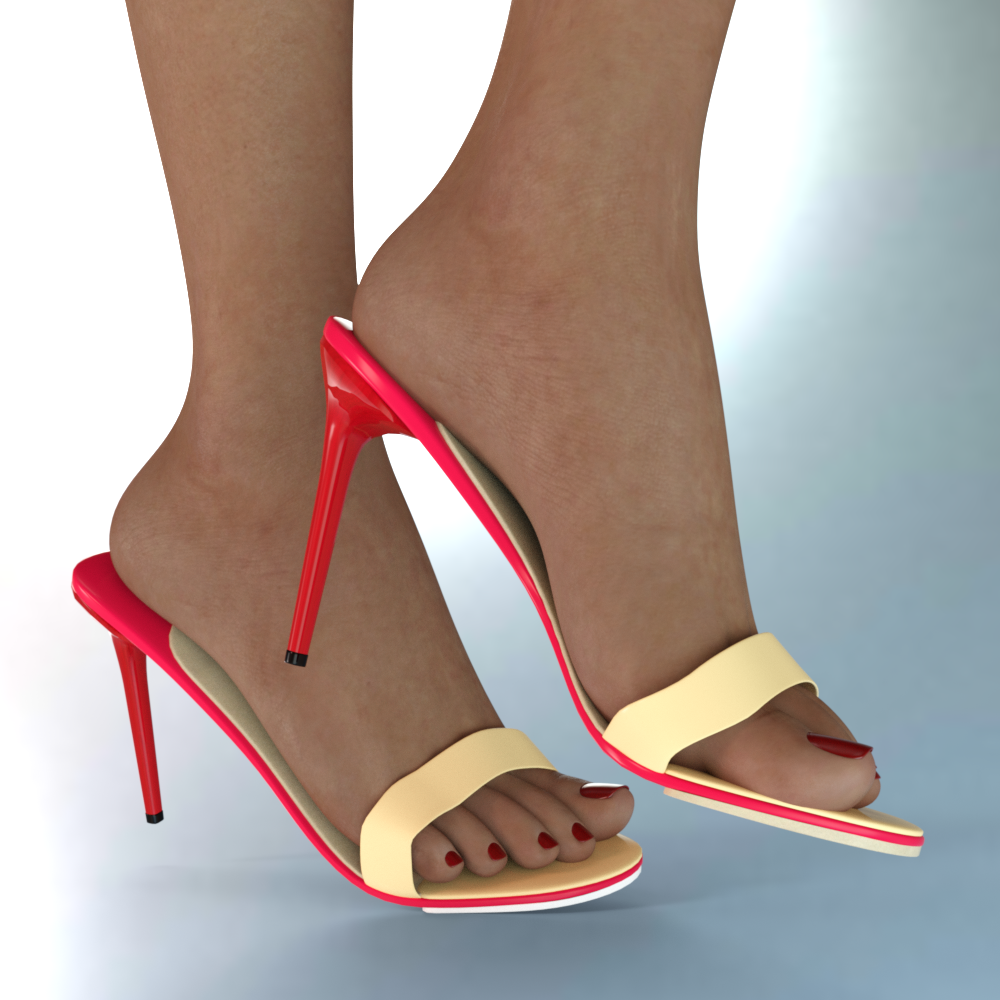
Genesis 8 high heel sandal Daz Studio versionI got some D/S files ready here now. I felt to include a morph to lower that top strap as otherwise it was pretty high off the foot. People can unlock the morph [I left it visible] and dial it out if so desired.
I have include a foot pose preset for G8F.
Anybody is free to use my foot pose(s) when modeling shoes ;-) I don't consider it copyrighted.
After applying a pose to G8F, one can reapply the foot pose and the shoes will again be on the feet.
Select G8F first, then load the shoes ... they are smart props. They can be loaded by themselves too if for example one wants shoes in the closet.
 XTransfer Module 1- Genesis 3 to Genesis 8 Morph Converter (Commercial)
Thats happening because the body morph isn't being rigged properly on some characters. We are aware of the issue and are on a fix. If you dial up the main character slider and go adjust rigging to shape it will fix the problem.
[Released] Character Converter from Genesis 8 Female to Genesis 3 Female - Conv JCMs too[Commercial]I would not go to tolerance 0. A very low tolerance, 0.0005, but not lower. There will be slight distortions in the eyes no matter what. Also, remember to delete the morphs before converting the head again as that is faster and you ensure the old, "bad" morph is gone. You can just delete the FHM morph and leave the others, with "Overwrite morphs" unchecked it will be faster. The morphs are in data/DAZ 3D/Genesis 8/Female/Morphs under the FIRST directory for Daz Studio Formats specified in the Content Directory Manager
Thanks, I will definitely try setting the tolerance a tiny bit higher. I also understand that it‘s not possible to completely spare the eyes. Nevertheless, I would still really like to understand what it is that actually happens in between converting from G8 to G3 or vice versa that makes the eyes such a problem. But that is probably beyond the scope of this thread. Anyways, the faces I‘ve done so far turned out really nice apart from the eyes, so thanks again for that!
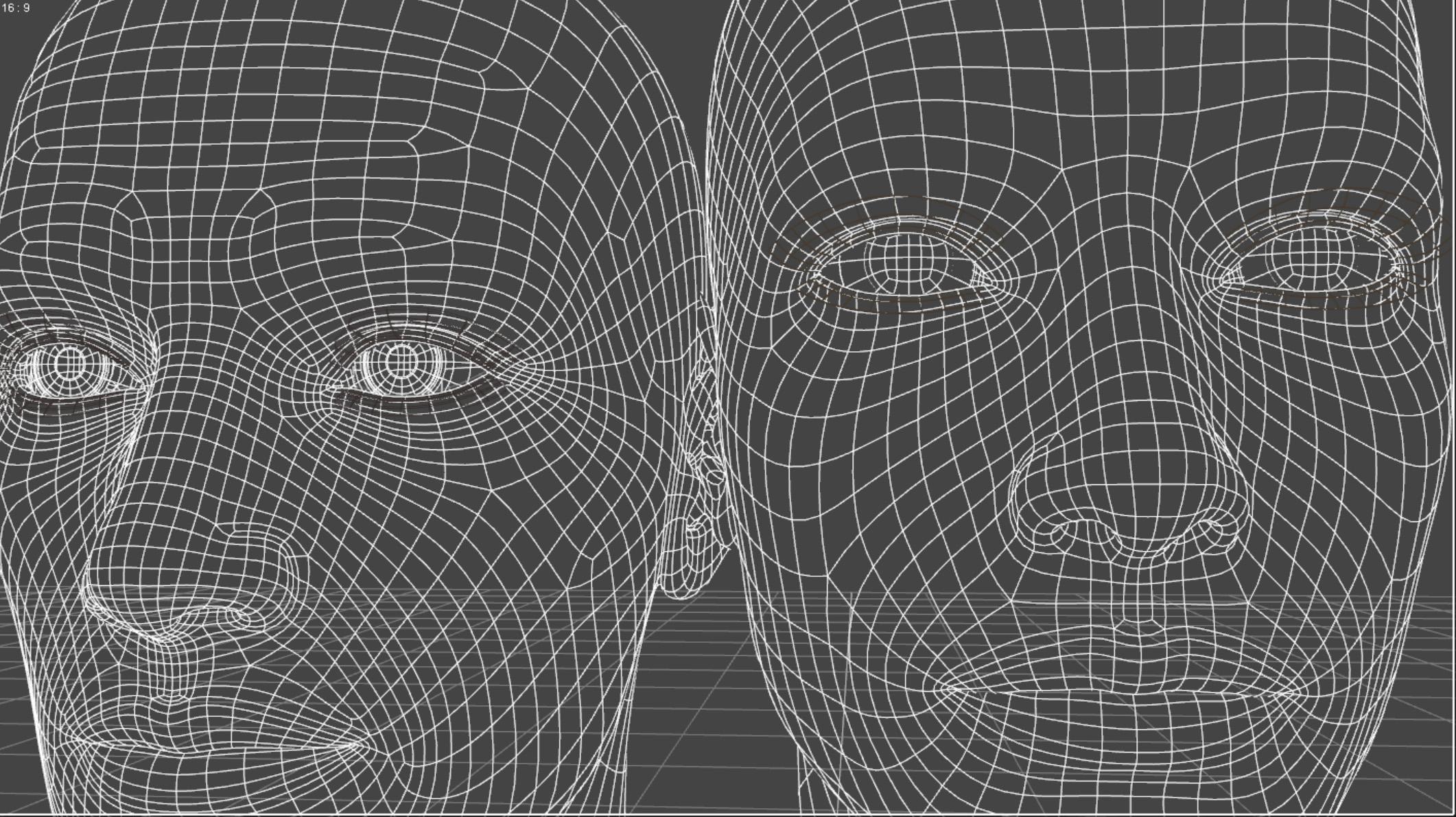
My theory for why eyes are a problem is that there are just many more polygons for the eyes in G2M (left) compared to G8M (right). The transfer process just does not have a lot to work with. It should still do a better job with normal eyes though. Please try again.
 [Released] Character Converter from Genesis 2 Male to Genesis 8 Male [Commercial]
Hello, I was wondering if anyone has ran into a problem with eyes during conversion? I was trying to convert the Dwarf character from Smay but the eyes are all messed up. Thanks.
Eeek! That is not a good conversion. Is that Dwarf Creator? I don't have that one. I wonder why it did that. It looks like the FBM morph is good though.
- Go into data/DAZ 3D/Genesis 8/Male/Morphs under the FIRST directory for Daz Studio Formats specified in the Content Directory Manager and delete the FHM (head) morph only.
- Now, load the dwarf and G8M into an empty scene. DO NOT MOVE THEM. Turn off ALL morphs except the head morph.
- Run the Convert Custom Character script and it should only convert the head morph. You should name the character the same as the Dwarf character so the head morph is correctly named and saved.
- Then copy the FHM morph to where the body morph is.
exporting and reimporting a morph target breaks eyes (Poser 11/Genesis2)I am posting this here again because the poser forum is still pretty dead.
Idk if anyone with daz can help me or not...anyway
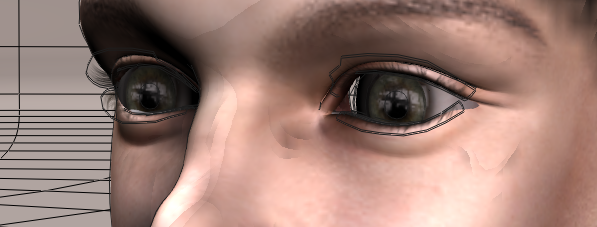
when I export this head as a morph target, and reimport it, the eyes are messed up. They are too far back in the head and there is a space between the skin and eyes. It's fine before i export it but when reimporting it, it is broken. I have done this without even editing it in Blender so I have chaned nothing at all before putting it back in.
Please someone help me fix this...
The entire reason I started this entire over is because of the eyes not being in the right place and now even without editing it's broken. here's an example
without loading the morph target. if i try to export the eyes and the head it gives me an incorrect number of vertices error when tryin to load it back into the head (and yes, I turned subsurface off just in case)
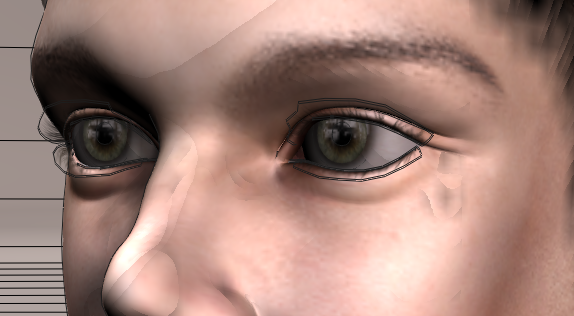
with it
 [Released] Character Converter from Genesis 8 Female to Genesis 3 Female - Conv JCMs too[Commercial]
I would not go to tolerance 0. A very low tolerance, 0.0005, but not lower. There will be slight distortions in the eyes no matter what. Also, remember to delete the morphs before converting the head again as that is faster and you ensure the old, "bad" morph is gone. You can just delete the FHM morph and leave the others, with "Overwrite morphs" unchecked it will be faster. The morphs are in data/DAZ 3D/Genesis 8/Female/Morphs under the FIRST directory for Daz Studio Formats specified in the Content Directory Manager
Thanks, I will definitely try setting the tolerance a tiny bit higher. I also understand that it‘s not possible to completely spare the eyes. Nevertheless, I would still really like to understand what it is that actually happens in between converting from G8 to G3 or vice versa that makes the eyes such a problem. But that is probably beyond the scope of this thread. Anyways, the faces I‘ve done so far turned out really nice apart from the eyes, so thanks again for that!
N-RArts Breast Morph FreebieJust released my first freebie!
You can find it on my DeviantArt account/at DeviantArt: http://fav.me/ddtgyzv
You can also find it on ShareCG: https://sharecg.com/v/95466/browse/21/DAZ-Studio/N-Ra-Pointed-Breast-Morph-for-Genesis-8-Female
EDIT: And Renderosity too!: https://www.renderosity.com/mod/freestuff/n-ra-pointed-breasts-morph-for-genesis-8-female/84877
Thank you for looking :3
How do you animate a character in a dForce outfit?I weld clothing for earlier figures in another commercial program that does not destroy UV mapping so when simulated it does not fall apart.
It needs to be fitted with the transfer utility if zeroing the simulation on close fitting surfaces so has it's limitations
I usually eliminate rigging on skirts by choosing the shirt option.
Or do it unfitted as a prop.
not everything welds sadly, I tried some Skyrim Yarl clothing meshes exported from Nifskope the other week and the necklace still fell off and it did not look great, it didn't explode though so there is that.

Being exported from my installed game and belonging to Besthesda cannot show you those either
 was done just for my own benefit and boredom.
game mesh has the added difficulty of being solid so have to cut out hand holes neck holes and bottoms with the geometry editor.
Welded means it's all one joined mesh
XTransfer Module 1- Genesis 3 to Genesis 8 Morph Converter (Commercial)OK update from our side..we fixed the rigging issue with characters that require other character bases. Also that navel and mouthrealismhd issue was a once off related only to how gianni 6 was saved. Regarding G1 genx base shape, that will take a bit longer to resolve, but we will role out this update asap since a lot of characters in the market are based off others. So this is crucial to get out.
Is it your recommendation that Navel & Mouth Realism HD be disabled in the XTransfer pane for all characters? I'm getting the same issue as the user above was having with Gianni 6 (but with a different, G3 character... I don't have Gianni 6 installed).
Ummmm..For now yes until we can find more characters that cause this issue. What G3 character is causing issues?
Here's an example: https://www.renderosity.com/mod/bcs/yana-for-genesis-3-females/137408/
When you transfer the head & body sliders, you get a "duplicate formula" error, and the "XT Navel" and "XT Mouth Realism HD" sliders default to 100% (even when just G8 base is loaded). Maybe it's a problem with how the figure was saved?
Also, unrelated to the Navel / Mouth Realism sliders, I've noticed an issue with this character: https://www.daz3d.com/hp-myrtle-for-star-2-0-and-aiko-7
When you only favorite her character dial, JCMs don't get transferred. To get JCMs, you have to favorite both the head & body sliders instead. I noticed this issue with another character as well, but I'm having difficulty finding out which one it was...
Regardless, XTransfer is a great (and much needed) product, and the remaining issues seem relatively minor. So, congrats!
XTransfer Module 1- Genesis 3 to Genesis 8 Morph Converter (Commercial)OK update from our side..we fixed the rigging issue with characters that require other character bases. Also that navel and mouthrealismhd issue was a once off related only to how gianni 6 was saved. Regarding G1 genx base shape, that will take a bit longer to resolve, but we will role out this update asap since a lot of characters in the market are based off others. So this is crucial to get out.
Is it your recommendation that Navel & Mouth Realism HD be disabled in the XTransfer pane for all characters? I'm getting the same issue as the user above was having with Gianni 6 (but with a different, G3 character... I don't have Gianni 6 installed).
Ummmm..For now yes (only if they populate in the transfer list, by design they not supposed to show) until we can find more characters that cause this issue. What G3 character is causing issues?
KEEP ASKING TO INSTALL GENESIS 3 ESSENTIALS..ALL THE TIME?If you're loading G8 and it's asking you for G3 base, then you have a character installed which references it. That character is what needs to be fixed.
Maybe if look in the log file when loading the figure you'll be able to see what morph that is.
Figure's bone rotation directions gone weirdThis will not solve the problem you are exposing, however I have observed the very same phenomenon...
As most content I own is for G3F, I mainly transfer G8 to G3 (which changes noting), and the method proposed by a-sennov is the best one in term of accuracy.
Problem 1 is not too annoying since I don't pose the eyes without watching the end result first.
I'd say that problem no 2 is more painfull as sometimes it is not immediately seen, unless you zoom on the hand. If too visible, I fix the akward rotation by going in the hidden properties...
Morph Loader Pro Help!Ok I've seen forum threads that ppl made on here who have had trouble by searching all over google. I've tried looking everywhere for a solution, but came across a video on how to make morphs using morph loader pro. what they did was they changed the head shape of the genesis 8 female base a bit and exported it with poser preset option. Then they reset the base figure shape (removing all edits) and did the same thing with the body and exported it. Next they opened morph loader pro and imported both files using poser preset option (without editing them in a third party program) and successfully created the morphs. However, when i tried this, i still get geometry doesnt match. what did i do wrong?
Free Software that Makes Life EasierWendy, thank you, for the heads-up on the Quixel Mixer stand-alone -- I have been waiting for this - still haven't gotten around to download UE yet...
Imago :
Came here for my Cararra needs, but since you posted that link, I should point out that I already updated it to 2.8x (there is a thread about it here in 'The Commons') and am making continual improvements for usability. So far, I am the only user, as no one has stepped up for beta testing (though, claims it's so sad that it is only for 2.79). Also, I am not the original author - just took up the mantle for porting, and making it a little more user friendly (such as no hand editing the files to make work, error-checking, and some setup automation).
However, it is not the 'long awaited' Blender/DS Bridge that everyone is clamoring for -- It is only a Morph Target/Shape Key bridge for easier IN/OUT between the two programs like others that have come before it.
* EDIT: Thank you, Catherine, for the heads-up on the Q.M. download file size -- That makes a difference for me for where I can download it - I have to rebuild my broken FatDog64 Linux USB that allowed me to download files up to 7G - For now I am stuck on only allowed up to 1.6G while loaded in memory. Thanks again!
May I ask which thread?
 WinterMoon Wants Attention.
Zelie was actually a big part of why I bought the Kaylee bundle. Often needs expression presets tweaking a bit, I find, but yeah, she's got a lot of potential.
Actually, the idea of "Dial Them Out" often works really well; there are a few times I've taken add-on shapes and layered them over a different base morph, which can often be a nice way of slightly tweaking a character to be a bit different from where they started.
Use of and naming your artI tend to make characters up out of several morphs, but I have occasionally ended up calling characters after one of the shapes used; they're often appropriate names for the character's ethnicity/age, so it's not unreasonable that said name gets stuck in my head.
"Molly", for example, uses 40% of Zev0's Molly character, and it's a believable name for a young British girl born 2004/2005-ish, so I kept it. Actually, I looked at a list of popular girl's names from the time... she really didn't feel like a Chloe, Jessica or Charlotte (even though I did use a bit of Charlotte 8's shape), and with Molly hovering in the 20-something-th place on the list, it was entirely reasonable.
And frankly, although the trend is generally a bit more recent than that, I just really didn't want a "special snowflake" name; which to me just seems like a way of dooming your child to a lifetime of "No, it's spelt..." which I get enough with my real surname. ("Castle" is something I borrowed from a few generations back in the family tree to use online).That said, I may have been taking the proverbial by calling one character "Viki Severn". (That said, she is a robot character, so in spite of using Vicky 7's face morph, she is still fairly distinct from the original).
Daz 3D is part of

Connect
DAZ Productions, Inc.
7533 S Center View Ct #4664
West Jordan, UT 84084Licensing Agreement | Terms of Service | Privacy Policy | EULA
© 2026 Daz Productions Inc. All Rights Reserved.