-
Missing files in Belle 6 and Cormac HD
This is the morph product for G2F with the cornea bulge morph: https://www.daz3d.com/genesis-2-female-head-morphs
Are the messages just something you found in the log file, or in a popup?
If they are only in the log file, then the characters should still load and be useable, just not exactly identical to the product page.You could raise a help ticket about this, if you want.
Thank you!
It is a pop up but it continue to load the characters. They're probably small details but I'd like to get the required items anyway.
$419.98 Banana Suit?Can the Yeti wear this? Lol!
:-) Mind you a morph helps it look better. And you can't be minding that it'll become a little bit hairy of a banana.
For those that want it, click here.
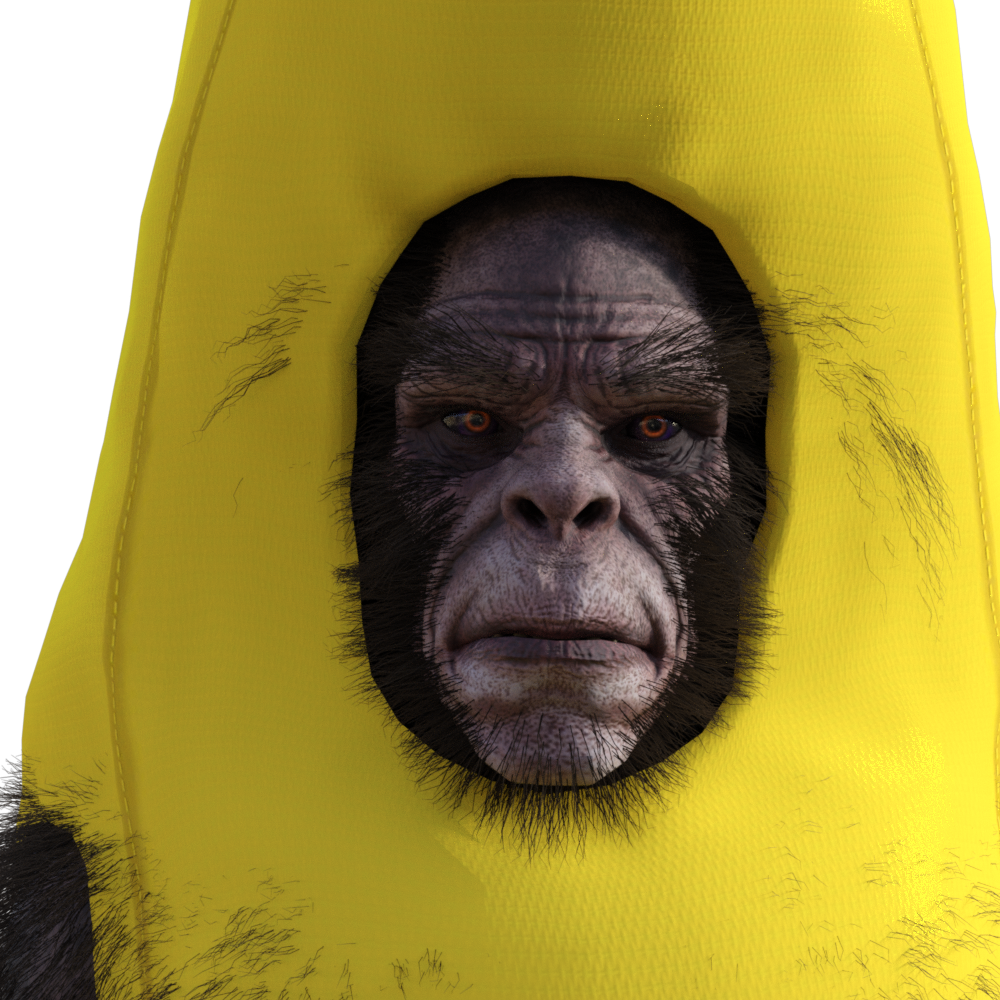
This awesome! Love it!
How to copy V8 skin(color) to another G8F?You might be able to do something like:
- Mke sure you can find the maps from Face Transfer
- Apply the desired maps
- Use Brow remover to remove the brows
- Use LIE to add the Face Transfer maps and adjust opacity to mix, or use an inverse of the brow remove mask to apply just the brow area from the Fact Transfer map, or do both in separate layers to get the ideal balance.
How to copy V8 skin(color) to another G8F?I believe that Richard gave the definitive answer. What you are seeing is not a change in the characters shape. That is an illusion. As Richard said, utilities like Face Transfer essentially use 2D photographs to create a 3D representation of that photograph. The underlying shape is only adjusted enough to allow the texture maps created from the photographs to more or less fit the facial features. So such utilities are more texture creation utilities than they are shaping or morphing utilities. Some people take the minor morphs produced by the utilities and further enhance or modify them using morph packages or modelling programs so that the shapes as well as the textures more closely resemble the subject. Using other textures on characters created using utilities such as Face Transfer merely reveals how little the face shapes are actually modified and how much of the illusion is dependent upon the texture maps. Remove those maps = remove the illusion.
Missing files in Belle 6 and Cormac HDThis is the morph product for G2F with the cornea bulge morph: https://www.daz3d.com/genesis-2-female-head-morphs
Are the messages just something you found in the log file, or in a popup?
If they are only in the log file, then the characters should still load and be useable, just not exactly identical to the product page.You could raise a help ticket about this, if you want.
Has anyone ever actually been able to make capes work?I have tried using the timeline to give the simulation more "time" to work, however this doesn't do much for the result. As I mentioned, I watched the tutorial I bought to try and pick up some tips, but the presentation meant alot got lost in translation, at least for me.
So from frame 0 I have the "default" pose, then from 10 is the actual pose I want, and then I give it until frame 30 to settle. Is there anything to this technique I am missing? From the anecdote I gave on the skirt I used, it seems like if I could just grab the whole cape and pull it out and up, and then let it collapse into place, that would give a good result, but many of these items don't seem to have a "dForce Ready" pose/morph like that.
The advantage of using the Timeline is that you ca set staging poins, rather than have every bone move from staring position to final pose without regard to what elese is going on (which can lead to awkward snagging, or even self-intersection causing the clothing to explode). Don't forget to try the better options for collision detection, and you may also want to increase he number of subframe s or iterations per sub-frame to give the simulation more time to adjust as things change.
TritiumCG Freebie Thread
Here's a render with your Rila Fukushima morph. Thank you!
Skin and body of Aiko 8.Freebie Credits:
Head Morph by TritiumCG: https://www.deviantart.com/tritiumcg/art/Rila-Fukushima-Head-Morph-for-G8F-832636705
Makeup by Aprils Vanity: http://shop.aprilsvanity.com/flo-makeup-for-genesis-8-females.html
Dasy Dukes by scheusal242: https://www.renderosity.com/mod/freestuff/contributor/scheusal242
Boots by Headkase & Varsel: http://www.sharecg.com/v/56443/browse/11/Poser/Bossy-Boots-2.0-for-GENESIS
Pose Converter by MCphylyss: https://www.sharecg.com/v/89846/browse/8/Script/Daz3d-Pose-Converter-StandaloneHylas' cornerFreebie Credits:
Head Morph by TritiumCG: https://www.deviantart.com/tritiumcg/art/Rila-Fukushima-Head-Morph-for-G8F-832636705
Makeup by Aprils Vanity: http://shop.aprilsvanity.com/flo-makeup-for-genesis-8-females.html
Dasy Dukes by scheusal242: https://www.renderosity.com/mod/freestuff/contributor/scheusal242
Boots by Headkase & Varsel: http://www.sharecg.com/v/56443/browse/11/Poser/Bossy-Boots-2.0-for-GENESIS
Pose Converter by MCphylyss: https://www.sharecg.com/v/89846/browse/8/Script/Daz3d-Pose-Converter-StandaloneHas anyone ever actually been able to make capes work?I have tried using the timeline to give the simulation more "time" to work, however this doesn't do much for the result. As I mentioned, I watched the tutorial I bought to try and pick up some tips, but the presentation meant alot got lost in translation, at least for me.
So from frame 0 I have the "default" pose, then from 10 is the actual pose I want, and then I give it until frame 30 to settle. Is there anything to this technique I am missing? From the anecdote I gave on the skirt I used, it seems like if I could just grab the whole cape and pull it out and up, and then let it collapse into place, that would give a good result, but many of these items don't seem to have a "dForce Ready" pose/morph like that.
Has anyone ever actually been able to make capes work?I've seen alot of capes on the store. And I've bought most of them, because they look great and I have so many applications for them, but I have never been able to make them work, even with dForce simulation. There's always some kind of problem like, if the hands are inside the cape, the simulation will always clip through any nails or wrist accessories. And for some reason they are always glued to the bottom parts of the breasts on females, so no matter how I simulate it, it's like it's taped to the chest. This also seems to create a situation where I can't really "open" a cape unless it's designed from the start to be open. There are so many cases where I wish I could literally see the billions of vertices and just manually grab and move them into place. Or at least unglue the pieces that are stuck in place.
I should also note I've purchased one of the dForce tutorials here on the site to try and learn how to use it, but the presentation was so all over the place, I couldn't really absorb anything useful. Yet surely this isn't the case for everyone. There has to be something to it that just hasn't clicked yet. At one point while going through my wardrobe, randomly applying items to try and create a cohesive outfit, I came across the skirt from https://www.daz3d.com/school-girl-costume-set-for-genesis-8-females and while skirts tend to have a bit of issue with fitting for me, I noticed this one has a particular morph called "dForce Ready" which literally just opens the skirt all the way out, as if the person was standing on top of a big fan. And what this did, is whenever you did the simulation, because of this pose, it basically became 100% perfect no matter what shape or pose was in play. Because there's enough space for the skirt to properly fall over whatever surfaces are in the path of simulation. Yet with bigger and more complex things like capes, they always seem to be too snug or too restrictive to do this sort of sim preperation. And at that rate it seems like it would be more effective to go nuclear and just pull everything into blender and manually put it together correctly. But that's not something I am able to do yet. So surely there is some trick or something to making these capes work.
Missing files in Belle 6 and Cormac HDI purchased Belle 6 and Jennie HD for Belle 6. The Belle 6 character works fine but when I attempt to load the Jennie HD character I receive the following message:
file not found
data/daz 3d/genesis 2/female/morphs/daz 3d/evolution head/phmeyescorneabulge.dsf
The product page doesn't say that it needs anything other than Genesis 2 or the Belle 6 character.
I've looked for a product in the Daz store and found a Genesis Evolution Head Morph product but not one for Genesis 2.
If I click OK the character loads, no doubt minus the one property.
A similar problem occurs when I load the Cormac character that I purchased as part of the Elios 8 Pro Bundle except the file is different:
data/daz 3d/genesis 8/male/morphs/daz 3d/landon 8/fhmlandon8.dsf
Again the product page doesn't say that anything other than Elios 8 is required.
It is possible that this was unintentional on the part of the content creators or perhaps the store listing is missing a required product. Either way it is a tad frustrating!
Does anyone know if there is/was a Genesis 2 Evolution Head Morph set? I can't seem to find it in the store.
Daz 4.11 Iray Dark Eyes Bug ?Ok, I got the G8M version done. Here it is. https://sharecg.com/v/95487/view/21/DAZ-Studio/Dark-Eye-Fix-from-World-Center-G8M
HOWEVER, I want to stress that this is a last resort. You should use either memory or speed instancing optimization before ever using this morph. In fact, you should ALWAYS have one of these options selected, and I will you show you why. If you are seeing this dark eye issue, then you are having other problems with your render! This is only a band aide to mask one single aspect of this problem that Daz Studio Iray has. It is far worse than simply eyes, or even transparencies around hair. It can directly effect the color accuracy of your works, and this is a very serious problem, one that Daz needs to address ASAP. Either Daz Studio needs to fix the AUTO setting, or they need to remove it completely. It is useless. 100% useless, and it negatively effects people's works. There is absolutely no reason to EVER use auto instancing optimzation.
If you look at my ShareCG upload, here is the 1st image.
Here is the second. I use this as a chance to show users where the instancing optimization option is located.
If you compare this image to the first two, you will notice that the skin is lighter in the second image. This is Sanjay 8's skin default preset, if anyone is curious. These images were rendered with the model at 2000 from the world center. However, I was able to spot a difference in the skin color even at just 500 from world center! It was subtle, but it was there. And what is important is that the eyes did not have the dark sclera issue at 500. So you would not immediately notice the problem if you were using the default auto instancing optimization. And that is terrible, because AUTO is the default! Whenever you create a fresh new scene, it is the default. You have to make sure to remember to select one of the other options every time.
I also want to point out, if I didn't already, that you can see problems in my original pics for the female version. Look at the crack above her lip. That should not be there! Again, my morph only hides the eye problem, other problems will still be there.
How extreme does this get? Lets look. How about 5000 from world center?
Lets start with the dreaded AUTO.

Holy crap, our boy became the spawn of Satan! Not only are the eyes all black, but his skin is drastically darker.
Let's try switching to Memory mode.

Wow, that cleared it up good. That's basically the same as he would look at world center.
Lets try the Speed mode.

Hmmmmm...still mildly Satanic looking. Not full hellspawn. Maybe he's just angry.
Lets try using the Eye Moisture Push Out morph on him with the same Speed setting.

Yay! He's not hellspawn now! But look at his skin. It is still noticeably darker than the memory mode. So using this morph only helps the eyes. If you see the dark eyes, you need to try switching this setting around, because this only masks the eyes.
All of these images were using a single distant light, created with default settings, slight rotated to be at an angle. I also used the headlight camera at 40% strength, because I didn't want to have to reposition a light every time I moved the model. All of the positions are on the Z axis. So when I say 500 or 5000 from world center, they are all on the Z axis. This is for anyone who wants to recreate this test for themselves. I also used Sanjay's skin because I had a feeling his material preset would show off this issue better than other models.
In this case, selecting the memory mode was a clear winner. However, it is not always the winner. I have had situations where using the speed setting worked better than the memory setting! So it is not a consistent thing, which is why I am stressing you need to try both settings. Don't just pick memory and think it will work every time. The time that speed worked better for me, I had a large scene that nearly filled my 1080ti's VRAM to capacity. You would think that using memory would be the logical choice in that situation, but no, speed was the only option that had no issues.
So Daz staff, I urge you, this needs to be addressed. The auto option is simply broken. I believe the best course of action is to remove auto from Daz Studio until it can be fixed at a later time. The issues with speed or memory are much more palatable for users, since they work so much better than auto does. Most users will not have any idea that instancing optimization is behind this unless they happen to find this thread. So at the very least, just get rid of the option for auto. I have yet to find a single situation where auto actually makes an improvement.
I had a horrible time with ShareCG getting this uploaded. Seriously. It took me longer to work out ShareCG than it did for me to create the morph and the pics for it! Very frustrating. So while I promised a G3 version, its getting late and I'll do that another day. I'll probably just put them together in a single zip file so that don't have to deal with ShareCG twice.
How to copy V8 skin(color) to another G8F?Before you need to use it, apply the desired materials to a figure then save out a Material Preset AND carefully UNselect everything that is not to be changed ;-)
Sorry, you idea seems doesn't work, even carefully unselected those eye parts, lips, mouth, face geometry and ear geometry, etc., after merged the new preset, the eyebrow still gone, and nose, mouth shape changed. I don't want any shape changing, just want a new skin color.

Material presets do not change the shape of anything.
Shape presets change shapes.
Another way to change skin colour is to change the colour applied to the skin on the Surface Tab.
From Face Transfer the eyebrow is the eyebrow from your photograph. Of course when you change the texture image on the face that will be lost. Other skins either have painted on brows {or photos of brows} or are bare so one can apply fibre brows {more realistic appearance}.
Character nameThey still have the V4 body morph for her available: https://www.deviantart.com/aeon--soul/art/Alice-5-for-V4-2013-367046756
JCM to dial morph OFF with positive and negative bendThank you, I can see now I will need a 2nd morph for one of the directions (which will just be restoring the default shape). It seems a little redundant but I suppose there's no getting around it, as long as it works I can live with it. Thanks again jimmac-donald (and Richard by proxy)
 Exporting FBX to Cinema 4D problems with clothing
1) Check the pose morph tag in C4D that everything looks ok; no doubled up morphs or extraneous values being keyed in.
2) FBX work from DS directly can be tricky
Does your FBX character match? ie. Which one is causing the problem ? character or clothing? or both ?
Note that FBX bends , character motions are not interpreted exactly as DS from the DS FBX export - in some programs like C4D, and others - because there is lack of applying JCM's, JCJ's, MCM's . Basically, the secondary connections and links are not active in the C4D importer. This causes a different motion than how it's interperted in DS
You can see an example in this thread (it's not a bone orientation problem)
https://www.daz3d.com/forums/discussion/325966/bone-orientations-are-changed-when-exporting-a-figure-with-fbx-formatOther programs can interpret it correctly; for example if you load that R. Knee bend exported from DS into Mobu, or do the knee bend directly in Mobu, then export from Mobu, the FBX is that imported correctly into C4D and match DS. The secondary corrections are present and the motions are identical
Obj is perfect, and you can verify this by exporting the character as obj and clothing as obj to see which is misbehaving
Alternatively, you should be able to use obj in C4D, and use that as the morph target in the pose morph tag, because their vertices matchExporting FBX to Cinema 4D problems with clothingNothing should happen
When you add a new morph there should be a new slider. Look for it in the properties pane. Increase it to 100% from 0%
Exporting FBX to Cinema 4D problems with clothingDid you watch the video that I uploaded? When I Load Morph with the exported OBJ nothing happens and the clothes stay the same as they were with the simulation cleared.
Modelsthere are morphs and dial parameters like you have in Character Creator and you can buy morph packages
I am only on iC6 but I believe with CC3 you can even transfer DAZ figures over to Character Creator iAvatars.
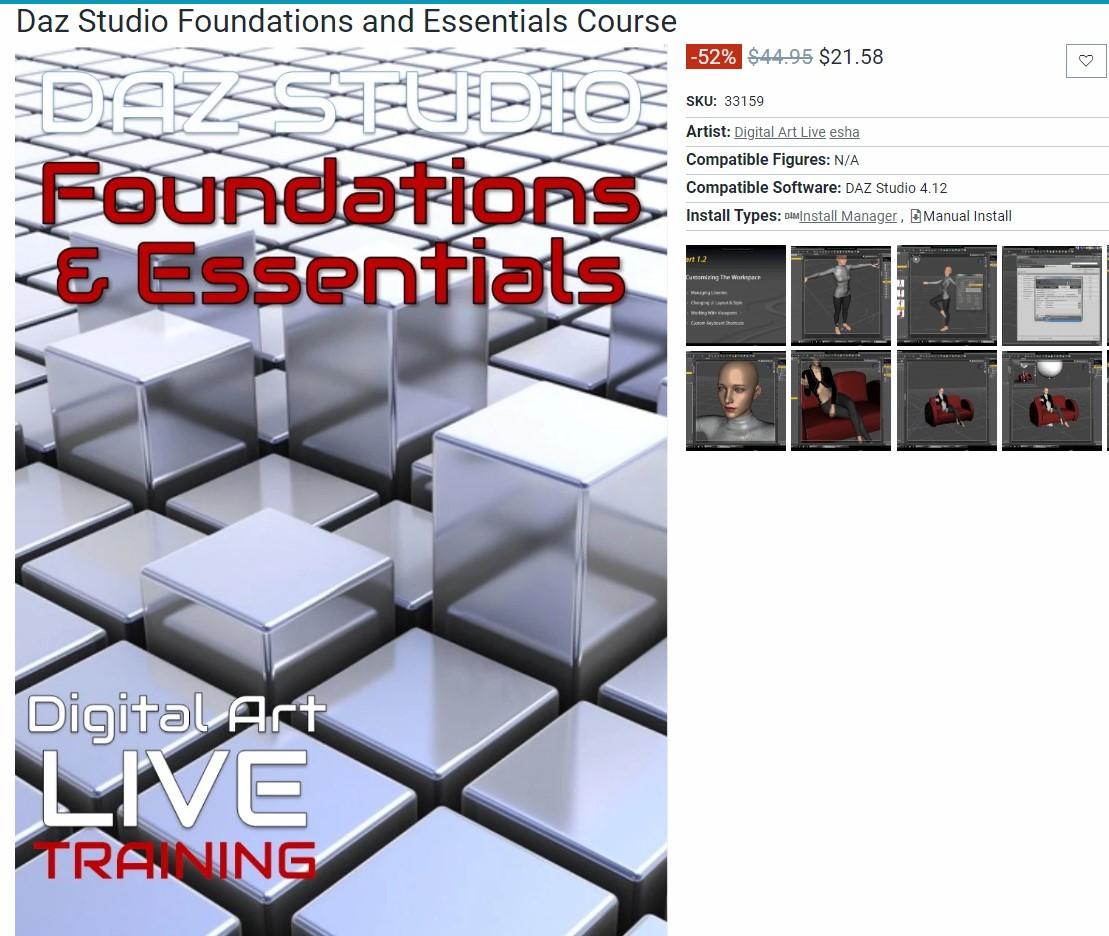
Diomede's Notepad, Sketchpad, and Chilling PadDaz Studio Foundations and Essentials
by Esha and Digital Art Live.
This morning, I watched the first half of this introductory webinar. You might look at my post count and think, "why is he doing an intro Studio course"? Wow, I am so glad I got this. Coming from another program, I just could never find things in the Daz Studio interface. Funny, because it is created to be so user friendly. But for simple things I'd be looking in the edit tab and they'd turn out to be in the create tab. I'd be using a rotate tool to bend limbs, getting frustrated when the tool would hop off to select another bone, unaware of all the different options for posing.
Esha does a great job, as always in this first half of the course. Very well organized. Starts with installation, which wasn't an issue for me. She goes into the layout options, how to save a custom layout, and how to transfer a custom layout if you change computers. She explains nodes, groups, and nulls. This might all seem too simple for experienced Studio users, but there was definitely some useful things in there for me. She then creates a sample scene and walks through some common issues (as I said, several of the various posing options were news to me). She discusses some basic camera information (eg. depth of field). Well done. Will report back when I finish the second half and do a test scene.
Daz 3D is part of

Connect
DAZ Productions, Inc.
7533 S Center View Ct #4664
West Jordan, UT 84084Licensing Agreement | Terms of Service | Privacy Policy | EULA
© 2026 Daz Productions Inc. All Rights Reserved.