-
Mouth Eating Morphs or Epressions
Hi guys,
Does anyone know if there is a mouth eating morph or expression available for Genesis 3 and 8?
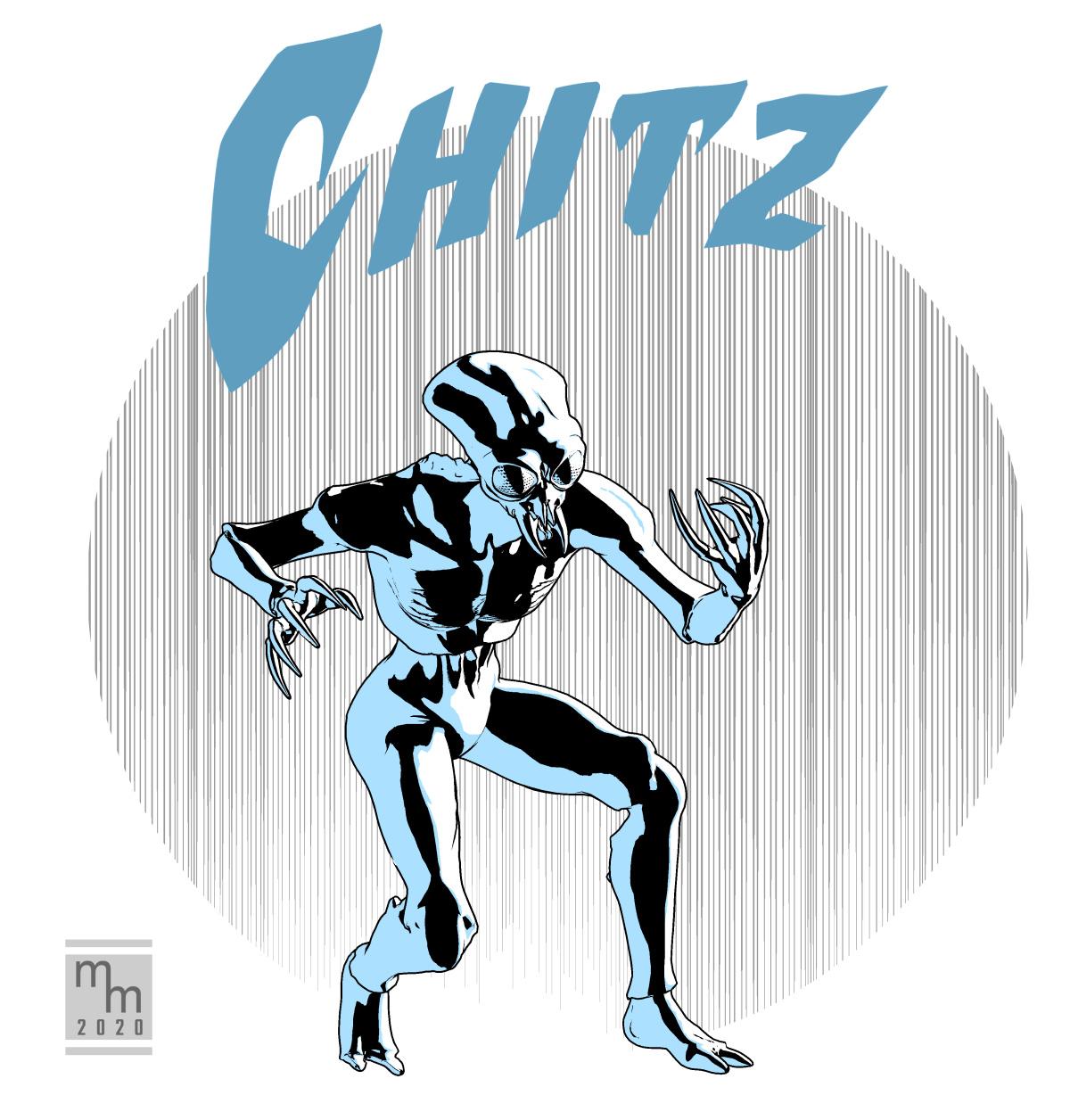
For example, the character is eating something and his cheeks grow like as if his mouth is full.SCI-FI CelebrationHere's a character from an upcoming sci-fi comic I'm working on. The figure is Michael 4 with a cool morph applied: Grotto's Insectoid (available at R'osity).
The character's real name is unpronouncable by humans, so he just goes by the (very) shortened version, "Chitz."
Rendered in Poser Pro 11 using the Comic Book Preview. Clean up in Clip Studio Paint. I think I spent an hour and a half on this quickie illustration.
That's cool. I'll have to find that morph. It would fit in nicely with my Alien Invasion series.
Dasan 8 is hereTo me, Dasan 8 looks like a cross between Sir Christopher Lee and Wes Studi. Very interesting character!
The Bundles are not quite to my taste. The Q Suit is certainly very good - but why on earth do they always make the jackets so short? At least in Europe a correct jacket always covers the buttocks (which also results in better proportions). I would never send an older man like D. out in a short jacket, but maybe it's different in the USA.
I think they make the jackets shorter to avoid the crotch triangulation that usually happens when they are longer. But Fit Control has a morph where the jackets can be lengthened. And they got the rest of the jacket right (though I still have to see if I can make the lapel lie down like I'd prefer). But there are no morphs to fix the shoulders, lapels, and collars of all the previous poorly made jackets.
Best model to start with?Here's some free G8 morph sliders to get you started: https://sharecg.com/v/91888/view/21/DAZ-Studio/SY-200-Morphs-for-Genesis-8-Head-and-Body
Thank you so much! Very nice tools, indeed !! :)
Best model to start with?Here's some free G8 morph sliders to get you started: https://sharecg.com/v/91888/view/21/DAZ-Studio/SY-200-Morphs-for-Genesis-8-Head-and-Body
More Non-photorealisitic Renders (NPR II)I've got to admit that I've been struggling to get my creative juices flowing. I guess it's all the stress, but now that I'm not commuting back and forth to work every day and I have a lot more time, I just haven't had the gumption to sit down and use the time for anything creative. I'm trying to bust through that wall tonight by just sitting down and making myself work on a quickie character design for my upcoming sci-fi comic project. This is an alien character from the comic. His real name is unpronounceable by humans, so it is greatly shortened to just "Chitz."
The figure is actually Michael 4 with a cool, full-body morph applied. The character is Insectoid by Grotto, available at R'osity. The great thing about this being an M4 morph is that I can still access all the great action poses in my library. Yeah, the extreme body shape means some of them need morphing, but having the base poses as a starting point will save me a lot of time when it actually comes to making the comic itself.
I know this is pretty simple, but I only spent about an hour and a half on this (not counting a few false starts with the lighting), but at least I got something done. And, hopefully, that's a start.
My usual workflow applies: Poser Pro 11 renders using the Comic Book Preview. Clean up is in Clip Studio Paint.
Report sales errors here: "There's Always Another Sale™"Added the new pro bundle, three required add ons, was happily adding freebies, cart got to $61 after four categories, added Face Transfer Unlimited, cart jumped to $292, removed Face Transfer Unlimited, cart did not return to $61, emptied cart and gave up.
If you could screenshot before deleting your cart, we can try to test it.
[Released] RSSY Clothing Converter from Victoria 4 to Genesis 8 Female [Commercial]If you are talking about looseness, there are a ton of helper morphs to fix things like that. The helper morphs are in the Parameters pane, below Actor->Converter Morphs (see Figure 10). Adjusting the Tighten All morph and turning on Smoothing can fix most issues.
If you are talking about shoulder armor becoming all bendy, that cannot be fixed.
I was having problems with bodysuits and coats and such, not armor or props that were supposed to be stiff. So far nothing I can do fixes the problem--all my V4 outfits look like they were morphed to fit Wilt Chamberlain while the actual characters are Tom Cruise--but I do have to give you props for putting in the hard work to get this program together. Even if it doesn't work for me, I salute your creativity and technical savvy.
SCI-FI CelebrationHere's a character from an upcoming sci-fi comic I'm working on. The figure is Michael 4 with a cool morph applied: Grotto's Insectoid (available at R'osity).
The character's real name is unpronouncable by humans, so he just goes by the (very) shortened version, "Chitz."
Rendered in Poser Pro 11 using the Comic Book Preview. Clean up in Clip Studio Paint. I think I spent an hour and a half on this quickie illustration.
Report sales errors here: "There's Always Another Sale™"Added the new pro bundle, three required add ons, was happily adding freebies, cart got to $61 after four categories, added Face Transfer Unlimited, cart jumped to $292, removed Face Transfer Unlimited, cart did not return to $61, emptied cart and gave up.
Best model to start with?I would recommend the Aurore HD character. You get different skin tones, HD morphs, brows, piercings and size morph.
Can't find scene subsetsI think I had the same thing happen when I had to move everything to a new laptop. DS now only shows the files saved before the transfer if I uncheck "filter by context." Try that and see if the files show up in the content tab.Thank you for answering! Where do you find that option? I go to "Content Library", then click in the searchbar. I have the option to choose File or Database. That's all the options that I see on mine.
Can't find scene subsetsI think I had the same thing happen when I had to move everything to a new laptop. DS now only shows the files saved before the transfer if I uncheck "filter by context." Try that and see if the files show up in the content tab.Cannot save my custom morphsMorphs are not going to show up in the Smart Content ... they show up on the Parameters and/or Shaping Panes.
? what these 3 different paths are you are referring to. They would have saved to be seen exactly where they were planted in the first place.
The data files would be in the data folder, subfolder for the figure [normally under DAZ 3D] under Morphs, base, your handle. You can only have one working morph with the same name so if you have saved it to 3 different places, 2 of them must be deleted from the data folder.
If you forgot where you parked them: in the file in the data folder search for "group" ... and there will be where it is located when you open D/S to use it.
{the figure has to be loaded and selected in the scene in order for any of its shapes and morphs to be seen}
Endlessly ongoing... playing cards/casino chips/coins/banknotes scatter... hiatus time (still)...and tangentially speaking - just slapping the doubloon face on the casino chips with a pseudo-metallic Poser Friefly shader...
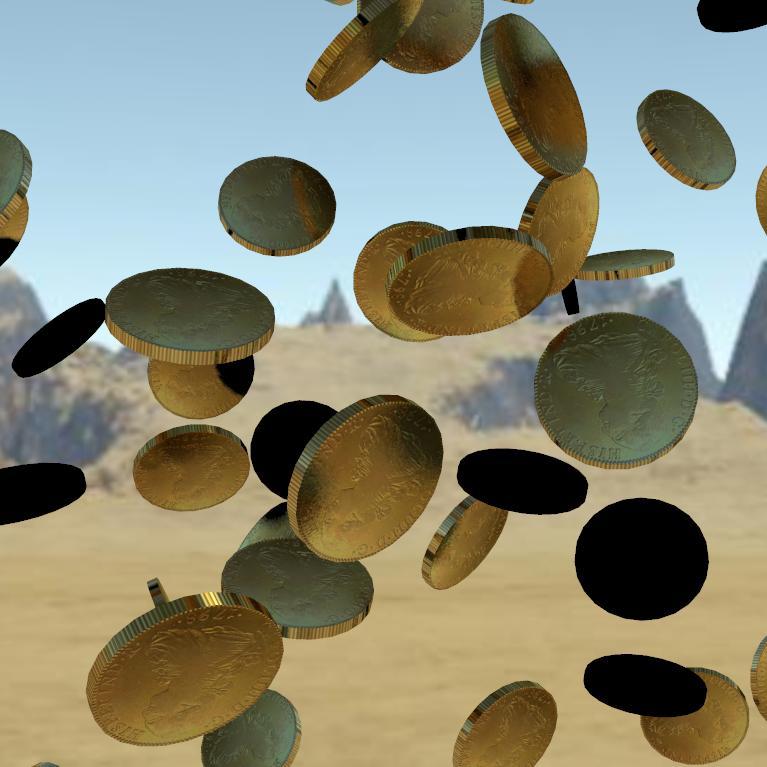
I'm rather surprised that the edges actually appear knurled/reeded - that's definitely a lucky bonus !
So coins may actually be easier than I thought.
However, I can't use a morph to change the thickness or diameter of the coin, because such morphs would screw up when combined with the mid-air rotation morphs.
I can't see any solution to changing the diameter:thickness ratio in the scatter prop.However (again), different diameter coins could be achieved by simply using scaling and a bit of simple mathemagics. E.g. a US quarter is about 1" diameter, and a cent about 0.75". So if I scaled a chip scatter prop to 6.51% the chips would be 2.54cm (1") across. If I scaled another chip scatter prop to 4.88% the chips would be 1.9cm (0.75") across. If I then set 'Mid-Air Scatter A' of the first prop to 0.2, and set 'Mid-Air Scatter AB' of the second prop to 0.267, and applied appropriate quarter/cent textures... then (if I've got my maths correct) you should have $13.04 up in the air !
I'm not going to even pretend to understand what you're talking about, love the image though!
Cannot save my custom morphsHi there
Im using the genesis 8 starter essentials, went to brush, created a morph. Brought it back, everything works wonderfully.
Except when I go to file/save as/support asset/morph asset
I add my morph to the checkmark list(only thing I check the x) ,but for the life of me, it never saves anything. i tried saving in the 3 different paths it allows me to, but the morphs don't show up in neither of them, and in the smart content search doesn't show up either.
what am I doing wrong?
thanks in advance
XTransfer Module 1- Genesis 3 to Genesis 8 Morph Converter (Commercial)If for some reason the transfer process is interrupted or you are forced to quite Studio itself, some users
have experienced that Studio or Genesis 8 will crash apon loading. To Fix this issue simply navigate to the transferred
morph location on your Genesis 8 Figure and delete the Product Folders inside XTransfer Directory, or last known set
that did not complete. You can also delete the entire XTransfer folder if issue still exists and start again.
Location for XTransfer folder isYour Content Library\data\DAZ 3D\Genesis 8\Female\Morphs\XTransfer
or
Your Content Library\data\DAZ 3D\Genesis 8\Female\Morphs\XTransferYou can also navigate to this location via the Browse to my saved XTransfer Morphs button within the script.
Please make sure the right content library is mapped inside your studio.
Also did you download version 1.2?
It fixes the crashing issue. If the problem persists I need to see your log file please.
Chevybabe's Dforce SBH Hair ThreadOK.. In that case: I would absolutely change the simulation settings:
You may not have to increase the settings as high as I have here in the attached image.. but it usually solves that "pull" problem.
The ear issue. The hair will not just follow like you want. You would have to add an ear morph and have the ears completely clean throughout the animation. Poke through like that can equal an explosion. The hair sims and collides but its not smart ;)
Wind.. yeah thats a bit tricky.. Im still looking to get more info on it.
Best model to start with?You already have the base Genesis figures, assuming you mean human models. While daz would obviously like you to buy add-ons you can certainly get your feet using the free bases. Beyond that, a lot will depend on what areas you are most interested in - do you buy morph packs to sculpt your own figures or are you wanting a series of pre-rolled characters? Do you want to do figure art (portraits), action scenes with the focus on the figures, environments with figures used simply for scale and completeness? Are theer particular genres that catch your fancy - some period of history, some type of fantasy, some style of SF? Thinking about what you want to end up with will probably help to focus your thoughts on what (if anythng) you need to add to your content library.
Log File WARNING woes!Holy Crap Batman!!!
Where the hell to start with this mare of a log file.
"Could not find parent for modifier", "Failed to prepare modifier" and "Failed to create modifier" are all linked. The fact I don't see any missing file errors has made me wonder if these are tied to your animation errors. Basically DS has no idea which mesh those four nail morphs are meant to be applied to, the "Parent" line in the morph files is probably empty or missing. Now if they have "adjust rig to shape" and "ERC freeze" applied to them and no parent data, then DS wont have a clue what properties to adjust, which just might be the source of all those animation errors.
Most of the rest of the errors are the regular "Could not find target property for formula". Basically DS has a morph property with an ERC link to a morph property in another file, problem is that DS either can't find that property anywhere in your content directories, or it's found it just not at the location it was told to look for it at.
Now the majority of these errors are created by Corrective morphs, morphs that control how other morphs look, if you don't have the other product installed then DS can't make the link and creates an error message.
Some of them are created by changing folder names/changing file names/changing property names etc after creating the files with the ERC links. Some are simple typos, someone has decided to do a spot of hand editing and messed up and hasn't spotted it.
Ran into all of those in the past, not a lot you can do about the Corrective morphs if you don't own the products they are tied too, the other forms of this error can be "fixed" if you are willing to spend a few hours editing DSF files.
Daz 3D is part of

Connect
DAZ Productions, Inc.
7533 S Center View Ct #4664
West Jordan, UT 84084Licensing Agreement | Terms of Service | Privacy Policy | EULA
© 2026 Daz Productions Inc. All Rights Reserved.