-
More Non-photorealisitic Renders (NPR II)
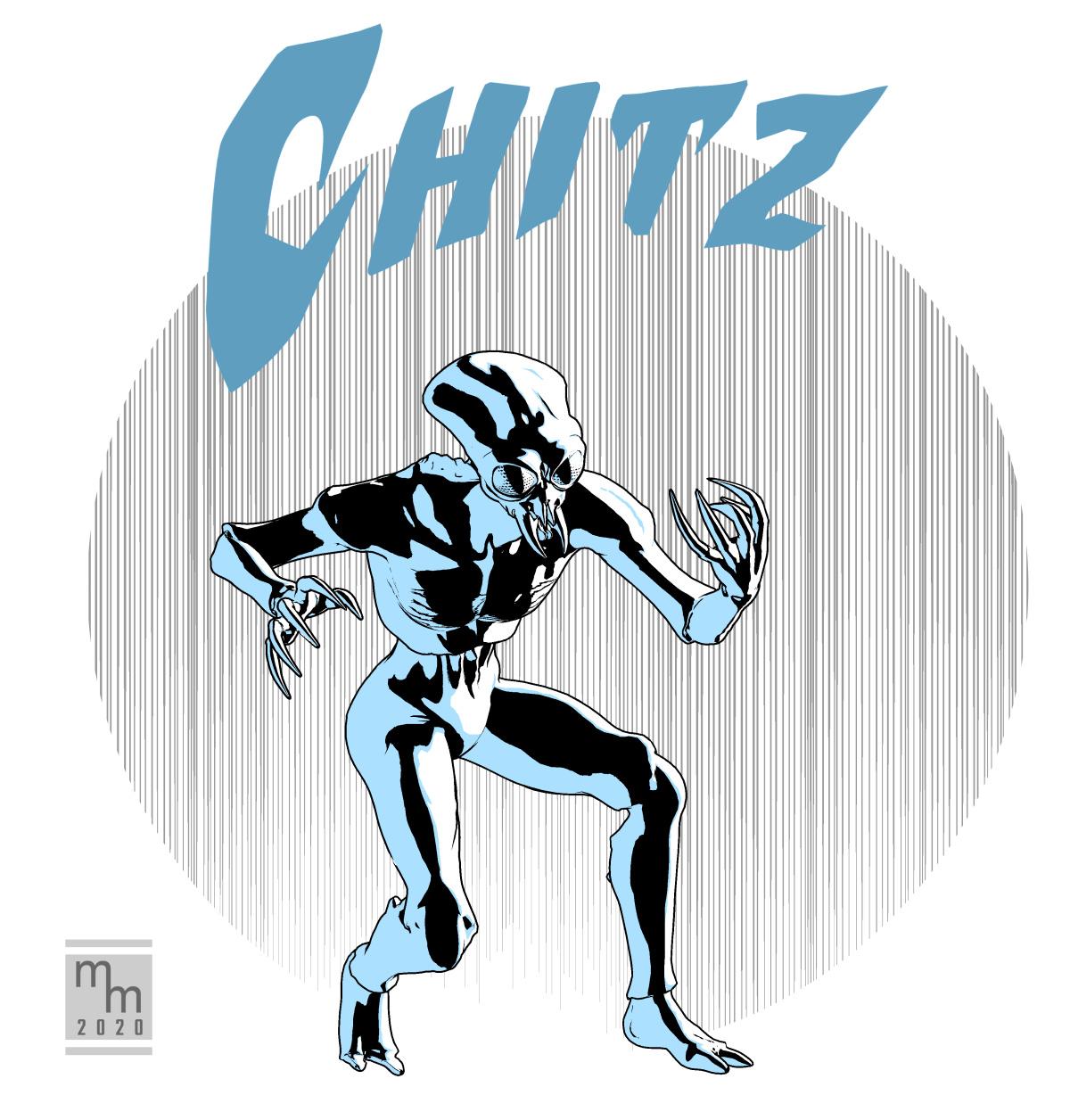
I've got to admit that I've been struggling to get my creative juices flowing. I guess it's all the stress, but now that I'm not commuting back and forth to work every day and I have a lot more time, I just haven't had the gumption to sit down and use the time for anything creative. I'm trying to bust through that wall tonight by just sitting down and making myself work on a quickie character design for my upcoming sci-fi comic project. This is an alien character from the comic. His real name is unpronounceable by humans, so it is greatly shortened to just "Chitz."
The figure is actually Michael 4 with a cool, full-body morph applied. The character is Insectoid by Grotto, available at R'osity. The great thing about this being an M4 morph is that I can still access all the great action poses in my library. Yeah, the extreme body shape means some of them need morphing, but having the base poses as a starting point will save me a lot of time when it actually comes to making the comic itself.
I know this is pretty simple, but I only spent about an hour and a half on this (not counting a few false starts with the lighting), but at least I got something done. And, hopefully, that's a start.
My usual workflow applies: Poser Pro 11 renders using the Comic Book Preview. Clean up is in Clip Studio Paint.
Cool image . I wonder about M4 morphs . For Toon character which mandatory morph I should have ?
Dasan 8 is here
Well, I can agree with that. Just look at the new releases. 2 MORE Teens for G8F. 0 for Males overall. I don't know why that is, but apparently they don't sell. The only reason why I'd wanna buy a teen male is for the skin texture, and morph it further. I just don't think it's fair to have that more females... But on the other side, I understand PAs, why would they spend their time creating something and risk not selling enough.While I apprechiate artist creating male content, I am quite often disappointed by the content we get. Why is it always pretty white ladies, the asian one who got released a couple of days ago, she is so pretty. I haven't bought her yet, I'm waiting for a sale because this March Madness has drained my wallet quite badly. But everytime we get a new male character, it's old, uninteresting. At least to me. There is 1 item from the bundle I actually wanna get, but that's it. Create a high quality male teen character, just like teen Josie or any others, that way people will buy them in pairs. Just my 2 centsI'm sorry, but which store are you looking at? Because I must respectfully disagree. :P
A lot of the characters are matching pairs. Leroy and Nida, Jonathan and Josephene, Kanade and Yuzuru, Deigo and Gabriela, Elios and Ellithia, Sanjay and Kala, Mr Woo and Mrs Chow, Ollie and Edie, Floyd and Mabel, Monique and Darius, Victoria and Michael, etc...it's not like they're only making young girls and old men.
Also, you've got characters like Deigo, Silas, Yuzuru, Sanjay, Nix, Lee, The Brute, Landon, a pretty diverse cast of male characters who aren't old.
If you don't mind me asking, what exactly would you consider an "interesting" male character?
Apparently there is a lack of Teen males. I saw more than one person complain about this.
In my mind there's nothing special about a teen and there are already a few teen males that are great, without the need for a DO character for it, but that is just my preference. I have 0 interest in a teen male.
Autofit? Clone? What do they do exactly?In the days when V4 and M4 were new, if you used any morph dials, only clothes which included the morphs you used would fit the edited figure. Do you recall how Aiko 4 and Hiro 4 were add-ons for V4 and M4? If one used any morphs from Aiko 4 on Victoria 4, then the only clothes that would fit the edited character were the ones which included Aiko 4 morphs (in most cases, unimesh add-ons).
With a weightmapped figure, that's no longer an issue. Genesis 2 female clothes, for example, will fit any Genesis 2 female character - including Aiko 6. No need to buy "unimesh" add-ons. With weight-mapped, it's all built in... whenever it's for the same generation and gender (except the first Genesis, but that one's unusual).
"Clones" for other generations are the tool (or script or whatever you want to call it) that allows clothes from the "clone" generation to fit another generation. So if you want clothes from Genesis 2 female to mostly automatically fit Genesis 8 female, you would need either a "Genesis 2 female clone for Genesis 8 female," or else one of the female Genesis 8 DAZ core figures (see "backward compatibility" in any of those character's descriptions).
If you've fallen behind, it can be helpful to know that there is no Genesis 4, 5, or 6. The number was jumped ahead, to make it match its generation.
Previously, the number after Genesis reflected which generation of Genesis was being used. Beginning at the current generation of figures, the number now matches which generation of overall DAZ figures. (Victoria and Michael were generation 1. Then there were V2 and M2, V3 and M3, V4 and M4 ... Genesis is generation 5, Genesis 2 is generation 6, Genesis 3 is generation 7, and then currently Genesis 8 is generation 8.)
Auto-fit, which seems to be built into all the later versions of DAZ|Studio, uses the clones to do its job best. So you should already have auto-fit, but that's only half of what you need. If, for example, you have the V4 clone for Genesis 2 female, but don't have a Genesis clone, then your Genesis 2 females can wear V4 clothing but not Genesis clothing. At least, not without tons of manual adjustments and maybe run those clothes through some variety of converter.
I don't know the how's or why's. I have only learned what works - from a combination of trial and error, and of seeing what other people post in these forums.
Hope it helps.
Thanks for the very detailed info.
I'm considering the possibility of transfering custom poser resources to daz format, and they use the very old deforming sphere zones for bone control, thanks to my poor ability.
I suppose a autofitted clothing has new weightmaps, otherwise it no longer fits the body as soon as the body changes pose. So if I create a cloth for V4 and have V4 for G2 clone, will DS calculate the weightmaps for me to fit G2? That can be an easier way to make G2 clothing because I can't create weightmaps
 .SereneNight's Sci-Fi Fun Thread 2
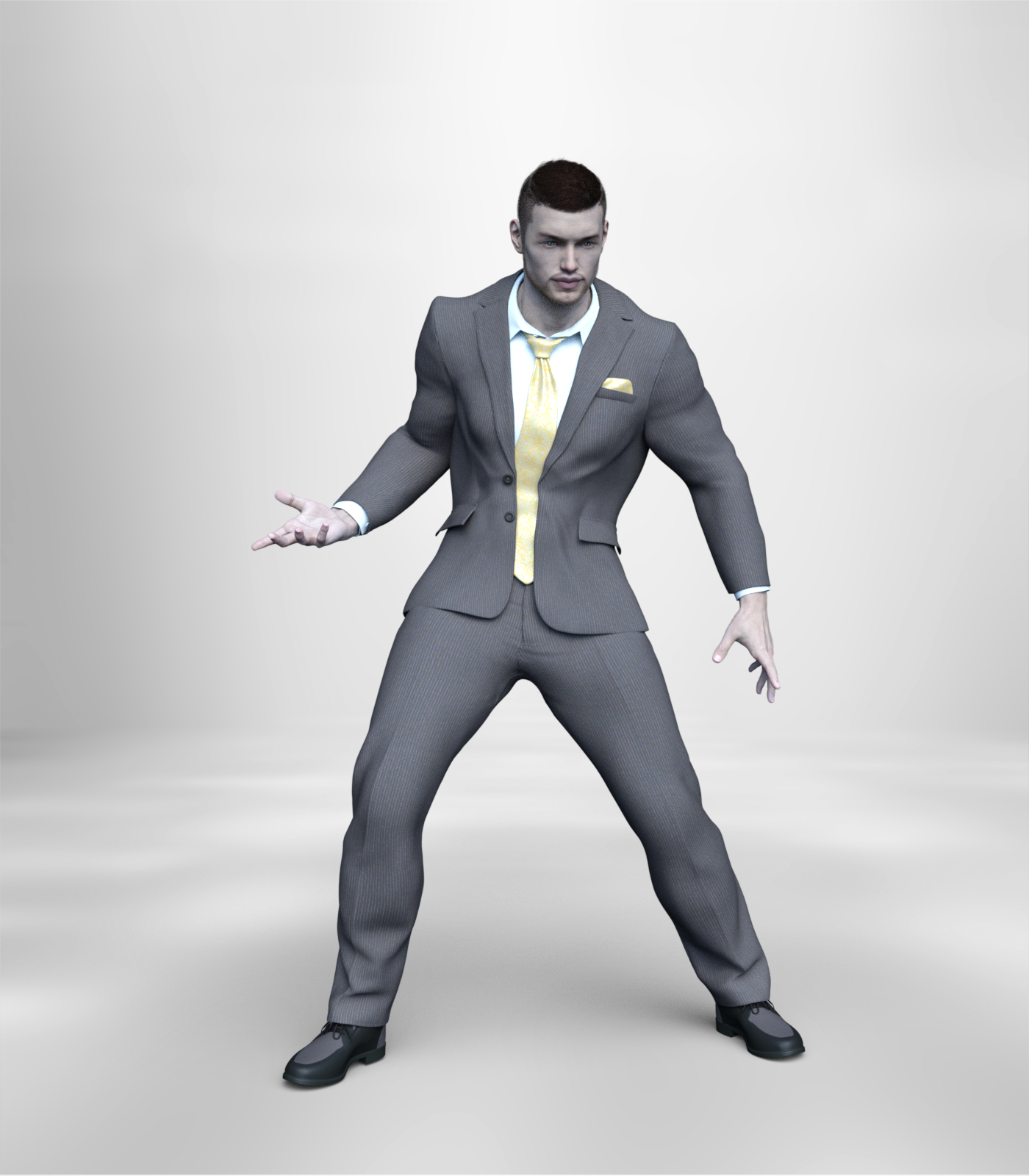
Thank you thank you thank you for making a wonderful suit at last! https://www.daz3d.com/q-suit-for-genesis-8-males hats off to you Anna Benjamin and Mada, for the wonderful Q suit! If you aren't fond of yellow, you can purchase the texture expansion or some shaders, and make this outfit look more mundane or less so, depending on your taste. Includes a open and shut morph, and a removable tie. this is Great stuff!
 Good to hear! I don't like to buy men's clothes until I hear your opinion of them.
so far the q suit, the wave hair, and the retro sci-fi suit are worth a purchase. I can't use the other three items.
Autofit? Clone? What do they do exactly?During generation 3, as in Michael 3, Victoria 3, Hiro 3, Aiko 3, etc., there weren't all that many significant morph packages. Instead, there were a variety of separate figures. Each of those separate figures had his or her own wardrobe (clothes designed specifically for that figure). Several outfits had no morphs in them at all, which meant that if one used any body morphs when customizing a character, only clothes including those specific morphs would fit properly.
In the days when V4 and M4 were new, the same was true for them. Then ... instead of making another batch of different characters, Aiko 4 and Hiro 4 were add-ons for V4 and M4. Girl 4 was another V4 add-on, etc. If one used any morphs from Aiko 4 on Victoria 4, then the only clothes that would fit the edited character were the ones which included Aiko 4 morphs (in most cases, unimesh add-ons).
With a weightmapped figure, that's no longer an issue. Genesis 2 female clothes, for example, will fit any Genesis 2 female character - including Aiko 6. No need to buy "unimesh" add-ons. With weight-mapped, it's all built in... whenever it's for the same generation and gender (except the first Genesis, because that one tried to combine both genders ... results were sufficiently imperfect that future generations returned to separating male and female).
...
"Clones" for other generations are the tool (or script or whatever you want to call it) that allows clothes from the "clone" generation to fit another generation. So if you want clothes from Genesis 2 female to mostly automatically fit Genesis 8 female, you would need either a "Genesis 2 female clone for Genesis 8 female," or else one of the female Genesis 8 DAZ core figures (see "backward compatibility" in any of those character's descriptions).
I don't claim to understand what's happening behind the scenes. I'm not technical. How I tend to think of it, which seems to work for me, is ... Without the clone to function as an interpreter, clothes from generation Q won't understand how to correctly fit generation X. They will try, because there's autofit, though they may not succeed very well.
...
If you've fallen behind, it can be helpful to know that there is no Genesis 4, 5, or 6. The number was jumped ahead, to make it match its generation.
Previously, the number after Genesis reflected which generation of Genesis was being used. Beginning at the current generation of figures, the number now matches which generation of overall DAZ figures. (Vicky and Mike were generation 1. Then there were V2 and M2, V3 and M3, V4 and M4 ... Genesis is generation 5, Genesis 2 is generation 6, Genesis 3 is generation 7, and then currently Genesis 8 is generation 8.)
...
Auto-fit, which seems to be built into all the later versions of DAZ|Studio, uses the clones to do its job best. So you should already have auto-fit, but that's only half of what you need. If, for example, you have the V4 clone for Genesis 2 female, but don't have a Genesis clone, then your Genesis 2 females can wear V4 clothing but not Genesis clothing. At least, not without tons of manual adjustments or else using some variety of converter.
I don't really know the how's or why's. I have only learned what works - from a combination of trial and error, and of seeing what other people post in these forums.
Hope it helps.SereneNight's Sci-Fi Fun Thread 2
Good to hear! I don't like to buy men's clothes until I hear your opinion of them.Thank you thank you thank you for making a wonderful suit at last! https://www.daz3d.com/q-suit-for-genesis-8-males hats off to you Anna Benjamin and Mada, for the wonderful Q suit! If you aren't fond of yellow, you can purchase the texture expansion or some shaders, and make this outfit look more mundane or less so, depending on your taste. Includes a open and shut morph, and a removable tie. this is Great stuff!
SereneNight's Sci-Fi Fun Thread 2Thank you thank you thank you for making a wonderful suit at last! https://www.daz3d.com/q-suit-for-genesis-8-males hats off to you Anna Benjamin and Mada, for the wonderful Q suit! If you aren't fond of yellow, you can purchase the texture expansion or some shaders, and make this outfit look more mundane or less so, depending on your taste. Includes a open and shut morph, and a removable tie. this is Great stuff!
New Installed Morphs Not AppearingHave you mamaged to get your morphs to work? I seem to have the same problem with 3 morphs: HD gen 8 female head morph, gen 8 female body and head morphs. Tried to reinstall manually, nothing works. Any help is appreciated.Auto Muscle Enhancer HD [Commercial]I made a few more images to show it in use for you all and tide you over until D.Master's product is released. This time I made a quick young Sasquatch who's doing some makeshift cross countrying training in the woods. I have AME cranked to 100% on this with some Maxx dialed in and some gorilla for g8 added as well. Wanted to show you it can work with things other than humans. It's definitely worth the wait!
Thank you for the new shots. I don't see the same details on the bent feet as the youtube demo video earlier. Is it because the render is done in lower subD? Also, if not too much trouble, can you do a render of very low flex size dial for non-bodybuilder type character to highlight what AME can add in realism even for average body size character?
You're welcome. I rendered him out at 4 SubD. It's partially due to some custom morphs to make Bigfoot's "big feet" more proportional, the hd morph is triggering but it's pretty low on the heel due to how the heel is pushed out.
Regarding the other renders, I can try rendering them out tomorrow. Just bear in mind that AME itself is going to change the shape of the character into a lightweight bodybuilder. If you want an "average Joe" type character, you're gonna have to use AME in low amounts.
Autofit? Clone? What do they do exactly?I tried to catch up with the new things these days and found my knowledge really out of date.
It looks like the clothing for one figure can be adjusted to fit another. But the description really doesn't tell me whether it transforms the clothing to fit the figure or transforms the figure to fit the clothing. I remember seeing 'clone'-named morph channels in Genesis. But as far as I know, morphs change the current figure, don't affect the other. Is there a new technique?
If this can be done and the result be saved, it may also help me with the weightmapping. I can create base models but weightmapping is beyond my ability. I'm still using deforming spheres for custom G2 clothing in poser.
Report sales errors here: "There's Always Another Sale™"So it would appear that Face Transfer Unlimited has been removed as an option now. THAT is supremely disappointing...
Yet it's still listed in the Resources and Addons section of the current promo.
Report sales errors here: "There's Always Another Sale™"Why is Face Transfer Unlimited not discounting when I have the Dasan 8 Pro Bundle and 3 items in my cart? As a PC+ member, it shows in the list of available DAZ Originals that can be taken for free when those conditions are met...
Lightning (Thunderbolt)Not as versatile, but mcasual has 7 morph prop
https://sites.google.com/site/mcasualsdazscripts/mcjsevenarcs-prop-and-script
Strange Cracks Caused by Hair appearing in the characters forehead.This happens to me a lot with hair and with clothing cracking and showing the flesh of the character through the fabric.
I bought "Mesh Grabber" a tool for use in Daz and it works well to edit the mesh. It has a lot of other uses like styling clothing and other geometry.
Mesh Grabber is my go-to tool when I need to form the mesh to where I need it. It is easy to use too. At least I was able to figure it out fine.
The basic stock tool works for most cases.
A lot of hair models don't have scaling settings and smoothing modifiers use a ton of CPU/GPU resource.
It is better to just reshape the mesh to fit the head by hand where you need it precisely.
A lot of times resizing the cap does not work because the mesh is only out in a specific place and not all around uniformly.
I am not sure who made Mesh Grabber but it works and you will never struggle over this problem again.
I concur - Mesh Grabber is one of the most valuable tool apps for Daz Studio, and is also my go to (another is Scene Optimizer, but that's another thread). Note though - it takes time to build the skills to use it effectively. It has various options for pulling/pushing the wire mesh and one needs to know the best option to select as well as the size of the portion of the mesh selected. Last night I was using it to morph the face and ears of a character. One way to learn to use it is too create various primitives with enough segments to get a feel for the different pulling points, size of area and pressure to use. There are also some good tutorials for the app on Youtube (search "Daz mesh grabber").
Best model to start with?I started out back then with the intention to create my own characters but lack the skill to texture myself or learn it. But there are tons of quality character packs on the market for this purpose. I have drawn my character in 2D as concept art and then looked for character packs that included what I wanted. I created my own basic head morph but you can do the same with morph packs. Then I added an HD addon to it.Depending on your character it might be you only need to purchase one character pack and one morph set. I started out with 1 clothing set and didn't purchase hair. As others mentioned you can use free HDRIs in the beginning if you don't want to purchase a light set in the beginning (to be honest in my opinion for some powerful light sets it makes sense to become more familiar with Iray lighting first before you purchase them to understand their strengths). With these minimums you can already make renders with your custom character.
[Released] RSSY Clothing Converter from Victoria 4 to Genesis 8 Female [Commercial]If you are talking about looseness, there are a ton of helper morphs to fix things like that. The helper morphs are in the Parameters pane, below Actor->Converter Morphs (see Figure 10). Adjusting the Tighten All morph and turning on Smoothing can fix most issues.
If you are talking about shoulder armor becoming all bendy, that cannot be fixed.
I was having problems with bodysuits and coats and such, not armor or props that were supposed to be stiff. So far nothing I can do fixes the problem--all my V4 outfits look like they were morphed to fit Wilt Chamberlain while the actual characters are Tom Cruise--but I do have to give you props for putting in the hard work to get this program together. Even if it doesn't work for me, I salute your creativity and technical savvy.
Can you post some images? and what outfits? SY or I can see if we have them and what we get.
Dasan 8 is hereGreat character. I usually only buy for the skins, as I morph the bejeesuz out of my characters, and Dasan's textures are really amazing. No brainer purchase for me. The cost for all the items I wanted was remarkably cheaper if I bought the Pro Bundle. Though I didn't like everything in the bundle itself, I couldn't resist the purple banner deal of $30 off from 5 different categories by buying 3 add-on purchases. I could hardly get my cart out of the door.
POST EDIT - Is anyone getting a funky eyelash thing going on with Dasan 8. Both the HD and regular version of him have these flat black cardboard strips for eyelashes when you render him? Just wondering if i should re-install him?
POST POST EDIT - Had to reapply the iray eyelash material to the character, but straight out of the box it looked like the material was not applied. But all fixed now, but odd. This is the first time I have run across this.
Best model to start with?If you are making your own characters, then the head morph packages are extremely useful for your task. The Base characters that come free with dazstudio are the starting point, then these morphs can help you change the look of the face and head.
https://www.daz3d.com/genesis-8-male-head-morphs
https://www.daz3d.com/genesis-8-female-head-morphs
There are other head morph packages which you can get later, but these are the Daz3D official morphs.
Is there any way to save a skeleton as a pose?I'm not sur I follow - if you want to give the figure wider shoulders you need a morph, and then to adjust the rigging to match. If you chnage the rigging but not the mesh then the result will be bends in the wrong place - if you really want to do that you can, via the Joint Editor tool, and then you could create a new proeprty and use ERC Freeze to link the changes to that
Cannot save my custom morphsyeah i cannot find them in the folders...no where ...seems like a bug or something
I was able to find the file in my dropbox(the third path it gave me a choice of) but now I'm unsure with what to do with this file or where to put it
The files are not meant to be visible inside DS, they go in the hidden Data folder, in specific sub-folders. Are they actually loading onto the figure? If so theya re in he right place (other than which cntent directory they are in, perhaps - you can set that at the top of the options dialogue when saving the morph asset).
Daz 3D is part of

Connect
DAZ Productions, Inc.
7533 S Center View Ct #4664
West Jordan, UT 84084Licensing Agreement | Terms of Service | Privacy Policy | EULA
© 2026 Daz Productions Inc. All Rights Reserved.