-
Which are the most fit female models?
Good list! I'd expand on it with:
Olympia 7 (and Olympia 8 I suppose, but I really dislike that character)


And here's a free G8M muscular morph:
https://www.renderosity.com/mod/freestuff/?item_id=79046(There used to be another awesome G8F muscular morph by someone called kingfisher/tastymooncheese, but it appears to be taken down...)
Novica & Forum Members Tips & Product Reviews Pt 13I took Paisley for Teen Josie 8 and tried aging her a bit using the Face Young morph set to around -30% and applying a number of other morphs to various parts of the face/head. I also used her base skin, which is probably one of the best, imo. For the lips, I removed the makeup and just decided to use the Diffuse Overlay layer to add the color.
Very nice. Those lips are definitely attention-getting, particularly with that shade of lipstick. :)
[Released] ManFriday's Mesh Grabber [Commercial]Dumb question about the Morph Spawn option, it will work on non-zeroed meshes?
I mean, if I use the grabber on a piece of clothing or a geograft on a char sitting far away from the world center, the morph will be created or I have to unparent the clothing/geograft and zero it to have effect?Novica & Forum Members Tips & Product Reviews Pt 13Dasan 8 Pro Bundle G8M Q Suit G8M
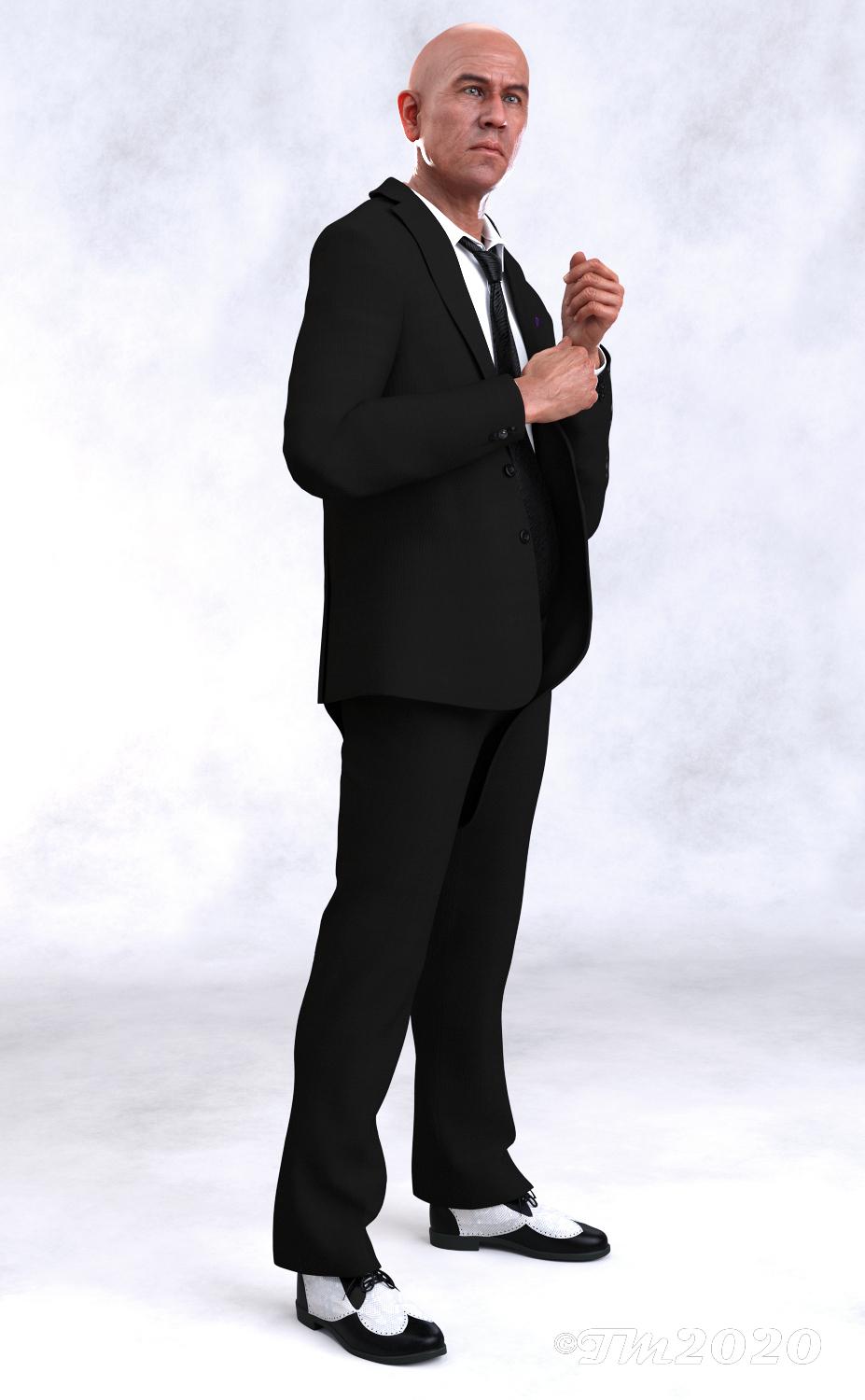
Dasan 8 Pro Bundle- Honestly I loaded the HD version but I can't verify that I rendered that! I forgot to check it before I closed it out and didn't save it. His look is good for an older gentleman but I will probably dial spin him most the time. I like his skin it looks really good to me. I have not messed with anything else in the bundle beyond the Q Suit. Honestly if it hadn't been for deals I probably would not have gotten the bundle, there is to much in it I don't really care for.
Q Suit-Nice suit! I know the color choice was probably because of the bundle but goodness! So I modified it with some Unique Fabric shaders from ArtCollab. Its got a few morphs to help with the fit. It also has some on/off buttons, for like sleeves and shirt tail, in the parameters which I loved because I didn't have to go hunt down separate materials or presets in the folders. It is not dforce but it has a drape morph which I did use in this render. It's also has an open and closed version of the jacket. Overall I really liked the suit, much better than the bouncer suit in the Dain 8 bundle.
 StrangeFate's stuff: Wild Kelpie Battle Outfit!
Working on Shapes support while Roguey pulls her hair trying to rig the Waist with all the moving parts, in a way that will deform and still work with most shapes...
Rather than doing custom morphs for the different shapes/characters I decided to add all the morphs and rigging necessary to all the pieces to allow them to be deformed to match (hopefully) any shape.
Other tan the Ogre Belly piece which was a nightmare to accomodate and needed a custom morph, all other pieces use combinations or morphs to shift, expand, thicken and otherwise adapt the armor/clothing as needed, so that it doesn't only just fit, but can be bulked up again to look imposing on bigger characters like the Ogre.There will be custom shapes with the armor, but other than the Ogre belly piece, they're all being done with the included morphs, which I hope will mean that anyone will be able to adapt the pieces to almost any type of new body.
Parts are not mirrored yet, so they only exist on 1 side atm :)

That looks awesome
Auto Shape Enhancer [Commercial]@DMaster, Is the master controller supposed to control the new Abs morph? It doesn't.
Yes, It should. It was an ad-on for you to adjust hidden abs muscle showing or not showing. I like the muscle showing. Some people may need not have it. So I created one for a quick request.
I will set up an update next week. and put it here. both male/female. It is a very small fix. I don't want to trouble DAZ to go about testing and uploading the DIM. Unless I plan to update it even more. Thinking about it. I will put in some HD wrinkles as a teaser to my Auto Wrinkle Enhancer HD. This way we can have a real update to ASE for DIM install.
I will put some wrinkles in the arm, knee and add an HD Rib Cage for the update next week.
Thank you.
Auto Shape Enhancer [Commercial]@DMaster, Is the master controller supposed to control the new Abs morph? It doesn't.
Yes, It should. It was an ad-on for you to adjust hidden abs muscle showing or not showing. I like the muscle showing. Some people may need not have it. So I created one for a quick request.
I will set up an update next week. and put it here. both male/female. It is a very small fix. I don't want to trouble DAZ to go about testing and uploading the DIM. Unless I plan to update it even more. Thinking about it. I will put in some HD wrinkles as a teaser to my Auto Wrinkle Enhancer HD. This way we can have a real update to ASE for DIM install.
I will put some wrinkles in the arm, knee and add an HD Rib Cage for the update next week.
Under performing GPU, could the solution be as simple as...Adding RAM won't help. If you're not seeing something like a 25% render time reduction then you need to check the 1070's clock speed during renders. If that is way below the base clock that could show your PSU is too weak, or that the card is overheating.
The renders will always take a while to start on that system. You're running PCIE gen 2 which is much slower than gen 3, slow enough the lanes could easily be getting saturated during a scene transfer. Further DDR3 is slow. It's max speed is the same as DDR4 minimum. You might even have SATA 2 rather than 3 which is also slower.
As to a benchmark showing the 1070 greatly underperforming that could be the PCIE gen 2 interface comparing to the gen 3 which is what most people are on.
But as I said check the cards clock speed and other stats using GPU-Z and you'll see for sure.
Problem creating morph on pleated skirtTrying to learn content creation I'm up to rigging and creating morphs. I've followed Sickleyield's tutorials, which are amazing by the way. I created a pleated skirt for Genesis 8 Female and managed to create a morph for the Left thigh side which worked perfectly. Used the same process to create a Right thigh side but the skirt doesn't return to zero when the side to side slider is moved back to zero. See images below. This is my process.
1. Create the posed skirt in marvelous designer.
2. Import into Daz as morph target.
3. Open Property Hierachy
4. Highlight side-side in skirt right thigh bend and move across to 1st stage controller in the property hierarchy.
Haven't saved this morph as it's not working properly. The first one, that is left thigh side is saved and working as it should.
Am I missing something.morph from zbrush(face) messes up the fingershello amazing daz users :)
I have a question; I did a morph(just the face) for a genesis 8 female in brush and then brought back the morph, everything works correctly at first glance. morph from 0 to 100, nothing else in the body changes, everything looks fine.
but then when i put poses, the fingers of my character get all messed up when i have my morph set to 100. How can i fix this? I'm pretty certain my morph doesn't move any verts in the fingers at all.
looking forward to hear your ideas
thank you.
Face Transfer failed to load base materialOK
I ahve remved all Starter Essentials (Except Mimic) and downloaded fresh and reinstalled ALL of them again and I still get this missing error. Is there ANY help at all or are we just out here with our pants down? I have NO desire to be moving my content files around and such.
The required mat then should be found on whichever Drive at:
:\DazDocs\DAZ 3D\Studio\My Library\data\DAZ 3D\Genesis 8\Female\Tools\Presets\Genesis 8 Females Simple MAT.duf
Sometimes rebooting the computer helps D/S reregister [or whatever it does] all what it has.
You ROCK! Thanks a bunch even though my initial spelling was horendes. I actually had to add in both male and female but is not getting errors now.
Thanks
You're quite welcome, glad you got it working! Enjoy.
btw - if you find that you want the face morphs um, 'fuller', this product was an instant buy for many of us when it came out:
https://www.daz3d.com/face-transfer-shapes-for-genesis-8
It was designed to compliment the Face Transfer plugin.
"Body By Sublime Series 8 Female" Question...Good, then you won't have to worry about buying all those base characters or possibly asking for a refund. I'm curious, what do you mean that you don't get the sliders? There must be some kind of slider for each style that allows you to increase/decrease the strength of how much the morph is applied. Otherwise, I can't imagine how you could combine them together; especially at full strength, as it would probably end up looking hideous.
Celebrity Look-a-Likes for 3D figures Part 2Maybe already asked, and maybe already answered... But has anyone seen a a morph of Dawn Wells (aka "Mary Ann" of Gilligan's Island)?
If not, what the heck are you all waiting for!
G
There ia a G3 I think that looks like her, from rendo...but I can't remember the model name. Will look about.
Hylas' corner
This Centaur is very serious about Butterflies.
Might have overdone it with the bloom and saturation... or maybe it's just the right amount for a slightly kitschy fairy tale vibe?
Freebie credits:
Skin by emotionaldreams: https://www.renderhub.com/emotionaldreams/ivana-for-genesis-3-and-genesis-8-female
Scar by SmidA: https://www.deviantart.com/smida460/art/SmidA-Scarface-767981202
Morph by Gregory H. Bontrager: https://sharecg.com/v/89882/related/21/DAZ-Studio/Elvis-Presley-for-Genesis-8-Male
Tree by Design Anvil: https://www.facebook.com/DESIGN-ANVIL-427676333955561/app/212097992149339/
Grass by Erock3D: https://erock3d.com/download/erock3d-free-grass-system/
HDRI by valzheimer: https://gumroad.com/l/DXEPjWhere to find Stalker Girl shirt?Probably unavailable, but you could try to contact the vendor through Customer Service. I don't think smay frequents these forums, but there are more generic alternatives, like PTF Grungy Threads (there are several products that add dirt, but I don't know of any others that add tears). That will do basically the same thing, but you are not limited to a single outfit or a single type of tear, it can be applied anywhere. It's a bit tricky to work with, but there are a couple of threads dealing with it.
Thank you, that makes sense if I can contact that way. I know there are some texture & other solutions, but I'm terrible at combining stuff well enough to make textures look good.
well there is the new ones for Genesis 8
https://www.daz3d.com/dforce-torn-clothes-for-genesis-8-females
is conforming enough you could dial in the genesis shape on G8F then convert it to a prop and use the transfer utility
Thank you. I do have that set, I was just being OCD about trying to find the original used in the promo image.
Thanks for the quick responses. :)
Where to find Stalker Girl shirt?well there is the new ones for Genesis 8
https://www.daz3d.com/dforce-torn-clothes-for-genesis-8-females
is conforming enough you could dial in the genesis shape on G8F then convert it to a prop and use the transfer utility
StrangeFate's stuff: Wild Kelpie Battle Outfit!Working on Shapes support while Roguey pulls her hair trying to rig the Waist with all the moving parts, in a way that will deform and still work with most shapes...
Rather than doing custom morphs for the different shapes/characters I decided to add all the morphs and rigging necessary to all the pieces to allow them to be deformed to match (hopefully) any shape.
Other tan the Ogre Belly piece which was a nightmare to accomodate and needed a custom morph, all other pieces use combinations or morphs to shift, expand, thicken and otherwise adapt the armor/clothing as needed, so that it doesn't only just fit, but can be bulked up again to look imposing on bigger characters like the Ogre.There will be custom shapes with the armor, but other than the Ogre belly piece, they're all being done with the included morphs, which I hope will mean that anyone will be able to adapt the pieces to almost any type of new body.
Parts are not mirrored yet, so they only exist on 1 side atm :)
Novica & Forum Members Tips & Product Reviews Pt 13I took Paisley for Teen Josie 8 and tried aging her a bit using the Face Young morph set to around -30% and applying a number of other morphs to various parts of the face/head. I also used her base skin, which is probably one of the best, imo. For the lips, I removed the makeup and just decided to use the Diffuse Overlay layer to add the color.
Paisley skin, Translucency @ 25%
Paisley morph 100%
https://www.daz3d.com/paisley-for-teen-josie-8
Teen Josie 8 morph 50%
https://www.daz3d.com/teen-josie-8
Eye color G8Eyes08 from Reese HD for G8F
https://www.daz3d.com/reese-hd-for-genesis-8-female
Various other morphs used for the face & body:
https://www.daz3d.com/genesis-8-female-head-morphs
https://www.daz3d.com/genesis-8-female-body-morphs
https://www.daz3d.com/ej-face-morphs-and-details-for-genesis-8-females
https://www.daz3d.com/ej-body-shape-and-detail-morphs-for-genesis-8-female-s
https://www.daz3d.com/rarestone-s-face-morphs-collection-for-genesis-8-female
https://www.daz3d.com/musculature-hd-morphs-for-genesis-8-female
https://www.daz3d.com/ultimate-natural-bend-morphs-for-genesis-8-female
Low Pigtail Hair
https://www.daz3d.com/low-pigtail-hair-for-genesis-3-and-8-females
Cherry Blossom Top
https://www.daz3d.com/dforce-cherry-blossom-outfit-for-genesis-8-females
School Girl Skirt & Stockings
https://www.daz3d.com/school-girl-costume-set-for-genesis-8-females
Burlesque Shoes
https://www.daz3d.com/burlesque-outfit-for-genesis-8-female-sAuto Shape Enhancer [Commercial]@DMaster, Is the master controller supposed to control the new Abs morph? It doesn't.
Old cr2 to Duf - ERC subcomponents lost in conversionI have been playing around with converting old 3d Universe characters to duf. I know that some in the forums indicate that it isn't worth it because weight mapping can cause serious wonkiness. Either way, it has been a great way to learn more about DS and what properties impact what.
With the Toon Snake, I ran into a new (for me) puzzle. The toon eyes are a slider/morph but there is a subcomponent of ERCs. They are the only piece that I can't figure out to have a accurate conversion. Is there a way to preserve them? Currently, my DS version of the toon snake only has traditional round eyes because the subcomponents are not carrying through the conversion.

Thanks for any help you may be able to provide.

Daz 3D is part of

Connect
DAZ Productions, Inc.
7533 S Center View Ct #4664
West Jordan, UT 84084Licensing Agreement | Terms of Service | Privacy Policy | EULA
© 2026 Daz Productions Inc. All Rights Reserved.