-
[Released] Character Converter from Genesis 2 Male to Genesis 8 Male [Commercial]
It sounds like when you were trying to get it working, something got corrupted. We need to see which morphs are being used. One of them is causing the issue. Can you show me the morphs being used? And then one at a time, try to turn it off and see what happens.
Sorry for the late reply, I'm up to my eyes in computer and project issues.
I've started off by uninstalling and re-installing the script.
I've created character presets for all of the Daz/PA models that I've tried to convert. The characters are: Minotaur 6, Reptillian 6, RawArt's Legendary Demon HD, Jepe's Orso, and one of my own characters. My character uses a morph which I fixed before its second transfer.
Minotaur and Reptillian 6 have transferred (as morphs). But when I load from the Content Library, I only get the G8M base.
My character has transferred okay. I just need to do some corrections in Blender.
Jepe's Orse does transfer, just not very well (see pic attached). With one attempt, he came out looking like Lucian 7 (with Force Convert).
Trying to convert Legendary Demon crashes Daz Studio, and throws out a "Fatal Error" message. There is a saved Character Preset, but converted Orso loads in. There image loaded shows the morph compared to the original version.
I've also been converting one character at a time. When I was try to convert all of the characters at once, all of them came out looking like Legendary Demon (like the pic on my last post).
When I was asking to show me the morphs when you load in a character, I meant load the character, select it, and then select "Currently Used":
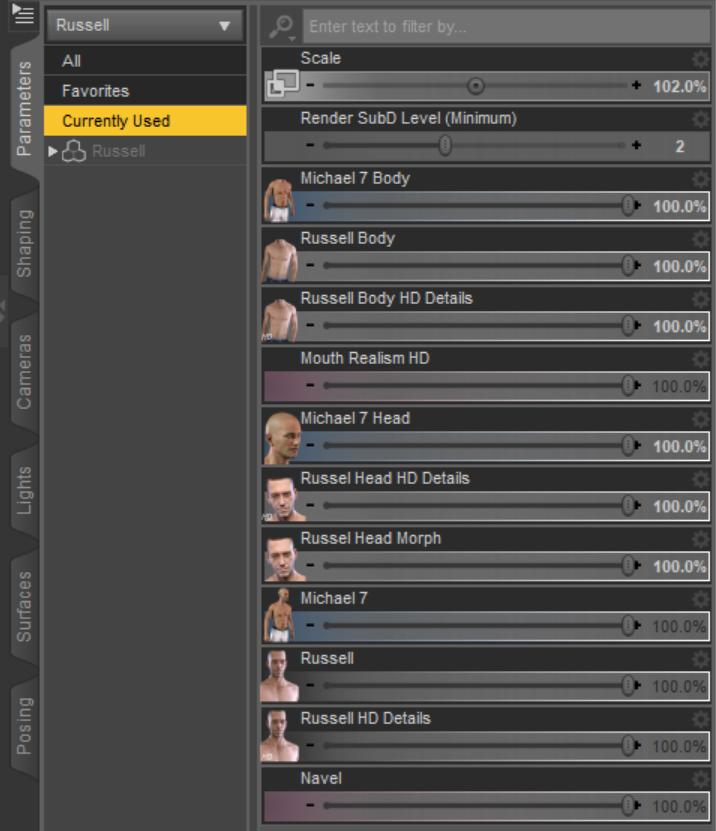
This shows us which morphs are changing the character. Then you dial down each morph by itself to see which one is giving you the corrupted look.
Looking for a bird character for G8FThere is a free script that transfers Genesis 3 morphs to Genesis 8, but will also transfer G8M morphs to G8F. Unfortunately none of the existing commercial products available currently allow this, so it is only via this free script you can do cross gender transfers for Genesis 8.
Download the script from here:
https://github.com/ArchitectMCP/GenNext
There is a long thread discussing the script here: Most important are the posts near the end by Singular Blue, the author of the script:
https://www.daz3d.com/forums/discussion/176271/morphs-from-g3-to-g8#latest
Replicate a face from a frontal photo, at hand, no plugins that failsHi.
I am also interested in these kind of things and have messed with it for a long time.
My conclusion is that the most important is not the morph itself but the textures and final rendering settings used.
But of course, good morphs also help a lot if the face has unique features.
in that sense here at daz we have a fellow user, @TritiumCG, who makes great head morphs for a very reasonable price. you can check his devianart page for more info:
https://www.deviantart.com/tritiumcg
Adding my own clothing to content librarySo, I can drop my own clothing into the scane. Then, I can use transfer utility to put it on the character. What should I do after that? How to save it in the content library?
Fixing a JCMHi I am modeling a shirt and would like to figure out how to fix a JCM or create a morph for the shirt that fixes the problum.
I created a video to help show my problum.
Here is the link
https://drive.google.com/file/d/1uf0iiSOhaHxJuGzTEFZ32AN_A9fpoGrc/view
Every time I export my shirt, fix the problum. I am only use a smoothing brush like in zbrush so no vertexes are added or taken away, so it should work. but when i import the model in moreph loader pro, and create the morph. When i dial up the properties all i get is my shirt turning into an explosive mess.
Any help is greatly apriciated. Thank you so much
TritiumCG Freebie ThreadLovely renders guys! I always enjoy seeing my morphs in action. :) <3
This time the theme is game characters, three of them:
https://www.deviantart.com/tritiumcg/art/DOA6-NyoTengu-Head-and-Body-Morphs-for-G8F-836342912 | https://www.deviantart.com/tritiumcg/art/SFV-Cammy-Head-Morph-for-G8F-835154763 | https://www.deviantart.com/tritiumcg/art/ME3-Ashley-Williams-Head-Morph-for-G8F-837044096
You can of course always mix-n-match them however you want, there's no rule that says you have to use them for who they're supposed to be depicting (I think Cammy's and Nyotengu's head dialed in a small amount might add just a little anime flavor for example). :)
Looking for a bird character for G8FI want to do a picture of someone's D&D character. Unfortunetly they are playing an Aarokokra (bird person).
I haven't been able to find very many avian characters anywhere. I have the G8F Harpy that gets me half way there. I just need a good bird head morph.
There's a decent one for G8M, the "Ancient Horus for Genesis 8 Male" by RawArt, but I need it for G8F.
Is there a utility to transfer morphs from G8M to G8F? I know that most of the morph transfer utilities have trouble with extreme morphs like a bird head.
Does anyone know of a good bird person figure?
There is an old raven person figure for Genesis or Genesis 2, I have it but it doesn't hold up well with the current figures.
Thanks
Edit: sorry misunderstood your goal...forget my message
 How To Keep The Original Clothing Size?
Hi everyone!
A thing I've never understood with Daz, is how to keep the original size of a piece of clothing, avoiding the auto-follow/transform that comes with every element of the wardrobe.
A situation I often find me in, is to shrink a figure.
I don't want the clothes to follow that shrinking, instead I'd like them to keep their original size, and then let dForce make its magic.It's not impossible to give a realistic effect for small changes: I transfer the piece of clothing, then I use Fit Control and I apply dForce.
But, as it shows in the attachment, the results of this method are underwhelming when the size change is noticeable.What am I missing?
Thanks in advance for your help!
EDIT: I had forgotten to modify the weight in dForce, you can see the result with all weight filled.
Still, is there any way to keep the true original size?AIUTO...CHI CONOSCE L’ITALIANO? PARTE DODICISi quel bundle ad alcuni appare free e altri no.
Meglio aspettare che fixino, allora.

Imago, tu che sei la persona con le conoscenze più versatili di Daz che conosco, mi sapresti dire se c'è un modo semplice per fare questa scena bene?
Ho trasferito la maglia che aveva l'uomo, e ci ho applicato dForce e una marea di morph di Fit Control, ma il risultato fa abbastanza schifo :(
Il problema è che questo benedetto Daz modifica sempre le dimensioni dei vestiti, ma non sarebbe realistico se la maglia si rimpicciolisse da sola :/
EDIT: lavoricchiando con dForce ho ottenuto questo risultato. Comunque si può fare di meglio?
Looking for a bird character for G8FI want to do a picture of someone's D&D character. Unfortunetly they are playing an Aarokokra (bird person).
I haven't been able to find very many avian characters anywhere. I have the G8F Harpy that gets me half way there. I just need a good bird head morph.
There's a decent one for G8M, the "Ancient Horus for Genesis 8 Male" by RawArt, but I need it for G8F.
Is there a utility to transfer morphs from G8M to G8F? I know that most of the morph transfer utilities have trouble with extreme morphs like a bird head.
Does anyone know of a good bird person figure?
There is an old raven person figure for Genesis or Genesis 2, I have it but it doesn't hold up well with the current figures.
Thanks
Replicate a face from a frontal photo, at hand, no plugins that failsthere are several fan pages of her on facebook found a few good side profile pics of her which will help get her head morph fairly accurate in facegen maybe some tweaking in studio with other face morphs. Another thing with facegen is it also gives you a body skin texture based on her skin texture which has worked pretty well for me with others done and you can add other body skin elements like stretch marks or makeup via skin builder 8. There also a lot of bikini model shoots she's done so you can use them as a referance to recreate her body shape via morphs. Still as others said hard to find an image minus bangs or closed mouth which makes her tricky. Anyway here's some side head shots found for any others to try and replicate her tooka long tie to find these ones. With the frontal image I tried to blend her closed mouth from your image didn't get it quite right but maybe someone can fix it
Graphmate or How to flatten that morph lineYes, even when I run a clear animation, which clears all my WANTED animation, the "morph lines" in graphmate don't clear, and those lines correlate with my pects bouncing, I just can't get rid of the bounces, driving me nuts. Even if I delete those 5 keys, the bounces are still there. Pulling my hair out.
Auto Muscle Enhancer HD [Commercial]Hi Lonesome Cowboy,
Hopefully, AME will get you a bit closer to what you are looking for.
Morphs are easy to make. You just have to have a base figure and a muscle figure. From here you can just take a region from the base and tell it to morphs to 2 figure regions. Thus you have muscle morphs - these are the separated muscle area you are talking about.
The morphs above are what everyone is doing. It is static in space. It is Ok for posing but it will be time-consuming to do it in animation.
When you start to move or pose the figure, the muscle in real life does not stay the same. Muscles are dynamic. they do not follow the same shape when you flex and move. So for me to create and adjust every muscle it will not be feasible. It is something that I know does not work for me. So, no to separate morphs.
AME is a G8 figure with muscle. Like the G8 figure, the joints and muscles are slide or move in order to keep the shape of the figure. Each part of the muscle cannot have its own morphs. When the arm goes up the body's skin moves. I have morphs where 4 joints have to bend in order for it to load or activate. I am morphing shape on top of the shape, on top of the shape, on top of the shape, and on top of shape in order to get the final shape without distortion.
It is fun figuring out how to do it. It is not fun when you start animating and the arm just morph-explode -I have to go back to the beginning to find the layer that messes it up and fix it.
Back to the point about separate morphs. Daz does have muscle morphs. You can add these on top of the AME. Don't overdo the morphs. It will work. Just not in animation.
I am still learning. It can only get better.
Auto Muscle Enhancer HD [Commercial]I was told folks here are talking about my Pose Packs I created for David3 back in the day and sold at Renderosity. Pretty confident you can't take those morphs from my old packs and resell them. We're not talking about doing that, are we? Just reference stuff, right?
Don't panic!
You see that they are only a good reference.
I see your link at rendo:
https://www.renderosity.com/mod/bcs/d3-hunkz-3/56171but the morphs are not available any more.
Where do you offer them at the moment?@DMaster: it would be fantastic if you can create similar morphs for G3M + G8M
When i use muscle-packs from different vendors, the whole figure is deformed in most cases: head and shoulder and other body-parts are often missformed, the legs are forgotten to morph ... or something in the anatomy is wrong.
It would be great to get
a) the whole body morph
b) separeate morphs for the body parts.
My images above are for orientation
[Released] Character Converter from Genesis 2 Male to Genesis 8 Male [Commercial]It sounds like when you were trying to get it working, something got corrupted. We need to see which morphs are being used. One of them is causing the issue. Can you show me the morphs being used? And then one at a time, try to turn it off and see what happens.
Sorry for the late reply, I'm up to my eyes in computer and project issues.
I've started off by uninstalling and re-installing the script.
I've created character presets for all of the Daz/PA models that I've tried to convert. The characters are: Minotaur 6, Reptillian 6, RawArt's Legendary Demon HD, Jepe's Orso, and one of my own characters. My character uses a morph which I fixed before its second transfer.
Minotaur and Reptillian 6 have transferred (as morphs). But when I load from the Content Library, I only get the G8M base.
My character has transferred okay. I just need to do some corrections in Blender.
Jepe's Orse does transfer, just not very well (see pic attached). With one attempt, he came out looking like Lucian 7 (with Force Convert).
Trying to convert Legendary Demon crashes Daz Studio, and throws out a "Fatal Error" message. There is a saved Character Preset, but converted Orso loads in. There image loaded shows the morph compared to the original version.
I've also been converting one character at a time. When I was try to convert all of the characters at once, all of them came out looking like Legendary Demon (like the pic on my last post).
New Dianna addon, AFE and ASE needed?D.Master, I never said I want to use HD addons for other characters to save money. This is only a side effect. I use my own character versions in my renders. Kind of kitbashing characters you could say. I take the skin preset of this, one morph from this pack, one from another pack, and my own morphs. So you see, if I don't use 3rd party HD details made for other characters I have to create my own HD details. Honestly, I don't have the skill and tools to do it now and j doubt I would ever learn it. Like I won't learn how to texture because this is just not where my interests are. Like many of us stay with DAZ figures not wanting to learn how to rig figures and faces. And that's OK.Will the HD details look on my custom character face as good as on the face of the character it was originally sculpted for? No way it will. Will my custom characters look better if I made custom textures and using my own sub div4 sculpt and export the details as displacement maps? Oh absolutely.
But then, I have no interest using fully out of the box characters from other artists. It has nothing to do with the quality of said products. I want to render what follows my artistic vision and I see characters made by other people as merely tools to achieve what I had in my mind. Therefore I have to accept that the tools I purchase don't work as well as their original intention.
I believe this is one aspect that has made Daz Studio and its ecosystem so successful, because it allows people with limited time and budget and options to play with assets created by others, and the costs of creating of these assets are shared among as many customers as this particular PA could attract, while at the same time retaining the option to customize the final result to some extent. Both customers and PAs have to deal with the constraints of this business model. But at the end it's not so much different than eating in a a la carte restaurant or hire a chef to tailor and prepare a meal completely by your custom wishes.
Some morphs not showing upSome of the PBM morphs for Genesis 8 female are not showing up within Daz Studio. I have gone bck to the features within the morph package and identified they should exist, have found them in the correct data folder but they will not be rcognized within DazStudio. I am running Daz Studio 4.12 on a Mac. They have worked fine before but I can not make them work. I have tried working remotely (offline) but when I load a model and check on the surfaces pane, it shows the path back to the cloud folder within my library. So it appears that the model uses some data that is from the cloud. Any advice you could give would be appreciated. I badly need the morphs to attain a desided outcome on a pose.
Graphmate or How to flatten that morph lineI created an animation with a walk aniblock, baked it to keyframes, then decided against it later. BUT... now I can't get rid of the soft body bounces.
How do I flatten or get rid of those lines. I don't want to unanimate what I do have with a clear animation (don't wanna throw the baby out with the bath water) but I just want to get rid of the bouncing.Anyone?
Auto Muscle Enhancer HD [Commercial]If you build a better muscle morph the World will beat a path to your door.
I live in a condo. so can we just get people to lobby entrance 1st? I will promiss you the door to my small little condo is next.
Product Library Unlinked ItemsIf you literally disable it then you will have trouble using AutoFit, possibly Face Transfer (I'm not sure there), and potentially other features (now or in the future). If you don't use those views then the dead links are not going to be in the way, so I'd leave it be - and at least have a default isntalaltion, without moving files, of the base content.
Yeah, I think you make a good point. I'll just leave it as is and reset the DB whenever it gets messy. My whole workflow depends upon knowing where things go (in my folder arrangement) so I'll always be moving files to where I want them. It makes it difficult to save render presets because they disappear too when the DB is reset.
Daz 3D is part of

Connect
DAZ Productions, Inc.
7533 S Center View Ct #4664
West Jordan, UT 84084Licensing Agreement | Terms of Service | Privacy Policy | EULA
© 2026 Daz Productions Inc. All Rights Reserved.