-
Genesis 9: Where's the muscles?
So I downloaded the free Genesis 9 Starter Essentials, and yes it's a nice start. I looked at the Genesis 9 Essentials on sale in the Daz Store, but it's comprised of mostly (a lot) of eyelashes and eyebrows.
I also looked at the Victoria 9 bundle. The list of features is kind of vague and doesn't mention any muscle morphs. So where are the muscle morphs?
Genesis 9 is looking good so far, but I'd really like those morphs.(as you can see in my profile picture) SereneNight’s Sci-Fi Fun Thread 3
If you use Victoria 9 skin on the G9 male form, there are chest/nipple textures aligned to the masculine form.
They're named: Victoria 9 Skin Nipples 01 Masculine or Victoria 9 Skin Nipples 02 Masculine.
Lee
Mid-way through 2022 a new Sales Thread:Report Issues Here "There's Always Another Sale™"So The Victoria Intro Bundle that I pre-ordered has shown up in DIM, and I have installed her/it.
The bonus items (Voss Hair and Summer Swimsuit) were not there yet. But I'll wait for those.
Now, to go test some of it out :-)
SereneNight’s Sci-Fi Fun Thread 3Okay, so I did buy V9 'pro bundle,' and it did finally arrive in my queue in DIM.
I think she's a pleasant surprise. I really do like her!
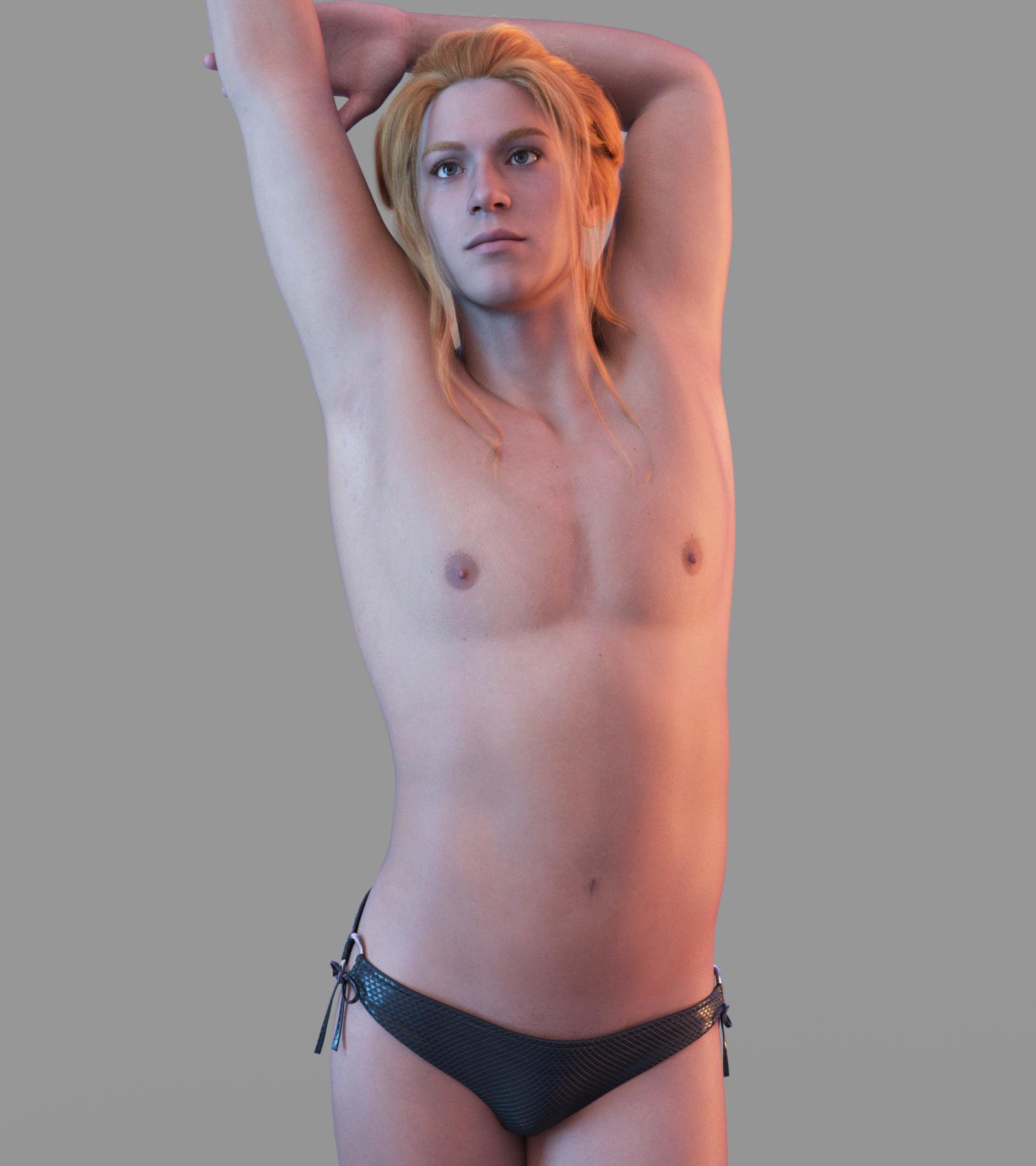
I did try her skin on the masculine form in the bundle, but her nipples do not align. The skin looks good, though, so hopefully, there will be a fix to make the male nipples and V9's skin work. This is one of the masculine skins which came with Gen 9.
One pitfall I see with the new file structure in unisex Gen 9 is I really do hope they keep it better organized. It's going to become hellish in there real quick if the files and folders aren't better managed.
Base Masculine Form
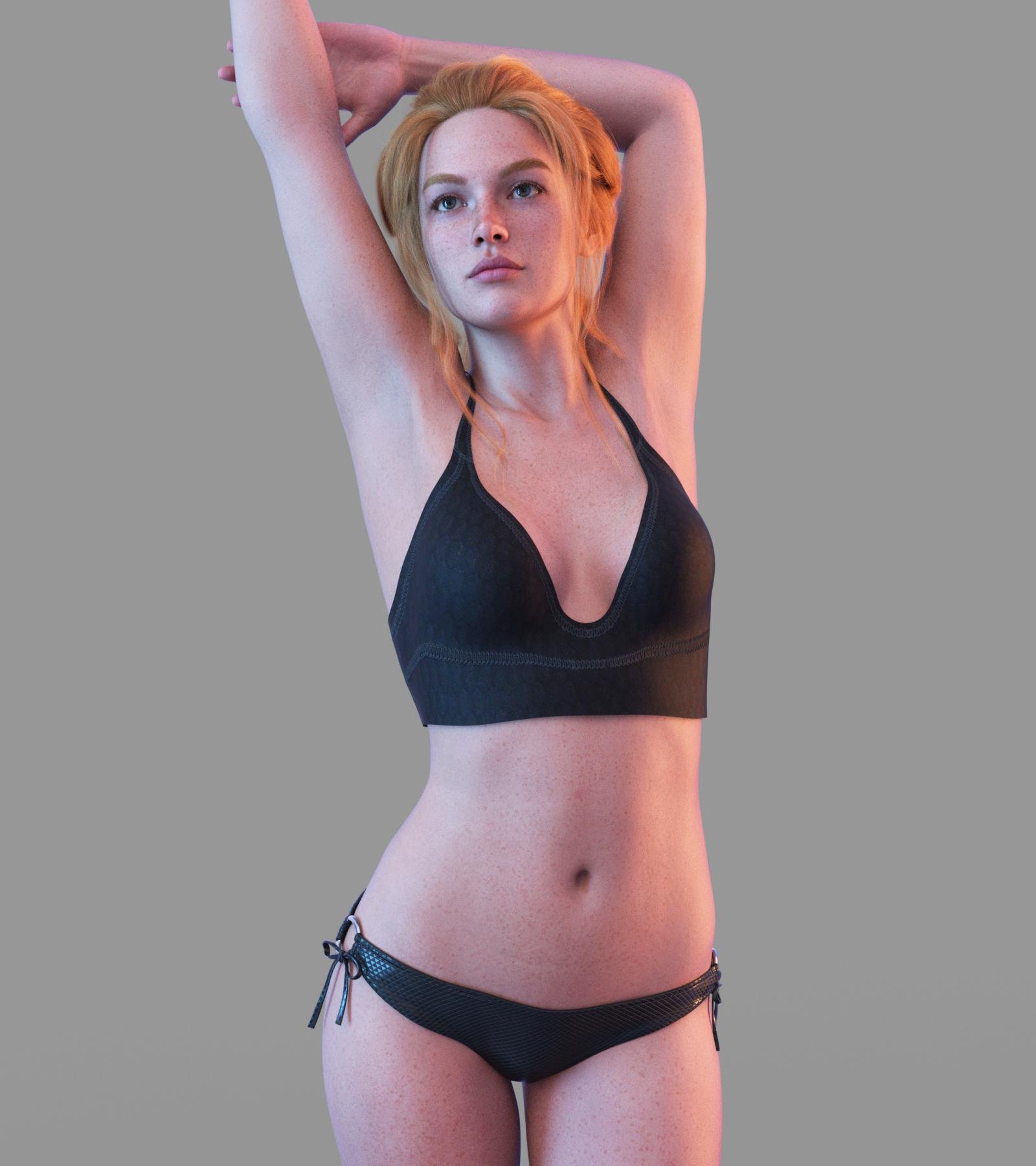
Victoria 9
 Mid-way through 2022 a new Sales Thread:Report Issues Here "There's Always Another Sale™"
jcbunn said:
What Items was in the preorder Bonus? just the hair?For Victoria 9 it was the Voss Hair and for the bundle it was the Voss Hair and the Summer Bikini.
What's in "Genesis 9 Character Essentials"?PerttiA said:
Pendraia said:
Bejaymac said:
Scratch that, it's not the script but rather what it's calling that's the problem
"data\DAZ 3D\Genesis 9\Base\Tools\Script Loads\Eyebrows\Card Eyebrows MAT.duf"
"data\DAZ 3D\Genesis 9\Base\Tools\Script Loads\Eyebrows\Fiber Eyebrows MAT.duf"^^^^^ those two files
I'm just waking up it's around 6.30am here but that sounds like what I was getting when loading eye cards and fiber eyebrows on Genesis 9. I haven't bought essentials yet. I'm wondering is the issue with the base model rather than the additional eyebrow set?
The Starter Essentials were updated around 9:30AM DAZ Time.
Just had a quick look. I didn't have Character essentials just the original genesis and Victoria. There were some mats for eyebrows that came with one of them that was calling for something from that package.
It looks like the error message I was getting was because I didn't own the character essentials. So I had them in my cart ready to buy anyway so i'm downloading them now and will see if there are still error messages.
Diva's Desire Outfit in the Victoria 9 HD Intro BundleI can not render a V9 with this Diva's Desire Outfit > black render, which means not enough VRAM.
I have a 3080 TI with 12GB VRAM. The texture compression settings are at the default values.
All subD settings to 0.I am sorry, but this product lacks quality control imho.
The mean reason for it not rendering is that ALL maps are 8K, even the earrings, some maps are just plain color. Why 8K then?
My quick solution for now is to reduce all the maps to 4K. Even then the outfit looks still very good. (allthough i think it doesn't suit an intro bundle)8K is overkill imho. People with non-professional videocards should be able to render a new product.
This needs to be fixed imho.
Genesis 9 Coming Soon! Preorder Victoria 9 HD TodayYes, database looks like it's sorted.
Victoria 9 shows up as "Purchased" in the Store for me.
Genesis 9 Coming Soon! Preorder Victoria 9 HD TodayGator said:
Masterstroke said:
Pro:
Expressions
Mouth and Teeth
Eyes look so much better.
Joint bending (well kind of. At least improved)
Con:
Gender Unimesh (hated it on Genesis, really don't like it on Genesis 9)
Not enough edge loops.
Missing base resolution details like nipples and navel.
Like Victoria 4, Genesis 9 will be a figure, that works best for portraits only.
Reminds me a bit of the META human hype, where it's all about faces.
OOF.
I was hoping for more. There have been a few Vicky 9 renders posted up from the lucky ones able to download her - the hands don't look very detailed at all. I'm hoping it's just that they didn't have SubD dialed up enough.
If the detail isn't there, I don't get it. Why go to the lengths for the realism in the face, but then ignore the hands and other parts of the body? The hands are awfully noticeable as people talk with their hands or are pointing to something, holding an object, etc. IMO, the strides in hyper realism in the face are lost if the body doesn't match.
Do not confuse G9 and V9. G9 is the free base figure, V9 the character, you have to pay for.
No risk for you downloading G9 and build your own opinion.Genesis 9 Coming Soon! Preorder Victoria 9 HD TodayMasterstroke said:
Con:
Missing base resolution details like nipples and navel.
Like Victoria 4, Genesis 9 will be a figure, that works best for portraits only.
Reminds me a bit of the META human hype, where it's all about faces.
Yeah, the nipple region lacks even the polygonal details of Genesis 3 and Genesis 8 (which were less detailed than the higher polygon-count Genesis 2).
Thank goodness for third-party artist-vendors and all the thirsty sorts who support them.
As said, it'll probably be a year or more before there's enough stuff on the market/enough of an ecosystem for me to switch over to Genesis 9.
(Comment somewhat unrelated to the nipple comments above.)Genesis 9 Coming Soon! Preorder Victoria 9 HD TodayThe Blurst of Times said:
Re: anecdotes about Victoria 9 being in one installer or another... (Connect, DIM, etc.)
I just reloaded the Victoria 9 product page.
https://www.daz3d.com/victoria-9-hdI may own the "bundle", but the V9 page still doesn't show "Purchased". I can still add V9 to my Cart. LOL.
Aside from the "bundle" having the "Purchased" flag, I still own nothing from the bundle itself. Reminds me of the old "Toy Yoda" gag, or the people who buy a "laptop" on eBay and find out they actually bought a cardboard box that formerly contained a laptop.
i.e. it's not a downloader issue. It's still something on their account/storefront database.
Any fix should be independent of the downloader.I have exactly the same issue, the bundle shows as purchased but none of the individual items or pre-order rewards are marked as purchased so there is bog all I can do until Daz fix it at their end :-/
Some communication would be nice!
Genesis 9 Coming Soon! Preorder Victoria 9 HD TodayMasterstroke said:
Pro:
Expressions
Mouth and Teeth
Eyes look so much better.
Joint bending (well kind of. At least improved)
Con:
Gender Unimesh (hated it on Genesis, really don't like it on Genesis 9)
Not enough edge loops.
Missing base resolution details like nipples and navel.
Like Victoria 4, Genesis 9 will be a figure, that works best for portraits only.
Reminds me a bit of the META human hype, where it's all about faces.
OOF.
I was hoping for more. There have been a few Vicky 9 renders posted up from the lucky ones able to download her - the hands don't look very detailed at all. I'm hoping it's just that they didn't have SubD dialed up enough.
If the detail isn't there, I don't get it. Why go to the lengths for the realism in the face, but then ignore the hands and other parts of the body? The hands are awfully noticeable as people talk with their hands or are pointing to something, holding an object, etc. IMO, the strides in hyper realism in the face are lost if the body doesn't match.
Genesis 9 Coming Soon! Preorder Victoria 9 HD TodayRichard Haseltine said:
TheRetiredSailor said:
Robert Freise said:
Haruchai said:
For people saying there are no genitalia textures for the base figure, was there ever? Base (essentials) figures in previous generations didn't come with genitalia textures IIRC. The Gen 9 essentials pack gives you Genitalia normals though and like the older Pro packs Victoria 9 comes with those textures.
True but they did come with a base texture in the Pro Pack
I understand both sides of this. Sure, DAZ is entitled to want money for the anatomical elements textures. No argument. My only point is that if they are going to sell something then it needs to be usable. Anatomical elements without the textures are not usable. For that reason I feel that the texture should be included with either base textures (which it hasn't been before IIRC) or with the retail product containing the anatomical elements. I realize that my opinion is not something meaninful beyond being just my opinion.
An earlier post said that Richard had indicated that he thought the textures should be included. Maybe this is just a launch day hiccup.
I was told that there should be maps for the anatomical elements, I have pointed outt hat there are not by report and by the file list in the readme. I would think this is a slip and that it will be fixed, but I imagine getting the pre-purchase orders filled properly and fixing any outright product bugs are taking priority.
Thank you for the confirmation, Richard. I totally agree on the pre-purchase orders filled being a priority.
Genesis 9 Coming Soon! Preorder Victoria 9 HD TodayRe: anecdotes about Victoria 9 being in one installer or another... (Connect, DIM, etc.)
I just reloaded the Victoria 9 product page.
https://www.daz3d.com/victoria-9-hdI may own the "bundle", but the V9 page still doesn't show "Purchased". I can still add V9 to my Cart. LOL.
Aside from the "bundle" having the "Purchased" flag, I still own nothing from the bundle itself. Reminds me of the old "Toy Yoda" gag, or the people who buy a "laptop" on eBay and find out they actually bought a cardboard box that formerly contained a laptop.
i.e. it's not a downloader issue. It's still something on their account/storefront database.
Any fix should be independent of the downloader.Genesis 9 Coming Soon! Preorder Victoria 9 HD TodayPro:
Expressions
Mouth and Teeth
Eyes look so much better.
Joint bending (well kind of. At least improved)
Con:
Gender Unimesh (hated it on Genesis, really don't like it on Genesis 9)
Not enough edge loops.
Missing base resolution details like nipples and navel.
Like Victoria 4, Genesis 9 will be a figure, that works best for portraits only.
Reminds me a bit of the META human hype, where it's all about faces.
Genesis 9 Coming Soon! Preorder Victoria 9 HD TodayUHF said:
For the love of all things kind and fluffy, can you (DAZ) provide information on what is required to use Genesis 9 and Victoria 9. Throw me a bone will ya!
Precisely WHAT VERSION of Daz is needed. Can you say that? Please?
4.21.0.x - the current release build or recent Public Builds.
I don't have a week to figure out all that isn't said, but you might want to say what video drivers are required with that, I don't want to spend a week reading through all the past comlaints of previous daz beta versions. But driver issues rendering Daz useless seem prominent. [I wasted 1 week on this recently, so... for the love of all things kind and fluffy... help.]
Are there any compatibility issues with Daz studio itself. Does it in any way require an update to Genesis 8 itself?
Is there any plan to make it possible to locate or even label Genesis 9 in the store? Currenly searching for "Genesis 9" pulls up anything at random seemingly. (So.. its not supported by the store yet.)
Genesis 9 Coming Soon! Preorder Victoria 9 HD TodayTheRetiredSailor said:
Robert Freise said:
Haruchai said:
For people saying there are no genitalia textures for the base figure, was there ever? Base (essentials) figures in previous generations didn't come with genitalia textures IIRC. The Gen 9 essentials pack gives you Genitalia normals though and like the older Pro packs Victoria 9 comes with those textures.
True but they did come with a base texture in the Pro Pack
I understand both sides of this. Sure, DAZ is entitled to want money for the anatomical elements textures. No argument. My only point is that if they are going to sell something then it needs to be usable. Anatomical elements without the textures are not usable. For that reason I feel that the texture should be included with either base textures (which it hasn't been before IIRC) or with the retail product containing the anatomical elements. I realize that my opinion is not something meaninful beyond being just my opinion.
An earlier post said that Richard had indicated that he thought the textures should be included. Maybe this is just a launch day hiccup.
I was told that there should be maps for the anatomical elements, I have pointed outt hat there are not by report and by the file list in the readme. I would think this is a slip and that it will be fixed, but I imagine getting the pre-purchase orders filled properly and fixing any outright product bugs are taking priority.
Victoria 9 - what a beautyVictoria 9 posed...
 It's finally VICTORIA 9 baby
Wonderland said:
Well I was dead set against buying into G9 but then I saw the promo for the makeup product https://www.daz3d.com/victoria-9-hd-makeup
I'm on an iPad and I zoomed in as close as possible on the eyes and lips and it really looks as realistic as a magazine ad! The main thing about previous generations was the lack of realism in the eyes, eyelashes, and the way some lipsticks had a sharp line and looked fake. There's no way I can invest a lot into G9 but I might end up getting the V9 bundle after all & the morphs/expressions when they come out. I'm sure a PA or maybe DAZ itself will come up with a clone for clothes. In the past I've done mostly non-realistic heavily postworked art anyway, but lately I've been getting into realism and G9 so far does seem more realistic. Most of the promos for DAZ Original core G8.1 characters look awful with that PBR plaster looking skin but the renders I've seen so far V9 and the makeup product skin look amazing! I'm wondering why they couldn't have had similar texturing on G8.1? Have they changed something in the PBR texturing?
Does this mean that for G9 make-up options are not included in the base figure but have to be purchased separately?
G9 is looking more and more expensive if that is the case.
Genesis 9 Coming Soon! Preorder Victoria 9 HD TodayWell, Victoria 9 is missing in action in my Install Manager (maybe she doesn't like to travel or has missed her flight to Europe).
Daz 3D is part of

Connect
DAZ Productions, Inc.
7533 S Center View Ct #4664
West Jordan, UT 84084Licensing Agreement | Terms of Service | Privacy Policy | EULA
© 2026 Daz Productions Inc. All Rights Reserved.