-
GenX2 - Need Help
Thanks, Havos! I'll try that.
So you load the base character (David 3 for example) and then inject all the head and body morphs and then export that as a CR2. Then you use this as the source file in GenX2. And you load the character injection file. Is that the head morphs and body morphs under the pose folder? Or a different file. Do you drop those files in the center box of GenX2 or do you have the base character loaded in the scene and apply the head or body morphs to it? And do you just load the head or body morphs separately depending on whether you are creating a head or body single morph? I know there is an option to get the non-zero morphs from the character in the scene.
I'm just not clear on what pp2 you are refering to, if it's not the head and body injection morphs. (I just checked and my head/body morph files are pz2. Is that the same thing? And if this is the right file, why do you have to inject them again, if they were already saved to the CR2 that was exported? Also, if you injected the morphs, will any of them have values? Or do you have to select one? Or set one?
Sorry about all the questions. Hopefully, this will be the last time. I really appreciate your help and I would really like to move David 3 to some of the other generations, as he was always one of my favorite characters. So that's why I keep pestering you.
Thanks again.
GenX2 - Need HelpOkay, I got it to work, but I didn't know I got it to work. I selected one of the morphs that were listed in GenX2 when I dropped David 3 in there. (I did not inject all the available head and body morphs.) And then I ran the transfer. Then I closed and opened Daz Studio and the only thing I saw was the morph I had selected under Generation X when I loaded Genesis. But then I happened to notice that there were these head morphs for David 3 under one of the other sections and I also found one that does the whole figure.
Or did the head and body morphs come from the David 3 for genesis product that I own?
In any case, I'm not clear on one thing. How does on one thing. How does selecting one of the morphs i.e. neck spandex transfer the character morphs. Wouldn't there have to be a head and a body morph that you could select so that you could transfer them.
Thanks
If you successfully transfer just one morph, then it will also add the head and full body morphs for that figure.
Remember for a figure like D3 there is no basic head and body morph that gives it the shape, the mesh itself defines the shape.
To give you an idea of how I use these old figures, I firstly create a CR2 file by injecting all the morph packages into the base figure and then exporting that figure as a CR2. I have done this for V4,M4 and all the generation 3 figures. Then I select this CR2 file as the source in the Gen X tab. You then load the character injection file (normally a pp2 file) and then select all non zero values. I then transfer the character as a single head morph and a single body morph, even though it might have consisted of many morphs on the original base.
I only use the CR2 files when moving morphs, I do not load the figure into the scene, although that is a method some people use.
Tears HD Plentiful TearsSee if there are morph dials on the figure or the head.
morph dials under poses, expressions. Never would have thought to look there.
Thanks.
product to inj face rigging to V4 and M4I did autofit m4 with all his morphs++ etc injected to Genesis 3 once,
hid genesis 3
if you ignored facial animation for mouth and eyes with bones and used his morphs instead most other stuff works quite well including genesis 3 morphs on the mesh
the face bones have the welding issue for mouth and eyes
I used that to export an obj for morphloader on M4 to transfer morphs from genesis 3 to M4so it could be done if the welding issue could be solved not m4 skeleton though
How to make imported clothing work with Genesis 8Then you need to adjust the model to fit the default shape, or pose the figure to fit and use the Bake Rotations command in the Jint Editor right-click menu to make thata proxy zero pose. Then you can use the Transfer Utility, and then if you used the second optin pose the rigged coat to match the default pose for the fgure and bake the coat's rotations.
true iray skins for blender are on the way ..These advances are great news and I am encoraged to give the plugin another go and really try to get to grips with it this time.
On a side note: I wonder if Thomas (or anyone) would be interested in also creating a simple bridge for exporting from DAZ to Blender in a similar manner to the way GoZ does it for ZBrush? Just for morphs and perhaps material zone changes. The export process, compared to GoZ, is a bit long-winded with object hiding and selecting, remembering to set base resolution, setting the export parameters in DAZ and the import/export parametrers in Blender and then figuring the best way to use Morph Loader. I don't have ZBrush but remember how easy it was when I tried it, or how simple it is to export to Hexagon (although I prefer Blender to Hexagon for these purposes).
product to inj face rigging to V4 and M4the mesh needs to be unwelded
you can actually use the transfer utility on all of them using clones but mouths are welded shut, eyeballs welded to sockets etc
just the skins work somewhat better
Celebrity Look-a-Likes for 3D figures Part 2Your model morphs are superb. I've downloaded Simone Missick, the actress that plays Misty Knight on Netflix Marvel's Luke Cage and added my own texture to her. I believed she turnt out okay.
I was commissioned to do four celebrity morphs recently, I figured I'll add the links here for anyone who may be looking for these actresses:
Rila Fukushima: https://www.deviantart.com/tritiumcg/art/Rila-Fukushima-Head-Morph-for-G8F-832636705
Simone Missick: https://www.deviantart.com/tritiumcg/art/Simone-Missick-Head-Morph-for-G8F-832845496
Christa Linder: https://www.deviantart.com/tritiumcg/art/Christa-Linder-Head-Morph-for-G8F-833172249
Sophia Loren: https://www.deviantart.com/tritiumcg/art/Sophia-Loren-Head-Morph-for-G8F-833997794
All freebie downloads: https://www.deviantart.com/tritiumcg/gallery/67331252/daz-studio-freebies
Thank you so much! I'm glad that you like them! If you ever upload your renders of Misty or any of my morphs to Deviantart, leave a link in the comments on the morph's page and I'll feature it. ^_^
I was recently commissioned to do a full body morph of Rihanna: https://www.deviantart.com/tritiumcg/art/Rihanna-Head-and-Body-Morphs-for-G8F-838891936
I know she's been done before, but the commissioner insisted on my take specifically. :) Anyway, I hope some of you guys will find some use for her too.
Thank you for another great morph.
Here are 2 quick renders of this amazing work.
Tears HD Plentiful TearsSee if there are morph dials on the figure or the head.
TritiumCG Freebie ThreadIt’s impossible to make a realistic Mia Sand morph, because Mia Sand herself doesn’t look realistic.
IRAY Photorealism?Surprised no one mentioned how incredible she looks. If you could put her in an environment it would be sweet to see. Personally I'm not a big fan of skin studies in black environments because in real life a single light in an perfectly dark room or space is physically impossible or at the very least implausible. Also it onluy shows you the way the skin looks as lit by the tight bright specualr type lighting that gives us the refelctions. Basically its easier to pull it off when the only light hitting the model is "direct" lighting. However I think the bigger challenge is getting skin to look as it should with indirect lighting in place as well. I'd LOVE to see you take her and put her in a real "place" and see how she looks. Love what I'm seeing here!
Technically she's in a dark room (a dark grey cube to be precise) I try to avoid rendering in voids because you end up losing some bounce light (there would be less on the undrside of her neck for instance)
I was going for studio portrait with a ring light (here's an internet example)

But my setup is still is a bit abstracted I definitely want to stick her in more of a scene, although even in scenes my aestetics tend more photoshoot than candid (or if not photoshoot, dramatic even in the realworld most of the photos I take are of dramatically backlit trees)
@jcade I agree. The eyes look fantastic! Would you mind sharing the secret?
The eyes are Parris' macro eyes with some tweaked settings, but the main key is that I switch the sclera material to eyemoisture, because I fund the gen3 way of dealling with eyes so much less fiddly its not even funny. I can use "thinwalled off" without getting weird shading on the sclera. Morph wise there's the cornea buldge morph and an iris depth morph. Looking at further reference I think I need to turn the specular strength down which is a new one for me
Aaaaaaaaad here is a full filmic comparison. Left is straight out of Iray, and right is run through filmic (with the look set to high contrast) Filmic just looks more photolike to my eyes
If you also render out a depth pass you can also do some nifty compositing tricks (as long as you're okay with some nodes) like using the defocus node to do depth of feild in post, I do this all the time when rendering buildings. Its so much faster its not even funny. (you can also use it sparingly to ad a tiny bit of dof to portraits, but because of the quality of the depth maps Iray outputs, it doesn't play great with transmaps>hair)
This is amazing. If you dont mind could I also share your other work here? I think the hair you render is some of the best I've ever seen.
This is strand based hair rendered in blender.


I still find blender better for long hair, as I have never been able to get clumping to work in Garibaldi on long hair without clumping through the skull (does someone here know how to fix this? I will love you forever) Its also easier to combine multiple hair groups in blender. some of those small strands were actually a seperate hair object and you can edit both while seeing the other one and all the objects in the scene, which you can't in Studio. On the other hand, Studio is great for short hair, and while you can't have multiple interacting hair objects you do have selection sets, which blender doesnt and it makes me sad
IRAY Photorealism?
Skin using 100%SSS Strand based hair, strand based eyebrows, velus hair... so many strands (in retrospect the velus hair might be a bit to strong, but it didnt look so clear until halfway through rendering and i decided I'd done enough re-renders). I'm also not fully satisfied with the hair, mostly trying to get baby hairs round the hairline. Sadly, you can't control the thickness if individual strands with a textuure, which I think would have helped (you cant do this in blender either and it makes me sad) I'm actually quite satisfied with the eyes, though, although this isnt really a shot that shows them off
One thing that was mentioned earlier that I think needs to be repeated, the morph is super important. I've started sculpting morphs (this lady's head is a custom morph for instance) and one thing I've noticed is that If i don't work from reference, a lot of the features end up sort of this is the concept of "nose" rather than an individual's nose. (if that makes any sense at all)
@jcade I agree. The eyes look fantastic! Would you mind sharing the secret?
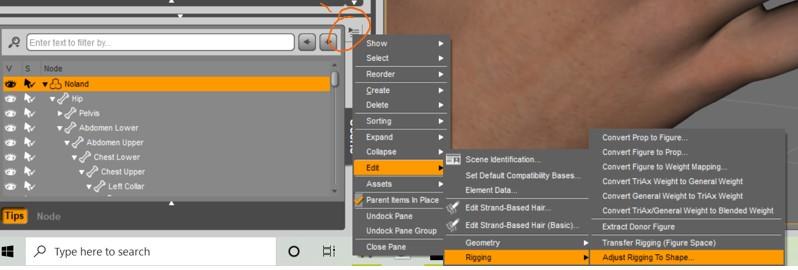
Morph loader pro does not adapt vertex group origins?You need to adjust the rigging to the new shape, it won't do that automatically when you create the morph.
You should find the "adjust rigging to shape" command in the context menu of the scene tab:
 TritiumCG Freebie Thread
Three Celebrity-ish morphs this time around:
https://www.deviantart.com/tritiumcg/art/Rihanna-Head-and-Body-Morphs-for-G8F-838891936 | https://www.deviantart.com/tritiumcg/art/Anna-Nystrom-Head-and-Body-Morphs-for-G8F-839866218 | https://www.deviantart.com/tritiumcg/art/Mia-Sand-Body-Morph-for-G8F-839204290
I think Rihanna might be my closest likeness yet, my commissioner seemed to think so. :)
GenX2 - Need HelpOkay, I got it to work, but I didn't know I got it to work. I selected one of the morphs that were listed in GenX2 when I dropped David 3 in there. (I did not inject all the available head and body morphs.) And then I ran the transfer. Then I closed and opened Daz Studio and the only thing I saw was the morph I had selected under Generation X when I loaded Genesis. But then I happened to notice that there were these head morphs for David 3 under one of the other sections and I also found one that does the whole figure.
Or did the head and body morphs come from the David 3 for genesis product that I own?
In any case, I'm not clear on one thing. How does on one thing. How does selecting one of the morphs i.e. neck spandex transfer the character morphs. Wouldn't there have to be a head and a body morph that you could select so that you could transfer them.
Thanks
IRAY Photorealism?A thread talking about skin, photorealism and using filmic in blender? Back into the fray!
AFAIK filmic is or is similar to a LUT, but is specifically geared towards accurately transforming 32bit render data into something resembling what you would expect to come out of a camera, whereas must LUTs are generally designed to take what is coming out of a camera (either 8 or 16 bit) and turn it into something pretty. Here's a great example image (from blenderguru I think)
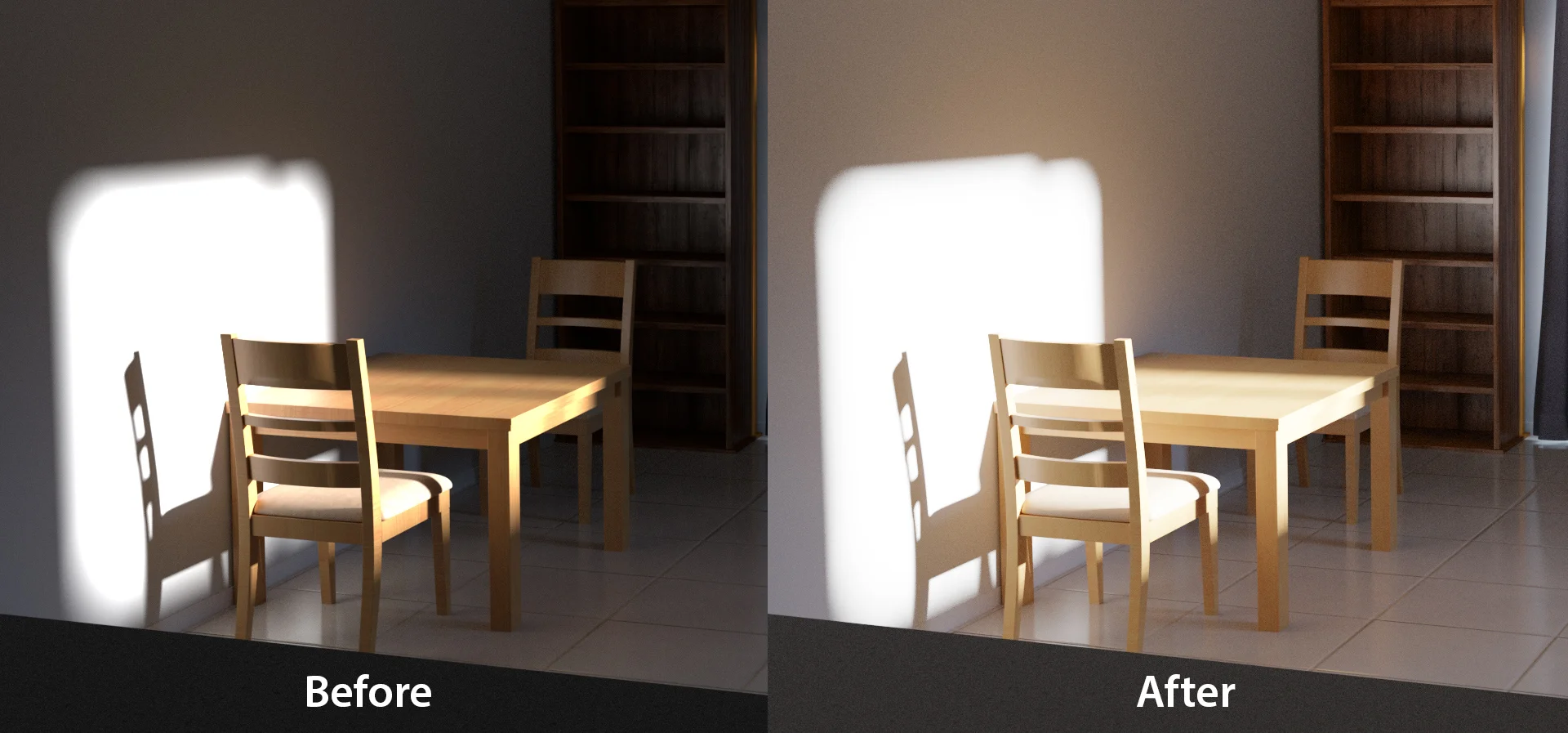
its not just that the shadows are lighted look at the edges of the direct light see how the first has this really weird and ugly falloff?
I actually happen to have a pretty good (if specific) example of where this really adds some realism. Render straight out of iray vs sending the exr over to blender and filmiced

See those weird blown out hotspots in the bokeh? fugly and something I've never seen when taking a photo
Also, thank you folks evangelizing spectral rendering, I had dabbled, but lacked some stick-to-itiveness. The SSS is indeed way more accurate, I can do 100% SSS without turning red or a glowing mess! Mind you because 100% SSS doesnt use the difuse map, if theres funkiness with the Translusency map things get weird fast, Although I have some preliminary expiriments that look hopeful, even for darker skin (which Iray is way more fiddly about)
And speaking of the fray, here's my hat in the ring, as it were. No lofi look for me, I love me some dramatic lighting
Skin using 100%SSS Strand based hair, strand based eyebrows, velus hair... so many strands (in retrospect the velus hair might be a bit to strong, but it didnt look so clear until halfway through rendering and i decided I'd done enough re-renders). I'm also not fully satisfied with the hair, mostly trying to get baby hairs round the hairline. Sadly, you can't control the thickness if individual strands with a textuure, which I think would have helped (you cant do this in blender either and it makes me sad) I'm actually quite satisfied with the eyes, though, although this isnt really a shot that shows them off
One thing that was mentioned earlier that I think needs to be repeated, the morph is super important. I've started sculpting morphs (this lady's head is a custom morph for instance) and one thing I've noticed is that If i don't work from reference, a lot of the features end up sort of this is the concept of "nose" rather than an individual's nose. (if that makes any sense at all)
Surprised no one mentioned how incredible she looks. If you could put her in an environment it would be sweet to see. Personally I'm not a big fan of skin studies in black environments because in real life a single light in an perfectly dark room or space is physically impossible or at the very least implausible. Also it onluy shows you the way the skin looks as lit by the tight bright specualr type lighting that gives us the refelctions. Basically its easier to pull it off when the only light hitting the model is "direct" lighting. However I think the bigger challenge is getting skin to look as it should with indirect lighting in place as well. I'd LOVE to see you take her and put her in a real "place" and see how she looks. Love what I'm seeing here!
Morph loader pro does not adapt vertex group origins?Hi.
I have an issue with morphs where the center of the different Vertex groups moves. Once I load the morph, the center of the groups stays at the original location which makes the result unusable.
In the attachedexample I just scaled the figure and then used the exported obj on the original. You cans ee how the origin of the selected part is at the level of the original.
I am using DAZ Studio 4.12
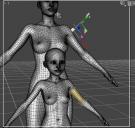
Can anyone tell what the issue is?
Celebrity Look-a-Likes for 3D figures Part 2Your model morphs are superb. I've downloaded Simone Missick, the actress that plays Misty Knight on Netflix Marvel's Luke Cage and added my own texture to her. I believed she turnt out okay.
I was commissioned to do four celebrity morphs recently, I figured I'll add the links here for anyone who may be looking for these actresses:
Rila Fukushima: https://www.deviantart.com/tritiumcg/art/Rila-Fukushima-Head-Morph-for-G8F-832636705
Simone Missick: https://www.deviantart.com/tritiumcg/art/Simone-Missick-Head-Morph-for-G8F-832845496
Christa Linder: https://www.deviantart.com/tritiumcg/art/Christa-Linder-Head-Morph-for-G8F-833172249
Sophia Loren: https://www.deviantart.com/tritiumcg/art/Sophia-Loren-Head-Morph-for-G8F-833997794
All freebie downloads: https://www.deviantart.com/tritiumcg/gallery/67331252/daz-studio-freebies
Thank you so much! I'm glad that you like them! If you ever upload your renders of Misty or any of my morphs to Deviantart, leave a link in the comments on the morph's page and I'll feature it. ^_^
I was recently commissioned to do a full body morph of Rihanna: https://www.deviantart.com/tritiumcg/art/Rihanna-Head-and-Body-Morphs-for-G8F-838891936
I know she's been done before, but the commissioner insisted on my take specifically. :) Anyway, I hope some of you guys will find some use for her too.
Creating clothing for Characters.If you use Reverse Deformations here you are subracting the AutoFollow morph and leaving only the additonal changes you made on top of it -that's part of the reason I suggested importing onto a zeroed figure with any AutoFollowed morphs removed.
How to make imported clothing work with Genesis 8Does the imported jacket line up with the base figure without adjustment? If so Edit>Figure>Transfer Utility, set the Source to Genesis 8 Male and the target to the Imported OBJ, and click Apply.
Daz 3D is part of

Connect
DAZ Productions, Inc.
7533 S Center View Ct #4664
West Jordan, UT 84084Licensing Agreement | Terms of Service | Privacy Policy | EULA
© 2026 Daz Productions Inc. All Rights Reserved.