-
Why doesn't Filament
[Why doesn't Filament] show up in my draw options menu? On a Mac OS 14
Edited for Please put your question in the post body and the title - Daz 3D Forums
[Released] RSSY 3Delight And Iray To Filament [Commercial]Another set of examples. This time camera #1 from Triple Moon Cottage. I was very careful to keep light levels the same between the two examples here. As before I set lighting levels in Filament Draw instead of in the tool. First is a straight RSSY conversion.
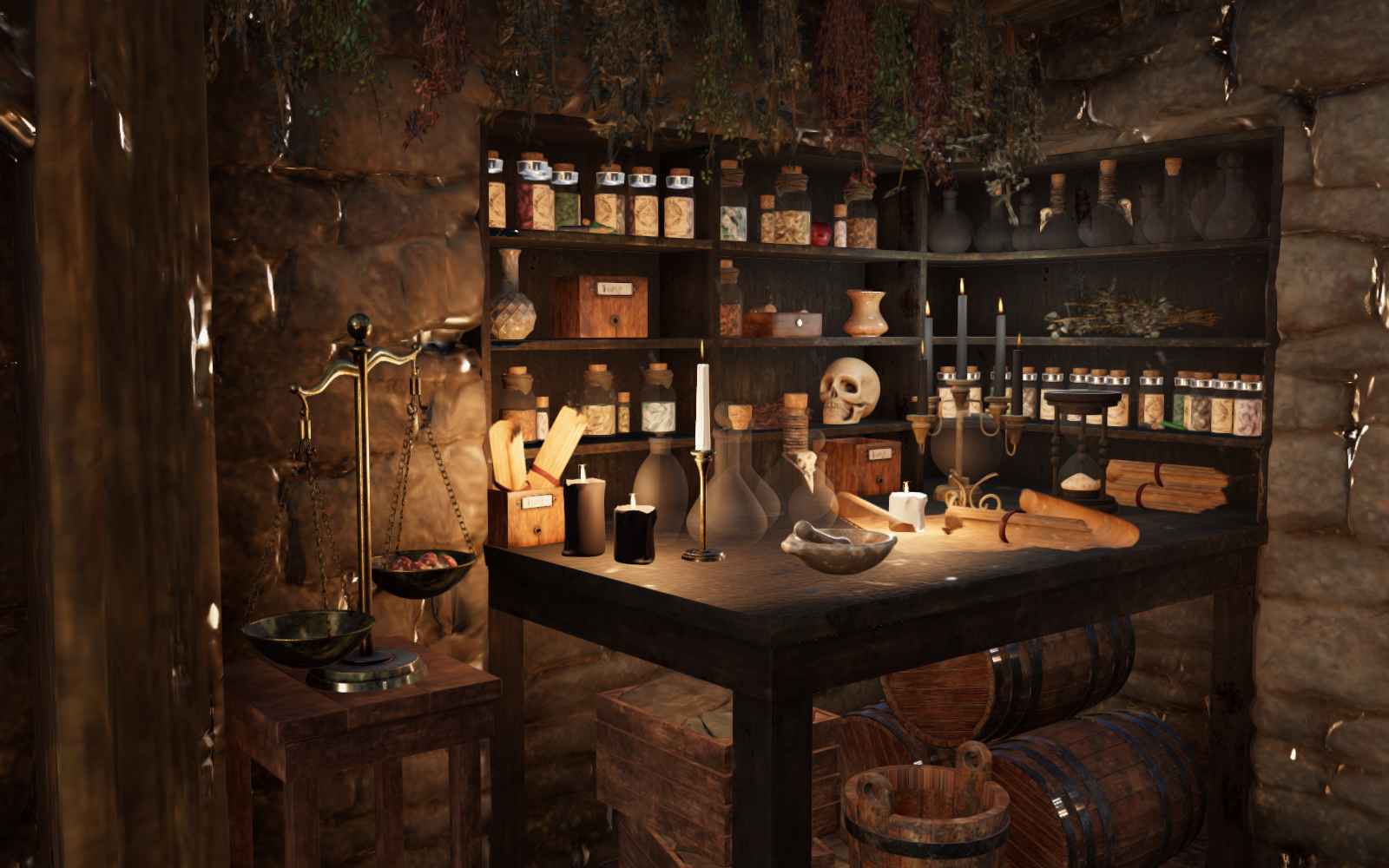
The second is a RSSY conversion, but with the base shader turned off.
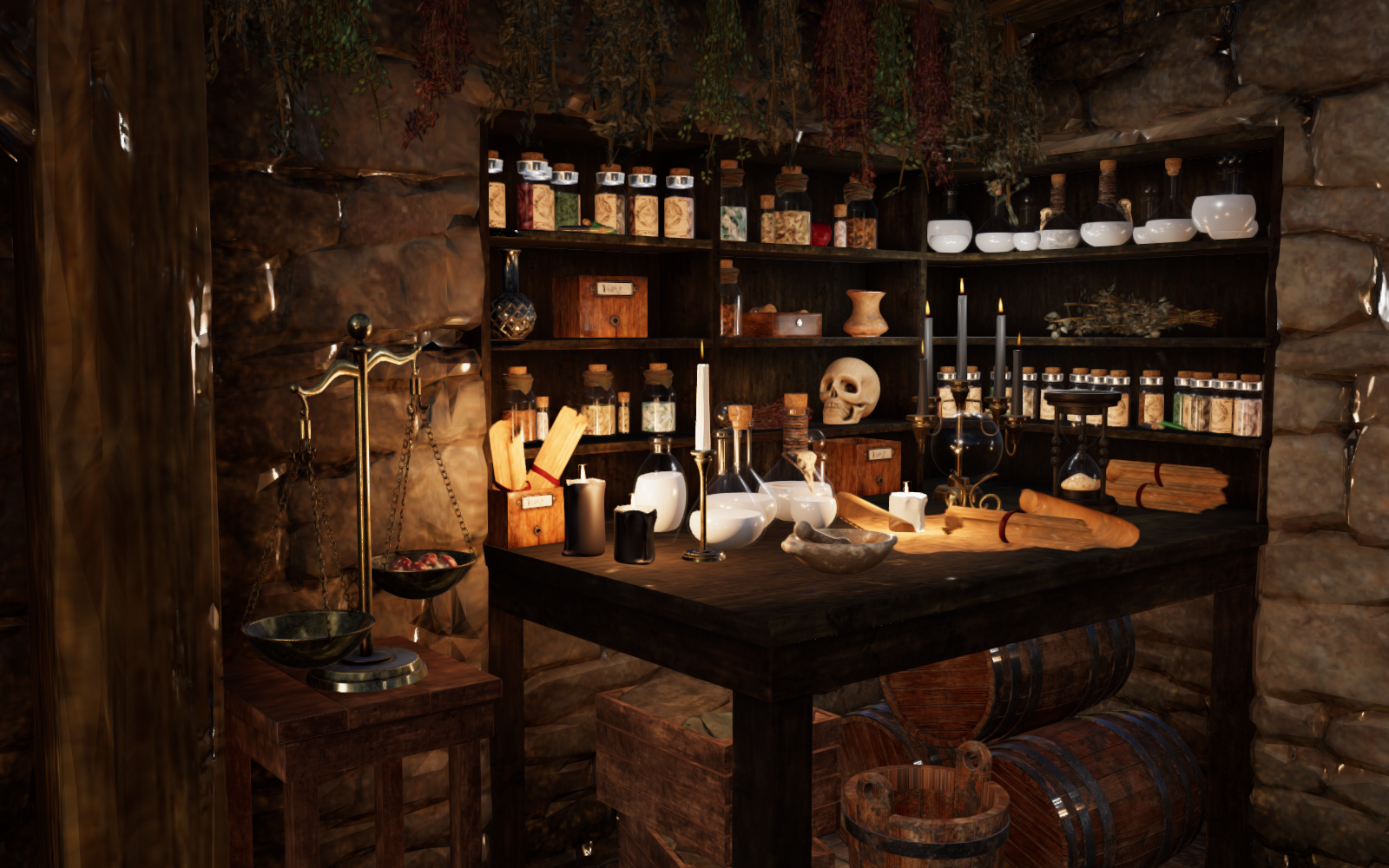
There are still some problems in the 2nd image, but I think it is evident it is far superior to the first. The problems that remain (such as overly reflective stone work, and lack of color in the potions are Filament problems, not problems with the convertor.
[Released] RSSY 3Delight And Iray To Filament [Commercial]Here is a scene shown 3 different ways. It is from Camera #5, Triple Moon Cottage. I prefer to use Filament Draw Options to adjust light levels so did so instead of using the conversion tool light levels.
First, without RSSY conversion but adjusting light levels:
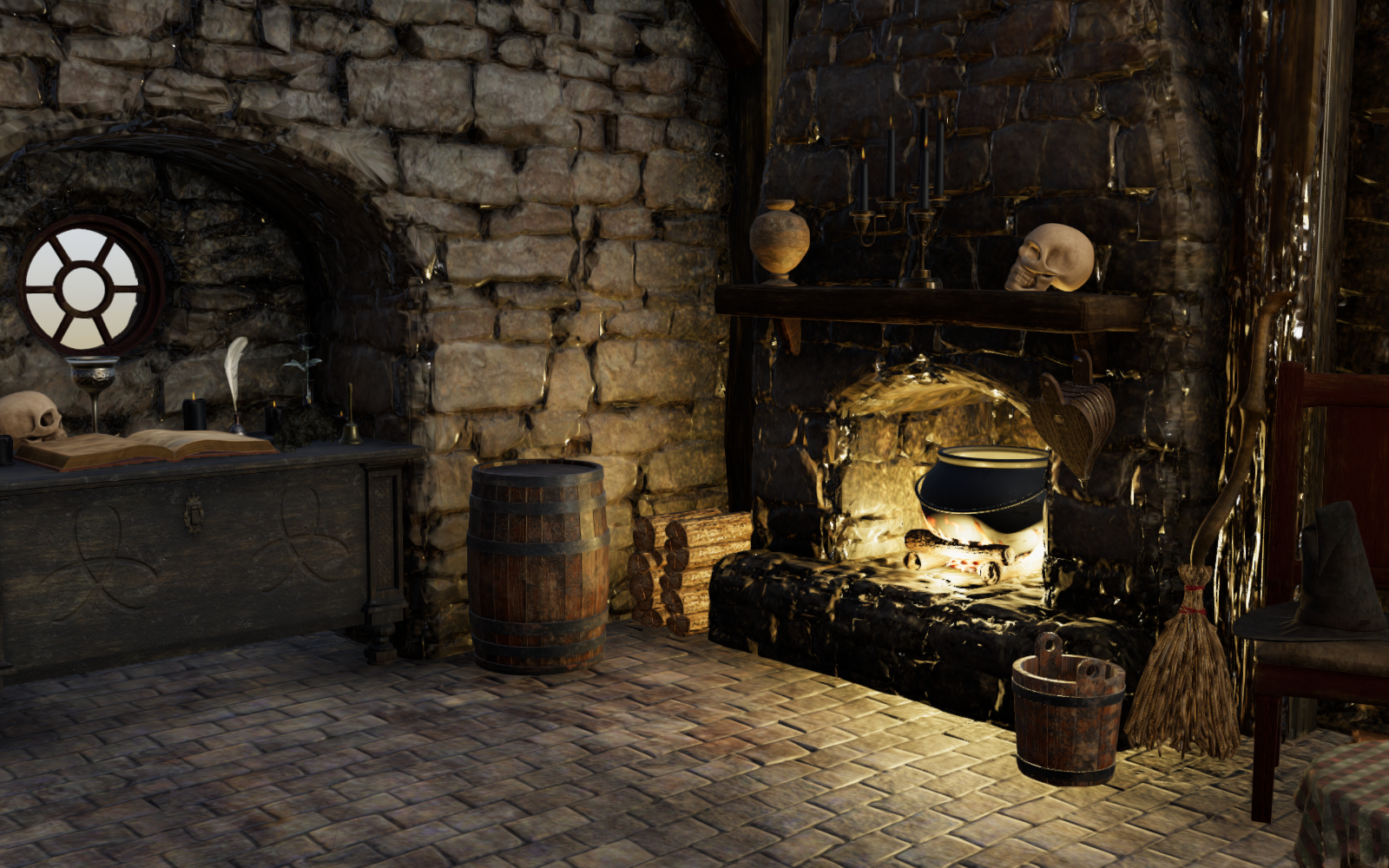
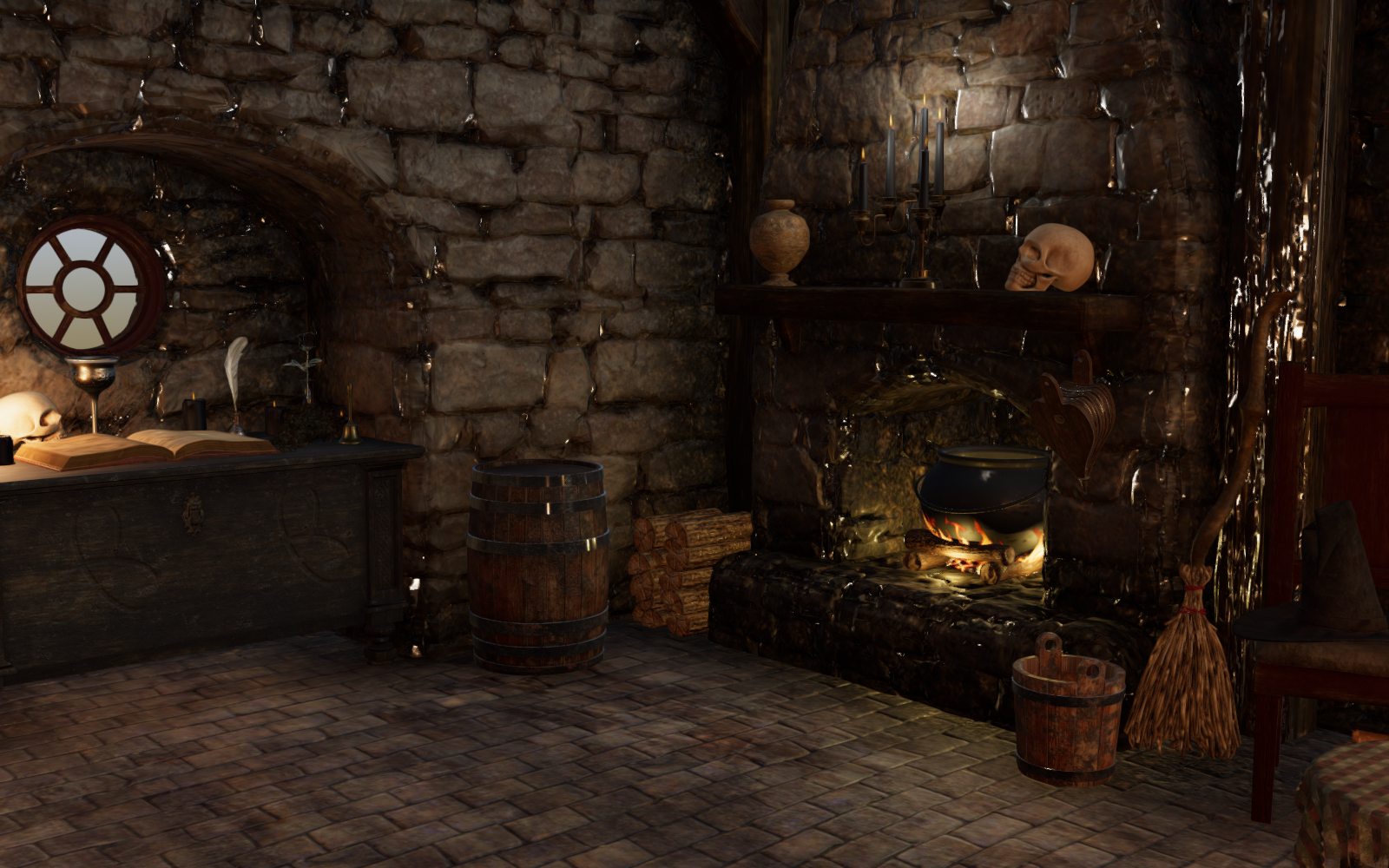
Second doing the regular RSSY conversion adding flame lights and replacing the various shaders as per default in the tool. This is certainly an improvement as you get some nice lighting affects from the additional flame lights.

Third, again doing RSSY conversion of materials and with flame lights. HOWEVER, the base shader is unchecked on the 3rd page. In my opinion the base shader often does more harm than good. In particular notice some of the metal objects like the chalice and bell now look correct again. This is my current favorite way of using the tool.
 RSSY 3Delight And Iray To Filament
nonesuch00 said:
The latest public betas has taken Filament way beyond what filament is in the current public release
I would love to hear more about this. I have looked at the beta thread and nothing is standing out.
Anyway, about the RSSY convertor, I have it and have been using it. My impression is that it can save you some time, but you probably are going to want to make adjustments, perhaps significant adjustments. Here is a scene I did three different ways: Iray, Filament with the RSSY convertor with minor adjustments, and Filament with RSSY convertor and major adjustments.
At this point my opinion is that the most useful parts of the Convertor are the ability to add flame lights, and the included shaders. I prefer NOT to use the automatic shader replacement.
Iray:
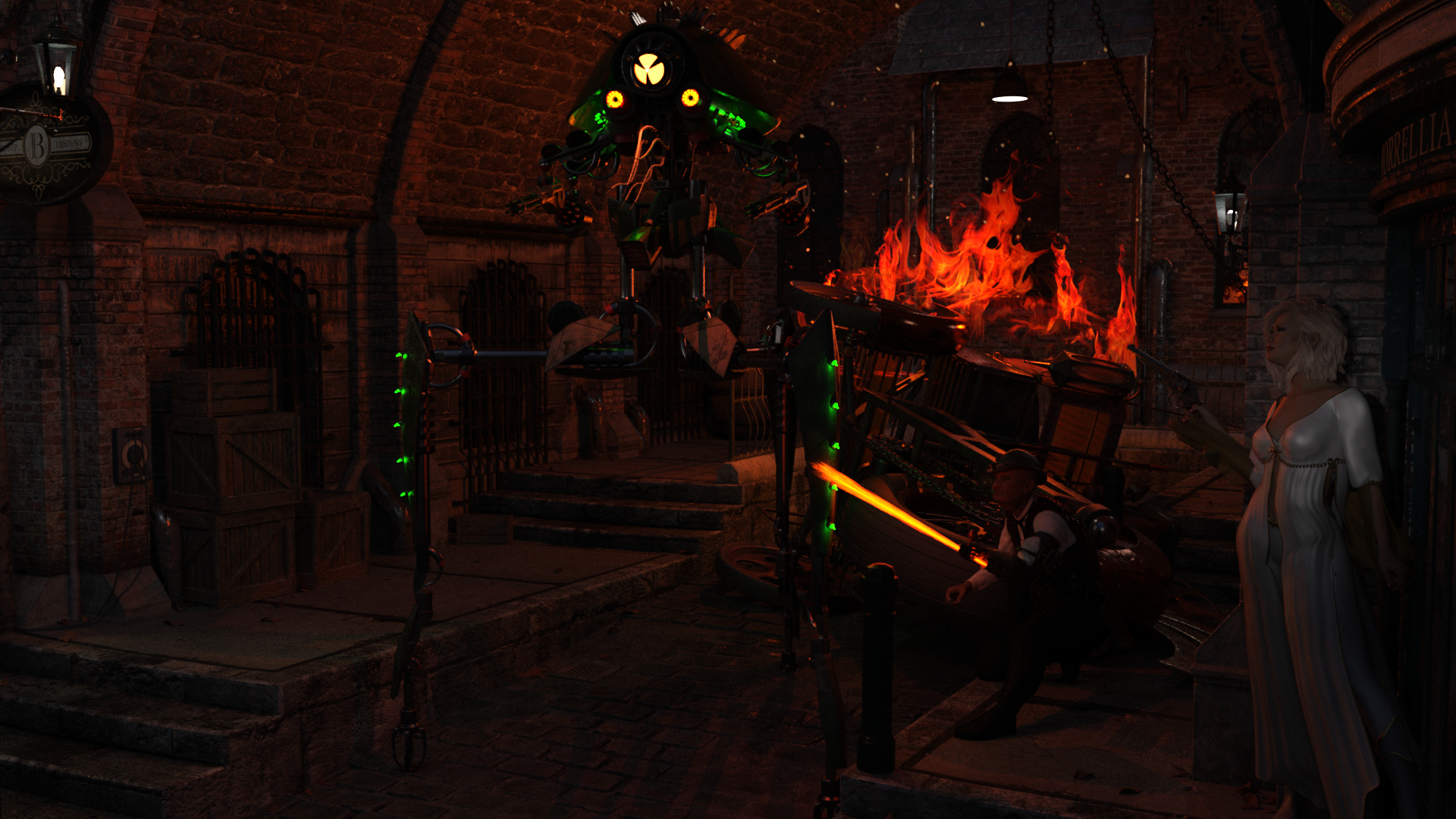
Filament after RSSY convertor (with some minor tweaks):
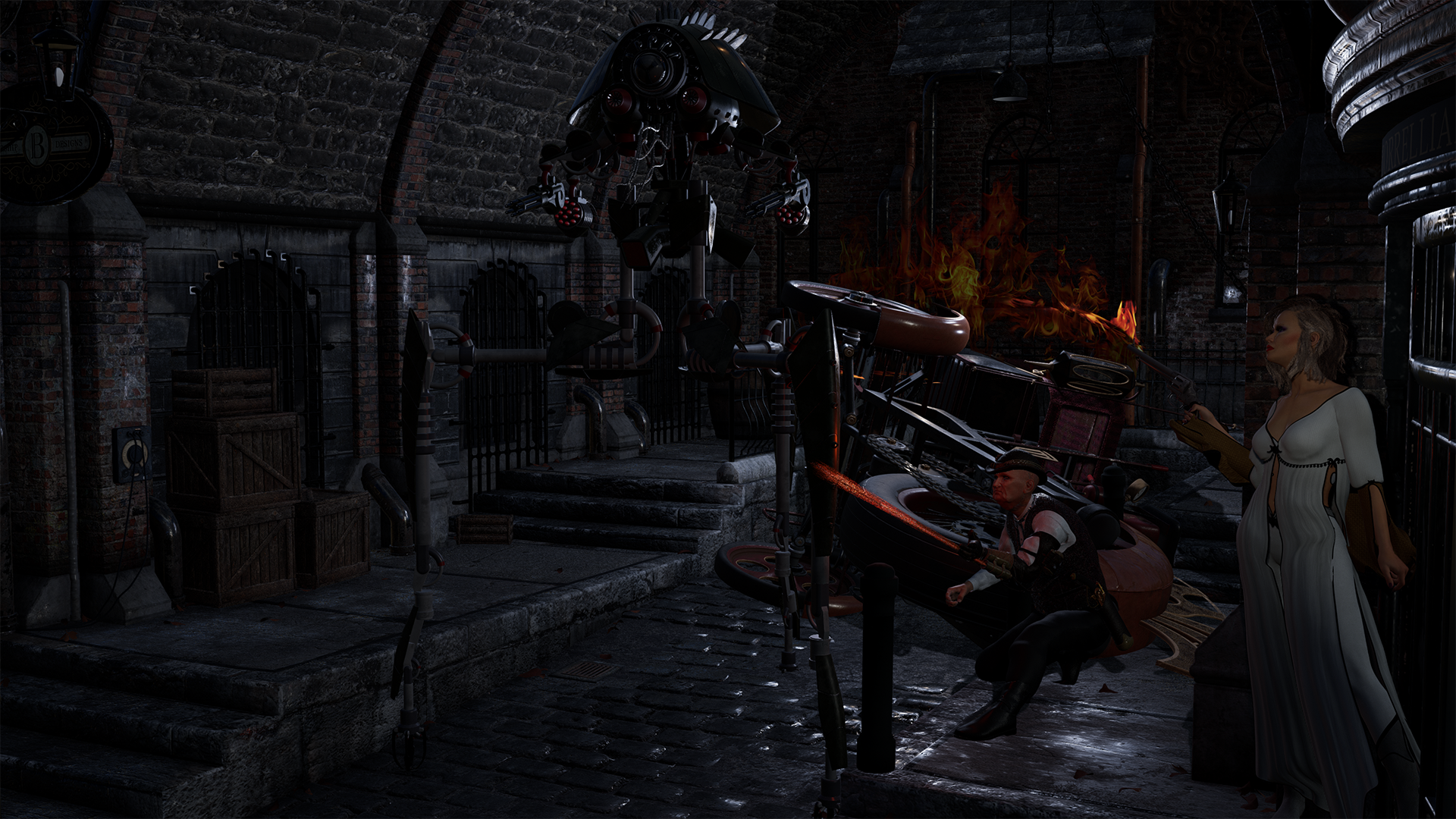
Filament using convertor but without automatic shader replacement and with major tweaks:
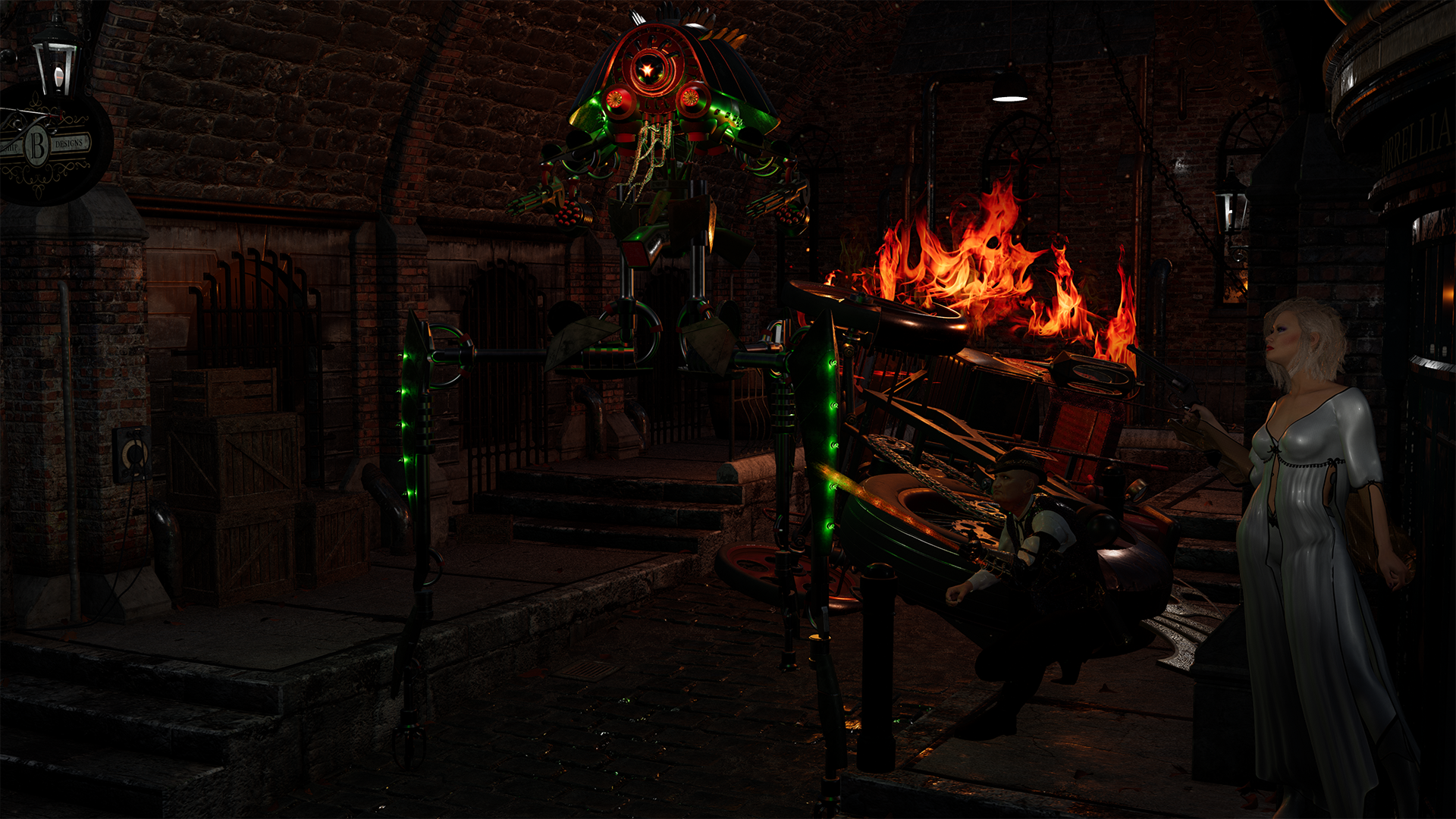
Overall, I think the tool is worthwhile. How worthwhile depends somewhat on the scene being adjusted and how the lighting was accomplished.
I do really wish that emissives would simply be added to Filament.
[Released] RSSY 3Delight And Iray To Filament [Commercial]dawnblade said:
This looks like it will be very helpful.
 The compatible software lists DS 4.15, but since you probably started working on this pre-4.15, that 4.14.0.10 will suffice? Thanks in advance for clarifying.
Yes, it should work. I worked on it with the 4.14. You need Filament is probably the biggest compatibility
Why 8-9 months for a Big Sur update?I'm trying to fix it for weeks. If you go in your folder c:\users/Crossover/Application Data/DAZ 3D/InstallManager/UserAccounts and look into Account.ini, there is a line with "RememberPassword=false", which I do change in "RememberPassword=true", but when DIM starts, the flag is "False" again. If you lock the file DIM is not starting. I'm almost giving up.
mosjeschwartzman said:
dragon440 said: I have Crossover 20 and I installed both 64 bit DIM and Studio
*Facepalm to self* I never looked at what types of bottles you could use in Crossover 20 to install applications in. I now chose a Win10-64bit bottle and I can install 64 bit DIM and Studio.
CMS still does not work – which has been established here before – but next to Multipass OpenGL and 3Delight I found that Iray works too; which is a huge relief to me!
If only filament would've worked... I'd loved to try that out.Why 8-9 months for a Big Sur update?dragon440 said: I have Crossover 20 and I installed both 64 bit DIM and Studio
*Facepalm to self* I never looked at what types of bottles you could use in Crossover 20 to install applications in. I now chose a Win10-64bit bottle and I can install 64 bit DIM and Studio.
CMS still does not work – which has been established here before – but next to Multipass OpenGL and 3Delight I found that Iray works too; which is a huge relief to me!
If only filament would've worked... I'd loved to try that out.Nvidia GeForce 3090/3080/other VRAM questionKevin Sanderson said:
Scene optimizing is good. Instead of green screen you can composite using just a png with any shadows of your character as a transparent render and combine that with a pre-rendered background only render. When you are a doing an animation you can use fewer samples which will save you time.
I'm not sure exactly what you mean by "as a png with any shadows" - surely the shadows must need something to be cast on to? All of my renders are to png so a transparent background shouldn't be a problem. However, with animations I have seen discussions about other problems. One is that the noise is animated and spoils the effect - this is obviously worse if the number of samples is low. Another is that composite methods only work if the camera is static. Once you move the camera, the background changes of course.
With my animations I have managed to find a compromise - I reduce the overall size of the render (if necessary I can enlarge it in post using something like Topaz). I keep the lighting very simple - usually a plain colour HDRi environment and a photometric light - no mesh lights. I reduce reflections from highly refelctive surfaces to reduce noise. I remove unnecessary and out-of-shot objects and, if it is interior, room walls too. Sometimes I use the s0-called X-Ray camera which has attached IRay section panes to let the light of the environment dome in.
Generally, using these methods I can render a single frame containig two characters in 2 - 3 minutes but that is still a long time compared to, say, Filament. However, filament is just not up to the job in terms of quality yet, IMHO.
[Released] ROG Fantasy Home: Entrance + Furniture Set Products [Commercial]
DAZ STUDIO 4.20 UPDATE: All our Products' lighting has been updated to work with Daz 4.20+ Iray. Make sure to update the Products.
Hi all!
Updating this Thread for the new Entrance coming out soon !!!
- Back of the entrance connects to the Fantasy Home Hallways.
- There's 2 different Entrance lengths.
- They each come in several variations, with and without windows on the sides.
- 2 Variants of the exterior Facade in 3 colors.
- Exterior Facade is made to be easily swappable with future Facades.
- The entrance product comes with scene subsets that decorate the entrance with the Hallway Furniture set, for those wanting more options or not wanting to purchase the Entrance furniture set.AND SAME AS ALWAYS:
- DAY / NIGHT render settings: Window emissives are set to DAY light by default. If you want night, select the wall or the window in question and you should see 2 groups for the window lights, just turn OFF the day light and ON the night light group. Iray render settings for day or night are in the Fantasy Home blue folders, they're the same render settings used for all Fantasy Home Products.- INFO icons in most folders contain more help/information about the content in the mouse over TIP.
- Some promos below!
This thread will be used for all ROG Fantasy Home related products.
 CURRENT FANTASY HOME PRODUCTS:
 Large Room - 360 Pano render of the interior.
 Living room Furniture Set
 Hallway
 Hallway Furniture Set
 Entrance
 Entrance Furniture Set
COMING NEXT:- Kitchen
- Small Bedroom
- Alt Large Room with Round Door.
- Smithy (?)
GENERAL FANTASY HOME INFO:
- Each Fantasy Home product has its own icon.
- Everything in the folder with the blue icons is for all Fantasy Home products (shared render settings etc).
- When something within a Product is made to work with another product (like a scene Subset from a furniture product that populates a room, it will also be indicated with a small icon within the scene subset Icon).


- For those wanting to export the products to other apps, there's 2 Hierarchical Material Presets included with the architecture, under Material Presets. Apply them to the whole scene (interior and exterior).
There's an info Icon there that should explain what's what.
- Filament Users: Walls (interior and exterior) and floor will be shiny/glossy in Filament and NOT have all the texture blending on them. This seems to be because Filament does not yet support DAZ's 4 layer blend shader taht was used.
Applying the Hierarchical 'Simple Materials' preset included to the whole scene, will replace the 4 layer blended materials with a regular Iray material that has all blending baked in.
These materials might use more RAM or VRAM, so for Iray I'd always use the default materials, or reapply them with the 'Complex Materials' preset included.
- The 'Complete' scenes have everything set up, lighting, interior + exterior etc so they're always a good place to start.
- If you're just doing interior renders, you can hide or delete the exterior to speed things up and save VRAM and load it back anytime through the included Scene Subset.
- Remember that the Fantasy Home Rooms are built to snap to a 25 cm grid that you can set in DAZ, to make sure everything snaps and fits well together if you're trying to combine rooms and hallways.
Promos, some of them using the Living Room Furniture, some the Hallway Furniture sets:


And decorated with the HALLWAY furniture, using the scene subsets included:


 Daz Studio 4.16[.0.x] Pro, General Release! (*UPDATED*)
marble said:
takezo_3001 said:
marble said:
takezo_3001 said:
nonesuch00 said:
It is irritating when I have a complex scene (Not really - it's just 6 DAZ 3D products - a set, a animal, a person, hair, eyebrows, clothing) in DAZ Studio but can't set the viewport to Filament because, presumable guess, my GeForce GTX 1650 Super 4GB runs out of RAM, and well that's OK, but I can't set Filament as an explicit render type in the list of renderer options, only viewport and so to get a Filament render I need Filament in the viewport chosen which is not happening for this scene; at least not happening 100% of the time; sometimes it does manage to open the scene in Filament without crashing DAZ Studio (in prior versions of DAZ Studio with filament).
Seriously, you need to free yourself and upgrade your computer when you're able as you'll always be held back by taking too much time out of your creative flow battling with VRAM/RAM requirements and allocations with your limited resources... sure you'll have to save up for months (I did for nearly a year before I was able to afford an RTX 3090) but in the end, it will be worth it so much!
I'm just glad that I have more than enough VRAM and RAM to be able to finally create complex scenes!
I so wish I could afford the 24 GB card because, as @Padone says, 8GB is just not enough. Even with Scene Optimizer run to reduce texture sizes by half, I still crashed back to CPU with only 3 characters in my scene. I still have a GTX 1070 and I think I have read that the RTX cards are more efficient with VRAM but even so, I will not buy another 8GB card. NVidia have just announced a low-end RTX 3060 which has 12GB (oddly that's more than you get with the more expensive 3060ti) but I have my doubts about whether 12GB will be enough. Probably not without Scene Optimizer. So I'm hoping they announce the long rumoured 3080 with 20GB but that will hit my finances so very hard.
It is doable, I only get $900-per month on a fixed income and I saved up $200 per month for at least 7 months in order to be able to afford the $1.6k price (That's with tax included) but you can also use the stimulus check itself as a start if need be, also if you have good credit you can lease a 3090 over at best buy once they get their stock in as well!
Yeah, no - I live in New Zealand and we don't get stimulus cheques (checks, in American English). We don't have Best Buy either. A RTX3090 here costs about NZ$ 3000 which converts to approx US$ 2150. A 3060 ti is selling for NZ$ 1000 which is about US$ 720 (MSRP is USD 399).
Believe it or not I am old enough to remember when check was still spelled cheque in USA. That was in the early 1970s. I can still remember being taken on a field trip in 1st grade to Midway Airport in Chicago and for some weird reason the lady that worked there that was showing us around, I think she was a stewardess, took us all on an airplane and proceded to teach us kids how to properly fill out a cheque, made out to John Q Public and then one to Jane Doe. However, the plane stayed parked the entire time we were on it and the cheques were all fake.
Daz Studio 4.16[.0.x] Pro, General Release! (*UPDATED*)takezo_3001 said:
nonesuch00 said:
takezo_3001 said:
nonesuch00 said:
It is irritating when I have a complex scene (Not really - it's just 6 DAZ 3D products - a set, a animal, a person, hair, eyebrows, clothing) in DAZ Studio but can't set the viewport to Filament because, presumable guess, my GeForce GTX 1650 Super 4GB runs out of RAM, and well that's OK, but I can't set Filament as an explicit render type in the list of renderer options, only viewport and so to get a Filament render I need Filament in the viewport chosen which is not happening for this scene; at least not happening 100% of the time; sometimes it does manage to open the scene in Filament without crashing DAZ Studio (in prior versions of DAZ Studio with filament).
Seriously, you need to free yourself and upgrade your computer when you're able as you'll always be held back by taking too much time out of your creative flow battling with VRAM/RAM requirements and allocations with your limited resources... sure you'll have to save up for months (I did for nearly a year before I was able to afford an RTX 3090) but in the end, it will be worth it so much!
I'm just glad that I have more than enough VRAM and RAM to be able to finally create complex scenes!
Yes, I'm definately being held back now by video RAM now but the bigger problem now is price gouging. No point in saving for a $1500 video card when I can't afford, even with saving money, and refuse to pay $2500 for a $1500 video card. End of story and no negotiations.
I'm scrubbing done my basement with bleach to kill mold for the next 2 weeks, LOL, not very creative, and in need of frequent breathers and an N95 mask, but, RTX 3000 series or not, I'm ready to got on to more interesting things than still renders and those RTX 3000 series cards were crucial to that in particular the AI assist from cleaning up and enlarging old family photos and videos. Also, It would of been nice to get an assist from the RTX 3000 series Pose AI / Omniverse fron nVidia but if they don't supply the goods I'll move on without nVidia. Once I progress beyond the point of needing such assistive help then well nVidia blew it didn't they? Not just with me but for every other customer they pulled this bait and switch of offering RTX 3000s series for a reasonable price but then we in fact only get 1000 series - 2000s series cards on offer for 3 times the MSRP. That's not going to fly here.
Not so, as I bought my 3090 FE for MSRP using HotStock, they just recently had shipments at best buy on the fifth, so you do not have to spend scalper prices on amazon/newegg/ebay! So if you want to buy a GPU at MSRP Best Buy is the only way to go!
There is a Best Buy 125 miles from me so I will try Hot Stock. Thanks for the tip.
 AIUTO...CHI CONOSCE L’ITALIANO? PARTE DODICI
Accidenti......altro che reni.....io considera che vengo da un Mac da tavolo del 2014 con cui renderizzavo in iray.....e volevo appunto passare a un portatile per comodità ma mai più Mac.Crios said:Imago said:
bartolicristiano_52bc7e73bb said:
Buongiorno ragazzi, dovrei cambiare PC portatile prossimamente....mi sapreste consigliare una buona macchina su cui fare girare degnamente DAZ?
Dipende da quale motore intendi usare.
Se vuoi utilizzare 3Delight o Filament, ti basta un buon processore con almeno 8 core (16 threads) con un buon turbo, minimo 3,8Ghz. Ne trovi anche con turbo a 4,2Ghz ma sono macchine da gaming. Per la GPU basta una "semplice" 1650 Super, giusto per avere una delle ultime. RAM ti bastano 16Gb.
Se invece vuoi usare IRay... Rassegnati e venditi entrambi i reni, 7/8 di fegato e pure un pezzetto di polmone, perchè su un portatile devi spendere almeno 3500 euro per una macchina da gaming con i controfiocchi, Qualcosa con una GPU cha parta almeno da una 2060 (il vero minimo minimo, punta più alto), diversamente fa prima a scaderti il miele che a finire un render. E considera che hanno trovato un barattolo di miele in una piramide risalente a circa 2900 anni fa ed è ancora commestibile.

La marca non ha molta rilevanza, ma evita Lenovo (scaldano troppo) e punta su più HP (la serie Omen è eccellente) oppure su Orgin (hanno un "compositore" di portatili online dive scegliere i tuoi pezzi).
Tuttavia, se hai problemi di spazio, ti consiglio piuttosto di puntare su un "mini-PC", ce ne sono che sono molto piccoli ma estremamente potenti e hanno il vantaggio di essere molto più espanibili nel futuro. Per risparmiare qualche moneta puoi prenderti una MoBo mini-ITX e poi ci monti quello che ti pare dentro ad un case piccolo piccolo.
Imago, ma per HP intendi qualcosa del genere?
XD XD XD
Daz Studio 4.16[.0.x] Pro, General Release! (*UPDATED*)takezo_3001 said:
marble said:
takezo_3001 said:
marble said:
takezo_3001 said:
nonesuch00 said:
It is irritating when I have a complex scene (Not really - it's just 6 DAZ 3D products - a set, a animal, a person, hair, eyebrows, clothing) in DAZ Studio but can't set the viewport to Filament because, presumable guess, my GeForce GTX 1650 Super 4GB runs out of RAM, and well that's OK, but I can't set Filament as an explicit render type in the list of renderer options, only viewport and so to get a Filament render I need Filament in the viewport chosen which is not happening for this scene; at least not happening 100% of the time; sometimes it does manage to open the scene in Filament without crashing DAZ Studio (in prior versions of DAZ Studio with filament).
Seriously, you need to free yourself and upgrade your computer when you're able as you'll always be held back by taking too much time out of your creative flow battling with VRAM/RAM requirements and allocations with your limited resources... sure you'll have to save up for months (I did for nearly a year before I was able to afford an RTX 3090) but in the end, it will be worth it so much!
I'm just glad that I have more than enough VRAM and RAM to be able to finally create complex scenes!
I so wish I could afford the 24 GB card because, as @Padone says, 8GB is just not enough. Even with Scene Optimizer run to reduce texture sizes by half, I still crashed back to CPU with only 3 characters in my scene. I still have a GTX 1070 and I think I have read that the RTX cards are more efficient with VRAM but even so, I will not buy another 8GB card. NVidia have just announced a low-end RTX 3060 which has 12GB (oddly that's more than you get with the more expensive 3060ti) but I have my doubts about whether 12GB will be enough. Probably not without Scene Optimizer. So I'm hoping they announce the long rumoured 3080 with 20GB but that will hit my finances so very hard.
It is doable, I only get $900-per month on a fixed income and I saved up $200 per month for at least 7 months in order to be able to afford the $1.6k price (That's with tax included) but you can also use the stimulus check itself as a start if need be, also if you have good credit you can lease a 3090 over at best buy once they get their stock in as well!
Yeah, no - I live in New Zealand and we don't get stimulus cheques (checks, in American English). We don't have Best Buy either. A RTX3090 here costs about NZ$ 3000 which converts to approx US$ 2150. A 3060 ti is selling for NZ$ 1000 which is about US$ 720 (MSRP is USD 399).
Oops, sorry, it was silly for me to assume, that's my idiotic mistake... but the good news is, that you live in New Zealand as your nation has done an outstanding job at nearly wiping out covid, and your government pretty much takes care of its citizens!
So even though you may pay out the backside for PC parts, you won't for your education/health at least!
Yes, I don't want to tempt fate and everyone here expects some new variant might still find its way in, but our lockdowns were pretty effective and the country was able to get back to almost normal relatively quickly. By the way, you are not alone in assuming that everyone you talk to online is an American - I get that a lot.
The issue of paying over the odds for PC parts has been around for a long, long time. Before I mover to NZ I was living in the UK and everyone was pretty disgusted that when we saw a price in US$ we could assume that the UK pound price would be the very same number even though there was a considerable exchange rate difference (with the pound being worth $1.50 or similar). Friends in Australia have the same complaint about American export pricing (even though the hardware comes from China).
Daz Studio 4.16[.0.x] Pro, General Release! (*UPDATED*)marble said:
takezo_3001 said:
marble said:
takezo_3001 said:
nonesuch00 said:
It is irritating when I have a complex scene (Not really - it's just 6 DAZ 3D products - a set, a animal, a person, hair, eyebrows, clothing) in DAZ Studio but can't set the viewport to Filament because, presumable guess, my GeForce GTX 1650 Super 4GB runs out of RAM, and well that's OK, but I can't set Filament as an explicit render type in the list of renderer options, only viewport and so to get a Filament render I need Filament in the viewport chosen which is not happening for this scene; at least not happening 100% of the time; sometimes it does manage to open the scene in Filament without crashing DAZ Studio (in prior versions of DAZ Studio with filament).
Seriously, you need to free yourself and upgrade your computer when you're able as you'll always be held back by taking too much time out of your creative flow battling with VRAM/RAM requirements and allocations with your limited resources... sure you'll have to save up for months (I did for nearly a year before I was able to afford an RTX 3090) but in the end, it will be worth it so much!
I'm just glad that I have more than enough VRAM and RAM to be able to finally create complex scenes!
I so wish I could afford the 24 GB card because, as @Padone says, 8GB is just not enough. Even with Scene Optimizer run to reduce texture sizes by half, I still crashed back to CPU with only 3 characters in my scene. I still have a GTX 1070 and I think I have read that the RTX cards are more efficient with VRAM but even so, I will not buy another 8GB card. NVidia have just announced a low-end RTX 3060 which has 12GB (oddly that's more than you get with the more expensive 3060ti) but I have my doubts about whether 12GB will be enough. Probably not without Scene Optimizer. So I'm hoping they announce the long rumoured 3080 with 20GB but that will hit my finances so very hard.
It is doable, I only get $900-per month on a fixed income and I saved up $200 per month for at least 7 months in order to be able to afford the $1.6k price (That's with tax included) but you can also use the stimulus check itself as a start if need be, also if you have good credit you can lease a 3090 over at best buy once they get their stock in as well!
Yeah, no - I live in New Zealand and we don't get stimulus cheques (checks, in American English). We don't have Best Buy either. A RTX3090 here costs about NZ$ 3000 which converts to approx US$ 2150. A 3060 ti is selling for NZ$ 1000 which is about US$ 720 (MSRP is USD 399).
Oops, sorry, it was silly for me to assume, that's my idiotic mistake... but the good news is, that you live in New Zealand as your nation has done an outstanding job at nearly wiping out covid, and your government pretty much takes care of its citizens!
So even though you may pay out the backside for PC parts, you won't for your education/health at least!
AIUTO...CHI CONOSCE L’ITALIANO? PARTE DODICIImago said:
bartolicristiano_52bc7e73bb said:
Buongiorno ragazzi, dovrei cambiare PC portatile prossimamente....mi sapreste consigliare una buona macchina su cui fare girare degnamente DAZ?
Dipende da quale motore intendi usare.
Se vuoi utilizzare 3Delight o Filament, ti basta un buon processore con almeno 8 core (16 threads) con un buon turbo, minimo 3,8Ghz. Ne trovi anche con turbo a 4,2Ghz ma sono macchine da gaming. Per la GPU basta una "semplice" 1650 Super, giusto per avere una delle ultime. RAM ti bastano 16Gb.
Se invece vuoi usare IRay... Rassegnati e venditi entrambi i reni, 7/8 di fegato e pure un pezzetto di polmone, perchè su un portatile devi spendere almeno 3500 euro per una macchina da gaming con i controfiocchi, Qualcosa con una GPU cha parta almeno da una 2060 (il vero minimo minimo, punta più alto), diversamente fa prima a scaderti il miele che a finire un render. E considera che hanno trovato un barattolo di miele in una piramide risalente a circa 2900 anni fa ed è ancora commestibile.
La marca non ha molta rilevanza, ma evita Lenovo (scaldano troppo) e punta su più HP (la serie Omen è eccellente) oppure su Orgin (hanno un "compositore" di portatili online dive scegliere i tuoi pezzi).
Tuttavia, se hai problemi di spazio, ti consiglio piuttosto di puntare su un "mini-PC", ce ne sono che sono molto piccoli ma estremamente potenti e hanno il vantaggio di essere molto più espanibili nel futuro. Per risparmiare qualche moneta puoi prenderti una MoBo mini-ITX e poi ci monti quello che ti pare dentro ad un case piccolo piccolo.
Imago, ma per HP intendi qualcosa del genere?
XD XD XD
AIUTO...CHI CONOSCE L’ITALIANO? PARTE DODICIMuscleman said:
Kainjy said:
Muscleman said:
Ma che bello c'è a importare un personaggio già pronto e non metterci nulla di tuo in pratica nell'immagine finale o di quello che farai? Solo per usare Lightning di FF?
Premetto che DAZ l'ho iniziato ad usare qualche mese fa (da poco dopo la fine del primo lockdown).
Il problema è che con la modellazione organica sono ancora all'inizio (alle basi). Me la cavo con la modellazione hard surface e a spostare vertici e aggiustare piccole parti ma modellare un character intero ancora non sono capace (che più che altro è un problema artistico di studio delle proporzioni e anatomia del corpo umano).
Per questo ho scelto un modello già fatto, per testare molte funzioni avendo già una base fatta. Ho fatto un po' di tutorial su vari argomenti ma di solito sono solo cose molto semplici: tipo quelli relativi al morph ti fanno fare cose come gonfiare la pancia.
In questo modo ho provato a vedere se ero capace di "andare da solo" e vedere se riuscivo a risolvere gli imprevisti (che ovviamente ci sono stati). Inoltre ciò mi ha permesso di vedere e analizzare la qualità tecnica dei lavori di Square-Enix. Lo stesso personaggio è stato usato in giappone come modello virtuale per sponsorizzare degli stilisti come Louis Vitton ( https://www.google.com/search?q=louis+vuitton+lightning&source=lnms&tbm=isch&sa=X&ved=2ahUKEwiS5oHus5juAhVM-qQKHWp8BiAQ_AUoAXoECBAQAw&biw=1360&bih=635 ).
Il prossimo step è quello di lavorare sui vestiti (oltre a correggere un paio di cose) mettendo un bel Dforce a mantello e capelli e correggere gli shader.Ovviamente se riuscirò a continuare nulla mi vieta di creare qualcosa da zero e magari venderlo sullo store.. però per ora è ancora troppo presto e mi limito a testare su cose già fatte.
Mi sarò spiegato male. Non mi riferisco ad usare una V8 o simili come BASE, ci mancherebbe. Ma dall'immagine che hai postato prima hai preso il personaggio diff con tutti gli assets e li ha messi lì....e quindi? Mi spiego? Perchè invece, magari, ispirandoti a FF non crei un personaggio originale, fatto ovviamente con oggetti che hai comprato negli stores, capisco che non è possibile dall'oggi al domani modellarsi tutto da se, ci mancherebbe, ma che RICHIAMI Lighting? Con i colori o lo stile, taglio dei capelli, cioè metterci davvero del tuo...e non limitandosi a importare cose fatti da altri e metterli così? Mi spiego? Non è un attacco eh...che capisco che sul web le cose vengono interpretate male senza un 'espressione che corredi ciò che si scrive...non con te ma è già capitato con altri su questo forum il problema...ma solo una domanda con un suggerimento a far meglio. :) - PS. Sono un fan di Final fantasy, conosco bene i loro lavori e amo al squre-enix. Io lavoro alla DAZ anche grazie a loro :)
Tranquillo non era un attacco, era solo un elenco di come la mia testa ha ragionato e come sono arrivato a scegliere di fare questa cosa... forse ho scritto in maniera un po' troppo sintetica e fredda (di solito sono molto sintetico).
Il modello di Lightning è una G8F eportata da DAZ a cui ho editato la posizione dei vertici e poi reimportato come morph sempre per G8F. Pertanto la topologia geometrica non è quella originale ma quella della Genesis 8. Gli asset che al momento sono messi lì e sono stati direttamente importati sono i vestiti (che ho comunque leggermente editato per delle lievi differenze col modello originale) e i capelli che vorrei rifare prendendo come base quelli originali (magari generare dei filament con guide ricalcate dalle cards originali).Per quanto riguarda gli oggetti negli stores io personalmente li vedo come un base da cui partire.. se compro un oggetto e lo uso così in maniera diretta senza fargli niente non vedo la differenza con l'importare un fbx di un modello esterno già fatto (ho solo magari perso tempo e soldi per comprare quell'asset sullo store). Ovviamente c'è sempre il problema legato alle licenze (gli oggetti DAZ comprati sono liberamente usabili nei render a differenza di altri online...).
Per carità c'è chi usa questi oggetti anche direttamente senza problemi, dipende dalla pipeline con cui si è abituati e/o costretti a lavorare (ad esempio io talvolta faccio render architettonici ma essendo costretto a lavorare con bassi budget e poco tempo, modello e texturizzo i muri, i soffitti, ecc... ma arredi e persone uso sempre e solo librerie già fatte da altri).
AIUTO...CHI CONOSCE L’ITALIANO? PARTE DODICIbartolicristiano_52bc7e73bb said:
Buongiorno ragazzi, dovrei cambiare PC portatile prossimamente....mi sapreste consigliare una buona macchina su cui fare girare degnamente DAZ?
Dipende da quale motore intendi usare.
Se vuoi utilizzare 3Delight o Filament, ti basta un buon processore con almeno 8 core (16 threads) con un buon turbo, minimo 3,8Ghz. Ne trovi anche con turbo a 4,2Ghz ma sono macchine da gaming. Per la GPU basta una "semplice" 1650 Super, giusto per avere una delle ultime. RAM ti bastano 16Gb.
Se invece vuoi usare IRay... Rassegnati e venditi entrambi i reni, 7/8 di fegato e pure un pezzetto di polmone, perchè su un portatile devi spendere almeno 3500 euro per una macchina da gaming con i controfiocchi, Qualcosa con una GPU cha parta almeno da una 2060 (il vero minimo minimo, punta più alto), diversamente fa prima a scaderti il miele che a finire un render. E considera che hanno trovato un barattolo di miele in una piramide risalente a circa 2900 anni fa ed è ancora commestibile.
La marca non ha molta rilevanza, ma evita Lenovo (scaldano troppo) e punta su più HP (la serie Omen è eccellente) oppure su Orgin (hanno un "compositore" di portatili online dive scegliere i tuoi pezzi).
Tuttavia, se hai problemi di spazio, ti consiglio piuttosto di puntare su un "mini-PC", ce ne sono che sono molto piccoli ma estremamente potenti e hanno il vantaggio di essere molto più espanibili nel futuro. Per risparmiare qualche moneta puoi prenderti una MoBo mini-ITX e poi ci monti quello che ti pare dentro ad un case piccolo piccolo.
Daz Studio 4.16[.0.x] Pro, General Release! (*UPDATED*)takezo_3001 said:
marble said:
takezo_3001 said:
nonesuch00 said:
It is irritating when I have a complex scene (Not really - it's just 6 DAZ 3D products - a set, a animal, a person, hair, eyebrows, clothing) in DAZ Studio but can't set the viewport to Filament because, presumable guess, my GeForce GTX 1650 Super 4GB runs out of RAM, and well that's OK, but I can't set Filament as an explicit render type in the list of renderer options, only viewport and so to get a Filament render I need Filament in the viewport chosen which is not happening for this scene; at least not happening 100% of the time; sometimes it does manage to open the scene in Filament without crashing DAZ Studio (in prior versions of DAZ Studio with filament).
Seriously, you need to free yourself and upgrade your computer when you're able as you'll always be held back by taking too much time out of your creative flow battling with VRAM/RAM requirements and allocations with your limited resources... sure you'll have to save up for months (I did for nearly a year before I was able to afford an RTX 3090) but in the end, it will be worth it so much!
I'm just glad that I have more than enough VRAM and RAM to be able to finally create complex scenes!
I so wish I could afford the 24 GB card because, as @Padone says, 8GB is just not enough. Even with Scene Optimizer run to reduce texture sizes by half, I still crashed back to CPU with only 3 characters in my scene. I still have a GTX 1070 and I think I have read that the RTX cards are more efficient with VRAM but even so, I will not buy another 8GB card. NVidia have just announced a low-end RTX 3060 which has 12GB (oddly that's more than you get with the more expensive 3060ti) but I have my doubts about whether 12GB will be enough. Probably not without Scene Optimizer. So I'm hoping they announce the long rumoured 3080 with 20GB but that will hit my finances so very hard.
It is doable, I only get $900-per month on a fixed income and I saved up $200 per month for at least 7 months in order to be able to afford the $1.6k price (That's with tax included) but you can also use the stimulus check itself as a start if need be, also if you have good credit you can lease a 3090 over at best buy once they get their stock in as well!
Yeah, no - I live in New Zealand and we don't get stimulus cheques (checks, in American English). We don't have Best Buy either. A RTX3090 here costs about NZ$ 3000 which converts to approx US$ 2150. A 3060 ti is selling for NZ$ 1000 which is about US$ 720 (MSRP is USD 399).
[Released] RSSY 3Delight And Iray To Filament [Commercial]SickleYield said:
barbult said:
SickleYield said:
FntsyArt said:
Sickleyield, thanks for clarifying the difference between what this product does to skin and what your other product does.
As for the line occurring in your image above, it is probably because of the Generate Texture Mipmaps under Filament Draw Options. Turn it to off. At least that has fixed it for me when I have seen it. The downside is mipmaps do have usefulness, which is why they exist (potentially less VRAM usage). I see them on Sunny 7 in my scene above if I have Mipmaps turned on.
I didn't actually know about that one myself. Good tip! :)Try to find more time to join us in the forums. We discussed the mipmaps/seams relationship back in November. You always have interesting input. It is good to see you here.
Thanks, but I deliberately limit my time here for the sake of my mental health, and have since around 2015. My normal agreement with Riversoft is that we only do forum release threads if he is in charge of them (I don't do them for my own content at all). Otherwise I normally leave support to Daz3d, as most PAs do, or answer questions on my Deviantart or email (I've quit reading YouTube comments too, for the same reasons).that is such a shame
 I always found you to be one of the most helpful PAs
I agree about Youtube though, it's a toxic cesspool and frequently I have to remove comments I make in reply and on other people's videos ( often quite innocent ones) and block people.
really getting sick of the incredibly nasty replies to my saying dandelions in lawns are pretty and bees love them
 [Released] RSSY 3Delight And Iray To Filament [Commercial]
Thanks, but I deliberately limit my time here for the sake of my mental health, and have since around 2015. My normal agreement with Riversoft is that we only do forum release threads if he is in charge of them (I don't do them for my own content at all). Otherwise I normally leave support to Daz3d, as most PAs do, or answer questions on my Deviantart or email (I've quit reading YouTube comments too, for the same reasons).barbult said:SickleYield said:
FntsyArt said:
Sickleyield, thanks for clarifying the difference between what this product does to skin and what your other product does.
As for the line occurring in your image above, it is probably because of the Generate Texture Mipmaps under Filament Draw Options. Turn it to off. At least that has fixed it for me when I have seen it. The downside is mipmaps do have usefulness, which is why they exist (potentially less VRAM usage). I see them on Sunny 7 in my scene above if I have Mipmaps turned on.
I didn't actually know about that one myself. Good tip! :)Try to find more time to join us in the forums. We discussed the mipmaps/seams relationship back in November. You always have interesting input. It is good to see you here.
Daz 3D is part of

Connect
DAZ Productions, Inc.
7533 S Center View Ct #4664
West Jordan, UT 84084Licensing Agreement | Terms of Service | Privacy Policy | EULA
© 2026 Daz Productions Inc. All Rights Reserved.