-
Strange Cracks Caused by Hair appearing in the characters forehead.
Out of touch hair always has a scale X Y Z morph, you can adjust it and it fixes this problem 10/10
Endlessly ongoing... playing cards/casino chips/coins/banknotes scatter... hiatus time (still)...and tangentially speaking - just slapping the doubloon face on the casino chips with a pseudo-metallic Poser Friefly shader...
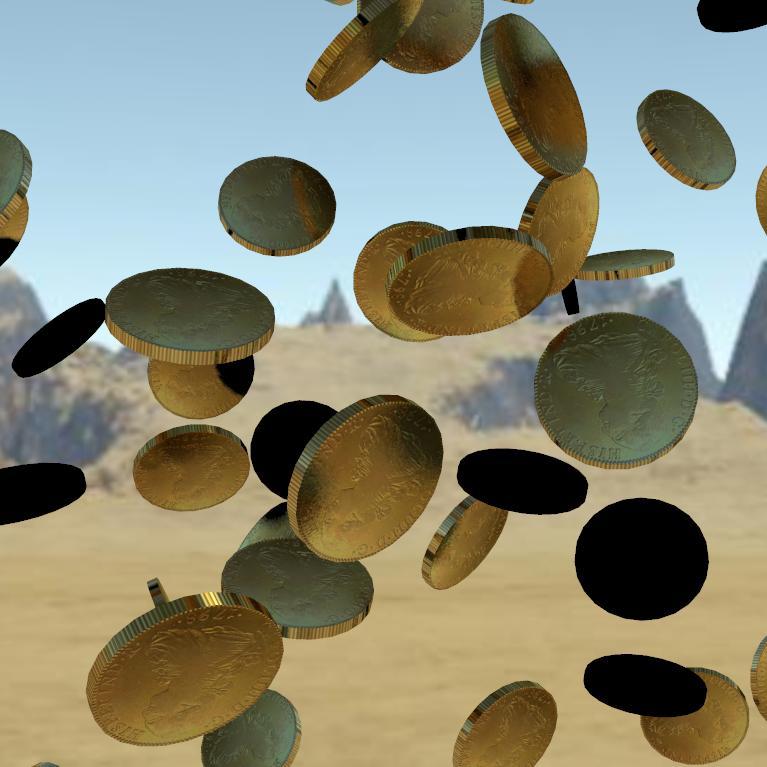
I'm rather surprised that the edges actually appear knurled/reeded - that's definitely a lucky bonus !
So coins may actually be easier than I thought.
However, I can't use a morph to change the thickness or diameter of the coin, because such morphs would screw up when combined with the mid-air rotation morphs.
I can't see any solution to changing the diameter:thickness ratio in the scatter prop.However (again), different diameter coins could be achieved by simply using scaling and a bit of simple mathemagics. E.g. a US quarter is about 1" diameter, and a cent about 0.75". So if I scaled a chip scatter prop to 6.51% the chips would be 2.54cm (1") across. If I scaled another chip scatter prop to 4.88% the chips would be 1.9cm (0.75") across. If I then set 'Mid-Air Scatter A' of the first prop to 0.2, and set 'Mid-Air Scatter AB' of the second prop to 0.267, and applied appropriate quarter/cent textures... then (if I've got my maths correct) you should have $13.04 up in the air !
Iliac crest too prominentIs the comparative screenshot sowing the base Genesis 8 and Genesis 3 figures? If so, I think you may have a bad morph in your G8M data altering your figures. Because that's not how the original base looks like.
XTransfer Module 1- Genesis 3 to Genesis 8 Morph Converter (Commercial)Also we have to remember it's a gift that g1 genx morphs transfers over to g8. We anticipated G2 as the furthest back possible without resistance. G1 was always an unknown. We will try our best to see how we can improve things regarding g1 in general but there are limitations because the mesh between g3 and g8 are different and genx was written to bring those to g3. I know for one we trying to solve why the base shape comes over so broken in the hands. We will maybe have to try and bring the base shape over to genesis 3 with different options inside genx itself, then transfer that to see if that is where the problem lies.Thanks for your efforts!
Celebrity Look-a-Likes for 3D figures Part 2Anyone know of a good Jeri Ryan morph? I know there is one for V3 and V4 but is there actually something newer?
(Released) COG Leather Vest and Bikini for Genesis 8 Female(s) [Commercial]Are there any morphs that move the sides of the jacket behind the breasts and off to the sides? Like an open wide morph?
XTransfer Module 1- Genesis 3 to Genesis 8 Morph Converter (Commercial)Also we have to remember it's a gift that g1 genx morphs transfers over to g8. We anticipated G2 as the furthest back possible without resistance. G1 was always an unknown. We will try our best to see how we can improve things regarding g1 in general but there are limitations because the mesh between g3 and g8 are different and genx was written to bring those to g3. I know for one we trying to solve why the base shape comes over so broken in the hands. We will maybe have to try and bring the base shape over to genesis 3 with different options inside genx itself, then transfer that to see if that is where the problem lies.Male Anatomy Gen8 MalePlease help! Any advise please on genitalia for Genesis 8 male (or any other genesis male). I just purchased Leading Male Morph Collection for Genesis 8 Male(s) but i think it's another dead end? I'm going in circles. Cannot locate male anatomy. Happy to purchase the right bundle.
I believe any Pro Bundle of a Major Figure ( Michael 8, etc.) includes the male gens.
Male Anatomy Gen8 MalePlease help! Any advise please on genitalia for Genesis 8 male (or any other genesis male). I just purchased Leading Male Morph Collection for Genesis 8 Male(s) but i think it's another dead end? I'm going in circles. Cannot locate male anatomy. Happy to purchase the right bundle.
Ethereal Goddess Hair for Genesis 8 Female... so has anyone actually found any morph/movement/pose dials as part of this hair? Or are these confirmed as not being present?
It really is a nice product, and I do like the style a lot - I'd like to work out how to use this properly.
 Lekkulians 2 Genesis 8 [commercial]
Thanks, good to know and I appreciate the options. If you have a moment, could you perhaps list the morphs that the tentacles have?
Screenshot of the Movement & Shaping panels.
These do not seem to appear anywhere when I load the lekkulian 2 head attachment, either on a Genesis 8 figure, or by themselves. Also, if I load the Lekkulian figure, the whole back of the skull where the tentacles attach is being crushed downwards.
(Installed via Daz Install Manager)
Unless you have the head tentacles attached to G8, then you will see the skull being distorted, it cannot be used without the tentacle attachment.
If you simply load up the character file that is included, it will come with all the parts attached. Then you simply need to select the tentacles in your scene tab and you will find all the shaping and pose dial in your parameters tab.
Hi Rawart!! Yes, I loaded G8, then loaded the tentacles. This seems to work okay, but the tentacles point sraight out from the back of the head, and I cannot see any dials to move them - these are missing when I load the tentacles on to a G8 base figure (load G8 > keep it "selected" in the window > load tentacles > no morph/pose dials).
When I load the character figure which includes the tentacles, the whole back of the skull is being pulled downward to what I guess is default G8 height for some reason. The pose dials for the tentacles do appear here, but the figure is being distorted for some reason.
I am assuming both these things are user error, but I am hoping to find out how to fix them.
What might cause an installed morph package to not show its dials?I created a brand new install of Studio v4.12 and installed a package I ran in 4.10 without a hitch. In other words, I know where to look for the dials.
Problem is: they're no showing up. But I see the physical dsf files in the file system.
Tried uninsalling and reinstalling, but no luck.How can I troubleshoot this?
Endlessly ongoing... playing cards/casino chips/coins/banknotes scatter... hiatus time (still)I mentioned back here about the problem I ran into when using the same image for the front/back of a chip. The problem occurs if the colours around the circumference of the chip are not left-right symmetrical.The fix for the example I gave was to simply rotate the outer colours until they were left-right symmetrical.
However, I've just realized that chips with two-colour inserts around the edge can't be done like that.
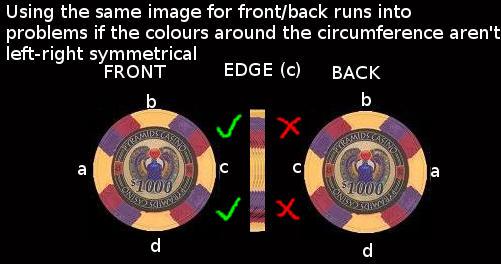
The* solution I can see is to create a separatemap for the back of the chip with the colours (but not the label) flipped left-right:
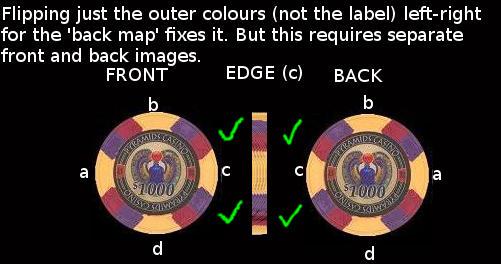
Obviously the chips would then need two material zones, 'front'and 'back' (edge colours are taken from the front map).
*An alternative is to modify the mesh so that the label and outer colours are separate material zones. But then I'd have to redo all those morph targets...and that's just not going to happen !
MCS Mega Bundle?What's the latest version of Unity with which they are compatible? I had them in 2019.3.7f1 and hoo boy do they not morph right. At least the MCS Male 1.6 (the latest version on the Asset Store).
Importing .bvh filesSo I have had luck importing mocap files into DS via BVH and a good Bone MAP to G1 figures. From there you can find various tools to apply the animations to G2/G3/G8 figures. DS does have retargeting (transfer utility?) I believe.
As for sliding feet, check out this utility: https://www.daz3d.com/glue-to-floor-utility-for-genesis-8-females
Good luck.
Muscle-Based Deformation take 2Daz has some prety unique tools for character creation and I don't think I could have achieved the same results in any other program.
I am really interested .. what tools do you use that are unique to daz studio ?
Daz has some prety unique tools for character creation and I don't think I could have achieved the same results in any other program.
I am really interested .. what tools do you use that are unique to daz studio ?
Same here. I tried to do a research on the tools offered by Daz, but found sparse info here and there
It's the ease of use Daz has above all else. Its design philosophy was to be able to be used by people with zero knowledge of 3D work. Everything is user friendly though behind its interface lies a similar complexity to that of any other 3D package. The amount of knowledge and work it takes to unite 2 rigged models into one is shocking for a Daz user who does it by the press of a button.
My favorite is Adjust Rigging to Shape. Having used other 3D packages it shocks me how well Daz does it and I only have to press a button. Can it be done in other programs? Yes. Can it be done in other programs in under 10 seconds? Absolutely not. I have a male and female version of my figure. I estimated it would take me around 2 weeks to properly transfer the rig. I didn't even considered that Adjust Rigging to Shape would help, I don't believe in magic. I just tried it for kicks and literally yelled out loud when I saw 99% of the job was done.
The same goes for most of Daz's tools, one of which is the Propriety Hierarchy. The ease of use allowed me to experiment easily and get instant results. If I were to do something like this in 3dsmax I would have needed to learn how to code, I would need to use several scripts, plug-ins, etc. If I had to worry of the technical aspect of the program, like whether this line of code is compatible with so and so version of the program, I doubt I would've gotten to where I am now. Even how stable the porgram is amazes me.
Keep in mind I'm just one guy. I only have a few years of 3D experience. This started as a side hobby and only got really into it 2 years ago. I'm no genius, I don't know how to code and I'm not an industry professional. My thing was trial and error and with Daz I was able to make tons of mistakes but in a relatively short period of time.
[Released] Character Converter from Genesis 8 Male to Genesis 3 Male [Commercial]Hi and thanks for the quick response. Here is a screenshot. When I filter on the currently used morphs under Shaping nothing shows up. Then what's strange is if I search for Sanjay morphs the Head and Body regions highlight but the morphs do not show up. And insight you have on this is deeply appreciated.
Looking at the figure, the Sanjay CTRL is not on. It looks like the script had a hard time finding the CTRL file to fix it, which means setting CTRL to 1 was not done in the character preset. I would select top-level Sanjay and filter there. Also, check your data/DAZ 3D/Genesis 3/Male/Morph and search for sanjay to make sure the FHM, FBM, and CTRL are there.
Bamboozle for Matt , morph + compatibilityThere is another path you can follow. Clothes Converter 4.0 can take Millennium Generation 3 clothes and "convert" them to other Generation 3 and Generation 4 figures (yes, it's old, but so are Millennium Generation 3 products, and this is the sort of product it was made for). You will have to shape things a bit, like with Mesh Grabber, but this has symmetry, rotations and scaling and will export a new .obj file, fully rigged as a Poser .cr2 figure for the new actor, and can use the existing material presets.
In this case, you can basically fit it for Kids 4 and then from Kids 4 to Genesis and higher with autofit or other products.
And, no, there is no open jacket morph...
[Released] Character Converter from Genesis 8 Male to Genesis 3 Male [Commercial]Hiya - RiverSoftArt - Thanks for all the great products you produce - I have used many and find them really useful to the projects I'm working on.
One quick question - when I convert a character from G8 -> G3, the character comes over great, but I don't get the morph dials and controllers in the shaping tab for the morphs that were transferred over so they are not added into the 'gene pool' for easy combination of existing G3 characters.
Troubleshooting so far:
- I do have Show Hidden Properties enabled. If I export the character via fbx the morphs are avaiable to export.
- If I search for the morph, the region is properly highlighted but the morph dials do not show.
Is there something that needs to be done to make them available?
Again thanks for the great work you do in these products.
You're welcome! If the characters are converting over, then the morphs are there to see. I would love in a character and then filter on the used properties. They will show up.
[Released] dForce Magnet [Commercial]the magnet is loading in like a half a screen away from the fabric.
The magnet uses the vertex location of the base mesh in default state. When you have a morph applied, a transformation or anything else that changes the object's appearance the Magnet will load with an offset. I recommend creating the magnet before you move or morph anything.
To use the magnet on a morphed dress, for example with a morph that widens the skirt, have the dress in default shape in frame 0, create the magnet there, and then apply the morph in frame 1 and move the magnet to fit the vertex's position.
I struggle with that restriction regullary. Is there no option to use the morphed mesh for the magnet position?
Not right now.
Daz 3D is part of

Connect
DAZ Productions, Inc.
7533 S Center View Ct #4664
West Jordan, UT 84084Licensing Agreement | Terms of Service | Privacy Policy | EULA
© 2026 Daz Productions Inc. All Rights Reserved.