-
Analogue jcm for Anatomical Elements?
Hi all
I want to create jcm an analogue only for genitals. Tell me the right path to take.
How do I imagine it:
1 way
-I import the model into BLEDNER(diffeomorphic).
-I do "Merge Geografts" .
-I can create new ones "shape keys". Everything is good and beautiful, but since the model mesh has changed I can't take it all back to Daz studio.
2 way
-I import the model into BLEDNER(diffeomorphic)
-I do "Merge Geografts - geometry nodes".
-Now I have 2 meshes.I can return a body with a ready-made morph back in DAZ the form *.obj.
-Genitals can also be returned back daz studio (obj), but the sculpting process itself is terrible since we already have 2 meshes and the seam is constantly visible.
3 way
-Change the number of polygons in the standard model daz (sew the genitals to the body).
-I import the model into BLEDNER(diffeomorphic).
-Сreating new morphs and bringing the whole body back daz.
-There are probably many risks here that I don’t know anything about yet.
Please tell me in what direction to move.
Show Us Your Bryce Renders Part 13Identifiant - thank you. There is no direct way to write directly in Bryce. I use EleFont, a very old tool, to create dxf files which I import into Bryce as an object.
Teobaldo - thank you.
Rendo migrations and the risk of duplicate purchasesFaeryl Womyn said:
Havos said:
csv files are common seperated lists of columns and are best opened in a spread sheet app, like Microsoft Excel or the free Open Office Calc. These will read the files in and display the data correctly formatted into columns.
Since the files are text, not binary, they can also be read by any text editor, eg Notepad, Notepad++ etc, but they will not look as professional as you will see all the commas seperating the fields.
I tried using Open Office Calc but it looks exactly like the CSV file.
Check that in the import options the separator is set to comma
Recently bought stuff not showing up in Smart ContentNo, Daz does not rely on product creators to categorize product assets. Daz makes the metadata, not PAs.Fabiana Appreciation ThreadI bought the Fabiana Velvet Shaders and the Blankets. The only disappointment with this purchase is that Daz didn't bother to add useful metadata. Everything is lumped in Lost and Found, without types, categories, or compatibilities. This is no fault of Fabiana. Metadata is supposed to be created by Daz after PAs submit their products. Fortunately for users, Fabiana has things well organized in the Content Library folders. I'm in the process of creating my own metadata for these two products, because I rely on Smart Content for efficient workflow.
I used the velvet shader on the dress, draped a blanket over her shoulder and added one of the feather earrings.
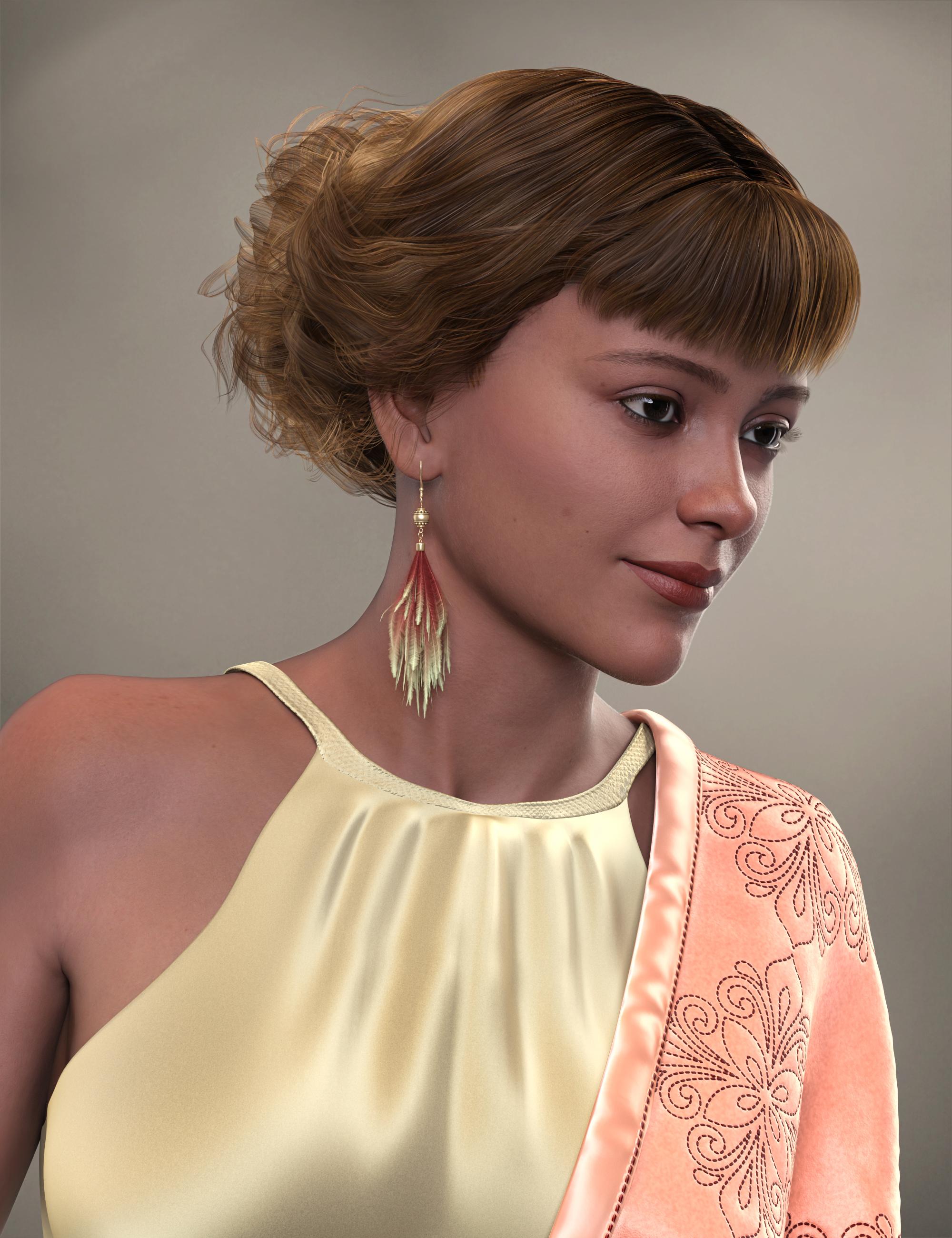 Recently bought stuff not showing up in Smart Content
Apart from the last two (shoes) the others do seem to all be transfers from Rendo - so as I said above they are missing useful metadata. You could open support ticket(s) about them?
Recently bought stuff not showing up in Smart ContentAre they all newly-transferred products from Rederosity? It seems that many of them are lacking properly-made metadata. This was mentioned in the Always Another Sale thread and I've noticed it for several Fabiana products I installed over the weekend.
There's Always Another Sale Thread -- Discussions Only Pt 2barbult said:
I bought two Fabiana products I didn't already own. I was upset that in spite of DIM indicating that they had metadata, it was not useful metadata. It didn't create any categories, comptibilities, types, etc. Every single thing was dumped into Lost and Found. I think I'm done buying transferred products, if Daz can't even bother to create real metadata for them.
I have a lot of products in the lost and found bin. Its a pain.
There's Always Another Sale Thread -- Discussions Only Pt 2I bought two Fabiana products I didn't already own. I was upset that in spite of DIM indicating that they had metadata, it was not useful metadata. It didn't create any categories, comptibilities, types, etc. Every single thing was dumped into Lost and Found. I think I'm done buying transferred products, if Daz can't even bother to create real metadata for them.RSSY G8-G9 Hair Converter not workingwildbillnash said:
Crosswind, what I meant by not getting materials is if I have the 'Filter by Content' checked, then the hair color options don't appear. I have to unckeck it to get to the colors.
Also, it seems a converted dforce hair won't work, meaning I can't 'Simulate' it.
I also have a problem with RSSY's clothes converter, but that's for another post.
In this case, "Filter by Context" is subject to the condition that the hair's Compatibility Base is defined in Compatibilities of each Material Preset, as metadata. There should be no problem when you use the original G3/G8's versions of this hair... while ticking "Filter by Context".
So, if it doesn't work with Filter by Context when you select the hair cap node, try selecting the sub hair node instead ... see if "Filter by Context" works or not...
Trying to fix skirt distortion but having troubleThe closer G8F's skirt was made to the crotch area, the more chance you'll get that "triangulated distortion" projected from G9's body shape (crotch shape) after auto-fitting...
The best and quickest way to fix the distortion is to use Smooth Brush with Sculpt mode, as well as Flat / Grab brushes etc. to finetune the details as needed. Then import OBJ file back to the skirt as a fix morph with Morph Loader Pro, or directly update the base geometry of the skirt with OBJ file.
Moving the "My DAZ 3D Library"jjoyner said:
crosswind said:
jjoyner said:
Last month, I dropped the portable drive on which all of my Daz Studio content was located; the drive is unusable. Fortunately, I had been installing content to another portable drive each time I used DIM to install. I changed the paths in Daz Studio to look at the backup drive and almost all of my content was available to me again. I also changed the install location in DIM to the new drive. There were a very few cases where I had missed making the backup install but those were easily fixed with a new DIM install. DIM however, shows all of the installed files that went to the dead drive as broken links because that drive no longer exists.
The contents of the dsx files in my Runtime/Support folder are a bit different than the contents of the corresponding dsx files in my Install Manager/Manifest Files folder. For example, in Manifest Files, I have a file named IM00068867-01_HHWyvern.dsx while in Runtime/Support, I have a corresponding file named DAZ_3D_68867_HH_Wyvern. If I change the install path in the file in the Manifest Files folder, what becomes of the file in the Runtime/Support folder? Show Installed files in DIM for the installed product shows the file in Runtime/Support.
Thanks.
The dsx file in Runtime\Support folder stores metadata while the dsx file in Manifest folder stores installation data, so they're different things. And if you change the file path(s) in dsx file in Manifest folder, nothing will be changed in dsx file in Runtime\Support folder 'cause that file was just installed from the original IM package... there's no link / replationship in b/t them.
Not so sure what you want to do but if you want to modify the paths of installed files according to the current file locations, modify IM00068867-01_HHWyvern.dsx... if you want to update paths for correcting / re-importing medadata, modify DAZ_3D_68867_HH_Wyvern.dsx
Show Installed Files action in DIM reads the data from the file : IM00068867-01_HHWyvern.dsx and will check if the files locate in the paths specified in the file, so DAZ_3D_68867_HH_Wyvern.dsx is irrelevant. In this case you mentioned, I think you have to synchronize the file paths in both of dsx files by manual modifying them, separately.... or go for a re-installation of this product.
Thanks much for clarifying the difference between the two types of dsx files. Daz Studio could read and open product files on the new drive but DIM did not know that the files were there because of its now outdated manifest files. I knew that using DIM to uninstall from the now phantom drive and reinstalling to the new drive would resolve the issue of dead links in DIM's Show Installed Files. A moment ago, though, I manually changed the install path in the product's manifest file from the former drive path to the new one and now all of the files in DIM's Show Installed Files are live links again. I will slowly over time manually update the installed path in the other manifest files. Again, thanks.
That sounds great ! You're welcome.
Moving the "My DAZ 3D Library"crosswind said:
jjoyner said:
Last month, I dropped the portable drive on which all of my Daz Studio content was located; the drive is unusable. Fortunately, I had been installing content to another portable drive each time I used DIM to install. I changed the paths in Daz Studio to look at the backup drive and almost all of my content was available to me again. I also changed the install location in DIM to the new drive. There were a very few cases where I had missed making the backup install but those were easily fixed with a new DIM install. DIM however, shows all of the installed files that went to the dead drive as broken links because that drive no longer exists.
The contents of the dsx files in my Runtime/Support folder are a bit different than the contents of the corresponding dsx files in my Install Manager/Manifest Files folder. For example, in Manifest Files, I have a file named IM00068867-01_HHWyvern.dsx while in Runtime/Support, I have a corresponding file named DAZ_3D_68867_HH_Wyvern. If I change the install path in the file in the Manifest Files folder, what becomes of the file in the Runtime/Support folder? Show Installed files in DIM for the installed product shows the file in Runtime/Support.
Thanks.
The dsx file in Runtime\Support folder stores metadata while the dsx file in Manifest folder stores installation data, so they're different things. And if you change the file path(s) in dsx file in Manifest folder, nothing will be changed in dsx file in Runtime\Support folder 'cause that file was just installed from the original IM package... there's no link / replationship in b/t them.
Not so sure what you want to do but if you want to modify the paths of installed files according to the current file locations, modify IM00068867-01_HHWyvern.dsx... if you want to update paths for correcting / re-importing medadata, modify DAZ_3D_68867_HH_Wyvern.dsx
Show Installed Files action in DIM reads the data from the file : IM00068867-01_HHWyvern.dsx and will check if the files locate in the paths specified in the file, so DAZ_3D_68867_HH_Wyvern.dsx is irrelevant. In this case you mentioned, I think you have to synchronize the file paths in both of dsx files by manual modifying them, separately.... or go for a re-installation of this product.
Thanks much for clarifying the difference between the two types of dsx files. Daz Studio could read and open product files on the new drive but DIM did not know that the files were there because of its now outdated manifest files. I knew that using DIM to uninstall from the now phantom drive and reinstalling to the new drive would resolve the issue of dead links in DIM's Show Installed Files. A moment ago, though, I manually changed the install path in the product's manifest file from the former drive path to the new one and now all of the files in DIM's Show Installed Files are live links again. I will slowly over time manually update the installed path in the other manifest files. Again, thanks.
Moving the "My DAZ 3D Library"jjoyner said:
Last month, I dropped the portable drive on which all of my Daz Studio content was located; the drive is unusable. Fortunately, I had been installing content to another portable drive each time I used DIM to install. I changed the paths in Daz Studio to look at the backup drive and almost all of my content was available to me again. I also changed the install location in DIM to the new drive. There were a very few cases where I had missed making the backup install but those were easily fixed with a new DIM install. DIM however, shows all of the installed files that went to the dead drive as broken links because that drive no longer exists.
The contents of the dsx files in my Runtime/Support folder are a bit different than the contents of the corresponding dsx files in my Install Manager/Manifest Files folder. For example, in Manifest Files, I have a file named IM00068867-01_HHWyvern.dsx while in Runtime/Support, I have a corresponding file named DAZ_3D_68867_HH_Wyvern. If I change the install path in the file in the Manifest Files folder, what becomes of the file in the Runtime/Support folder? Show Installed files in DIM for the installed product shows the file in Runtime/Support.
Thanks.
The dsx file in Runtime\Support folder stores metadata while the dsx file in Manifest folder stores installation data, so they're different things. And if you change the file path(s) in dsx file in Manifest folder, nothing will be changed in dsx file in Runtime\Support folder 'cause that file was just installed from the original IM package... there's no link / replationship in b/t them.
Not so sure what you want to do but if you want to modify the paths of installed files according to the current file locations, modify IM00068867-01_HHWyvern.dsx... if you want to update paths for correcting / re-importing medadata, modify DAZ_3D_68867_HH_Wyvern.dsx
Show Installed Files action in DIM reads the data from the file : IM00068867-01_HHWyvern.dsx and will check if the files locate in the paths specified in the file, so DAZ_3D_68867_HH_Wyvern.dsx is irrelevant. In this case you mentioned, I think you have to synchronize the file paths in both of dsx files by manual modifying them, separately.... or go for a re-installation of this product.
How to "purchase" Blender bridge?Boorsman said:
It doesn't show up in DIM. I personally don't like using DIM. I actually like manually putting things in DAZ. I looked at Diffeomorphic, and I can't figure out how to download it. What I'm trying to do is import a character I created into Blender with the textures applied. I followed the steps precisly in a tutorial I watched on how to add a DAZ creation into Clip Studio Paint as a 3D character for my drawing. When I import my created OBJ, there are no textures. The video's creator has a character imported with textures applied. Mine won't.
Did you click the Place order button? No payment required means you don't need to specify a payment method, but you still have to complete the order.
How to "purchase" Blender bridge?It doesn't show up in DIM. I personally don't like using DIM. I actually like manually putting things in DAZ. I looked at Diffeomorphic, and I can't figure out how to download it. What I'm trying to do is import a character I created into Blender with the textures applied. I followed the steps precisly in a tutorial I watched on how to add a DAZ creation into Clip Studio Paint as a 3D character for my drawing. When I import my created OBJ, there are no textures. The video's creator has a character imported with textures applied. Mine won't.
There's Always Another Sale Thread -- Discussions Only Pt 2lou_harper said:
daveso said:
lou_harper said:
As I said at the middle of last page, I bought the Ameircana set from Kitbash3D, but converting them into useable assets in DAZ is tedious. If there were similar assets native to DAZ I'd be over the moon. And wouldn't have to be the whole kit and kaboodle at once, but could be bit by bit. A store here, a house there. I'm especially interested in exteriors. DAZ store has several diner, candy store, cafe, etc. interiors, but few of them have exteriors, even fewer nice ones.
What format do they arrive in? DAZ imports quite a few, but texture application not that fun to do? Aren't they pretty large as well physically?
They have this software called Cargo and through that you can one-click import an asset into Blender. And there is a process to export them from Blender as an FBX, which then you have to import into DAZ. You add the textures in DAZ. The files are well named so it's not hard but tedious. And I'm not crazy about most of the textures. Files size are not big, but then nothing seems to be rigged. Windows, doors don't open. Iirc, somewhat big physically but you can change the size % when exporting it from Blender.
yeah, seems like a pain.
There's Always Another Sale Thread -- Discussions Only Pt 2daveso said:
lou_harper said:
As I said at the middle of last page, I bought the Ameircana set from Kitbash3D, but converting them into useable assets in DAZ is tedious. If there were similar assets native to DAZ I'd be over the moon. And wouldn't have to be the whole kit and kaboodle at once, but could be bit by bit. A store here, a house there. I'm especially interested in exteriors. DAZ store has several diner, candy store, cafe, etc. interiors, but few of them have exteriors, even fewer nice ones.
What format do they arrive in? DAZ imports quite a few, but texture application not that fun to do? Aren't they pretty large as well physically?
They have this software called Cargo and through that you can one-click import an asset into Blender. And there is a process to export them from Blender as an FBX, which then you have to import into DAZ. You add the textures in DAZ. The files are well named so it's not hard but tedious. And I'm not crazy about most of the textures. Files size are not big, but then nothing seems to be rigged. Windows, doors don't open. Iirc, somewhat big physically but you can change the size % when exporting it from Blender.
Trying to fix skirt distortion but having troubleIt's been a few days since this was posted and you may have already gotten this answered on the blender forum, but I have your answer. The cyan-colored edges on your model are "hard edges".Hard edges maintain their sharpness when smooth shading is turned on. To remove the hard edges, follow these steps:
Select the skirt and go into Edit Mode>turn on edge selection > press Shift while selecting all of the cyan edges (the selected cyan edges turn a whiter cyan when selected) > click "Edge" dropdown > click "Clear Sharp" > the cyan edges now turn orange (with the last selected edge turning white) > your model is now entirely smooth.
Above "Clear Sharp" is "Mark Sharp," which adds the cyan sharp edges to objects. Sometimes when importing an object into blender, sharp edges on the model appear. I'm not entirely sure why, but it might have to do with exporting from the one 3D software to another. It doesn't happen all the time, but if it does, the sharp objects happen in strange places (such as on random parts of a character's face). Its best practice to check models for things such as face orientation, sharp edges, loose geometry (random vertices floating around), and do a limited dissolve (merge overlapping/identical faces) when you import models. (To delete loose edges: Mesh > Clean Up > Delete Loose. To do Limited Dissolve: Mesh > Clean Up > Merge by Distance.) I hope your skirt project has been going well.
Loading Morph From Blender to Gen 9 gives strange resultsadreacooper_c7d3371011 said:
Hi, thanks for answering, Crosswind. I tried using the settings exactly as you described, and the same thing still happens. It's good to know the settings to use when going from Blender 4 to DAZ. Scale has never been an issue for me, though, and whatever is happening to my mesh is something else entirely. It's just so bizarre that the arms and legs are fine, but everything else is messed up.
you have done something to vertex order. It is weird that vertex order would be preserved for parts of body and not other parts (assuming the morph loader pro settings you showed are what you actually did). If vertex order was compromised during export from Daz or Import to Blender, then likely you would see issue for the entire figure, not just part of it. So it might not be import/export issue. Instead, it might be the case that you did something after loading in Blender to change vert order.
There is a blender plugin from gumroad for restoring vertex order. So you can use that plugin to take the normal geometry to restore vertex order. Or just redo everything from scratch. Another method to avoid redoing the morphing in Blender, I think you might be able to load fresh undistorted Daz figure to blender, and then transfer your current shape as shapekey.
Daz 3D is part of

Connect
DAZ Productions, Inc.
7533 S Center View Ct #4664
West Jordan, UT 84084Licensing Agreement | Terms of Service | Privacy Policy | EULA
© 2026 Daz Productions Inc. All Rights Reserved.