-
Models, Characters and Character Presets... what's the difference?
Models, Characters and Character Presets... what's the difference?
Without ever really having understood much, I have oddly amassed quite a collection* of DAZ models, characters and "character presets" over the years. It might be the simplest most obvious explanation but could somebody enlighten me so that I will no longer harbor this big question mark in my head :P
(1) Models are the basic, no-frills base starting point which is usually free (eg. Genesis 8 Male G8M)
(2) Characters are specifically created from base models and portray, well, a character; these usually come with their own set of skins, textures, body transformations etc to be applied on a base model from the same generation (eg. Jonathan 8 for G8M)
(3) Character Presets are other characters built/derived from Characters from the same generation; these always come with body/face transformations and sometimes with their own set of skins and textures (eg. Deric for Jonathan 8)
(4) Both Characters and Character Presets are primarily time-saving artistic renders that enable us to "dive straight" into a scene without having to transform the base models to a face which we will enjoy seeing in our renders :P
Q: Based on the examples above, if Deric is derived from Jonathan 8 who is himself derived from Genesis 8 Male, why then would Jonathan 8 be a prerequisite for Deric? Because Deric uses Jonathan's skins? (ie. if C:B:A then why not C:A)
Q: So, if one were to only purchase Deric, what would happen if one were to apply Deric to Genesis 8 Male without first owning Jonathan 8?
Q: Characters and Character Presets are not necessary items (eg. I could manually morph G8M to look like Jonathan but I will just not have the latter's skins and eye colors, etc).*A cursory look at my Product Library revealed that I currently own Genesis, Genesis 2, Genesis 3, Aiko 3, Michael 3, James, Benjamin, Victoria 5, Gabi, Tori, Aiden, Axel, Logan, Brandon, Michael 6, Victoria 6, Genesis 8, Callan, Quinton, Zander, Ryker, Martin, Orrin, Chace, John, Wufei, ... most of whom I have never before used or even greeted... and not to mention I believe I have dogs, robots and dragons too!... I sometimes feel like I have a whole extended family that I have yet to meet LOL This has been such a mystery and it wish it could be unraveled once and for all :P
Thanks guys!
Broad shoulder morph for Genesis 8 female?Hey guys. I tried finding this but most stuff seems to be just piling on muscle, and not making them wider. The standard bodybuilder morph that comes with Daz also just does this, making a situation where its just a narrow frame with lots of muscle piled on top. Can any of you point me to the right product, so I can get more variance in body shape?
Celebrity Look-a-Likes for 3D figures Part 2I have been using Face Transfer plugin in Daz Studion and have come up with this morph of Alexis Bledel and Lauren Graham. I frequency edited the source image but I think that more diting wouldf improve the skin texture to remove some of the specular reflectiion
Selfie Thread?It occurs to me that with all the face and body morph kits on daz studio, it's possible to make a self protrait and I was wondering how many people would be interested in doing a daz selfie thread? I think this is a really fun idea. Lets all do our best to create a selfie in daz and upload!
Stop genesis from loading morphsMS,
Tried the .off idea because I thought it might really be powerful. Like 'commenting out' a bunch of content. I tried it with an expression and I am not sure I understand the result. In this case anyways, if you add the off suffex to both the alias_head_eCTRL3duDaytonExpressionAfraid.dsf and the eCTRL3duDaytonExpressionAfraid.dsf the affraid expression dial disappears and I might assume the morph is not loaded into RAM. If you add the off suffex to only eCTRL3duDaytonExpressionAfraid.dsf only, the expression dial dissappears. If you add the off suffex to only alias_head_eCTRL3duDaytonExpressionAfraid.dsf the expression dial remains and the expression works. I am not sure it is a safe assumption but I think you have to apply the .off to both and if you do it will not read the expression into RAM. I was really hoping that one combination would have left the dial but it not work - that way I could have applied the off to a bunch of content that I didn't want loaded into RAM but I would still know it was there if I wanted to turn it on.
interesting - from your info, I would gather that the '.OFF' technique that D3D uses with his checkboxes in GenX2 probably coordinates related and dependent morphs as a group, where as my manual attempts would probably miss these dependencies, without identifying the file-dependencies manually.
Like you, I like to 'comment things out' to help minimize interactions when I'm debugging black-boxes.
I could see that even moving folders might also trigger this effect if dependencies exist across the folders (e.g. when a PA uses the core DAZ dials for part of an expression, etc.). I'll still hack at things like this, but I may pick my battles more carefully knowing this.
Thanks for the update.
--ms
The Mac FAQI'm really getting interested in Marmoset, as perhaps a means of fast renders. In this thread: https://www.daz3d.com/forums/discussion/389081/auto-muscle-enhancer-hd-commercial/p15
hookflash asks, [H]as anyone tried exporting their AME animation from Daz in Alembic format and then rendering in Marmoset Toolbag? In theory, it should work as long as the Daz Alembic exporter really is "vertex exact," as the product page says[?]
And D. Master answers: ABC render in marmoset. Once in marmoset it just play. And I can pan around the animation. Video was just a scene capt of Mamoset.
There is a link to the video: https://youtu.be/o2DauchvTkA
hookflash says about the Alembic format: Basically, it allows you to transfer pure mesh data (static or animated) between 3d applications, such as Daz and Marmoset, without having to worry about the usual incompatibilities that you get with formats like FBX and DAE.
So, does this show great potential for Mac users if iRay via nVidia GPUs are never coming back to the Mac platform? I'm just seeking information. I'm not trying to promote Marmoset or anything else.
[Released] ManFriday's Mesh Grabber [Commercial]Okay, after spending a lot ot money and time on products that don't do what they say they do, it was a revelation to find Mesh Grabber! Worth every penny. The problem I'm having is that I don't know how to get the most out of it. Sure, I've got "poke through" solved (THANK YOU THANK YOU THANK YOU) but I have no idea how to get some of the other effects shown in your vids, like smoothing clothing and extending the top of a tower. Are there going to be any youtube instruction tutorials? That would make this whole thing make sense for me.
Well, I use it a lot times, I made simple videos who show examples. In the rotation thread did I showed what I made with the rotation.
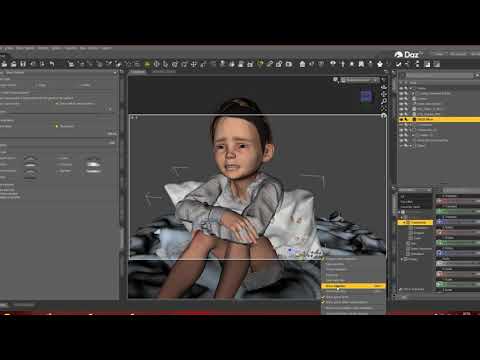
There can you see how I used it to make a pillow fit in the arms of the boy, but that was an old version with more struggles.
Here I showed how to move the blanket over the teddy using the rotation + side moving features.
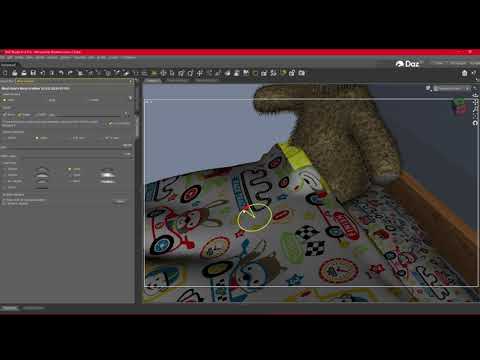
I mainly recommend use the Linear function. I also use Meshgrabber to Model a bit, also to fit Clothes to my will.
Here you saw a other thing I made:
https://www.daz3d.com/forums/discussion/407321/making-a-morph-out-of-meshgrabbers-move
If you set the Falloff Size from meshgrabber to 0, you can use it to move Objects who are inside other objects. It... give soo much examples, BUT.
You should not try to find what others do and copy that, mainly I would say Meshgrabber comes TO YOU, when you need it, You have an object but you wanna change it, you pull out Meshgrabber and try to adjust it ;)
Daz3d to Blender WorkflowThank you @benniwoodel for the nice video it gives a good overview. I see you're using an old version of the plugin in the video. In the new version the pose scale has been fixed please download the development version.
As for facial animations they should work. Again please download the development version. I just tried a viseme animation on G2F and it works fine. If you use aniblocks you have to bake them to the timeline. The plugin doesn't import aniblocks. This may also apply to mimic for @wolf359.
As for the corrective morphs that you don't know about, they import the daz jcms, that for example shape elbows and knees when you pose the character. Try a pose with and without to see the difference yourself.
As for the outfit "breakings" this is what the plugin "transfer correctives" is for that you don't use in your video. The reason is that the genesys platform in daz studio uses an automatic fitting that transfers the jcms of the figure to the outfit. Unless the outfit has custom jcms for that character that is. Also often a smoothing modifier is used in daz studio to fix the same breakings when jcms are not enough. In blender you can use a shrinkwrap modifier on the outfit to get the same effect.
http://diffeomorphic.blogspot.com/p/morphs.html
As an additional note for materials conversion. The plugin works much better with the uber shader so when exporting G1-G3 assets with 3delight materials it's good to convert the materials to the uber shader inside daz studio before exporting. This is good even for iray itself though because this way you have better control on the materials when rendering with iray so it's a win win.
These are just some notes hope they help sorry I don't have time for full tutorials.
edit. @shavonnew Your system is a little weak in the video card but it's not bad. In blender you can use the simplify panel to limit the textures size in the viewport and in rendering, plus there are other settings that also help. This will get you better performances. In daz studio there's the same problem though and people needs to use the scene optimizer addon to get anywere from a basic scene.
https://www.daz3d.com/scene-optimizer
Another Dazaholic Needs an Intervention Thread - Pro Bundle EditionI own 27 G8 pro bundles, but I own over half of the 76 core figures, which didn’t sound right until I realized that the centaurs counted for two, and the list also included the basic morph packs. I got Victoria and Michael for free, I bought the parts of Gabriela’s bundle that I wanted out of Fast Grab, I picked up Caryn and Tobyn during a March Madness sale, Charlotte’s starter bundle somehow showed up in a PC+ for a day sale and I got it for $3, the Girl 8 was, if I remember correctly, free as a giveaway of core characters...
I’m really at a point of diminishing returns for pro bundles. There are a bunch more that I still have wishlisted, but none that I’m super excited about except maybe Alexandra.
off topic threadit's OK, here I am one of you regardless of my rig
whether one has a monster like yours or a budget one (I used Carrara on my Dell inspiron laptop in 2009)
Carrara still can do great stuff
out there, I lack the very powerful machine and graphics cards needed to render pretty photoreal DAZ Dollies in HD morph detail with Dforced everything
here we art around creatively
 rather than click and load the latest content
  Is Windows Daz Content compatible with Mac?
If you've only ever used Mac, be prepared for a little culture shock moving to PC. Some simple things are a little different until you get used to them.
As for hardware configuration recommendations, there are lots of theads here with lots of suggestions. I live on a small fixed income and survived quite nicely with used (at least 7 years old) PCs adapted and updated to have hardware adequate for running DAZ Studio except for an IRay capable card. A few months ago though, I finally broke down and decided to get a proper DAZzing computer and looked at the prices of off-the-shelf or commercially pre-built custom models. The price of an adequate system always seemed to bottom out at about $1200 US. I'm an old computer nerd from the '70s so I thought I could save money by building my own system. So I bought my first new computer in 20 years by piecing it together from catalog bought parts per suggestions of an on-line parts compatability website ( https://pcpartpicker.com/ ) I stuck with known brands and tried to get middle or high grade parts. I was successful and finally pieced together a system, when all done (after 4 months), for $1400 US.
 So, not necessarily a money or time saver, and it was a risk of failure or damage, but I took my time doing research and assembly. And even after it was functional, I added additional parts weeks or months later to finalize it. In the end though, I'm happy with it.
But for even a non-professional DAZzing machine, like others have said before me, I recommend at least a graphic card with an nVidea 1660 chip and 6GB of graphic memory (what I have). Computer's CPU should have at least 4 or 6 sub-processors. RAM should be at least 16GB. Internal storage should be at least 2TB total. If supported by your motherboard, you should take advantage of the new "M.2 NVMe SSD NAND" solid-state drive technology (so very much faster than spinning hard drives) and get at least a 500GB module of it for the operating system. I have two, a 500GB for the OS and a 1TB for rapid access data, as well as an internal 2TB standard 7200RPM spinning hard drive for backups, and a 4GB external spinning drive for duplicate backup and archive.
Note: "M.2" is physical connector type. "NVMe" is interface data transfer protocol. "SSD" is Solid-State Drive memory storage class. "NAND" (or v-NAND) is particular storage technology. I stuck with known brands like Samsung or Crucial. I used the more expensive Samsung EVO 970 models in my DAZzing machine. But I also have had good experience with the 40% cheaper Crucial MX500 standard 2.5 inch SATA connector SSDs (slower than M.2 NVMe but still several times faster than spinning drives) in my older machines so I would also trust their (also 40% cheaper) M.2 NVMe versions. Regardless of whether your new system has any M.2 sockets, you should have at least one SSD in your system. It makes a big difference in day to day operational speeds. And breathes new life into older machines.
Making a Morph out of Meshgrabbers MoveHi,
I have here this:

It was lucky possible to move it out, it is normmaly just this:

But I wanna try to move it more out. Is it possible to make it as Morph? Maybe, I can split it to make it as new geo, but I know duplicating the object can cause Problems.
Maybe if I duplicate it in an empty scene, delete all around, then make a .obj out of it and reimport?
The original design was just to look like this:

The next problem is, the Box have just at the start a brown skin, deeper is it black, for a shadow look maybe.

I have wood shaders but, that object have a crazy complex surface structure (I dont like this splitted over the image surfaces... I prefer everything have its own surface, but I understand its maybe more work).
So no idea... I would maybe also have to redesign it, if I wanna pull the box more out.
Any Ideas?
The used room is this: https://www.daz3d.com/i13-dorm-interior (grabbed free during corona bonus days :) )
Edit: That should be far enough pulled out.

Atm, do I switch between 2 Objects, the room have open/closed objects, but this is not very much open.
How to improve DIM download speed?It doesn't matter what download speed you get from your supplier it is the push speed i.e. upload speed, of the server you are connecting to that governs how fast you receive the download. Heavy traffic on the upload server or your ISP's server can also slow the transfer.
Thank you for this... it explains why on one hand i can watch streaming 4k services with no problem but only get upto 2 Mbps from DIM.
[Released] Rotations Add-On for ManFriday's Mesh Grabber [Commercial]I seriously can't get how this is even comparable to dformers. I mean, I love dformers. I've been using dformers for years to make morphs and sculpt and all kinds of stuff. But the FINE TUNING and precision detailing- at the touch of a dial, to click directly where you want to affect, and how... it's so totally worth it. Nothing else adds that kind of functionality to DS. Yes, of course, there's always outside programs that can do the same things. Obviously. But if you want to keep things in DS, keep your workflow in one program? This is a MUST HAVE. I've paid so much more for programs outside of DS to have the same functions....but to do this in DS, without the back and forth of other programs and testing and such.... Hands down, this is worth it. It's not just for tweaking hair. It can do SO MUCH. I can't give enough words to say it. It's worth it.
Absolute, I dont use daz anytime without meshgrabber, its like in Gimp/Photoshop a normal Morph tool, to shrink/turn around or whatever with a tool... if I would have to export my image everytime to just morph it... I would give it up and cancel my hobby :P
plasma_ring said:
Mesh Grabber's one of the most useful tools I've bought and so I picked this up right away and I'm curious to see what other functions could be added. I chalk it up to my ADHD tax; there are some processes that don't click with me at all, I know realistically I'll probably never sit down and learn them because they bore me to tears, and I'll happily pay someone to think about them for me if I can afford to. One of my favorite uses for Mesh Grabber is circumventing dForce for any movement that isn't straightforward gravity draping, so the rotation addon is really helpful.
ManFriday have a decent List what he (or she?... Man= HE, but the Video voice is female, maybe he hired someone^^), have all as ideas, like one of the next to do things is a Smoothing modifier, which I would love, like I can see in Zbrush (never bought, but I saw videos), where we can make hard edges smoother, that would be great!
How to improve DIM download speed?It doesn't matter what download speed you get from your supplier it is the push speed i.e. upload speed, of the server you are connecting to that governs how fast you receive the download. Heavy traffic on the upload server or your ISP's server can also slow the transfer.
Shape Rigger Plus(Commercial)The user guide specifically says do not have any other morphs dialed in and make sure the figure is in it's default position when rigging a morph. That is how it was designed to work. It is best to rig morphs on the default base figure, and not a loaded in character.
Oh, yes. I had read the user guide and forgot about the instructions.
It would be nice if in cases of customers forgetting that; that SRP would zero the morphs and the poses and then restore them after it was finished using DS Save - Restore function.
Aubrey 8The "High Collar Outfit" - oh dear. Interesting in idea - but WAY too clingy on the breasts, that collar would mean you would be limited in posing of the head, it's not dForce, so I think you'd be VERY limited in its movements. Clothes simply do NOT sit under breasts like that.
Weirdly, in the promo image on the sales page for the starter bundle is the same outfit on (maybe) the same woman, but doesn't have the same breast cling thing happen. It seems to be something that happens on larger breasted women only, and maybe is an outfit that really needs custom morphs to work better.
Though I suppose thats pretty typical that clothing doesn't fit larger breasts well, it's weird it doesn't seem to happen on the other copy of (maybe) the same character, so I guess the custom morph wasn't done then.
I was expecting Valentina the pirate lady! There's been quite a few pairs recently.
Maybe there will be a pirate lady addon?
I don't think there was enough pirate content for a lady pirate to be released.
I just hope the next bundle is more interesting. I also hope they start wswitching up the offers on these pro bundles and they stop with this coupon nonsense as a purple banner.
I suppose there is a few pirate lady outfits out already, but still, I think we all have a need for more booty.
Interesting is always personal of course, so we just have to get lucky in that respect. I suppose having a wider selection of items you're interested in helps, and I don't find many bundles are targetted at mine (I still really don't care about any male bundle at all).
Often it seems they scale the deals based on the perceived desireablity of the bundles (male bundles usually seem to have slightly better deals as they're less desirable). So "weird" bundles tend to get better deals (like Edie). I'm not really sure where i'd rate the desirablity of this bundle as it's pretty standard with no obvious theme and a few quirks.
Iray, color transforms, and dynamic range.That video by Andrew is highly inaccurate. The srgb space has nothing to do with the transfer function and it's a very good output for standard monitors, so there's nothing bad about it.
As for iray you can get a "filmic" transfer the same as blender by turning off burn highlights and crush blacks in the tone mapping panel.
edit. I'd add that using a "filmic" transfer is not necessarily better than a "standard" transfer, it all depends on what you need. To simulate real cameras the "filmic" transfer is not good.
Daz Studio Pro BETA - version 4.12.2.60! (*UPDATED*)indeed,
losing data - not OK - ever.
As a fellow character animator, I absolutely appreciate the investment that stands to be lost with this 'feature'.
Also, that side-effect of the 'H' button that you mention - news to me, and welcome news. Thanks.
I noticed that when activating the 'H' option in the list, that some of my timeline elements/tracks simply disappeared from the list (4.12.0.86 - might be fixed now). That's when I opened Keymate and 'found' and corrected my issues.
Re: the losing of data - I'd be curious if you opened the originally saved animation file(s) in a text editor (un-gzip it if compressed), if the morph/edit elements that you used in the timeline are there (saved), or if the save function is failing (rather than the reload function). The answer to this question is critical to my continued commitment to the 4.12 series. I'd also be curious if you were to save your figure animations as 'pose-presets', if the results would be any more or less complete (a possible safety net?).
Lastly, I do not think that the kind of morphs used (DAZ, or Zed's, or ...) matter. I think they are simple vertex-delta collections in 'dsf' format - separated in collection folders, and the generating entity shouldn't matter, as DS does the dsf generation/saving in the same way, regardless the source (unless that's changed across versions...). The *number* of morphs in your figure's collection might matter, but I wouldn't think the nature of the deltas would matter. I'd hope not!
thanks for the details,
--ms
Daz Studio Pro BETA - version 4.12.2.60! (*UPDATED*)Custom morphs are not animated.
1. Create morph in ZBrush
2. Animate it on the timeline.
3. Save the scene
4. Close and reopen Daz3d
Animation keys are missing from the timelinefwiw, a recent 4.12.x change unsets the 'H' (hidden) keys setting on scenes when they are reloaded. You may have to re-set that each time you start DS/load a scene.
Also note that scene frame-counts and the like have been really wonky after reloadeding in recent releases too, but I haven't updated my system lately (last general rls, and I've played with some interim betas which didn't fix any of the animation stuff I use), as I'm really trying to get some work done - however crippled my animations tools are becoming w each update...
urg,
--ms
This creates enormous problems. If the animation fails in the middle of rendering. The app will close. And I will have to render all the animation again. Because I don't remember where and what animation keys were located on the timeline. And there are more than 20 morphs in one animation. God... at least return the ability to save morph animation, please. I don't understand why it was removed. In addition, the PRO version now corresponds to the Public version. She has the same problems. I just sit there and cry...
The timeline has been completely re-done in the 4.12 series, and as is reasonable-to-expect, bugs have crept in. I still have room for optimism, as the keymate/graphmate integration is a big improvement in many facets of the new timeline.
That said, the beta thread is littered with instances of problems related to this massive change, most of which are not addressed in this General Release. Apparently, if they are not formally registered as bugs in the DS tracker, they don't get attention - blame me, as I won't do a bug report if the bug is mentioned in the forums.
Re: losing your work, As I try to keep current w DS and still get work done in this forward-moving arena, I can only recommend the following:
Those are good suggestions generally but what dantist22121991 is reporting is very serious for anyone that does animations, this is a data loss bug. I experience it as well, it started with 4.12.1.117. I need to do a more careful bug report because at least on the scene I am working on right now, some pose modifiers are lost and some are not. In my scene when I load "Pose Controls/Head/Mouth/Tongue/Easy Tongue" the keyframes are there (as are all the frame 0 non-animating full body and head morphs) but the keyframes for "Pose Controls/Head/Mouth/Open Wide" are gone.
It could be on the saving not loading side, since the Open Wide keys I believe were added after I updated. This is not a bug report obviously just a description of what's happening to me right now. I will make a test scene and be more precise and file a bug if I can figure that process out.
Note, animating fine movements like speech and facial expressions is hours of work and isn't something I can afford to recreate every time I load the scene. For now am avoiding 3rd party morphs and expressions. I would think this would seriously affect all of Zed's stuff, right?
As far as what was said about [H]idden keys: it is dangerous to have them always enabled. When [O]ther / [A]lias / [H]idden keys are enabled in the new Timeline, creating a new figure keyframe can hang the machine when you have lots of morphs and expressions. It is easy to do-- even if you don't accidentally highlight the figure object and stick to the bones. For instance, accidentally including the Head bone when you have lots of facial morphs and expressions will be a spinning cursor for 15 minutes sometimes, and lots of the time it never comes back. Turning those off is a survival tactic. If they need to be viewable in the timeline in order to be saved or loaded or whatever is happening, one errant mouse click can ruin your day. Nevertheless, if it is just a matter of checking that those keys are visible in the Timeline in order for them to be saved, then, I guess we have a workaround if it's true. Will test.
Update: still issue on 4.12.2.6 beta. Start with new scene, gray G8F dev figure. I chose the Mouth Open Wide dial, set it to a bunch of different values in the 0-30 default range there. Saved it. Waiting awhile, saw that as usual in task manager Daz is still running. Killed the process. Started up 4.12.2.6 again, loaded the test scene. No keyframes saved.
Other details:
- OctaneRender plugin is installed which is a very active plugin doing stuff like converting materials and adding subitems to my camera, which is unnerving. I should start with a vanilla install no plugins to test I realize, will do that in a bug report if I get that far. Don't know if that is a factor I installed it around same time I updated.
- I have KeyMate and GraphMate plugins installed as well. These work as well as ever but using them to create the keyframes doesn't help nor would I expect it to, really.
- TRSAOH flags are all enabled in the new Timeline.
-- But: I don't see the keyframes unless I disable [H]idden keys, then re-enable them via the checkmark in the dropdown "Types" menu. I see the keyframe on the new timeline at least. This is not new, I've had to do that ever since the new Timeline was added.
-- when I ensure I've checked/unchecked H several times , and then save after creating some keyframes,when I load I do get a single saved keyframe! I think it was the one closest to frame zero. But the other 3 created with that dial are gone.
Daz 3D is part of

Connect
DAZ Productions, Inc.
7533 S Center View Ct #4664
West Jordan, UT 84084Licensing Agreement | Terms of Service | Privacy Policy | EULA
© 2026 Daz Productions Inc. All Rights Reserved.