-
Auto-Fit List list of items
@chris-2599934
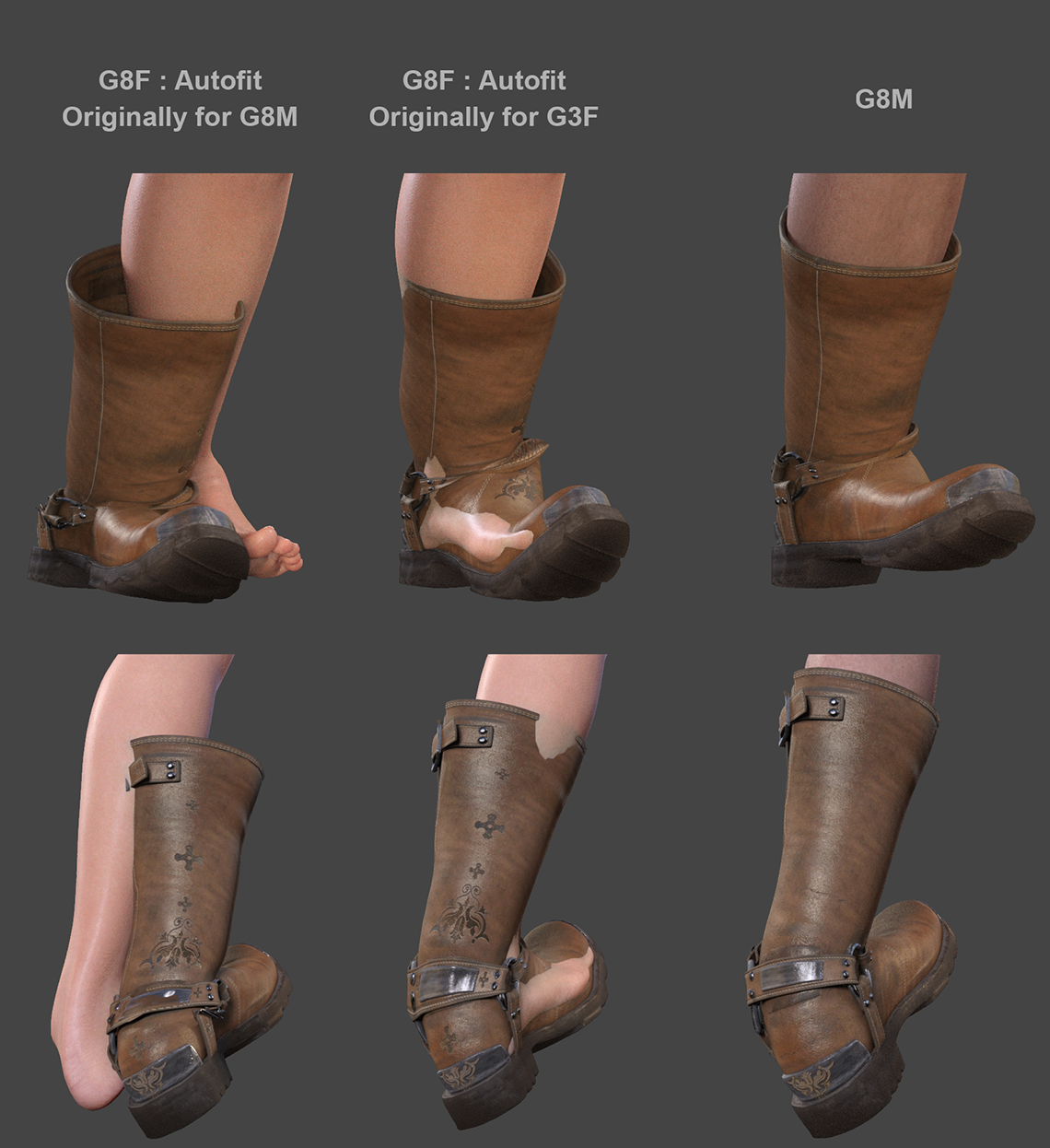
Thanks for this nice step-by-step idea. Scene identification gives results similar to Auto-Fit originally made for G3F. I guess with a bit of Mesh Grabber or (probably) better a morph done with GoZ in ZBrush, this should do the trick. Though JCM of the boots don't behave properly at all. I miss some rigging/weighing knowledge to make all that work properly. If I had that knowledge I'd model my own boots ;) (Really have to work on that rigging own assets part...)
I managed to get a decent result using [...] item originally made for : "Genesis 3 Female". But if the original boots for boots for G8M bend decently well (Engineer Boots for Genesis 8 Male(s)) , when Auto-fitted, all JCM (if there were any in the original product ?) and the weighing isn't as good as the original.
Genesis 8 Cross-Figure Resource Kit seems a bit pricy to fit 17$ boots. It would take my virtual boots at 45$ which is more than I'd put in real shoes :) But it seems like an excellent tool if one were to create assets to sell on stores I guess. I'll have a look into that, sounds like an excellent option, thanks for the tip. I guess this tool does what we can do straight from within DAZ interface. But it ain't simple to figure it out..
Damn you're right, I didn't even think about that. Auto-Fit menu is different and lighter because it's the new G8 Auto-Fit. Thanks for pointing that out.
I'm building my own clothes/shoes, etc in MarvelousD/ZBrush/Maya/RizomUV/SubstanceP. This is my job so to say. No limits there I can do more or less anything. But I need to figure out how to rig, define weights, define JCM and then save Assets properly (hard to find good tutorials about all that) and I guess (I hope !) I'll find those boots issue trivial in a few weeks ;)
Thanks all for your help. I think I'm gonna fit them boots with G3F compatibility. Then morph them in ZBrush to position them properly. Then figure out how to define JCM and weighing. If I can do all that, then it will be a perfect transfer of a G8M asset onto G8M. And a good first step into building one's own assets.
Cheers.
The Marvelous Designer ThreadI've always used the transfer utility. It will give the garment some default weight mapping and will autofollow character morphs and poses. I'm not sure I have the terminology correct.
Daz3d to Blender WorkflowHehe thank you! Now moving onto the next stage, do you recommend I use rigify on her for posing?
Should I save this file as base such that if I ever want to use this character, I'll duplicate from this file since it already has her shaders and hair in it and then change the scene around her accordingly?
For Marvelous Designer, between it and Daz3d, I would first get the A pose of my model, bring her to Marvelous Designer, get the outfit on her, go back to Daz and change the pose to what I want and then bring that model into Marvelous Designer as morph target. Once the outfit is fitted into her pose, I then save the outfit as obj and bring that obj back into Daz.
Are the steps basically the same between Blender and Marvelous Designer?I would really pose her in Daz Studio before exporting. I gripe a lot about Daz Studio, but you will never hear me say anything bad about the rig, posing tools, or even ready-made pose assets that you can just buy for cheap. Not to mention that if you use a Blender rig, you'll be throwing away the JCMs and JCJs, which are two of the things that set Genesis models apart from everything else. With Rigify, I think you will quickly learn just how good the Genesis framework is, and how much it really does for you :)
That being said, people swear by Rigify... I've never used it though.
You don't have to duplicate her. You can keep her in her own blend file, and "link" to her in another. You'll probably want to keep the character in one file, the environment in another, VFX stuff in a third, etc... that way you can change things independently of one another, and it makes loading and saving a lot faster. "Appending" is another operation, but that's not what you want in this case... it's like File/Merge in Daz Studio.
As for getting MD stuff back into Daz, I'm afraid I can't help you with that either... once out of Daz Studio there's no way I would go back in :) and I often really want to know why people would actually do that. Getting things back into Blender is trivial. There's a Marvelous Designer thread here where people are doing some seriously impressive stuff, though. I'm sure there are a half a dozen people there who could tell you anything you wanted to know, and even some things you didn't know you wanted to know.
My workflow has been to export an Alembic file without subdivisions, that starts in an A-pose, and import that into MD. I fit the clothes, run a sim, and export the resulting garment to Blender as Alembic. I just import it on top of the subdivided Alembic I exported from Daz. It works perfectly, but I'm sure you could use obj as well. You might have to fiddle with the scaling, as it didn't seem to work as logic would suggest. On second thought, you know, there's really probably someone on that MD topic that could inform you better.
But seriously, why are you trying to get things back into Daz Studio? :)
The Marvelous Designer ThreadI use a particle size of 10 usually and quadrangulate the mesh. dForce doesn't like triangles. I export from MD as thin and welded. in DS I make it a conforming garment with the Transfer Utility. I apply the dForce Dynamic Modifier and it simulates pretty well with default settings. (I haven't made elaborate clothing with many layers.) For hard to fit character shapes I often use an animated simulation starting at G8F and morphing to the desired figure. Then I export the garment OBJ and make an FBM for the character, so I don't have to do this the next time.
I made this polo shirt for G8F and then made an FBM for Mabel following the animation technique I described above.
All very encouraging. I have a bunch of ready-made garments that I can use for practise (from CG Elves) and there are some low-priced garments from the already mentioned Evgeniya Petrova at ArtStation. Is the Transfer Utility step important? I've never used it before.
By the way - I'm really impressed at the skill you've already developed in such a short time.
Bug Report: Animators Beware, DS 4.12.1.117 deletes values keyframes en masseDaz has tried to incorporate Keymate and Graphmate features into the Timeline pane. The Timeline pane is still buggy, IMO. I have unresolved help requests open. I think it is their intent that the Timeline will replace Keymate and Graphmate. Keymate and Graphmate are no longer available in the Daz Store.
And I am petty glad that I bought them years ago because the new timeline needs a lot of work so I rely on KeyMate/Graphmate. But the problem with saving a scene and losing settings is particularly annoying. I found it happened on morph dials but probably on other things too.
Daz3d to Blender WorkflowSubd is completely up to you. I don't think I've ever gone above 2.
As for hair, yeah, a few of us are struggling with getting a handle on it. I've seen what competent people can do with it, and very quickly, though. If you're using 2.83, though, you can put the character in a collection and then set that collection as the collision collection. That should vastly improve penetrations and just look more natural.
As for the irises, you could fix it in Blender, there's probably an edge loop you could slide, but I think you should really find a morph in Daz for that sort of thing... stand on the shoulders of giants, ya know?
Thank you again! Is it possible to move a model from Blender back into Daz to edit or do I have to re import a new model and restart the shading process all over again?
Also should I make sure to import her as high res?I actually wouldn't know... there might be a way, but I'm sure it is not easy.
But if I were you, I'd copy the blend file before the export so you can just File/Append all your materials that you worked so hard to perfect.
And there are two ways to go about choosing what resolution to export at. If you want it EXACTLY how it is in Daz, export at High Resolution, and the file will be large. If you can deal with very slight differences, convert to base resolution and apply a subdivision surface modifier once in Blender. The file will be lighter. But for one character, and one frame, I'd just export at High.
Again, thank you so so much for your mega helpful comments! I redid everything again with my first model using the second model's skin shader and spent the whole day working on hair. I'm glad to say... I'm really proud of her hair! Hah!
Woah. I like the hair, too! Congrats!
Hehe thank you! Now moving onto the next stage, do you recommend I use rigify on her for posing?
Should I save this file as base such that if I ever want to use this character, I'll duplicate from this file since it already has her shaders and hair in it and then change the scene around her accordingly?
For Marvelous Designer, between it and Daz3d, I would first get the A pose of my model, bring her to Marvelous Designer, get the outfit on her, go back to Daz and change the pose to what I want and then bring that model into Marvelous Designer as morph target. Once the outfit is fitted into her pose, I then save the outfit as obj and bring that obj back into Daz.
Are the steps basically the same between Blender and Marvelous Designer?The Marvelous Designer ThreadI use a particle size of 10 usually and quadrangulate the mesh. dForce doesn't like triangles. I export from MD as thin and welded. in DS I make it a conforming garment with the Transfer Utility. I apply the dForce Dynamic Modifier and it simulates pretty well with default settings. (I haven't made elaborate clothing with many layers.) For hard to fit character shapes I often use an animated simulation starting at G8F and morphing to the desired figure. Then I export the garment OBJ and make an FBM for the character, so I don't have to do this the next time.
I made this polo shirt for G8F and then made an FBM for Mabel following the animation technique I described above.
Daz Studio Pro BETA - version 4.12.2.60! (*UPDATED*)Unfortunately, I now know that it was not my computer (Macbook Pro 2013) – but rather Daz 4.12.1+ incompatibility with Mac's Catalina OS that has caused serious problems working in the application for the past few months. As a result, one of my favorite applications will sadly get shelved going forward. And that's after 15 years (since May 2005) of working with Daz and buying tons and tons and tons of content on Daz3d.com.
How do I know it's not my computer? Just bought a new Macbook Pro to support all my 3D work in ZBrush, Maya, Blender, etc., - 64 Gigs of RAM, 2.4 Ghz 8-core Intel Core i9, and a pretty hefty graphics card. I did not transfer over Daz from my old computer. Just content. I did a 100% fresh install; but to my complete shock, after working in Daz for a little more than 3 hours tonight, I'm having identical problems I had on my 2013 machine (on Catalina), even after a completely fresh install. Both the Beta 4.12.2.6 and 4.12.1.117 exhibit the same behavior:
-
1-2 crashes per hour.
-
Extremely long lag times for loading content (e.g., one character).
-
Freqeunt lags in the process of merely manipualting a character.
-
When I save a file, two "Save" dialog boxes pop up overlapping each other (exactly what happened on my old computer) that both read "Filtered Save". I select one and save, and then about after 6 additional saves, Daz crashes.
-
When rendering, a dialog box pops up that says I am already rendering, which is false.
-
When I've been lucky enough to get past 30 minutes of working in Daz and I save an existing file, it treats it if it were a new file... "Untitled". So it's essentially "Save As" forever after that point. At times the old file I had been working on was never saved anyway.
-
From time to time, after rendering, Daz crashes. It also crashes after merely saving (or trying to save) the scene I'm working on.
NONE of this happened before 4.12.1.117. It's really sad because I have deadlines and Daz used be fantastic for certain parts of my workflow. I was really, really hoping this new computer would solve the problems, but it looks like I can't use Daz anymore, at least until these serious problems are solved. And that's after working with Daz for 15 years. Really, really, really disappointed.
Submit support tickets. These all sound like bugs that should be relatively easy to reproduce (and therefore fix) if documented properly. Something that most likely rarely happens given how few OS X Daz Studio users there seem to be these days.
Can no longer use Daz on my Mac after 15 yearsUnfortunately, I now know that it was not my computer (Macbook Pro 2013) – but rather Daz 4.12.1+ incompatibility with Mac's Catalina OS that has caused serious problems working in the application for the past few months. As a result, one of my favorite applications will get shelved going forward. And that's after 15 dedicated years (May 2005) of working in Daz and buying tons and tons and tons of content on daz3d.com.
How do I know it's not my computer? Just bought a new Macbook Pro to support all my 3D work in ZBrush, Maya, Blender, etc., - 64 Gigs of RAM, 2.4 Ghz 8-core Intel Core i9, and a pretty hefty graphics card. I did not transfer over Daz from my old computer. Just content. I did a 100% fresh install; but to my complete shock, after working in Daz for a little more than 3 hours tonight, I'm having identical problems I had on my 2013 machine (on Catalina), even after a completely fresh install. Both the Beta 4.12.2.6 and 4.12.1.117 exhibit the same behavior:
-
1-2 crashes per hour.
-
Extremely long lag times for loading content (e.g., one character).
-
Freqeunt lags in the process of merely manipulating a character.
-
When I save a file, two "Save" dialog boxes pop up overlapping each other (exactly what happened on my old computer) that both read "Filtered Save". I select one and save, and then about after 6 additional saves, Daz crashes.
-
When rendering, a dialog box pops up that says I am already rendering, which is false.
-
When I've been lucky enough to get past 30 minutes of working in Daz and I save an existing file, it treats it if it were a new file... "Untitled". So it's essentially "Save As" forever after that point. At times the old file I had been working on was never saved anyway.
-
From time to time, after rendering, Daz crashes. It also randomly crashes from time to time after merely saving (or trying to save) the scene I'm working on.
NONE of this happened before 4.12.1.117, or before Catalina. It's really sad because I have deadlines and Daz used be fantastic for certain parts of my workflow. I was really, really hoping this new computer would solve the problems, but it looks like I can't use Daz anymore, at least until these serious problems are solved. And that's after working with Daz for over 15 years. Really, really, really disappointed.
Celebrity Look-a-Likes for 3D figures Part 2https://www.deviantart.com/tritiumcg/art/Kristen-Stewart-Head-and-Body-Morphs-for-G8F-841957993
Download for a Kristen Stewart morph, a recently finished commission.
I'm probably not the first to take her on, but I hope someone finds some use for my version anyway. :)
Daz Studio Pro BETA - version 4.12.2.60! (*UPDATED*)Unfortunately, I now know that it was not my computer (Macbook Pro 2013) – but rather Daz 4.12.1+ incompatibility with Mac's Catalina OS that has caused serious problems working in the application for the past few months. As a result, one of my favorite applications will sadly get shelved going forward. And that's after 15 years (since May 2005) of working with Daz and buying tons and tons and tons of content on Daz3d.com.
How do I know it's not my computer? Just bought a new Macbook Pro to support all my 3D work in ZBrush, Maya, Blender, etc., - 64 Gigs of RAM, 2.4 Ghz 8-core Intel Core i9, and a pretty hefty graphics card. I did not transfer over Daz from my old computer. Just content. I did a 100% fresh install; but to my complete shock, after working in Daz for a little more than 3 hours tonight, I'm having identical problems I had on my 2013 machine (on Catalina), even after a completely fresh install. Both the Beta 4.12.2.6 and 4.12.1.117 exhibit the same behavior:
-
1-2 crashes per hour.
-
Extremely long lag times for loading content (e.g., one character).
-
Freqeunt lags in the process of merely manipualting a character.
-
When I save a file, two "Save" dialog boxes pop up overlapping each other (exactly what happened on my old computer) that both read "Filtered Save". I select one and save, and then about after 6 additional saves, Daz crashes.
-
When rendering, a dialog box pops up that says I am already rendering, which is false.
-
When I've been lucky enough to get past 30 minutes of working in Daz and I save an existing file, it treats it if it were a new file... "Untitled". So it's essentially "Save As" forever after that point. At times the old file I had been working on was never saved anyway.
-
From time to time, after rendering, Daz crashes. It also crashes after merely saving (or trying to save) the scene I'm working on.
NONE of this happened before 4.12.1.117. It's really sad because I have deadlines and Daz used be fantastic for certain parts of my workflow. I was really, really hoping this new computer would solve the problems, but it looks like I can't use Daz anymore, at least until these serious problems are solved. And that's after working with Daz for 15 years. Really, really, really disappointed.
The "Animators Assemble!" thread for Daz animation WIPs, clips, and tipsIf you have the CC3 pipeline version ( I do not obviously) your FBX import is shape projected onto a NATIVE Iclone CC3 base avatar and I believe there are some Iclone native joint corrective morphs or something...Unfortunately, iClone & CC3 still don't support JCMs, despite the fact that they were on the 2019 roadmap at one point (RL ran into "performance issues"). It's just vanilla skin-weighting; although, if you're a sucker for punishment, you could theoretically animate corrective morphs manually using Morph Animator.
 How to save a pose from a fitted figure?
Is the morph meant to work for multiple poses of the coat, or is there to be a one-to-one relationship between poses and morphs?
Yes, which is why I'm trying to see if I can skip some steps because it's a lot of work going back and forth with the morphs between 2 programs. Because of the huge number of bones it's possible to reproduce the look of the morph through posing the handles alone.
Cloth sym has its own limitations like unattached geometry falling off. Let's say I have a scarf with a bunch of metal rings attached to its whole length. I can have two identically rigged scarf figures, one with ring geometry, the other without. I can then simulate the scarf with no rings in a cloth sym. I take that morph then apply it to the figure in Daz -> Adjust Rigging to Shape -> Memorize figure. I then fit the scarf with the rings on the modified figure without the rings then voila: simulated cloth with unattached geometry.
How to save a pose from a fitted figure?So you've added a huge number of handles to adjust the draping. And then using Marvellous Designer to refine that, after which you load the result as a morph? Is the morph meant to work for multiple poses of the coat, or is there to be a one-to-one relationship between poses and morphs?
Stop genesis from loading morphsIf this is true (no reason to doubt), it'd be a great for someone to write a utility that analyzes and minimizes these morph-based meshes to *only* the vertices w deltas - kind of like a morph decimator. Would certainly help w the apparent problem.
Similarly, puppeteer presets save *all* morphs in a loaded character - whether they are used in the puppeteer session or not, which can make them quite huge, and when most of the saved data is irrelevant - as usually 95% of the relevant morph-settings are unchanged in a given session. Worse, these saved unused morph-settings actually override all existing figure morphs when applied to differently morphed figures in later sessions.
Interesting design defaults, these.
I wonder if such a utility could be written, per your description of what's going on.
--ms
How to save a pose from a fitted figure?I still don't see what adjusting the rigging is doing - a fitted item always takes the rigging of the item it is fitted to, that's how the system works. You may want to rerig the draped model in place of the original, rather than using a morph, though I'm not clear why the morph (without changing the rigging) isn't working for you.
I adjust the rigging only on the morphed figure. In my image the first draped figure has had a morph applied to it. Then I adjusted the rigging so the bones match up with the vertices. The second draped figure has no morph meaning using posing alone one could achieve the same cloth result. But it's 900 bones, which is why I use the figure with the adjusted rigging as a base for the pose.
Here is a short video of the process: https://imgur.com/DzSbspA
Both figures are at pose zero, however because the rig of the adjusted figure is different the fitted figure will look as if posed. Neither figure has had any XYZ coordinates modified, only the Origin and End points of the bones of the adjusted figure has been modified. I need to somehow translate this Origin and End points information into XYZ translate/rotate/scale information so I can save it as a pose. Then i'll be able to get the same look without the need of a hidden figure with the adjusted rigging.
Stop genesis from loading morphsOh dear. I wonder why empty dials would use that much RAM. Or maybe it preloads all geografts too, just in case? That would seem strange behavior. I should test all my geografts at some point before I start my great reinstall of 2020 lol. Good info to have I guess. Another person called about a job, so it seems my great install will not start next week either lol.
The size difference comes from the morph-mesh loaded with the dial, and the way the morph has originally been made.
If I were to make a morph that raised the eyebrows, I have a choice of making the morph with just with the bare mesh of the head (skin) or with the complete mesh of the figure, eyes, teeth... all included. If I did the latter, the morph would use so much more ram than doing it with just the skin of the head.
Gen 4 and older figures load these meshes as you "inject" them into you figure, but Genesis figures load everything you have installed at the time you bring your figure into the scene or when you open a previously saved scene = If you see the dial, the mesh was read into your figure, increasing the memory consumption and making it a little slower to open.
Stop genesis from loading morphsNot sure I would conclude a link between the dials and the RAM consumption directly. When I look at the properties of the data folder for kitten it's about 76MB. So perhaps the more appropriate conclusion is that there is a link between anatomy extras and their morphs and the RAM consumption. (Just not sure I understand the magnitude here as compared to the character morphs. My speculation is that these products have many more vertices and so the morph files are larger. And/or they load by default at a higher SubD? A G8F I think has 17K vertices at base resolution. Kitten Genitalia graft: 1.3K, Kitten Lashes: 31.5K; Kitten Torso graft: 4.5K; Kitten Legs graft: 2.2K; Kitten Head graft: 2.1K; Kitten Breast graft: 2.0K; and Kitten Arms graft at 3.4K. These are all base values and I think they load at high resolution ie 4 times these values. But if the graft's morphs work on the base resolution that's still a pile of deltas. And the lashes value is very interesting. One wouldn't want to be carrying too many redundant lashes morphs??) Good luck with earning money. i'll let you know how I progress.
Beta for DazCentral, your new Content ManagerI don't think anyone is wilfully withholding an answer to the question about third-party content, ...
Here we disagree. I think they would very much *like* to give an answer that they simply can't afford, given the limited resources available to them. Probably the right call, but be honest about it. By-and-large, this is a super-reasonable community of really smart people who can both handle the reality of trade-offs.
... but I doubt it has been tested so it's waiting on someone giving it a go.
I would counter-speculate that nobody in the dev group has been explicitly tasked to work on the ability to import native renderosity/hivewire zipfiles into the DIM or DAZCentral core. really. and I get that, but the assumption that there's already something in there to 'give a go' ... hmmm. nope. not buying it. makes no sense. I''d love to be wrong here.
Don't forget that Daz Rawb said above that DIM and Daz Central are the same base core, so I doubt this is a matter of development costs (and I'd hold out hope that cool stuff added to DC will find its way into DIM too). ...
DIM can't natively import foreign data of any kind! Was clearly never designed to. In fact, it still cannot properly handle DAZ Bryce (tm) or DAZ Carrara (tm) content zipfiles after 5 years! (and yes, even *this* makes sense to me, however much I don't like it).
And getting useful content and smart-data for foreign data into the DAZ database took Riverdside Art months of work and study according to his/her own product backstory. I'm sure those development costs were quite substantial to them.
Per @mrinal's salient description of the complexity of this import capability, I would disagree that development costs aren't relevant here, and a counter that it has *everything* to do with development costs, and rightly so. It may still be worth doing (for existing customers), or it may never be worth doing (for new customers) - it's a complex ROI estimation, but I can't, without some common-sense-based push-back believe the idea that it's already in the core and we just need to wait for the code to mature. Not without some substantiation (anything hint/indication all would be welcomed). The existing DIM options and natural market tensions don't align with this representation of the current situation.
Re: DIM<->DAZCentral symbiosis - I also sincerely hope the improvements in the core are bi-directional - double win for DAZ too. Based on the early returns, I'll continue to watch with a cautious eye, saving my older installers as we go.
... I think the "you" who "spoke" would eb the silent(ish) group who use the content and applications but don't post on the forums.
Are you speculating that there's a large number of silent users that have tried and really like the new DAZ Central tool, and haven't experienced any of the problems described in here?
Sounds like another beer-bet to me. A good many of the folks in this thread that have tried this new tool and had problems are some of the most DS-savvy veterans in our user-community. These are the best of the best, and many are blue-blood DAZ supporters to the core. The early returns are mixed, but it is a beta.
All I have to go on is market forces and the comments in this thread, but I know how I'll be betting.
I'm pretty sure that DIM and Daz Central won't introduce some kind of DRM - they are dealing with plain zips, albeit with a particular structure - but I wouldn't bet on there never being a return to DRM (I get sent links to the industrial-scale warez sites that are leaching on Daz content).
I don't even know where to start on this (I sure they won't but bet they will), other than appreciating that the data-theft is a real problem to which I have no good answer.
What I want with my data (import/export/control/flexibility), is exactly what makes the data so easy to steal. I think the "grey line" will always be making it hard enough to not be easy to steal, while making it easy enough for legit customers like me to still reach our intended cross-platform data-transfer workflows and goals. It's a tough one for sure, and it's tough for everyone in all of the content and media-based industries.
There's a fascinating dynamic in the broader marketplace, where the "have's" can and do pay, and the "have-nots" filch and steal, and the "in-betweens" define the dynamics of battleground each day. Open-source, I-tunes, phone-services, DAZ free app w/paid content - all trying to establish their footings in a very very fluid context. I'm sure it will all look very different in 10 years, and yet somehow it will be the same :)
What's encouraging is the ever-rising invoice number count each day in the store, which indicates to me that many other honest and good people like us are still paying fair value for quality goods and services.
cheers,
--ms
How are you greeting the end of the world?People in big cities are really at risk. Living out here in a remote part of NY State I haven't heard of anybody I know getting it much less dying of it, yet.(Knock on wood) But neither have I heard of anybody getting mugged or in an automobile accident which happens a lot. So, just because I don't witness it, doesn't mean it isn't happening. Some people are too eager to forget that. All it takes is one misstep or unlucky encounter. Stay prudent.
A barber in upstate NY who was defying stay at home orders to cut hair in his shop has contracted the virus...
Yet another Darwin Award contender.

Well unless you're in the risk group the risk of dying is pretty small, and when you get well again you're probably immune (no more worries). The first ones they opened up for here (two weeks ago I think) were young kids in kindergartens and schools, for they don't seem to be affected much if they get infected, and so far no horror stories.
Except that people *not* in any risk groups are dying. So really, you're running the gauntlet if you get it, no matter who you are.
There are several complicating issues:
1) we don't know if people who get sick and recover are immune and for how long
2) we don't know if people who get sick and recover are still contagious and can infect others
3) kids generally live with other people, and may not be as careful about practicing good hygiene like frequent hand washing, so even if they are less likely to become seriously ill (and we don't really know how much "less" means), they're probably more likely to transfer the virus from one family to another. Kids could be living in the same house as their grandparents or other people who have higher risk
Daz 3D is part of

Connect
DAZ Productions, Inc.
7533 S Center View Ct #4664
West Jordan, UT 84084Licensing Agreement | Terms of Service | Privacy Policy | EULA
© 2026 Daz Productions Inc. All Rights Reserved.