-
Genesis 8.1 / Victoria 8.1
Visuimag said:
Lighting really does matter, but I'll say, the new skin works much better with nearly every type of light (at least to me) than any Genesis 8 skin
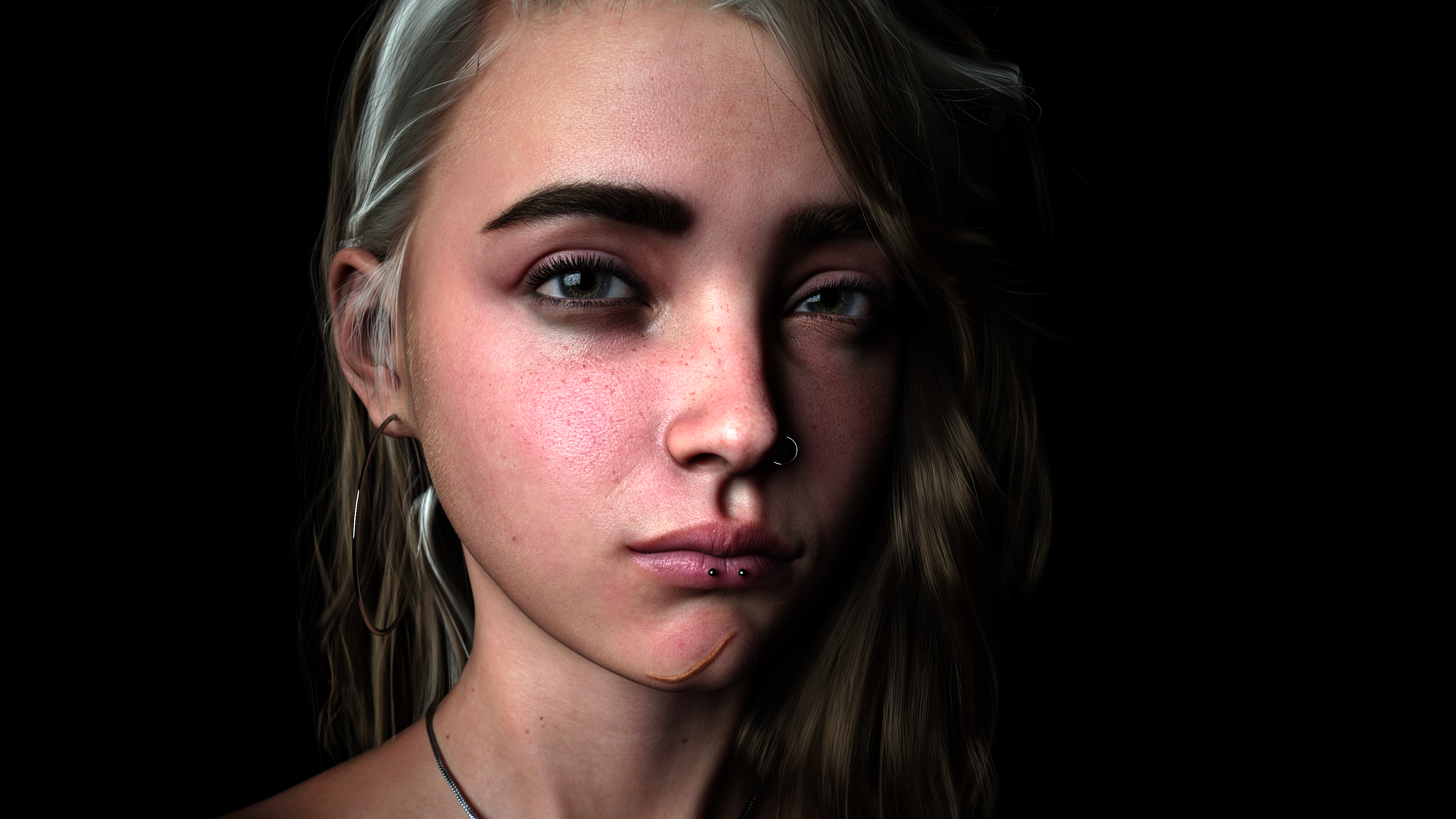
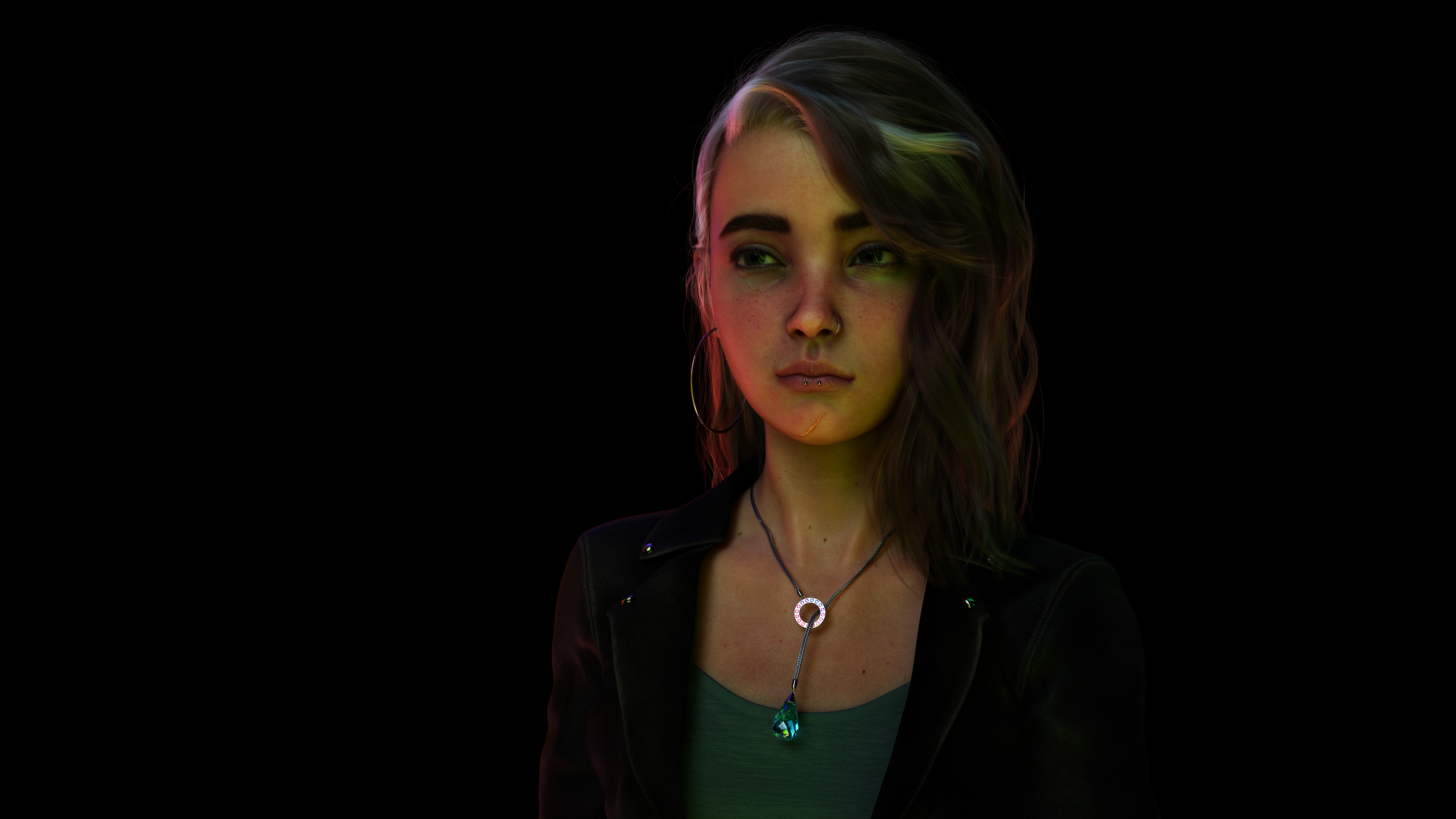
Have you tried it with filament yet?. I be interested to see the results if all those new face morphs and skin details, peach fuzzy will give you photo realistic images with filament?.
Daz Studio 4.16[.0.x] Pro, General Release! (*UPDATED*)jukingeo said:
Hello All,
I am having trouble getting Version 4.15 to work on my system. I was on version 4.12 and skipped over 4.14, but when I saw the release of Genesis 8.1, I decided to update. So I went for version 4.15 and I had found out that Iray had stopped working. So naturally I figured I had to update the driver and low and behold I did a search and came up with this:
NVIDIA Iray
- Integrated Iray 2020.1.3 (334300.6349); see this thread for more detail
- REQUIRES: NVIDIA Driver 451.48 (or newer) on Windows; see NVIDIA Driver Downloads
- NVIDIA recommends installing Studio Drivers
- REQUIRES: NVIDIA Driver 451.48 (or newer) on Windows; see NVIDIA Driver Downloads
Alright, so no biggie...or so it would seem. My system is an i7 6700k with an NVidea GTX 1080i on it. When I go to the Nvidea site and look up that card's current driver, it is version 391.35...which isn't anywhere near 451.48. So what do I do now?
In the meantime while I wait for an answer, I had to revert my system back a couple days to get version 4.12 back so it works. Does this mean I am out of luck with my current video card? If so, then that royally pisses me off as I just bought that card last year.
Can I use Genesis 8.1 with version 4.12?
I have 2 -1080 ti's Game drivers are the only thing available for GTX gpus cards. which should still work Gaming drivers just come with extra support for VR goggles, support for game controllers etc. but the video driver should be the same
if you are using a GTX gpu you are best served to stay with daz studio 4.12.0.86 for optimal use for this gpu without fall back to cpu issues .now that NIVIDA has made opitex prime accelerator default as always on in their driver upgrades to compensate for the RTX raytrace values in the RTX gpu's . Daz studio has moved beyond the GTX architecture support. So either stay with daz 4.12.0.86 for optimal performance for your GTX gou. or buy a new rtx or greater GPU . That is the options I am looking at as well So I know how you feel. its not very pleasant.
Most likely why daz added filament as a renderer , not everyone in all countries can afford to buy a new GPU every time daz updates their studio app.
Daz Studio 4.16[.0.x] Pro, General Release! (*UPDATED*)It took me a hour to read all the comments on this thread . But I am able to say all my questions have all been answered I had. I was thinking of upgrading. But it appears. its best I stick with 4.12.0.86 for a little while longer.
Gosh the more forward daz tries to go the more backwards it seems that things get. I have no interest in genesis 8.1 for animation, because all that extra trappings of morphs is not needed or will hardly even noticed during animation unless you render 4k image series (good luck with that if you think rendering at 1080 takes long to render.). unlike still rendering images, animation images move to fast to really appreciate defined facial movements or body peach fuzzy. most game engines & 3rd party 3d apps or won't use or load all that crap anyway.
But i do have some interest in the new Filament & iray , PBR shader improvements, to improve animation quality. but not at the cost of having to start from scratch finding new work around's to get studio to fit back into my work flow with all the issues reported here.
YIKE!
Thank you everyone posting your comments very helpful information.
Trouble with updating to version 4.15 and Gen 8.1 with GTX 1080TIHello All,
I am having trouble getting Version 4.15 to work on my system. I was on version 4.12 and skipped over 4.14 as I wasn't interested in the Filament upgrade, but when I saw the release of Genesis 8.1, I decided to update. So I went for version 4.15 and I had found out that Iray had stopped working. So naturally I figured I had to update the driver and low and behold I did a search and came up with this as a requirement for version 4.15:
NVIDIA Iray
- Integrated Iray 2020.1.3 (334300.6349); see this thread for more detail
- REQUIRES: NVIDIA Driver 451.48 (or newer) on Windows; see NVIDIA Driver Downloads
- NVIDIA recommends installing Studio Drivers
- REQUIRES: NVIDIA Driver 451.48 (or newer) on Windows; see NVIDIA Driver Downloads
Alright, so no biggie...or so it would seem. My system is an i7 6700k with an NVidea GTX 1080i graphics card on it. When I go to the Nvidea site and look up that card's current driver, it is version 391.35...which isn't anywhere near 451.48. So what do I do now?
In the meantime while I wait for an answer, I had to revert my system back a couple days to get version 4.12 back so it works again, but while the system reverted back, something in Daz Didn't and now I get the error message below:
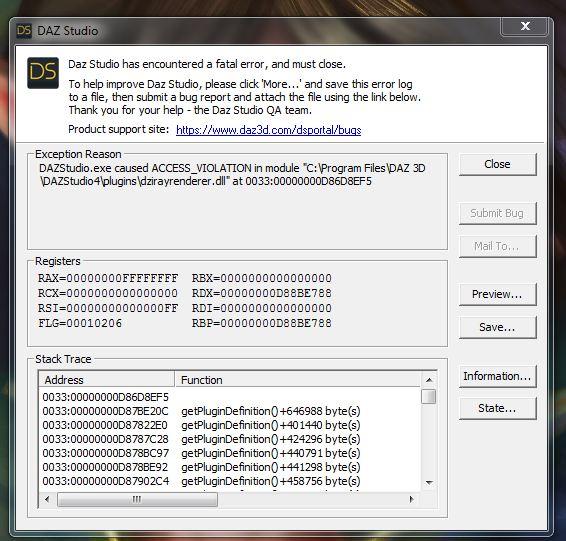
So now I am stuck and not very happy. While I would like to upgrade, it seems that suddenly my video card is now not supported?!? If so, then that royally pisses me off as I just bought that card last year.
Does this mean I am out of luck with my current video card? Can I use Genesis 8.1 with version 4.12? If I can't then in the very least, I need go get version 4.12 working again.
Any assistance would be much appreciated.
EDIT: I had noticed that in the DIM, it says I have version 4.15 installed. So naturally that was the last action I did from the DIM so it still thinks I have version 4.15 installed. I am thinking I might have to do uninstall of the main Daz Studio program and reinstall it? I hope not as it is pain to get my library database refreshed as it is pretty large.
Thanks,
Geo
Calling the Filament Renderer in plugin code? [SOLVED]Thanks to Richard Haseltine who answered over in the Daz Scripting forum where I also posted hoping to get info that can translate into plugin code. If you are reading this you can find the scripted sample for what options to select for the renderer and render options here:
Here's the basics of my code which worked for me. My Daz Script code handles some items before calling my plugin, like setting the layout and user drawing style to 'Filament (PBR)'. If you are doing everything in plugin you may need to set the layout and user draw styles here also.
// get render mgr and options
DzRenderMgr* oRenderMgr = dzApp->getRenderMgr();
DzRenderOptions* oRenderOptions = oRenderMgr->getRenderOptions();

// set required render options
oRenderOptions->setRenderImgToId(oRenderOptions->DirectToFile);
oRenderOptions->setRenderType(oRenderOptions->ScreenShot);
// tempFilename is QString of my temp directory + filename
oRenderOptions->setRenderImgFilename(tempFilename);
// tempImage is a QImage. Used to set the desired render dimensions, otherwise if skipped setting it manually it will use the render options height/width
oRenderOptions->setImageSize(tempImage.size());

// select the viewport and make it active (note:viewportMgr has been passed into my class from DazScript, you would need to create your own)
DzViewport* oViewport = viewportMgr->getViewport(0); // depends on the layout and which viewport you are trying to render, get the index of the one you want

// set which viewport is active (it will only render the active viewport)
viewportMgr->setActiveViewport(oViewport);

// render the active viewport
bool success = myRenderMgr->doRender(myRenderOptions);
Using egpu Nvidia with Mactsroemi said:
If it's just about getting started, you do know that you can render with the CPU on the Mac, right? NVidia cards are much faster of course, but Iray does not depend on them. I've rendered many images on an iMac with CPU only.
This is true. I've made a lot of images on the Mac using CPU renders. As long as your workflow can accommodate leaving it to render overnight, it's doable. A PC with a GPU is, however, much much faster, and this is helpful not just for the final render but for test and in-progress renders. I haven't done any direct comparisons, but my guess is that my new PC with a 1070Ti probably renders 6-10 times faster than my i9 MacBook Pro. And the 1070Ti is old and slow compared to the current generation of Nvidia cards.
When DAZ Studio is finally compatible with Big Sur, it'll be interesting to see if CPU renders on Apple's M1 chips are any faster than CPU renders on Intel hardware. My guess is that because of the layers of emulation required, they'll actually end up slower, but I could be wrong. And while I don't think we'll ever see Iray optimized for Apple Silicon, it's possible that we might see optimized versions of Octane, Filament, Cycles or 3DL, at which point the Mac could suddenly become a rendering powerhouse again. Especially if Apple design their own GPUs and/or put some more memory into their 'pro' machines.
Genesis 8.1 / Victoria 8.1Mark_e593e0a5 said:
4.15 works on Catalina. I am using it on macOS 10.15.7It is rather okay, but you may experience render issues with opacity. This seems to be a general 4.15 issue and not related to Macs. Filament renderer is not available, the rest is and so far it seems to work. What I did before upgrading:
- make a copy of the DAZ Studio application folder "/Applications/DAZ 3D/DAZStudio4 64-bit". You can name is as you like, I have named mine "__DAZ Studio 4.12"
- make a copy of your user's "Library" DAZ folder, "/Users/<username>/Library/Application Support/DAZ 3D". I kept the orignal name and prefixed it with "__412_"
Then do the upgrade. That way, you can move back to 4.12 if things go really bad,
Thanks. I dunno if the increased facial expression control is worth the hassle, since I play with opacities a lot. But it's good to know 4.15 works. I'll keep an eye on it for bugfixes.
Genesis 8.1 / Victoria 8.1lexbaird said:
Is this new Genesis 8.1 usable with earlier versions of Daz Studio?
Being on a Mac with Catalina, I am holding at Version 4.12.1.118, which is the last stable version for me as far as I know. This means that such things as Hexagon 2.5 and Filiment renders are not useable. Is this yet another thing Daz has let Mac users fall behind on?
4.15 works on Catalina. I am using it on macOS 10.15.7
It is rather okay, but you may experience render issues with opacity. This seems to be a general 4.15 issue and not related to Macs. Filament renderer is not available, the rest is and so far it seems to work. What I did before upgrading:
- make a copy of the DAZ Studio application folder "/Applications/DAZ 3D/DAZStudio4 64-bit". You can name is as you like, I have named mine "__DAZ Studio 4.12"
- make a copy of your user's "Library" DAZ folder, "/Users/<username>/Library/Application Support/DAZ 3D". I kept the orignal name and prefixed it with "__412_"
Then do the upgrade. That way, you can move back to 4.12 if things go really bad,
Auto Muscle Enhancer HD [Commercial]terry_duquette said:
Well, started playing in 4.15 and G8.1F....initial assessment, don't rush. The base figure has just the Iray base map, some mouth and eye improvements with the tear addition. Lots of talk (28 pages as of today) in the Commons. The good thing was all the characters and morphs all showed up, and I was able to load G8F morphs with the morph loader pro. So below is a quick character build (crossgender morph, 75% Alistair, 15% Cartoony for Leemoon, and my HD Musculature morphs tweaking, layered with AME body and ASE) including my custom bicep morph on the G8F platform. First thing I noticed that the figure loads in SubD2 rather than 1. All the expressions show up, but a lot of them don't work. If you have D.Masters AFE, then you probably have most of the capability of the G8.1F facial enhancement rigging. Don't know if it's something in the figure or 4.15, but overall things seemed to move and react slower than before, will have to see once I go back to G8M work. There does seem to be a difference in the UV torso map rigging. Went to get a Filament render and add the beautiful skin shell, the torso faded out, so that product is useless on 8.1 for now. I could load any skin shader from the library, so for good looking Filament/PBR support looks like new product or updates required, thus Victoria 8.1. Also was led to believe from the promo descriptions that Vellus hair was defaulted, nope, guess you need V 8.1 for that feature also. Will continue to play, but again, my opinion, don't rush. TD
Just noticed on the Filament renders I should have added the hair cap, I was so focused on trying to fix the torso or find some work around! TD
Thanks for all of this information, Terry.
Genesis 8.1 expressionsNo crashes for me so far, Dell 7500 workstation, dual Xeon, 24core, 24gb ram, rtx 2070 super, win10pro. Also tested on Acer Nitro i7 Laptop 9th gen, rtx 2060, 16gb ram, win10 home. Windows at latest drivers, using latest Nvidia Studio drivers. Tested both in regular viewport and with filament
Auto Muscle Enhancer HD [Commercial]Well, started playing in 4.15 and G8.1F....initial assessment, don't rush. The base figure has just the Iray base map, some mouth and eye improvements with the tear addition. Lots of talk (28 pages as of today) in the Commons. The good thing was all the characters and morphs all showed up, and I was able to load G8F morphs with the morph loader pro. So below is a quick character build (crossgender morph, 75% Alistair, 15% Cartoony for Leemoon, and my HD Musculature morphs tweaking, layered with AME body and ASE) including my custom bicep morph on the G8F platform. First thing I noticed that the figure loads in SubD2 rather than 1. All the expressions show up, but a lot of them don't work. If you have D.Masters AFE, then you probably have most of the capability of the G8.1F facial enhancement rigging. Don't know if it's something in the figure or 4.15, but overall things seemed to move and react slower than before, will have to see once I go back to G8M work. There does seem to be a difference in the UV torso map rigging. Went to get a Filament render and add the beautiful skin shell, the torso faded out, so that product is useless on 8.1 for now. I could load any skin shader from the library, so for good looking Filament/PBR support looks like new product or updates required, thus Victoria 8.1. Also was led to believe from the promo descriptions that Vellus hair was defaulted, nope, guess you need V 8.1 for that feature also. Will continue to play, but again, my opinion, don't rush. TD
Just noticed on the Filament renders I should have added the hair cap, I was so focused on trying to fix the torso or find some work around! TD
Step-by-Step: Using the new PBR Skin on Genesis 8My understanding about PBR is that one of the benefits will be that if you get the skin looking good in Filament it will look just as good in Iray. Is that right?
Daz Studio 4.16[.0.x] Pro, General Release! (*UPDATED*)I was happily working with 4.12 and thought filament and V8.1 warranted upgrading to 4.15. So I did. Now maybe I regret it - I ran into this outdated driver thing on a previous update so one might think I should have learned. The longer version of the story is that after the update to 4.15, I was not able to get my GPU into the render game. I checked the DAZ Studio help log and sure enough, I needed to upgrade my video driver. (I am a bit older and find the idea of installing drivers a bit beyond user maintenance but there you go. . . .) So I installed the latest video driver (studio version as I had read that in some cases that worked better for filament) and sfa worked. Wouldn't see both of my cards nor drive my two screens. After calming down, I installed the latest gaming driver and 'recovered' my two screens and specky was able to see both of my cards. And now the render bit. (Remember - I have installed the latest driver. . .)
When I render my simple (1 G8F figure) test scene in 4.15 it takes about 2 minutes and uses the CPU and RTX 2070 GPU (dedicated to rendering).
When I render the same scene in 4.12 it takes about 1 min 45 seconds and uses the CPU, RTX 2070 and GTX 660 ti (because 4.12 does not 'need' the latest CUDA version and 'sees' the GTX card.)
To the eye, at least, there is no difference in the renders. This is the second time at least, and likely the last, that I have been surprised to find a DAZ Studio version update rendered hardware obsolete - at least for its use and to be honest I think this is likely more linked to the GPU manufacture. . . . .
But the bottom line is, for me, the update to 4.15 has resulted in a degredation in performance.
!! Store Issues - Known Problems - Please Read !!One thing about Daz that's always bothered me is that frequently stuff like G8.1 and Filament shows up without sufficient documentation or explanation. Witness the confusion about what does and doesn't work with Genesis 8.1 or how they will affect our workflow. These are things that reasonable people who use Daz Studio regularly, and have made investments in Daz assets would want to be informed about. We still don't know what Daz's plans regarding Filament are.
#include "dz3dviewport.h"; causes compile errorsHello,
after getting info from Richard Haseltine in the scripting forum regarding Filament rendering I am trying to use the Dz3DViewport objects in my plugin. However, just adding the header include statements:
#include "dz3dviewport.h";
to my .h and .cpp files, and then building, causes 6 syntax errors to show up in my .cpp file. When I remove them I can once again compile my plugin.
Is there any known issues with these objects?
thanks in advance
Vic 8.1 textures not appearing in iray..?I believe that the new skin shader won't work in DS versions 4.12 and older, but if you have filament then you're obviously using a recent version so that's not it. Any geoshells on her?
Vic 8.1 textures not appearing in iray..?Stumped.. loading Victoria 8.1 HD, putting some clothes and hair on her and this is what I get in textured viewport, filament and Iray preview (and render window).
If I apply mats from any other G8F character, Iray renders textured model..
Any thoughts?
Scripted Filament Renderering? [SOLVED]Richard Haseltine said:
I'm going to quote the official word rather than risk confusing the issue with a paraphrase:
Filament is implemented as a DrawStyle ("real-time" renderer), not an offline renderer.
---http://docs.daz3d.com/doku.php/public/software/dazstudio/4/referenceguide/scripting/api_reference/samples/rendering/render_drawstyle/startthanks Richard, I think I found that same sample page about 1/2 hr ago. I changed the 'Hidden Line' drawstyle to 'Filament (PBR)' and it appears to have worked. The only other thing i've tried so far is to change the code to try to render a different non-active viewport (which has a different camera associated) and it still rendered the active one. I'm not sure if that is normal for this type of real-time rendering as I haven't done these kind before. My 'offline' rendering script can select whichever camera I want to render from. If you are forced to render from the active viewport that is kind of limiting and I hope they update that in the future.
Edit: by rendering to a non-active viewport I should explain better. I set the layout to FOUR_PANE and have each of the four viewports assocaited to different cameras. In the sample code I change this line:
//var oViewport = oViewportMgr.getActiveViewport();
to:
var oViewport = oViewportMgr.getViewport(2); // bottom left viewport
so the top left viewport (numbered 0) is still active. I was hoping that forcing the code to the non-active viewport would allow me to only select the viewport via script to render, not making it the active viewport.
Scripted Filament Renderering? [SOLVED]I'm going to quote the official word rather than risk confusing the issue with a paraphrase:
Filament is implemented as a DrawStyle ("real-time" renderer), not an offline renderer.
---http://docs.daz3d.com/doku.php/public/software/dazstudio/4/referenceguide/scripting/api_reference/samples/rendering/render_drawstyle/startBuy Something That Doesn't Work in Carrara? Post your Questions and Workarounds here. (please)After taking Holiday time to get to know the sides of Daz Studio that I never really used it for, I have made a few other discoveries along the way:
- I prefer to use Daz Studio for working with anything Genesis 2, 3 and 8 - Compatibility makes a World of Difference!
- I prefer Carrara when working with Genesis 1 - For my Rosie character, things that fit almost perfectly simply using Auto-Fit are pretty much unusable in D|S
- I like to use transparency maps, so Filament just doesn't work for me.
I spent quite a lot on Genesis 8 in order to create and test Rosie 8, which was a worthwhile investment. I really needed to try this technology as well as others, like Octane and Iray, new D|S animation features, etc.,
It was refreshing (to me) to see that these modern render engines have their own batch of flaws and difficulties. In Carrara, using Carrara dynamic hair, I often have to re-render certain frames of an animation because one of the six layers of hair didn't render for that frame. Carrara makes this fix incredibly natural, easy and fast.
Did I love my experience in Daz Studio? Absolutely - largely because Rosie 8 turned out so well, thanks to Thorne/Handspan Studios' Lara being such a perfect fit for her, along with a whole lot of tweaking and Victoria 8's body. Linday's Long Curly dForce hair is amazing as well, but it takes a LOT of time to simulate and render. In comparison, it uses four layers of hair that simulate simultaneously which can take 5+ minutes or even more per frame, while Rosie 5's six layers of hair must be simulated individually, but simulate around 1.2 to 2 frames per second. Big difference. It does put a hit on render times, but after all this time optimizing, I'm still getting mid-distance shots rendered in less than 2 minutes per frame. So far if I try that speed in Octane, the results aren't nearly as good. Iray... um... forget about speed. Given time to bake, however, and Iray spits out the finest renders I've ever seen from my own work.
I've made a fair review of my stint into Daz Studio on my site: Discovering Daz Studio
Would I switch from Carrara to Daz Studio? I doubt that could happen.
Do I want to use Daz Studio more along with my Carrara work? Absolutely!
Daz 3D is part of

Connect
DAZ Productions, Inc.
7533 S Center View Ct #4664
West Jordan, UT 84084Licensing Agreement | Terms of Service | Privacy Policy | EULA
© 2026 Daz Productions Inc. All Rights Reserved.