-
Daz Studio 4.15 64-bit crashing on PC laptop
I realised that some of the errors in the log file were from wiping my PC laptop (reinstalling to factory defaults but keeping mu files), so I deleted all DAZ related files, and reinstalled it through Daz Central. Daz Studio still crashes when I try to open a saved scene, so there's still a problem somewhere - I don't know how to solve it.
The log file says this (have also attached it below):
2021-06-20 10:51:25.192 WARNING: ..\..\..\..\..\src\pluginsource\DzIrayRender\dzneuraymgr.cpp(480): Could not add path: "C:/Users/hdobrowolski/AppData/Roaming/DAZ 3D/Studio4/shaders/iray". Due to unknown error -2 [I can find the Studio4 folder on my laptop, but it doesn't have a 'shaders' folder in it]
2021-06-20 10:51:25.192 WARNING: ..\..\..\..\..\src\pluginsource\DzIrayRender\dzneuraymgr.cpp(480): Could not add path: "C:/Users/hdobrowolski/AppData/Roaming/DAZ 3D/Studio4/temp/shaders/iray". Due to unknown error -2 [see above]
2021-06-20 10:51:25.193 WARNING: ..\..\..\..\..\src\pluginsource\DzIrayRender\dzneuraymgr.cpp(359): Iray [ERROR] - GPU:RENDER :: 0.0 GPU rend error: NvAPI call NvAPI_Initialize returned an error:
2021-06-20 10:51:25.193 WARNING: ..\..\..\..\..\src\pluginsource\DzIrayRender\dzneuraymgr.cpp(359): Iray [ERROR] - GPU:RENDER :: 0.0 GPU rend error:
2021-06-20 10:51:25.193 WARNING: ..\..\..\..\..\src\pluginsource\DzIrayRender\dzneuraymgr.cpp(359): Iray [WARNING] - CUDA:RENDER :: 0.0 CUDA rend warn : CUDA module initialization failed. [the laptop doesn't have a CUDA module]
2021-06-20 10:51:25.193 WARNING: ..\..\..\..\..\src\pluginsource\DzIrayRender\dzneuraymgr.cpp(359): Iray [WARNING] - CUDA:RENDER :: 0.0 CUDA rend warn : The version of your CUDA driver is 0.0, but 11.0 is the required minimum [there's no CUDA on the laptop]
2021-06-20 10:51:25.193 WARNING: ..\..\..\..\..\src\pluginsource\DzIrayRender\dzneuraymgr.cpp(359): Iray [WARNING] - CUDA:RENDER :: 0.0 CUDA rend warn : Please update your display driver (current version ). [see above]It complains about similar things related to NVIDIA also.
I don't have a NVIDIA graphic card on the laptop, but if I've understood correctly it should be able to do Iray renders with the CPU? There's an Intel(R) Iris(R) Plus Graphics card on the laptop, am aware it's not great but that's all I have.
Can someone please help?
New! Novica & Forum Members Tips & Product Reviews Pt 14Someone in Product Suggestions was looking for a Rugby Uniform (real, not skimpwear) for G8F. I think the tight fitting leotards and shorts and tops/bras are easier to produce for the women and men. I am sick of the baggy shorts and tees for the guys, especially without any details.
But Rugby, Football, Tennis, Golf (from the little I see from the tournaments, it seems almost like Friday business wear now), Hockey, Bicyling (weekend warriors vs serious teams), Baseball, Basketball, Horse Riding English and Western/Working, Sking outfits and gear. This is off the top of my head.
Need Hiking clothes for mountains in fall, where you can have summer, fall, and winter in 24 hours. I believe there is hiking equipment in the store.
I have seen surfing suits in the store finally. On the Central Coast of California, I never saw a surfer get into the Pacific without one.
This is kind of a ramble, a thunderstorm is moving over us. Noise, wind, no rain. And now rain.
Is there a quick way to install ALL my content with Daz central/ studio?Starbase 1 - Nick said:
Will Daz Central still work with all the items if a different bit of softwsare ionstalled them though?
Thank You,
Nick
AFAIK DAZ Central and DIM share the same data and file structures. But DAZ Central has a bad reputation for messing things up (may have been fixed now, I don't know), so I'd recommend DIM which has a much better reputation.
Carrara Challenge #58 - It's a Kind of Magic - WIP thread.Headwax said:

Five Wizards and the Necromancer's Grimoire
Most of the lighting in this is from caustics - light reflected from the central sphere.
you get the blobby effect by reducing the caustic's filter size in the render room
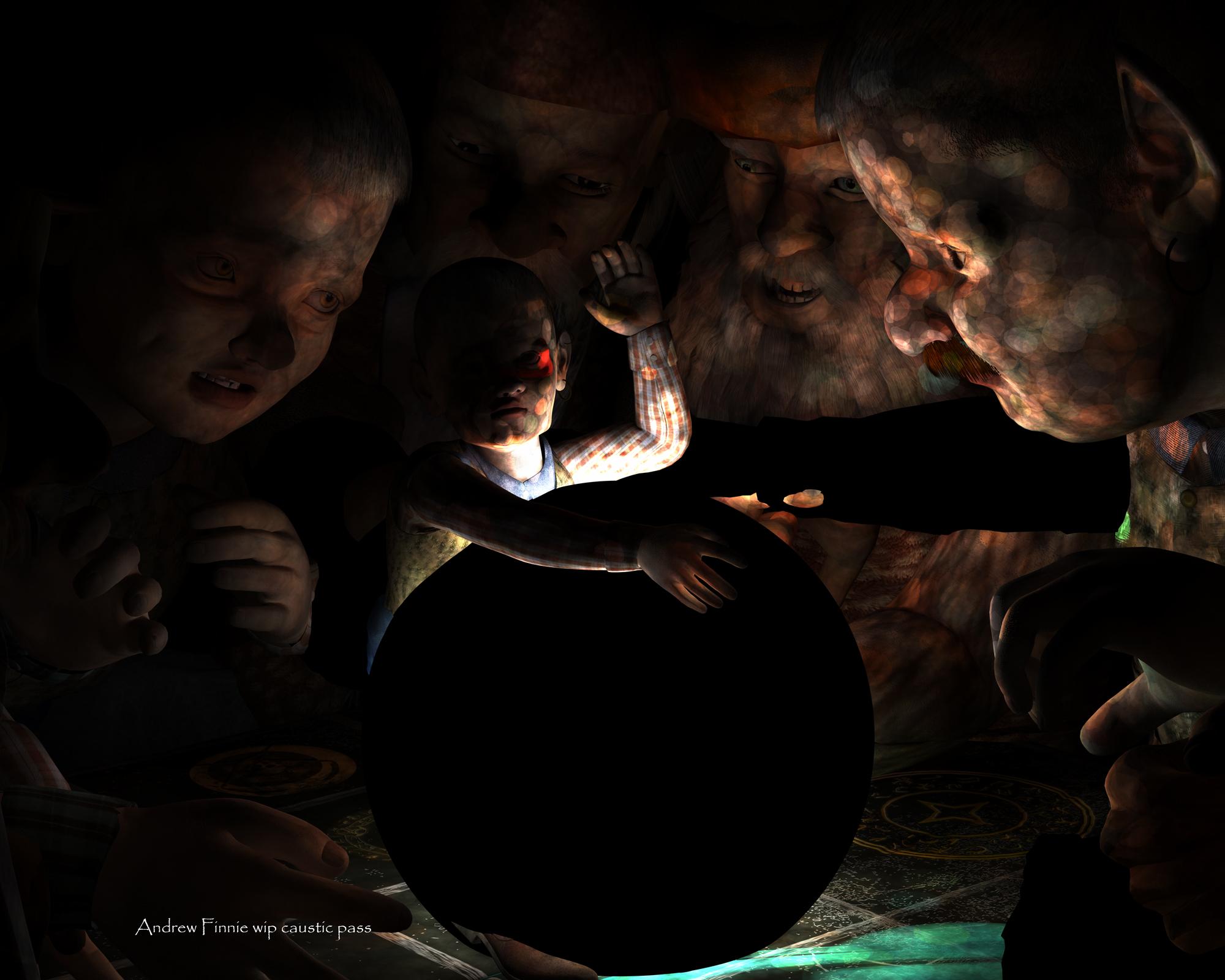
Andrew - now that is the darker theme to balance the other entries of cuteness. Excellent use of caustics. Render times of caustics often make me pause, but worth it.
Genesis8.1 is not in the installation itemkein999 said:
Genesis8.1 is not in the installation item
No item in plugins of Daz Central
Please tell me what to do.Sorry for the hard-to-read English. I am Japanese.
G8.1 is installed by installing the Genesis 8 Starter Essentails
Genesis8.1 is not in the installation itemGenesis8.1 is not in the installation item
No item in plugins of Daz Central
Please tell me what to do.Sorry for the hard-to-read English. I am Japanese.
Carrara Challenge #58 - It's a Kind of Magic - WIP thread.Five Wizards and the Necromancer's Grimoire
Most of the lighting in this is from caustics - light reflected from the central sphere.
you get the blobby effect by reducing the caustic's filter size in the render room
Is there a quick way to install ALL my content with Daz central/ studio?Will Daz Central still work with all the items if a different bit of softwsare ionstalled them though?
Thank You,
Nick
Is there a quick way to install ALL my content with Daz central/ studio?I've got a big new fast PC, so naturally I want to install the new latest Daz studio and manager.
Over the years I have bought many, many assets - is there a way to download and install the whole lot in one go overnight? (I'm pretty confident I could do this with the old tool, but I cannot see it in Daz central)
Or do I have to work down the list clicking each one iin turn.
Thank you!
Nick
Why use DIM or Connect?Thank you.
Sorry for mixing up the terms Connect and Central.
Why use DIM or Connect?Connect is the system for installing within Daz Studio - did you mean DIM or Daz Central? Some items (e.g. plug ins, and other things that need to go in the applications folder) cannot be isntalled through Connect, others require that they share a location while Connect gives everything its own folder (e.g. the ExP system used in the fourth generation Daz figues and many scripts).
Getting old content on new computer.
Sorry, I meant Central, not Connect. The DIM problem is a known issue which should be fixed with the next Daz update.scott762_948aec318a said:Why won't the new computer run DIM? It's Windows 10, right? I'd figure that out first rather than some wonky workaround.
There's also Daz Central.
To copy over, you need to check where your content is installed. Edit -> Preferences -> Content tab -> Content Directory Manager
Getting old content on new computer.Why won't the new computer run DIM? It's Windows 10, right? I'd figure that out first rather than some wonky workaround.
There's also Daz Central.
To copy over, you need to check where your content is installed. Edit -> Preferences -> Content tab -> Content Directory Manager
Downloading the Latest DS?Thanks. But how? Why am I taken to a Daz Central download page and not a Daz Studio download page? Where is the page for the latest build?
Okay I think I found another page that, oddly, wants me to enter new ID, email, and password (though I'm already signed in), and then a download...but it just downloaded Daz Central. But one this is open, Daz and Daz to Blender start to install. This process should be part of the onsight instructions so people know what to expect.
Downloading the Latest DS?So frustrating, I want to download the latest daz (Fig 8.1 apparently won't work with my old 4.10 version), but when I click on that link it takes me to a page to download Daz Central. So I download Daz Central and it won't work. Is this a Mac/Safari issue? Daz...you need to make things easier.
Winter Forest HDRI not in Smart Content or Content LibraryI have downloaded https://www.daz3d.com/winter-forest-hdri (twice) using DIM but it does not appear in either Smart Content or Content Library. It's listed in Daz Central with an OPEN button but this only leads to an error message. (Resource error. Could not find the 72103 Product")
If I uninstall it and then install it using Daz Central it gives the same error. on opening.
I notice that my other HDRIs from this PA are in a folder called JDA_HDRI but this one is in JDA HDRI.
Any ideas what to do next?
Why did my Genesis 8.1 only have limited expression adjustment?PerttiA说:
您是如何安装它们的(DIM/DAZ Central/DAZ Connect(在 DS/Smart Content 内部)/手动安装)?
您是一直使用相同的安装方法还是使用了几种方法?
Well, I used to install DAZ4.15 manually, and recently I changed it to DIM online installation, but Genesis 8 Malet and Female Starter Essentials and Powerpose Tempolates I used DIM online update to install.
Why did my Genesis 8.1 only have limited expression adjustment?How did you install them (DIM/DAZ Central/DAZ Connect (inside DS/Smart Content)/Manual installation)?
Have you always used the same installation method or have you used several methods?
Moving directory from C:Yes
Depending on how you install content via DIM or Connect or DAZ central
I have my content on my F: drive and have two folders
F:\My Daz 3D LIbrary and F:\My Daz Connect Library
Now my SSD C: drive gets bored but my F: Harddisk drive is way bigger loading times were only slighty slower but not running out of space is better
I am rendering so cant see the setup dialog to confirm
Auto Face EnhancerIt just reappeared again, 30 minutes after my last post! I'd uninstalled Auto Face Enhancer from Daz Central, loaded a new figure, applied a few expressions, and on about the fourth expression it automatically started applying these hideous Auto Face Enhancers. I have to get rid of this thing!
Daz 3D is part of

Connect
DAZ Productions, Inc.
7533 S Center View Ct #4664
West Jordan, UT 84084Licensing Agreement | Terms of Service | Privacy Policy | EULA
© 2026 Daz Productions Inc. All Rights Reserved.