-
Problem with importing models
They're from different websites. The obj files which I mentioned are from Deviantart but the one in screenshot is from Sketchup. Link to the exact page : https://3dwarehouse.sketchup.com/model/593f4e14-36dc-4e54-875c-7439d5bc6a40/The-Mad-Hatter-Johnny-DeppWhere are the models coming from, though? It may be a consequence of soemthing in the source.
More Non-photorealisitic Renders (NPR II)thank you mmitchell, artini et jepsonpeteCMT :)
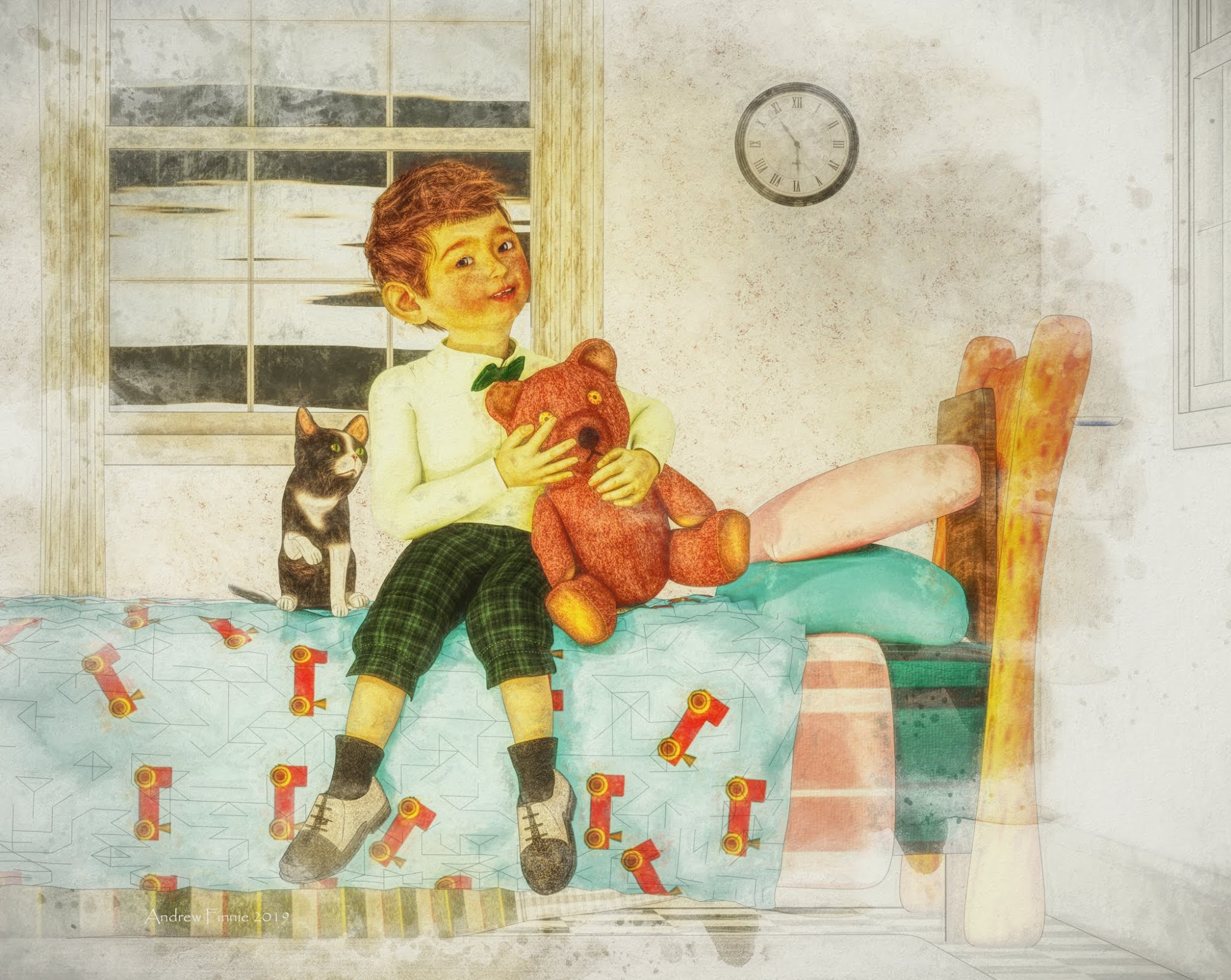
This has a nice flat drawing effect. I have no idea how you created this, but it's really impressive.
Have you by any chance used Google Sketchup or sketchmake to create the backwalls, windows, etc?
The muted colours really add to the watercolour, or coloured pencil sketch effect you are going for here. Nice work.
ah thanks I'm sorr just saw this
Bedroom was somethingI picked up at daz - I guess the main thing about this style is to lose most of your shadows
In Carrara you can render thiings like shadows and diffuse textures in different layers - so you combine them with the full render to get a softer look
hope t his makes sense
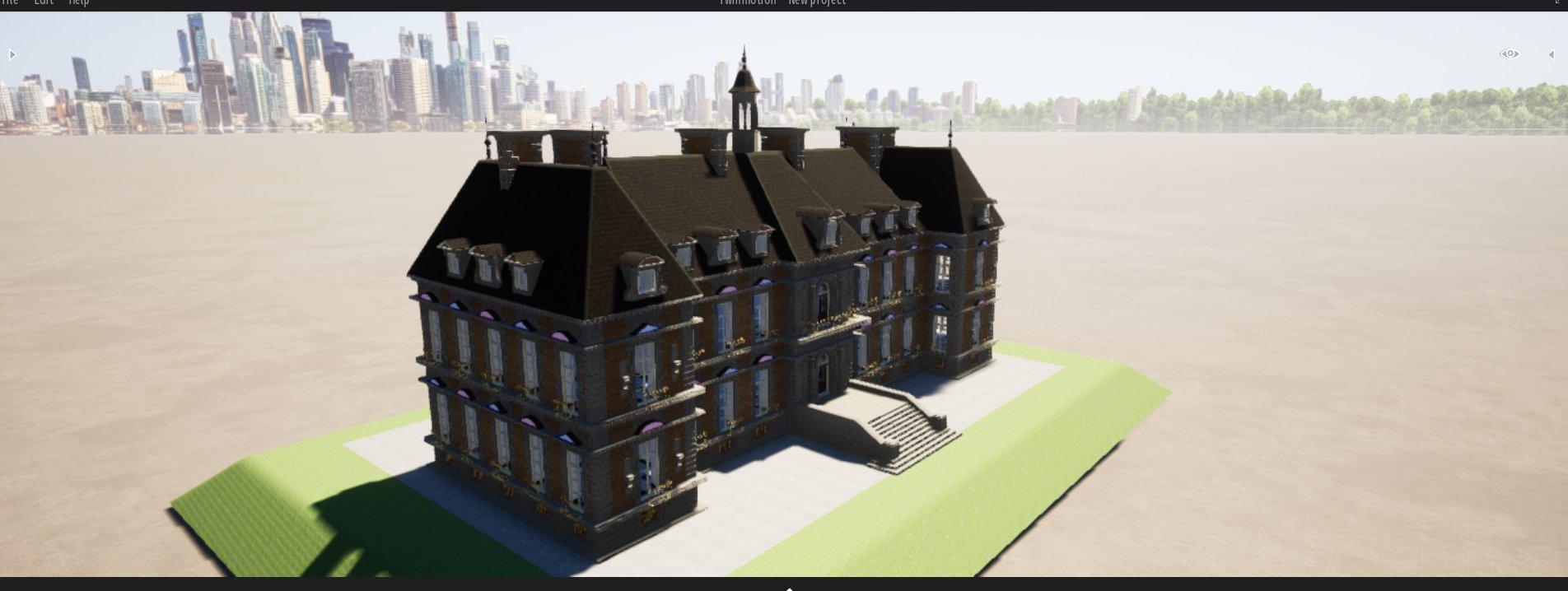
Twinmotion renders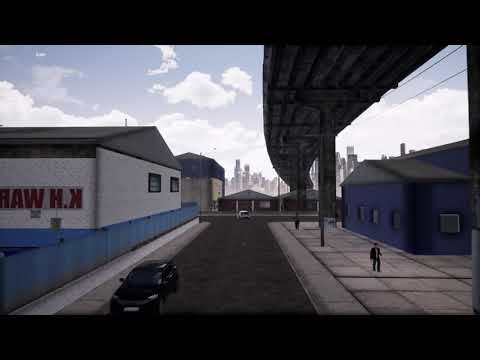
Stonemason's warehouse in Twinmotion
looks like something from 15 years ago, you need this https://blenderartists.org/t/free-normalmap-generator/642602
It is one of SM's older sets but that rendered in minutes with those people and cars that follow paths
you can find the texture folder, and create new normal/specular/displacement maps etc, using the free tool in the blender forums and modernise the scene
Or I can render it PBR in the Octane 4 plugin using the diffuse in the bump channels
 with actual DAZ people following paths in Carrara!
are lots of ways one could do a better job with a lot of work

this was quick and fun took minutes
most DAZ users not interested in Twinmotion likely for your reasons
they want to spend hours on an image
those people can export the scene, open it in sketchup and use https://enscape3d.com/ which will probably be cheaper then twinmotion
Twinmotion is still free
it will probably remain that way after november,
people pay big money to download 4k textures, spend hours with the clone brush making the texture a bi-directional tile. and won't want to spend big money on a engine that make's your render look like a cartoon with no detail.
Twinmotion rendersStonemason's warehouse in Twinmotion
looks like something from 15 years ago, you need this https://blenderartists.org/t/free-normalmap-generator/642602
It is one of SM's older sets but that rendered in minutes with those people and cars that follow paths
you can find the texture folder, and create new normal/specular/displacement maps etc, using the free tool in the blender forums and modernise the scene
Or I can render it PBR in the Octane 4 plugin using the diffuse in the bump channels
with actual DAZ people following paths in Carrara!are lots of ways one could do a better job with a lot of work
this was quick and fun took minutes
most DAZ users not interested in Twinmotion likely for your reasons
they want to spend hours on an image
those people can export the scene, open it in sketchup and use https://enscape3d.com/ which will probably be cheaper then twinmotion
Twinmotion is still free
Twinmotion rendersStonemason's warehouse in Twinmotion
looks like something from 15 years ago, you need this https://blenderartists.org/t/free-normalmap-generator/642602
It is one of SM's older sets but that rendered in minutes with those people and cars that follow paths
you can find the texture folder, and create new normal/specular/displacement maps etc, using the free tool in the blender forums and modernise the scene
Or I can render it PBR in the Octane 4 plugin using the diffuse in the bump channels
with actual DAZ people following paths in Carrara!are lots of ways one could do a better job with a lot of work
this was quick and fun took minutes
most DAZ users not interested in Twinmotion likely for your reasons
they want to spend hours on an image
those people can export the scene, open it in sketchup and use https://enscape3d.com/ which will probably be cheaper then twinmotion
p.Con PlannerWow, thanks for the heads up.
ungroup everything in p.Con planner, before you start in the edit tab, then you can delete the 2d images and material all of it using the materials in the start tab, then edit material size, rotation, scale in the material editor under the edit tab
it takes no time, the attached image, is using this from sketchup 3d warehouse https://3dwarehouse.sketchup.com/model/u1cea3e17-954f-4d98-bc98-dac7b64a8571/House-3
Some of the full buildings arn't created using the professional versin of sketch though, so they arn't BIM architected, and will have 10,000 extra polygon's
Looks good. Maybe I can make a facsimile of the neighborhoods I grew up in, that would be fun.
p.Con PlannerWow, thanks for the heads up.
ungroup everything in p.Con planner, before you start in the edit tab, then you can delete the 2d images and material all of it using the materials in the start tab, then edit material size, rotation, scale in the material editor under the edit tab
it takes no time, the attached image, is using this from sketchup 3d warehouse https://3dwarehouse.sketchup.com/model/u1cea3e17-954f-4d98-bc98-dac7b64a8571/House-3
Some of the full buildings arn't created using the professional versin of sketch though, so they arn't BIM architected, and will have 10,000 extra polygon's
p.Con Plannera program that allow's you to create your own room's quick and easy for interior designing, but also export's to collada so the geometry room's are in scale with Daz charector's after an import. it can also help converting 3ds model's to fbx by just double clicking on the 3ds file and then exporting to fbx, and also export sketchup warehouse model's used
you need to texture everything in p.Con planner to add UV map's if you want to add custom Iray shader's in Daz
MATTERPORT ? I can’t understand what I’m seeing here!What part? they sell 3d scanning cameras and the resources to host and showcase the models you scan. Not really anything useful for the DAZ community.
How is a photorealistic model of an entire house of no use? I mean, are the models unusable? Like in a foreign file format?
Most models that are photoscanned have really whacked UVmapping because of the technique used. You could import an .OBJ into DS, but the quality will usually be way less than a model designed for DS with a regular modeling app. The technique works best for smaller items in my experience. if you go to the Sketchup warehouse or sketchfab you can find quite a few models developed using 3D scanning techniques.
Is there a way to pass objects back and forth from Autocad to Daz?Why use SketchUp to do the materials when you can dothem rightin Blender?
Is there a way to pass objects back and forth from Autocad to Daz?Is there a way to pass objects back and forth from Autocad to Daz?
I was wondering if there is a prefered format for this...
JD
According to Autodesk, these are the formats available for export
Format Description Related command In AutoCAD LT? 3D DWF (*.dwf) 3D DWFx (*.dwfx) Autodesk Design Web Format 3DDWF No ACIS (*.sat) ACIS solid object file ACISOUT No Bitmap (*.bmp) Device-independent bitmap file BMPOUT Yes Block (*.dwg) Drawing file WBLOCK Yes DXX Extract (*.dxx) Attribute extract DXF™ file ATTEXT No Encapsulated PS (*.eps) Encapsulated PostScript file PSOUT Yes IGES (*.iges; *.igs) IGES files IGESEXPORT No Lithography (*.stl) Solid object stereolithography file STLOUT No Metafile (*.wmf) Microsoft Windows ® Metafile WMFOUT Yes V7 DGN (*.dgn) MicroStation DGN file DGNEXPORT Yes V8 DGN (*.dgn) MicroStation DGN file DGNEXPORT Yes Using Siemens NX, the only way that worked well is Lithography (STL). DXF introduces all sorts of surface distortions. Step 3 is necessary for some reason if you plan to assign a material where you want to see a textured surface and be able to adjust the horizontal and vertical scaling of it and the bump height as well.
- Export it as an STL
- Import it into Blender and Convert it to an OBJ
- Open the OBJ with Sketchup and assign any material to it and export it again as an OBJ
- Import into Daz
3D Art Freebie Challenge-August 2019-"Best Friends Forever" -Entries Thread OnlyHere's my (first) entry for this month's contest:
Tommie, Ashley, and Maria,
Besties.
All figures Genesis base
Freebies:
Die_trying's V4 morphs for Genesis (Tommie, Ashley, Maria)*
Pin-up Girl Pack (Tommie)*
Ultimate Shader Pack (Chrome shaders—with reflection maps removed—for Tommie's wristwatch, earrings, and necklace, Ashley's eyes)*
Ella V4 (Tommie's eyes)*
Sandra for V4* (Tommie's skin)*Satin shaders (Maria's top, ashley's top, tights, and gloves)*
Super Shine Shader pack (Tommie's truck)*Glass Shaders (Sapphires in earrings)*
M3 Baseball Cap (Tommie)*
Cross My Heart tenth down (Tommie)
Stud Earrings (Tommie)*
Genesis Lacy Female Underwear (Tommie)*
Bossy Boots for Genesis (Tommie)*
HFS EVAN Expansion set (Ashley's Eyes)*
R72 Leather shaders Asley's and Maria's belts,boots,)*
The Major (Tommie's Ashley's and Maria's jackets)*
Tomboy Tanktop (Tommie)*
Rosalie Rose (Maria)*
Cuffed Heeled Boots (Maria)*
Hoop Earings for #Dream's Lusitana (Maria's Earrings)*
Ghastly's Generic Anime/Manga Head morph for Genesis (Ashley)*
Gothic for V4 (Ashley’s gloves)*
Karma for V4 (Ashley's top)
Tights for Genesis (Ashley's tights)*
Leather Belt for M4 Archiaus (Ashley's belt)*
Cuffed Ankle boots for Genesis (Ashley's boots)*
Olessa's Treasure Earrings (Ashley's Earrings)*
V4 Pearls and Fans (Ashley's Earrings)*
Post Apocalyptic Vehicle Accessory Pack (Truck Flood lights)*
License Plate and Frame (Truck license plate)*Truckbed Tool Chest (In Truck bed)*
Light Recon Vehicle (LRV)*
LRV add-ons (LRV)*Sky Dome (sky)*
Dystopia City Blocks 11-20 (Buildings, city skyline, asphalt)
MoveS for Hitomi (Tommie) [biweekly freebie 2 JUL 2019]
Sassafrass Poses for V5 (Ashley and Maria) [Biweekly freebie 5 AUG 2019]
Paid For Items
Willow for Genesis 2 Female (Tommie)Marja Hair for Genesis (Tommie)
End of Summer Hair for Genesis and Genesis 2 Female (Ashley)
JeanZ Skirt for Genesis (Asley)
Dark Moods for Genesis (Maria's pants and belt)
No-count Items
Genesis Evolution Head Morphs and Body Morphs (All characters)
Ramwolf's Freebie Morphs for Genesis (All characters)*Blue F-150 (Truck)
Ford Emblem (Truck)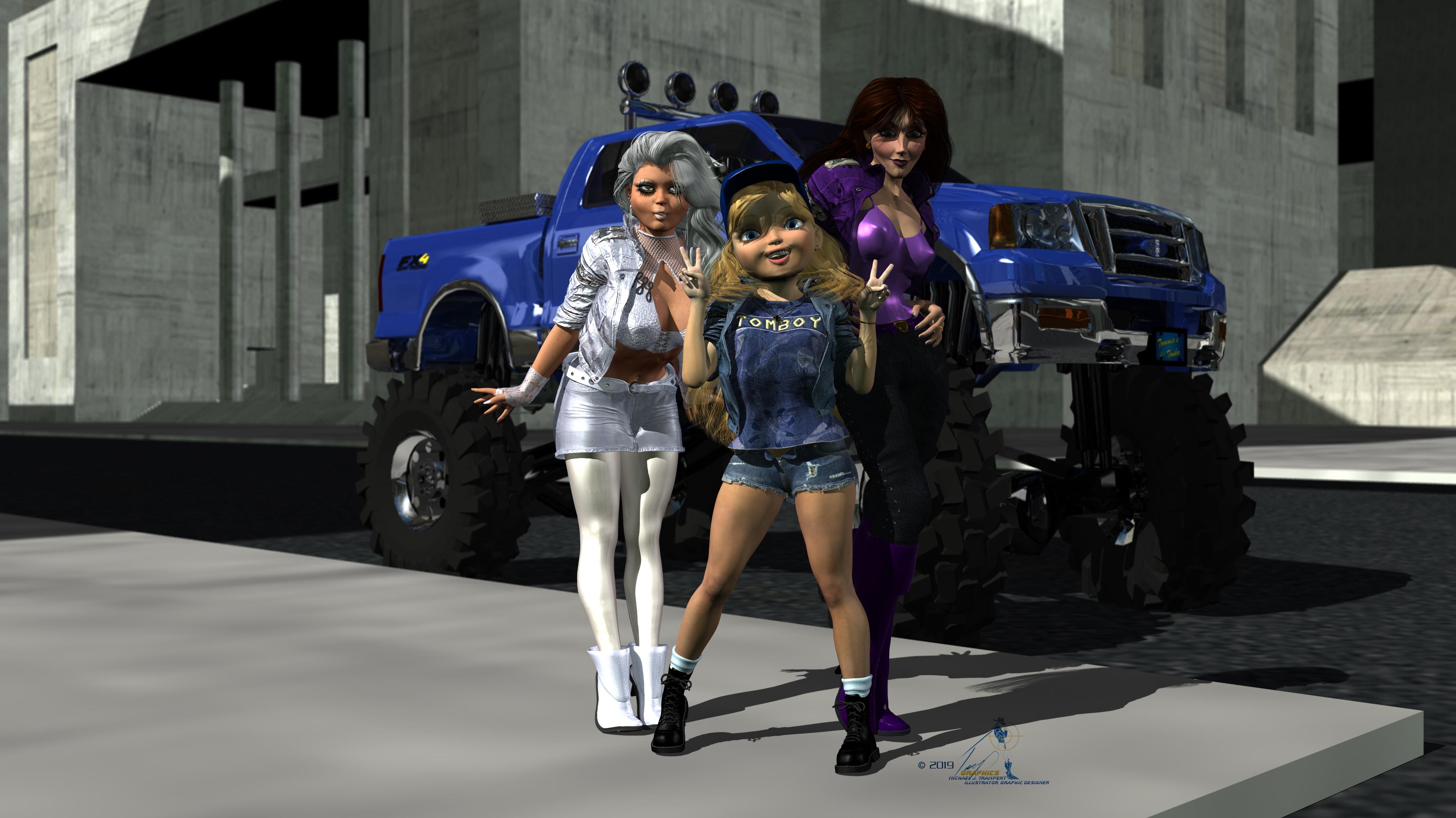 3D Art Freebie Challenge-August 2019-"Best Friends Forever" -Main Thread Only
Here's my (first) entry for this month's contest:
Tommie, Ashley, and Maria,
Besties.
All figures Genesis base
Freebies:
Die_trying's V4 morphs for Genesis (Tommie, Ashley, Maria)*
Pin-up Girl Pack (Tommie)*
Ghastly's General Purpose Anime Team Morphs ( Kageto, Yosei, Kitsune)*Ghastly's Big Eye Anime Team Morphs (Yosei, Kitsune)*
Ultimate Shader Pack (Chrome shaders—with reflection maps removed—for Tommie's wristwatch, earrings, and necklace, Ashley's eyes)*
Ella V4 (Tommie's eyes)*
Sandra for V4* (Tommie's skin)*Satin shaders (Maria's top, ashley's top, tights, and gloves)*
Super Shine Shader pack (Tommie's truck)*Glass Shaders (Sapphires in earrings)*
M3 Baseball Cap (Tommie)*
Cross My Heart tenth down (Tommie)
Stud Earrings (Tommie)*
Genesis Lacy Female Underwear (Tommie)*
Bossy Boots for Genesis (Tommie)*
HFS EVAN Expansion set (Ashley's Eyes)*
R72 Leather shaders Asley's and Maria's belts,boots,)*
The Major (Tommie's Ashley's and Maria's jackets)*
Tomboy Tanktop (Tommie)*
Rosalie Rose (Maria)*
Cuffed Heeled Boots (Maria)*
Hoop Earings for #Dream's Lusitana (Maria's Earrings)*
Ghastly's Generic Anime/Manga Head morph for Genesis (Ashley)*
Gothic for V4 (Ashley’s gloves)*
Karma for V4 (Ashley's top)
Tights for Genesis (Ashley's tights)*
Leather Belt for M4 Archiaus (Ashley's belt)*
Cuffed Ankle boots for Genesis (Ashley's boots)*
Olessa's Treasure Earrings (Ashley's Earrings)*
V4 Pearls and Fans (Ashley's Earrings)*
Post Apocalyptic Vehicle Accessory Pack (Truck Flood lights)*
License Plate and Frame (Truck license plate)*Truckbed Tool Chest (In Truck bed)*
Light Recon Vehicle (LRV)*
LRV add-ons (LRV)*Sky Dome (sky)*
Dystopia City Blocks 11-20 (Buildings, city skyline, asphalt)
MoveS for Hitomi (Tommie) [biweekly freebie 2 JUL 2019]
Sassafrass Poses for V5 (Ashley and Maria) [Biweekly freebie 5 AUG 2019]
Paid For Items
Willow for Genesis 2 Female (Tommie)Marja Hair for Genesis (Tommie)
End of Summer Hair for Genesis and Genesis 2 Female (Ashley)
JeanZ Skirt for Genesis (Asley)
Dark Moods for Genesis (Maria's pants and belt)
No-count Items
Genesis Evolution Head Morphs and Body Morphs (All characters)
Ramwolf's Freebie Morphs for Genesis (All characters)*Blue F-150 (Truck)
Ford Emblem (Truck)All Links Check Out Plz Move To Entries Thread
3D Art Freebie Challenge-August 2019-"Best Friends Forever" -Main Thread OnlyHere's my (first) entry for this month's contest:
Tommie, Ashley, and Maria,
Besties.
All figures Genesis base
Freebies:
Die_trying's V4 morphs for Genesis (Tommie, Ashley, Maria)*
Pin-up Girl Pack (Tommie)*
Ultimate Shader Pack (Chrome shaders—with reflection maps removed—for Tommie's wristwatch, earrings, and necklace, Ashley's eyes)*
Ella V4 (Tommie's eyes)*
Sandra for V4* (Tommie's skin)*Satin shaders (Maria's top, ashley's top, tights, and gloves)*
Super Shine Shader pack (Tommie's truck)*Glass Shaders (Sapphires in earrings)*
M3 Baseball Cap (Tommie)*
Cross My Heart tenth down (Tommie)
Stud Earrings (Tommie)*
Genesis Lacy Female Underwear (Tommie)*
Bossy Boots for Genesis (Tommie)*
HFS EVAN Expansion set (Ashley's Eyes)*
R72 Leather shaders Asley's and Maria's belts,boots,)*
The Major (Tommie's Ashley's and Maria's jackets)*
Tomboy Tanktop (Tommie)*
Rosalie Rose (Maria)*
Cuffed Heeled Boots (Maria)*
Hoop Earings for #Dream's Lusitana (Maria's Earrings)*
Ghastly's Generic Anime/Manga Head morph for Genesis (Ashley)*
Gothic for V4 (Ashley’s gloves)*
Karma for V4 (Ashley's top)
Tights for Genesis (Ashley's tights)*
Leather Belt for M4 Archiaus (Ashley's belt)*
Cuffed Ankle boots for Genesis (Ashley's boots)*
Olessa's Treasure Earrings (Ashley's Earrings)*
V4 Pearls and Fans (Ashley's Earrings)*
Post Apocalyptic Vehicle Accessory Pack (Truck Flood lights)*
License Plate and Frame (Truck license plate)*Truckbed Tool Chest (In Truck bed)*
Light Recon Vehicle (LRV)*
LRV add-ons (LRV)*Sky Dome (sky)*
Dystopia City Blocks 11-20 (Buildings, city skyline, asphalt)
MoveS for Hitomi (Tommie) [biweekly freebie 2 JUL 2019]
Sassafrass Poses for V5 (Ashley and Maria) [Biweekly freebie 5 AUG 2019]
Paid For Items
Willow for Genesis 2 Female (Tommie)Marja Hair for Genesis (Tommie)
End of Summer Hair for Genesis and Genesis 2 Female (Ashley)
JeanZ Skirt for Genesis (Asley)
Dark Moods for Genesis (Maria's pants and belt)
No-count Items
Genesis Evolution Head Morphs and Body Morphs (All characters)
Ramwolf's Freebie Morphs for Genesis (All characters)*Blue F-150 (Truck)
Ford Emblem (Truck)Sheaths?TBH, I'd be completely okay if it was just a seperate object that didn't attach to the figure or conform, and that I'd have to position independently. As long as it looks appropriate for the weapon. I love the look of the beautiful Darque Rose Weapons Collection, but not having sheaths for the swords and especially daggers made me love them less. The Blade Weapons 2 for Genesis 3 and 8 are the right idea, although not the look I'm after. Here are the sheaths, now sort yourself out.A scabbard could indeed just be positioned at the thigh, without needing to pe actually attached to a clothing item. Parenting it to the pelvis would put it in the right general position and it could be repositioned as necessary. Perhaps if you like a sword that lacks a scabbard you could make the scabbard in sketchup or blender, and import it into Daz. (SketchUp is easier to use, and exported models can be imported into Daz if via Blender.)
Twinmotion rendersthanks for bringing this thread back up since I didn't see it earlier/have a use for it. Since this also works in VR, I have something new to play with, awesome!
play with BIM tools in freecad and build your own buildings https://www.freecadweb.org/
pCon is better though, as exporting your design to callada is already to scale in daz after an import, and it also uses the sketchup model library https://pcon-planner.com/en/ and after an import, all faces are single objects in the daz scene view to hide and rotate like the doors and walls etc
Can we have a post of links to long-form graphic novels, comics and series created using daz studio?There is a stigma around using 3D models as a reference/base for 2D art -especially in comics- to be sure. Considering Poser still elicits visceral reactions stemming from poorly rendered fetish artwork with scantily clad Victoria 4 from those not into the medium like all of us here... it might be a long time before openly saying you use Daz in 2D comic work is acceptable. I still remember some rows over using SketchUp, back in the day....
Twinmotion rendersi doubt the last version of the castle is inverted i remember bringing it in Poser to correct that type of problem
i'll try it in FBX
oh my the fbx export takes time, it's hundreds of props
a long long time ago, i imported a Google-earth type of castle from what was it Sketchup's sharing archive 3D something, in collada format, those were 2-sided and very annoying
but my castle is a very well behaved poser prop ( hundreds of props since each door each window is a prop )
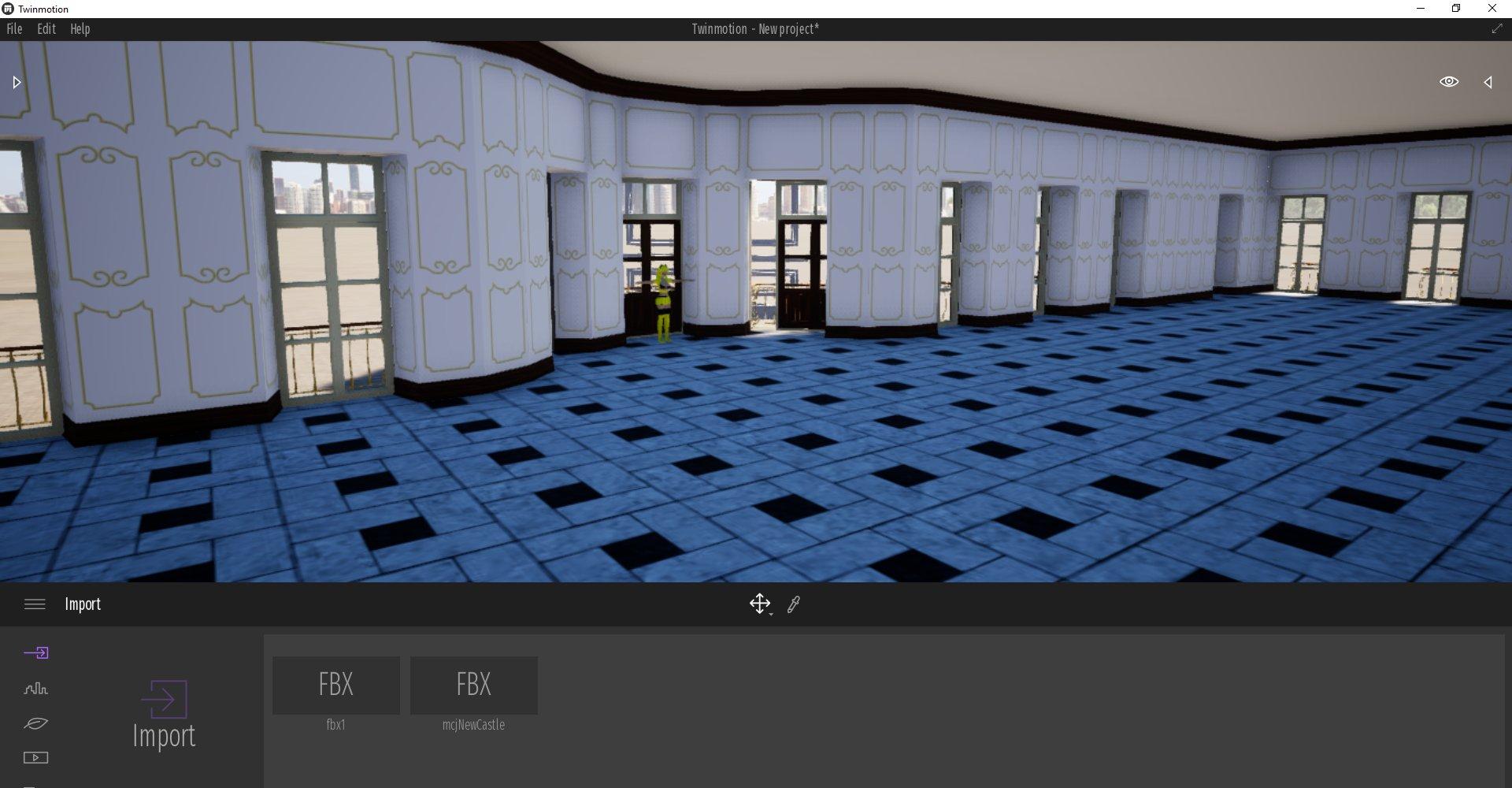
I tried your Castle but you have half of it inverted so not the easiest one to work with creating 2 sided mesh
the link in my first post should lead to it
I tried your Castle but you have half of it inverted so not the easiest one to work with creating 2 sided mesh
the link in my first post should lead to it
The Mac FAQFound this article: https://www.sharecg.com/nbc/articles/1/1676840/OTOY-Announces-Revolutionary-Octane-X-macOS-iOS-WWDC-2019
According to this, "Octane X has been rebuilt from the ground up in Metal for the all-new Mac Pro and the latest generation iPad Pro. It is the culmination of a long and deep collaboration with Apple's world class engineering teams."
"Octane X supports integration across all major 3D content creation apps on macOS, including: Unity, Unreal, Autodesk Maya, C4D, Houdini, Blender, SketchUp, Poser, Lightwave, Modo, Nuke, Poser and USD View."
"Octane X will be available for Mac users to try as a preview release later this year."
"The final and full commercial release of Octane X Enterprise Edition will be offered as a free license to customers purchasing the new Mac Pro."
It doesn't mention DAZ Studio above, but might it include DS?
Octane does not have a DS plugin for OS X, only for Windows, but might change.
The Mac FAQFound this article: https://www.sharecg.com/nbc/articles/1/1676840/OTOY-Announces-Revolutionary-Octane-X-macOS-iOS-WWDC-2019
According to this, "Octane X has been rebuilt from the ground up in Metal for the all-new Mac Pro and the latest generation iPad Pro. It is the culmination of a long and deep collaboration with Apple's world class engineering teams."
"Octane X supports integration across all major 3D content creation apps on macOS, including: Unity, Unreal, Autodesk Maya, C4D, Houdini, Blender, SketchUp, Poser, Lightwave, Modo, Nuke, Poser and USD View."
"Octane X will be available for Mac users to try as a preview release later this year."
"The final and full commercial release of Octane X Enterprise Edition will be offered as a free license to customers purchasing the new Mac Pro."
It doesn't mention DAZ Studio above, but might it include DS?
Daz 3D is part of

Connect
DAZ Productions, Inc.
7533 S Center View Ct #4664
West Jordan, UT 84084Licensing Agreement | Terms of Service | Privacy Policy | EULA
© 2026 Daz Productions Inc. All Rights Reserved.