-
What exactly are Headshop, Face Gen and Face Transfer?
Thanks, I was a fraid that if I created a face, a texture would just erase it.
I watched that. It was what raised the question in the first place. Headshop's textures in the video looked like they would clash with any scene the figure was in (especially the hair).
What exactly are Headshop, Face Gen and Face Transfer?Misumu said:
info_b3470fa520 said:
Misumu said:
So then you can use a texture, and it does not change the shape of the face?
HeadShop changes both the shape and the texture and does this automatically inside DAZ Studio. It really is a one-step operation (but you can also use custom features such as age, weight, smile or custom nose shapes).
Thanks, I was a fraid that if I created a face, a texture would just erase it.
What exactly are Headshop, Face Gen and Face Transfer?info_b3470fa520 said:
Misumu said:
So then you can use a texture, and it does not change the shape of the face?
HeadShop changes both the shape and the texture and does this automatically inside DAZ Studio. It really is a one-step operation (but you can also use custom features such as age, weight, smile or custom nose shapes).
Thanks, I was a fraid that if I created a face, a texture would just erase it.
What exactly are Headshop, Face Gen and Face Transfer?Misumu said:
So then you can use a texture, and it does not change the shape of the face?
HeadShop changes both the shape and the texture and does this automatically inside DAZ Studio. It really is a one-step operation (but you can also use custom features such as age, weight, smile or custom nose shapes).
Rikki Six Character inquiry/helpLOL, you might try TritiumCG over at deviantart since they already have some morphs for some other porn stars and might be able to help you out.
You could also try doing it yourself with facegen or headshop in the store
What exactly are Headshop, Face Gen and Face Transfer?Unless I have misunderstood the nature of these programs, all they do is make a texture of a face, correct? They do not actually sculpt the face? I am asking because it does not seem particular useful if you want to blend the features of two people via something like the "Lovechild" but apply a new texture to create a new figure (As in a vastly different skin tone to the originals). I use Daz Studio to create characters for my writing and gaming needs, and the resources available as packaged individuals are ultimately limited compared to how many characters can be in a book. I am a intermediate user of Daz and like to experiment, but do not want to spend long periods of time trying to sculp new figures. Is there some program that actually can sculpt the underlying features of an image?
Headshop 13 w Lovechildinfo_b3470fa520 said:
mbKingWin, HeadShop DOES NOT INSTALL WITH DAZ INSTALLERS!!! It has its own installer. Please read README document that explains the installation.
The installer has step by step instructions. Key is to select the CORRECT DESTINATION FOLDER to install to.
The steps outlined to find where your working DAZ Studio is installed are in the manual in Chapter 4: https://printahead.net/wp-content/uploads/2020/05/HS13-Manual.pdf
If still no luck, pls. send me an email: [email protected]
That seems to have fixed it. So, it appears that there are two application folders, One at C:\Daz 3D, and onother one inside that folder at C:\Daz 3D\Applications\64-bit\DAZ 3D, That just seems wrong!
Anyway, It was the nested one that I needed to use for the install of HeadShop.
Thanks for the help.
Headshop 13 w LovechildmbKingWin, HeadShop DOES NOT INSTALL WITH DAZ INSTALLERS!!! It has its own installer. Please read README document that explains the installation.
The installer has step by step instructions. Key is to select the CORRECT DESTINATION FOLDER to install to.
The steps outlined to find where your working DAZ Studio is installed are in the manual in Chapter 4: https://printahead.net/wp-content/uploads/2020/05/HS13-Manual.pdf
If still no luck, pls. send me an email: [email protected]
Headshop 13 w Lovechildkage_mortalis said:
Update on my installation difficulty Headshop: Predictably the problem was the way I had Daz set up as I had tried to move its location in the past. Lasloves (the author) emailed me the day after I posted to the forums. Unfortunately, the email got caught in a spam folder. He then contacted me on the forums (which prompted me to check my email spam folder). We set up a time to skype. He solved my problem in 8 minutes and 3 seconds including introduction and pleasantries. To say this was great customer service would be an understatement. I am now up, running and completely recommend headshop 13. Also, I feel completely comfortable purchasing anything produced by Abalone LLC. Thank you again!
I am also having a problem installing HeadShop 13. What I have tried:
- Gone to Help/About Installed plugins" and click on any plugin. Where I read the location where the DAZ 3D/DAZStudio4 folder is installed. Then followed the directions in the YouTube video to manually install.
- Clicked on the Install Manager Ready button on the product page. Then finished in DIM.
After each attempt I restarted DS.
Would you be able to list the process you used to get it working?
Thanks
Headshop 12 for G8 does not installHad successful skype with Ziv. As expected, his Studio was installed in a non-default way and when he installed HeadShop, he used default destination instead of installing to the actual folder.
How do you find where your DAZ Studio is actually installed?
1. If you have a shortcut, right-click and ask for "Find Location".
2. If you are in DAZ Studio, go to Help/About Installed plugins" and click on any plugin. You can read the location where the DAZ 3D/DAZStudio4 folder is installed.
When installing HeadShop, you must browse to this location. Make your "DAZ 3D" folder the destination!
HeadShop OneClick2021 now at DAZ! (Commercial)OneClick2021 features a number of breakthrough technologies that cannot be found in other similar programs:
- OneClick2021 now comes with new "Profile" tab and Nose Library
- OneClick2021 can work with photos that feature open smile with teeth showing
- OneClick2021 can take 3/4 head photo, and rotate it back to a full head, even if one side of the photo is obscured
- OneClick2021 can use photos that are only lit on one side and have the other dark or obscured by hair
- OneClick2021 also automatically detects gender
- OneClick2021 uses "Autodots" to automatically find over 50 points in order to automatically shape the 3D head
- Autodots can be used to manually adjust shape in the main work area
- OneClick2021 works with all Genesis figures (Genesis 3 Base and Genesis 8 Base)
- OneClick2021 features 4096 x 4096 textures and improved smoothness
- In addition to a manual OneClick2021 is also delivered with pop-up Teach Panels and how-to video links.
Headshop 12 for G8 does not installHello,
I purchased the headShop today. Did everything the video explained. I open DAZ and in the edit menu there is no headShop plugin.
What do I do?
I installed the 2 folderds and double checked that all reqired files are in place.
Headshop 13 w LovechildUpdate on my installation difficulty Headshop: Predictably the problem was the way I had Daz set up as I had tried to move its location in the past. Lasloves (the author) emailed me the day after I posted to the forums. Unfortunately, the email got caught in a spam folder. He then contacted me on the forums (which prompted me to check my email spam folder). We set up a time to skype. He solved my problem in 8 minutes and 3 seconds including introduction and pleasantries. To say this was great customer service would be an understatement. I am now up, running and completely recommend headshop 13. Also, I feel completely comfortable purchasing anything produced by Abalone LLC. Thank you again!
How is HeadShop 13 for realism? It is Worth buying? Please help.I have headshop 12. havent upgraded to 13. so far its the most used out of 3 because of easiness and quality output. If you heard of headshot, a plugin from another company thats the closest thing to accurate scan i can think of from photos. headshop from daz is a close second. although you might not get 100 percent similar in the end. there are times the resemlance are pretty close
Headshop 13 w Lovechildkage_mortalis said:
I followed the directions and manually installed but it is not appearing on the edit drop down. Anyone else had this trouble and found a workaround/solution?
99% of this situation user installed HeadShop to default installation, but has the working DAZ Studio on another location.
Step 1. Make sure you verify where your working DAZ Styudio is installed.
Step 2. Once verified, install HeadShop TO THIS LOCATION. For example: if your DAZ Studio is installed on d: Apps/DAZ 3D then you enter this as the destination folder at install.
Headshop 13 w Lovechildinfo_b3470fa520 said:
Catherine3678ab said:
thomasritzler said:
Hi I'm having serious trouble with headshop 13 with lovechild plugin.
The program works fine, it exports the .obj-file and texture content aswell. However, when I open DAZ, load a Genesis 8 Basic Female character, remove eyelashes (I also tried NOT removing the eyelashes) because I read somewhere that the eyelashes sometimes causes problems, and start Morph Loader Pro and find my .obj-file from the Headshop 13 software and try loading the morph - a popup appears saying "Geometry did not match, failed to create morph." I should also mention that I haven't been able to integrate the Headshop plugin into Daz Studio, I am forced to use Headshop as a stand alone program for exporting the .obj-file. I use Windows 10 Pro, Daz Studio 4.15.0.2.
Can anyone help med out?
Thanks
1. It sounds like you may have missed putting the figure to base resolution. And yes for the G8 figures, no eyelashes.
For the Windows edition, yes when you open D/S, under Edit there should be the option to start Headshop. Check through the provided readme instructions for installation.
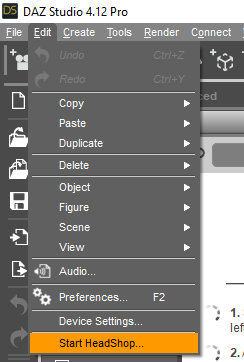
Little correction: You do not need to put the Genesis figure in "Base" resolution - the morphs will work also in "High" resolution
Unless they've changed something in the coding from previous editions, no. To make a morph from an .obj import via Morph Loader, one needs to have the receiver at base resolution.
Once the morph is made then certainly one can return the figure to high resolution.
If one makes it all through HeadShop one does not need to change the resolution or remove the eyelashes however I find helping the plugin doesn't hurt anything either ;-)
Headshop 13 w LovechildCatherine3678ab said:
thomasritzler said:
Hi I'm having serious trouble with headshop 13 with lovechild plugin.
The program works fine, it exports the .obj-file and texture content aswell. However, when I open DAZ, load a Genesis 8 Basic Female character, remove eyelashes (I also tried NOT removing the eyelashes) because I read somewhere that the eyelashes sometimes causes problems, and start Morph Loader Pro and find my .obj-file from the Headshop 13 software and try loading the morph - a popup appears saying "Geometry did not match, failed to create morph." I should also mention that I haven't been able to integrate the Headshop plugin into Daz Studio, I am forced to use Headshop as a stand alone program for exporting the .obj-file. I use Windows 10 Pro, Daz Studio 4.15.0.2.
Can anyone help med out?
Thanks
1. It sounds like you may have missed putting the figure to base resolution. And yes for the G8 figures, no eyelashes.
For the Windows edition, yes when you open D/S, under Edit there should be the option to start Headshop. Check through the provided readme instructions for installation.
Little correction: You do not need to put the Genesis figure in "Base" resolution - the morphs will work also in "High" resolution
Headshop 13 w Lovechildthomasritzler said:
Hi I'm having serious trouble with headshop 13 with lovechild plugin.
The program works fine, it exports the .obj-file and texture content aswell. However, when I open DAZ, load a Genesis 8 Basic Female character, remove eyelashes (I also tried NOT removing the eyelashes) because I read somewhere that the eyelashes sometimes causes problems, and start Morph Loader Pro and find my .obj-file from the Headshop 13 software and try loading the morph - a popup appears saying "Geometry did not match, failed to create morph." I should also mention that I haven't been able to integrate the Headshop plugin into Daz Studio, I am forced to use Headshop as a stand alone program for exporting the .obj-file. I use Windows 10 Pro, Daz Studio 4.15.0.2.
Can anyone help med out?
Please make sure you set DAZ Studio Preferences to "Default" as shown:
How is HeadShop 13 for realism? It is Worth buying? Please help.JENR8 said:
I have used Headshop since the beginning days of Faceshop. I have never liked the way the eyes look. Has it fixed the eyes, so they don't appear like holes or just plain off?
I am also curious if there's other 3D face modelers that are better from pictures, or is Headshop 13 the way to go and worth it?
Worth it? That's rather subjective. We have 3 ways to make likenesses from pictures, each plugin or program has its pros and cons. Face Transfer you already have in D/S so you can discover how much you like or {don't} that one.
FaceGen is the other one which will make morphs and textures for Genesis through to G8. I have been having some fun with that one. If you want to see some examples, in the freebies thread - the one suggesting to be nice, I've shared a few ;-) Accuracy does require mastering where one places the dots. It has an option to "keep the eyes round" which I do use.
HeadShop13 places the dots for us :-) I just leave those dots where it places them. It does a better job than I do. I don't recall it messing up the eyes.
How is HeadShop 13 for realism? It is Worth buying? Please help.I have used Headshop since the beginning days of Faceshop. I have never liked the way the eyes look. Has it fixed the eyes, so they don't appear like holes or just plain off?
I am also curious if there's other 3D face modelers that are better from pictures, or is Headshop 13 the way to go and worth it?
Daz 3D is part of

Connect
DAZ Productions, Inc.
7533 S Center View Ct #4664
West Jordan, UT 84084Licensing Agreement | Terms of Service | Privacy Policy | EULA
© 2026 Daz Productions Inc. All Rights Reserved.