-
[Released] Character Converter from Genesis 2 Male to Genesis 8 Male [Commercial]
I've tried converting Orso again. Daz crashed when I closed the script window. I found morphs were being saved in two different places. One was in a file named "Local User", and another was "Genesis 2".
I was reading the thread for the "Genesis 2 Female to Genesis 8 Female Character Converter", and some people were saying that the characters were (sometimes) taking an hour (or so) to convert. It's something that I've not experienced. Most have been converted within ten minutes. Having said that, I'm try to convert Scott 6, and he took a total of 22 minutes and 22 seconds (plus, Daz crashed when I closed the window for the script - again). It's still making that "Male" morph dial too.
I've attached the latest "crash-dump-file-thing" to see if you can get any new (or different) information from it (if you don't need it, just ignore it ^^').
Have you been converting other characters successfully then? The file I sent you *mostly* worked? I need to know this feedback in order to know if I should submit a patch. However...
...I know why you are getting the "Male" character. The script asks DS for the product info for Scott 6:
2020-04-27 20:36:22.813 DEBUG: GetVendorInfo D:/Daz3D/People/Genesis 2 Male/Characters/Scott 6.duf People/Genesis 2 Male/Characters/Scott 6.duf
2020-04-27 20:36:22.815 DEBUG: No products found for file D:/Daz3D/People/Genesis 2 Male/Characters/Scott 6.duf
2020-04-27 20:36:22.816 DEBUG: /data/DAZ 3D/Genesis 2/Male/Genesis2Male.dsf
2020-04-27 20:36:22.824 DEBUG: Vendor Name: DAZ 3D
2020-04-27 20:36:22.824 DEBUG: Product Name: Genesis 2
2020-04-27 20:36:22.824 DEBUG: Character Name: MaleThe script then uses the path to make up a name, but in this case "Male" is the parent "Character" directory. I probably should make the default be "Unknown G2M" or something like that if it is "Male" or "Female". I will try and send you an update to try tomorrow morning.
When you save a Face Transfer... where are all the files saved?I saved a character... showed my.. victim... and was told to delete it. I know where the texture directory is, so I just need to know if there's anything else that needs to be deleted.
Face Transfer saves 'scene subsets' under "Face Transfer" unless you've put them elsewhere.
Geomitry mismatch on Gen8 in blender mirrorOkay, marble, fair-enough -- good questions...
"Virtual" just means as stored in (RAM) memory for the Sub-D (subdivision) modifier. That's the Subdivision Modifier for Sub-D modelling that contains algorithms for Catmull-Clark (B2.7x and below only, with Daz Studio equivalent - Catmull-Clark[Legacy]), Simple (no rounding - squares stay square), and Pixar OpenSubDiv (for B2.8x series -- Replacing legacy Catmull-Clark).
Not to be confused with the sculpting only Multiresolution Modifier for sculpting multi-level sculpts inside of Blender.
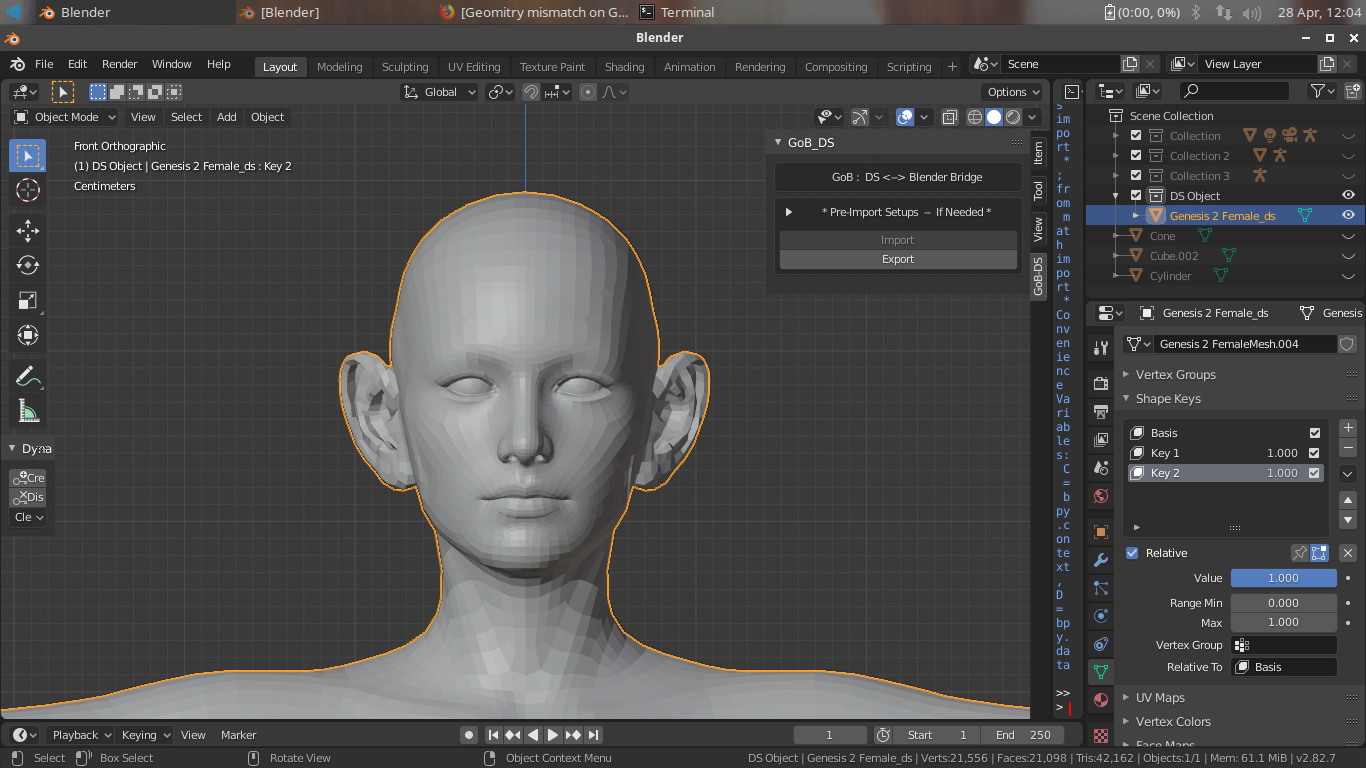
As far as preferring the Sculpt Tools to Edit Mode vertex morphing (including Proportional Editing), the good news is you can use the non-destructive Shape Keys MT work in Sculpt Mode as well.
I use both in tandem. As long as you have a SK set up per morphing task, you can have an advanced array of limitless choices/changes/reworks, and compounding non-destructive morphing to get what you envision. I create in the 100's range per average session -- Think along the lines of the Daz3D Store work of PA Zev0 and his/her enormous morph target products catalog. I have been creating at that level for decades -- I am a content creator, but not a seller/PA/what-have-you in any store -- Some of us create for our art, and some have to purchase from those who create for the masses who choose not to create for whatever reason. But, I digest...
To answer your question regarding the point of utilizing Sub-D when you just have to turn it off for the morph target upon export; If you want your morph to be better represented in DS at whatever DS Sub-D level you are shooting for, you should be creating your MT's at the same level for fidelity. There will never be a true 1-1 conversion, but you will be close enough for it to work better.
If you only create at Base level in Blender -- It's fine if you only want to utilize Base level in DS, but you might encounter not seen anomalies if you use Sub-D on your figures/props in DS at different levels. It might not happen with simple MT's, but some advanced ones can be quite different from there base counterparts where it is smooth transitions at level 3 or 4, but have crossed topology (overlapping edges/vertices) at base level -- at base the morph might look horrendous, but look great at the level you were shooting for.
Virtual mirroring -- I was only referring to the mirroring algorithms in Sculpt Mode, which are great. They are permanent modifications on the mesh for all enabled mirroring unless you utilize the Shape Key non-destructive morphing workflow I outlined above. Same as with Edit Mode, without it, all changes are permanent - with it, you can make any changes, including all the way back to original.
* EDIT: marble, thank you, for your questions -- You gave me something to think about to add to my TODO list for the DS <--> Blender Bridge Addon for morph target work. I should add auto-setup of Sub-D Modifier at user defined level toggle button to my other user enable-able import settings. But, I will hard-code auto-OFF for the Sub-D for the Export button to force 1-1 vertex count. Thanks again...
When you save a Face Transfer... where are all the files saved?I saved a character... showed my.. victim... and was told to delete it. I know where the texture directory is, so I just need to know if there's anything else that needs to be deleted.
Help identifying FE Decoration model plsRE: Mattymanx promo girl:
Okay, found more info from the Mattymanx source, but not a solution.
REF:
What character is used in this promo image ?
"I named her May. She is a custom dial mixed character. Her body is a mix of 5 different character morphs while her head is a mix of over 17 different character and morph sets. Her skin is Sage for G3F by Thorne."
[EDIT to add}
Found this as well by searching the forums. A Gallery image with a lineup of these 'Mattymanx Girls' with lists of items used - could help!
It was mentioned that Tigerlily for G2F was a base.
The Posse 2 3D Art by Mattymanx in 2017 on Jan 27, 2017Geomitry mismatch on Gen8 in blender mirror@DaremoK3 ... Thanks for your explanation here. I hope I'm not side-tracking too much but I have to ask about your references to "virtual" and Sub-D in Blender. I use Blender to make the occasional morph (usually for clothing but less so since the advent of dForce). I prefer the Sculpt tools to Edit in Blender but I'm always wary of anything that might alter the vertex count. So my question is: what is the point of sculpting in Sub-D or virtual mirroring if you have to turn it off again before sending the object back to DAZ Studio?
Which Muscle Set Do I Need?So, Genesis 8 Female Body Morphs has a morph called Stomach Depth...?
Ridiculously long loading time........I have committed on this issue before, and the only solution I have found to loading a character quicker was to remove morphs in the "data" folder and add them as you need them. It is a little of a pain, but your load times are faster and the RAM that each character uses is less. I don't know if this is caused by the number of character assets/morphs in the data folder or if it is because of they way I have my content library setup. I only have the character morphs that I use alot in the data folder and as I need another one I will add it before I launch a character. If you add it after you launch a character you will need to save your work and restart the program. The character will then add the morph the next time you load the scene, which isn't a problem because you can still pose and work with the scene and then correct uses later when you reopen the file.
Geomitry mismatch on Gen8 in blender mirrorAs soon as you cut it in half you destroyed vertex order.
You can not do anything that destroys vertex order -- The obvious ones are Add/Remove topology in any Mode, but this also carries through with Joining/Separating meshes (Example; Separate eyelashes, fingernails, etc.) as this also changes vertex ordering on the coding level via BMesh.
Now, for the B28.x series, I have been doing more coding than morph target work, but I believe this will still be the same as is in the 2.7x series (Just checked -- Still works the same).
You can use sculpting with the virtual mirroring as felis above has pointed out, but if you are more comfortable creating your morphs in Edit Mode you can utilize the technique I use for asymmetrical to symmetrical (half of model to other half of model [mirrored half - virtual only -- Do Not Cut Mesh]) morph targets.
You do this via use of Shape Keys, and the SK's transfer functions.
* EDIT : I forgot to mention -- You can use Sub-D Modifier for your MT work, but only keep it virtual (as a modifier stack). Do Not Apply! Set it to what ever viewport level you want to approximate for Daz Studio Sub-D, but make sure to TURN OFF the Sub-D modifier before you export your MT or Blender will hard-set the Sub-D level in the exported vertices to your current level which WILL destroy vertex order and count.
Example:
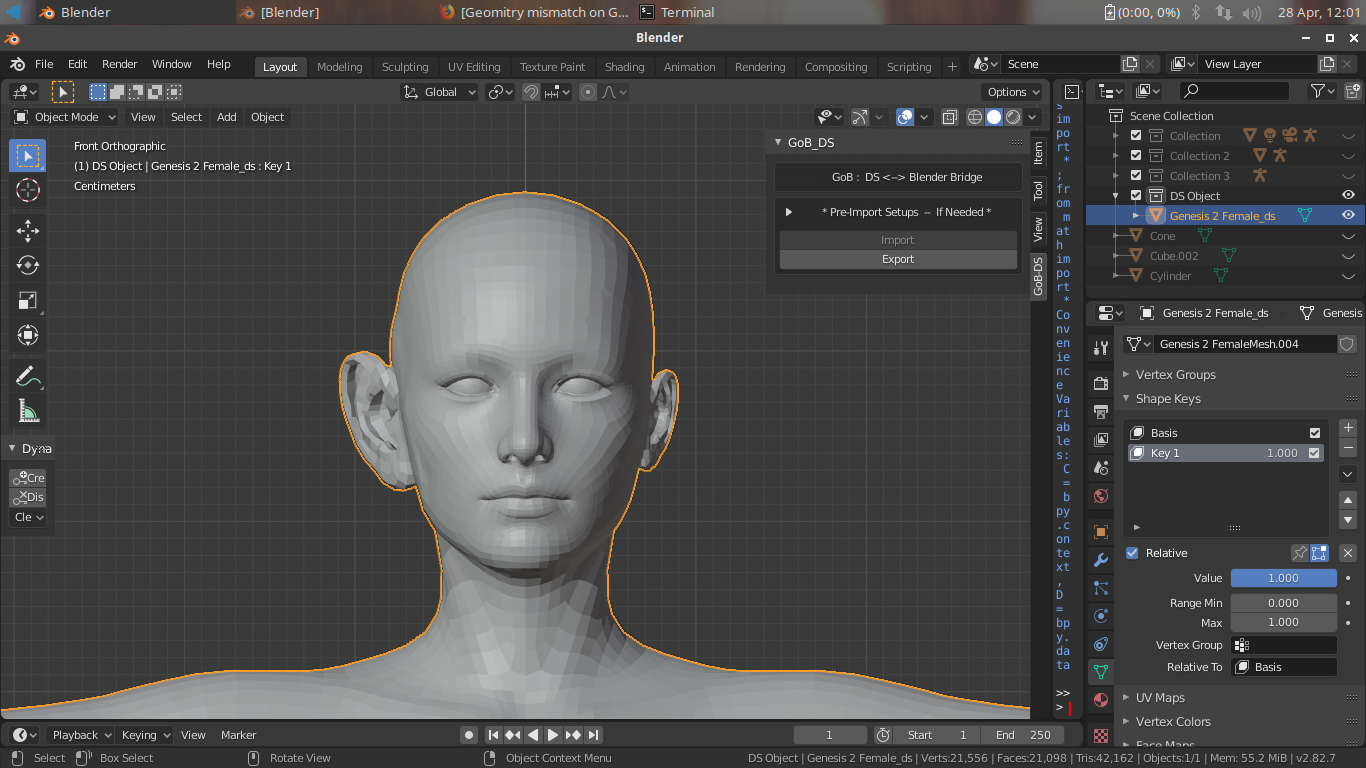
1. In Object Mode Set up a shape key for a morph target for your ear morph, enable the 'use' in Edit Mode toggle, and set your SK to 1.000
2. Go to Edit Mode and create your morph.
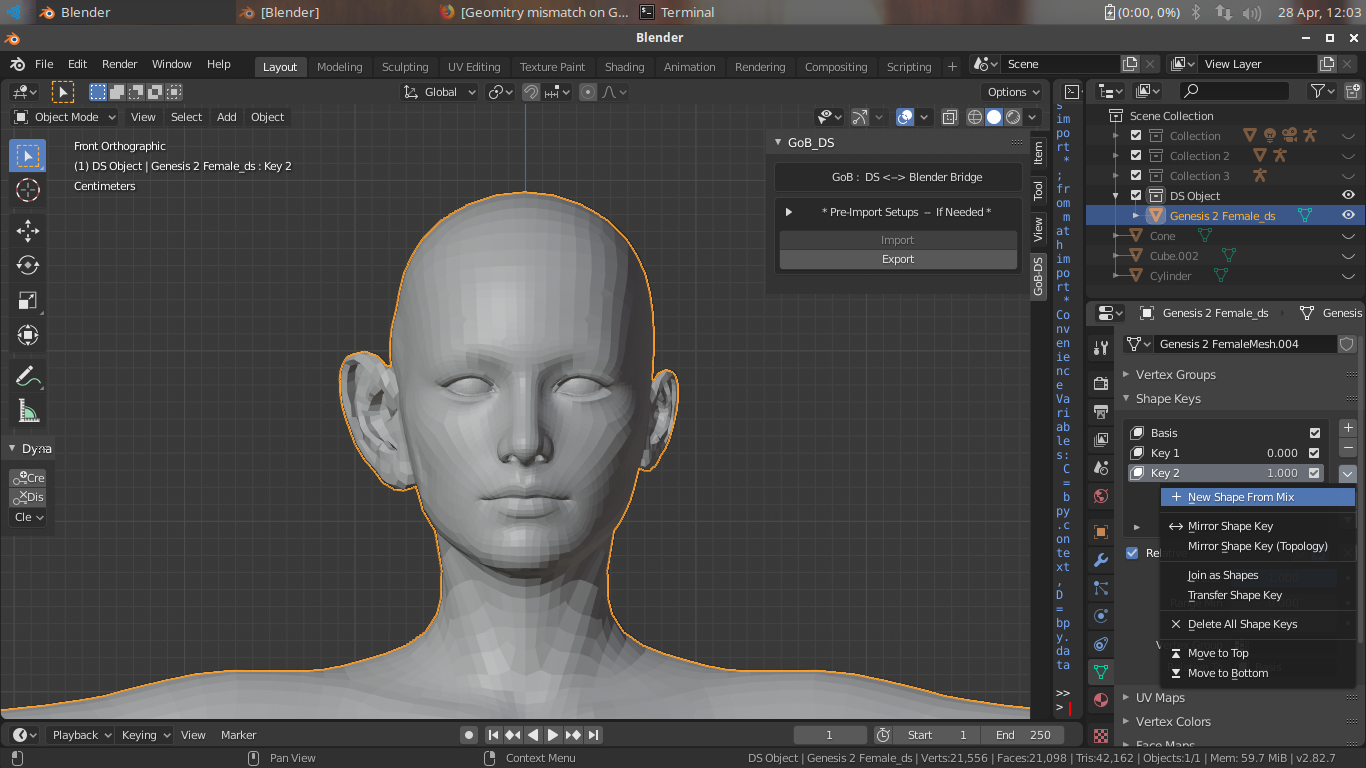
3. Go back to Object Mode and play with the SK slider - you should see your morph work. If all is well, click on the drop-down arrow underneath the '+/-' (add/delete SK's) for the shape key functions and while your morph is set to 1.000
4. Select the one to create a 'New Shape From Mix' -- This will create a duplicate SK.
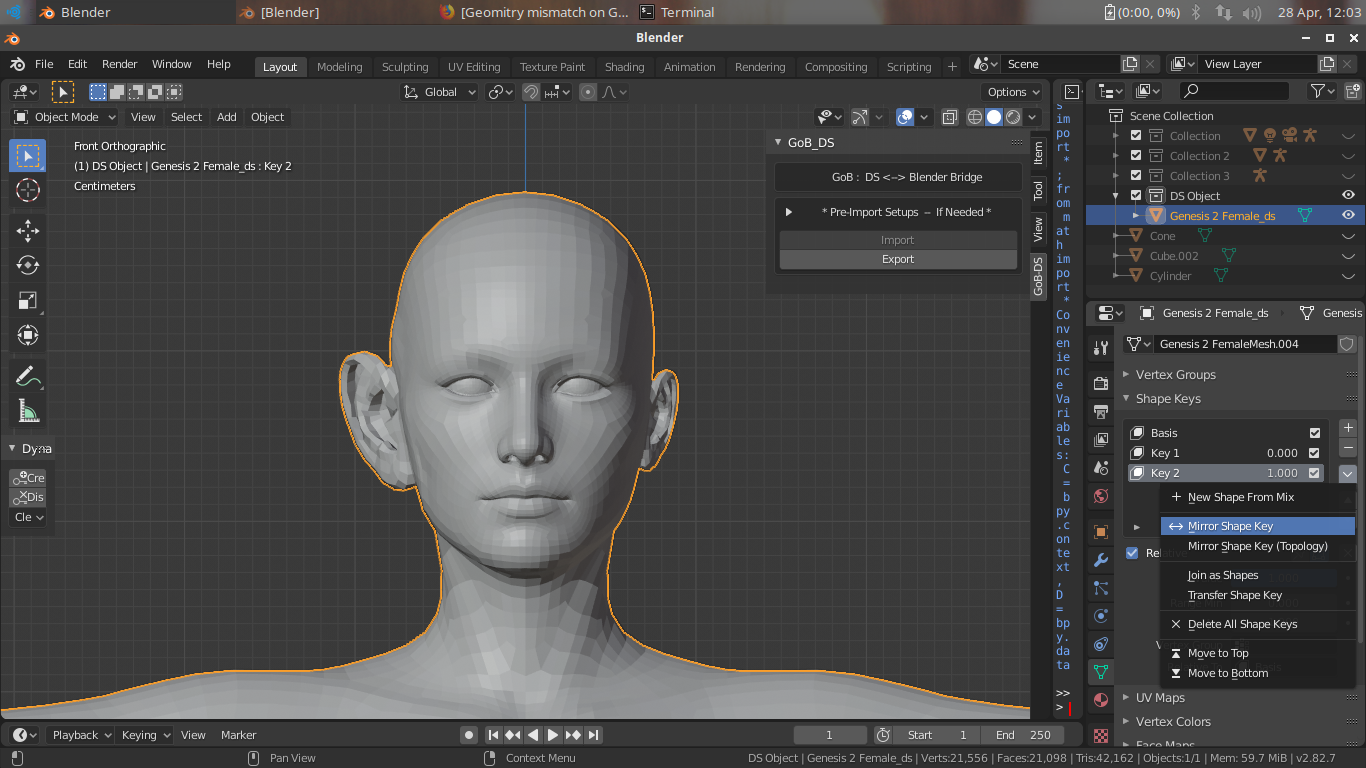
5. Set all SK's to 0.000. Select the new SK, set it to 1.000, and go back to the function menu.
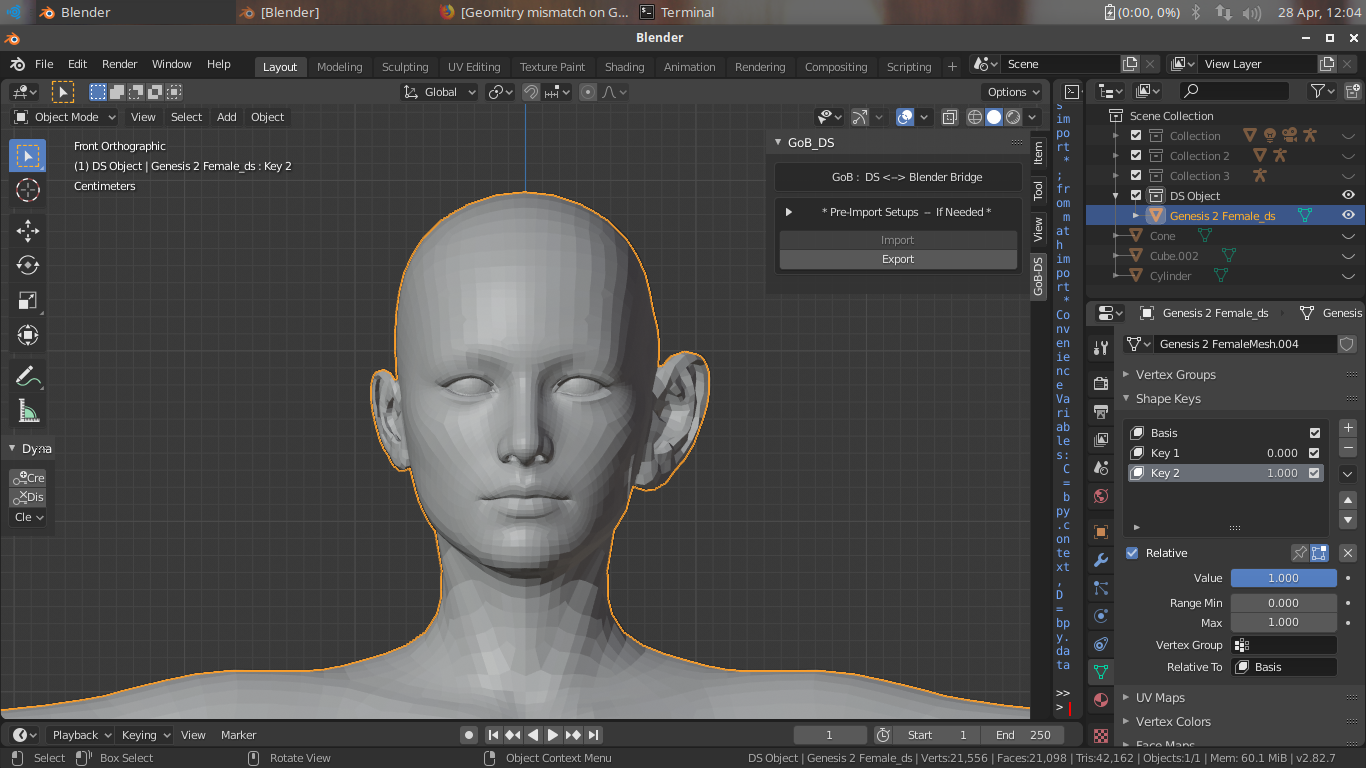
6. This time select 'Mirror Shape Key' (there should be 2 -- Default and mirror topology -- I always use default). There you go - a mirrored morph.
If you want to combine them to a single morph, set them both to 1.000 and repeat the 'New Shape From Mix' function. Rename them as you see fit (if needed/wanted).
For export to use a MT back in Daz Studio, only set the SK you want as a morph to 1.000 -- All others should be set to 0.000.
Hope this helps...
Example Images:
 Geomitry mismatch on Gen8 in blender mirror
You can't use a mirror modifier in blender, because that will change vertex order, and then your morph will be a mess. In sculpt mode you can mirror along the axis.
Possible to merge features from different characters? Nose from A, eyes from B ?Hi all, trying to slice and dice to make a different character within Daz Studio. Is it possible to take the nose shape from one character and merge it with the eye shape of another? The face/head sliders seem to change everything instead of the specific feature. Help would be greatly appreciated!
You could try using Blender to create a custom morph that has all the features you want on one model. IIRC one of the key things when making morphs is that the vertex count of the model cannot change. So you cant do stuff like merge verts, delete verts or remove doubles cause those would change the vert counts.
So take the main character in Daz that has the most features that you like and send it to blender. Then the minor parts that you want to use gets sent over to blender too. The character that has the nose you want? send it to blender. The character that has the eye shape you want? send that to blender. So for example you have your main character in blender, the nose character and the eye character for a total of 3 characters. The main character is the one that will get reimported back to Daz once you're all done. If all the characters are the same generation they will have the same vertex count, just different vertex locations. So then its just a matter of overlaying the nose character on top of the main character. Hiding or deleting the parts of the nose character you aren't going to copy. Then you figure out the XYZ coordinates for each vert on the nose character. Find the same vert on the main character and change its XYZ coordinates to the same. Once you've repeated this for all the verts in the nose then your main character will eventually have the same nose as the nose character. You delete the entire nose character since you are done copying it, keep the main character and repeat the process for the eye character. Once you've copied all the XYZ coords of the eye verts onto the main models eye verts then you can delete the eye character too. So you are now left with the main character which has a nose shape and eye shape that you want. Find a tutorial that shows how to get that modified mesh into Daz as a morph slider and you are set. I made a custom morph with a piece of clothing and i used one of Sickleyields tutorials. But it should be possible with a figure too.
Wow, that's going to take some time. Reminds me of when morphing early Poser and DAZ figures years ago, the individual body part joints/seams would no longer line up correctly, so the verts had to be re-aligned one by one! Needs a lot of patience.
Ridiculously long loading time........Loading times are down to a few things all happening at the same time.
First off is all the software you have running, they all generate software errors, even your OS, these errors sit in your CPU like boulders in a river, slowing the data flow, and will remain there for as long as the software is running.
Second is DS has to load thousands of small asset files in a short space of time, computers would rather have the same amount of data in one or two large files, as they can process them a hell of a lot quicker.
Third is the amount of errors being generated by those small asset files, those errors also end up in your CPU, slowing it even further.
Fourth is errors that cause DS to freeze, those are the main problem as it can take your computer a few minutes to get DS unlocked, only for it to run into more of the same.
I'm not sure what you are trying to say here.
Basically that a CPU clogged full of Software Errors, the software design, and poorly done content are all combining to cause long load times.
First up is the programs running in the background, a Selective Startup would help a little, but how many people here know what that is let alone how to use it.
Second is the design of the software, tbh using thousands of little asset files is pretty much ingrained into a software designers DNA, so not much chance of that changing.
Which leaves the content, and the part I'm trying to skirt around as I'm likely to get myself banned if I'm not careful.
To give you some idea of the problem, in the store there is a product for G8F, I believe it's been there for a couple of years now, it's a morph pack rather than a character. This product has two "broken" morph asset files in it, by broken I mean DS isn't creating the slider or any of the ERC in those files, which means other assets in the product aren't working correctly either. The problem, DS is loading G8F but the parent data in those assets is looking for G3F, result instant failure to create the modifier, the worst part is that the log tells you those files aren't working, yet neither the vendor or DAZ QA have bothered their backside to check it, or they seen it and didn't have a clue what any of it meant.
Then there's the products with corrective morphs for every morph pack and character with an 8 in the name, that's fine for the small minority who own all those products with an 8 in the name, for the rest of us it means a log file bloated with error messages, and extended load times.
Things need to change before people get P'd off enough to take their money elsewhere.
ps I don't have any of these products, but I am used as Customer Support by my friends, as a result I get to see the issues as I'm normally the person that ends up fixing the problems for them.
upgading from Gen2 to Gen8?Hi! I am soooo glad to have chanced upon this thread while searching...
I first started on DAZ in 2006 and returned in 2013. I admit to never having successfully learned the software all these years and work (and reality!) has kept me away until recently. My creative fire has just been rekindled and there are now lots of helpful YouTube videos to guide me!).
Since 2006, I must have spent over $3000 on characters (G1, G2, G3, Michael3-5-6, Victoria5, etc), products (lighting systems, hair, beard and anatomy mods, etc), clothes, accessories...
I have the same question. Do my past purchases work on G8 characters? Or would I have to repurchase EVERYTHING from scratch (which I most certainly would not spend on again). Would the above two suggested converters enable me to utilise past purchases on G8? If not, I may just content myself with using older Genesis models.
THANKS SO MUCH for your help and advice!
Off the top of my head, the only things that will work without buying utilities are the clothes and hair because of Auto-Fit. (Even then, things like shoes won't work too well and longer hairs will lose their bones unless you parent them.)
Lighting systems will work if you use them in the correct render engine. (Using your 3Delight lights in 3Delight will work.) If you render in 3Delight, please make sure the textures in the scene are all for 3Delight because DS might crash if there's an Iray material preset in the scene. (3Delight textures in an Iray scene won't affect anything.)
Anatomy mods, if they're geografts, will not work. HD morphs will not transfer between generations. SD morphs will transfer using GenX and then one of the G3 to G8 converters, but it's a lot of work. (Some morphs won't transfer over for whatever reason. These convertions aren't exactly perfect at times.) The UVs have changed drastically between Genesis 2 and Genesis 3 & 8. In order to use older textures on G8 or use newer textures on older figures, you would need to invest in Cayman Studios' geografts. The good news is that most G8 characters use the base UV which is basically the same between G3 and G8. However, some materials may be tricky to apply since eyelashes are a separate geometry in G8 and those often require "hierarchical presets", which automatically apply textures to figures and anatomical parts, like eyelashes and genitals. The work around is re-saving these as "material presets".
It is easier to stick to the old items. But G8 has better bends and expressions. You can always experiment with the free G8 bases available in your product library, "Genesis 8 Starter Essentials".
XTransfer Module 1- Genesis 3 to Genesis 8 Morph Converter (Commercial)Sorry for being lazy but I recently bought your XTransfer product instead of using Singular Blue's work (good as it is) and I want to know if I can use XTransfer to transfer this product's morphs from G8F to G8M:
https://www.daz3d.com/rarestones-face-morph-collection-for-the-girl-8
or vice versa, G3M to G8M to G8F:
https://www.daz3d.com/multi-man-for-genesis-3-male
Not being an expert on 3D modeling and DAZ 3D's JCMs, MCMs, and the like, supposing if what I asked about above was possible by XTransfer, then would I need after the xtransfer to use the Shape Rigger+ product I bought to adjust those transferred morphs?
Thanks very much!
First RenderThe highlights are a bit too burnt, try dailing the exposure a bit down, unless this an outside scene, than it is ok.
The outfit seems to float a bit, this can be solved if it is a dforce outfit or with a morph perhaps.
Her right arm intersects a bit with her body, maybe moving the arm or the camera solves that.
It's a great start though, the character portrait has a distinctive look to it. Have fun!
converting head from Genesis to Genesis 3I love this beautiful head for Genesis 1, and I tried to convert to Genesis 3 on my own by just adding a extension to the neck to connect to G3F neck for geo-graft, and everything went all ok. However, the morphs went all AWRY, it went so distorted on pretty much of the entire figure when I move the slider on any morph. When I loaded in the Geo-graft, I used Transfer Utility to transfer the morphs from the original figure from Genesis to the new geograft on Genesis 3.
if you can compare to Genesis and Genesis 3 (see attachment)
Hmm, to make Genesis 1 head into a geograft for Genesis 3???
You made a 'clothing item' of Genesis 1 head attached to some new geometry to add it onto Genesis 3, fixing it up so that the Genesis 3 head would hide when the Genesis 1 head geograft was applied, and then ??? you tried to transfer the morphs from Genesis to the geograft on Genesis 3???
No I don't think that would work.
The concept is that the existing morphs for Genesis 3 may or not {because heads are not bodies} apply somewhat to the geograft attachments.
When making the Genesis Head which is to become the geograft I would suggest morphing it before cutting out the mesh.
Silly question, if you like the Genesis character why are you wanting to change it over to Genesis 3. Just curious. It might be easier to remake the morphs for Genesis 3 in the usual manner, then the eyes and everything will work as they should for Genesis 3 [hopefully].
Celebrity Look-a-Likes for 3D figures Part 2A cool find....
https://www.deviantart.com/elsinestrouno/art/Amelie-Death-Stranding-Morph-for-G8F-836591073

It's suppose to be Amelie (from the game "Death Stranding") Morph for G8F, which is based on a young Lindsay Wagner (from "The Bionic Woman"), who had her likeness (young and old) approved for the game (also voiced her older character).
Can someone help me find low cut pants for G8F that unzip and open?I can't remember the specific products, but there were a few on Renderosity with that function. Maybe they were OOT's... As for style: I'd just replace the texture with something more appropriate for the timeperiod, I don't believe there's a lot of fantasy options with this type of morph. Switch denim out for a leather or cloth shader.
I've looked all over renderosity and can't find it. The problem is I don't even know what to look for. If you know of any pants with this functionality, please let me know, thx.
I found Exnem's Jeans for Genesis 8 female. They do unzip, but they look way too much like jeans. Even if I change the texture, I'm not sure I can hide the pockets and loops.
The return of Genesis 1?Late to the party, but I do want to mention a couple things about Genesis 1, which I still use most of the time (when I don't use Genesis 1 it's usually because I don't feel like transferring a Mil4 or even Mil3 character. I rarely use G2 or G3, and I was surprised recently to see how much content I had for them.)
The major races in my stories have much less sexual dimorphism than humans. When you''re working with a female character that is 6 foot, 250 pounds, with the same muscle mass as a male, male poses often work better than female ones.
When Genesis came out I thought I was going to stick with V4 and M4, but I discovered that just with free morphs that were available in the first few months of Genesis' debut I could easily create realistic 250 pound muscular females that looked better with half an hour of work than I'd ever gotten with months of work using practically every V4 morph pack available.
Genesis 1 males have a lot more clothing options than most male figures get, and Genesis 1 females have a much higher percentage of non-skimpy clothing than most female figures.
I really hated Victoria 6. Most of the G2F figures seemed so intent on showing off the great body details they had that they looked anorexic to me. It wasn't until Olympia 6 that I started buying some G2F items.
Auto Muscle Enhancer HD [Commercial]I do not really understand much about morphing and the language to describe this.I have no idea what JCMs are. I read this very often, but i do not understand what this means.
How did you create this chest-morph on your example-images?
When i have this morph separated, i may combine it with other morhphs and then the results are better.
I also wish a bit a little ballon-form-morph for the chest-muscles as it is shown in my images above.JMC see https://www.daz3d.com/forums/discussion/72219/jmc-what-is-it
Creating a Morph see https://www.daz3d.com/forums/discussion/6483/tutorial-creating-a-genesis-g2f-g2m-full-body-morph-for-daz-studio-pro-4-6-by-rkane-1/p1
there are a ton of videos on creating Morphs and JMC in the daz store and on YouTube.
You can combine any morph with any other morph the results will vary, often it is a game of adjusting a morph's influence or multiple morph's influence in the settings. Ultimately it is going to depend on what you are hoping to achieve.
Daz 3D is part of

Connect
DAZ Productions, Inc.
7533 S Center View Ct #4664
West Jordan, UT 84084Licensing Agreement | Terms of Service | Privacy Policy | EULA
© 2026 Daz Productions Inc. All Rights Reserved.