-
Poser and File Corruption
Has anyone discovered that assets for Poser, for example Michael 4 files and related character morphs, become corrupted and function oddly? Tonight I discovered that none of my M4 character morph head or body inj files would work. Srangely, the mat files for the various characters, when applied to M4, injected both their corresponding head and body. Deleting the prefs files as Poser recommends for unusual behaviour only resulted in more aggravation. Poser ran but could not open the default PZ3. It simply hung until I gave up. Has anyone had a similar experience, and if so what did you do about it? Thanks very much.
Bug Report: Animators Beware, DS 4.12.1.117 deletes values keyframes en masseBe aware that there is a Timeline bug that causes all of the "O" keyframes to be invisible when you open a saved file. They are still there, but not shown on the timeline. Go down to the keyframe types and toggle "O" off and back on and your "O" type keyframes will reappear on the timeline. I believe this bug is independent of the completely lost keyframes. I think the "A" and "H" have some strange things going on, too.
Aha! It has been pointed out to me that you can right-click in the name/relationships area on the left of the Dopesheet and select Refresh, which redisplays the missing types. The Timeline is not intended to be done yet, so don't despair of these issues being addressed
That's only of comfort to those who have the option of reverting to KeyMate/GraphMate, it seems to me. Fortunately I do so I continue to use them but I was under the impression that the missing morph adjustments are part of the save/reload bug whether or not KeyMate was used.
Yes I am glad i bought them when they were avilable as well. Graph-mate is way better than daz graph editor Though the animate2 built in graph editor works pretty good too.
I am still on 4.12.0.85 .. Not bugs to report
Creating a created character as a dialable morph.You can save as a Character Preset or Scene Subset and skip all that other stuff which is more along the lines of things you might to if your character was using Merchant Resources and you wanted to save your work with those and your own unique morphs as something for sale in the DAZ 3D Store.
I usually save an entire scene and then recall it when I want the character, such as the one above. However, what I want now is a dialable morph that allows me to adjust the degree of that particular character's shape. The purpose being is that I can have my own set of morphs to dial in either a muscular figure, a voluptuous figure, or even get more detailed and control groups of morphs say for the arms and legs and then just adjust a set with one dial. For example, I have the muscularity pack for Genesis 8 figures:
https://www.daz3d.com/musculature-hd-morphs-for-genesis-8-female
If you take a gander at that and note all of the options, you can easily see it takes a long time to fiddle with all those dials. In fact, I only regularly use about half of them...but it is generally the same ones. So I would like to group adjustments to a single morph and then dial in what I want for the arms, legs, back, mid section. But for the most part I want to combine body types to create new ones as quickly as possible and that is why I want to be ablet to 'dial in' a preset instead of just loading up a scene of a figure and then try to tweak each indivitual parameter from there.
Thank you.
Geo
Something big is coming!I do wish the head was its own morph. It looks really good dialed into other characters.
Delicious food deserve a bite...Don't use booleans in Hexagon, noooo. ;-)
If "all" one does is delete mesh in Hexagon, the UV set will remain unchanged.
One could also morph a bite using Hexagon, or Blender, or Bryce, etc.
Why does this happen when I make a custom morph?Did you test your workflow with a simple morph to make sure it worked? Like pull out some vertices in Blender, and see if that morph transfers over to Daz Studio.
that's what I did lolll, you're looking at the results from such
Why does this happen when I make a custom morph?Did you test your workflow with a simple morph to make sure it worked? Like pull out some vertices in Blender, and see if that morph transfers over to Daz Studio.
G2 to G8 converter?GenX2 can add the Michael 4 base morph to Genesis 3 but G3 to G8 requires manual adjustment before the transfer in order to prevent the G8 rigging issues.
You must adjust the M4 pose to the G3 default pose, export the OBJ and create a new G3 morph with it.
Once it's done the corrected morph (M4 + G3 pose) can be transferred to G8.
G2 to G8 converter?Is there a thread about "character bloat"?I would think the whole file would be read in (presumably it just reads in the whole thing and uses the JSON parser on the resullt) but the detas are jettisoned until needed.I'm fairly certain this is what is going on.
I have a fast computer and all content on an internal SSD, but I also have hundreds of characters. Daz Studio was great when I initially tried it out, and then I spent lots of money buying characters from multiple sites and when I started trying to use them seriously I realized load time made Daz Studio basically unusable for my purposes.
It's definitely the morphs, as I moved them in and out of the data folder to test performance.
I ran a whole bunch of timing tests to see what mattered, e.g. JCMs and pose morphs vs. character morphs, creating new morphs consisting of body & head morphs merged. The main determiner seems to be the size of the morphs; a bunch of small body part morphs load as fast as a single character morph. Replacing one morph for body & head instead of two morphs doesn't help at all. So to a first approximation the size of the file (though compressed vs. uncompressed made no meaningful difference on my machine) is the main issue.
It seems like it could improved straightforwardly if anyone cared; for example, the overhead due to having more morphs available for a scene with 4 G8F characters requires 4 times as long to load as one with a single G8F, so it seems like it's loading and throwing away this data over and over during a scene load. Since the only purpose seems to be to be able to display the dials, it would make a lot more sense to me to cache that data (in memory, or better yet to disk). I realize that each character stores their own copy (since each can have different morphs loaded dynamically), but the issue here is just reading the ones on disk to populate the character--just putting a cache between this 'load the dials' reader and the actual morph files.
I've done a few things to deal with this:
1. I split all my morphs up into dozens of content libraries and only keep a couple loaded at a time
2. I mainly use purchased characters for their skins, and I use dial-spun characters with those skins 95% of the time.
But I'm still not happy. It's really tedious to map and unmap content libraries; it's still slower to load than it should be; and I wasted a lot of money on character morphs I will never use unless this gets fixed.
Creating a created character as a dialable morph.One thing to remember though... the more extreme a morph is, the more there's a need for hidden JCMs and other hidden correction morphs and tricks to make sure it bends naturally. That's why a character like George works so much better than just dialing up a fat morph, so always keep in mind that creating a single morph for the head or body may not work as well as the original combination of morphs.
Delicious food deserve a bite...There is plenty of delicious food in the shop, I'm thinking in Oskarsson's sweet bakery props (that pink doughnut is asking for a nibble)
https://www.daz3d.com/sweet-bakery-props
Question is... can it being achieved with transparency maps, or a morph must be used for it?
A transparency map would make a hole in it, not a bite. A morph could work, assuming there are enough polygons for that.
Is there any option in Daz Studio for substract from a mesh the intersection with other mesh??
No.
Need something easy, sure any 'bigger' program as maya, 3dmax can do it, but can't spent much time in this hobby (las of us 2 will be here in a couple of days) :-)
Free modelling programs like Blender and Hexagon can probably do boolean operations like that. However that would most probably alter the UVs, you'd need to create new textures.
Delicious food deserve a bite...There is plenty of delicious food in the shop, I'm thinking in Oskarsson's sweet bakery props (that pink doughnut is asking for a nibble)
https://www.daz3d.com/sweet-bakery-props
Question is... can it being achieved with transparency maps, or a morph must be used for it?
Is there any option in Daz Studio for substract from a mesh the intersection with other mesh??
Need something easy, sure any 'bigger' program as maya, 3dmax can do it, but can't spent much time in this hobby (las of us 2 will be here in a couple of days) :-)
Thanks in advance
WHERE is (EmmaAndJordi) EJ Face morphs and Details?I don;t have that morph pack, but assuming it works like most others then you probably need to select the G8M figure (not just the head) then use the "Parameters" tab and expand the "Actor" section, then "Head" and they should appear as sliders (like those shown in the promo images).
ETA: You can expand the "Head" section too and click on "Ears" or "Cheek and Brows" or "Eyes" or whatever to see just those morphs. Normally only full shaping presets appear in Content Libarary or Smart Content (also Zero presets like the ones you found) - the main morphs in this product are just partial morphs that affect one small area of the head.
Generally, I find all of their products in the Shaping tab. Go to the top of the Shaping tab and search for EJ.
[Released] Shapeless Morphs for Genesis 8 MaleHi!! I would like to show you my new product coming soon in Daz store:
"Shapeless Morphs for Genesis 8 Male" brings you over 100 morphs to change your genesis 8 body in shapes never seen before, modifying feet, legs, torso, arms, hands, head and face.
You can get unlimited shapes in seconds when you change the intensity of the morphs or when you mix them, trying different body part combinations for your characters.
Get Shapeless Morphs for Genesis 8 Male and start creating! :)GENERAL QUESTIONS
Can I use G8M Materials? YES, you can use materials for Genesis 8 Male such as Michael 8, diego 8, etc. these morphs don't affect them. I uploaded some photos as examples in comments :)
Can I move my character to create poses? YES, first load the morphs that you need in the character, then move hands, neck, legs, etc as you normally do it to create your pose.
Can I use pose presets for G8M? YES, you have 2 options: use one of the saved "set presets" provided in this pack, those settings come ready to use pose presets on the character. The second option is locking the invisible nodes, for example, If you want a character without a hand, you should select the hand and all its following nodes or "Children"(in this case, the fingers), then go to Edit-Figure-Lock-Lock selected node pose, now apply the correspondent morph (which hides the hand) and you will be ready to use the pose presets. If you are using morphs that don't hide body parts you won't need to do this process.
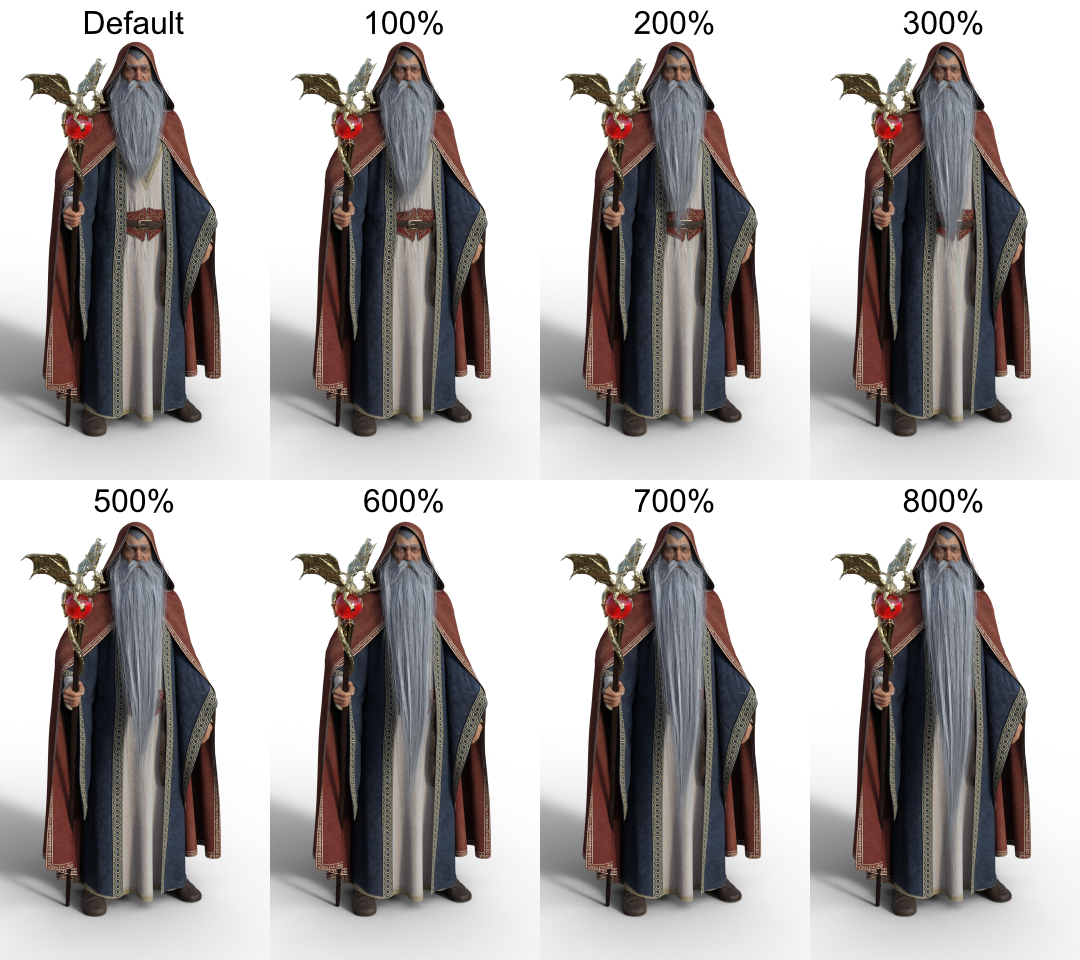
Suggestions for a long white wizard style beard for Genesis 8 MaleI got curious and tested Sevrin's suggestion: It works really well!
I removed the limits from the beard length morph and cranked it up to 800%
 What Happened TO Guy 4 for M4?I think I found a solution to a problem Okay long story short I needed to have an equivalent for the girl 4 to make a male figure that matches the style of that character . once upon a Time Daz offered a figure morph pack called the guy 4 but apparently the person who created that passed away they retired the package and it is no longer available. at that point I started messing around with alternative means to try to figure out this problem to make a stylistically matching male figure to go with the girl 4 . I remembered that sometimes Michael 4 will take Victoria 4 morphs . I applied the girl for morphs to Michael 4. And hallelujah the morphs took , however when I use the dial to change the head into that style the eyes go all wonky and do not scale up and change with the morph neither do the teeth. now I'm trying to figure out how I can fix this so that every time I pose the figure I don't have to readjust the eyes and the teath . if anybody has any ideas please feel free to share
Could you perhaps fix the eyes and teeth in the default pose and position, then export it at base resolution as an OBJ then reimport it back in as a morph for M4? I have only made morphs for Genesis figures, so I don't know if the older generation figures work the same or not when it comes to creating morphs for them.
What Happened TO Guy 4 for M4?I think I found a solution to a problem Okay long story short I needed to have an equivalent for the girl 4 to make a male figure that matches the style of that character . once upon a Time Daz offered a figure morph pack called the guy 4 but apparently the person who created that passed away they retired the package and it is no longer available. at that point I started messing around with alternative means to try to figure out this problem to make a stylistically matching male figure to go with the girl 4 . I remembered that sometimes Michael 4 will take Victoria 4 morphs . I applied the girl for morphs to Michael 4. And hallelujah the morphs took , however when I use the dial to change the head into that style the eyes go all wonky and do not scale up and change with the morph neither do the teeth. now I'm trying to figure out how I can fix this so that every time I pose the figure I don't have to readjust the eyes and the teath . if anybody has any ideas please feel free to sharethe guy 4I think I found a solution to a problem Okay long story short I needed to have an equivalent for the girl 4 to make a male figure that matches the style of that character . once upon a Time Daz offered a figure morph pack called the guy 4 but apparently the person who created that passed away they retired the package and it is no longer available. at that point I started messing around with alternative means to try to figure out this problem to make a stylistically matching male figure to go with the girl 4 . I remembered that sometimes Michael 4 will take Victoria 4 morphs . I applied the girl for morphs to Michael 4. And hallelujah the morphs took , however when I use the dial to change the head into that style the eyes go all wonky and do not scale up and change with the morph neither do the teeth. now I'm trying to figure out how I can fix this so that every time I pose the figure I don't have to readjust the eyes and the teath . if anybody has any ideas please feel free to shareWHERE is (EmmaAndJordi) EJ Face morphs and Details?I don;t have that morph pack, but assuming it works like most others then you probably need to select the G8M figure (not just the head) then use the "Parameters" tab and expand the "Actor" section, then "Head" and they should appear as sliders (like those shown in the promo images).
ETA: You can expand the "Head" section too and click on "Ears" or "Cheek and Brows" or "Eyes" or whatever to see just those morphs. Normally only full shaping presets appear in Content Libarary or Smart Content (also Zero presets like the ones you found) - the main morphs in this product are just partial morphs that affect one small area of the head.
Daz 3D is part of

Connect
DAZ Productions, Inc.
7533 S Center View Ct #4664
West Jordan, UT 84084Licensing Agreement | Terms of Service | Privacy Policy | EULA
© 2026 Daz Productions Inc. All Rights Reserved.