-
Just cannot get face transfer utility to work
I meet the same problem and have cracked it.
I am a Chinese. I found it will popup the error message. "Face Transfer failed to generate. Try a different source image" if the photo path include Chinese.
So, just check the path of your photo that if there are non-English character even the name of photos.
That's interesting, thank you for sharing the info.
Cancel buttonsThere are some processes that take a long time without any way of cancelling them except force-quiting DS. I was trying to save out a morph and had the wrong figure selected, so it had a lot of morphs in it that I didn't want to save, but there was no way of cancelling the save. This happens with other things as well. I know some processes can't be interrupted without catestrophic failures, but if it's a matter of abandoning an unwanted save, simulation, etc., it would be great to have cancel buttons implemented more broady than they are now.
What is 'backward compatible' for G8 and what isn't?In general poses don't really translate, but there are converters, some pay and some free.
Clothing/.hair, with the right clones or converters you can pretty much autofit any clothing/hair other than heels which have been problematic since genesis 1. When autofitting, if there isn't a specific clothing type, just use full body when applicable.
Textures, they tend to be more figure UV specific. There are some products that allow older skins to be used on G8 and vice versa with the use of geografts (look for Cayman Studios in the store).
Morphs, with the use of GenX you can transfer most morphs from V4 all the way up to G3. There are then a couple of converters to transfer morphs from G3 to G8.
In general the backwards compatibility is there, but minimal which makes sense since DAZ is a marketplace first and foremost and relies on users purchasing items to stay in business.
Keep in mind that many of the tools and products made to help with backwards compatibility are designed to work only in the target app, Daz Studio, so using them outside of the native app might be a problem.
The "Powered by Hot Pockets" Complaint ThreadA little research on the Internet reveals that NikonTransfer has not been updated since 2015 so I'm not surprised it has finally fallen over the edge.
I really don't know why I use the Nikon software for image transfer from camera to computer. My camera doesn't do RAW images and I don't really need any fancy editing features specific to a top-end Nikon camera. I can transfer images from the camera via USB or even directly from the SD card with other apps like Photoshop. I just used NikonTransfer for getting the images from the camera and putting them into an automatically named folder. Almost any other image accumulation software product can do that.
HOWEVER, I did find out that Nikon now has a newer free product called "ViewNX-i" as part of a suite of products that are approved for use under Windows10. The suite includes "NikonTransfer-2". So, I've downloaded it and will install it. If it works, fine. If not, then OK, I'll just find some other way.
Edited to add: New Nikon app. suite installed after uninstalling the old NikonTransfer. Transfering images from camera now works OK (Yay!)
 Suite includes:
"NikonTransfer-2" for getting images from selected Nikon cameras. (this is what I was after)
"ViewNX-i" for browsing & editing images. (this seems to be faster loading than the default Microsoft viewing tools)
"Capture-NX-D" Not sure what it does but it looks like a more sophisticated browsing and editing app.
"Picture Control Utility-2" Which looks like a lazy person's image editor to achieve various moods. Several built-in filters.
How do I export a figure to Blender?How do I export a figure to Blender? I want the rigging, and if possible the morphs. It would be good to be able to transfer poses and animations- especially facial expressions- although some of this is actually easier in Blender.
So far, when I try to export in FBX format, it comes into Blender all twisted up, even a plain G8F figure in the original A pose. Any idea what I might be doing wrong? I started with the default settings in the export dialogue, and tried changing a few items, but am not getting anything better.
What is 'backward compatible' for G8 and what isn't?What is 'backward compatible' for G8 and what isn't? It seems that the expressions for V4 do not work with G8. I see that some autofit stuff will transfer if you know what figure it was for, but some won't (such as shoes for Michael- the fitter doesn't offer the choice 'shoes' so it just dumps them on the ground).
While I can see how technical issues might prevent some kinds of backward compatibility, it's frustrating not to have a clear, up-front indication of the kinds of things that can work with different figures. Is there some documentation on this?
The "Powered by Hot Pockets" Complaint ThreadComplaint: Windows10 feature update 2004 appears to have broken my NikonTransfer application that imports images from my camera to my computer.
 At first I thought that is was the camera not working, but I removed the memory card from the camera and put it directly into the memory slot on the computer and initiated the NikonTransfer application with identical non-results.
 So, then I was worried that the images on the camera were scrambled. But no, when viewed as a simple folder of images, PhotoshopBridge sees them just fine. So, I guess I need to go looking for an updated copy of NikonTransfer or possibly researching the Internet to see if other people are having problems with image transfer utilities after upgrading to Win10-2004.
Non-complaint: I got my pictures into the computer the old fashioned way.
 Among them was the one I took this morning of the baby groundhog that has been appearing in the yard outside my kitchen window. Last year I showed y'all a photo of the adult groundhog that was living under the storage shed on that property. Well, I haven't seen the big one since late fall, but now this little one has been sniffing around in the mornings. Yeah, yeah, I know, hard to tell the size of the critter without any size comparison, but take my word for it, it's smaller. About the size of a cat instead of a small dog.
The OMG department: Tomorrow's the first day of summer.
Edited to add: Ooh,ooh, there's two of them. Two little groundhogs. No sign of momma yet, but two small ones out on the lawn at the same time for about 30 seconds.
w10 has become bvuggy and unstable lately. insideous happenings.
Lately?
XTransfer Module 1- Genesis 3 to Genesis 8 Morph Converter (Commercial)Makes total sense.
XTransfer cannot find some files because it searches drive E:, but on my PC there is no drive E, only C: and F:
Why are you looking for files on a drive that does not exist?
I have already uninstalled and installed the XTransfer module several times with Daz Imstall Manager, but the error persists.
See attached image.You have a setting somewhere that X transfer is looking for I'd guess; it's either a bug, or something set incorrectly by the user; we don't like admitting it, but we do all make mistakes. Took me an hour yesterday to realise why something wasn't rendering correctly in Blender - called myself some pretty uncomplimentary names once I'd realised.
If uninstalling X transfer hasn't solved then look elsewhere; hopefully Zev0 can offer a suggestion as it may be a bug.
I made some changes:
I changed the letter of the disk to E:
I uninstalled and installed Xtransfer more than twice and now it does recognize the disk, but it has other errors that I mention in the files I send below.
Xtransfer installed and uninstalled it with DIM, I even downloaded it from DAZ3D.com and installed it once with the same results.
I also uninstalled and installed DAZ Studio, and it's still the same, plus PostgreSQL CMS doesn't work for me.
Attachment files with errors and log.txt.Ancient Hindu Devi/Yakshi/Apsara dancer statue for Genesis 8 Female?I know, this is a strange request. But ever since watching the Tomb Raider movie with Angelina Jolie, featuring the giant Hindu statue that comes to life and moves around, I've had the idea of taking one of the curvaceous female sculptures found on the walls of ancient Hindu temples, and making it into a posable character in Daz Studio.
This is a very odd idea, I know, but I've already found some awesome ancient Hindu-like backgrounds that might work with this idea, and I really want to make this a reality, a sort of fantasy adventure render series where this statue comes to life and begins dancing for the viewer. I'm attaching specific examples of these statues that I think are ideal for my design.

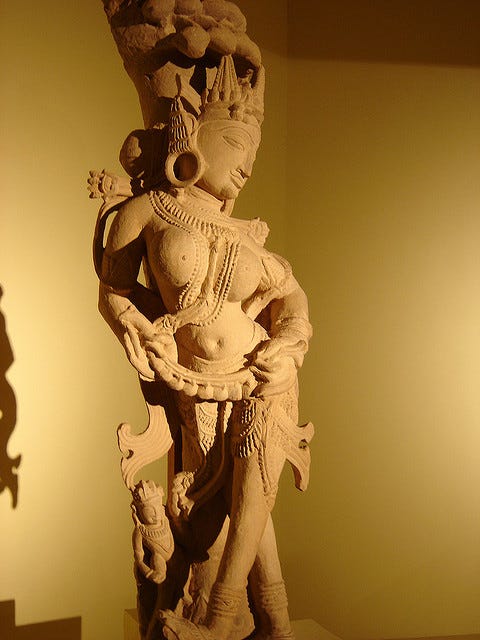


If I were to throw some cash into the project, would someone be willing to help me out? Maybe create a morph and texture set for G8F?
AIUTO...CHI CONOSCE L’ITALIANO? PARTE DODICISi puoi farlo, ma devi anche correggere i percorsi del DIM e di DAZ Studio, altrimenti non li trovi nei Tab Content e Smart Content. Ricordati anche di reimportare i metadata alla nuova posizione dal Content Management.
Tuttavia, dovrai correggere tutte quelle scene che contengono cose create da te, tipo textures o morphs. Quelle cose non sono integrate nei metadata e il loro percorso viene salvato all'interno della scena.
Se la scena è abbastanza recente non avrai bisogno di correggere i percorsi delle geometrie, in quanto vengono salvate all'interno della scena stessa (occhio quando condividi le scene!) a meno che tu non le abbia salvate nelle tue librerie creando una voce Metadata.Grazie!
Non ho mai creato metadata per nulla.
Devo lo stesso fare queste operazioni coi metadata? I prodotti Daz non li hanno già integrati, ovunque io li installi?Sì lo so dei percorsi.
Si, sono intergrati e in genere dopo aver corretto i percorsi funzionano senza problemi, ma alcuni prodotti come plugin, addon e in alcuni casi morph, hanno necessità di reimportare i metadata. E a volte anche riattivati tramite seriale.
Quanto a quelli "user" vengono salvati in automatico quando, per esempio, salvi come Asset una maglia o un morph. Anche quelli vanno reimportati in certi casi.Attenzione, lo dico da utilizzatore di Merchant Resource, molto spesso chi vende o regala le Merchant, dice esplicitamente di non creare freebiees con quelle. Io ho un intera parte della mia wishlist piena di Merchant dela DAZ, ma nessuno permette di fare freebiees, solo prodotti da vendere.
Quello è uno dei motivi per i quali evito le Merchant Resources, sia commerciali che gratuite. Non sai mai cosa puoi farci, specia quando rimandano a licenze confusionarie o incomplete.
Molto meglio fare da sè e disegnarsi le risorse da sè o generarle con i programmi appositi.

E visto che si parla di mercato, uno di voi PA mi potrebbe togliere una curiosità? Vedo un sacco di bravissimi artisti "relegati" su altri store, spesso mescolati a robaccia per Poser, senza traccia di loro su DAZ... Voglio dire, con quella qualità, per quale motivo non vendono (anche) qui "da noi"? Avrebbero parecchia più visibilità e un bacino di clienti molto più ampio, almeno credo.

Appunto ti dicevo, io al momento ho solo Merchant Resource della DAZ, o di qualche creator con cui ho parlato direttamente e a chi ho chiesto, licenza alla mano, cosa si poteva e non poteva fare. Per il discorso dei creatori che sono strafighi e non stanno qui sulla DAZ, è perchè magari non vogliono sottostare ai dettami della DAZ, che sono più restrittivi degli altr store se non sbaglio. Ma dovremo chiedere lumi a @muscleman o @maclean
Ma io non parlo di artisti "bollenti"!
Che restrinzioni possono esserci su un morph di una bambina o sul modello di una maglia?Dipende dal PA in realtà, io voglio lavorare per i migliori in questo campo, e i migliori è la DAZ, e mi sta bene l'esclusività dei prodotti che posto qui, non ci stanno frottole. Mentre altri preferiscono fare diversamente
Sono d'accordo. Io mi ricordo quando avevo il mio primo prodotto pronto e chiedevo nel chat a chi darlo. Tanti mi hanno detto, "Rendo, perche prendono qualsiasi prodotto senza discutere. Invece DAZ e molto particolare". Io l'ho dato a DAZ. Pensavo se non lo volessero, potevo sempre andare da Rendo. E in tutti quest'anni, (dal Giugno 2001), ho dato tutti i miei prodotti a DAZ.
Il discorso e questo. C'e chi non si fida del proprio livello di qualita, o non vuole la concorrenza forte, o preferisce altri ambienti. Non dico e sbagliato. Ognuno fa la sua scelta, e buona fortuna!
Oh wow...ma sei tu! :O :O
Mi ricordava qualcosa il nome, ma non avevo mai fatto il collegamento!
Li uso molto i tuoi prodotti, sono unici e mi salvano quando devo creare qualcosa di nuovo che non esiste, complimenti! :D
AIUTO...CHI CONOSCE L’ITALIANO? PARTE DODICISi puoi farlo, ma devi anche correggere i percorsi del DIM e di DAZ Studio, altrimenti non li trovi nei Tab Content e Smart Content. Ricordati anche di reimportare i metadata alla nuova posizione dal Content Management.
Tuttavia, dovrai correggere tutte quelle scene che contengono cose create da te, tipo textures o morphs. Quelle cose non sono integrate nei metadata e il loro percorso viene salvato all'interno della scena.
Se la scena è abbastanza recente non avrai bisogno di correggere i percorsi delle geometrie, in quanto vengono salvate all'interno della scena stessa (occhio quando condividi le scene!) a meno che tu non le abbia salvate nelle tue librerie creando una voce Metadata.Grazie!
Non ho mai creato metadata per nulla.
Devo lo stesso fare queste operazioni coi metadata? I prodotti Daz non li hanno già integrati, ovunque io li installi?Sì lo so dei percorsi.
Si, sono intergrati e in genere dopo aver corretto i percorsi funzionano senza problemi, ma alcuni prodotti come plugin, addon e in alcuni casi morph, hanno necessità di reimportare i metadata. E a volte anche riattivati tramite seriale.
Quanto a quelli "user" vengono salvati in automatico quando, per esempio, salvi come Asset una maglia o un morph. Anche quelli vanno reimportati in certi casi.Attenzione, lo dico da utilizzatore di Merchant Resource, molto spesso chi vende o regala le Merchant, dice esplicitamente di non creare freebiees con quelle. Io ho un intera parte della mia wishlist piena di Merchant dela DAZ, ma nessuno permette di fare freebiees, solo prodotti da vendere.
Quello è uno dei motivi per i quali evito le Merchant Resources, sia commerciali che gratuite. Non sai mai cosa puoi farci, specia quando rimandano a licenze confusionarie o incomplete.
Molto meglio fare da sè e disegnarsi le risorse da sè o generarle con i programmi appositi.
E visto che si parla di mercato, uno di voi PA mi potrebbe togliere una curiosità? Vedo un sacco di bravissimi artisti "relegati" su altri store, spesso mescolati a robaccia per Poser, senza traccia di loro su DAZ... Voglio dire, con quella qualità, per quale motivo non vendono (anche) qui "da noi"? Avrebbero parecchia più visibilità e un bacino di clienti molto più ampio, almeno credo.
Appunto ti dicevo, io al momento ho solo Merchant Resource della DAZ, o di qualche creator con cui ho parlato direttamente e a chi ho chiesto, licenza alla mano, cosa si poteva e non poteva fare. Per il discorso dei creatori che sono strafighi e non stanno qui sulla DAZ, è perchè magari non vogliono sottostare ai dettami della DAZ, che sono più restrittivi degli altr store se non sbaglio. Ma dovremo chiedere lumi a @muscleman o @maclean
Ma io non parlo di artisti "bollenti"!
Che restrinzioni possono esserci su un morph di una bambina o sul modello di una maglia?Dipende dal PA in realtà, io voglio lavorare per i migliori in questo campo, e i migliori è la DAZ, e mi sta bene l'esclusività dei prodotti che posto qui, non ci stanno frottole. Mentre altri preferiscono fare diversamente
Sono d'accordo. Io mi ricordo quando avevo il mio primo prodotto pronto e chiedevo nel chat a chi darlo. Tanti mi hanno detto, "Rendo, perche prendono qualsiasi prodotto senza discutere. Invece DAZ e molto particolare". Io l'ho dato a DAZ. Pensavo se non lo volessero, potevo sempre andare da Rendo. E in tutti quest'anni, (dal Giugno 2001), ho dato tutti i miei prodotti a DAZ.
Il discorso e questo. C'e chi non si fida del proprio livello di qualita, o non vuole la concorrenza forte, o preferisce altri ambienti. Non dico e sbagliato. Ognuno fa la sua scelta, e buona fortuna!
Moving content to a new PC...How??Hi all
I have my original DAZ studio 4.12.086 installer 64 bit
If I do a vanilla Daz studio install on my new Ryzen rig (win 10 pro)
is it possible to manually copy over my old content data
base ,across my network ,from My old (win 10 home) toshiba and REPLACE the Default base content that installs
with DS 4.12.
FYI I dont care about any Application plugins I am only using Daz studio to morph ,dress,& export Characters out.
I only want all of my current genesis1,2,3,8 figures&morphs clothes etc
as they were on the old machine.Need some help Baking my Squirrelmy rigged LAMH never goes well as I get stretched vertices
I understand what you are doing but it needs to be done on a zeroed figure not the load figure and you will get the stretched vertex issue
same as any DAZ figure conforming clothing with the transfer utility
I have done plenty critters with rigged fur myself but pretty much given up because of that issue
your cat looks cute

Exactly. Figures are exported in a zero pose, but the I'm not using the Transfer utiliy in Daz to transfer weights. I'm waiting for a tool that I can then surgically fix the wt map issues. Poses are exported using the option for exporting just the base figure, which translates to just the skeletal rig.
The "Powered by Hot Pockets" Complaint ThreadComplaint: Windows10 feature update 2004 appears to have broken my NikonTransfer application that imports images from my camera to my computer.
At first I thought that is was the camera not working, but I removed the memory card from the camera and put it directly into the memory slot on the computer and initiated the NikonTransfer application with identical non-results. So, then I was worried that the images on the camera were scrambled. But no, when viewed as a simple folder of images, PhotoshopBridge sees them just fine. So, I guess I need to go looking for an updated copy of NikonTransfer or possibly researching the Internet to see if other people are having problems with image transfer utilities after upgrading to Win10-2004.Non-complaint: I got my pictures into the computer the old fashioned way.
Among them was the one I took this morning of the baby groundhog that has been appearing in the yard outside my kitchen window. Last year I showed y'all a photo of the adult groundhog that was living under the storage shed on that property. Well, I haven't seen the big one since late fall, but now this little one has been sniffing around in the mornings. Yeah, yeah, I know, hard to tell the size of the critter without any size comparison, but take my word for it, it's smaller. About the size of a cat instead of a small dog.The OMG department: Tomorrow's the first day of summer.
Edited to add: Ooh,ooh, there's two of them. Two little groundhogs. No sign of momma yet, but two small ones out on the lawn at the same time for about 30 seconds.
w10 has become bvuggy and unstable lately. insideous happenings.
Just cannot get face transfer utility to workFace transfer doesn't work for me either. "Face Transfer failed to create. Please try another source image." I get an error message. I’ve read a lot here and see that it’s not just with me. Experiencing this, I don’t think I would buy the full version for the money!
Did you try several different photos?
Yes, more. Before I wrote here, I read the experiences of others. I also tried a photo editor.
Face transfer doesn't work for me either. "Face Transfer failed to create. Please try another source image." I get an error message. I’ve read a lot here and see that it’s not just with me. Experiencing this, I don’t think I would buy the full version for the money!
Did you try several different photos?
Yes, more. Before I wrote here, I read the experiences of others. I also tried a photo editor.
Mod Edit :- to sort out the quoteI only tried on my own machine. There is no other option.
I feel like I have to wait to use Face Transfer. If you need a lot of photos and a lot of computers, then something is wrong there. This needs to be improved.
Could you help me with ImageMagic Denoiser? (Supposedly making rendering faster) write the error message "No file or directory to display." Daz Studio was installed in IM. Everything is where the Install Manager installed it. Windows 10 is my system and the program is on an HP laptop.
I already wrote in the forum, I wrote to the creator of the Denoise script, but I didn’t get a response from anyone. If you could help me with this, I would be very happy for him. Thanks in advance.The "Powered by Hot Pockets" Complaint ThreadComplaint: Windows10 feature update 2004 appears to have broken my NikonTransfer application that imports images from my camera to my computer.
At first I thought that is was the camera not working, but I removed the memory card from the camera and put it directly into the memory slot on the computer and initiated the NikonTransfer application with identical non-results. So, then I was worried that the images on the camera were scrambled. But no, when viewed as a simple folder of images, PhotoshopBridge sees them just fine. So, I guess I need to go looking for an updated copy of NikonTransfer or possibly researching the Internet to see if other people are having problems with image transfer utilities after upgrading to Win10-2004.Non-complaint: I got my pictures into the computer the old fashioned way.
Among them was the one I took this morning of the baby groundhog that has been appearing in the yard outside my kitchen window. Last year I showed y'all a photo of the adult groundhog that was living under the storage shed on that property. Well, I haven't seen the big one since late fall, but now this little one has been sniffing around in the mornings. Yeah, yeah, I know, hard to tell the size of the critter without any size comparison, but take my word for it, it's smaller. About the size of a cat instead of a small dog.The OMG department: Tomorrow's the first day of summer.
Edited to add: Ooh,ooh, there's two of them. Two little groundhogs. No sign of momma yet, but two small ones out on the lawn at the same time for about 30 seconds.
Korvath HD for Genesis 8 MaleMy bad - it wasn't the Korvath figure. Seems the poses coming with the Rococerous are faulty ...
i've got the same problem
none of the pose work for g8 male ...
Well... Rococerous isnt a G8 morph, it's a standalone creature according to its store page or am i missing something.
Just cannot get face transfer utility to workFace transfer doesn't work for me either. "Face Transfer failed to create. Please try another source image." I get an error message. I’ve read a lot here and see that it’s not just with me. Experiencing this, I don’t think I would buy the full version for the money!
Did you try several different photos?
Yes, more. Before I wrote here, I read the experiences of others. I also tried a photo editor.
Mod Edit :- to sort out the quoteOK, I'm not sure what to suggest then. You might want to try opening a support ticket.
May 2020 - Daz 3D New User Challenge - Using Props and Push Modifiers/DeformersYou can have two or more active dForms and when you use Spawn Morph it will create a single morph that is the compound effect of the dForms
Yes, dForce will stack with other modifiers - once a mesh is dForce you can do anything to it, and if you run a simulation it will drape over the morphed or dFormed shape of the target items.
Thank you! :)
Need some help Baking my SquirrelI've been having really great luck converting & exporting via FBX furred, LAMH animals until I tried this older one with the European Grey Squirrel, or rather the Rodent Polymorph. The end result is the base figure isn't fitting to the fur items. Its some sort of morph or transformation issue though that just isn't getting baked, in that the result is the base rodent & not the breed initially selected. Figure is zero posed with the exception of the Jaw opened 1/2 range. OBJ export works fine in retaining the shape.
Here's a screen grab: OBJ in black wires, the FBX result in White.
It's not just a scaling factor; there are subtle morphs to a given breed as well. I'm not exporting any morphs though (can't use them), only baking. Wish I could use the OBJ but they have no weight map info as the FBX does.
In DS, I've tried every combo of selecting, baking, memorizing, etc. but doesn't seen to have any affect in this case as it has before. Not having proper docs for the process of course certainly doesn't help so flaying around with with trial & error.
Hoping someone might know what I'm missing here.
You might test it on the Daz poser squirrel if you have it. it already has included ik-chains too boot https://www.daz3d.com/daz-squirrel and see if you get the same issue. you might be able to trouble shoot the problem anyway. I haven't used any AM rodents for my animated projects. I bought one set & they do make nice renders in daz studio. but that all I can use it for . it didnt carry over into poser with DSON very well But posers all I ever tried using them in too so thats the extent of my exprience with AM rodents
I would join you in complaining about lack of documents for daz studio but it appears now when I do it gets my comments removed.
No, I don't have theDaz Squirrel. I might take a look, but what this is largely about is taking the figure + LAMH fur into a form that the fur responds to bone deformation. Don't think it has a preset.
And ya, I've severely reduced my forum participation for same reasons.
The daz squirrel is pretty old too. The reason I mentioned the daz squirrel was because it came with the .obj so you could test the scene with it you can always cover it with one of oso shader or fiber mesh hair if it worked
edited for spelling sorry for my dyslexia
Daz 3D is part of

Connect
DAZ Productions, Inc.
7533 S Center View Ct #4664
West Jordan, UT 84084Licensing Agreement | Terms of Service | Privacy Policy | EULA
© 2026 Daz Productions Inc. All Rights Reserved.