-
Everett 9 HD - Discussion Thread
xyer0 said:
Fit Control was made for you and me:

I wish Daz had commissioned Luthbel to do a line of male contemporary clothes for G9 with extra textures by Luthbellina.
At this point I'm just grateful that at least there are some decent male clothes being made, even though a lot of what does come out is rather mediocre or excessively redundant. Remember all the folks who kept saying that if DAZ went back to a unisex base there would be a huge increase in products for male characters? I guess that turned out to be true if what you want is men in well-fitted women's swimsuits and lingerie, but beyond that, this generation has the worst output ratio of male to female characters since Genesis was introduced while the clothing ratio seems even more skewed.
Third Party Software Installed Via Install Manager?Here is what I decided was the easiest. This is from the README file of a non-DAZ product for DAZ Studio:
QUOTE
************************** INSTALATION *******************************Unpack Poser zip files to Your Poser Runtime folder.
The model will be placed in
runtime/library/Character/Coflek Gnorg/Pulp Sci-FiUnpack Daz Studio zip files to your DAZ 3D Library
The model will be placed in
Vehicles\Coflek Gnorg\Pulp Sci-FiEND QUOTE
Attached is a screenshot of what happens, it ends up in "My Library" (which I selected for the Unzip), not "My DAZ Connect Library", which is fine. You just have to "Load" the DSON User file from the "Pulp Scifi" folder, i.e. it does not show up in the DAZ Studio Content Tabs.
Freebie Challenge February 2026 - "Stronger Than You Think" - Main ThreadStronger Than You Think
You didn't think you'd win the race, but you're stronger than you think.
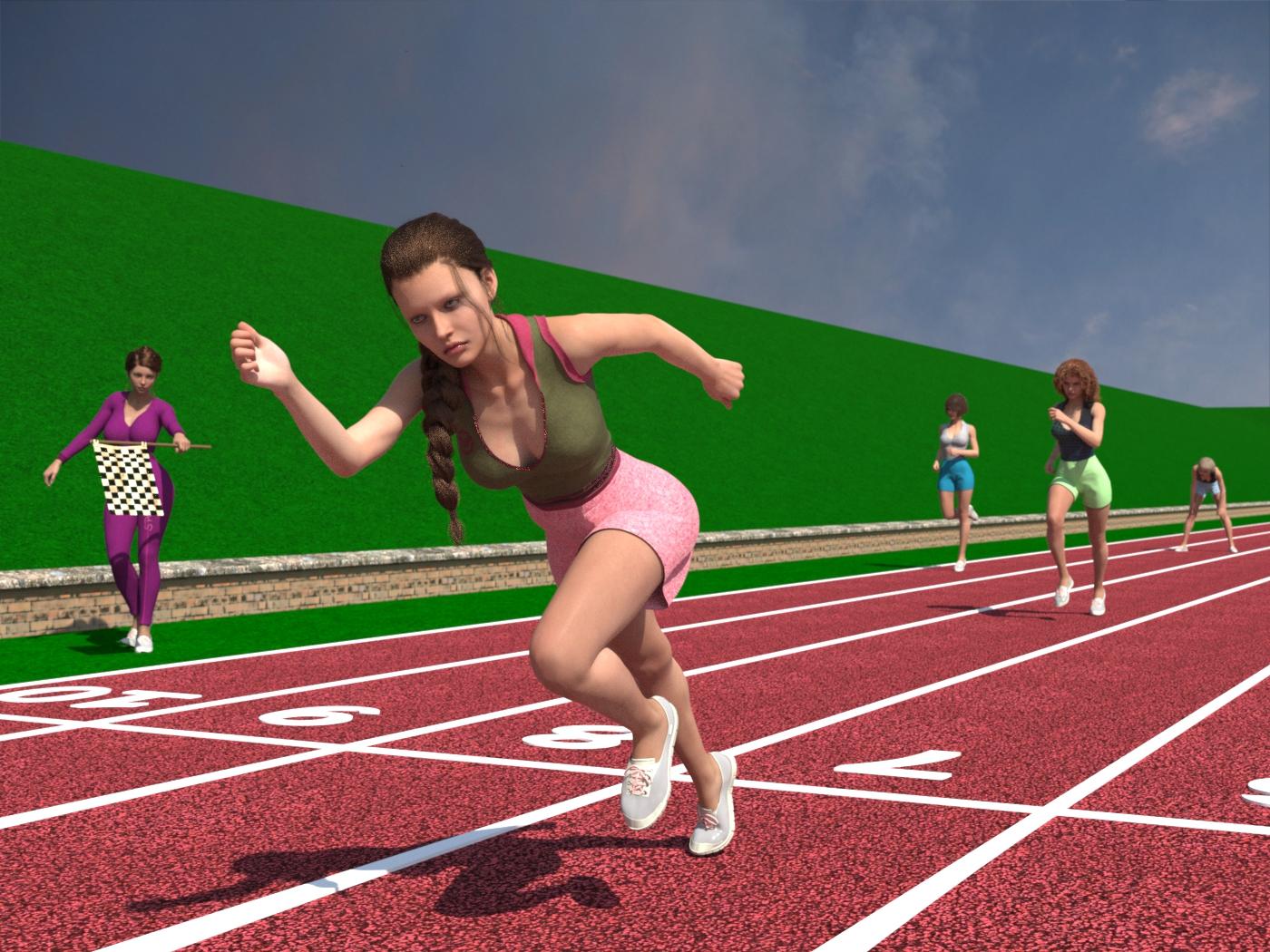
Freebies
Kk Kate Character for Genesis 8, 8.1 Female
https://www.renderhub.com/melovephoto/kk-kate-character-for-genesis-8-8-1-femaleVFox Vixen for Genesis 8 Female
https://www.renderhub.com/vfoxgames/vfox-vixen-for-genesis-8-female-1-year-giftAgate Plunge Top - cropped version
https://www.patreon.com/posts/139501624?collection=1728660Urban Noise styles for Agate
https://www.patreon.com/posts/perfect-match-es-146812881G8F Shorts & Summer Top
https://www.wilmapsdigitalcreations.co.uk/view_product.php?id=459Everyday Outfit Genesis 8 by teknology3d
https://www.renderosity.com/freestuff/items/83138/everyday-outfit-genesis-8dForce_French Twist Hair for Genesis 8 Female(s) by zoro_d
https://www.renderosity.com/freestuff/items/81937/dforce-french-twist-hair-for-genesis-8-femalesCandy Braids Hair for Genesis 8 Female
https://www.renderhub.com/zoro-d/candy-braids-hair-for-genesis-8-females
or
https://www.renderosity.com/freestuff/items/88062/candy-braids-hair-for-genesis-8-femalesAlice Short Hair 2 for Genesis 8 Female( Now Free)
https://www.renderhub.com/rango2001/alice-short-hair-2-for-genesis-8-femaleDingo's Wild Curls for Genesis 8 Female by Dingo
https://www.renderosity.com/freestuff/items/86422/dingos-wild-curls-for-genesis-8-femaleFLAG
Freebie - SmidA - Small Flag
https://www.deviantart.com/smida460/art/Freebie-SmidA-Small-Flag-1024629497
or
Small Flag (DAZ3D; Iray; obj. included) - Part 1 of 3 by SmidA
https://www.renderosity.com/freestuff/items/97344/small-flag-daz3d-iray-obj-included-part-1-of-3
Small Flag (DAZ3D; Iray; obj. included) - Part 2 of 3 by SmidA
https://www.renderosity.com/freestuff/items/97345/small-flag-daz3d-iray-obj-included-part-2-of-3
Small Flag (DAZ3D; Iray; obj. included) - Part 3 of 3 by SmidA
https://www.renderosity.com/freestuff/items/97346/small-flag-daz3d-iray-obj-included-part-3-of-3Athletics Ground by richardandtracy
https://www.renderosity.com/freestuff/items/88078/athletics-groundG8F Warm-up 1-5 by richardandtracy
https://www.renderosity.com/freestuff/items/87721/g8f-warm-up-1-5G8F Sprint Start Poses by richardandtracy
https://www.renderosity.com/freestuff/items/88827/g8f-sprint-start-posesGenesis 8 Female DForce Ready Pose -02 by BBarbs
https://www.renderosity.com/freestuff/items/84702/genesis-8-female-dforce-ready-pose-02HDRIs / Fouriesburg Mountain Midday
https://polyhaven.com/a/fouriesburg_mountain_middayNo count
short-hair-for-g8f (no longer available)
Hair: https://www.renderhub.com/guhzcoituz/freebies-short-hair-for-g8fWhat's this CLEARING THE SCENE ?I've been getting that message for years and I use Windows. I think it has a lot to do with how many products you have installed in your active libraries and, at some point, DS seems to get a bit kerfluffled trying to do whatever it's trying to do and it will take forever to shut down. Worse case scenario, assuming that you actually saved everything while working you can just force a close using the task manager or simply power the computer down..
New Year, New Sales Thread: Report Issues Here 3 "Reporting Only"Adela said:
These products are advertised with an 85% base discount, but when added to the cart, the discount drops to 60%. And if you include “New” products in your cart, the discount increases to 80%.

The Daz Marketplace experienced a glitch this morning when the new daily sale was rolled out. All "Current Items" in the "Mad Artist Stores" were discounted at 85% or more, and not at the advertised" 60% off ". The "Recent", "Classic", and "Legacy" Mad Artist Store items were discounted as advertised. Daz has since corrected the issue.
What you are likely seeing is residual stuff from Daz's fix, in your web browser. Try clearing your web browser's cache to resolve the issue.AI in DAZ studio what makes sense what are the fears?FSMCDesigns said:
daybird said:
I'm curious to see if the traditional DAZ method can compete with AI in the coming years. I'm noticing that my artistic skills are increasingly falling behind the quality of AI-generated images.
I think DAZ needs to consider how to integrate AI support into the program. There are so many ways AI can assist us in creating images without taking away all our freedom. Many good suggestions have already been posted here.
Just being able to sort and use my purchased products would simplify the workflow so much. I enter what I want to depict in the scene, and DAZ gives me a window with items that match that vision and that I already own. Alternatively, it could even show products that I don't own but that are available in the shop.
AI already surpases everyones artistic skills, the reason many don't embrace it is they feel like they lose control since it eliminates certain aspects of the 3D workflow they are used to and some still feel like it is immoral based on how some models are trained off internet data.
While AI tools in DS would be great, I feel it's kind of pointless since the end goal is the image and that is where AI excels. Higgsfield AI already has tools where you can take an existing image, and the change the camera angle, or the lighting and get a new image. If DAZ wants to implement AI in artists workflow they are way behind the curve and will have to do a ton of work to get up to speed. There are already sites where you can use AI to create full textured PBR models to use in 3D apps. One of the things many DS users use DS for is animation, which is complicated and tedious in DS. There are 100's of AI apps that will animated any DS render in seconds
I started playing around with AI a little over 2.5 years ago and now the only time I open DS up is to create a simple image prompt to help guide AI when needed. The images and scenes I used to create in DS, I can now use AI to create and the quality is always far superior and done in a fraction of the time. I do feel a little bad because I want to support PAs here since I was a 3D modeler back in the day and used Max and Maya to make game assets for a game studio, but time marches on and I am just as creative now with AI as i was with 3D, probably more so since AI can give me results that 3D and Iray can't..
I think the next wave of AI goes beyond just images. We are talking about automating, with reasoning and decision making, significant sections of the production process so we are freer to focus on the creative aspects. So it's not so much that DAZ Studio incorporates AI into its image generation, but if you want to use it for generating a simple image prompt it acts as a tool within a larger AI workflow.
AI in DAZ studio what makes sense what are the fears?daybird said:
I'm curious to see if the traditional DAZ method can compete with AI in the coming years. I'm noticing that my artistic skills are increasingly falling behind the quality of AI-generated images.
I think DAZ needs to consider how to integrate AI support into the program. There are so many ways AI can assist us in creating images without taking away all our freedom. Many good suggestions have already been posted here.
Just being able to sort and use my purchased products would simplify the workflow so much. I enter what I want to depict in the scene, and DAZ gives me a window with items that match that vision and that I already own. Alternatively, it could even show products that I don't own but that are available in the shop.
AI already surpases everyones artistic skills, the reason many don't embrace it is they feel like they lose control since it eliminates certain aspects of the 3D workflow they are used to and some still feel like it is immoral based on how some models are trained off internet data.
While AI tools in DS would be great, I feel it's kind of pointless since the end goal is the image and that is where AI excels. Higgsfield AI already has tools where you can take an existing image, and the change the camera angle, or the lighting and get a new image. If DAZ wants to implement AI in artists workflow they are way behind the curve and will have to do a ton of work to get up to speed. There are already sites where you can use AI to create full textured PBR models to use in 3D apps. One of the things many DS users use DS for is animation, which is complicated and tedious in DS. There are 100's of AI apps that will animated any DS render in seconds
I started playing around with AI a little over 2.5 years ago and now the only time I open DS up is to create a simple image prompt to help guide AI when needed. The images and scenes I used to create in DS, I can now use AI to create and the quality is always far superior and done in a fraction of the time. I do feel a little bad because I want to support PAs here since I was a 3D modeler back in the day and used Max and Maya to make game assets for a game studio, but time marches on and I am just as creative now with AI as i was with 3D, probably more so since AI can give me results that 3D and Iray can't..
New Year, New Sales Thread: Report Issues Here 3 "Reporting Only"Adela said:
These products are advertised with an 85% base discount, but when added to the cart, the discount drops to 60%. And if you include “New” products in your cart, the discount increases to 80%.
When you said 85% off, I thought you meant the Legacy category, but it seems like they come from somewhere else in the sale. Can you tell me what specific section?
New Year, New Sales Thread: Report Issues Here 3 "Reporting Only"These products are advertised with an 85% base discount, but when added to the cart, the discount drops to 60%. And if you include “New” products in your cart, the discount increases to 80%.
Does anyone still have DieTrying-Morphs-for-G8-FFixed by dakkuuan(Free Asset)?Hi all,
I recently lost a bunch of archived installers after a hard drive failure and a Windows repair attempt which included a free morph pack I used to have: "DieTrying-Morphs-for-G8-FFixed" by dakkuuan.
It was a free asset that was only posted on ShareCG, but ShareCG shut down last year, so I can’t access the original download anymore. The original link was
http://www.sharecg.com/v/88550/browse/21/DAZ-Studio/DieTrying-Morphs-for-G8-FFixed
Unfortunately, it’s also behind a login wall on the Wayback Machine.Because of this, many of my older scenes are now missing these morphs.
The install location usually looks like:
data\DAZ 3D\Genesis 8\Female\Morphs\Body\Here are some example files:
/data/DAZ 3D/Genesis 8/Female/Morphs/Body/Chin short.dsf
/data/DAZ 3D/Genesis 8/Female/Morphs/Body/Chin wide.dsf
/data/DAZ 3D/Genesis 8/Female/Morphs/Body/Eyebrows arc left.dsf
/data/DAZ 3D/Genesis 8/Female/Morphs/Body/Eyebrows arc right.dsf
/data/DAZ 3D/Genesis 8/Female/Morphs/Body/Face oval.dsf
/data/DAZ 3D/Genesis 8/Female/Morphs/Body/Lips curves lower.dsf
/data/DAZ 3D/Genesis 8/Female/Morphs/Body/Neck scale Z.dsf
/data/DAZ 3D/Genesis 8/Female/Morphs/Body/Nose ridge small.dsf
/data/DAZ 3D/Genesis 8/Female/Morphs/Body/Nose wide.dsfIf anyone knows of a mirror or a place where it was reuploaded, I’d really appreciate the help. If you still have the original archive and are allowed to share it, please let me know.
Thanks
Daz Studio 6 Beta - version 6.25.2026.19821! (Updated July 23, 2026)johndoe_36eb90b0 said:
Here is a list of outstanding issues I am having in latest beta:
Slideshow when moving figures around the scene
Easy to reproduce:
- Open DAZ Studio
- Set viewport to Iray preview
- Set object resolution to 1/1 for manipulation
- Load single G8 or G9 figure
- Pan camera left / right and note latency
- Now move figure left / right by dragging X transform slider and note latency
Expected behavior:
- Since both movements are relative to each other (you either move camera or the figure) the latency should be the same
Actual behavior:
- Pan is smooth, figure movement is slideshow to the point of being unusable and having to switch to textured mode to pose things
Notes:
- I understand that moving a figure vs moving a camera is different (figure movement includes changes to scene graph), but it wasn't this bad in 4.x version -- especially not with single figure and empty scene on high-end hardware.I don't see any great difference (but I am using a 5090). As you say, there is some lag as the actual 3D data is being updated as opposed to a movement of the viewpoint.
Broken encrypted (DSE) scripts
Easy to reproduce:
- Open Daz Studio
- Load a G8 figure
- Load a 3rd party geograft
- Load a script to copy textures from figure to geograft
Expected behavior:
- Script works
Actual behavior:
- Script fails with error because API has been changed and compatibility was broken
Notes:
- I understand the necessity of updating SDK API, what I have a problem with is that vendors whose products I bought refuse to update the scripts because the SDK API is supposedly still not stable and they might as well never update it depending on whether they still offer support for specific products. Daz should find a way to enable us to still run those scripts in v6 because having to load a scene in 4.24 just to apply a different material preset every time you need to change something defeats the purpose of having new Daz Studio version. If the scripts were not encrypted we could fix them ourselves with some effort but with encryption that is impossible. Daz could at least provide a DSE migration tool that decrypts, updates, and re-encrypts those scripts because I am sure that material copy script could be fixed up automatically.Scripts depend on the Qt version to an extent, there are chnages thata re outside Daz' control (though they have been able to implement workarounds in some cases). Whether a script works or not depends on exactly which features it uses, how it is written, and whether it risked using undocumented features.
dForce Simulation not updating preview while in Iray mode
Easy to reproduce:
- Open Daz Studio
- Load a figure
- Load dForce hair or cloth
- Set viewport to Iray preview
- Hit Simulate
Expected result:
- dForce object simulation is shown
Actual result:
- Viewport drops from Iray to something resembling smooth shaded
- Figure (and its movement if Start Bones From Memorized Pose is enabled) is visible
- dForce object simulated is invisible
- If the dForce object is selected only the bounding box is moving in viewport while simulating
Notes:
- I am not expecting dForce to actually render in Iray mode, but whatever mode the viewport drops into while simulating should show the object being simulated. Having to switch viewport to textured or smooth shaderd to see what's going on during simulation is inconvenient.The Viewport drops to OpenGL but it does update in my simple text case (just a dynamic plane). This may be a perfomance issue.
So much from me for now, hope you can pass this to devs.CommunicationIf it is a standard serialisation system then you can also have DS connect to your daz Account (Connect>LOg In) and then the serial number will be available via the button next to the empty field in Help>About Installed plug-ins.
There's Always Another Sale Thread -- Discussions Only Pt 5ANGELREAPER1972 said:
so I'm a plus member and one of the deals we get with the newsletter is you buy two featured member products for an extra discount + extra discounts on some feature products if you buy them as well in same order usually under $2 really good deals/bonuses well in the sale today or yesterday how you look at it one advertising cloth fixer below the Lucas promo they have that advertised
30% off Daz+ New Releases Buy both New Releases to get an extra 30% off them and link to some more good deal and of course us members get bit more discount
Newsletter? I've been Plus for... a long, long time and never seen a newsletter. In fact I recently turned off notifications because I never see anything useful.
Bug in sliders minimum value ?I have this problem too.
The only solution I have found is to write a function that runs when 'editEnd()' is called:
connect(wMyBuggySlider, "editEnd()", onMyBuggySliderChange);If the value is less than the desired minimum, the function changes it to the minimum:
function onMyBuggySliderChange() {
    if (wMyBuggySlider.value < desired_min) wMyBuggySlider.value = desired_min;
};
Visually, at the UI level, when you move the slider below the desired minimum and then release it, it jumps to the desired minimum.
EZfinder Promos a bit confusingTaoz said:
Charlie Judge said:
I have a very large DAZ library (~8Tb, over 3,500 products)
Those numbers sound odd. Don't you mean 35.000 products (I think I read in another post/thread that you have something like that)?
Yes, 33,500 products. A typo that missed a '3'. I have corrected my post.
Wet Hair for any hairstyle including Dforce.Step One:
Setect hair of your choosing.
Step Two:
Duplicate the hair Edit - Duplicate - Duplicate Note Hierarchies
Step Tree:
Select duplicated hair right click find fit to and fit to none
Step Four:
Reselect the dublicate hair go to surface tab and highlite all dublicated hair on editor.
Step Five:
Go to Preset on Surface tab and select the iray uber base and apply on the dublicated hair.
Step Six:
Go to shader preset called water shader https://www.renderosity.com/marketplace/products/154887/water-shaders and apply to the hair.
Step Seven:
Then Adjust on top of the hair on figure how you want to look.
Finally parent the dublicated hair to the head for movement and poses.
have fun and good luck
EZfinder Promos a bit confusingCharlie Judge said:
I have a very large DAZ library (~8Tb, over 3,500 products)
Those numbers sound odd. Don't you mean 35.000 products (I think I read in another post/thread that you have something like that)?
EZFinder - Advanced Content Manager for Daz Studio [Commercial]Charlie Judge said:
EZ3DTV said:
EZFinder has been developed and tested on SSD storage. It should work fine on a traditional HDD, if DAZ Studio runs
well on your setup, EZFinder will too, though the initial scan will take longer. If you're running EZFinder from a
HDD, I'd love to hear how it performs for youWith some perserverence I I now have EZ-Finder working on my system (I messed up my first scan attempt and nothing showed up even in the left panel and had to start over)
I have a very large DAZ library (~8Tb, over 3,500 products) stored on an external HDD and a pretty fast system (Windows 11, AMD Ryzen 9 7900x, 64 GB Ram, RTX 3090) That runs DAZ Studio well. My initial scan took about 12 hour and the HDRI scan took another 8 hours. EZ-Finder took me a bit of time to get used to but seems to be working OK
Initially I was disappointed that only the left panel was populated and I had to experiment a bit to figure out the left panel and how to populate the other panels. I also found that using the library button to locate a product and then load it to the other panels is also useful.. Injecting a product into DAZ Studio only takes a minute or two for it to appear in my scene. I haven't tried EZ-Shader yet but it looks like it may be useful.
Great news! EZFinder works with HDD storage, including external drives. The initial scan will take longer than on a SSD, but after that first scan, you can use the Append scan feature to add new products incrementally, which takes a fraction of the time. EZHDRI also has an Append checkbox and is even faster. I had to be cautious about HDD support since I hadn't tested it on a library running from a hard drive, but users have confirmed it works well.
A quick tip on Search: it works in two modes depending on context. If you have content loaded in the thumbnail grid, search filters what's currently displayed. If you clear the grid first (using the Clear UI button), Search switches to searching across your compartments in the left panel instead. You can also double-click or right-click any compartment to load it into the thumbnail grid right-click also gives you the option to inject content directly.
Thanks for the update Charlie Judge! I am glad you got it to work! In theory, it should work quite well with a HDD. System memory is used to paginate, and it should not take any longer to load any item as it does in Daz itself.
Let's appreciate/discuss today's new releases - more ongoinger threadI'm pretty confused as to why Daz has recently released characters called "Sophia for Genesis 9" and "Lucas for Genesis 9", given that "Sophia 9" and "Lucas 9" have been out as core characters for over a year.
Just seems like that's asking for confusion regarding customer support tickets and pre-requisite products.
There's Always Another Sale Thread -- Discussions Only Pt 5so I'm a plus member and one of the deals we get with the newsletter is you buy two featured member products for an extra discount + extra discounts on some feature products if you buy them as well in same order usually under $2 really good deals/bonuses well in the sale today or yesterday how you look at it one advertising cloth fixer below the Lucas promo they have that advertised
30% off Daz+ New Releases Buy both New Releases to get an extra 30% off them and link to some more good deal and of course us members get bit more discount
Daz 3D is part of

Connect
DAZ Productions, Inc.
7533 S Center View Ct #4664
West Jordan, UT 84084Licensing Agreement | Terms of Service | Privacy Policy | EULA
© 2026 Daz Productions Inc. All Rights Reserved.