-
[RESOLVED] HD Skin - how does it load? And what does it do?
HD refers to the detail in the morph (it moves the vertices created by SubD, usually using level 3 or 4) - it isn't about, and doesn't include, maps.
"Duplicate Formulas Found" is KILLING me!There's something wonky going on with this. As a content creator I get this all the time when just working on a character and going back and forth through GOZ, pretty soon I will get a duplicate formula error with no understandable reason since every morph has different data. I might have 20 little morphs and they're all saved in the scene file only at that point. Some morphs will be rigged. Log is then filled with this stuff:
2020-06-24 22:01:34.390 WARNING: ..\..\..\..\..\src\sdksource\fileinput\dzassetdaz.cpp(6871): owner: Genesis8Female
2020-06-24 22:01:34.390 WARNING: ..\..\..\..\..\src\sdksource\fileinput\dzassetdaz.cpp(6872): output: neck_2:/data/DAZ%203D/Genesis%208/Female/Genesis8Female.dsf#neck_2?center_point/y
2020-06-24 22:01:34.390 WARNING: ..\..\..\..\..\src\sdksource\fileinput\dzassetdaz.cpp(6873): input: Genesis8Female:/Scenes/blah/blah_016.duf#ZBrush%20Morph?value
2020-06-24 22:01:34.483 WARNING: ..\..\..\..\..\src\sdksource\fileinput\dzassetdaz.cpp(6870): Duplicate formula found linking zOrigin & ZBrush Morph
If you are correcting JCMs or MCMs make sure that you use ERC Bake on the links (right-click on them in the Proeprty Hierarchy pane) before doing a fresh ERC Freeze - doing two ERC Freezes on the same property without a bake between is very likely to trigger this issue.
Ashan 8Here is my first test -

I did swap in Abasi's eyes and brows as Ashan's are...pretty awful. In addition, I blended in Owen's specularity map for the body and part of the face as Owen's has much better detail. Ashan's seem rather low rez if viewed in Photoshop at 100%. I also did my personal tweak to his SSS maps. His body morph was moved down to 50% as he's entirely too buff.
How to create pressure-point morphs?Hey Guys,
Is it possible to create a zone-specific, pressure-point morph to a character?
I've seen, for example, products such as 'Breast Morphs', that allows for the look of breasts being positioned, gravity-appropriate.
Is it possible to adjust witnin Studio, to allow for single specific pressure point, such as, when a character maybe has something heavy on their leg, and the proper indent that would follow. Or a character reaches across their body and their breast/chest compresses on the one side to match that pressure, versus, the arm simply dissappearing into the breast/chest area of the body.
Is Photoshop, post-processing correction, the only real option here?
TIA.
- Sol
"Duplicate Formulas Found" is KILLING me!There's something wonky going on with this. As a content creator I get this all the time when just working on a character and going back and forth through GOZ, pretty soon I will get a duplicate formula error with no understandable reason since every morph has different data. I might have 20 little morphs and they're all saved in the scene file only at that point. Some morphs will be rigged. Log is then filled with this stuff:
2020-06-24 22:01:34.390 WARNING: ..\..\..\..\..\src\sdksource\fileinput\dzassetdaz.cpp(6871): owner: Genesis8Female
2020-06-24 22:01:34.390 WARNING: ..\..\..\..\..\src\sdksource\fileinput\dzassetdaz.cpp(6872): output: neck_2:/data/DAZ%203D/Genesis%208/Female/Genesis8Female.dsf#neck_2?center_point/y
2020-06-24 22:01:34.390 WARNING: ..\..\..\..\..\src\sdksource\fileinput\dzassetdaz.cpp(6873): input: Genesis8Female:/Scenes/blah/blah_016.duf#ZBrush%20Morph?value
2020-06-24 22:01:34.483 WARNING: ..\..\..\..\..\src\sdksource\fileinput\dzassetdaz.cpp(6870): Duplicate formula found linking zOrigin & ZBrush Morph
How To Backup Your Custom Characters?Custom morphs that you have not saved as an asset will be embedded in a Scene or Scene Subset, and also in a Character Preset though they will then be loaded only if the preset is used to load a new figure rather than modifying the selected fiigure.
However, there have - at least in the past - been issues with morph projection using embedded morphs so I would suggest saving as an asset. When saving a morph asset (or any other kind) you can specify which content directory to use - I would suggest using a separate directory for custom content, then you can easily back it up without having to back up the installed content.
Thank you for the answer!
So I can take a character, save it as a shaping preset, delete the morphs I don't need for other characters to keep the library fast and clean, and merge that shape on a basic G8 figure to get the same shape?
If you export the figure as OBJ and import back as a full body morph, it doesn't need any other assets but the base character..
Before exporting, you may want to set the scale of the figure to 100%.
Thanks, but I don't know how to do that!
Load your figure into an empty scene
Remove all the accessories (clothes, hair, jewelry, lashes, brows, gens...)
Zero the figure pose
Zero the morphs you don't want to save permanently to the figure
Set the scale to 100%
Set the "Resolution Level" to "Base" (in Parameters\Figure\General)File->Export
Choose a name for the OBJ-file and check the file type (Save as type:) = Wavefront Object (*.obj)
Select the OBJ export options, I'm mostly exporting to Blender for DS morph creation, so mine are:
Scale = 100%
x - Ignore Invisible Nodes
x - Write Faces
x - Write Polylines
x - Write Object Statements
x - Write Groups
x - Use Node Name(s)
"Accept" and the OBJ-file will be createdLoad the developer version (or base figure) to an empty scene
Zero the developer version (or base figure)Edit -> Figure -> Morph Loader Advanced
Choose a file = Find the saved *.obj file
"Morph Path/Morph Name", the arrow will open a list of locations where you can place your morph, by default it uses the name of the *.obj as the name of the morph, but you can ghange it here.
Check that the scale is the same (100%) as was used in exporting
"Accept"Navigate to the path where you saved the morph (Parameters\Figure\Actor\Full Body\People\Mine\...) and you find the morph there ready to use.
You may need to use "Edit->Figure->Rigging->Adjust Rigging to shape" especially if the final scale of your figure is something else than 100%
At this stage the morph (figure) works only with the base figure you loaded it into, but if you save the morph as an asset, the morph can later be found in "Parameters" just like any other figure/morph you have installed for that base figure.
This is a bad idea - aside from the licensiing issue if you ever want to share you will lose any and all corrective morphs (to make the shape work with poses and expressions) so it will almost certainly be inferior to the original version made with multiple morphs.
I was going with: "Of course it's for personal use only, and with assets I've bought"
Yes, but the loss of JCMs/MCMs is the big issue for the end user.
How To Backup Your Custom Characters?Custom morphs that you have not saved as an asset will be embedded in a Scene or Scene Subset, and also in a Character Preset though they will then be loaded only if the preset is used to load a new figure rather than modifying the selected fiigure.
However, there have - at least in the past - been issues with morph projection using embedded morphs so I would suggest saving as an asset. When saving a morph asset (or any other kind) you can specify which content directory to use - I would suggest using a separate directory for custom content, then you can easily back it up without having to back up the installed content.
Thank you for the answer!
So I can take a character, save it as a shaping preset, delete the morphs I don't need for other characters to keep the library fast and clean, and merge that shape on a basic G8 figure to get the same shape?
If you export the figure as OBJ and import back as a full body morph, it doesn't need any other assets but the base character..
Before exporting, you may want to set the scale of the figure to 100%.
Thanks, but I don't know how to do that!
Load your figure into an empty scene
Remove all the accessories (clothes, hair, jewelry, lashes, brows, gens...)
Zero the figure pose
Zero the morphs you don't want to save permanently to the figure
Set the scale to 100%
Set the "Resolution Level" to "Base" (in Parameters\Figure\General)File->Export
Choose a name for the OBJ-file and check the file type (Save as type:) = Wavefront Object (*.obj)
Select the OBJ export options, I'm mostly exporting to Blender for DS morph creation, so mine are:
Scale = 100%
x - Ignore Invisible Nodes
x - Write Faces
x - Write Polylines
x - Write Object Statements
x - Write Groups
x - Use Node Name(s)
"Accept" and the OBJ-file will be createdLoad the developer version (or base figure) to an empty scene
Zero the developer version (or base figure)Edit -> Figure -> Morph Loader Advanced
Choose a file = Find the saved *.obj file
"Morph Path/Morph Name", the arrow will open a list of locations where you can place your morph, by default it uses the name of the *.obj as the name of the morph, but you can ghange it here.
Check that the scale is the same (100%) as was used in exporting
"Accept"Navigate to the path where you saved the morph (Parameters\Figure\Actor\Full Body\People\Mine\...) and you find the morph there ready to use.
You may need to use "Edit->Figure->Rigging->Adjust Rigging to shape" especially if the final scale of your figure is something else than 100%
At this stage the morph (figure) works only with the base figure you loaded it into, but if you save the morph as an asset, the morph can later be found in "Parameters" just like any other figure/morph you have installed for that base figure.
This is a bad idea - aside from the licensiing issue if you ever want to share you will lose any and all corrective morphs (to make the shape work with poses and expressions) so it will almost certainly be inferior to the original version made with multiple morphs.
I was going with: "Of course it's for personal use only, and with assets I've bought"
How To Backup Your Custom Characters?Custom morphs that you have not saved as an asset will be embedded in a Scene or Scene Subset, and also in a Character Preset though they will then be loaded only if the preset is used to load a new figure rather than modifying the selected fiigure.
However, there have - at least in the past - been issues with morph projection using embedded morphs so I would suggest saving as an asset. When saving a morph asset (or any other kind) you can specify which content directory to use - I would suggest using a separate directory for custom content, then you can easily back it up without having to back up the installed content.
Thank you for the answer!
So I can take a character, save it as a shaping preset, delete the morphs I don't need for other characters to keep the library fast and clean, and merge that shape on a basic G8 figure to get the same shape?
If you export the figure as OBJ and import back as a full body morph, it doesn't need any other assets but the base character..
Before exporting, you may want to set the scale of the figure to 100%.
Thanks, but I don't know how to do that!
Load your figure into an empty scene
Remove all the accessories (clothes, hair, jewelry, lashes, brows, gens...)
Zero the figure pose
Zero the morphs you don't want to save permanently to the figure
Set the scale to 100%
Set the "Resolution Level" to "Base" (in Parameters\Figure\General)File->Export
Choose a name for the OBJ-file and check the file type (Save as type:) = Wavefront Object (*.obj)
Select the OBJ export options, I'm mostly exporting to Blender for DS morph creation, so mine are:
Scale = 100%
x - Ignore Invisible Nodes
x - Write Faces
x - Write Polylines
x - Write Object Statements
x - Write Groups
x - Use Node Name(s)
"Accept" and the OBJ-file will be createdLoad the developer version (or base figure) to an empty scene
Zero the developer version (or base figure)Edit -> Figure -> Morph Loader Advanced
Choose a file = Find the saved *.obj file
"Morph Path/Morph Name", the arrow will open a list of locations where you can place your morph, by default it uses the name of the *.obj as the name of the morph, but you can ghange it here.
Check that the scale is the same (100%) as was used in exporting
"Accept"Navigate to the path where you saved the morph (Parameters\Figure\Actor\Full Body\People\Mine\...) and you find the morph there ready to use.
You may need to use "Edit->Figure->Rigging->Adjust Rigging to shape" especially if the final scale of your figure is something else than 100%
At this stage the morph (figure) works only with the base figure you loaded it into, but if you save the morph as an asset, the morph can later be found in "Parameters" just like any other figure/morph you have installed for that base figure.
This is a bad idea - aside from the licensiing issue if you ever want to share you will lose any and all corrective morphs (to make the shape work with poses and expressions) so it will almost certainly be inferior to the original version made with multiple morphs.
Content Directory Manager Presets?So, I have a lot of content directory folders. Some are simply on different drives for size purposes, some are WIPs for my own products so I can isolate for testing, some are solely for morph files that are merchant resources, some are simply different morphs for G8F that I can choose to load or not load depending on what I'm doing, etc. Is there a way to save the content directory folders as presets? I would love to just save certain presets as to what folders are mapped without having to remove/add a growing number of folders each time.
Thanks in advance!
[In store now] Felidae by AM - Snow Leopard [Commercial]I saw in your other thead a request for the log file. This is from the latest freeze:
2020-06-24 11:29:52.728 *** Scene Cleared ***
2020-06-24 11:30:01.262 File loaded in 0 min 10.6 sec.
2020-06-24 11:30:01.266 Loaded file: Strayed into Woods.duf
2020-06-24 11:30:01.610 Loaded Morph Deltas in 0 min 0.0 sec.
2020-06-24 11:30:01.615 Loaded file: JCM-SnowLeopardAM-rThighTwistNeg.dsf
2020-06-24 11:30:01.622 Loaded Morph Deltas in 0 min 0.0 sec.
2020-06-24 11:30:01.623 Loaded file: JCM-SnowLeopardAM-rThighSidePos.dsf
2020-06-24 11:30:01.629 Loaded Morph Deltas in 0 min 0.0 sec.
2020-06-24 11:30:01.629 Loaded file: JCM-SnowLeopardAM-rThighBendNeg.dsf
2020-06-24 11:30:01.636 Loaded Morph Deltas in 0 min 0.0 sec.
2020-06-24 11:30:01.637 Loaded file: JCM-SnowLeopardAM-rShldrTwistPos.dsf
2020-06-24 11:30:01.642 Loaded Morph Deltas in 0 min 0.0 sec.
2020-06-24 11:30:01.648 Loaded file: JCM-SnowLeopardAM-rShldrSideNeg.dsf
2020-06-24 11:30:01.655 Loaded Morph Deltas in 0 min 0.0 sec.
2020-06-24 11:30:01.655 Loaded file: JCM-SnowLeopardAM-rShldrBendPos.dsf
2020-06-24 11:30:01.663 Loaded Morph Deltas in 0 min 0.0 sec.
2020-06-24 11:30:01.663 Loaded file: JCM-SnowLeopardAM-rShinBendPos.dsf
2020-06-24 11:30:01.669 Loaded Morph Deltas in 0 min 0.0 sec.
2020-06-24 11:30:01.670 Loaded file: JCM-SnowLeopardAM-rHindPawBendPos.dsf
2020-06-24 11:30:01.676 Loaded Morph Deltas in 0 min 0.0 sec.
2020-06-24 11:30:01.681 Loaded file: JCM-SnowLeopardAM-rHindFootTwistPos.dsf
2020-06-24 11:30:01.688 Loaded Morph Deltas in 0 min 0.0 sec.
2020-06-24 11:30:01.688 Loaded file: JCM-SnowLeopardAM-rHindFootSideNeg.dsf
2020-06-24 11:30:01.694 Loaded Morph Deltas in 0 min 0.0 sec.
2020-06-24 11:30:01.696 Loaded file: JCM-SnowLeopardAM-rHindFootBendNeg.dsf
2020-06-24 11:30:01.701 Loaded Morph Deltas in 0 min 0.0 sec.
2020-06-24 11:30:01.703 Loaded file: JCM-SnowLeopardAM-rFrontPawBendPos.dsf
2020-06-24 11:30:01.709 Loaded Morph Deltas in 0 min 0.0 sec.
2020-06-24 11:30:01.714 Loaded file: JCM-SnowLeopardAM-rFrontFootTwistNeg.dsf
2020-06-24 11:30:01.720 Loaded Morph Deltas in 0 min 0.0 sec.
2020-06-24 11:30:01.721 Loaded file: JCM-SnowLeopardAM-rFrontFootSidePos.dsf
2020-06-24 11:30:01.728 Loaded Morph Deltas in 0 min 0.0 sec.
2020-06-24 11:30:01.728 Loaded file: JCM-SnowLeopardAM-rFrontFootBendPos.dsf
2020-06-24 11:30:01.735 Loaded Morph Deltas in 0 min 0.0 sec.
2020-06-24 11:30:01.735 Loaded file: JCM-SnowLeopardAM-rForeArmTwistPos.dsf
2020-06-24 11:30:01.742 Loaded Morph Deltas in 0 min 0.0 sec.
2020-06-24 11:30:01.746 Loaded file: JCM-SnowLeopardAM-rForeArmBendNeg.dsf
2020-06-24 11:30:01.756 Loaded Morph Deltas in 0 min 0.0 sec.
2020-06-24 11:30:01.757 Loaded file: JCM-SnowLeopardAM-rCollarTwistNeg.dsf
2020-06-24 11:30:01.763 Loaded Morph Deltas in 0 min 0.0 sec.
2020-06-24 11:30:01.764 Loaded file: JCM-SnowLeopardAM-rCollarSidePos.dsf
2020-06-24 11:30:01.770 Loaded Morph Deltas in 0 min 0.0 sec.
2020-06-24 11:30:01.771 Loaded file: JCM-SnowLeopardAM-rCollarBendNeg.dsf
2020-06-24 11:30:01.777 Loaded Morph Deltas in 0 min 0.0 sec.
2020-06-24 11:30:01.783 Loaded file: JCM-SnowLeopardAM-neck2TwistPos.dsf
2020-06-24 11:30:01.792 Loaded Morph Deltas in 0 min 0.0 sec.
2020-06-24 11:30:01.793 Loaded file: JCM-SnowLeopardAM-neck2SidePos.dsf
2020-06-24 11:30:01.799 Loaded Morph Deltas in 0 min 0.0 sec.
2020-06-24 11:30:01.800 Loaded file: JCM-SnowLeopardAM-neck2BendNeg.dsf
2020-06-24 11:30:01.807 Loaded Morph Deltas in 0 min 0.0 sec.
2020-06-24 11:30:01.809 Loaded file: JCM-SnowLeopardAM-neck1TwistPos.dsf
2020-06-24 11:30:01.815 Loaded Morph Deltas in 0 min 0.0 sec.
2020-06-24 11:30:01.821 Loaded file: JCM-SnowLeopardAM-neck1SidePos.dsf
2020-06-24 11:30:01.827 Loaded Morph Deltas in 0 min 0.0 sec.
2020-06-24 11:30:01.828 Loaded file: JCM-SnowLeopardAM-neck1BendNeg.dsf
2020-06-24 11:30:01.833 Loaded Morph Deltas in 0 min 0.0 sec.
2020-06-24 11:30:01.834 Loaded file: JCM-SnowLeopardAM-lThighTwistNeg.dsf
2020-06-24 11:30:01.838 Loaded Morph Deltas in 0 min 0.0 sec.
2020-06-24 11:30:01.841 Loaded file: JCM-SnowLeopardAM-lThighSideNeg.dsf
2020-06-24 11:30:01.845 Loaded Morph Deltas in 0 min 0.0 sec.
2020-06-24 11:30:01.851 Loaded file: JCM-SnowLeopardAM-lThighBendPos.dsf
2020-06-24 11:30:01.855 Loaded Morph Deltas in 0 min 0.0 sec.
2020-06-24 11:30:01.857 Loaded file: JCM-SnowLeopardAM-lShldrTwistNeg.dsf
2020-06-24 11:30:01.861 Loaded Morph Deltas in 0 min 0.0 sec.
2020-06-24 11:30:01.862 Loaded file: JCM-SnowLeopardAM-lShldrSideNeg.dsf
2020-06-24 11:30:01.866 Loaded Morph Deltas in 0 min 0.0 sec.
2020-06-24 11:30:01.867 Loaded file: JCM-SnowLeopardAM-lShldrBendPos.dsf
2020-06-24 11:30:01.872 Loaded Morph Deltas in 0 min 0.0 sec.
2020-06-24 11:30:01.877 Loaded file: JCM-SnowLeopardAM-lShinBendPos.dsf
2020-06-24 11:30:01.882 Loaded Morph Deltas in 0 min 0.0 sec.
2020-06-24 11:30:01.883 Loaded file: JCM-SnowLeopardAM-lHindFootTwistNeg.dsf
2020-06-24 11:30:01.889 Loaded Morph Deltas in 0 min 0.0 sec.
2020-06-24 11:30:01.891 Loaded file: JCM-SnowLeopardAM-lHindFootSidePos.dsf
2020-06-24 11:30:01.895 Loaded Morph Deltas in 0 min 0.0 sec.
2020-06-24 11:30:01.896 Loaded file: JCM-SnowLeopardAM-lHindFootBendNeg.dsf
2020-06-24 11:30:01.900 Loaded Morph Deltas in 0 min 0.0 sec.
2020-06-24 11:30:01.905 Loaded file: JCM-SnowLeopardAM-lFrontPawBendPos.dsf
2020-06-24 11:30:01.910 Loaded Morph Deltas in 0 min 0.0 sec.
2020-06-24 11:30:01.911 Loaded file: JCM-SnowLeopardAM-lForeArmTwistNeg.dsf
2020-06-24 11:30:01.916 Loaded Morph Deltas in 0 min 0.0 sec.
2020-06-24 11:30:01.916 Loaded file: JCM-SnowLeopardAM-lForeArmBendNeg.dsf
2020-06-24 11:30:01.921 Loaded Morph Deltas in 0 min 0.0 sec.
2020-06-24 11:30:01.922 Loaded file: JCM-SnowLeopardAM-lCollarTwistPos.dsf
2020-06-24 11:30:01.927 Loaded Morph Deltas in 0 min 0.0 sec.
2020-06-24 11:30:01.932 Loaded file: JCM-SnowLeopardAM-lCollarSideNeg.dsf
2020-06-24 11:30:01.937 Loaded Morph Deltas in 0 min 0.0 sec.
2020-06-24 11:30:01.937 Loaded file: JCM-SnowLeopardAM-lCollarBendPos.dsf
2020-06-24 11:30:01.944 Loaded Morph Deltas in 0 min 0.0 sec.
2020-06-24 11:30:01.944 Loaded file: JCM-SnowLeopardAM-headTwistPos.dsf
2020-06-24 11:30:01.952 Loaded Morph Deltas in 0 min 0.0 sec.
2020-06-24 11:30:01.953 Loaded file: JCM-SnowLeopardAM-headSidePos.dsf
2020-06-24 11:30:01.958 Loaded Morph Deltas in 0 min 0.0 sec.
2020-06-24 11:30:01.963 Loaded file: JCM-SnowLeopardAM-headBendNeg.dsf
2020-06-24 11:30:01.974 Loaded Morph Deltas in 0 min 0.0 sec.
2020-06-24 11:30:01.975 Loaded file: JCM-SnowLeopardAM-chestTwistPos.dsf
2020-06-24 11:30:01.986 Loaded Morph Deltas in 0 min 0.0 sec.
2020-06-24 11:30:01.986 Loaded file: JCM-SnowLeopardAM-chestSidePos.dsf
2020-06-24 11:30:01.992 Loaded Morph Deltas in 0 min 0.0 sec.
2020-06-24 11:30:01.992 Loaded file: JCM-SnowLeopardAM-chestBendNeg.dsf
2020-06-24 11:30:01.998 Loaded Morph Deltas in 0 min 0.0 sec.
2020-06-24 11:30:02.003 Loaded file: JCM-SnowLeopardAM-abdomen4BendPos.dsf
2020-06-24 11:30:02.008 Loaded Morph Deltas in 0 min 0.0 sec.
2020-06-24 11:30:02.009 Loaded file: JCM-SnowLeopardAM-abdomen2BendNeg.dsf
2020-06-24 11:30:02.037 Loaded Morph Deltas in 0 min 0.0 sec.
2020-06-24 11:30:02.037 Loaded file: Snow Leopard.dsf
2020-06-24 11:30:09.317 Loaded image Lion-Parts-D.jpg
2020-06-24 11:30:09.544 Loaded image SnowLeopard-Body-D.jpg
2020-06-24 11:30:09.706 Loaded image SnowLeopard-Eyes-D.jpg
2020-06-24 11:30:09.793 Loaded image TA_Upland_01_texture.png
2020-06-24 11:30:09.855 Loaded image usc_grass_patch_01_512_diffuse.png
2020-06-24 11:30:10.261 Loaded image usc_tree_01_bark_diffuse.png
2020-06-24 11:30:11.099 Loaded image USC_Conifer_01_bark_diffuse.png
2020-06-24 11:30:11.141 Loaded image NTP4-matCone-C.jpg
2020-06-24 11:30:11.974 Loaded image usc_tree_01_leaf_autumn_diffuse.png
2020-06-24 11:30:11.981 Loaded image usc_tree_01_leaf_cutout.png
2020-06-24 11:30:12.034 Loaded image NTP4-matTwigNeedlesDry-C.jpg
2020-06-24 11:30:12.064 Loaded image NTP4-matTwigNeedlesDry-A.jpg
2020-06-24 11:30:12.138 Loaded image NTP4-matTwigNeedlesGreen-C.jpg
2020-06-24 11:30:12.174 Loaded image NTP4-matTwigNeedlesGreen-A.jpg
2020-06-24 11:30:12.224 Loaded image usc_fallen_leaf_01_diffuse.png
2020-06-24 11:30:12.234 Loaded image usc_fallen_leaf_01_cutout.png
2020-06-24 11:34:00.171 Updated metadata for 0 of 1 items.
2020-06-24 11:34:03.935 WARNING: ..\..\..\..\..\src\sdksource\cloud\dzcloudtasknotifier.cpp(660): sync completed successfully, 1 items succeeded, 0 items failed.
2020-06-24 11:34:03.935 Metadata update succeeded.
2020-06-24 11:35:00.168 Updated metadata for 0 of 1 items.
2020-06-24 11:35:00.237 WARNING: ..\..\..\..\..\src\sdksource\cloud\dzcloudtasknotifier.cpp(660): sync completed successfully, 1 items succeeded, 0 items failed.
2020-06-24 11:35:00.237 Metadata update succeeded.
2020-06-24 11:38:50.241 WARNING: QLayout: Attempting to add QLayout "" to QWidget "", which already has a layout
2020-06-24 11:38:50.315 WARNING: QLayout: Attempting to add QLayout "" to QWidget "", which already has a layout
2020-06-24 11:38:50.386 WARNING: QLayout: Attempting to add QLayout "" to QWidget "", which already has a layout
2020-06-24 11:38:50.418 WARNING: QLayout: Attempting to add QLayout "" to QWidget "", which already has a layout
2020-06-24 11:38:50.458 WARNING: QLayout: Attempting to add QLayout "" to QWidget "", which already has a layout
2020-06-24 11:38:50.475 WARNING: QLayout: Attempting to add QLayout "" to QWidget "", which already has a layout
2020-06-24 11:38:50.498 WARNING: QLayout: Attempting to add QLayout "" to QWidget "", which already has a layout
2020-06-24 11:38:50.616 WARNING: QLayout: Attempting to add QLayout "" to QWidget "", which already has a layoutMary
How To Backup Your Custom Characters?Custom morphs that you have not saved as an asset will be embedded in a Scene or Scene Subset, and also in a Character Preset though they will then be loaded only if the preset is used to load a new figure rather than modifying the selected fiigure.
However, there have - at least in the past - been issues with morph projection using embedded morphs so I would suggest saving as an asset. When saving a morph asset (or any other kind) you can specify which content directory to use - I would suggest using a separate directory for custom content, then you can easily back it up without having to back up the installed content.
Thank you for the answer!
So I can take a character, save it as a shaping preset, delete the morphs I don't need for other characters to keep the library fast and clean, and merge that shape on a basic G8 figure to get the same shape?
If you export the figure as OBJ and import back as a full body morph, it doesn't need any other assets but the base character..
Before exporting, you may want to set the scale of the figure to 100%.
Thanks, but I don't know how to do that!
Load your figure into an empty scene
Remove all the accessories (clothes, hair, jewelry, lashes, brows, gens...)
Zero the figure pose
Zero the morphs you don't want to save permanently to the figure
Set the scale to 100%
Set the "Resolution Level" to "Base" (in Parameters\Figure\General)File->Export
Choose a name for the OBJ-file and check the file type (Save as type:) = Wavefront Object (*.obj)
Select the OBJ export options, I'm mostly exporting to Blender for DS morph creation, so mine are:
Scale = 100%
x - Ignore Invisible Nodes
x - Write Faces
x - Write Polylines
x - Write Object Statements
x - Write Groups
x - Use Node Name(s)
"Accept" and the OBJ-file will be createdLoad the developer version (or base figure) to an empty scene
Zero the developer version (or base figure)Edit -> Figure -> Morph Loader Advanced
Choose a file = Find the saved *.obj file
"Morph Path/Morph Name", the arrow will open a list of locations where you can place your morph, by default it uses the name of the *.obj as the name of the morph, but you can ghange it here.
Check that the scale is the same (100%) as was used in exporting
"Accept"Navigate to the path where you saved the morph (Parameters\Figure\Actor\Full Body\People\Mine\...) and you find the morph there ready to use.
You may need to use "Edit->Figure->Rigging->Adjust Rigging to shape" especially if the final scale of your figure is something else than 100%
At this stage the morph (figure) works only with the base figure you loaded it into, but if you save the morph as an asset, the morph can later be found in "Parameters" just like any other figure/morph you have installed for that base figure.
Toggle Switch modelsBelieve me, those are on the agenda. I'm going to do some experimenting to see if I can link a position morph to turning emission on and off.
Might have to do some scripting.
Toggle Switch modelsNot to give you more to do, but...


Believe me, those are on the agenda. I'm going to do some experimenting to see if I can link a position morph to turning emission on and off.
Aeon Soul - Everyday 2 for Genesis 8 MaleI was thrilled to see the product too. I'd be more thrilled if the pants could morph to ankle length, but I will take what I can get! Great stuff Aeon Soul, thank you!
Just cannot get face transfer utility to workI meet the same problem and have cracked it.
I am a Chinese. I found it will popup the error message. "Face Transfer failed to generate. Try a different source image" if the photo path include Chinese.
So, just check the path of your photo that if there are non-English character even the name of photos.
that works,thank you so much !
Stacking character morphs. Why?A character will still work without the required "base" morph, it's just a case of whether thats close enough to how you want the character to look. Very often in the commons you'll have people asking if someone would do a quick render of "Albert for Wilber6" without Wilber 6 so they can see if they might still want the character depsite not owning the requisite base morph - sometimes they still look fabulous, other times.. not so much.
I did one such render for someone on there once, you can see the difference when you don't have the base morph but depending how much of that character is "mixed in" will depend how different the look is without it, a lot of people only use a charater as a start point anyway and dial in morphs to get the end look they're after.
Bianca promo hair?
Any helpful leads on what hair this is please?
Face Transfer failed to load a genesis. Try a different source inage.There are no obstructions in the face features of my photos, but the Transfer still fails
Face Transfer failed to load a genesis. Try a different source inage.As you can see
I don't know how to upload pictures.
If you have encountered such a problem and it has been solved, you can tell me how to solve it?
IRAY Photorealism?the big diference is unlike DS you can't just select the leg and face and adjust their sss settings together (you can set up things such that you can with nodes but that requires some setup and it still lacks a bit of flexibility) or say you have scenery with 20 different windows each with their own material, even if youu just combine them, you sill have to go through each one to combine them. now if you reuse that set in 10+ renders you can append it from the initial scene and it won't need setup that extra setup gets canceled out pretty quickly by the faster render time (though fwiw both diffeomorphic and teleblender do pretty decent conversions that scenery never needs that much tweaking usually just glass)
Thank you for the in-depth reply, j cade.
Which do you recommend if I don't plan on posing the characters in Blender? Diffeomorphic or teleblender?
I'd probably go teleblender in that case. Diffeomorphic doesnt currently have an easy way to export out figures without their rigs, but I also might be biased because I'm more comfortable using Teleblender (mainly because when I started exporting to blender it was the only option)
Teleblender is definitely the "do everything in daz and then export to render" option whereas Diffeo is designed with the goal of getting daz content to work in blender
On the other hand I think Diffeo does better with its default material conversion, which never really factored into my decision making, because I am phisically incapable of leaving materials on their default settings anyway. Never the less I think I/ve done some frankensteining on atleast one render, where I exported the figure via teleblender but the scenery via diffeo (it was a stonemason set and I decided I didn;t really feel like adjusting quite that many materials for a single image)
The reason I have avoided Teleblender is, as I recall, it requires 3Delight materials rather than Iray. I can't be fussed to convert everything back to 3Delight - even if there is a 3Delight material available which is becoming less and less likely. That said, the last time I tried the Diffeomorphic DAZ Importer I was disappointed with the conversion. If it comes down to a trade-off between the time it takes to tweak materials for Cycles/Eevee and the time taken to render in IRay, then the latter seems less hassle.
I use telebender with iray materials afaict it works, it grabs some of the textures at least, like I said I will adjust all of them anyway no matter what, I tweak every material in my daz renders and those were created for iray, so I never really paid attention to the material conversion
and he time trade off is why I have been talking to someone interested in doing sequential art so theres a very different time trade off at work, lets say the initial setup takes 4 hours or more, If you then end up rendering 50 images and the cycles render take 10 minutes where the Iray ones would have taken a half hour (and thats generous to iray, honestly) you very quickly end up saving a lot of time
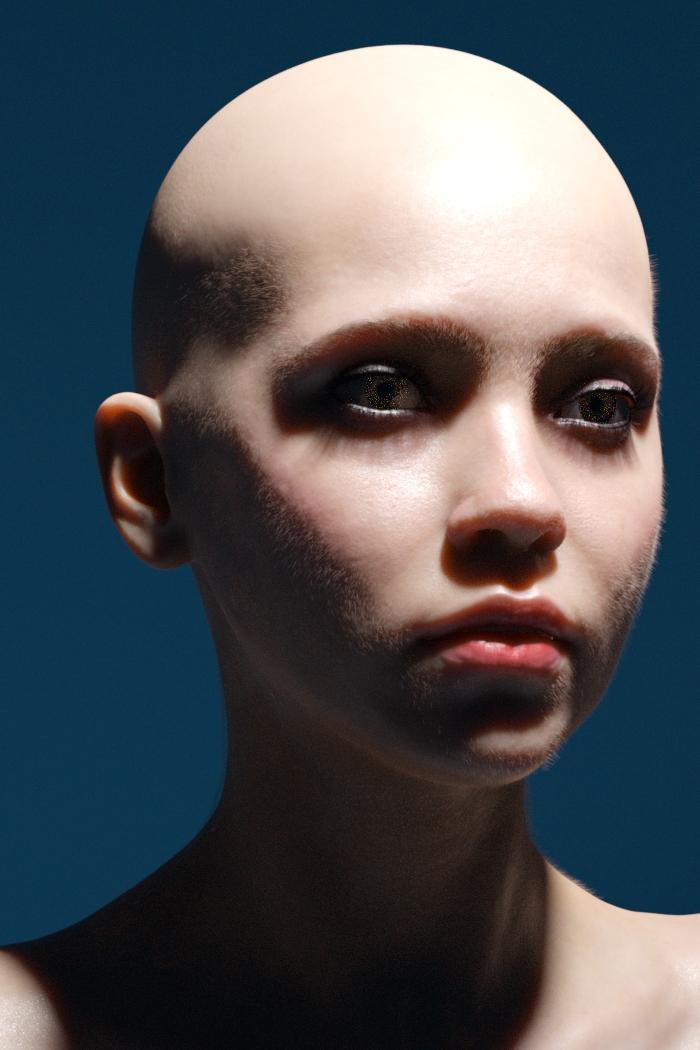
anywho this is all suuuper irrelevant to photorealism in Iray, so heres further expiriments with vellus also I stuck the bump in the displacement at well and I kind of like the effect, it helps break up the surface a little at least
I loaded the morph that my cycles render used and matched the lighting (completely different texture though)
It still lacks the softeness of the cycles render and I may have to go to even more strands which is a bit terrfyingbut there are some elements that I really like and its a more reasonable ammout of furryness.
Daz 3D is part of

Connect
DAZ Productions, Inc.
7533 S Center View Ct #4664
West Jordan, UT 84084Licensing Agreement | Terms of Service | Privacy Policy | EULA
© 2026 Daz Productions Inc. All Rights Reserved.