-
Female anatomy for gen 8 default figure ?
I have an existing gen 8 figure, custom modelled (even the skin customized).
Is there any way to add anatomy to the existing female gen 8 figure? Maybe via third party products?
Or is the only way via Victoria?
If so, can I transfer the complete custom gen 8 model (morph, skin etc.) to Vic8?
Not sure what you are trying to do, but as pointed out, victoria 8 is simply a morph for genesis 8 female. All you have to do to transfer your genesis 8 character to victoria 8 is to turn a dial in the morphs section
As for the anatomical elements you can use the ones that come with any adult pro bundle (IF you have the specific textures for the anatomical elements) or you can use a 3rd party addon from renderotica that will use the torso maps and offer better looks and functionality
Is there a guide to general weight mappingyes filling each group to 100% to start and than adjusting the weighting from there is usually the way to go(unless you are weighting a conformer which you will want to match the base figure to start). there is even an option in studio weighting to apply a starting weight for each group 'Fill by Bone Selection Group(s) '
where a morph shows up has nothing to do with Weighting. Morphs are simply instructions to move verts to new positions relative to the original positon of the vert. Weighting can affect how a morphed figure bends and you might need to create Joint controlled morphs to fix any distortion created by the bend, but thats a whole other kettle of fish.
and Yes Fully red does equal 1
Thanks, Will. Would the fact that the general weightmap also includes the scale weightmap factor into that?
Part of the new found interest in weightmapping is I'm having an issue with morphs not loading correctly with reverse deformations if the prop's joints are at a scale other than 100%.
e.g.:
- Have a geograft prop that's scaled to 150%. Export it to Blacksmith.
- Make some changes to the obj's mesh and save it.
- When I morph load it back onto the prop that's scaled at 150%, I get the changes I made, but I'm also seeing the mesh tear and move in other places.
- Tweaking the weight map seems to fix those changes "kinda"
Strangely, if I dial the prop back to 100% and then morph load the change obj, it loads with the no issues and the prop takes on the new size and shape.
"Duplicate Formulas Found" is KILLING me!Easy to fix. Remove the morph or edit the DUF file by replacing the ID.
Is there a guide to general weight mappingyes filling each group to 100% to start and than adjusting the weighting from there is usually the way to go(unless you are weighting a conformer which you will want to match the base figure to start). there is even an option in studio weighting to apply a starting weight for each group 'Fill by Bone Selection Group(s) '
where a morph shows up has nothing to do with Weighting. Morphs are simply instructions to move verts to new positions relative to the original positon of the vert. Weighting can affect how a morphed figure bends and you might need to create Joint controlled morphs to fix any distortion created by the bend, but thats a whole other kettle of fish.
and Yes Fully red does equal 1
Female anatomy for gen 8 default figure ?I have an existing gen 8 figure, custom modelled (even the skin customized).
Is there any way to add anatomy to the existing female gen 8 figure? Maybe via third party products?
Or is the only way via Victoria?
If so, can I transfer the complete custom gen 8 model (morph, skin etc.) to Vic8?
Stacking character morphs. Why?I don't think there's any benefit to the customer, necessarily... in fact I looked at it as a ploy to sell more of the base character until I found out that you could at least try to use the second morph without the base character. Probably comes down to what tools or abilities the PA's who make the add-on morphs have at their disposal more than anything. They'd make their own base characters if they could, I'd imagine.
Is there a guide to general weight mappingYes, you are correct. By default weights are normalised. That means that for any vertex the total weights across all the joints that affect it adds up to one. Adding or removing weight for one joint will have to take weight from elsewhere (to add) or add it (for removal) - reducing the weight pushes the excess to the parent bone.
Thank you, Richard, for confirming that. Is there any guideline for how best to apply it when starting out? Let's say you have 6 joint pole, is it best just to fill in each joint to the max and then smooth out the edges where each joint next to said joint meets?
For debugging purposes (using the 6 jointed pole example). If I make a morph on joint 3 that cause the pole to have a bump, and when I dial that morph into the figure I see distortion on joint 2 that was not part of the morph, should I assume that means I underweightmapped joint 3 and some of that morph is going to join 2. Therefore I need to add more weight to joint 3 to get its value to 1?
Also, does joint fully red = 1?
Bullwarg & NyorozoMale bullfrogs inflate their throats to sing, I don't see a morph listed to do this.
 "Duplicate Formulas Found" is KILLING me!
I've been having this problem for over two years on G3F and G8F, G8F being far worse. Going through my log file would require a week of time. I don't have that type of time on my hands. I believe there is a very simple answer to this: for Daz studio to ignore Duplicate Formula errors and move on.
and that would help how? Logging the error take almost no time, it's finding it in the first place that slows the process and that would have to be done before it could be ignored.
In my experience, the more Daz logs, the longer it takes. I've removed morphs before and it took hours. added them back in and took less than 1 hour. So the proclaimed 'morphs' isn't all that's bogging down Daz studio. But for the logging error- a database could be created on the user's computer and once daz does an initial scan, any problem files would be cross referenced and ignored, allowing the system to move forward. if more content is found, it would add those to the database. I'm sure there are other points to be had, but this would help significantly- especially if an author doesn't update said problem files.
The writing of the log file doesn't take long (and is deferred until DS isn't busy) - a lot of errors/warnings in the log is associated with slow loading because of the errors, not the logging. Which file would be ignored for a clash? How would updates be handled? I'm not saying this is impossible, I do think it would have its own impact on speed (checking each file to see if it should be skipped - especially for a long list), it would be another "moving part" with its own potential to go wrong, and it would potentially remove useful debugging information.
The speed determent would be far less- as Daz could create a list of offending files. Once daz checks the name of the file against the list, it moves on, not scanning the inners of each individual file, which it seems to do.
And this 'moving part' would be optional- ie, a toggle switch like a radio button. I made this suggestion before and it was completely ignored.
That, or Daz / vendor creates a script that goes through all duplicate formula files and fixes the issue automatically. I'd be willing to pay $100 for this type of guaranteed fix because of the amount of time it wastes for me.
I also agree that Daz should have a computer that has ALL the products loaded and QA's the morphs as people create them, so that the vendors are required to upload quality morphs- as stated prior, DAZ is free, it's the content library that they make money on- and if content is broken, they can't make money. So they are literally losing money with this error.How would a script fix the ssue? Most of the time it's a conflict between two products that happen to use the same name, so what would the fix be - scan through all the product files to change the name of the conflicting proeprties, being sure to change any presets that call it and hoping that no other products call it? It might be possible, I've done the equivalent manually, but it would inbtroduce a lot of potential for breakage too.
If it's a conflict, find a conflict between Anain&Akasha and another product. That's what 60% of my several hundred, if not thousands of 'duplicate formulas' in my log file are. If it is a conflict, then a more strict adherence to file structures and names could be implemented to keep this from happening. At my place of employment, we have several thousands of files, if not millions. Each file gets a unique name, so unique that not two files have the same name. I've seen other scripts here for fixing duplicate IDs and such- opening a file up and changing a piece of information in said file and resaving it or renaming it, isn't difficult.
That is a very large number of problem files. I have a lot of content and there is only one unresolved Duplicate Formula (which I have, pending a fix, manually cleared) - even allowing that a single product pair might throw multiple messages if there is a name clash it does sound as if there is more than just the way the content is initially set up going on. I do agree that a strict naming convention should help - and indeed a lot of PAs add an abbreviation of their name to the morph name for this reason.
Yes, it is. I have 4 TB of content- purchased and free. From renderosity and here. Suprisingly, I have more issues from here than I do renderosity. do you know how infuriating it is to buy a package, only for Daz to throw an error saying it wasn't done correctly? Then me having to hunt down that file and fix it?
If the protocols that guide content creation were more strictly enforced, it's more than likely the problem would diminish. There are multiple other companies that disect xml files and scan the code, looking for things that aren't up to par and reject the entire file if an error is found, telling the content creator to fix it before it's allowed and published.
Again, this is not usually an error in the file/product - it's a conflict between two products. Not something that could be fixed by scanning a single file. Checking for conflicts would take time related exponentially to the number of files.
If it's not the file/product, then what is the issue with "Duplicate Formulas found"? What is the EXACT cause of the issue? If a file is released with absolutely no error in the coding within, but still causes Daz studio to throw an error in the file- what's the culprit? I bought Daphne for Olympia 8 and i get the error. Is there another product that uses her file naming convention? Or Daz scanning within the file itself?
According to the log, it says it found a duplicate formula linking FHM and CTRL in ctrldaphne.dsf. This tells me it's within the file.
I don't know about anyone else, but if the error is within the file as the daz file suggests
Not understanding the basic issue does call into question the usefulness of suggestions for a fix or workaround.
What is happening is that you have two characters named "Daphne" installed, and both use ctrldaphne for (I guess) the full morph and (again guessing since you don't specify) FHMdaphne for the head morph (and possibly other names in common too). As a result when Daz loads both it is asked to create, and then to llink, two ctrldaphne sliders with two FHMdaphne sliders and doesn't know what to do. Installing either without the other will not generate an error, it's only when both are installed that there is a name conflict and an error is reported. If one or both of the PAs had in some way complicated the names (adding their initials to the morph name, or adding something like "forO8" at the end of the Olympia one) then there would be no clash. Now, I don't see another Genesis 8 Daphne in store so I suspect the other party to the clash is from another store or is a freebie - it is a pity the log doesn't list both files contributing to the clash - but that shouldn't stop you from opening a support ticket to ask Daz/the PA to do something to make the names on the sliders more unique.
"Duplicate Formulas Found" is KILLING me!I've been having this problem for over two years on G3F and G8F, G8F being far worse. Going through my log file would require a week of time. I don't have that type of time on my hands. I believe there is a very simple answer to this: for Daz studio to ignore Duplicate Formula errors and move on.
and that would help how? Logging the error take almost no time, it's finding it in the first place that slows the process and that would have to be done before it could be ignored.
In my experience, the more Daz logs, the longer it takes. I've removed morphs before and it took hours. added them back in and took less than 1 hour. So the proclaimed 'morphs' isn't all that's bogging down Daz studio. But for the logging error- a database could be created on the user's computer and once daz does an initial scan, any problem files would be cross referenced and ignored, allowing the system to move forward. if more content is found, it would add those to the database. I'm sure there are other points to be had, but this would help significantly- especially if an author doesn't update said problem files.
The writing of the log file doesn't take long (and is deferred until DS isn't busy) - a lot of errors/warnings in the log is associated with slow loading because of the errors, not the logging. Which file would be ignored for a clash? How would updates be handled? I'm not saying this is impossible, I do think it would have its own impact on speed (checking each file to see if it should be skipped - especially for a long list), it would be another "moving part" with its own potential to go wrong, and it would potentially remove useful debugging information.
The speed determent would be far less- as Daz could create a list of offending files. Once daz checks the name of the file against the list, it moves on, not scanning the inners of each individual file, which it seems to do.
And this 'moving part' would be optional- ie, a toggle switch like a radio button. I made this suggestion before and it was completely ignored.
That, or Daz / vendor creates a script that goes through all duplicate formula files and fixes the issue automatically. I'd be willing to pay $100 for this type of guaranteed fix because of the amount of time it wastes for me.
I also agree that Daz should have a computer that has ALL the products loaded and QA's the morphs as people create them, so that the vendors are required to upload quality morphs- as stated prior, DAZ is free, it's the content library that they make money on- and if content is broken, they can't make money. So they are literally losing money with this error.How would a script fix the ssue? Most of the time it's a conflict between two products that happen to use the same name, so what would the fix be - scan through all the product files to change the name of the conflicting proeprties, being sure to change any presets that call it and hoping that no other products call it? It might be possible, I've done the equivalent manually, but it would inbtroduce a lot of potential for breakage too.
If it's a conflict, find a conflict between Anain&Akasha and another product. That's what 60% of my several hundred, if not thousands of 'duplicate formulas' in my log file are. If it is a conflict, then a more strict adherence to file structures and names could be implemented to keep this from happening. At my place of employment, we have several thousands of files, if not millions. Each file gets a unique name, so unique that not two files have the same name. I've seen other scripts here for fixing duplicate IDs and such- opening a file up and changing a piece of information in said file and resaving it or renaming it, isn't difficult.
That is a very large number of problem files. I have a lot of content and there is only one unresolved Duplicate Formula (which I have, pending a fix, manually cleared) - even allowing that a single product pair might throw multiple messages if there is a name clash it does sound as if there is more than just the way the content is initially set up going on. I do agree that a strict naming convention should help - and indeed a lot of PAs add an abbreviation of their name to the morph name for this reason.
Yes, it is. I have 4 TB of content- purchased and free. From renderosity and here. Suprisingly, I have more issues from here than I do renderosity. do you know how infuriating it is to buy a package, only for Daz to throw an error saying it wasn't done correctly? Then me having to hunt down that file and fix it?
If the protocols that guide content creation were more strictly enforced, it's more than likely the problem would diminish. There are multiple other companies that disect xml files and scan the code, looking for things that aren't up to par and reject the entire file if an error is found, telling the content creator to fix it before it's allowed and published.
Again, this is not usually an error in the file/product - it's a conflict between two products. Not something that could be fixed by scanning a single file. Checking for conflicts would take time related exponentially to the number of files.
If it's not the file/product, then what is the issue with "Duplicate Formulas found"? What is the EXACT cause of the issue? If a file is released with absolutely no error in the coding within, but still causes Daz studio to throw an error in the file- what's the culprit? I bought Daphne for Olympia 8 and i get the error. Is there another product that uses her file naming convention? Or Daz scanning within the file itself?
According to the log, it says it found a duplicate formula linking FHM and CTRL in ctrldaphne.dsf. This tells me it's within the file.
I don't know about anyone else, but if the error is within the file as the daz file suggests
[Released] Chthonian Cyclops for Genesis 8 Male [Commercial]If you had a morph for an eye poked out by a stake, that might be a clincher!
Bullwarg & NyorozoYeah - I totally agree! Gero looks really cute too. And the promos for the Alternate Skins look SO GOOD! The poses are funny and the outfit looks really unique and fun. There looks to be a lot of great variety there - very cool. I'm really impressed with all the PAs who worked on the Bullwarg stuff.
Here's a quicky render I did of Bullwarg. Here he's pretty much "out of the box" except I lowered the Duel Lobe Specular Weight on his skin and eyes to .50:
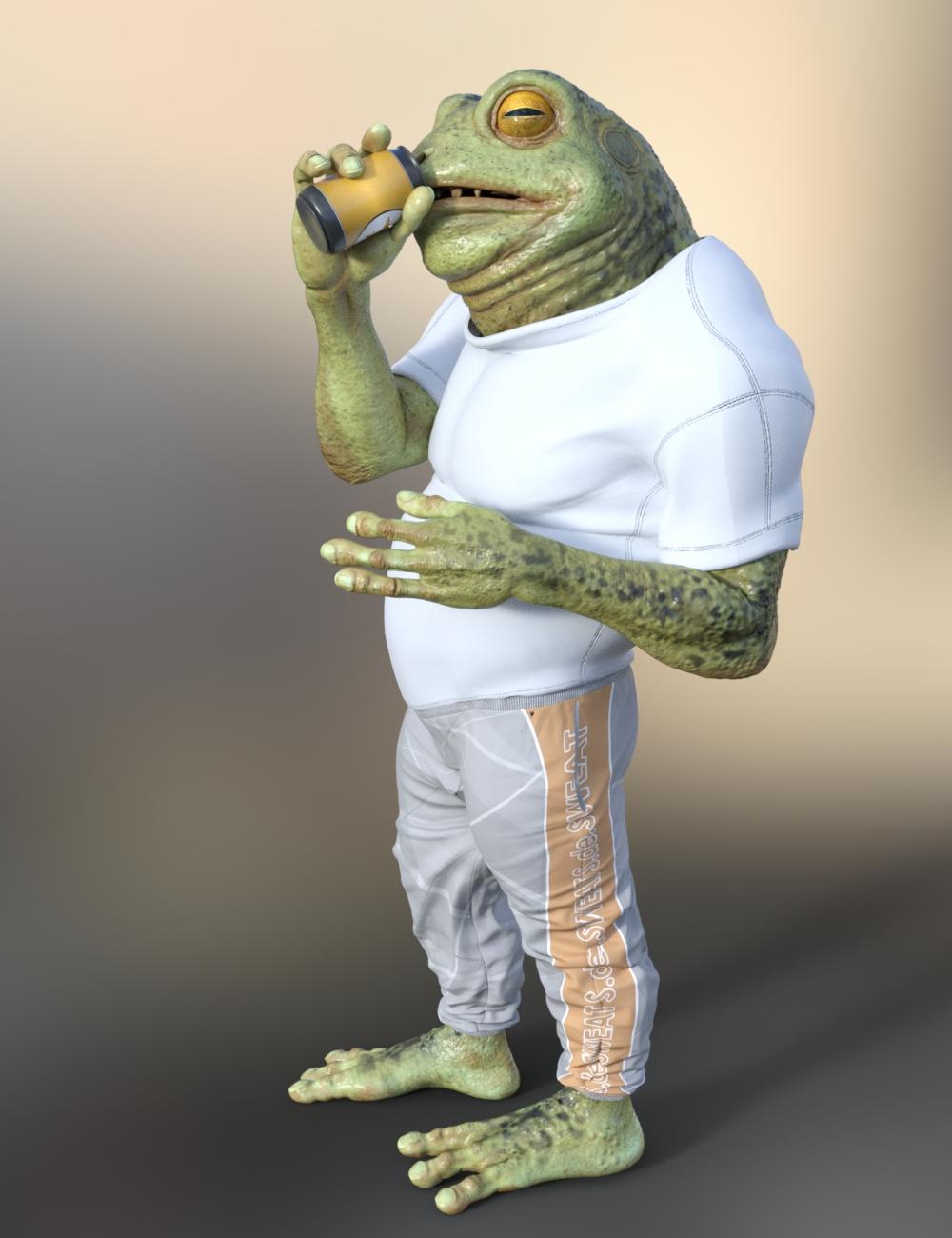
And here are a couple of NPR renders for funzies (don't mind the jaggedness around the edges, I had to lower his resolution to Base Resolution and turn off his bump and normal maps to get the NPR effect, so he doesn't have the detail he normally would - but that's kind of the effect one wants for NPR renders).
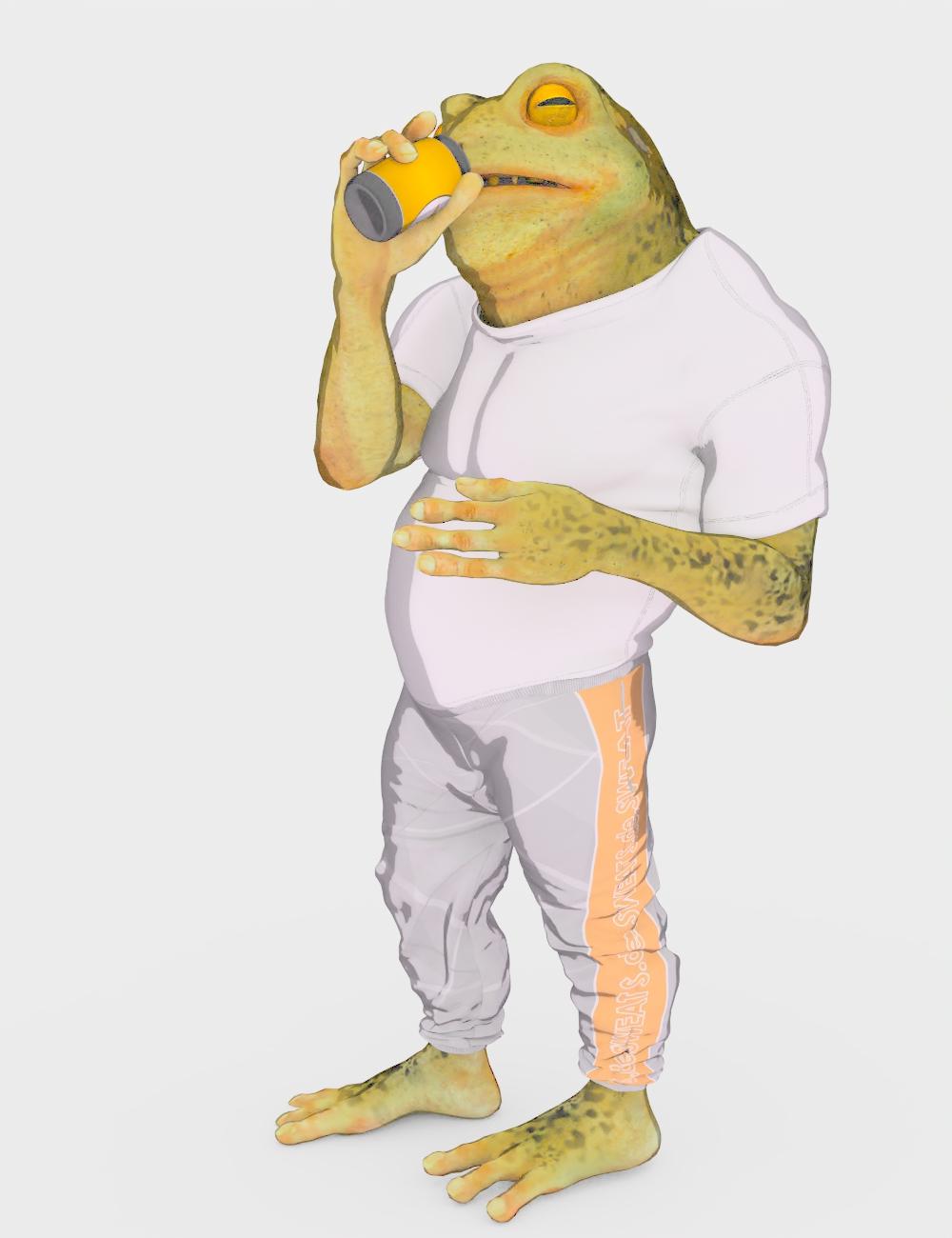
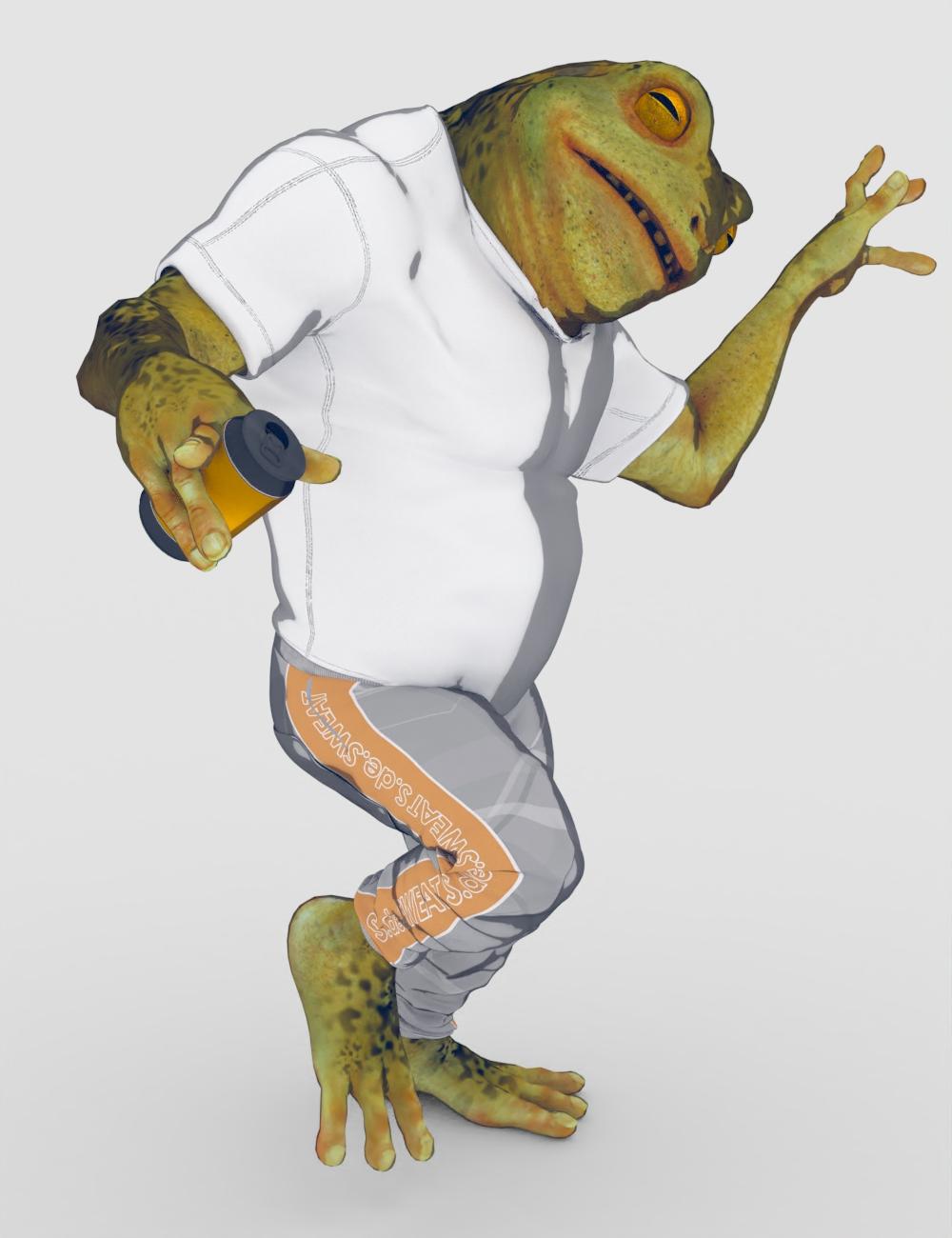
Because he's an extreme HD Morph, the clothes took a little bit of finessing. I had to add a smoothing modifier on the pants to smooth out the "crotch" area, and added a push modifier to the shirt so that it could clear all his awesome HD bumps/lumps and detailing. But that's pretty much to be expected I think when you have such an extreme morph of Genesis 8 Male with a lot of HD lumps, bumps, and creases.
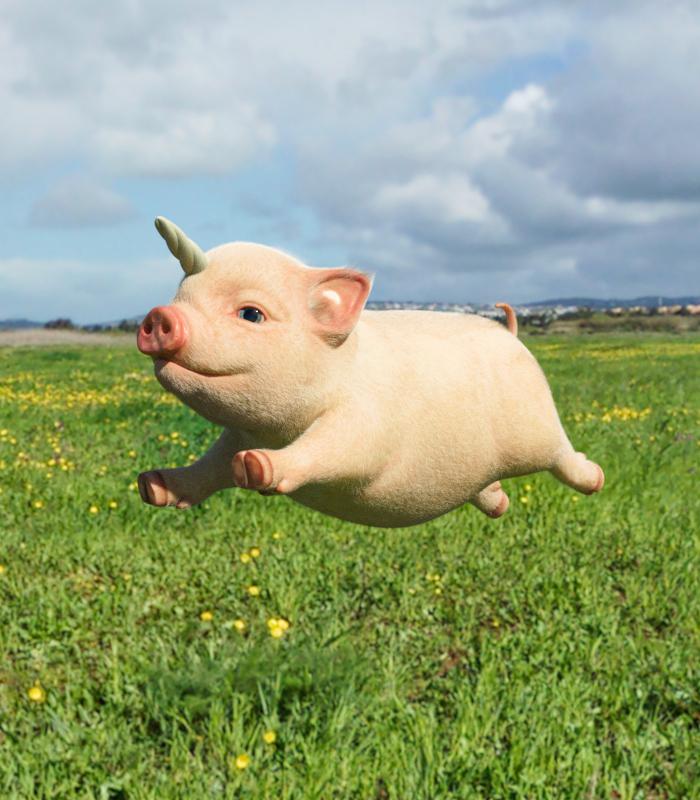
Fury the piglet- Appreciation thread. Nice comments only.Precious the unicorn gave up her little horn, so Pigicorn could have it. It was smaller and rounder. I am not sure about the placement, but now Pigicorn can fly! She/He just needs little wings!
I added a bone shader to make it look more like a horn
This is so cute! I agree, this stubby one is perfect for him.

Thanks, Catherine, have fun playing with him.
 I hope your mom gets better soon.
You're welcome and thank you for making this. Well, she's not returning home so she's not too happy. And with this lock-down, semi-lock-down, not sure if or when family will be allowed to visit freely. So I try not to think about it all too much. But at least we can call and talk with her on the phone.
Here are a few renders. I used one of the easy portrait light sets the only drawback of which is for subjects that are not actually people, renders tend to be a little on the blurry side. One day I might figure out how to fix that. For the piglet with DForce fuzz, the first render attempt seemed to 'freeze' so I cancelled that and ran a render with the hair turned off. That went very quickly. So then I turned the hair back on and it rendered quite well time wise. So possibly D/S needed a little boost for preparing the textures first. Its tail curls!!! Also dialed in a little of some of the other morphs for the running and flying editions.
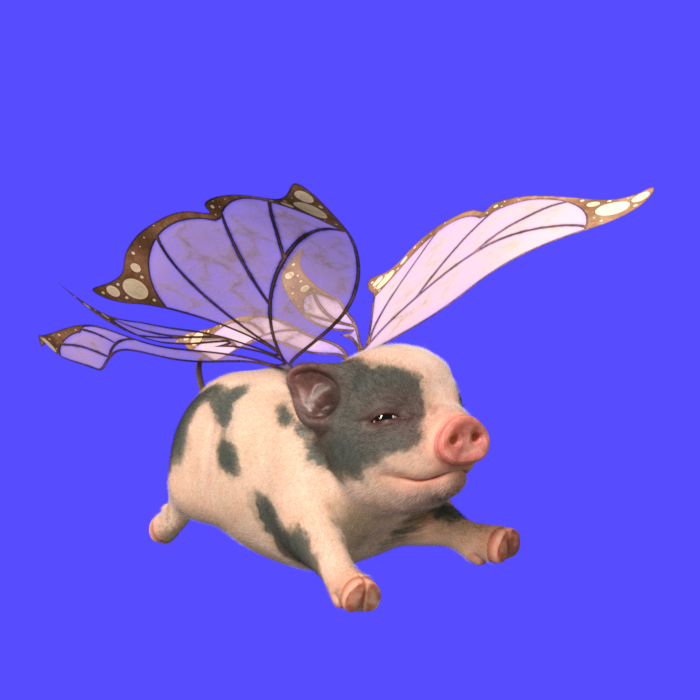
I'm sorry to hear that, It must be very hard on everyone. *Hugs*
On a much lighter note, Fury looks adorable in butterfly wings, somehow they looks natura on him.
And yes, I had to include a curly tail morph or it wouldn't have been a proper pig. Fury the piglet- Appreciation thread. Nice comments only.-nm morph was scrapped, didn't play well with all poses.
Is there a guide to general weight mappingI've been working on fixing weightmaps for a prop I was given. I'm finding that using general weightmapping is a bit like playing with one of those old liquid filled jelly balloons. Every time I smooth out one part of a joint, something else carries over to a nearby joint and pokes out. If lock off the nearby joint, Daz will seem to get mad and not let make any changes to the joint that is not locked after a certain. I'm assuming Daz is trying to reach a certain value and if i go over that or under it it spreads it out to nearby joined to reach that number value.
To make it more infuriating, I'm finding this also affect to loading morphs with reverse deformations when the scale of the object is above 100%, the morph will get jagged and tear based on the weight map. However, if I dial the same morph in at a scale of 100% of the object, the reverse deformation morph takes with no problem or jagged edges on the mesh.
Is there a guide that will walk me through it?
DS 4.12 Loading a new character does not reset all morphs. Why?Easiest way to handle these;
1. Load your base figure or the developer version.
2. Zero the figure
3. Memorize the figure
4. File->Save As->Support Asset->Save Modified Assets
This procedure will zero the default value in the ill-behaving morph.
[In store now] Felidae by AM - Snow Leopard [Commercial]Never had DS crash with dforce hair before. I am not able to use the Snow Leopard. (Only tried using the basic HDRI that DS loads with) Tried three times and DS closed down each time.
Here are the lines from the last attempt.
2020-06-24 21:06:49.731 Iray [INFO] - SCENE:IO :: 1.0 SCENE io info : Loading module "::daz_3d::dual_lobe_hair" from "C:\Program Files\DAZ 3D\DAZStudio4\shaders\iray\daz_3d\dual_lobe_hair.mdl".
2020-06-24 21:06:49.958 File loaded in 0 min 0.9 sec.
2020-06-24 21:06:49.960 Loaded file: Snow Leopard - Wearable Preset.duf
2020-06-24 21:06:50.031 Loaded Morph Deltas in 0 min 0.0 sec.
2020-06-24 21:06:50.031 Loaded file: Snow Leopard.dsf
2020-06-24 21:06:50.371 Loaded image SnowLeopard-Body-C1.jpg
2020-06-24 21:06:50.938 File loaded in 0 min 4.8 sec.
2020-06-24 21:06:50.938 Loaded file: Snow Leopard - Iray dForce.duf
2020-06-24 21:06:51.363 Loaded image Lion-Parts-D.jpg
2020-06-24 21:06:51.599 Loaded image SnowLeopard-Body-D.jpg
2020-06-24 21:06:51.767 Loaded image SnowLeopard-Eyes-D.jpg
2020-06-24 21:08:08.876 Loaded image SnowLeopard-Body-C1.jpg
2020-06-24 21:08:08.886 Loaded image SnowLeopard-Body-C1.jpg
2020-06-24 21:08:09.465 Loaded image SnowLeopard-Body-Density-1.jpg
2020-06-24 21:08:37.438 Loaded image SnowLeopard-Body-Density-1.jpg
2020-06-24 21:08:47.590 Loaded image SnowLeopard-Body-Density-1.jpg
2020-06-24 21:08:48.255 Loaded image SnowLeopard-Body-Density-1.jpg
2020-06-24 21:11:04.169 Iray [INFO] - IMAGE:IO :: 1.0 IMAGE io info : Loading image "E:\Daz 3D Content\Runtime\Textures\AM\Felidae\Lion-Body-A.jpg", pixel type "Rgb", 4096x4096x1 pixels, 1 miplevel.
2020-06-24 21:11:04.243 Iray [INFO] - IMAGE:IO :: 1.0 IMAGE io info : Loading image "E:\Daz 3D Content\Runtime\Textures\AM\Felidae\Lion-Body-R.jpg", pixel type "Rgb", 4096x4096x1 pixels, 1 miplevel.
2020-06-24 21:11:04.245 Iray [INFO] - IMAGE:IO :: 1.0 IMAGE io info : Loading image "E:\Daz 3D Content\Runtime\Textures\AM\Felidae by AM\SnowLeopard-Body-D.jpg", pixel type "Rgb", 4096x4096x1 pixels, 1 miplevel.
2020-06-24 21:11:04.324 Iray [INFO] - IMAGE:IO :: 1.0 IMAGE io info : Loading image "E:\Daz 3D Content\Runtime\Textures\AM\Felidae\Lion-Parts-W.jpg", pixel type "Rgb", 4096x4096x1 pixels, 1 miplevel.
2020-06-24 21:11:04.391 Iray [INFO] - IMAGE:IO :: 1.0 IMAGE io info : Loading image "E:\Daz 3D Content\Runtime\Textures\AM\Felidae\Lion-Parts-R.jpg", pixel type "Rgb", 4096x4096x1 pixels, 1 miplevel.
2020-06-24 21:11:04.489 Iray [INFO] - IMAGE:IO :: 1.0 IMAGE io info : Loading image "E:\Daz 3D Content\Runtime\Textures\AM\Felidae\Lion-Parts-D.jpg", pixel type "Rgb", 4096x4096x1 pixels, 1 miplevel.
2020-06-24 21:11:04.551 Iray [INFO] - IMAGE:IO :: 1.0 IMAGE io info : Loading image "E:\Daz 3D Content\Runtime\Textures\AM\Felidae\Lion-Parts-B.jpg", pixel type "Rgb", 4096x4096x1 pixels, 1 miplevel.
2020-06-24 21:11:04.610 Iray [INFO] - IMAGE:IO :: 1.0 IMAGE io info : Loading image "E:\Daz 3D Content\Runtime\Textures\AM\Felidae\Lion-Parts-G.jpg", pixel type "Rgb", 4096x4096x1 pixels, 1 miplevel.
2020-06-24 21:11:04.618 Iray [INFO] - IMAGE:IO :: 1.0 IMAGE io info : Loading image "E:\Daz 3D Content\Runtime\Textures\AM\Felidae by AM\SnowLeopard-Eyes-D.jpg", pixel type "Rgb", 4096x4096x1 pixels, 1 miplevel.
2020-06-24 21:11:04.619 Iray [INFO] - IMAGE:IO :: 1.0 IMAGE io info : Loading image "E:\Daz 3D Content\Runtime\Textures\AM\Felidae\Lion-Eyes-N.jpg", pixel type "Rgb", 2048x2048x1 pixels, 1 miplevel.
2020-06-24 21:11:31.779 Iray [INFO] - IMAGE:IO :: 1.0 IMAGE io info : Loading image "E:\Daz 3D Content\Runtime\Textures\AM\Felidae by AM\SnowLeopard-Body-F.jpg", pixel type "Rgb", 2048x2048x1 pixels, 1 miplevel.
2020-06-24 21:12:03.651 Iray [INFO] - IMAGE:IO :: 1.0 IMAGE io info : Loading image "E:\Daz 3D Content\Runtime\Textures\Orestes\SkyHdris-SunnyClouds\sunnysky01c-435.hdr", pixel type "Rgb_fp", 8192x4096x1 pixels, 1 miplevel.
2020-06-24 21:13:41.440 Iray [INFO] - IRAY:RENDER :: 1.0 IRAY rend info : Updating geometry.
2020-06-24 21:13:41.444 Iray [INFO] - IRAY:RENDER :: 1.0 IRAY rend info : Importing scene graph.
2020-06-24 21:13:41.445 Iray [INFO] - IRAY:RENDER :: 1.0 IRAY rend info : Importing geometry for motion time 0
2020-06-24 21:14:27.716 Iray [INFO] - IRAY:RENDER :: 1.0 IRAY rend info : Geometry import (6 objects with 161m triangles, 6 instances yielding 161m triangles) took 46.202s
2020-06-24 21:14:27.805 Iray [INFO] - IRAY:RENDER :: 1.0 IRAY rend info : Updating materials.
2020-06-24 21:14:29.322 Iray [INFO] - MATCNV:RENDER :: 1.0 MATCNV rend info : Material instance 'DS_Snow Leopard__bigCat_UpperTeeth_f82_13454' uses MDL JIT compilation.
2020-06-24 21:14:29.380 Iray [INFO] - MATCNV:RENDER :: 1.0 MATCNV rend info : Material instance 'DS_Snow Leopard__bigCat_LowerTeeth_f83_13472' uses MDL JIT compilation.
2020-06-24 21:14:29.606 Iray [INFO] - MATCNV:RENDER :: 1.0 MATCNV rend info : Material instance 'DS_Figure: Snow Leopard_guideHairs_SG0__bigCat_Skin_12a0_13559' uses MDL JIT compilation.
2020-06-24 21:14:29.634 Iray [INFO] - MATCNV:RENDER :: 1.0 MATCNV rend info : Material instance 'DS_Figure: Snow Leopard_guideHairs_SG1__default_12c4_13605' uses MDL JIT compilation.
2020-06-24 21:14:29.680 Iray [INFO] - MATCNV:RENDER :: 1.0 MATCNV rend info : Material instance 'DS_Figure: Snow Leopard_guideHairs_SG2__default_12e8_13651' uses MDL JIT compilation.
2020-06-24 21:14:29.681 Iray [INFO] - MATCNV:RENDER :: 1.0 MATCNV rend info : Material instance 'DS_Figure: Snow Leopard_guideHairs_SG3__default_130c_13697' uses MDL JIT compilation.
2020-06-24 21:14:29.735 Iray [INFO] - MATCNV:RENDER :: 1.0 MATCNV rend info : found 70 textures, 22 lambdas (7 unique)
2020-06-24 21:14:29.969 Iray [INFO] - IRAY:RENDER :: 1.0 IRAY rend info : Emitter geometry import (1 light source with 2 triangles, 1 instance) took 0.000s
2020-06-24 21:14:29.970 Iray [INFO] - IRAY:RENDER :: 1.0 IRAY rend info : Updating environment.
2020-06-24 21:14:32.190 Iray [INFO] - IRAY:RENDER :: 1.0 IRAY rend info : Updating backplate.
2020-06-24 21:14:32.191 Iray [INFO] - IRAY:RENDER :: 1.0 IRAY rend info : Updating lens.
2020-06-24 21:14:32.191 Iray [INFO] - IRAY:RENDER :: 1.0 IRAY rend info : Updating lights.
2020-06-24 21:14:32.192 Iray [INFO] - IRAY:RENDER :: 1.0 IRAY rend info : Updating object flags.
2020-06-24 21:14:32.193 Iray [INFO] - IRAY:RENDER :: 1.0 IRAY rend info : Updating caustic portals.
2020-06-24 21:14:32.193 Iray [INFO] - IRAY:RENDER :: 1.0 IRAY rend info : Updating decals.
2020-06-24 21:14:32.197 WARNING: ..\..\..\..\..\src\pluginsource\DzIrayRender\dzneuraymgr.cpp(305): Iray [WARNING] - IRAY:RENDER :: 1.0 IRAY rend warn : The 'iray_optix_prime' scene option is no longer supported.
2020-06-24 21:14:32.264 Iray [INFO] - IRAY:RENDER :: 1.0 IRAY rend info : Allocating 1-layer frame buffer
2020-06-24 21:14:32.270 Iray [INFO] - IRAY:RENDER :: 1.0 IRAY rend info : Using interactive scheduling, caustic sampler disabled
2020-06-24 21:14:32.271 Iray [INFO] - IRAY:RENDER :: 1.0 IRAY rend info : Initializing local rendering.
2020-06-24 21:14:32.351 Iray [INFO] - IRAY:RENDER :: 1.0 IRAY rend info : Rendering with 1 device(s):
2020-06-24 21:14:32.351 Iray [INFO] - IRAY:RENDER :: 1.0 IRAY rend info : CUDA device 0 (GeForce GTX 1080 Ti)
2020-06-24 21:14:32.352 Iray [INFO] - IRAY:RENDER :: 1.0 IRAY rend info : Rendering...
2020-06-24 21:14:32.662 Iray [VERBOSE] - IRAY:RENDER :: 1.6 IRAY rend progr: CUDA device 0 (GeForce GTX 1080 Ti): Processing scene...
2020-06-24 21:14:38.810 WARNING: ..\..\..\..\..\src\pluginsource\DzIrayRender\dzneuraymgr.cpp(305): Iray [ERROR] - IRAY:RENDER :: 1.11 IRAY rend error: Unable to allocate 579429216 bytes from 2584199987 bytes of available device memory
2020-06-24 21:14:38.907 WARNING: ..\..\..\..\..\src\pluginsource\DzIrayRender\dzneuraymgr.cpp(305): Iray [ERROR] - IRAY:RENDER :: 1.6 IRAY rend error: CUDA device 0 (GeForce GTX 1080 Ti): Scene setup failed
2020-06-24 21:14:38.915 WARNING: ..\..\..\..\..\src\pluginsource\DzIrayRender\dzneuraymgr.cpp(305): Iray [ERROR] - IRAY:RENDER :: 1.6 IRAY rend error: CUDA device 0 (GeForce GTX 1080 Ti): Device failed while rendering
2020-06-24 21:14:38.920 WARNING: ..\..\..\..\..\src\pluginsource\DzIrayRender\dzneuraymgr.cpp(305): Iray [WARNING] - IRAY:RENDER :: 1.6 IRAY rend warn : All available GPUs failed.
2020-06-24 21:14:38.924 WARNING: ..\..\..\..\..\src\pluginsource\DzIrayRender\dzneuraymgr.cpp(305): Iray [WARNING] - IRAY:RENDER :: 1.6 IRAY rend warn : No devices activated. Enabling CPU fallback.
2020-06-24 21:14:38.938 WARNING: ..\..\..\..\..\src\pluginsource\DzIrayRender\dzneuraymgr.cpp(305): Iray [WARNING] - IRAY:RENDER :: 1.6 IRAY rend warn : Re-rendering iteration because of device failure
2020-06-24 21:14:38.940 WARNING: ..\..\..\..\..\src\pluginsource\DzIrayRender\dzneuraymgr.cpp(305): Iray [ERROR] - IRAY:RENDER :: 1.6 IRAY rend error: All workers failed: aborting render
2020-06-24 21:14:38.942 Iray [INFO] - IRAY:RENDER :: 1.0 IRAY rend info : CPU: using 12 cores for rendering
2020-06-24 21:14:38.942 Iray [INFO] - IRAY:RENDER :: 1.0 IRAY rend info : Rendering with 1 device(s):
2020-06-24 21:14:38.942 Iray [INFO] - IRAY:RENDER :: 1.0 IRAY rend info : CPU
2020-06-24 21:14:38.943 Iray [INFO] - IRAY:RENDER :: 1.0 IRAY rend info : Rendering...
Fury the piglet- Appreciation thread. Nice comments only.I am in favor of a fury expansion. Perhaps with an additional winged costume, a horn and a morph to give him a newborn older shape.
"Duplicate Formulas Found" is KILLING me!There's something wonky going on with this. As a content creator I get this all the time when just working on a character and going back and forth through GOZ, pretty soon I will get a duplicate formula error with no understandable reason since every morph has different data. I might have 20 little morphs and they're all saved in the scene file only at that point. Some morphs will be rigged. Log is then filled with this stuff:
2020-06-24 22:01:34.390 WARNING: ..\..\..\..\..\src\sdksource\fileinput\dzassetdaz.cpp(6871): owner: Genesis8Female
2020-06-24 22:01:34.390 WARNING: ..\..\..\..\..\src\sdksource\fileinput\dzassetdaz.cpp(6872): output: neck_2:/data/DAZ%203D/Genesis%208/Female/Genesis8Female.dsf#neck_2?center_point/y
2020-06-24 22:01:34.390 WARNING: ..\..\..\..\..\src\sdksource\fileinput\dzassetdaz.cpp(6873): input: Genesis8Female:/Scenes/blah/blah_016.duf#ZBrush%20Morph?value
2020-06-24 22:01:34.483 WARNING: ..\..\..\..\..\src\sdksource\fileinput\dzassetdaz.cpp(6870): Duplicate formula found linking zOrigin & ZBrush Morph
If you are correcting JCMs or MCMs make sure that you use ERC Bake on the links (right-click on them in the Proeprty Hierarchy pane) before doing a fresh ERC Freeze - doing two ERC Freezes on the same property without a bake between is very likely to trigger this issue.
Yeah I'm not doing anything like that. Also I'm using Morph Rigger Plus do rig stuff these days anyway.
Fury the piglet- Appreciation thread. Nice comments only.It probably won't happen, but I kind of hope that Hypertaf can come up with a morph to make him into an adult miniature pot-bellied big. And then the cuteness can continue even beyond piglet age! (Seriously, I'm going to get him, and I don't even know what I could possibly do with him, but that much cuteness cannot be resisted!)
Fury is so cute! look at his little piglet toy!

You realize that Boyd and Owen and one of the kids have to have some sort of piglet interaction, right? It's pretty much required!
Daz 3D is part of

Connect
DAZ Productions, Inc.
7533 S Center View Ct #4664
West Jordan, UT 84084Licensing Agreement | Terms of Service | Privacy Policy | EULA
© 2026 Daz Productions Inc. All Rights Reserved.