-
Something big is coming!
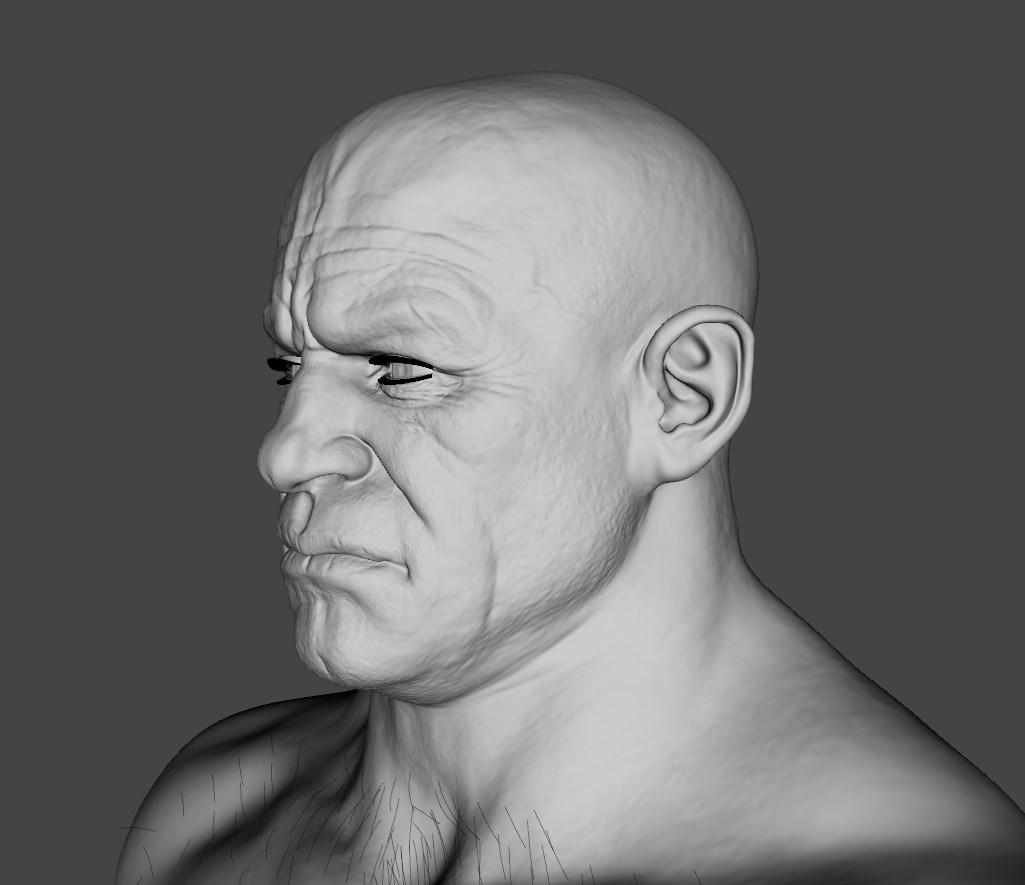
He is HD. The normal maps also include more detail, but I actually lowered them to 0.25 for the closeup. Here is a mesh only viewport screen.
Hellboy, since you have the character, is there an option for Underbelly without the tattoos on his forearms? Thanks in advance.
No, just tattoos on.
Very interesting! I didn't see HD morph listed in the file list, so does his base morph come with HD details you only see if you dial in higher sub-d, or are all details included in the normal map?What you see in the image is just the base mesh at 4 Res. He is HD on itself. Not rendered, just preview. Normal map seems to add extra detail info. For face closeups I lower the Normal to 0.25 because I don't want THAT much detail so close.
Something big is coming!
Very interesting! I didn't see HD morph listed in the file list, so does his base morph come with HD details you only see if you dial in higher sub-d, or are all details included in the normal map?He is HD. The normal maps also include more detail, but I actually lowered them to 0.25 for the closeup. Here is a mesh only viewport screen.
Hellboy, since you have the character, is there an option for Underbelly without the tattoos on his forearms? Thanks in advance.
No, just tattoos on.
Something big is coming!Hasn't anyone else notice that the Gangster Bundle is all old stuff? I already own 3 of the items. And if you go to the shop main page 6 items from the top two rows came out in December-February.
According to the readmes, the Mobster room and Retro Interrogation room are new, with an original release date of 5/27/2020. And if you want some of the stuff in it and don't have it, the price is decent.
I just realized that Underbelly is a single morph character, according to the product page, with no division between head and body morph. I don't think any other Daz Original character has done that before. I understand it -- splitting a morph that detailed would be something of a pain -- but it's definitely odd.
Morph transfer G3F to G8FThis tutorial broke down almost immediately:
Now start the Morph Loader Pro. Its icon looks like a flexing arm with a P on it. Click on the button that says "Choose Morph Files." Navigate to your obj and select it. It should appear as NameYouChose.obj with options under it that you can click to expand.
Next, create a NEW property group. You must do this by right-clicking on the words "Morphs/Morph Loader" and choosing "create" AFTER you load the obj file into Morph Loader Pro. I suggest Actor/Female (or Universal or, at a future point, Male)/G1/MyCharacters or the like. This will save you a lot of trouble later.
Click Accept.
Assuming that's written accurately, it's describing things that are not in evidence in my version of Morph Loader Pro. The words "morphs/morph loader" don't appear in the MLP dialog. I've right-clicked everything in the dialog and nothing responds the way the author suggests.
Any suggestions? All I'm interested in is transferring morphs (full dialed character morphs, and individual morphs) from G3F to G8F, since Xtransfer doesn't work for me at all, and genX is no longer in development and doesn't cover this use case.
After Saving Subsets, Poses, Materials, Etc, I Have An Ever Increasing Couple Second DelayAs the title says, it seems that, after some time (meaning after a reinstall of Windows), when I save DAZ Studio stuff (be it a Subset, Pose, Material, Morph/Shape, etc.), I get this few second pause in the program before I can use it again. Like I said, after a fresh install of Windows 10, it's good. I can go right back to using Studio after the save, but over time, usually within a month, that "pause" will gradually start to trickle and get longer and longer as time passes. I was just wondering if anyone else has noticed this and what could be done to fix it, because nothing has worked and this has happened across multiple SSDs, GPUs, CPUs (builds) and every version of DAZ Studio I've used in the last 3 years or so.
Water Woman Geograft & Rigging HelpFor an item to work as a fitted GeoGraft it needs to exactly match an edge loop (ring of connrected vertices) and it's joint centres need to match the base figure for the common bones - using the Figure Setup pane will let you add correctly named bones, but it won't make them match the existing bones on the base - you probably can copy-and-paste, or you can use the Transfer utility and then change the child bones as needed.
Transfer Utility HelpIs the clothing lining up, without any adjusting, with the figure before you run the Transfer Utility? Is the figure morphed?
Wishful ThinkingHere's some wishful thinking too .. I usually work with male characters. I tried to work with a female character and I cannot figure out how to make her breasts SMALLER. Everything i see, all the controls i have, make them bigger. They're too big to start with so how do I get them smaller? I'm using Tasha 8. Dear lord in heaven!
..I cheat, using utilities like Zev0's Growing Up Morphs (which has a youth chest size and breast morphs), Zev0's Breast Control, dial in a bit of a younger character body shape (like Tween Julie or one of 3DU's pre teens), and sometimes use a bit of the Androgynous morph from "Genesis classic" via Generation X2 (I primarily work with G3 not G8). What combination I use depends on the base figure I build a character off of.
Here's my Leela character who is rather petite.
She's adorable. :)
[Released!] Kingston for Genesis 8 Male [Commercial]Hi rhees.birman
So, the character preset is working, but not the individual head and body presets, right? Have you tried dialing up those morphs directly from the parameters tab? For the genital morph you'll need to have G8M genitalia selected.
At glance it could be an installation problem, because if the full character preset works, the head, and body morphs were correctly installed as it uses both morph files, so maybe the path of the individual presets could be wrong. If you are using Daz installation Manager (DIM) I would uninstall and reinstall Kingston just to discard the possibility of an corrupted installation issue.
Please let me know.
Transfer Utility HelpHi,
I'm struggling with using the Transfer Utility tool on Daz Studio 4.12, Every time I use the tool this is the result, I'm trying to create an obj file, into clothing for the Genesis 2 female model.
If anyone has any suggestions, I would be really grateful.
Thank you.
Dial Control for Genesis to Genesis 8 (Commercial)I just picked this up and it looks great so far. One observation I will make is that I commonly click on a model with extreem morphs when I start developing a character In daz. In this case I clicked on crypto and started adding full body morph characters like glumgurgle and the giant morph thinking it would be cool to use this tool to manage how much of each I use for the final character. I noticed within the script window that (I am assuming) because I started with Crypto as my base character and not Genesis 8 male, when I look for crypto so that I can dial back his admitidly over bearing looks a bit I don't see a dial. I suppose I could change my rutine and always start with Genesis 8 or what ever generation base I might need but then that requires me to look for and load a particular skin and I guess I am just used to picking a particular model and going with it. Do let me know if I have overlooked where you access the original caracter morphs. .
This update will now bring up the main character dial under the new list dials with default value option. See two posts up.
Water Woman Geograft & Rigging HelpHi All,
I'm doing the art for a comic book featuring the Water Woman character I created. Below are a full body shot and portrait of the initial character design. The relevant bits of her story: during a sailing trip in the Bermuda Triangle, her soon-to-be-ex girlfriend knocks her out and throws her overboard, leaving her to drown. Magical beings transform her into a non-Newtonian fluid, basically seawater with variable viscosity. Her scientist mom makes a suit that helps her have a more human form. When the suit is at full power, she appears fully human. At partial power, she's more fluid and, without her suit, she's just articulable water.
I've sculpted a geograft to replace her legs with a single limb, for when she's in more fluid form. Below are front and back screenshots of the geograft mesh.
In Blender, I've assigned vertex groups for 6 bones: Hip, Pelvis, Upper, Lower, Base, and Tip. I want the Hip and Pelvis to match the rigging for G8F. The Upper bone will replace G8F's thighs; the Lower will replace G8F's calves; the Base will replace G8F's feet; and the Tip will replace G8F's toes.
Ultimately, I need to use either morphs or rescale/ERC Freeze controls to reshape her lower body into a:
- Tail - Reduce the Z (front-to-back) scale of the Base and Tip, so the sphere becomes a manatee-like tail for swimming.
- Puddle - Reduce the Y (top-to-bottom) scales of the Upper, Lower, Base, and Tip, and increase the X and Z (front-to-back and side-to-side) scales of the Lower, Base, and Tip, so it looks as if she's rising from or sinking into a puddle.
- Funnel - Reduce the X and Z (front-to-back and side-to-side) scales of the Lower, Base, and Tip, so it looks as if she funnels down to a near-point. I can then twist her Upper, Lower, Base, and Tip so it looks as if she's swirling from or into a drain or pipe.
As I understand the geograft and rigging process, I need to:
- Use Figure Setup to import the obj file and create the bone hierarchy: hip > pelvis > upper > lower > base > tip
- Use the Joint Editor to adjust the Upper, Lower, Base, and Tip bones if necessary.
- Use the Weight Map tool to change triax to general weight, clear triax weight, fill by bone selection groups, and smooth the weighting of the Upper, Lower, Base, and Tip bones.
- Use Transfer Utility with 'Merge Hierarchies' to transfer the G8F rigging to the Hip and Pelvis bones, then Memorize Figure Rigging.
- Use the Geometry Editor tool to select the top ring of the geograft geometry for grafting, and to select the G8F polys below that ring for auto-hide.
- Create morphs (if needed) or (better) rescale bones as described above and ERC Freeze to create the Tail, Puddle, and Funnel controls.
- Save As > Figure/Prop Asset to save the geograft as a G8F modification.
- Apply the saved geograft to my Water Woman character.
- Verify that the geograft bones adjusted to my Water Woman's body morphs (Height, G8F Body Morphs, Cartoonized morphs). If necessary, Adjust Rigging to Shape and create an FBM. (I'm not sure how to do this.)
Do I have those steps in the correct sequence? Or should I use the Transfer Utility before I make adjustments with the Joint Editor and Weight Map tools?
From tutorials I've watched, it seems I need to set both G8F and the geograft at Base Resolution (Subdiv 0) before I do steps 2-4, and un-parent the geograft before I do step 5, then re-parent the geograft to G8F before I do Step 7?
What else have I missed?
Thank you all for your help!
Crissie
The Mac FAQI don't have ZBrush so I don't, obviously, have GOZ installed. Hopefully someone has and can reply. I was just trying to look at if from a "systems perspective". But launching is usually straight forward, but on the other hand, creating virtual links to programs usually involves more intricate stuff that cn go wrong.
Thanks anyway. Any advice is welcomed.
Just out of interest, what external modelling software do you use? Im still new to modelling outside of Daz so im open to other ideas. Blender is an option for me if i can't get zbrush to work. Or if someone knows the old fashion way of using the .obj and .mtl files that zbrush spits out to make a morph in daz im all ears.
Been using Modo 801 mostly and dabbled a little in Blender 2.8
Have you used Blender for charater morphs before? Does it have an easy to use Daz bridge? I havent commited to purchasing Zbrush just yet so i'm open to other options even though ive learned the zbrush basics.
Only Bridge I've used is Hexagon, and I havn't done much morphs, does more props and environment stuff.
The Mac FAQI don't have ZBrush so I don't, obviously, have GOZ installed. Hopefully someone has and can reply. I was just trying to look at if from a "systems perspective". But launching is usually straight forward, but on the other hand, creating virtual links to programs usually involves more intricate stuff that cn go wrong.
Thanks anyway. Any advice is welcomed.
Just out of interest, what external modelling software do you use? Im still new to modelling outside of Daz so im open to other ideas. Blender is an option for me if i can't get zbrush to work. Or if someone knows the old fashion way of using the .obj and .mtl files that zbrush spits out to make a morph in daz im all ears.
Been using Modo 801 mostly and dabbled a little in Blender 2.8
Have you used Blender for charater morphs before? Does it have an easy to use Daz bridge? I havent commited to purchasing Zbrush just yet so i'm open to other options even though ive learned the zbrush basics.
The Mac FAQI don't have ZBrush so I don't, obviously, have GOZ installed. Hopefully someone has and can reply. I was just trying to look at if from a "systems perspective". But launching is usually straight forward, but on the other hand, creating virtual links to programs usually involves more intricate stuff that cn go wrong.
Thanks anyway. Any advice is welcomed.
Just out of interest, what external modelling software do you use? Im still new to modelling outside of Daz so im open to other ideas. Blender is an option for me if i can't get zbrush to work. Or if someone knows the old fashion way of using the .obj and .mtl files that zbrush spits out to make a morph in daz im all ears.
Been using Modo 801 mostly and dabbled a little in Blender 2.8
I could be coming at this from the wrong angle so maybe i should explain what im looking to do. Im still new to everything 3d so for now im spending most time in Daz. I would like to make a few tweaks to some of my characters and using GoZ and zbrush worked really well, until it came to sending it back to Daz for clothing, HDRi's, hair and rendering etc. etc. I'd like this back in to Daz as a morph i guess so i can call it up at any time in my Daz work flow.
Can i just miss out GoZ completely and reimport the obj and mtl files back to Daz as a morph or character? Like i say im still new to 3d stuff so my knowledge of the componant parts is there, but limited.
Something big is coming!maikdecker said:
Although the type of male he displays is exactly what I would usually hurry to buy, there's a couple things that keep me off...
- no anatomical element textures (okay.. with second source anatomicals you don't need them... but stll..)
- no skin texture without those arm tattoos it seems...
That's two things for the main figure... and for the package
- clothes without ANY movement morph... the same we got a couple times now already, which probably are designed for something different than 3D rendering but rather 3D games
- dForce hair with a beard that looks like a soggy sponge glued to his chin...
So maybe I'll get me that figure when he really drops down to a very low cost... but probably not, as I think I can roll the dials among the tons of figures I have to get something quite close to it ^^
melissastjames said:
I typically buy characters for their skin more than their shape and I was excited to see this guy coming...then I saw that his tattoos are completely unfinished, and not even unfinished in the respect that he's just on his way to full sleeves...it looks as if he was built to never be seen without that one specific rolled-sleeve shirt as there are wonky seams and things cut off abruptly. Disappointing to say the least.
Thank you both for posting - this is exactly what I was wanting to know. It looks like the model was (pre-Daz) created to be wearing the sleeves-rolled-up shirt, which is why the textures stop there. In order to use him for anything else, I'd have to use a different skin and apply LIE tatoos. If I'm going to do that then I may as well blend a few other characters and save the cost of this one. A real shame because everything else on this character looks very realistic.
The Mac FAQI don't have ZBrush so I don't, obviously, have GOZ installed. Hopefully someone has and can reply. I was just trying to look at if from a "systems perspective". But launching is usually straight forward, but on the other hand, creating virtual links to programs usually involves more intricate stuff that cn go wrong.
Thanks anyway. Any advice is welcomed.
Just out of interest, what external modelling software do you use? Im still new to modelling outside of Daz so im open to other ideas. Blender is an option for me if i can't get zbrush to work. Or if someone knows the old fashion way of using the .obj and .mtl files that zbrush spits out to make a morph in daz im all ears.
Been using Modo 801 mostly and dabbled a little in Blender 2.8
Something big is coming!Although the type of male he displays is exactly what I would usually hurry to buy, there's a couple things that keep me off...
- no anatomical element textures (okay.. with second source anatomicals you don't need them... but stll..)
- no skin texture without those arm tattoos it seems...
That's two things for the main figure... and for the package
- clothes without ANY movement morph... the same we got a couple times now already, which probably are designed for something different than 3D rendering but rather 3D games
- dForce hair with a beard that looks like a soggy sponge glued to his chin...
So maybe I'll get me that figure when he really drops down to a very low cost... but probably not, as I think I can roll the dials among the tons of figures I have to get something quite close to it ^^
Wishful ThinkingHere's some wishful thinking too .. I usually work with male characters. I tried to work with a female character and I cannot figure out how to make her breasts SMALLER. Everything i see, all the controls i have, make them bigger. They're too big to start with so how do I get them smaller? I'm using Tasha 8. Dear lord in heaven!
..I cheat, using utilities like Zev0's Growing Up Morphs (which has a youth chest size and breast morphs), Zev0's Breast Control, dial in a bit of a younger character body shape (like Tween Julie or one of 3DU's pre teens), and sometimes use a bit of the Androgynous morph from "Genesis classic" via Generation X2 (I primarily work with G3 not G8). What combination I use depends on the base figure I build a character off of.
Here's my Leela character who is rather petite.
Babina 8Hello, dear colleagues in the forum! Please tell me, what morphs are applied to the head of the babina in these images? https://www.daz3d.com/media/catalog/product/cache/1/image/960x1248/17f82f742ffe127f42dca9de82fb58b1/b/a/babina-8-00-main-daz3d.jpg https://www.daz3d.com/media/catalog/product/cache/1/image/9df78eab33525d08d6e5fb8d27136e95/r/a/raver-hair-for-genesis-8-females-00-main-daz3d_1.jpg https://www.daz3d.com/media/catalog/product/cache/1/image/9df78eab33525d08d6e5fb8d27136e95/r/a/raver-hair-for-genesis-8-females-03-daz3d.jpg https://www.daz3d.com/media/catalog/product/cache/1/image/9df78eab33525d08d6e5fb8d27136e95/r/a/raver-hair-for-genesis-8-females-04-daz3d.jpg I searched for this morph for a long time, but I just can’t find it. Very pretty. The base model has a too angular face, it looks older. On those morphs, the face has a less pointed chin, another incision in the eyes, and a smoother face shape. https://www.daz3d.com/forums/uploads/FileUpload/b4/b18723308c6f4c31ba5fc0cc3528db.png If you help me find these facial morphs, I will be very grateful for your help.Daz 3D is part of

Connect
DAZ Productions, Inc.
7533 S Center View Ct #4664
West Jordan, UT 84084Licensing Agreement | Terms of Service | Privacy Policy | EULA
© 2026 Daz Productions Inc. All Rights Reserved.