-
[Released] Cocktails! [Commercial]
Very Interesting. Any chance to get in those morphs liquid level or options for half glass / empty glass?
The second tilt morph makes the glass more empty (the liquid would spill otherwise)
 Cobra Queen for G8F [commercial]
Love the character, but any morph for the head distorts the cowl, I tried giving her a more reptilian shape and it distorted to hell. Besides that I am still happy with my purchase
Can Genesis 3 figures be imported into Carrara?Will the Carraractors accept body and actor morphs?
I tried the Victoria 7 morph but can't figure out how to apply it.
I'm also considereing getting the Genesis 3 Body Morphs.
BTW. I'm overjoyed that I was able to load Gen 3 and she seems to be working!

All glory goes to Misty for solving the problem of loading and using blended weights
Thanks Bunyip for showing the morph locations.
Here is a Victoria 7 example of using content made for G3F in Carrara.
- In Daz Studio, I loaded an outfit specifically for G3F, in this case the Samira outfit which has an Egyptian theme.
- For each clothing item, I used EDIT : FIGURE : RIGGING : Convert to blended
- I saved each converted item as a scene subset (other people get better success saving differently)
- I started Carrara
- I loaded Misty's G3F character available at the other site. (I'm not bothering with shaders for this example)
- I loaded the blended rigging versions of the Samira outfit for G3F.
- As standard for Carrara, I used "fit to" for each of the clothing items and chose G3F.
- After selecting the "actor" level of G3F. I dialed the Victoria 7 morph to 1. The V7 morphs were autmatically projected to the Samira clothing.
Beta for DazCentral, your new Content ManagerRichard Haseltine said:
When I used Daz Connect, I found that I couldn't download the files on one PC, and then transfer them later onto my main PC, which meant that I couldn't create a backup of all my products. (I'm on a 2mb line so downloading takes forever,)
Does DazCentral allow you to simply move your entire library around, backup, restore, move it onto an external hard drive if you start running out of space, move it to another PC, when you upgrade etc like you can with files downloaded through DIM?
I guess this answers my question. it looks like we have to redownload our entire library. It seems like just another form of DRM to be honest.
Can I copy products installed using Daz Connect from one computer to another?
The preferred workflow is to log in to each computer and install the desired products using Daz Connect
I like to move files around on disk to organize them differently. Can I still do that?
You cannot move files around for products installed through Daz Connect. You can change the drive and/or path to which products are installed using Daz Connect, but you cannot manually re-organize the files within the product.
The FAQ entries relate to Daz Connect (the Install pane etc. in DS), not Daz Central. (And the Connect files are not encrypted, so you can back them up - but they will not load correctly through CMS-based views if you move them.)
So so clarify then, if you use Daz Central to download files, does it use the connect format or the DIM format for saving files?
DIM
oh wow, okay. That's a pleasant surprise.
Beta for DazCentral, your new Content ManagerRichard Haseltine said:
When I used Daz Connect, I found that I couldn't download the files on one PC, and then transfer them later onto my main PC, which meant that I couldn't create a backup of all my products. (I'm on a 2mb line so downloading takes forever,)
Does DazCentral allow you to simply move your entire library around, backup, restore, move it onto an external hard drive if you start running out of space, move it to another PC, when you upgrade etc like you can with files downloaded through DIM?
I guess this answers my question. it looks like we have to redownload our entire library. It seems like just another form of DRM to be honest.
Can I copy products installed using Daz Connect from one computer to another?
The preferred workflow is to log in to each computer and install the desired products using Daz Connect
I like to move files around on disk to organize them differently. Can I still do that?
You cannot move files around for products installed through Daz Connect. You can change the drive and/or path to which products are installed using Daz Connect, but you cannot manually re-organize the files within the product.
The FAQ entries relate to Daz Connect (the Install pane etc. in DS), not Daz Central. (And the Connect files are not encrypted, so you can back them up - but they will not load correctly through CMS-based views if you move them.)
So so clarify then, if you use Daz Central to download files, does it use the connect format or the DIM format for saving files?
DIM
Beta for DazCentral, your new Content ManagerRichard Haseltine said:
When I used Daz Connect, I found that I couldn't download the files on one PC, and then transfer them later onto my main PC, which meant that I couldn't create a backup of all my products. (I'm on a 2mb line so downloading takes forever,)
Does DazCentral allow you to simply move your entire library around, backup, restore, move it onto an external hard drive if you start running out of space, move it to another PC, when you upgrade etc like you can with files downloaded through DIM?
I guess this answers my question. it looks like we have to redownload our entire library. It seems like just another form of DRM to be honest.
Can I copy products installed using Daz Connect from one computer to another?
The preferred workflow is to log in to each computer and install the desired products using Daz Connect
I like to move files around on disk to organize them differently. Can I still do that?
You cannot move files around for products installed through Daz Connect. You can change the drive and/or path to which products are installed using Daz Connect, but you cannot manually re-organize the files within the product.
The FAQ entries relate to Daz Connect (the Install pane etc. in DS), not Daz Central. (And the Connect files are not encrypted, so you can back them up - but they will not load correctly through CMS-based views if you move them.)
So so clarify then, if you use Daz Central to download files, does it use the connect format or the DIM format for saving files?
Animation in DAZIt is the best thing available inside Daz Studio, but is unacceptably primitive by the standards of any real animation environment. If you are trying anything beyond very simple movements, you would be better off learning how to get your content out of Daz and taking advantage of the great tools that exist everywhere else, besides Daz Studio.
Daz Studio is the best character creation environment you will find. The Genesis framework is incredibly flexible and really just clever in many ways. The PAs are amazing, even before you consider how little they charge.
But an animation system it is not, and your efforts will end in frustration and wasted time.
I'm with TheMysteryIsThePoint here.
Regardless the animation work done w DS - the best stuff that's been done is a testimonial to the DS animator's tenacity and mastery of DS, not to DS itself - relative to its animation capabilities. DS is currently not a professional animation suite, nor is/was it ever promoted as such. I say this having spent a lot of time convincing myself otherwise. Having a capability, and being designed for it are not the same. Photoshop was designed as a photo-manipulation tool, even though many use it to draw/paint brilliant images. Sure - it can be done, and quite well sometimes.
Even for those that really like the DS tools, I don't think there's any argument that the main reason most DS animators use DS and not Maya or equiv is familiarity and cost.The pros use their high-end tools for a reason - time is money, and efficiency and well-designed interfaces (in any domain) saves time - more time than the tools cost on those kinds of projects. Not my world.
After a rather large personal investment in "the DAZ way", tools, and skills, all chosen mostly because of the aniblock/puppeteering paradigm, I'm pretty much taking my (still) relevant experience and time, and moving to alternate platforms. My own reasons why, well, they tend to be transient in here, but include issues with interface consistency, specific animation capabilities, render-time, and data-transfer compatibility issues in my workflow. Add to that my long-term realization that the animation features are virtually all Add-Ons to a system designed from the core for generating static imagery, and the resulting tool-suite I currently see in DS makes sense. The future is also pretty obvious if you project the historic development trends in a forward direction. And I can always be wrong and come back to a familiar DS home-base if I like. I'll add that Carrara is actually far more capable and consistent in virtually all of my areas of interest, but it has not been updated in years, so that's not a bus to get stuck waiting for any longer. It'll also retain value in my toolkit, but it's not a long-term option either.
There's still a place for DS for certain functions - many can be done as well in DS as anywhere, but never forget that DAZ is a content company. Their focus tends to be static renders (animation is a cultural and technical addition and/or after-thought) and they don't develop DS for income (directly). For these reasons, and simple observation of the current capabilities, dev-activity, and direction(s) of the alternative tools in this particular (me-gonna-be-pro-someday) marketplace segment, moving on makes sense to me. I'll keep an eye on DS, as the recent changes in the timeline and other animation features are interesting, but for me, they're a day-late and dollar short.
Like wolfe359, my workflow is going to be flavored with some DS, but mostly blender, iclone, and maybe unreal5 if some tests pan-out.
To those that use DS, all the power to you - and if your work is brilliant, it will be all-the-more appreciated for my knowing what it took to pull it off.
As for me, TheMysteryIsThePoint articulates and confirms my own current explorations, and for new users, paying some heed to his/her words would be time well-spent.
You can still acquire great figures and content at the DAZ store for a good value, so a win-win is still there for the taking.
cheers,
--ms
Daz3d to Blender WorkflowUnder Morphs, did you transfer expressions? It's the section before Finishing.
Edit: The following is my check list; for anyone starting out, I'd start with just up to corrections; test it works, then start again and continue. It's a great way of getting used to the process and picking up mistakes in our workflow - at least it was for me. I like breaking long processes into sections.
Export To Blender
- Save Character at high res
- Save json at base
-- either with or without a pose----------------------------------------------------
Import in Blender
--------------------------
** CORRECTIONS
* Rig is selected when file imports
- A to select all
- Merge Rigs
- I look to make sure correct at this stage before continueing.* Make all Bones Poseable
--------------------------
** MATERIALS
* Save Local Textures
- will need to save Blend File first--------------------------
** MORPHS
* Update Morph Paths* Load Face Units
* Load Expressions
* Load Visemes
* Load Correctives* Transfer Correctives
- Select item (clothing item), then G8
- Transfer Correctives - dialogue box opens - try defaults (Both and Auto) and click Transfer Correctives
* Transfer Expressions
- Select item (eye lashes/brows item), then G8
- Transfer Expressions - dialogue box opens - try defaults (Both and Auto) and click Transfer Expressions--------------------------
** FINISHING* Merge Anatomy
- If genitals, tail, horns, or other geocraft is included, this will need doing
- Ensure G8 is selected (active selected in Outliner)
- select geocrafts, then G8
- Merge Anatomy (should say if wrong order)
* Apply Reset Pose to current pose (presuming figure was imported in A/T pose?)* Don't optimise poses or convert to rigify if intend to load poses. (I always load poses.)
Can Genesis 3 figures be imported into Carrara?You can find morphs in several spots.
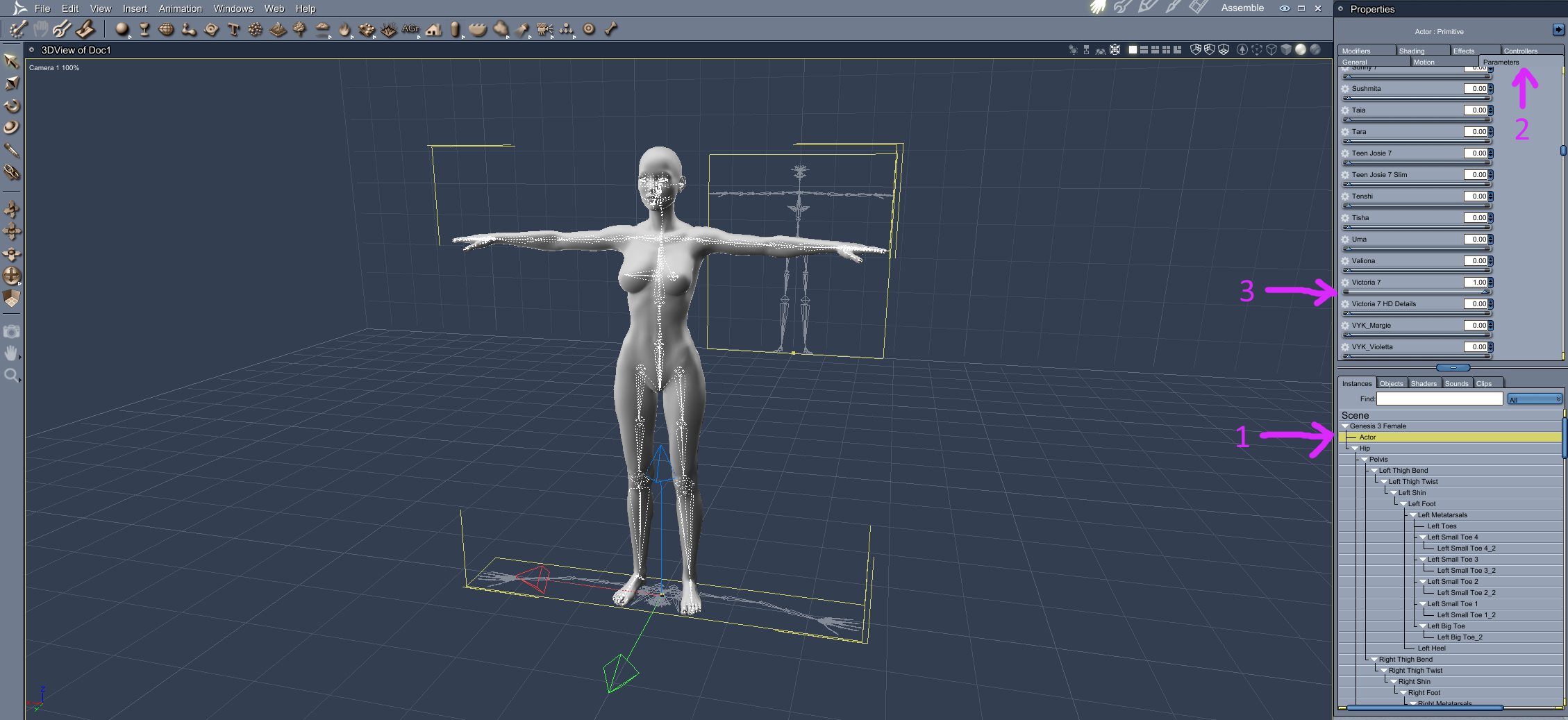
1. If you click on Actor
2. Then click on the Parameters tab
3. Scroll down and use the slider on the morph you are after. In the Filter box at the top if you type in the name of the morph if known it will narrow down the search.
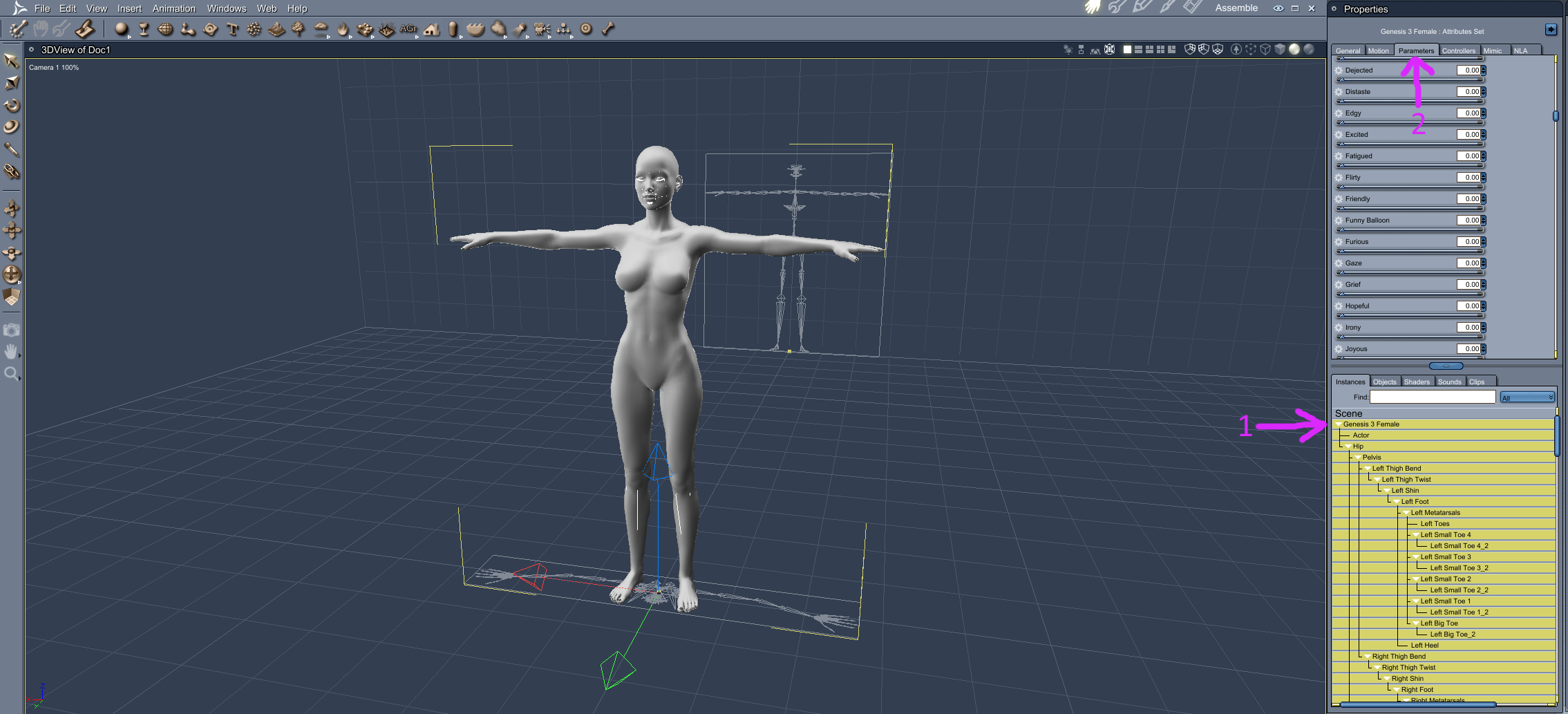
1. If you click on the name of the figure in your scene
2. Then click on the parameters tab, then scroll down the list
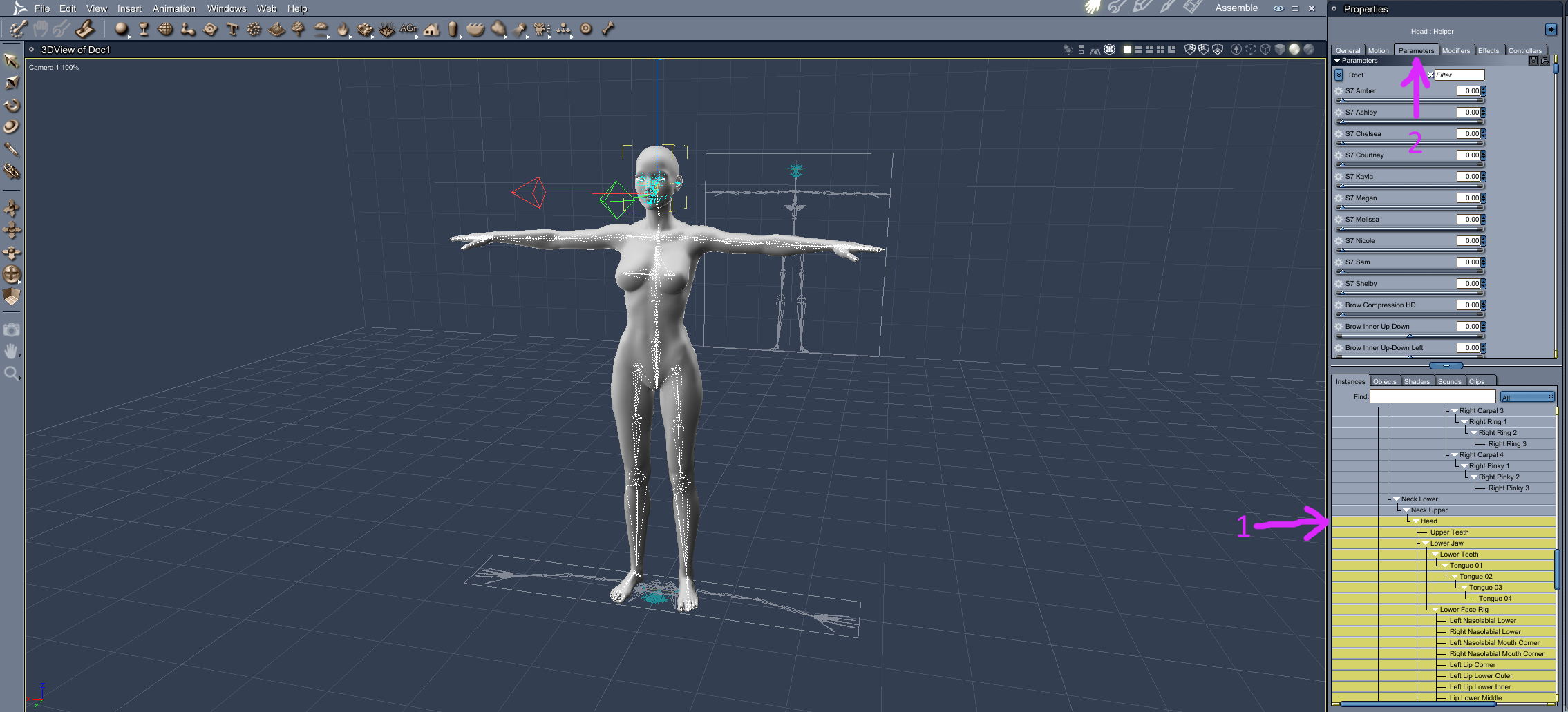
1. If you click on the Head
2. Then click on the Paramters tab, then scroll down the list
I seriously just asked myself "but how do they make that rotobot stand up"And turning would be an interesting exercise with one flat cross section wheel. Unicycles can turn due to CG transfer and a curved cross section wheel. I suppose it could be done with a torque reaction internal gyro, but there are easier ways of doing it.
Squishing the tire to one side or the other works fine. I've been driving a OneWheel for years (see the post above this one).
I have precisely the same reservations about the Segway; An exceedingly clever, high tech, energy intensive, design intensive, resource intensive solution solving a problem a bicycle solved 150 years ago
Did you ever see a bus or commuter train that could hold 50 bicycles?
Where do you put your bike as you go from class to class, or building to building at work?
Something like an original Segway or those "hoverboard" style smaller two-wheel ones can pivot about its center, which is very handy.
The Chinese electric unicycle ones are briefcase sized. You won't notice if you're in an elevator with six people that each have one. You will notice if there are six people with bicycles.
with virtually no technology, little resources, small design effort and zero non-renewable energy input.
Humans don't eat for free, my friend. The resource requirements to keep a bicycle on the road are huge. And my solar panels produce
In my view, the Segway is a solution still looking for a problem that hasn't yet been solved.
I'm familiar with the expression "A solution looking for a problem", but I can't work my way through all the logical premises in "a solution still looking for a problem that hasn't yet been solved."
Personal electric transportation devices (Segways, hoverboards, OneWheels, electric unicycles) solve a ton of problems. Maybe not your particular first-world problems (although I'm first-world and I have one) but not everyone has your privilege.
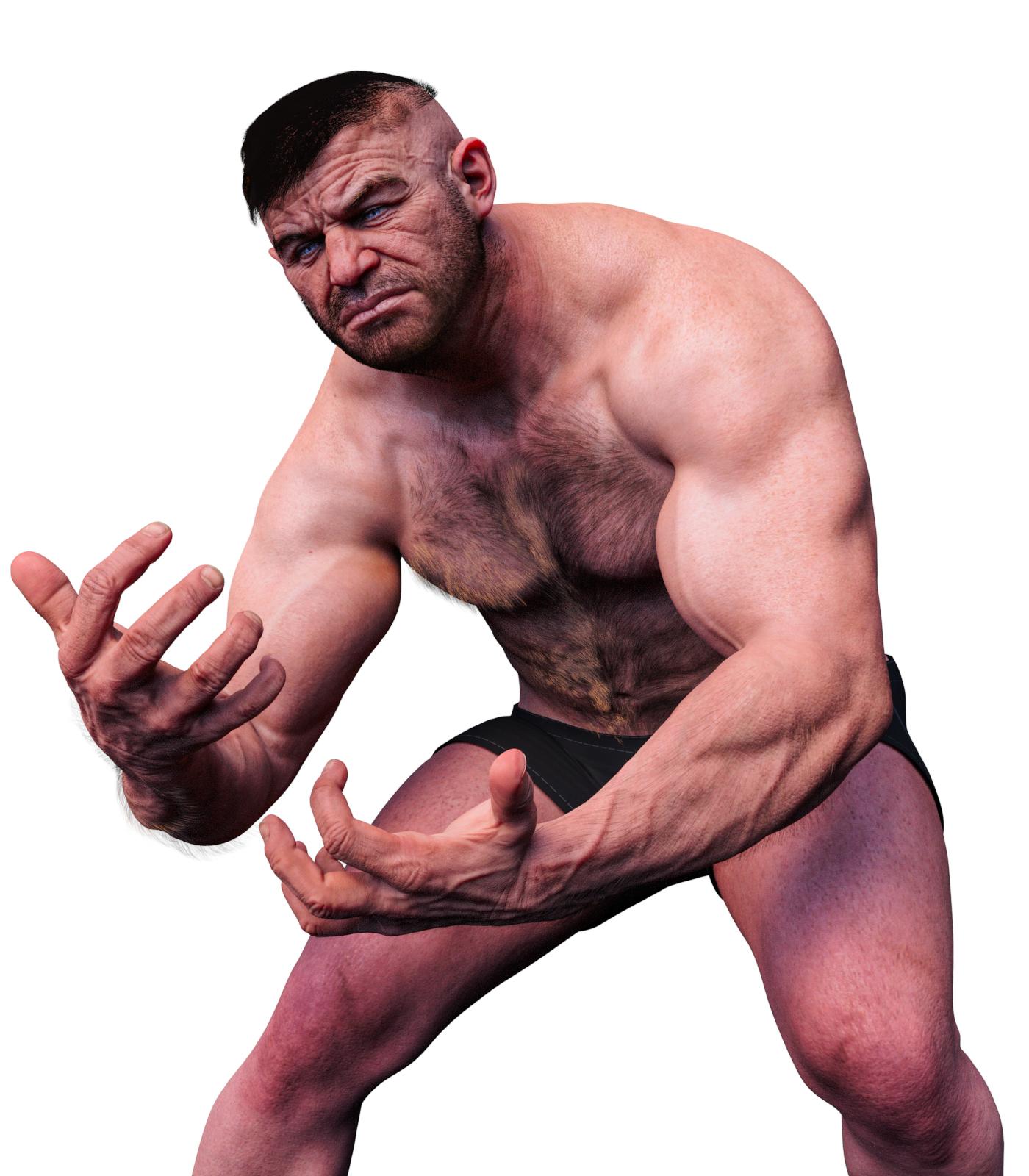
Something big is coming!Underbelly renders nicely. Love his strand based hair and his kind of Adolf(?) hairstyle. His chest hair has patches of yellow which I felt was strange. His arms are big and powerful, and look better without tats. His legs lack detail and seem under developed. I had to crush a lot of blacks to get rid of some of the darkness surrounding his face. I replaced the eye texture, since the shadows were too dark there, and even shining a bright light, I had some trouble getting details.
The only issue I run into with him, was his morph does odd things to pants sometimes underwear. I know its his morph, since when I dial it out the distortion goes away. Perhaps a result of his different shape.
 Novica & Forum Members Tips & Product Reviews Pt 13
@valzheimer You should put a link to your product in your post, that way it will link it on the product page with the Daz Dealz add-on. Thank you for the previews and looking forward to the new ones! Honestly I passed on the hair originally because I do not do a whole lot of afican american images (mainly because I can't ever get them lighted correctly and get agrivated) and didn't see any need for the hair AND THEN ya'll started talking about it then I had to go check it out and look at all the options! Oh my! Unfortunately budget does not allow right now but it has been wishlisted for asap!
I didn't know that about the link, I'll edit the post after this one :) I was actually warned (by my husband) that the hair may be too specific and it may deter customers who don't usually render African-American themes and that not everybody shares my fascination with this type of hairs, but I guess my personal taste prevailed in the decision as it happens so often. I like to say I make my products for myself and my taste and needs first, which may not always the best commercial decision :)
Most wardrobe and hair products that I own load with smoothing automatically enabled on load (i.e. smoothing defaults to ON). So, relying on smoothing may be bad practice, but it seems to be common practice with wearables in the Daz store. Personally, I find using smoothing on a hair cap to be much easier than trying to fiddle with a bunch of morphs to figure out what morphs to dial to get the cap to fit without floating too far away from the head.
I remember it being the regular case mostly until maybe halfway through Genesis 3 (Genesis and Genesis 2 nearly always came with smoothing modifiers), but I was told, while of course we are allowed to do it, it shouldn't be the practice, actually I noticed quiet a lot of items coming with the smoothing modifier but it is set to OFF (as is the case with the Cap on this hair too) :)
Anyhow to continue here's some requested shots of dForce Natty Undercut Hair for Genesis 8 Female(s) (this time linked). On Zelara 8 as she's a pale girl so you can see where hair meets the scalp more clearly in the contrast, smoothing modifier set to ON, no other adjustments.
First and second image are closeups of the forehead and hair under (undercut), All Hair Down morph (which is basically pre-draped state), All Hair Raise (can be used also after the sim if hair gets too glued down by force), All Scale (puffs up the hair physically in size making strands a tad longer), All Hair Back, All Hair Front, All Hair Left, All Hair Right, All Twist Left, All Twist Right, Front Forward (divides the bangs and moves them further forward). All morphs dialed to 100% each image a separate morph, used on Style 03 hair (one that makes hair the puffiest as I think it shows moves to the biggest extent). No postwork, all images rendered to couple hundred samples in resolutions shown, HDRI 20 (default value) and lights from Fast Production Lights.
Hope that helps, and I'm truly grateful for all the feedback, needless to say if anyone needs to see more I'm around :)
V.
Default Gf8 loading with preset morphsAttached screenshot combo shows how any G3M is now loading (this is the base G3M with Growing Up textures on it). I can "0" the figure and then add a specific character by clicking on that figure's Shapes, but they're ALL coming in with these dials set to these values, and whatever the selected character's dials are supposed to be, added. NOT pretty.
Since taking the screen shots, I uninstalled Toon Generations 2, so anything affected by "Adjust Age" seems to have been shut off, but that still leaves the expressions, hand poses, various head morphs, and tongue morphs. Is there a way to find out what morph controls in the pane belong to what sets?
It's like there's something in the database that says, "Load G3M, apply this set of morphs and poses, then apply any character settings that aren't in this set." Should I try resetting the database and reimporting metadata, or will I need to reinstall ALL my assets if I do that? This is only annoying if I am loading a new character in a blank scene, but if I load a prior scene I've saved and it screws up every G3M-based character in it, I'm not sure how I'm going to know what dials need to be fixed and what ones I had saved intentionally.
EDIT: It also occurred to me that this problem started happening after Studio had crashed during a simulation, and when I restarted it, my workspace had defaulted back to as-installed state.EDIT 2: Reset the database and re-imported all the metadata. No change

EDIT 3: Uninstalled Genesis 3 Starter Essentials Male and reinstalled. Problem persists. WHERE is it getting these settings from?
Can Genesis 3 figures be imported into Carrara?Will the Carraractors accept body and actor morphs?
I tried the Victoria 7 morph but can't figure out how to apply it.
I'm also considereing getting the Genesis 3 Body Morphs.
BTW. I'm overjoyed that I was able to load Gen 3 and she seems to be working!
Regarding Geografting...(Quad-thumb hands)Why not morph the little finger to look like a thumb?
I may have to try that, since the OTHER way was an exercise in frustration.

Then again, I WAS being a little ambitious...
I'm gonna give it a try tomorrow. The joints shouldn't (hopefully) be too hard (since I've been learning about them and weights during the process...),
the only downside is that I likely won't be able to use 'Symmetry' in Lightwave, since that seems to mess up point count, for some odd reason...

Thank you.
Greg
 DesignDoll to Daz?
Going from the images on the DesignDoll website, Sakura 8 may also be a good fit, style-wise, if that's the goal. She has a lot of morph adjustment options specifically made to work with her style and a male counterpart (though he's actually a morph for Sakura/Genesis 8 Female rather than built for Genesis 8 Male).
There are also the previous versions of Aiko, and for males, there are Kenji and the older Hiro figures. It would be a good starting point to find a ready-made Genesis-based stylized character in the store and then use morphs or Blender to further customize them. They'd have the native Daz Studio support for all the poses, hair, and outfits in the store (and the freebies offered on other sites). Doing that sounds a lot simpler to me than trying to import an unrigged figure and rig it from scratch, then having to convert Genesis-compatible clothes and hair to fit it, and have to find a workaround for any pose presets that may not work with your custom rigging (though perhaps that just sounds daunting to me since I've never rigged a figure in DS before). It really depends on what you want and how much work you're willing to do to get the desired results.
Weird head discoloration cause of hairThat's the hair cap, it is literally on the same coordinates as the forehead's geometry. Whichever hair that is you can fix this via the Parameters Pane via a forehead morph (if that hair has one).
Stop genesis from loading morphsTheKD,
Well my project of 2020 Spring cleaning has not started well. As mentioned it started with a hard drive failure - self inflicted, or otherwise, the result is the same. As I work through the exercise of reinstalling my content on a new drive, I am appreciating that there is a lot to this morph induced RAM problem. What I think I have learned is that all the associated runtime morphs (shaping, expression, linked to props or clothing fitting etc) 'load' (maybe link is what I want to say) with the G8F figure when it's loaded into a scene. In this way they are available as needed. At the moment for me this means an idle RAM consumption for DAZ Studio of 300MB goes to 4.8GB when the first G8F with clothing and hair is added and 9.4GB when I add a second. (The rendering challenge is separate: I can render this scene in under two minutes for all but high-end final renders with my modest RTX 2070.) With 32 GB of RAM and my CPU it is difficult, to impossible, to tune a timeline in order to simulate clothing to get a good fit or, heaven forbid, try to use more advanced hair. Puppeteer is out of the question. So I cannot get there from here. Years into speculative buying for interest sake, I am realizing the error of my ways. More is not better. Better is better but what does it look like. But it's more frustrating because of the way I have saved my characters: Scene Subsets. If I have this right, saving a character preset has the limitation of not allowing you to include clothes or hair etc. This can be overcome by saving a scene subset. Perfect I thought. Except now my characters all load missing files because everything that was present when they were saved needs to be there when they are loaded or it is identified as missing. Wonderfully, it doesn't matter because it will load anyways, unless it does matter; but, you would have no way to know whether what was identified as missing was being used. So in the vicious circle, I am reinstalling content to get created figures to install without missing files or only missing files I have already dealt with and then resaved. Then I think I am going to have to do some kind of ruthles vetting. At the momnet it's starting to look like the characters are easier to keep than not. First to go (gone already to its own runtime maybe never to be seen again) is AFE. Next is likely expressions that come with poses. Then the maze of duplicate (or near duplicate) expression collections - maybe expressions specific to charcters as well. Next duplicate body-part specific morph collections:lips, breasts, glutes etc. Finally duplicate (or near duplicate) grafts. I think I see numerous instances of resaving characters as I make difficult desicions about removing things from my main runtime. But something has to go. I am not yet sure how, in each of the above categories, I will decide what is the best option or options to keep. But I'll get there - might be way easier if DAZ was multi threaded . . . . in which case maybe the RAM issue wouldn't matter. I don't know. Meanwhile, it seems to me that the only way to enjoy the newer or more sophisticated functionality of DAZ Studio is to massively streamline my runtime. More to follow.
A bit more on expressions, shapes and morphs. I am realizing there are, as always, many ways to deliver products. This is what I think I understand:
- In some cases characters and expressions are unique morphs with presets and dials (usually). The meaning of unique in this case is that the morphs move the mesh directly. These morphs are impacting RAM consumption and there are dials with the morph name in the parameters tab.
- In some cases the characters or expressions are shape or pose presets storing direction to assign values to loaded morphs. In this case the mesh is being moved indirectly and adding this character or expression set adds nothing to the RAM consumption issue I am try to resolve. There is no dial in the parameters tab with the morph name. Tuning is done perhaps by adjusting the values in the currently used filtered parameters tab.
- In some cases they are both - ie presets assign values to existing morphs but there is also a dial with the morph name to allow tuning directly. These are perhaps the most elegant and powerful but also are a RAM load.
This only means that when considering expressions and in some cases characters to eliminate in order to reduce RAM load, there are some which will be more impactful than others. No point in removing expressions that are based on presets and do not impact RAM consumption at all.
geograftable bodieswell yes I have those converters
sometimes its not enough especially with HD morph features made for those particular generations which no conversion script can transfer as encrypted.
just geografting the head or body would give the advantages of all generations without revealing the secrets
this would be like taking Cayman's geograft UV methodology one step further too
Face Transfer...could be worse
My first Face Transfer fail/
Is that a fail? I immediately recognized her.
Margaret Thatcher?
Daz 3D is part of

Connect
DAZ Productions, Inc.
7533 S Center View Ct #4664
West Jordan, UT 84084Licensing Agreement | Terms of Service | Privacy Policy | EULA
© 2026 Daz Productions Inc. All Rights Reserved.