-
Character Dial-Spinning Best Practices
You could also try using Shape Splitter (formerly X-Morphs) to split specific parts of a morph from another. If you like a certain's character's nose, for example, you could totally use Shape Splitter to make a morph of just that nose and add it to your morph library. Its also great for splitting those characters that have head and body as a single morph (which I detest but thankfully is rare now). Its a very cool product to play with.
But yeah, like Diva said there is no right or wrong way to do anything, as long as you get to what you want it doesn't matter how you get there. I don't think there is any faster way if that is what you are looking for. I do think Rarestone's 200 shaping morphs are awesome. She made one each for male and female and they have a lot of unique and very specific morphs that nobody else has.
There is also a randomizer script product too. I do not have this myself, but it could be a fun thing to play with when you have no idea of what you want. It has some options in how you set it up.
I second that about the Rarestone packs. I've made a couple of really interesting looking characters and some that won't be seen for the safety of everyone's eyes- but had fun making them all. There is sooooo much there to customize- nose tip tilt, nostril arcs, cheekbones, eyelids, dimples, creases, face shapes, etc with nice pictures to give you an idea of what you'll be editing. I keep hearing good things about the Shape Splitter one and will definitely be checking it out as well. Personally I find that characters that are kind of similar or made by the same artist give me the best results dialed in less than 50%. It seems like every time I hit more than 50% blending different characters I start to get weird distortions (face sucks in, face shrinks, weird angles, etc).
Animation in DAZ@Ivy on pricing ,I agree completely
Reallusion is a confusing MONEY PIT!!
Yes there is a basic $200 version that comes with the free base CC3 Characters with all of the animation tools( except the curve editor) but you cannot import or export anything and can only use your own morph dialed CC3 Characters and render with the native Iclone Engine (that cannot even do Raytraced or screen space reflections!!) unless you buy the same Slow arsed IRay plugin that Daz inc. gives us for no Money
It would be a good alternative to Poser just for the animation & lipsynch tools for a total newbie with no existing hoard of legacy Daz/poser content.
Now if you are in the Daz ecosystem (which I still am for base Characters& clothing dev), the $600 USD Pipeline version with import export capability only makes financial sense if you make your own clothing and are experienced with one of the major Pro Apps/engines Like Blender,C4D, or Unity&UE4x for import& rendering.
If you do NOT make your own clothing, you still have to either buy the expensive Iclone store clothing, which is nowhere near the quality of Daz content, and pay an even HIGHER price for the "export versions" if you plan to send it out to any of the major Pro Apps/engines Like Blender,C4D, or Unity&UE4x.
Or buy Daz clothing and convert it with CC3 pipeline which is even more money. :-/
Now you see why people like myself (and perhaps wendy) put the brakes on at version 6.5 pipeline.
In my case, my 10 year old Maxon C4D software was too OLD to accept modern FBX & Alembic imports from Iclone, snd I even had to use( now defunct) paid third party plugins( Riptide&interposer) to get my animated ,lipsynced Poser& Daz figures into C4D for "Galactus Rising".
My ancient C4D is the only reason I was still using Daz studio,KeyMate ,GraphMate, optitex and two versions of Mimic to produce pre-animated Genesis Characters that could be rendered in C4D.
With Blender 2.8x supplanting C4D as the final scene rendering environment, I am finally able to consolidate All of the Character animation & Lipsync/Face puppet into Iclone that does these functions better than Daz studio even with imported Daz genesis figures
Create all of the clothing and props in Blender and fit them in Daz studio and import my Iclone animated customized Genesis 1-2 people from Iclone to blender via FBX or Alembic if Iclone cloth sims are used.
For someone like you however I can easily see why Iclone Pipeline cannot be justfied pricewise, just to import the limited BVH format into DAZ studio .AIUTO...CHI CONOSCE L’ITALIANO? PARTE DODICIL'ho visto anch'io. Il loro desiderio è farci usare tutti lo stesso metodo.
Ma fra installazione personalizzata, DIM, Connect, Central... stanno facendo un po' di casino. Spero almeno che Central per loro sia quello definitivo.
Comunque ho capito perché ci metteva generazioni a caricare figure G8F/M: più morph package e figure sono installati, e più tempo ci metterà a caricarli, in maniera direttamente proporzionale e quasi lineare.
Questo è dovuto al fatto che, anche se non stai usando un morph, Daz costruisce i rapporti fra tutti i morph disponibili installati per quel personaggio, ogni singola volta.
Mi è bastato disistallare un terzo delle G8F, e una ventina di morph package che non usavo spesso, e i tempi di caricamento si sono ridotti di più del 65%. Ma è sempre più di un minuto e mezzo.Non resta che fare un bell'upgrade di hardware, e ho cose interessanti in cantiere, vi dirò quando saranno montate nel PC! :D
Io spero di no, Central è terribile! Mancano un mucchio di funzioni del DIM tipo il link alle cartelle di installazione, export delle liste, verifica del tipo di installazione e via dicendo... Capisco che un buon 90% degli utenti di non vanno oltre il carica la figura nuda-metti la parrucca-metti la mutanda-applica una posa a caso-renderizza col primo set in lista.... Ma c'è anche gente che certa una certa professionalità.
Quanto ai morph, altro motivo per non usare G8 e amici belli, almeno fino a che non si decidono a sistemarlo un poco di più. Io ho qualcosa come 4000 e passa morph installati per G1, tra commerciali e custom, e il tempo di caricamento non cambia se aggiungo o rimuovo un pò di quei morph. Anche quando carico una figura con molti morph applicati non ci mette di più.
Lo avevo letto un paio di mesi fa sul forum e ho fatto una prova, il mio Genesis impiega quattro/sei secondi a caricare sulla scena sia con tutti i morph che totalmente senza. Oltretutto ha pure rallentato ulteriormente con l'ultimo aggiornamento per usare quel accrocchio di Face Transfer.
Più vanno avanti peggio fanno...

Sono funzioni di DIM che non ho mai usato, ma certamente meglio più funzioni che meno.
La mia intera libreria è basata su G8, sarebbe troppo un casino usare altro.
Poi non so nemmeno per quanto tempo ancora potrò continuare questo lavoretto part-time. Per ora va bene così.Peccato che abbiano cambiato sistema di gestione Morph rispetto a Genesis 1 allora. Mi piacerebbe molto riuscire a caricare i miei personaggi custom in 4 secondi.
In realtà no... E' molto più semplice convertire tutto da G8 a G1 rispetto a G1 a G8.
Io uso capelli, abiti e perfino morphs di G3/8 su G1 e funzionano correttamente. Penso dipenda dal rig più semplice e dal maggior numero di poligoni di G1.
Per assurdo posso far indossare a G1 moltissimi abiti di G8 utilizzando l'opzione "Not Supported" senza distorsioni quando G8 con il Clone apposito di G1 storta tutto.
Custom morphs file pathsYou can't. You can save a preset to apply the morph wherever you want, but the technical morph data file must use that folder hierarchy.
Custom morphs file pathsUsing Daz Studio 4.10.0.123 Pro 64Bit
Looking for some help with the file path for custom morphs.
I'm able to create and save a custom morph just fine, it's the file path that is bothering me and while I can change the default directory, its all the other folder underneath I'd like to get rid of.
What I get: "3D Work\Daz Custom Files\Morphs\data\WillDupre\DH2_Tack\DH2_WesternSaddle\Morphs\Teigh\Saddle\Test.dsf"
What I'd like: "3D Work\Daz Custom Files\Morphs\Saddle\Test.dsf"
Any idea how I can go about doing this?
Many thanks.
GENERAL FREEBIE REQUESTS part 3I'm looking for a morph for Genesis 3/8 Male and Female to remove the nostril holes so I can get a manga/anime look for a character. Anyone know where I can find this? If it's only available in a paid package, I'm fine with that. I do have Sakura 8 and that has an option remove nostrils but it doesn't work on plain Genesis 8, so that's out. Ideas?
Help with bonesYou need to set up a custom morph in the tail to match the morph you are applying to the figure, adjust the rigging to match, and use ERC Freeze to link the adjusted rigging - DS knows to adjust bones in fitted items to folow the identically named bones in the base, but it doesn't know what to do with custom bones that don't have a match in the base figure.
Llola Lane’s RENDER A MONTH Challenge 2020 (CLOSED)@Zatetic Can't blame the fairy for being curious here. I would also want a closer look if I saw that on the beach.

@TristanQEverett You really nailed that dog's expression! And I see you managed to sneak in the chicken too.
Thanks but I don't have any dog product. Those dogs are static objects and I had to improvise the scene around his expressions. Since I didn't had much time, I couldn't improve the shader surface on dogs. This render can be done better. I will do it as a side activity some other day when I am free.
very nice and very well done to Zatetic and TristanQEverett.
Thank you!
Man, I was going to ask where you got that Bassett hound morph.
Celebrity Look-a-Likes for 3D figures Part 2Some work in progress test renders of my latest celebrity inspired comission. Might see if you can guess the actor to ensure I'm on the right path?
Hair and stubble are placeholders until I create some that more resemble the intended actor, and everything else is work in progress:
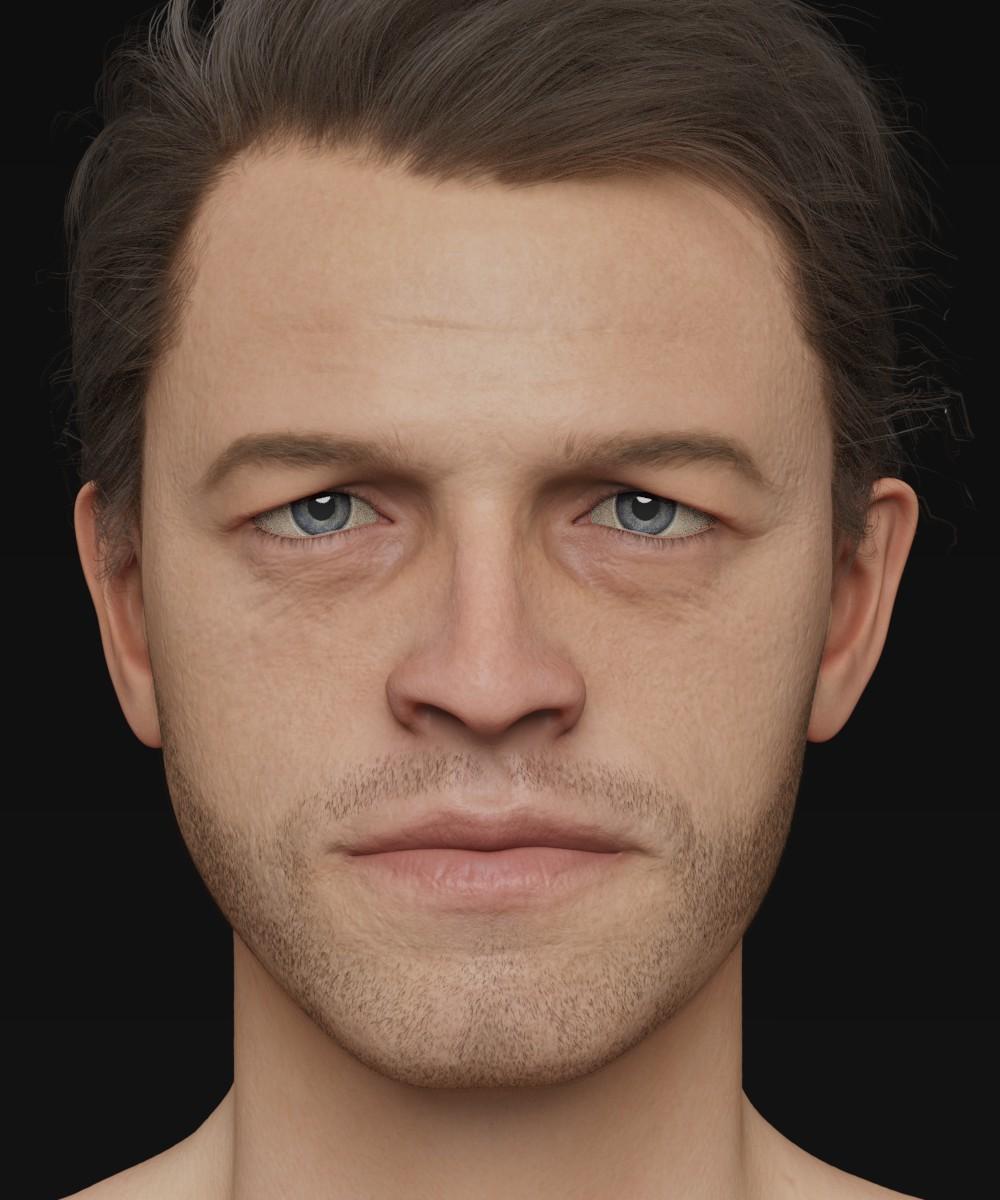
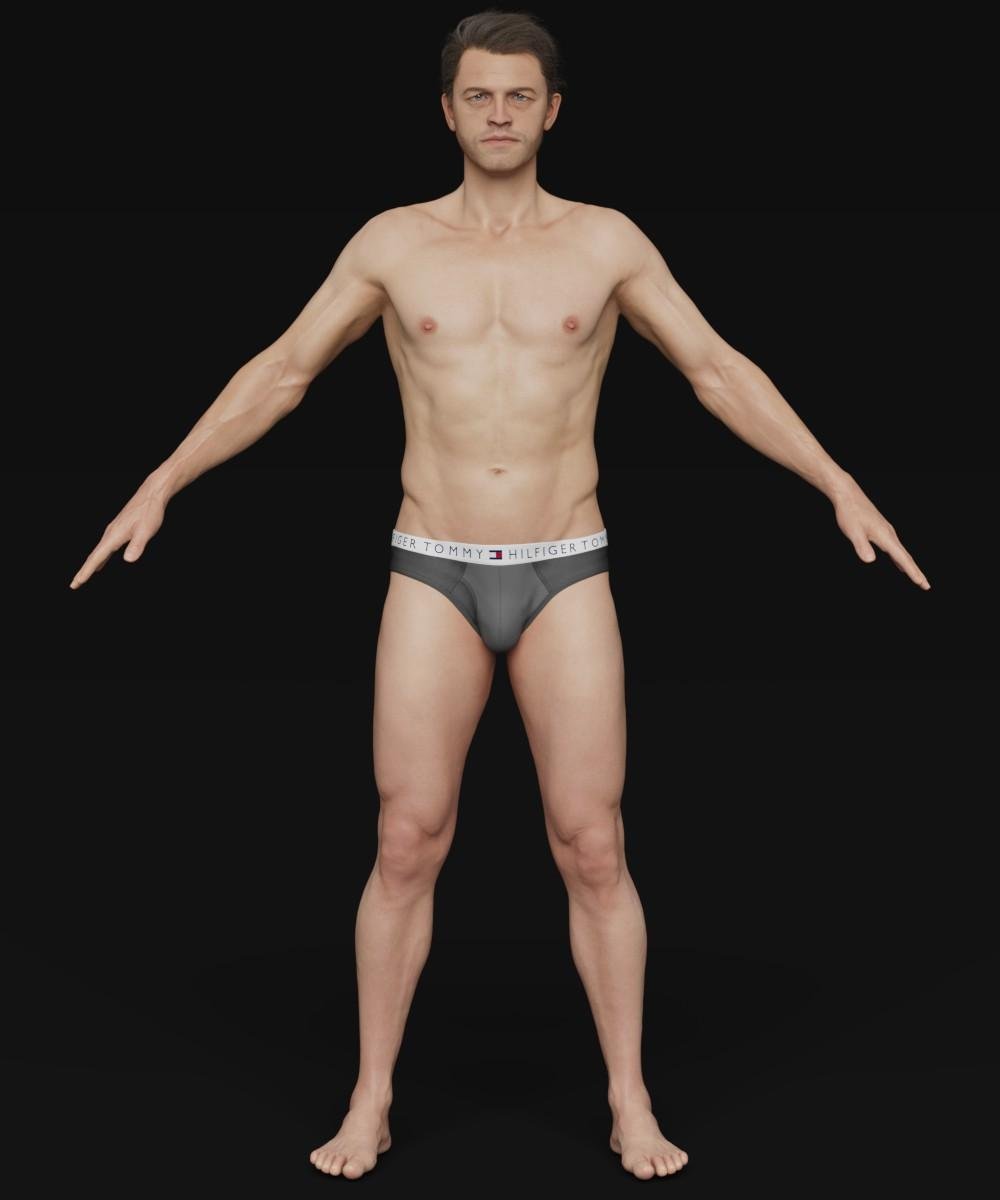
My hope is that Daz may be interested when I'm finished... He really would benefit from being a HD morph.
Cheers!
Daniel
Multiple collision object for DAZ figuresIn the Transfer Utility, choose Source figure your body suit for example, and the Target figure your gun belt (or vice-versa). Then hit merge hierarchies. Unches the Faces Transfer. Then fit the body suit to the gun belt. Then go to the Geometry Tool -> right click -> merge fitted figure's geometry.
The transfer utility merges the rigs (the bones setup), then the Geometry tool will merge the geometries.
Fit Control for Genesis 8 (Commercial)I mentioned a potential useful function in the Dial Control thread, in that not only would it show the paths for morphs on a character, but also the paths for clothing items?
Having thought about it, I added that it could be potentially more of a function of Fit Control.
You mentioned that because clothing typically had fewer morphs, it would be of limited use.
What I am thinking of though, is that I often, & I suspect others do too, save kitbash outfits as a wearable preset.
If the paths for clothing locations could be shown, perhaps via a seperate related script, it would ease finding installation of individual items to facilitate morph adjustments & texture changes.
Always use reverse deformation morph loader pro?With reverse deform, you're reversing out any morphs that you have added to the Genesis 8 Male base, for example, such as a nose morph made by a PA or the Michael 8 body or face morph.
[Released] Character Converter from Genesis 2 Female to Genesis 8 Female [Commercial]I'm having trouble with the eyes. I tried converting Callie 6 three times but her eyes always end up really elongated and oval. I tried to convert Keiko 6 and the same issue arises - the very elongated eyes. I tried following the process laid out here: https://www.daz3d.com/forums/discussion/comment/5403631/#Comment_5403631 and set the tolerance to .02. But that didn't help. I'm still getting the long oval eyes. Does anyone have any suggestions or a fix?
I'm using "Conversion Process 2020 Method" if that makes a difference? Should I be using a different setting?
Nothing like the eyes in that post? Have you converted a lot of other G2F characters? Perhaps if you temporarily move the other morphs to another location and try again (unchecking the convert JCMs though, that takes way too long).
Another thought, did the eyes change at all between your two conversions? If not, CC may not have actually done a new morph for the head. You need to delete the head morph between tries.
I've only tried converting Callie and Keiko so far.
I deleted the morphs for Callie between tries (it took me a while to find them, they where in a folder labelled "3D Universe,DAZ 3D,Heysun Oh" in the data folder under the Genesis 8 Female morphs. Very weird.
I'll keep trying and maybe I can get it to work. I see that the eyes look good at the link I posted, so there has to be a way to get them to look like that. I'll try again.
Sounds like you did everything right. If you only delete the FHM morph and you set the script so it doesn't overwrite morphs, it will be faster in your attempts. Please post a log of the conversion. I want to make sure that it is actually using the 2020 method. If for some reason, the script cannot find a FHM morph (or whatever prefix you specify), it will fall back to the 2019 methods.
I finally figured out the issue. User error, of course - apparently I had done an earlier attempt at transferring Callie 6 but in a different Daz Studio Directory on a different hard drive. So I wasn't finding ALL the Callie 6 morphs when I was deleting them between tries. After tracking down the morphs on the other drive and deleting them, I tried the method outlined by Brugan again. This time it worked much better.
There was still some slight "oval" effect on the iris as well as some minor warping of the eyelids, but I added a smoothing modifier to the figure and that fixed the eyelids. For the slight oval iris I added J Cade's Sakura Iris Oval morph at a negative value: https://www.daz3d.com/forums/discussion/comment/3179366/#Comment_3179366
I also added ArkadySkies' G2F morph: https://www.daz3d.com/forums/discussion/comment/3179366/#Comment_3179366
I think after those minor adjustments she came out great!


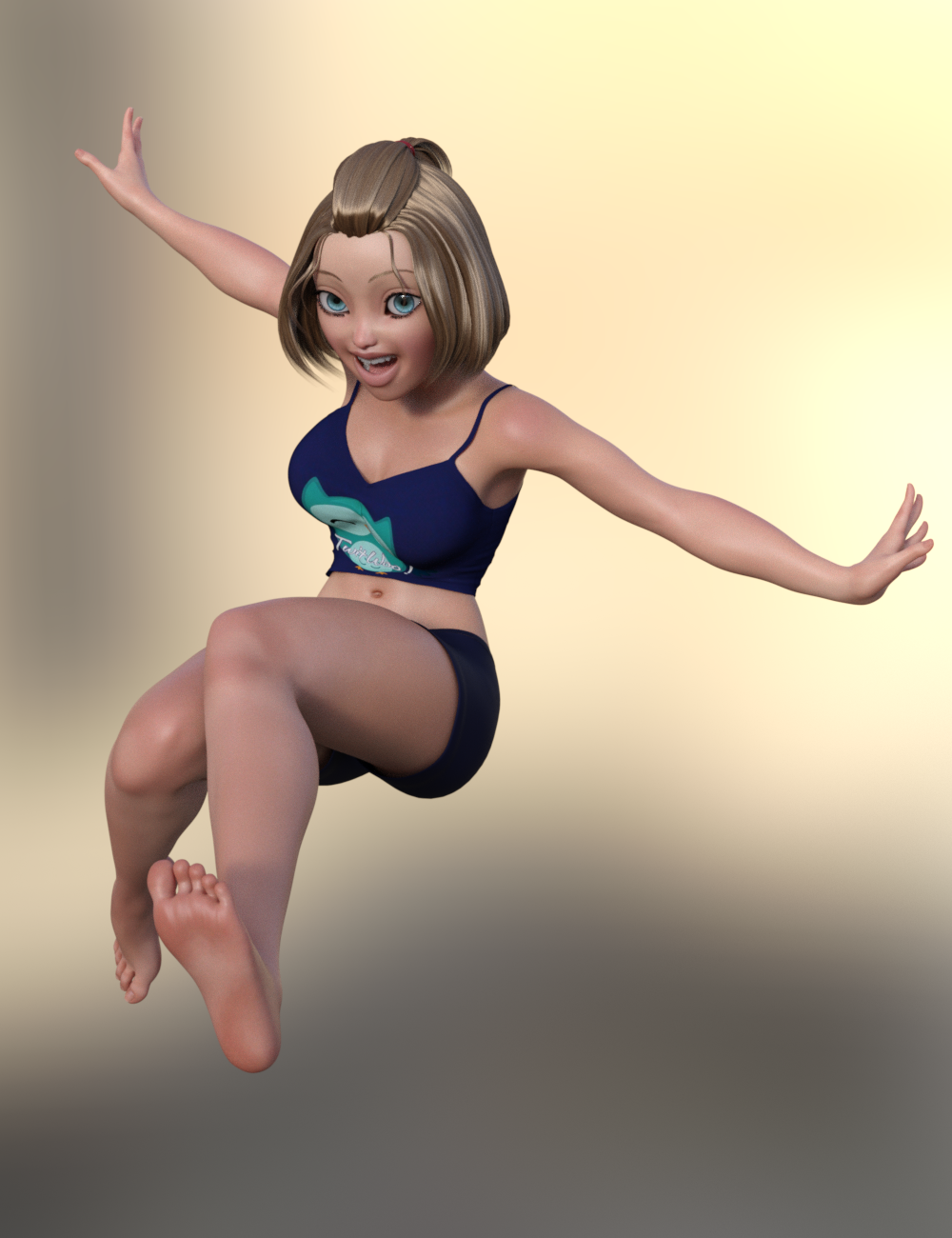

The skin and hair from Toon Generations Essentials works great with her, imo.
It turned out really great! I am glad you got it working.
Thank you! And thank you for such great products! I've been longing to have my G2F characters brought up to G8F! :D I'm looking forward to trying it with my custom G2F characters. I'm really glad you made this!
You're welcome!
Always use reverse deformation morph loader pro?If the morph is imported on base figure that option won't do anything.
Always use reverse deformation morph loader pro?I have been doing morphs for genesis for some time now and using the reverse deformation in morph loader pro when finetuning an already made morph.
But would there actually be any diffrence using reversed deformation on a new morph loader pro when importing a new morph for genesis 8 base compared to not use it?
Cromwell the Barbarian for G8M [commercial]Cromwell the Barbarian for G8M
https://www.daz3d.com/cromwell-for-genesis-8-male-with-dforce-hair
Bring your Barbarian fantasies to life with this mighty warrior. Cromwell is an older warrior who has seen many battles and his scars tell his tales. Life is hard, but the strong survive.
A powerfully sculpted High Definition morph is accented with detailed textures with many variations. Dirtied arms and legs, multiple tattoo options, and many facial hair styles and colours, with different eye colors a bonus set of Gold Jewelry, because every barbarian needs his bling.
The set comes complete with custom crafted High Definition Morphs, and texture sets, suitable for Iray
- Product Includes
- One Cromwell Character Preset
- One Cromwell Shaping Preset
- One D-Force Beard Figure
- One D-Force Eyebrow Figure
- One D-Force Body Hair Figure
- One Full Body Texture Material Preset with anatomical elements
- Three Face Material Presets
- Two Lip Material Presets
- Two Chest Material Presets
- Two Leg Material Presets
- Three Arm Material Presets
- Five Eye Material Presets
- Five Beard Style Variations Material Presets
- Five Beard and Brow Colour Variations Material Presets
- Includes only Iray Material Presets
- BONUS Earring, Armband, and Thumb Ring props


 AIUTO...CHI CONOSCE L’ITALIANO? PARTE DODICI
L'ho visto anch'io. Il loro desiderio è farci usare tutti lo stesso metodo.
Ma fra installazione personalizzata, DIM, Connect, Central... stanno facendo un po' di casino. Spero almeno che Central per loro sia quello definitivo.
Comunque ho capito perché ci metteva generazioni a caricare figure G8F/M: più morph package e figure sono installati, e più tempo ci metterà a caricarli, in maniera direttamente proporzionale e quasi lineare.
Questo è dovuto al fatto che, anche se non stai usando un morph, Daz costruisce i rapporti fra tutti i morph disponibili installati per quel personaggio, ogni singola volta.
Mi è bastato disistallare un terzo delle G8F, e una ventina di morph package che non usavo spesso, e i tempi di caricamento si sono ridotti di più del 65%. Ma è sempre più di un minuto e mezzo.Non resta che fare un bell'upgrade di hardware, e ho cose interessanti in cantiere, vi dirò quando saranno montate nel PC! :D
Io spero di no, Central è terribile! Mancano un mucchio di funzioni del DIM tipo il link alle cartelle di installazione, export delle liste, verifica del tipo di installazione e via dicendo... Capisco che un buon 90% degli utenti di non vanno oltre il carica la figura nuda-metti la parrucca-metti la mutanda-applica una posa a caso-renderizza col primo set in lista.... Ma c'è anche gente che certa una certa professionalità.
Quanto ai morph, altro motivo per non usare G8 e amici belli, almeno fino a che non si decidono a sistemarlo un poco di più. Io ho qualcosa come 4000 e passa morph installati per G1, tra commerciali e custom, e il tempo di caricamento non cambia se aggiungo o rimuovo un pò di quei morph. Anche quando carico una figura con molti morph applicati non ci mette di più.
Lo avevo letto un paio di mesi fa sul forum e ho fatto una prova, il mio Genesis impiega quattro/sei secondi a caricare sulla scena sia con tutti i morph che totalmente senza. Oltretutto ha pure rallentato ulteriormente con l'ultimo aggiornamento per usare quel accrocchio di Face Transfer.
Più vanno avanti peggio fanno...
Sono funzioni di DIM che non ho mai usato, ma certamente meglio più funzioni che meno.
La mia intera libreria è basata su G8, sarebbe troppo un casino usare altro.
Poi non so nemmeno per quanto tempo ancora potrò continuare questo lavoretto part-time. Per ora va bene così.Peccato che abbiano cambiato sistema di gestione Morph rispetto a Genesis 1 allora. Mi piacerebbe molto riuscire a caricare i miei personaggi custom in 4 secondi.
AIUTO...CHI CONOSCE L’ITALIANO? PARTE DODICIL'ho visto anch'io. Il loro desiderio è farci usare tutti lo stesso metodo.
Ma fra installazione personalizzata, DIM, Connect, Central... stanno facendo un po' di casino. Spero almeno che Central per loro sia quello definitivo.
Comunque ho capito perché ci metteva generazioni a caricare figure G8F/M: più morph package e figure sono installati, e più tempo ci metterà a caricarli, in maniera direttamente proporzionale e quasi lineare.
Questo è dovuto al fatto che, anche se non stai usando un morph, Daz costruisce i rapporti fra tutti i morph disponibili installati per quel personaggio, ogni singola volta.
Mi è bastato disistallare un terzo delle G8F, e una ventina di morph package che non usavo spesso, e i tempi di caricamento si sono ridotti di più del 65%. Ma è sempre più di un minuto e mezzo.Non resta che fare un bell'upgrade di hardware, e ho cose interessanti in cantiere, vi dirò quando saranno montate nel PC! :D
Io spero di no, Central è terribile! Mancano un mucchio di funzioni del DIM tipo il link alle cartelle di installazione, export delle liste, verifica del tipo di installazione e via dicendo... Capisco che un buon 90% degli utenti di non vanno oltre il carica la figura nuda-metti la parrucca-metti la mutanda-applica una posa a caso-renderizza col primo set in lista.... Ma c'è anche gente che certa una certa professionalità.
Quanto ai morph, altro motivo per non usare G8 e amici belli, almeno fino a che non si decidono a sistemarlo un poco di più. Io ho qualcosa come 4000 e passa morph installati per G1, tra commerciali e custom, e il tempo di caricamento non cambia se aggiungo o rimuovo un pò di quei morph. Anche quando carico una figura con molti morph applicati non ci mette di più.
Lo avevo letto un paio di mesi fa sul forum e ho fatto una prova, il mio Genesis impiega quattro/sei secondi a caricare sulla scena sia con tutti i morph che totalmente senza. Oltretutto ha pure rallentato ulteriormente con l'ultimo aggiornamento per usare quel accrocchio di Face Transfer.
Più vanno avanti peggio fanno...
Star Wars - Falleen RaceI will admit I haven't done any deep sea Google searching, but I haven't been able to find any characters or character morphs for Star Wars. I've seen the Twi'lek lekkuian morph, but one that I would like to find or learn how to make is for the Falleen race. They're more or less Human with some facial ridges on their head and a spinal ridge down their back. I would like to focus on the facial ridges because the spinal ridge can be covered up with clothing. Does anyone have a resource for this or know where I can look to learn how to make these ridges in the Genesis 8 Male?
I've attahed an example of what I am looking to make.
AIUTO...CHI CONOSCE L’ITALIANO? PARTE DODICIL'ho visto anch'io. Il loro desiderio è farci usare tutti lo stesso metodo.
Ma fra installazione personalizzata, DIM, Connect, Central... stanno facendo un po' di casino. Spero almeno che Central per loro sia quello definitivo.
Comunque ho capito perché ci metteva generazioni a caricare figure G8F/M: più morph package e figure sono installati, e più tempo ci metterà a caricarli, in maniera direttamente proporzionale e quasi lineare.
Questo è dovuto al fatto che, anche se non stai usando un morph, Daz costruisce i rapporti fra tutti i morph disponibili installati per quel personaggio, ogni singola volta.
Mi è bastato disistallare un terzo delle G8F, e una ventina di morph package che non usavo spesso, e i tempi di caricamento si sono ridotti di più del 65%. Ma è sempre più di un minuto e mezzo.Non resta che fare un bell'upgrade di hardware, e ho cose interessanti in cantiere, vi dirò quando saranno montate nel PC! :D
Daz 3D is part of

Connect
DAZ Productions, Inc.
7533 S Center View Ct #4664
West Jordan, UT 84084Licensing Agreement | Terms of Service | Privacy Policy | EULA
© 2026 Daz Productions Inc. All Rights Reserved.