-
Moving DAZ Content off of C: Drive in 2020
okay right clicked my old liberary and exported meta data, then right click smart content and hit import meta data content, looks like it might work when its done seeing all the missing names. yup that worked
Vue, Plant Factory now freeMasterstroke said:
---and how to get Iray-Genesis characters into Vue.
You can import a G9 as FBX but..have fun getting the materials to look right in vue.


it will import a poser files(PZ3) natively with materials
though,so poser users may find this an alternative for outdoor rendering.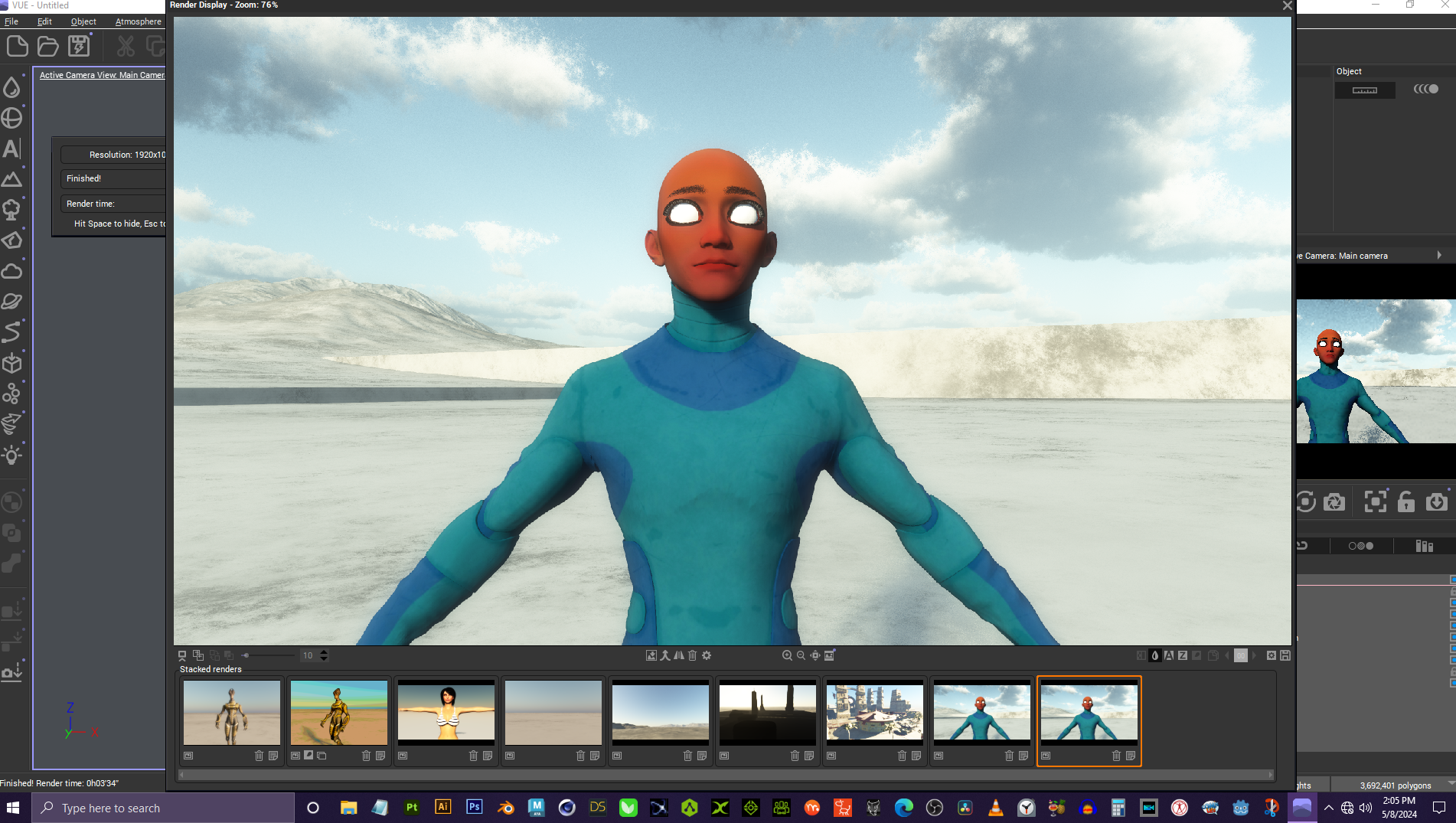 [Released] Content Wizard [Commercial]
robertswww said:
@Cliffborne I don't think there is a unified guide to fixing errors encountered in Content Wizard. Most of the problems have a solution listed somewhere in this thread, but currently at 46-pages long, it can take a lot of time to find all the solutions.
Sometimes you can find answers in the Content Wizard User Manual.pdf which you can find either inside Daz Studio (once CW is installed), or open the CW product folder and look in the Scripts sub-folder and drill-down until you see it.
Daz Content Wizard Documentation:
http://docs.daz3d.com/doku.php/public/read_me/index/67507/startI did compile a list of some of the most common Errors and Solutions, as follows...
Black Triangle with a Red Exclamation Mark:
Uncheck all the Morph files and UV Sets (+Weblinks, Templates, etc.) in the Smart Content tab, as they are not needed for creation of Smart Content.No User Facing Files Where Found In The Product:
Fix the error by Unpacking and Re-Zipping the product folder with the same folder structure and names as Daz uses.FILE EXISTS error:
Clear the working directory (temp directory you set the path to in CW)... Restarting CW should also empty it.There were errors during installation:
Remove any Templates.zip files from your list of product Zip files you imported into CW (under the Product tab).Error creating metadata for Daz Studio:
Make sure you have Runtime and Support folders inside your save location
(Example: DAZ CONTENT/3rd-Party/My DAZ 3D Library/Runtime/Support/)Hope that helps :)
Thanks a lot for this!!! I might create a small guide myself, someday :)
[Released] Content Wizard [Commercial]robertswww said:
@Cliffborne I don't think there is a unified guide to fixing errors encountered in Content Wizard. Most of the problems have a solution listed somewhere in this thread, but currently at 46-pages long, it can take a lot of time to find all the solutions.
Sometimes you can find answers in the Content Wizard User Manual.pdf which you can find either inside Daz Studio (once CW is installed), or open the CW product folder and look in the Scripts sub-folder and drill-down until you see it.
Daz Content Wizard Documentation:
http://docs.daz3d.com/doku.php/public/read_me/index/67507/startI did compile a list of some of the most common Errors and Solutions, as follows...
Black Triangle with a Red Exclamation Mark:
Uncheck all the Morph files and UV Sets (+Weblinks, Templates, etc.) in the Smart Content tab, as they are not needed for creation of Smart Content.No User Facing Files Where Found In The Product:
Fix the error by Unpacking and Re-Zipping the product folder with the same folder structure and names as Daz uses.FILE EXISTS error:
Clear the working directory (temp directory you set the path to in CW)... Restarting CW should also empty it.There were errors during installation:
Remove any Templates.zip files from your list of product Zip files you imported into CW (under the Product tab).Error creating metadata for Daz Studio:
Make sure you have Runtime and Support folders inside your save location
(Example: DAZ CONTENT/3rd-Party/My DAZ 3D Library/Runtime/Support/)Hope that helps :)
Thanks a lot for this!!! I might create a small guide myself, someday :)
DAZ database gone?DIM does not show what is intalled, DAZ Central also and the Smart Tab ist empty. I have changed the drive and path the assets are because of memory problems some months ago but then everything worked just fine. Just after changing of the email adress and password these problems started.
Also I tried to reimport the metadata but after hours of doing nothing - the task manager showed 0% CPU time and no activity on the drives - I stopped the program.
DAZ database gone?That does seem odd. As far as I am aware the state of the CMS database is not dependant on your Daz account details. For this to happen without any other error messages or something else not mentioned does not quite make sense to me. Perhaps someone else will have other ideas?
I wouldn't advise this until you determine why it's happened in the first place but if your previously-installed products are there but just not appearing under Smart Content then you can use the "Content DB Maintenance" -> "Reimport Metadata" function to put it all back in.
[Released] Content Wizard [Commercial]RiverSoft Art said:
Overwrite is copying all the metadata from the Daz columns (i.e., what CW read from the Daz database for this item) to the analyzed columns.
But shouldn't it then read the current category instead of nothing? No matter what file I try this on (stuff that already shows up correctly in the smart content panel), I always end up with both category columns empty.
Diffeo - Importing G8.1 Female - error when loading morphsI don't get any error here, either with easy import or manual import. You may try to update and clean install.
https://diffeomorphic.blogspot.com/2022/11/safely-installing-new-version.html
my steps (1.7.4.2116):
- in daz studio export G8.1 as non-HD
- in blender easy import with the default preset
- import FACS
How to render polylinesUncannyValet said:
@InTheFlesh - your email is exposed See: https://www.daz3d.com/forums/discussion/681551/why-is-daz-exposing-user-email-addresses
@TheMysteryIsThePoint - Any luck? It would be nice if we could import renderable Blender hair.Thanks for the heads up, fixed it now!
I did end up making some progress, but I lost a hardrive recently and been out of the scene working on other projects for a while now. Hopefully I'll get back to it eventually.
[Released] Content Wizard [Commercial]Nathrai said:
(I'm sorry if this has been asked before - I tried to skim the thread, but 46 pages is a tad bit long ...
 )
)First of all, a HUGE thank you for this, after a few weeks I already can't imagine going without this script!
You're welcome!
But today I tried to add a .zip to an existing product for the first time, and I can't seem to get it right. Here's what I tried:
- Load the configuration file for the product
- Add the new .zip file
- Analize / Refresh analysis
I get the popup asking what to do with files already categorized in smart content:

Sadly, neither does want I would need.
- Overwrite simply deletes everything in the "category" column
- Skip defaults to the automatic categories which, depending on the original .zip files, can be terribly off
Is there any way to keep the existing categories? Either by only updating the analysis for the new .zip file, or by convincing overwrite to not delete the category information?
Overwrite is copying all the metadata from the Daz columns (i.e., what CW read from the Daz database for this item) to the analyzed columns.
DAZ database gone?Why did you have to change your email address? I've never done that but I assume you'd have to go via Daz Support or something - are you sure you didn't just setup a different account and so you are now logging in as a user without any content?
I don't know too much about multi-account setups, but generally if DIM is showing none of your content installed then that is because you have either changed the manifest files path or removed the files. If Daz Studio is showing an empty Smart Content then you have either somehow reset your metadata or created a new empty database somehow. Neither of these things should be affected by changing an email address.
So you may need to supply more info on the exact things you did?
[Released] Content Wizard [Commercial]@Cliffborne I don't think there is a unified guide to fixing errors encountered in Content Wizard. Most of the problems have a solution listed somewhere in this thread, but currently at 46-pages long, it can take a lot of time to find all the solutions.
Sometimes you can find answers in the Content Wizard User Manual.pdf which you can find either inside Daz Studio (once CW is installed), or open the CW product folder and look in the Scripts sub-folder and drill-down until you see it.
Daz Content Wizard Documentation:
http://docs.daz3d.com/doku.php/public/read_me/index/67507/startI did compile a list of some of the most common Errors and Solutions, as follows...
Black Triangle with a Red Exclamation Mark:
Uncheck all the Morph files and UV Sets (+Weblinks, Templates, etc.) in the Smart Content tab, as they are not needed for creation of Smart Content.No User Facing Files Where Found In The Product:
Fix the error by Unpacking and Re-Zipping the product folder with the same folder structure and names as Daz uses.FILE EXISTS error:
Clear the working directory (temp directory you set the path to in CW)... Restarting CW should also empty it.There were errors during installation:
Remove any Templates.zip files from your list of product Zip files you imported into CW (under the Product tab).Error creating metadata for Daz Studio:
Make sure you have Runtime and Support folders inside your save location
(Example: DAZ CONTENT/3rd-Party/My DAZ 3D Library/Runtime/Support/)Hope that helps :)
How to render polylinesUncannyValet said:
@InTheFlesh - your email is exposed See: https://www.daz3d.com/forums/discussion/681551/why-is-daz-exposing-user-email-addresses
This is somewhat fixed, at least to thee xtent of not showing the email.
@TheMysteryIsThePoint - Any luck? It would be nice if we could import renderable Blender hair.
How to render polylines@InTheFlesh - your email is exposed See: https://www.daz3d.com/forums/discussion/681551/why-is-daz-exposing-user-email-addresses
@TheMysteryIsThePoint - Any luck? It would be nice if we could import renderable Blender hair.Vue, Plant Factory now freeVue 5 was the first 3D software I used and I loved it. I bought it along with Poser 5. The problem at the time was that Vue was really expensive (I bought the basic espirit version), and to make it communicate with other software you had to buy the expensive infinite version or various plugins. They then seemed to release a new yearsion every year or so, it was really too expensive for the hobbyist for what it did, so I gave up on it, the environments it created at the time were the best on the market though, much better than Bryce in my view.
A few years ago, they went to subscription which I absolutely refuse to pay for any subscription software.
To have these for free now is absolutely amazing. They come with a large range of objects and plants, you can do a lot with it, although, going back to it now, it's not as fun to use as I remember, perhaps because I'm so used to other software but if you're into 3D, you need to get these. You can export into Daz Studio and/or export from Daz Studio ion FBX and import intto Vue. It even imports native Poser content.
Diffeo - Importing G8.1 Female - error when loading morphsBy the way: I don't get such an error when I load the FACS with the Easy Import.
Diffeo - Importing G8.1 Female - error when loading morphsMaybe a dumb question.
Blender 4.1, Diffeo 1.7.4 developer version, Daz Studio 4.21
Loading Genesis 8.1 Base Female in Daz Studio. Resolution is set to High and Subdiv to 2.
Then I save the scene and use Export to Blender (no-HD)I make an Easy Import of Genesis 8.1 Base Female in Blender, which works fine, but without any Morphs, FACS and so on.
In the Custom Properties I only find the following morphs, which is ok.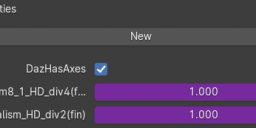
So, when I select the G8.1 object next, I try to Import FACS, but I get an error.
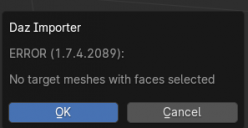
What am I doing wrong?
Daz to Blender: Imported morph shows as low polyWhen trying to import a model with a morph to blender, the morph itself becomes significantly less smooth when I apply it in blender as compared to Daz. It looks like how it shows before you apply the morph in Daz3D as you're moving the slider. Can anyone point me to a fix? Thanks in advance! I'm using a G8 model, if that helps.
How to export my house model from Blender to DAZ?James said:
lilweep said:
Yes, except as i mentioned above, there is batch export of obj from Blender, and batch import ob obj into Daz by dragging and dropping and spamming enter. So neither of those steps take much time.
I tried those batch export. None function 100% as expected.
Like for example, No uv map.
most of them are out of date.
I even tried a paid one in Blendermarket, but still have similar problem.
So importing obj to daz by drop and drag works, but if the exported files has no uv map, it becomes a problem.
Okay but did you try this?
https://www.versluis.com/2021/12/how-to-export-multiple-objects-from-blender-as-obj-or-fbx/ ;
Does the mesh with missing UV actually have a UV map in Blender?How to export my house model from Blender to DAZ?lilweep said:
Yes, except as i mentioned above, there is batch export of obj from Blender, and batch import ob obj into Daz by dragging and dropping and spamming enter. So neither of those steps take much time.
I tried those batch export. None function 100% as expected.
Like for example, No uv map.
most of them are out of date.
I even tried a paid one in Blendermarket, but still have similar problem.
So importing obj to daz by drop and drag works, but if the exported files has no uv map, it becomes a problem.
Daz 3D is part of

Connect
DAZ Productions, Inc.
7533 S Center View Ct #4664
West Jordan, UT 84084Licensing Agreement | Terms of Service | Privacy Policy | EULA
© 2026 Daz Productions Inc. All Rights Reserved.