-
Can Genesis 3 figures be imported into Carrara?
Next question: Are the "Genesis 3 Female Body Morphs" usable from within Carrara on Janette?
If you have a character all set up in Carrara but now you've bought more morphs and want to use them with that figure, we can Transfer the Shapes to the frsh figure using NLA.
This also works if we decide to go the other way and Reduce the Amount of Morphs* we have on a figure - except that if we remove morphs that are part of the original character being transferred, those will cause a one-time error message and simply won't transfer - but everything else will come through fine.
* the article is written for Genesis 1, but the same method works for any of the Genesis generations
Love your new site!
 Silene
Thank you! Working on some helpful goodies that I think you'll really like! ;)
Can Genesis 3 figures be imported into Carrara?Next question: Are the "Genesis 3 Female Body Morphs" usable from within Carrara on Janette?
If you have a character all set up in Carrara but now you've bought more morphs and want to use them with that figure, we can Transfer the Shapes to the frsh figure using NLA.
This also works if we decide to go the other way and Reduce the Amount of Morphs* we have on a figure - except that if we remove morphs that are part of the original character being transferred, those will cause a one-time error message and simply won't transfer - but everything else will come through fine.
* the article is written for Genesis 1, but the same method works for any of the Genesis generations
I did not know this, obvioiusly I must have not been paying attention at the time DOH? This sounds amazng and just read your link. So, once you do that, do you just then save the updated character with the new/changed data back to your browser as a car file that then loads as 'normal'? And then you can repeat this as you collect any new morphs or want to drop some?
Sorry I have never used NLA before and am really looking forward to trying this! Love your new site!
SileneYep, you got it! The key to transferring shapes is the dialog that pops up during the NLA Pose. I like to drag that window bigger and open the Actor hierarchy and make sure my shaping morphs are being selected. Except nowadays, I just click the box at the top level to deselect everything and then click it again, which selects Everything.
This is a Pose NLA (single key frame) and I'm just going to "Load Clip Data" rather than actually adding the clip to the timeline. So the rest doesn't matter.
Looking for a Converter "Male Genesis 2, 3 and 8" Hair to M4 - so I can use it in CarraraCarrara can also become a good conversion tool when used with Daz Studio to help bring it all together. This video is for making clothing for Genesis 2, but if we use the Blended Weight trick as mentioned in previous posts, we can get the hair you want into Carrara.
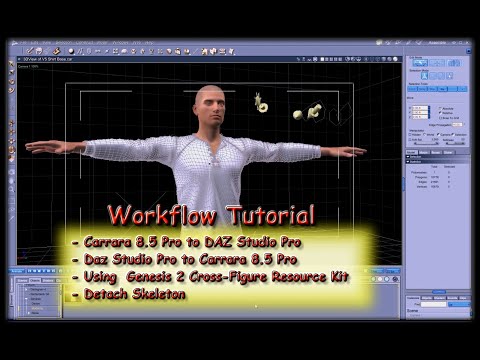
Once we're in Carrara, select the model level (Actor, in this case) and go Edit > Fenric > Unlock Figure
- Then go Animation > Detach Skeleton
- Drag Actor out of the group and rename it to the hair
- We can now delete the group you've pulled Actor from.
So now we have Prop hair. We can now use scaling or the vertex model tools in the Assemble room to shape the hair to M4
Once that's done, export as OBJ using the Daz Studio preset - I never include texture with export in this phase
In Daz Studio, load in M4, the import the hair prop you've just exported as OBJ. Don't parent it to M4 or anything, just bring it into Studio
Now open the Transfer Utility and transfer from M4 to the hair. By the end of the process, you'll have hair that follows M4's poses but perhaps not shapes. We can use Carrara (or Hexagon) to model morphs for shaping or movement or whatever, and add those to your new hair via MorphLoader Pro.
Go to Josh Darling's YouTube channel for all of the tutorials you'll want on using the tools in Studio to make this all happen. ;)
Can Genesis 3 figures be imported into Carrara?Next question: Are the "Genesis 3 Female Body Morphs" usable from within Carrara on Janette?
If you have a character all set up in Carrara but now you've bought more morphs and want to use them with that figure, we can Transfer the Shapes to the frsh figure using NLA.
This also works if we decide to go the other way and Reduce the Amount of Morphs* we have on a figure - except that if we remove morphs that are part of the original character being transferred, those will cause a one-time error message and simply won't transfer - but everything else will come through fine.
* the article is written for Genesis 1, but the same method works for any of the Genesis generations
I did not know this, obvioiusly I must have not been paying attention at the time DOH? This sounds amazng and just read your link. So, once you do that, do you just then save the updated character with the new/changed data back to your browser as a car file that then loads as 'normal'? And then you can repeat this as you collect any new morphs or want to drop some?
Sorry I have never used NLA before and am really looking forward to trying this! Love your new site!
SileneCan Genesis 3 figures be imported into Carrara?Next question: Are the "Genesis 3 Female Body Morphs" usable from within Carrara on Janette?
Just make sure you load a Fresh Johnathon or Janette after buying new morphs for them. When we save our Genesis characters in Carrara format, their morphs collection is saved with the figure, and won't automatically add new ones - so we must load a fresh figure from the library.
If you have a character all set up in Carrara but now you've bought more morphs and want to use them with that figure, we can Transfer the Shapes to the frsh figure using NLA.
This also works if we decide to go the other way and Reduce the Amount of Morphs* we have on a figure - except that if we remove morphs that are part of the original character being transferred, those will cause a one-time error message and simply won't transfer - but everything else will come through fine.
* the article is written for Genesis 1, but the same method works for any of the Genesis generations
*Released dforce Sea Salt* CommercialI also want to take some time to offer some quick tips with this particular hair.
This is one of the hairs that I would not recommend changing dynamics settings on if you are animating a simulation. Leave them be for your own sanity :)
If you are just using gravity.. knock yourself out.. it should behave just fine.
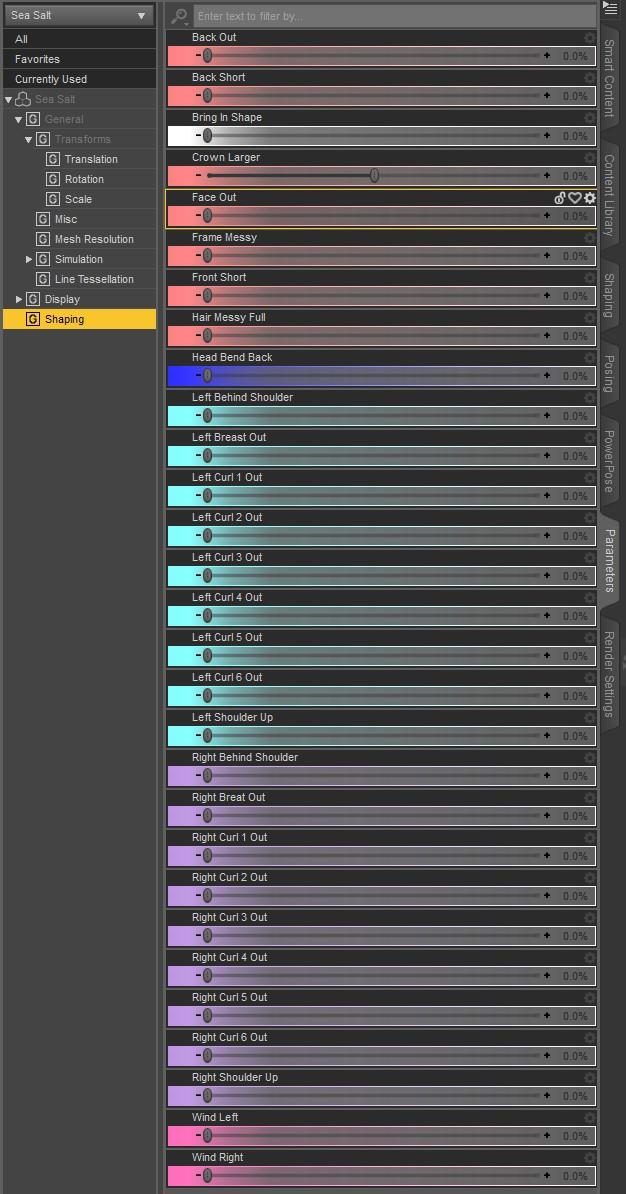
If you find your hair is sticking to the body too much, use the "Head Bend Back Morph". before simulating. It also looks so much nicer after certain simulations.
Also.. I keep forgetting to add a special preset so that the hair is visible in the nvidia viewport. Sorry guys.. I honestly never use it. So fo those of you that are struggling to figure out why its rendering invisble in the nvidia viewport:
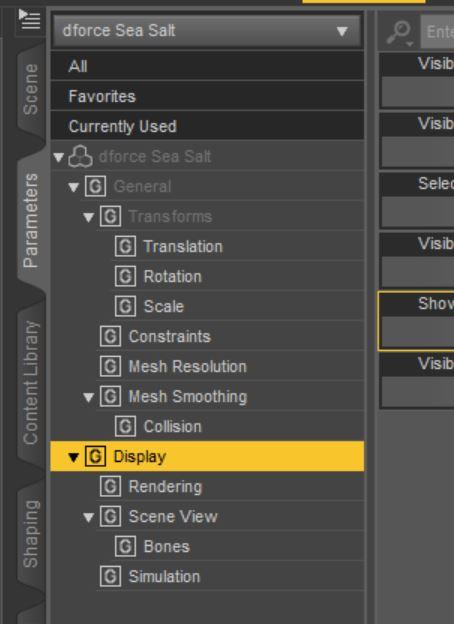
Click on the hair in your scene.
Click on the parameters tab.
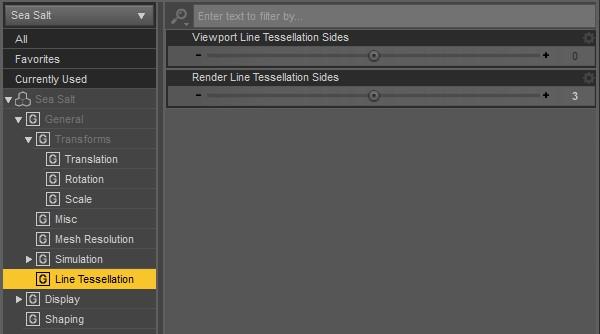
Scroll down in the parameters tab and change the Viewport line tesselation sides and change it from 0 to 3.
Also Ill make sure I add the word hair to my products in the future. It's the small simple things i miss when I put these complicated things together.
Ok, I'm having some problems...
1. It was a G3 hair trying to fit on G8. I had read in the forums to look in lost & found and tried that hair. Neither hair is named G3 or G8 so theres no way to know which is which,
2. I can't find Viewport LineTesselation sides
3. The BIGGEST problem: There is nothing that says Actor and no morphs at all that I can find.
Please help! Looking forward to trying this beautiful hair!
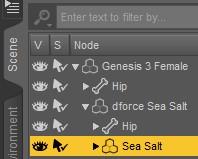
In the scene tab, expand "dForce Sea Salt" and Select "Sea Salt". The Line Teslation and Morphs will then be in the Parameters Tab.
 Angharad 8
The makeup drives me nuts. But at least we got one clean face promo. Yeah, the body is a more distinctive morph than the face, but she does look like she mixes well.
Angharad 8And three of the four outfits actually have shoes (well, boots) that someone could walk in. Most of the getups have enough pieces to make them potentially useful for kitbashing, anyway.
Not impressed with the hair being only Iray. That's for sure.
Not a bad base morph, although there are others I've liked better. I do like the add-on characters in the bundle. One of those is also Iray only, but I'm more likely to just convert a character skin. Hair is trickier, although there are at least a v=couple of shader packs which will give me at least a basic 3DL version to work from.
If someone brought out a realistic set of 3DL hair shaders, it would hit the cart so fast there'd be skidmarks.
Angharad 8She looks quite short and stocky, which I find interesting. It's the sort of morph I'd like to dial in, in varying degrees. Makeups don't do anything for me (i am over that winged eyeliner/eyeshadow style), but I'd like to see some renders here to get a better judge of her skin.
I really like the Ninian outfit particularly the design of the boots.
"Angharad" is a celtic name, I think? Welsh perhaps? I see the celtic "influence" in the name of the "Ninian" outfit and of course..."highlands range" outfit. I think "Cerian" for the Cerian NObility outfit is from the Welsh too. Of course, I don't see a celtic and/or welsh influence in the designs of the outfits or characters, but who cares - I never see a pro bundle as a "only this genre" type thing. Just found it interesting in the naming.
Morphing brushI'm not familiar with Poser or the morphing brush, but we do have Mesh Grabber now, which sounds like it fulfills a similar function.
The Mesh Grabber is a useful tool, although the way in which it works is cumbersome. This is not a reflection on the vendor but rather the way in which it works which is limited to the existing magnet system within DS. The vendor has done a good job with the limited tools available.
Morph brushes work in a completely different way than clumsy magnets. If you wish to see how morph brushes work (and the amazing results you can get), there are a number of free software packages which use such tools, for example Sculptris (which is a simplified version of Zbrush) and Blender. The technology for Morph Brushes has been around for a very long time. I don't understand why DAZ3d won't implement them in DAZ Studio; maybe someone from DAZ3d would care to comment?
The obvious question is; if there are other third party software packages (even free ones) which do implement Morph Brushes, why don't we just use those? The answer is simple; communication and compatibility. You have to be able to send the DS figures/objects back and forth between the third party software packages, and that is not always easy or smooth. For Zbrush, DS uses GoZ to send objects/figures back and forth and that works (most of the time), but it would make life much simpler if the Morph Brushes could be used on the fly within DS. That would avoid some of the incompatability problems that sometimes exist between DS and Zbrush. Further, Zbrush is an expensive program and so not available to all. I don't know if GoZ works with Sculptris.
If Morph Brushes were implemented in DS then issues like poke through or clothing intersecting with the figures hands etc could be dealt with within seconds. Mesh artifacts caused by Autofit could be corrected within seconds. Every DS user could (with a bit of practice) make their own morphs to figures and clothing. That last point is the only reason I can think of why DAZ3d won't implement Morph Brushes; on the basis that it may take work away from vendors. If that is the reason (and it may not be), then it is based on shortsighted thinking. Implementing Morph Brushes in DS would not only make using DS easier and more fun, it would also release a tidal wave of creativity from many people and be a starting point for people on the path to creating new content (though again, where this new content would/could be sold might be an issue for DAZ3d). At least this is my opinion.
*Released dforce Sea Salt* CommercialI also want to take some time to offer some quick tips with this particular hair.
This is one of the hairs that I would not recommend changing dynamics settings on if you are animating a simulation. Leave them be for your own sanity :)
If you are just using gravity.. knock yourself out.. it should behave just fine.
If you find your hair is sticking to the body too much, use the "Head Bend Back Morph". before simulating. It also looks so much nicer after certain simulations.
Also.. I keep forgetting to add a special preset so that the hair is visible in the nvidia viewport. Sorry guys.. I honestly never use it. So fo those of you that are struggling to figure out why its rendering invisble in the nvidia viewport:
Click on the hair in your scene.
Click on the parameters tab.
Scroll down in the parameters tab and change the Viewport line tesselation sides and change it from 0 to 3.
Also Ill make sure I add the word hair to my products in the future. It's the small simple things i miss when I put these complicated things together.
Ok, I'm having some problems...
1. It was a G3 hair trying to fit on G8. I had read in the forums to look in lost & found and tried that hair. Neither hair is named G3 or G8 so theres no way to know which is which,
2. I can't find Viewport LineTesselation sides
3. The BIGGEST problem: There is nothing that says Actor and no morphs at all that I can find.
Please help! Looking forward to trying this beautiful hair!
 Daz3d to Blender Workflow
Just to be clear, the material transfer work I'm doing will only translate Iray Uber Shader to Blender Cycles.
I noticed some Daz assets use Shader Brick materials instead of Iray Uber.I guess I underestimate, if you need to make that caveat. I don't think I have any important assets that aren't... I should really check. But thanks for the clarification.
Daz3d to Blender WorkflowI don't see the "effort" to replicate IRay in Blender as being worthwhile either, but if @JClave's work is going to give it to me with no effort, I would certainly like to use in Blender many assets that look great in IRay. Sure, Daz Importer will get me reasonably close, but who would not prefer to have one less thing to think about having to perfect once in Blender?
Just to be clear, the material transfer work I'm doing will only translate Iray Uber Shader to Blender Cycles.
I noticed some Daz assets use Shader Brick materials instead of Iray Uber.
With my approach, those Shader Brick materials will have to be converted to Iray Uber Shader in Daz before being exported to Blender.
This means that, those materials (which comprise a minor subset of total materials in Daz store) may look somewhat different to the original materials in Daz. (though should be much more of acceptable quality than materials created using existing methods)
Once the Iray Uber Shader implementation in Blender is successful, I will try my luck contacting Daz to see whether they would be willing to help me figure out all the Shader Bricks so they can be translated.
@wolf359 - rendering in Daz Iray is great if you are happy with the feature sets provided.
But if you want to do even just 5% more especially when extracting useful render passes for postwork / non-photorealistic rendering, you will have to do a lot of manual work for each time you generate render passes, or pray to Daz and Nvidia to provide extra features.
My ultimate goal with Blender is to customise Cycles further to generate purpose-built render passes that will be used for non-photorealistic renderingAuto Muscle Enhancer HD [Commercial]Inquire, answering for DMaster, this is basically another character morph, that has a ton of Joint Control Morphs embedded, with controls on how much you want to blend in on any character, with any other morphs. I have been waiting for the female version, so here is some more exploration of G8F morphed onto G8M so I could play with this product! Attached are baseline G8F with 70% of the AME body and 25% veins and muscle definition, with 30% upper body 2x, and 20% lower body 2x. All in SubD1. The side by side is some of my preferences on the G8F form.
League Of Legends 3D Models From Riot for Fans! (Free & Official)https://www.facebook.com/1653360584/posts/10221118999158618/
another video, gets easier the next figure one does,
so does the transfer utility rigging, his fingers are rigged!
faces will still be unlikely
 Face Transfer Unlimited For Commercial Use?
They told me I can't so I got my refund and bought some morph Mrs. I have found that I can do pretty decent dial morphs myself so I will just go that route and do everything the hard way like I have had to do my whole life anyway. I don't have enough money for my own lawyer so I will just go the full MR route. Unless I have it in writting that I can I won't bother with the Face Transfer Unlimited again. Thank you for trying to help. I do appreciate it. I'm just really frustrated with all the rules and tegulations regulations one has to go through today just to make a few bucks.
Face Transfer Unlimited For Commercial Use?Sigh, so many little things are not spelled out in plain English.
So, going by how I read the EULA yes we can and because I was simply told to read the EULA which Lauren said covers this matter. And also I know from previous contact with the Company that MR morphs can be used for redistribution as well {without purchasing any other licenses}. So it being that Face Transfer Unlimited is a plugin with which one can make morphs, as indeed one can also using Hexagon, why not eh? As with any face morph, be careful whose likeness is being morphed esp. for commercial use. That being said, many people have near exact doubles in life BUT do not use unauthorized face images for texturing with ;-) Those people have lawyers too.
Have attached the part of the EULA which I figure covers this matter. The Company is aware of this thread. :-)
Now, if anybody is thinking of going Pro using Face Transfer Unlimited, please, it's not that great. And no the product for 'fixes' of its morphs is NOT being sold as merchant resource. You would have make all the fixes yourself. It is a wonderful little plugin for one's own use.
If anybody is thinking of going Pro using Face Transfer, I would suggest taking a copy of the full EULA and bringing it to your own lawyer for interpretation and advice.
Sigh.
Let's all go outside and watch Wormwood dance with the Earth.
 Daz Studio and Linux
I read 'somewhere' a long time ago that iray is pretty bad in this regard. Even people that have multiple cards and render on a dedicated card while using another card for display, reported heavy slowdowns during renders. I think it's the CPU. But since I can't remember where I read that, don't take my word for it. And obviously, things may have changed since 2017.
I wonder if this was two Nvidia cards, or an AMD to drive the video and an Nvidia to ty to get the advantage of GPU rendering.
Honestly, with a Ryzen 7 and 32GB memory, I don't find CPU rendering that bad - the default Iray timeout of one and a half hours is usually sufficient for a good render - and if it's still fireflies after than, double the time, up the quality and Resume.
Thanks... I checked, I seem to have used 3delight-12.0.137-Linux-x86_64.tar. The download is dated April 2017, sounds about right. Recently it started crashing on 80% of renders, but in a random fashion. Dunno what's up with that. But again, I love the iray results, so I doubt I'll turn back.
Odd. I seldom see crashes with 3Delight - once in a while the render cacks out with a rib file error.
Did you check out my Awe gallery? Regular 3DL materials can't hold a candle to Awe as they are PBR - light transmission isn't as good as iray (or any unbiased engine) and there is a real dearth of easy shader presets, but it's usually quick on Progessive render.
Before settling on 3Delight I tried to go Luxrender with the Reality plugin but that was a major let-down. :( The reality plugin isn't meant to be used on a different system -never mind a linux one-, it looks for the files in their original locations, like C:\Program Files\ so that was utterly useless. At least DAZ Studio had the foresight to provide a button "Collect and localize" that gathers all required files and makes all paths relative. Otherwise it would have been a no-go.
I got Reality to work - but it's not as robust as Daz Studio and frequently crashed trying to transfer large scenes.
I preferred how the alternate Luxrender plugin, 'Luxus' operated. Not as well set up with a materials conversion system, but more integrated. Unfortunately it's never been updated to cope with the new Luxcore render - and still depends on the old render engine.
Octane now has a Free tier, but as it requires a connection to the internet to work - I've been doubtful it'd work - I've registered, but not gotten around to trying to get it working.
I'm kind of hoping someone will do a plugin for AMDs Prorender.
There are some rumours Daz is working on an Eevee style engine.
We can get the open source of DAZ?As well as where I come from, TheMisteryIsThePoint (What a beautiful nick ...!), The selfless work of thousands of brains is more coherent in order to improve, not 100% a software code, but 7947934% or more! This can be verified with Blender, where many users use Daz products to transfer them to a more efficient work environment, where there are unthinkable tools in Daz. Not everything is going to be bad! Daz has, today, have the best 3D character frameworks. For this reason, other companies such as Reallusion, with their iClone, are using these characters: Their iAvatars are, in my opinion, very weak. But they do provide interaction with mocap, for example, and that's where Daz fails.
I don't really know what end use Daz users have. A render of a pretty photo with a damsel with a centaur stomping on it? A poster for a red lantern house (...)? Years ago I was doing TV spots and videos for trade fairs, and I had to adapt to the kindest 3D, since I'm actually an industrial designer and what I used most was Rhino and Solidworks. I use the Daz figures for my presentations of my products, closer to hand utensils (Dinnerware, kitchen appliances, etc.) and having the possibility to put your hand correctly in a 3D simulation is a fantastic tool, which I never found: Daz gave it to me.
And I'm also a programmer, not a professional, but I do my scripts in Python (which, mysteriously, Daz lacks ..). I work with three computers in my house, two Win10 and a Linux Debian Kali (For a wifi project that I have in my hands ...). I usually use Visual Studio and the linux gnu c ++. And, of course, I love GitHub and other developer websites, where you see the code, and think about whether it is valid, or something is wrong ... and you warm your head to help polish code. And you help hundreds of people. And you have feedback from other people, and between all of them, wonders are created.
So I was asking for some open source. Daz hangs many times, simply by deleting a character ... Importing a third-party Fbx is heroic! .. And in that, we can all help. That alone was my proposal. Thank you all.

I'm certainly not going to blame Daz for continuing to believe that the only way to succeed is to protect their IP; that's how it has always worked. There aren't enough Billion-dollar Open Source companies like Red Hat to make the other paths self-evident. But I think a lot of companies, say IBM and HP, probably wish they had understood a decade earlier. And IBM and HP are the lucky ones at least in that they still exist today.
Anyway, you are certainly not alone in your thinking.
We can get the open source of DAZ?As well as where I come from, TheMisteryIsThePoint (What a beautiful nick ...!), The selfless work of thousands of brains is more coherent in order to improve, not 100% a software code, but 7947934% or more! This can be verified with Blender, where many users use Daz products to transfer them to a more efficient work environment, where there are unthinkable tools in Daz. Not everything is going to be bad! Daz has, today, have the best 3D character frameworks. For this reason, other companies such as Reallusion, with their iClone, are using these characters: Their iAvatars are, in my opinion, very weak. But they do provide interaction with mocap, for example, and that's where Daz fails.
I don't really know what end use Daz users have. A render of a pretty photo with a damsel with a centaur stomping on it? A poster for a red lantern house (...)? Years ago I was doing TV spots and videos for trade fairs, and I had to adapt to the kindest 3D, since I'm actually an industrial designer and what I used most was Rhino and Solidworks. I use the Daz figures for my presentations of my products, closer to hand utensils (Dinnerware, kitchen appliances, etc.) and having the possibility to put your hand correctly in a 3D simulation is a fantastic tool, which I never found: Daz gave it to me.
And I'm also a programmer, not a professional, but I do my scripts in Python (which, mysteriously, Daz lacks ..). I work with three computers in my house, two Win10 and a Linux Debian Kali (For a wifi project that I have in my hands ...). I usually use Visual Studio and the linux gnu c ++. And, of course, I love GitHub and other developer websites, where you see the code, and think about whether it is valid, or something is wrong ... and you warm your head to help polish code. And you help hundreds of people. And you have feedback from other people, and between all of them, wonders are created.
So I was asking for some open source. Daz hangs many times, simply by deleting a character ... Importing a third-party Fbx is heroic! .. And in that, we can all help. That alone was my proposal. Thank you all.
Daz 3D is part of

Connect
DAZ Productions, Inc.
7533 S Center View Ct #4664
West Jordan, UT 84084Licensing Agreement | Terms of Service | Privacy Policy | EULA
© 2026 Daz Productions Inc. All Rights Reserved.