-
Sakura 8
OK, so Sakura definitely has some competition. This is G8F with: Petunia, Rarestone's toon brows and Animeyes for Aiko4.


Nice work! Those eyes look great on her. Were they difficult to change from G8F to these, due to the wide gap in character generations?
Can't see 200 face morph slidersHi,
I've installed 200 face morph sliders for DAZ (copied to the correct folders in My DAZ3D Library, double-checked - everything is where it should be)... However, I don't seem to have them appear in the parameters section when I select the head. Am I doing something wrong? I've been following the YouTube tutorial below and it seems that where he's supposed to get those sliders - I don't.
https://www.youtube.com/watch?v=wtxsDxKY5Ok&t=235s
All my files seem to be where they should, e.g. C:\Users\Public\Documents\My DAZ 3D Library\data\DAZ 3D\Genesis 8\Female\Morphs\DogZ&Zev0\200 Plus
Sakura 8OK, so Sakura definitely has some competition. This is G8F with: Petunia, Rarestone's toon brows and Animeyes for Aiko4.
Morph Loader Pro issuesI didn't understand the bit about measurements.
The preserve existing deltas is an option that matters only if you are overwriting an existing morph with a new one of the same name.
Exporting bought Daz character.Based on the screenshot, you have "materials" selected. Those need the base character loaded first. Try "All files," (right above materials) and see if there's an actor or figure, or something like that there. I'm not sure what it's called exactly.
I don't own this product myself, but reading the store page and the ReadMe it looks like there is no "Actor" to load, just shaping morphs for Genesis and a set of materials.
So: it looks like you need to load a Genesis base figure, then apply the Dwarf materials (as seen in your screenshot) and apply whichever of the dwarf head/body/nose/jaw/brow/ear shapes from the Shaping tab or (I assume) the Parameters tab. There's supposed to be a full morph for an aged dwarf and a couple of partials too - they should all show under the Shaping tab.
Copy settings from 1 prop to another?I did only used the ERC Freeze to make the morph, I also clicked theBake to timeline or something, but I had no idea what that make, and... I had no real result.
The Morph for the trap doors have no impact to the hanging nooses things (What is the English word? I found "noose", what is also a body part or "Rouge" which leads me to star wars, in german it is clear: Galgenstrick).
Edit:
I try to give you more infos:

Maybe that help you to help me :(
That was the working version. (in my still open daz Studio).
And this is the not working version in my second instance:

I made a clip, i have no idea if it helps you :(

Maybe I have to redo it, because I made the morph wrong?
Copy settings from 1 prop to another?I was lucky able to just duplicate it, using my "mccasual" "PressToSnapp" script to let the duplicated jump to the same position.
And now have all the same sliders.

I am not sure... I think I can delete the old ones?
Btw. I am allowed to somehow share the complete settings somewhere? I also made a animateable mover, that the lever will pull all 4 Trapdoors, from default you had to move all 4 doors+lever 1 by 1. I also changed all to iray.
I am not sure about licensing stuff.
Edit: I see now this:

Is that a problem?
Edit 2, made a Scene Subset and test loaded it in a second instance:

it DOES load, but:

The dorrs dont open with my new made morph :( And yeah... The morphs of the hanging nooses does work.
I used the ERC Freeze and used from Timeline, Checkbox to create the morph.
I still have the Original setting open, I hope you can come back and help me out :<
Auto Muscle Enhancer HD [Commercial]Inquire, answering for DMaster, this is basically another character morph, that has a ton of Joint Control Morphs embedded, with controls on how much you want to blend in on any character, with any other morphs. I have been waiting for the female version, so here is some more exploration of G8F morphed onto G8M so I could play with this product! Attached are baseline G8F with 70% of the AME body and 25% veins and muscle definition, with 30% upper body 2x, and 20% lower body 2x. All in SubD1. The side by side is some of my preferences on the G8F form.
Looks very good. In these images, did you add some of the new SWOLE for Hercules morphs?
Morph Loader Pro issuesI see. That made it work fine. Should I leave preserve existing deltas as Yes or No?
Also, regarding this, "Also noticed a lot of discrepencies in the measurement" is there something I can do, or that is just how morph loader works? (Both the figures are on mesh res, so I thought there shouldn't be a difference)
Morphing brushI'm not familiar with Poser or the morphing brush, but we do have Mesh Grabber now, which sounds like it fulfills a similar function.
The Mesh Grabber is a useful tool, although the way in which it works is cumbersome. This is not a reflection on the vendor but rather the way in which it works which is limited to the existing magnet system within DS. The vendor has done a good job with the limited tools available.
As far as I ama ware the Mesh grabber is its own deformer, not an expansion of those buil into DS/suppllied by other pllug-ins
Morph brushes work in a completely different way than clumsy magnets. If you wish to see how morph brushes work (and the amazing results you can get), there are a number of free software packages which use such tools, for example Sculptris (which is a simplified version of Zbrush) and Blender. The technology for Morph Brushes has been around for a very long time. I don't understand why DAZ3d won't implement them in DAZ Studio; maybe someone from DAZ3d would care to comment?
I doubt you will get an official comment, but I would imagine that the amount of development itme it would eat and the problem of implementing it in a UI that is already doing a lot of other things may both be factors.
The obvious question is; if there are other third party software packages (even free ones) which do implement Morph Brushes, why don't we just use those? The answer is simple; communication and compatibility. You have to be able to send the DS figures/objects back and forth between the third party software packages, and that is not always easy or smooth. For Zbrush, DS uses GoZ to send objects/figures back and forth and that works (most of the time), but it would make life much simpler if the Morph Brushes could be used on the fly within DS. That would avoid some of the incompatability problems that sometimes exist between DS and Zbrush. Further, Zbrush is an expensive program and so not available to all. I don't know if GoZ works with Sculptris.
If Morph Brushes were implemented in DS then issues like poke through or clothing intersecting with the figures hands etc could be dealt with within seconds. Mesh artifacts caused by Autofit could be corrected within seconds. Every DS user could (with a bit of practice) make their own morphs to figures and clothing. That last point is the only reason I can think of why DAZ3d won't implement Morph Brushes; on the basis that it may take work away from vendors. If that is the reason (and it may not be), then it is based on shortsighted thinking. Implementing Morph Brushes in DS would not only make using DS easier and more fun, it would also release a tidal wave of creativity from many people and be a starting point for people on the path to creating new content (though again, where this new content would/could be sold might be an issue for DAZ3d). At least this is my opinion.
Suggestion: All HairFind your "more volume" morph, click the gear and select 'Parameter settings' uncheck 'Use Limits' and accept. Now you can dial in a negative value for "More Volume"
Can Genesis 3 figures be imported into Carrara?Thanks, dartonbeck! I learned the hard way about not being able to add newly installed morphs to existing genesis figures.
but, I did NOT know about the NLA workaround! I'll have to try that as I just bought a new morph set.Can Genesis 3 figures be imported into Carrara?Next question: Are the "Genesis 3 Female Body Morphs" usable from within Carrara on Janette?
If you have a character all set up in Carrara but now you've bought more morphs and want to use them with that figure, we can Transfer the Shapes to the frsh figure using NLA.
This also works if we decide to go the other way and Reduce the Amount of Morphs* we have on a figure - except that if we remove morphs that are part of the original character being transferred, those will cause a one-time error message and simply won't transfer - but everything else will come through fine.
* the article is written for Genesis 1, but the same method works for any of the Genesis generations
Love your new site!
 Silene
Thank you! Working on some helpful goodies that I think you'll really like! ;)
Can Genesis 3 figures be imported into Carrara?Next question: Are the "Genesis 3 Female Body Morphs" usable from within Carrara on Janette?
If you have a character all set up in Carrara but now you've bought more morphs and want to use them with that figure, we can Transfer the Shapes to the frsh figure using NLA.
This also works if we decide to go the other way and Reduce the Amount of Morphs* we have on a figure - except that if we remove morphs that are part of the original character being transferred, those will cause a one-time error message and simply won't transfer - but everything else will come through fine.
* the article is written for Genesis 1, but the same method works for any of the Genesis generations
I did not know this, obvioiusly I must have not been paying attention at the time DOH? This sounds amazng and just read your link. So, once you do that, do you just then save the updated character with the new/changed data back to your browser as a car file that then loads as 'normal'? And then you can repeat this as you collect any new morphs or want to drop some?
Sorry I have never used NLA before and am really looking forward to trying this! Love your new site!
SileneYep, you got it! The key to transferring shapes is the dialog that pops up during the NLA Pose. I like to drag that window bigger and open the Actor hierarchy and make sure my shaping morphs are being selected. Except nowadays, I just click the box at the top level to deselect everything and then click it again, which selects Everything.
This is a Pose NLA (single key frame) and I'm just going to "Load Clip Data" rather than actually adding the clip to the timeline. So the rest doesn't matter.
Looking for a Converter "Male Genesis 2, 3 and 8" Hair to M4 - so I can use it in CarraraCarrara can also become a good conversion tool when used with Daz Studio to help bring it all together. This video is for making clothing for Genesis 2, but if we use the Blended Weight trick as mentioned in previous posts, we can get the hair you want into Carrara.
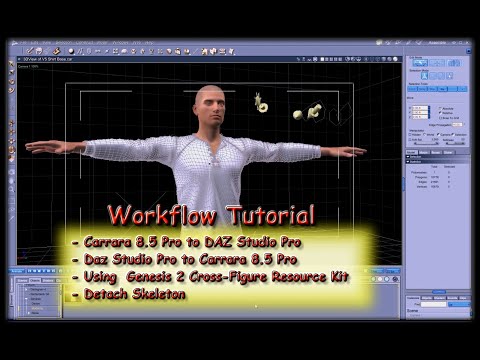
Once we're in Carrara, select the model level (Actor, in this case) and go Edit > Fenric > Unlock Figure
- Then go Animation > Detach Skeleton
- Drag Actor out of the group and rename it to the hair
- We can now delete the group you've pulled Actor from.
So now we have Prop hair. We can now use scaling or the vertex model tools in the Assemble room to shape the hair to M4
Once that's done, export as OBJ using the Daz Studio preset - I never include texture with export in this phase
In Daz Studio, load in M4, the import the hair prop you've just exported as OBJ. Don't parent it to M4 or anything, just bring it into Studio
Now open the Transfer Utility and transfer from M4 to the hair. By the end of the process, you'll have hair that follows M4's poses but perhaps not shapes. We can use Carrara (or Hexagon) to model morphs for shaping or movement or whatever, and add those to your new hair via MorphLoader Pro.
Go to Josh Darling's YouTube channel for all of the tutorials you'll want on using the tools in Studio to make this all happen. ;)
Can Genesis 3 figures be imported into Carrara?Next question: Are the "Genesis 3 Female Body Morphs" usable from within Carrara on Janette?
If you have a character all set up in Carrara but now you've bought more morphs and want to use them with that figure, we can Transfer the Shapes to the frsh figure using NLA.
This also works if we decide to go the other way and Reduce the Amount of Morphs* we have on a figure - except that if we remove morphs that are part of the original character being transferred, those will cause a one-time error message and simply won't transfer - but everything else will come through fine.
* the article is written for Genesis 1, but the same method works for any of the Genesis generations
I did not know this, obvioiusly I must have not been paying attention at the time DOH? This sounds amazng and just read your link. So, once you do that, do you just then save the updated character with the new/changed data back to your browser as a car file that then loads as 'normal'? And then you can repeat this as you collect any new morphs or want to drop some?
Sorry I have never used NLA before and am really looking forward to trying this! Love your new site!
SileneCan Genesis 3 figures be imported into Carrara?Next question: Are the "Genesis 3 Female Body Morphs" usable from within Carrara on Janette?
Just make sure you load a Fresh Johnathon or Janette after buying new morphs for them. When we save our Genesis characters in Carrara format, their morphs collection is saved with the figure, and won't automatically add new ones - so we must load a fresh figure from the library.
If you have a character all set up in Carrara but now you've bought more morphs and want to use them with that figure, we can Transfer the Shapes to the frsh figure using NLA.
This also works if we decide to go the other way and Reduce the Amount of Morphs* we have on a figure - except that if we remove morphs that are part of the original character being transferred, those will cause a one-time error message and simply won't transfer - but everything else will come through fine.
* the article is written for Genesis 1, but the same method works for any of the Genesis generations
*Released dforce Sea Salt* CommercialI also want to take some time to offer some quick tips with this particular hair.
This is one of the hairs that I would not recommend changing dynamics settings on if you are animating a simulation. Leave them be for your own sanity :)
If you are just using gravity.. knock yourself out.. it should behave just fine.
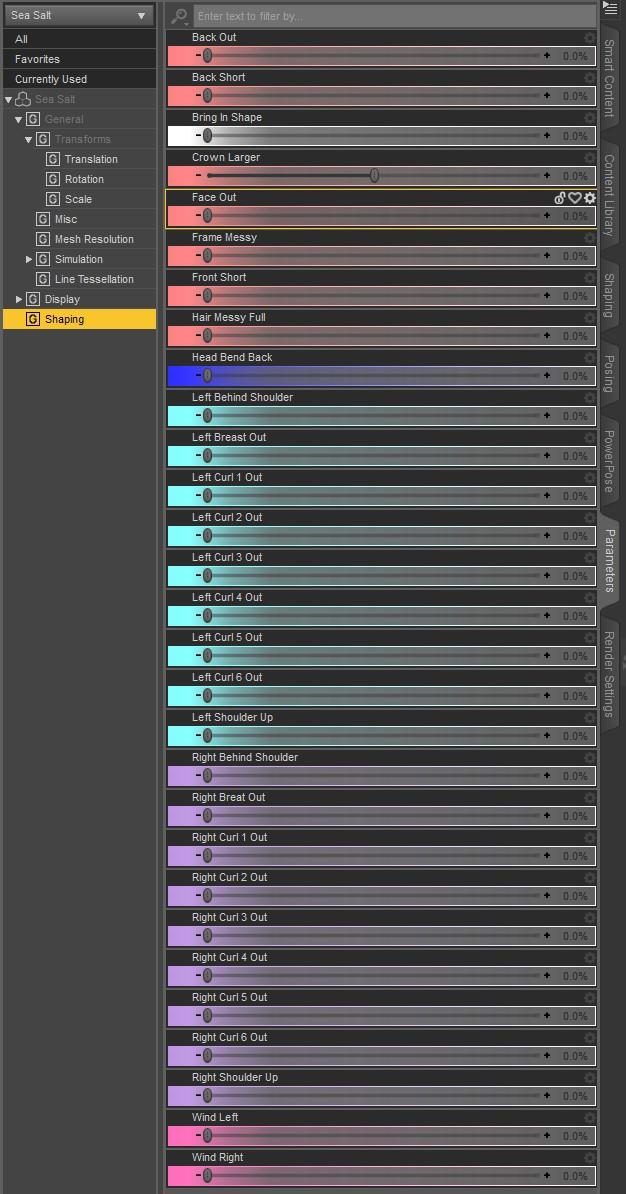
If you find your hair is sticking to the body too much, use the "Head Bend Back Morph". before simulating. It also looks so much nicer after certain simulations.
Also.. I keep forgetting to add a special preset so that the hair is visible in the nvidia viewport. Sorry guys.. I honestly never use it. So fo those of you that are struggling to figure out why its rendering invisble in the nvidia viewport:
Click on the hair in your scene.
Click on the parameters tab.
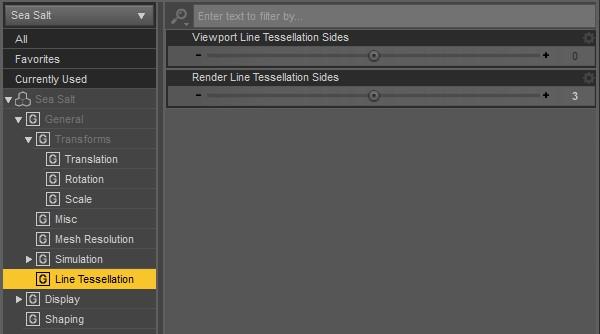
Scroll down in the parameters tab and change the Viewport line tesselation sides and change it from 0 to 3.
Also Ill make sure I add the word hair to my products in the future. It's the small simple things i miss when I put these complicated things together.
Ok, I'm having some problems...
1. It was a G3 hair trying to fit on G8. I had read in the forums to look in lost & found and tried that hair. Neither hair is named G3 or G8 so theres no way to know which is which,
2. I can't find Viewport LineTesselation sides
3. The BIGGEST problem: There is nothing that says Actor and no morphs at all that I can find.
Please help! Looking forward to trying this beautiful hair!
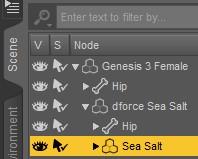
In the scene tab, expand "dForce Sea Salt" and Select "Sea Salt". The Line Teslation and Morphs will then be in the Parameters Tab.
 Angharad 8
The makeup drives me nuts. But at least we got one clean face promo. Yeah, the body is a more distinctive morph than the face, but she does look like she mixes well.
Angharad 8And three of the four outfits actually have shoes (well, boots) that someone could walk in. Most of the getups have enough pieces to make them potentially useful for kitbashing, anyway.
Not impressed with the hair being only Iray. That's for sure.
Not a bad base morph, although there are others I've liked better. I do like the add-on characters in the bundle. One of those is also Iray only, but I'm more likely to just convert a character skin. Hair is trickier, although there are at least a v=couple of shader packs which will give me at least a basic 3DL version to work from.
If someone brought out a realistic set of 3DL hair shaders, it would hit the cart so fast there'd be skidmarks.
Daz 3D is part of

Connect
DAZ Productions, Inc.
7533 S Center View Ct #4664
West Jordan, UT 84084Licensing Agreement | Terms of Service | Privacy Policy | EULA
© 2026 Daz Productions Inc. All Rights Reserved.