-
Pablo and Hans Genesis 9 HD Character Bundles
nonesuch00 said:
Thanks for reminding me I have the Pablo bundle on my wishlist & never bought it.
I've not tried it yet, but supposedly if you are a premier member you can transfers the Genesis 3, Genisis 8, and Genesis 8.1 models to Genesis 9. I for one am very curious as to how well the NutCracker Soldier would come out at the other end of that process as I've not triied it yet.
You definitely should get him. He's great.
I can transfer the shapes but they don't look the same to me. I have all the conversion tools (now what's the phrase... all the gear and no idea! :D) but I cant seem to get the same results as the original 8.1 versions. Also, as I've said previously, you can only convert the standard version, not the HD version unlss you are a PA. At least that's how I understand it so, the figures are always going to be smoother. If anyone has had success with either of the models though, do let me know.
I have the NutCracker Soldier but judging by my success rate on the more human characters, I'm probably not the best person to test this for you!
Shape Transfer DAZ Premier and other thingsOkay, I bought into the Premium thing and have some questions.
Are there any tutorials on how to use the Shape Transfer, to get ealier versions of my characters into Genesis 9 as advertised?
What about Geometry Sculptor? Pose Converter? Render Que?
I have tinkered around and I can't find some of these things, and this was a big factor in deciding to put up the money to buy the Premier tier in the first place.
I hate to say this but I am feeling a little ripped off. Where are the supposed discounts, and freebies? Search as I might I have yet to see anything labled as such.
Am I just not understanding how it is labeled or it there some place to look?
Thanks.
File TransferHello,
I need proper help. I work with a Mac. I've had a new Mac for a year now. I can't move my DAZ Studio from my old Mac to my new one. The DAZ files are from a Mac Late 2013 to a Mac Pro 2023. So far, I haven't found a proper tutorial. I don't know why I can't just copy the DAZ files to other hard drives. I hope a Mac user from Berlin will get in touch and help me right away. I'm willing to pay, too. But I'd also be happy if someone from another side of the world could help me. Thank you in advance, and I'm waiting eagerly. Thank you very much,
Reza
Workaround for G8 SBH Auto-Fit failure to G9If you dont want to make it again, you have two options:
Option 1: Export and rig using transfer utility
Dial up clone morph on G8/G9 as required so both donor and acceptor figure are same shape. Export the G8 SBH with Tesselation Sides value =1. On obj exporter dialogue ensure Write Polylines is checked. Import the exported obj back into Daz. Use Transfer Utility to transfer from Source (Genesis 9*) rigging to the Target (Imported SBH obj), setting shape to Current for both. If the Genesis 9 figure is not at default shape (e.g., if you have dialled in a clone shape on the Genesis 9 figure or any other active morph), you will need to set Reverse Source Shape from Target (or whatever it is called) in the Transfer Utility advanced options.
*Or Genesis 9 haircap instead of Genesis 9 figure.
Option 2: Genesis 8 Skinsuit on Genesis 9
Create a skinsuit for Genesis 9 made out of Genesis 8's skin such that Genesis 9 will wear Genesis 8. You can equip the Editable SBH Object to the Genesis 8 wearable skinsuit since geomery of G8 is conserved.
Again, you will use Transfer Utility to transfer Genesis 9 rigging to Genesis 8. Again, they will need to be the same shape before you run Transfer Utility.
I have not tested if Option 2 actually works...
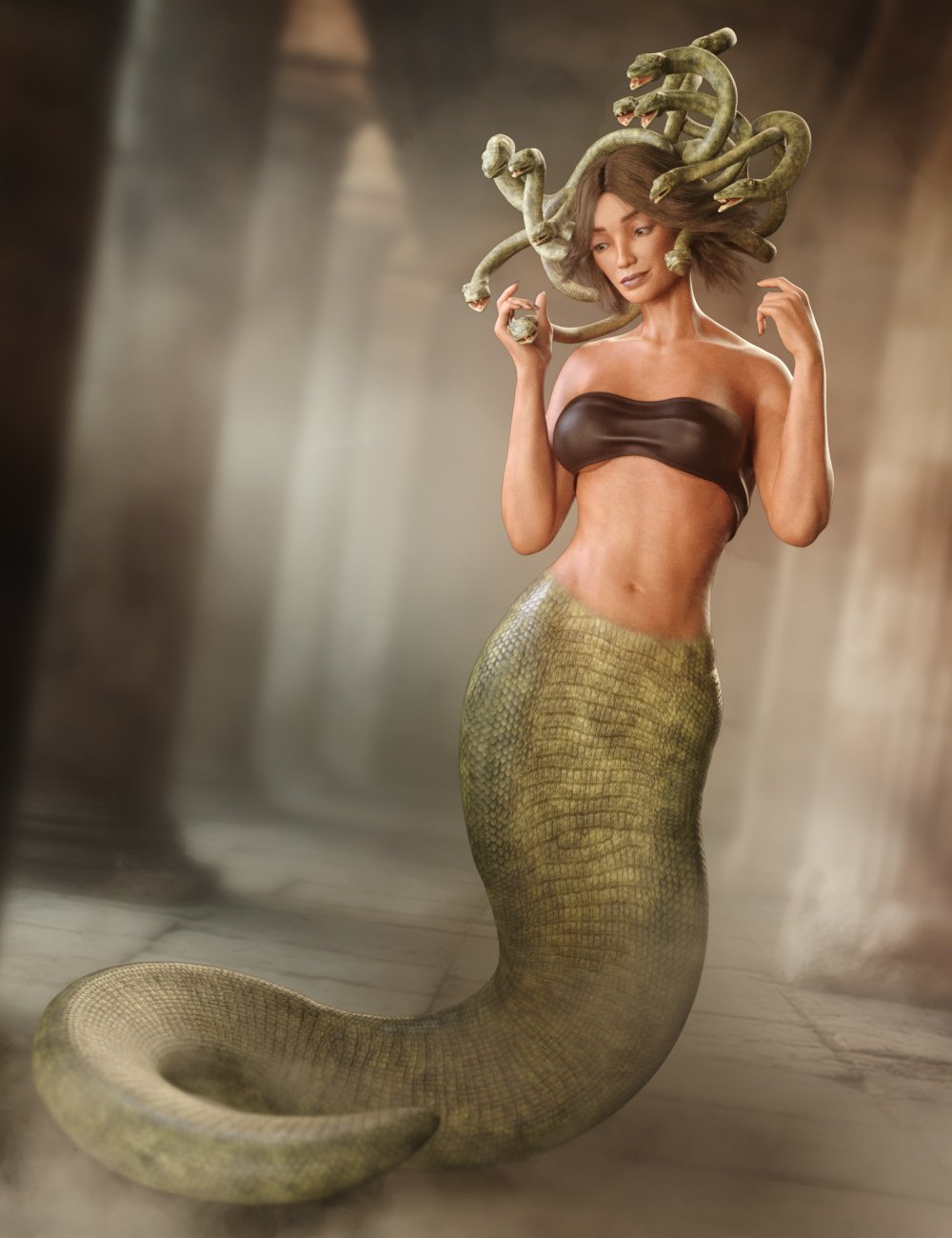
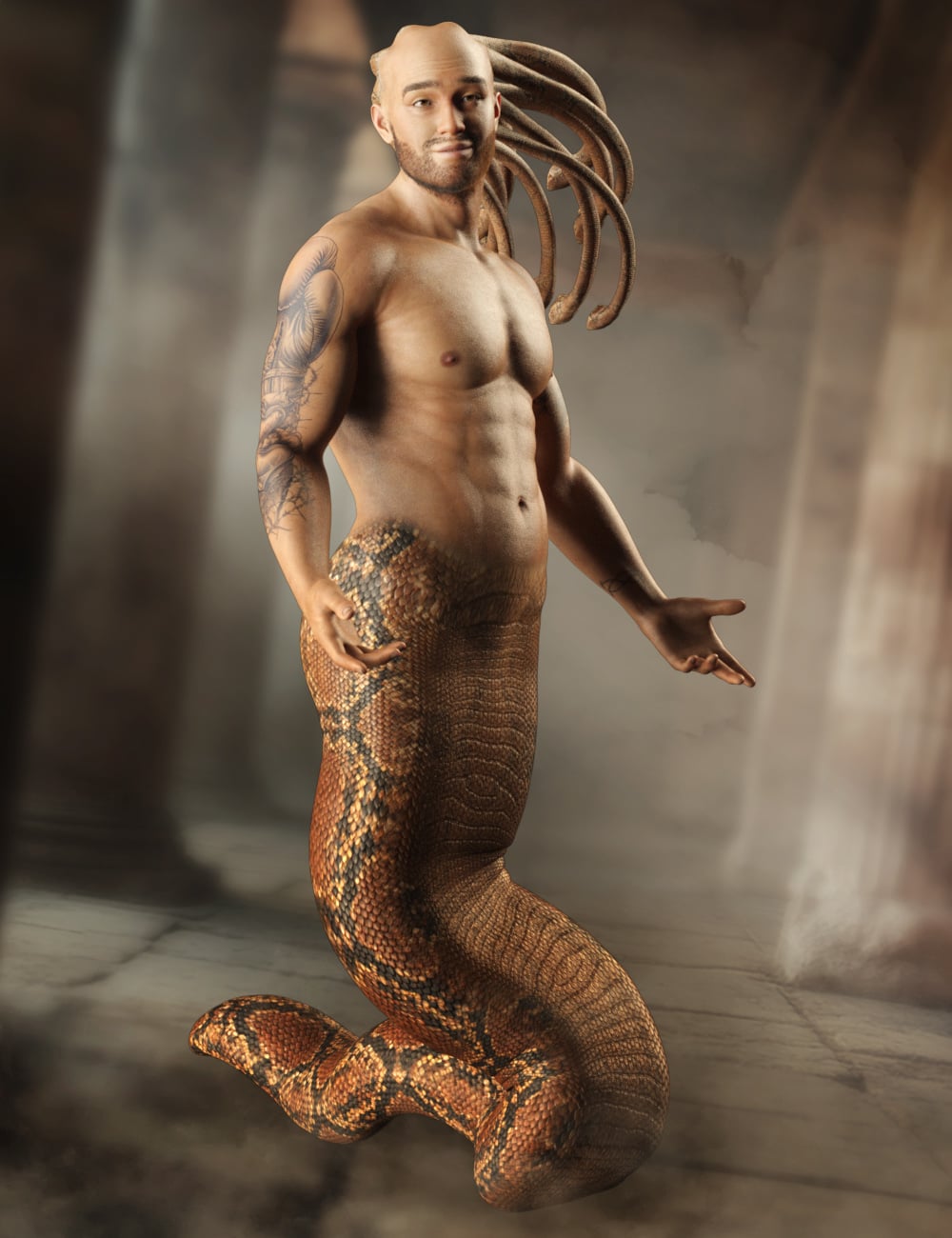
Medusae for Genesis 9Medusae for Genesis 9
https://www.daz3d.com/medusae-for-genesis-9
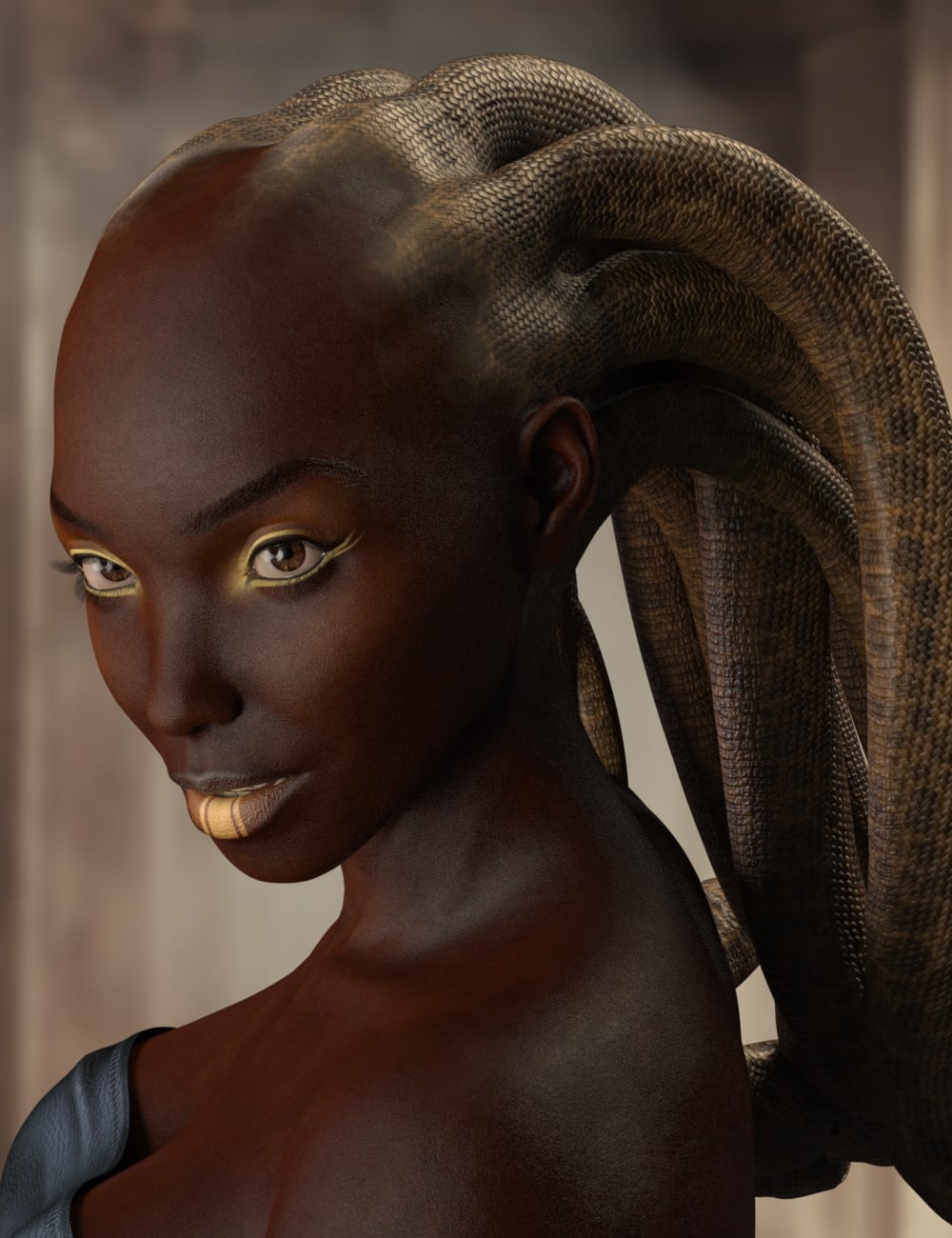
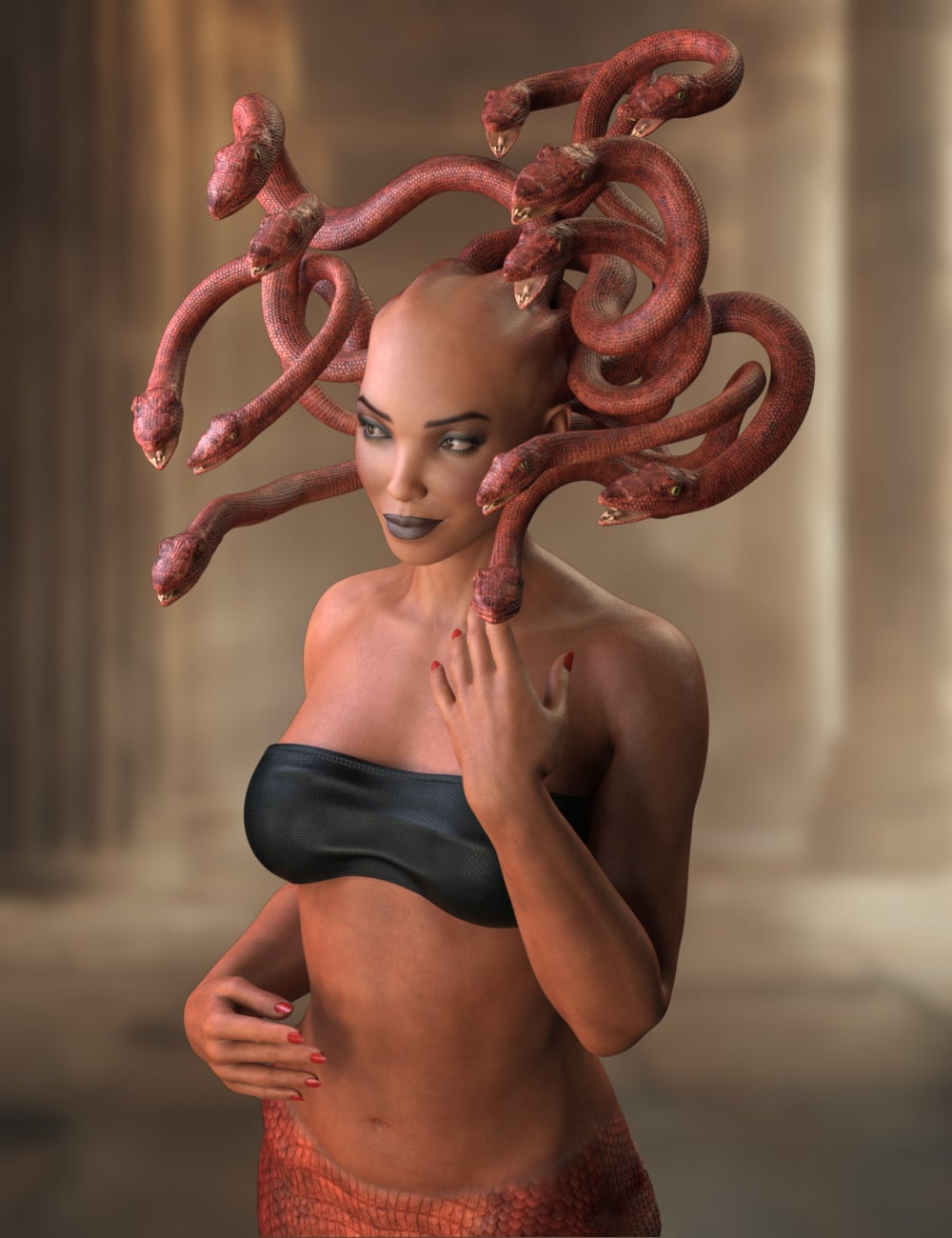
Unleash myth and menace with Medusa, a transformative 3D add-on set that lets you graft the iconic serpentine elegance of Medusa onto any of your favorite characters. Featuring a fully poseable snake-hair crown and a long, winding serpent tail, Medusae is designed for seamless integration with most Genesis 9 Characters (within reason). Ten distinct texture styles offer everything from classic snake scales to vibrant, otherworldly patterns, while an array of morph dials gives you full control of posing. Whether you're creating a cursed sorceress, a monstrous guardian, or a sci-fi serpent hybrid, Medusae brings powerful mythological flair and dynamic flexibility to your creations.
Medusae comes with High Definition morphs, Ultra Realistic textures, and Snake Head and Tail Geografts to enhance their reality.
90 Easy pose dials to simplify posing the head snakes, including 5 full style presets.
8 Full Tail easy pose dials for posing the snake body graft.
What's Included and Features
- Medusae for Genesis 9: (.DUF)
- One Medusae Wearable Parts Preset
- One Medusae Shaping Preset
- Material Options:
- Ten Skin Style Material Presets
- Addons:
- 01 Snake Head Geograft Preset
- 01 Tail Geograft Preset
- 02 Geoshell addons for seamless blending to other characters
 How can I modify clothing in blender which has multiple objects parented to it?
So I have learnt to sculpt and modify single piece clothing, but the one I want to modify now has 10 separate buttons attached as objects which will cause a vertice mismatch if I export the shirt with the buttons and then importing as a morph to the shirt.
I could export each individual button along with the base shirt and then import the morph for each individual item but that will be very time consuming, is there an easier way to do this?
Looking for a Loose fitting woman's vintage blouseThis is sort of like that: https://www.daz3d.com/mid-victorian-outfit-for-genesis-8-female-s, It has a "no jacket" morph that makes it a bit poofier, but looks silly if you don't use it with the included skirt. I don't know how it dforces, as I have never tried.
 Organizing Resale-Legal Morphs in Daz Studio: Seeking a Global, Scalable Workflow
As long as you include only settings (so that the original morph product is needed for them to do anything) then you can use any morph in character creation, though of course the more you use the more required products you have to list and the smaller your potential market.
By categories do you mean paths (groups) in the property listings? Yes, those are local settings - you could update the saved assets, but any update would overwrite your changes. You could save your own version of the figure, with favourites and paths, as a character preset and use that, rather than the default preset or a character, to load it any time you wanted to work on morphing.
The scripts here http://docs.daz3d.com/doku.php/public/software/dazstudio/4/referenceguide/scripting/api_reference/samples/start#products show how to access product information - that would help with identification, and you could add code to regroup the morphs on-the-fly, which would allow you to use any character preset and then turn it into one organised for creation work.
Organizing Resale-Legal Morphs in Daz Studio: Seeking a Global, Scalable Workflow"Organizing Resale-Legal Morphs in Daz Studio: Seeking a Global, Scalable Workflow"
Hi all,
I’ve been working to organize my morphs in Daz Studio in a way that lets me easily identify and use only those that are legally safe for resale — namely merchant resource (MR) morphs and the default Daz morphs from Genesis Starter Essentials. My end goal is to speed up character creation while keeping everything legally clean.
Here’s a breakdown of where I’m at and what I need help with:
WHAT I'M TRYING TO DO
• Build a streamlined workflow that lets me quickly locate morphs I’m allowed to use in models for resale.
• Include both:-
Merchant Resource morphs I’ve legally acquired.
-
Default Daz morphs that come with Genesis Starter Essentials (not for baking, but usable otherwise).
• Make this organization global, not just per-scene.
WHAT’S NOT WORKING
GLOBAL ORGANIZATION TOOLS ARE LACKING
Favorites, custom categories, etc. seem to be saved per scene or figure, not globally.
I want something that works across all projects — not just clever scene-specific workarounds that fall apart later.IDENTIFYING THE DEFAULT MORPHS IS A PAIN
Once you install additional content, it’s almost impossible to tell which morphs came from Genesis Starter Essentials.
I even installed Daz on a second PC with nothing but the Genesis base to try and isolate the defaults.
I created a model with all default morphs active for reference.
But Daz doesn’t give a built-in way to cleanly export or categorize these morphs globally.NO CLEAR LIST OF WHAT’S FREE AND USABLE FROM DAZ
Morphs like the “200+” set are easy to identify, but others from Genesis Starter Essentials — while technically usable if not baked — aren’t documented clearly anywhere that I can find.SCENE TAB ORGANIZATION IS A SECONDARY CONCERN, but if you have good solutions, I'm all ears.
Even when trying to keep things tidy in the Scene tab, parenting quirks or hierarchy bugs often make reusable setup a hassle.
If there’s a workaround for organizing without breaking things, I’d love to know.WHAT I'M LOOKING FOR
• A way to create and apply global morph categories — or at least some way to flag or filter resale-safe morphs persistently.
• A definitive list of all morphs included with Genesis Starter Essentials (or a reliable way to extract a list of them).
• Tips or tools for efficient MR morph management, ideally that don’t rely on guessing or manually checking every morph.
• Bonus: Any tricks for organizing the Scene tab without creating parenting/instancing issues when reusing content.WHAT I DON’T WANT
• I’m not looking for a “good enough” hack that falls apart after one project.
• I want something I can trust to work across my whole workflow — even if it takes some setup.Thanks so much in advance. Even partial solutions or references to threads or tools I may have missed would be a huge help!
Workaround for G8 SBH Auto-Fit failure to G9Richard Haseltine said:
Ideally work on a skullcap, not directly on the model. If this is not for redistribution you might be able to turn the ehad into a skull cap with the Geometry Editor, but I haven't tested to see if the hair would survive deleting the rest of the figure.
Welp, that was a negative. It didn't break or crash, but it seems to be the same sort of deal as when you use morph loader pro - it runs a comparison of the point count and if they don't match it bombs out.
Unless anyone has any other ideas, from scratch (with a skull cap!) it is!
Workaround for G8 SBH Auto-Fit failure to G9Richard Haseltine said:
Ideally work on a skullcap, not directly on the model. If this is not for redistribution you might be able to turn the ehad into a skull cap with the Geometry Editor, but I haven't tested to see if the hair would survive deleting the rest of the figure.
Might not even need to use the Geo Editor and risk the crash. Could probably delete the unused points in C4d and bring it in as an obj then transfer utility it, as long as I name the surface zones the same.
Add smoothing modifier to figures remove detailed mesh from advanced morphAnyway to prevent that? I know smoothing modifer prefer smooth surface, but I need to draw 2 muscled men fighting each other, add smoothing modifier to either charcter will remove all the detailed mesh from morphs like swole and viens, I tried to add more subdivisons and lower the collision value but they don't seem to work. Any workaround on this?
Star Trek Builders Unite 8: THE REBOOTbluto said:
This may be a forlorn hope, but has anybody by chance made a Tellarite morph for G8M? Or G3M or G9 even? I checked the listings on the first page of course but sometimes folks start projects that don't quite make it to Official Freebie Releasewe.
we are working on some but they arent quite ready yet. when they are they well be for g3 m/f g8 m/f and g9
Marvelous. The Klingon unis look great as well.
How to Achieve the Squeezing/Pinching Morph Effect Shown in the Image?sucan2015 said:
lilweep said:
sucan2015 said:
lilweep said:
if subdvision wasnt high enough, you can increase subdivision...
if you cant load hd morphs, then you dont need to, you dont need a poseable figure for a static render. you can just use your subdivided figure as a static mesh.
Do you mean I should increase subdivisions in ZBrush and then export to DAZ?
Zbrush is an example of a sculpting software where you would do this yes
If so, would I lose all the materials and textures in the process?
Well, they wouldnt be "lost" you just need to transfer them. Obviously this process below assumes your method for exporting and importing a sculpt doesnt remove the Surfaces.
Steps:1. Import your subdivided and sculpted obj file from Zbrush (or whatever software you suclpted it in)
2. In the surfaces tab for the imported sculpt, add the same shader that was used on your original figure (e.g., Iray Uber, or PBR Skin, etc)
3. Hide the original figure
.4. Copy the surfaces from the original figure to the imported figure. (Right click and copy in surfaces tab of original figure, paste in surfaces tab for imported figure)
Alternatively for making HD morphs there are options on youtube.
I might have made a mistake, but I’m not sure. When I increase subdivisions in ZBrush, finish sculpting, and use GoZ to return to DAZ, I choose "Create New Object." However, the newly imported figure only has one surface, so I can’t copy surfaces from the original figure.
If possible, please let me know what I’m doing wrong. Thanks!GoZ does not preserve groups (I am not sure if this inherent to GoZ or just the way it is implemented). Use OBJ instead, and import materials as groups in the options in ZBrush, but you will need to rename the groups afterwards (unless they have changed it recently ZBrush does not preserve names even if it preserves the actual grouping).
Genesis 9 FACS – How do you drive hundreds of DAZ morphs with a 2-D facial board in Blender?Yea, I will use the Daz morph. But I also want to use 2D facial controller to intuitivelly tweak those parameters.
Thanks for the advice.
How to Achieve the Squeezing/Pinching Morph Effect Shown in the Image?lilweep said:
sucan2015 said:
lilweep said:
if subdvision wasnt high enough, you can increase subdivision...
if you cant load hd morphs, then you dont need to, you dont need a poseable figure for a static render. you can just use your subdivided figure as a static mesh.
Do you mean I should increase subdivisions in ZBrush and then export to DAZ?
Zbrush is an example of a sculpting software where you would do this yes
If so, would I lose all the materials and textures in the process?
Well, they wouldnt be "lost" you just need to transfer them. Obviously this process below assumes your method for exporting and importing a sculpt doesnt remove the Surfaces.
Steps:1. Import your subdivided and sculpted obj file from Zbrush (or whatever software you suclpted it in)
2. In the surfaces tab for the imported sculpt, add the same shader that was used on your original figure (e.g., Iray Uber, or PBR Skin, etc)
3. Hide the original figure
.4. Copy the surfaces from the original figure to the imported figure. (Right click and copy in surfaces tab of original figure, paste in surfaces tab for imported figure)
Alternatively for making HD morphs there are options on youtube.
I might have made a mistake, but I’m not sure. When I increase subdivisions in ZBrush, finish sculpting, and use GoZ to return to DAZ, I choose "Create New Object." However, the newly imported figure only has one surface, so I can’t copy surfaces from the original figure.
If possible, please let me know what I’m doing wrong. Thanks!How do I Link Multiple Objects for Sculpting?If all you need is to transfer the sculpt to the eyebrows for reference then it can be done in blender with a surface deform modifier. But you have to switch to object mode to update the bind.
[Released] ManFriday’s Figure Converter for Genesis 9 [Commercial]
The problem could be adjusting the rigging to shape. Is the issue when you pose the figure?suffo85 said:I don't own this product but found this thread when doing my own manual conversions with G3 to G8/9, and was looking for an answer to the hand stretching problem. This thread has expanded a bit since then, and I see you've posted a workaround, which is awesome lol so I'm a bit late to the party but I puzzled the entire issue out and fixed it, at least for my manual conversions. The problem with G3 is the T pose, the stock clones do not attempt to align with it at all and remain in the A pose. Just putting G3 into the A pose wasn't enough to outright solve the issue though, I'm speculating because of the differences in the way the shoulders work. It fixes some of it, but then other parts of the resulting conversion will be warped like the arms.
The way I solved it was by creating my own clone from scratch and using Blender's shrinkwrap modifier wrapped G9 to G3's T-pose including the weird shoulder geometry.
Anyway, it's simple to make with a little patience and positioning as long as you're not afraid to mangle G9 a bit in Blender lol. Essentially it's just adding a shrinkwrap modifier to G9 and then stretching it until you can ensure that when you apply the modifier all of the bodyparts go where they're supposed to, stretching and mangling upper G9 torso is definitely required lol.
I hope this post can bring about a fix for you guys.

Also I don't mind providing my clones for download, I don't need or want anything for them, I never made them available because I'm not sure if they would violate Daz's copyright since they're essentially still in their original forms, just shrinkwrapped to other Genesis versions and origin poses.
Edit to add, if you attempt to do this make sure that before you export your final product in Daz Studio (for example, if converting G3 to G9, your final product would be the G9 morphed into whatever character you've converted), make sure you return it to the proper A pose for G9 using the arm bends 45 and -45, and the leg positioning, etc. Same applies if you're exporting our a G8 morph except the leg bends are a little different then.
Daz Studio 6 Beta - version 6.25.2026.19821! (Updated July 23, 2026)Then I loaded Genesis 9 Base Anime Feminine and got all these warnings:
2025-05-05 00:47:38.495 [INFO] :: Base morphs connected: Base Anime Feminine << Genesis 9 Toon Mouth
2025-05-05 00:47:38.496 [INFO] :: Creating morph projection map: Base Anime Feminine << Genesis 9 Toon Mouth
2025-05-05 00:47:38.505 [INFO] :: Finalizing scene data...
2025-05-05 00:47:38.527 [WARNING] :: file:///N:/DAZ 3D/Studio/My DIM Library/data/Daz 3D/Genesis 9/Base/Tools/Utilities/Toon Preparation.dse:510:7 Variable "sDrawStyle" is used before its declaration at 629:6.
2025-05-05 00:47:38.527 [WARNING] :: file:///N:/DAZ 3D/Studio/My DIM Library/data/Daz 3D/Genesis 9/Base/Tools/Utilities/Toon Preparation.dse:530:58 Variable "sDrawStyle" is used before its declaration at 629:6.
2025-05-05 00:47:38.528 [WARNING] :: file:///N:/DAZ 3D/Studio/My DIM Library/data/Daz 3D/Genesis 9/Base/Tools/Utilities/Toon Preparation.dse:541:11 Variable "sDrawStyle" is used before its declaration at 629:6.
2025-05-05 00:47:38.528 [WARNING] :: file:///N:/DAZ 3D/Studio/My DIM Library/data/Daz 3D/Genesis 9/Base/Tools/Utilities/Toon Preparation.dse:424:23 Variable "sShellName" is used before its declaration at 631:6.
2025-05-05 00:47:38.528 [WARNING] :: file:///N:/DAZ 3D/Studio/My DIM Library/data/Daz 3D/Genesis 9/Base/Tools/Utilities/Toon Preparation.dse:431:42 Variable "sShellLabel" is used before its declaration at 632:6.
2025-05-05 00:47:38.529 [DEBUG] :: Selecting SelectionTarget Genesis9 G9ToonMouthDaz Studio 6 Beta - version 6.25.2026.19821! (Updated July 23, 2026)Then I loaded the gray base Genesis 9 (not Dev Load) and got these warnings:
2025-05-05 00:26:00.771 [INFO] :: Setting up follow targets...
2025-05-05 00:26:00.771 [INFO] :: Start following: Genesis 9 << G9 Eyebrows Card Style 06
2025-05-05 00:26:00.771 [INFO] :: Following started: Genesis 9 << G9 Eyebrows Card Style 06
2025-05-05 00:26:00.771 [INFO] :: Connect base morphs: Genesis 9 << G9 Eyebrows Card Style 06
2025-05-05 00:26:00.780 [INFO] :: Creating morph projection map: Genesis 9 << G9 Eyebrows Card Style 06
2025-05-05 00:26:00.784 [INFO] :: Base morphs connected: Genesis 9 << G9 Eyebrows Card Style 06
2025-05-05 00:26:00.849 [INFO] :: Creating morph projection map: Genesis 9 << G9 Eyebrows Card Style 06
2025-05-05 00:26:00.852 [INFO] :: Finalizing scene data...
2025-05-05 00:26:00.874 [WARNING] :: file:///N:/DAZ 3D/Studio/My DIM Library/data/Daz 3D/Genesis 9/Base/Tools/Utilities/Remove Duplicate Eyebrows.dse:8:10 Variable "oNode" is used before its declaration at 30:6.
2025-05-05 00:26:00.874 [WARNING] :: file:///N:/DAZ 3D/Studio/My DIM Library/data/Daz 3D/Genesis 9/Base/Tools/Utilities/Remove Duplicate Eyebrows.dse:25:5 Variable "oEyebrows" is used before its declaration at 41:6.
2025-05-05 00:26:00.876 [DEBUG] :: N:/DAZ 3D/Studio/My DIM Library/data/Daz 3D/Genesis 9/Base/Tools/Script Loads/Eyebrows/Card Eyebrows MAT.duf
2025-05-05 00:26:00.877 [INFO] :: Prepare asset load (merge): /data/Daz 3D/Genesis 9/Base/Tools/Script Loads/Eyebrows/Card Eyebrows MAT.dufDaz 3D is part of

Connect
DAZ Productions, Inc.
7533 S Center View Ct #4664
West Jordan, UT 84084Licensing Agreement | Terms of Service | Privacy Policy | EULA
© 2026 Daz Productions Inc. All Rights Reserved.