-
NOA 8.1
That's the first thing came to my mind when I saw himMimicMolly said:He looks like Michael 4.NOA 8.1He looks like Michael 4.How to use a character bought from the store?@davidsaul, it happened to me too, I got some free items, then I run Daz Studio and I was asked to get the "missing items" to get started with the interactive tutorial.
These files were free when I got them from the store, so check them if are still free:
https://www.daz3d.com/using-auto-fit-victoria-4-to-genesis-2-female
https://www.daz3d.com/using-auto-fit-genesis-to-genesis-2-female
https://www.daz3d.com/using-auto-fit-michael-4-to-genesis-2-male
https://www.daz3d.com/using-auto-fit-genesis-to-genesis-2-male
The last two products requiere these: "Michael 4 for Genesis 2 Male" and "Basicwear for M4"
Like you I am out of luck, because these are on sale in the store.
So, its up to you what do you want do next.
I suggest you to check the freebies section first, then go to the store and do a search, wish you good luck!
How to use a character bought from the store?Welcome davidsaul,
This tripped me up at first too. Many of the items in the store are "addons" to other products so you need to check carefully the things you purchase.
Check in the description where it says "Compatible Figures" or "Required Products" - you need to make sure that anything listed there are items you have. If you have already purchased the items the store will say "(owned)" after the product link - unless it requires one of the Genesis models which come free with Daz but are not tagged as owned for some reason. On the catalog thumbnails page under the items you will see that these have V4 & M4 which correspond to Victoria 4 and Michael 4 - so you can see this info there too.
Also, that item is for Poser and so I believe you would be able to use it in Daz (if you had the right models) but may not be too straight forward.
I would try and stick to items that specify "Daz Studio 4.20" in the compatible software and for compatible figures it would probably be best to stick to ones that are for the Genesis 8 (or 8.1) range for now. You can use things that are for earlier Genesis figures but they do have to be converted (usually that seems to work OK) so best to leave that till you are more familiar with the software.
Also, as a general note. Always check the "What's Included and Features" section - it will probably be a bit confusing at first but it does tell you what is included which is not always everything that you see in the promo pic.
How to use a character bought from the store?The Clown Clan isn't a model. It is a set of morphs and textures for the Michael 4 and Victoria 4 figures and requires them for use.
How to use a character bought from the store?Hello everyone, I'm a brand new Daz user and am finding Daz Studio very confusing so far.
I purchased the Clown Clan model from the store but I just can't figure out how to use it. It keeps throwing up an error saying it can't find a file for a Michael 4 or something? I have no idea what this means, any suggestions would be highly appreciated. Thanks
Regards
David
3D Printing Licences - What?Taoz said:
Wanderer said:
Haven't been following the conversation here much, but wanted to share what I've found. Response from support ticket as of yesterday was no word on an automated ability being added. Let me tell you why you might not want to have an automated process. I've spent the last several days going through and adding hundreds of licenses manually. Today, I came across two bundles that were not free and (I'm pretty sure) should've been: Monique 6 Starter Bundle and Keiko 6 Pro Bundle (none of the items in either bundle showed up as free after adding to the cart). If I had trusted an automated process, I would not have known some licenses were missed. As it is, I was able to request the addition by way of support ticket. Will see how that goes. Will post if there's further trouble.
SO, yeah, maybe an automated process isn't going to be the greatest if there turn out to be many more bundles like these. It took me going through many hundreds of items just to discover these two. I have several thousand products left to get.
If you own a bundle you also own the individual items, and these are all recorded in your account. So if DAZ just ignore the bundles which can't be printed themselves anyway, which is the logical thing to do, and just add the license to all regular items, that shouldn't be a problem. All in all it should be a fairly simple database operation I believe. Iterate through the items of an account, check if item was purchased before 2022-08-12 and is a DAZ Original, if yes, add license to the item.
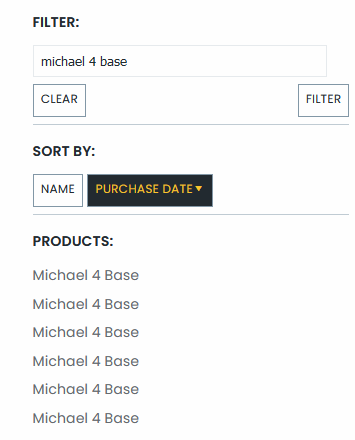
Only problem I see is accounts with duplicate items, which may or may not cause issues. I know of a couple of people with that issue, and I got it myself too not long ago. For my part it occured after I added a lot of Starter bundles to my account which at that time you could do for free if you owned all the items in them (which you do if you own the pro bundle), to avoid them cluttering the store pages. After that I now have a number of products with one or more duplicates, e.g. Michael 4 is listed 6 times in my library.
I appreciate the attempt at helping, but let me be clear in what I've tried to share. I went through hundreds of my items, all of the Daz Originals, so far they've all worked except for a handful that I might not have acquired before the cut-off. And then today, I stumbled across a bunch of items that would not work. Add the individual items, which all belonged to those two bundles, did NOT work. Everything else has worked, including textures and bundles... even Studio lights and Iray shaders. Except for those two bundles. Which means, for some reason unknown to myself, those two bundles were not being counted even though they should've. I've had both of those bundles for over a year. They are both Daz Originals. They should've been free, but they weren't.
So, I reiterate what I said before. If I were using an automated solution, which I previously advocated for, I would not have known about the failure of those licenses to count until it would likely be past the deadline to acquire them. Should it be easy to do? Yes. It SHOULD.
You do you. I'm not waiting for the automated "solution" which has not been promised. Support told me yesterday there was no word on whether one would be forthcoming. They told me they wouldn't even know if it did happen and that I'd have better chances finding out through the store pages. SOoooo... I'm not waiting for that solution when, if I do it myself, it'll be done to my standard, and I can put in a support ticket for the ones that didn't work, just as I did for those two bundles. Besides, with Daz Deals configured properly, it doesn't take too long to do a hundred of them. A few more days, and I should have them all. If you want to wait for a possible solution, that's fine. Since I now know that some items might get missed, I'd rather not wait.
3D Printing Licences - What?Wanderer said:
Haven't been following the conversation here much, but wanted to share what I've found. Response from support ticket as of yesterday was no word on an automated ability being added. Let me tell you why you might not want to have an automated process. I've spent the last several days going through and adding hundreds of licenses manually. Today, I came across two bundles that were not free and (I'm pretty sure) should've been: Monique 6 Starter Bundle and Keiko 6 Pro Bundle (none of the items in either bundle showed up as free after adding to the cart). If I had trusted an automated process, I would not have known some licenses were missed. As it is, I was able to request the addition by way of support ticket. Will see how that goes. Will post if there's further trouble.
SO, yeah, maybe an automated process isn't going to be the greatest if there turn out to be many more bundles like these. It took me going through many hundreds of items just to discover these two. I have several thousand products left to get.
If you own a bundle you also own the individual items, and these are all recorded in your account. So if DAZ just ignore the bundles which can't be printed themselves anyway, which is the logical thing to do, and just add the license to all regular items, that shouldn't be a problem. All in all it should be a fairly simple database operation I believe. Iterate through the items of an account, check if item was purchased before 2022-07-12 and is a DAZ Original, if yes, add license to the item.
Only problem I see is accounts with duplicate items, which may or may not cause issues. I know of a couple of people with that issue, and I got it myself too not long ago. For my part it occured after I added a lot of Starter bundles to my account which at that time you could do for free if you owned all the items in them (which you do if you own the pro bundle), to avoid them cluttering the store pages. After that I now have a number of products with one or more duplicates, e.g. Michael 4 is listed 6 times in my library.
AIUTO...CHI CONOSCE L’ITALIANO? PARTE TREDICICrios said:
Concocordo con Silvhe, io lo uso dalla 2.5 e solo verso la 3.0, quando finalmente aggiunsero il rigging, che la DAZ creò la doppia versione. Free senza rigging e a pagamento con il rigging, da dire che all'epoca era possibile creare personaggi con il rig che funzionava anche in Poser, in quanto era ancora usati Victoria 4 e Michael 4.
Orpo quanto son vecchio e non me ne ero accorto! (◉_◉)
Io ho l'installazione della versione 2.0 nella mia libreria di backup e da qualche parte dovrei avere anche quella della 1.8...Però da quel che ricordo anche su quelle versioni era possibile realizzare delle animazioni complesse, non era solo "una posa e renderizza".
AIUTO...CHI CONOSCE L’ITALIANO? PARTE TREDICIConcocordo con Silvhe, io lo uso dalla 2.5 e solo verso la 3.0, quando finalmente aggiunsero il rigging, che la DAZ creò la doppia versione. Free senza rigging e a pagamento con il rigging, da dire che all'epoca era possibile creare personaggi con il rig che funzionava anche in Poser, in quanto era ancora usati Victoria 4 e Michael 4.
Stop IK Chains from loading on a figure (Inverse Kinematics)The Pythion is, I think, in Poser fprmat and probably has IK chainss et up in the CR2 file. Those can be edited out (with a text editor) - there are instructions around for doing it with Victoria 4 and Michael 4 I think.
Converting Characters: M4 to G8M?I've scoured the store and cannot seem to find a conversion product to let me use an M4 character on G8M. I used Giacomo (https://www.daz3d.com/giacomo-for-michael-4-and-hiro-4) years ago and wanted to see if I could use him again. I'd rather use G8M. I saw some conversion products but they didn't go back far enough (that I could see) so I wondered if I overlooked the product.
If there isn't a product like that, is converting a character hard? I'd love some pointers if anyone is in the know about doing this and willing to give pointers to me.
Thanks a bunch!
AIUTO...CHI CONOSCE L’ITALIANO? PARTE TREDICI@Cornelius
Innanzitutto benvenuto.
Ribadisco anche io cosa ti ha detto @Imago... dipende da cosa vuoi farci.
La 3060 avendo 12GB immagazzina più asset in memoria (modelli e texture) e dunque permette di gestire scene "enormi" ma renderizza più lenta rispetto la TI (che ha invece più processori) che avendo meno memoria può contenere scene meno pesanti.Dipende da cosa usi di solito della libreria DAZ: se usi personaggi come Victoria/Michael 4, Genesis 1/2/3 e relativi vestiti/accessori puoi usare la TI perchè i modelli e le texture non sono così pesanti e dunque 8 GB ti bastano (a meno che non fai render di quartieri), inoltre la TI ti fa renderizzare il tutto più velocemente con Iray.
Se invece usi i Genesis 8/8.1 con i morph HD (che moltiplicano di 4 o anche 16 volte il numero di facce) e poi usi i vestiti con Dforce e ambientazioni con texture da 8-16k dovresti usare una scheda video in grado di contenere questi GB anche se renderizzerai ad una velocità minore. Ricordati che puoi sempre spezzare il render in più parti e poi ricomporlo con Photoshop (personaggio + sfondo) o puoi usare plugin per ridurre le texture e il numero di poligoni (Decimator della DAZ).
Infine usi Iray in versione interattiva (real time)? Se si la TI velocizza l'anteprima.
Come vedi entrambe hanno vantaggi e svantaggi.. ma sta a te sceglierla in base all'uso che ne farai.[Released] Bone Minion for Genesis Poses [Commercial]RiverSoftArt said:
rhye_7b205b2b74 said:
Not sure what I bought originally 'Bone Minion for Generation 4 Poses Bundle SKU:86319 ' and now this has appeared 'Bone Minion for Genesis Poses Bundle SKU:86513 ' and you have to pay for it all over again?
What is the difference, the product page albeit the main picture is the same, I have not even got around to using it and now it is updated as a new bundle that I have to pay for all over again?
They are 2 different products.
- Bone Minion for Generation 4 Poses converts Michael 4 and Victoria 4 poses to other generations.
- Bone Minion for Genesis Poses converts Genesis poses to other generations.
Thanks for the prompt reply, I can see the difference!
[Released] Bone Minion for Genesis Poses [Commercial]rhye_7b205b2b74 said:
Not sure what I bought originally 'Bone Minion for Generation 4 Poses Bundle SKU:86319 ' and now this has appeared 'Bone Minion for Genesis Poses Bundle SKU:86513 ' and you have to pay for it all over again?
What is the difference, the product page albeit the main picture is the same, I have not even got around to using it and now it is updated as a new bundle that I have to pay for all over again?
They are 2 different products.
- Bone Minion for Generation 4 Poses converts Michael 4 and Victoria 4 poses to other generations.
- Bone Minion for Genesis Poses converts Genesis poses to other generations.
[Released] Bone Minion for Genesis Poses [Commercial]Serene Night said:
So I am a bit confused. I was trying to follow directions and load bone minion to use with Michael 4 poses.
I think part of the issue is that in the scripts folder there is only one bone minion and to find the m4 ones I must go into the product library. I kept going into scripts and clicking the one there. But this is wrong. I am not even sure which one that is It would be nice if they were in the same place.
After I used bone minion it seems to work on 2 or 3 poses for m4 and then just remain visible in the main default pose.
it seems to work initially. I only really use genesis 8.1 and 8 and want to use older poses like m4.
First off, to use M4 poses, you need to have bought the Bone Minion for Generation 4 Poses for Genesis 8 and 8.1 (or the bundle). Then you will have a Michael 4 Bone Minion and a Victoria 4 Bone Minion. If you only have a Genesis Bone Minion, you bought the Bone Minion for Genesis Poses.
After a Bone Minion has been applied to your figure, you apply poses to it. ***IF*** they change the hip, they will be transferred to your parent Genesis 8 figure. IF they do not, you need to use the Apply Changes script. With the Bone Minion showing, it is easy to see if the pose changed anything. If the pose doesn't change the hip, the Bone minion will be left in that pose. IF a pose did change the hip, the pose will be transferred and the Bone minion will be change back to the default T Pose.
If you are applying M4 poses to a Genesis Pose
[Released] Bone Minion for Genesis Poses [Commercial]So I am a bit confused. I was trying to follow directions and load bone minion to use with Michael 4 poses.
I think part of the issue is that in the scripts folder there is only one bone minion and to find the m4 ones I must go into the product library. I kept going into scripts and clicking the one there. But this is wrong. I am not even sure which one that is It would be nice if they were in the same place.
After I used bone minion it seems to work on 2 or 3 poses for m4 and then just remain visible in the main default pose.
it seems to work initially. I only really use genesis 8.1 and 8 and want to use older poses like m4.
AIUTO...CHI CONOSCE L’ITALIANO? PARTE TREDICIKainjy said:
ci puoi dire che prodotti spariranno (se non i singoli almeno per quali figure.. Michael 3/Victoria o addirittura Michael 4/Victoria 4) ? Quando ci sarà questa fine?
E' quasi un anno che la DAZ sta pulendo lo store, parecchie cose ora sono disponibili solo a chi le ha acquistate.
AIUTO...CHI CONOSCE L’ITALIANO? PARTE TREDICIci puoi dire che prodotti spariranno (se non i singoli almeno per quali figure.. Michael 3/Victoria o addirittura Michael 4/Victoria 4) ? Quando ci sarà questa fine?
Is this the KIDS 4?Moved to Art Studio as it is not a Daz Studio question.
No, it's a shape fpr Genesis that more-or-less matches Kids 4. Kids 4 is of the same generation as Victoria 4 and Michael 4 - https://www.daz3d.com/the-kids-4-base
Daz 3D is part of

Connect
DAZ Productions, Inc.
7533 S Center View Ct #4664
West Jordan, UT 84084Licensing Agreement | Terms of Service | Privacy Policy | EULA
© 2026 Daz Productions Inc. All Rights Reserved.