-
Aeon Soul Undress/Dress poses/clothes
mats76 said:
Anyone having problems with pokethroughs? For me it looks good in preview but in iray preview or render I get pokethroughs even with G8F base.
Image below is G8F base with no active morphs or hidden morphs
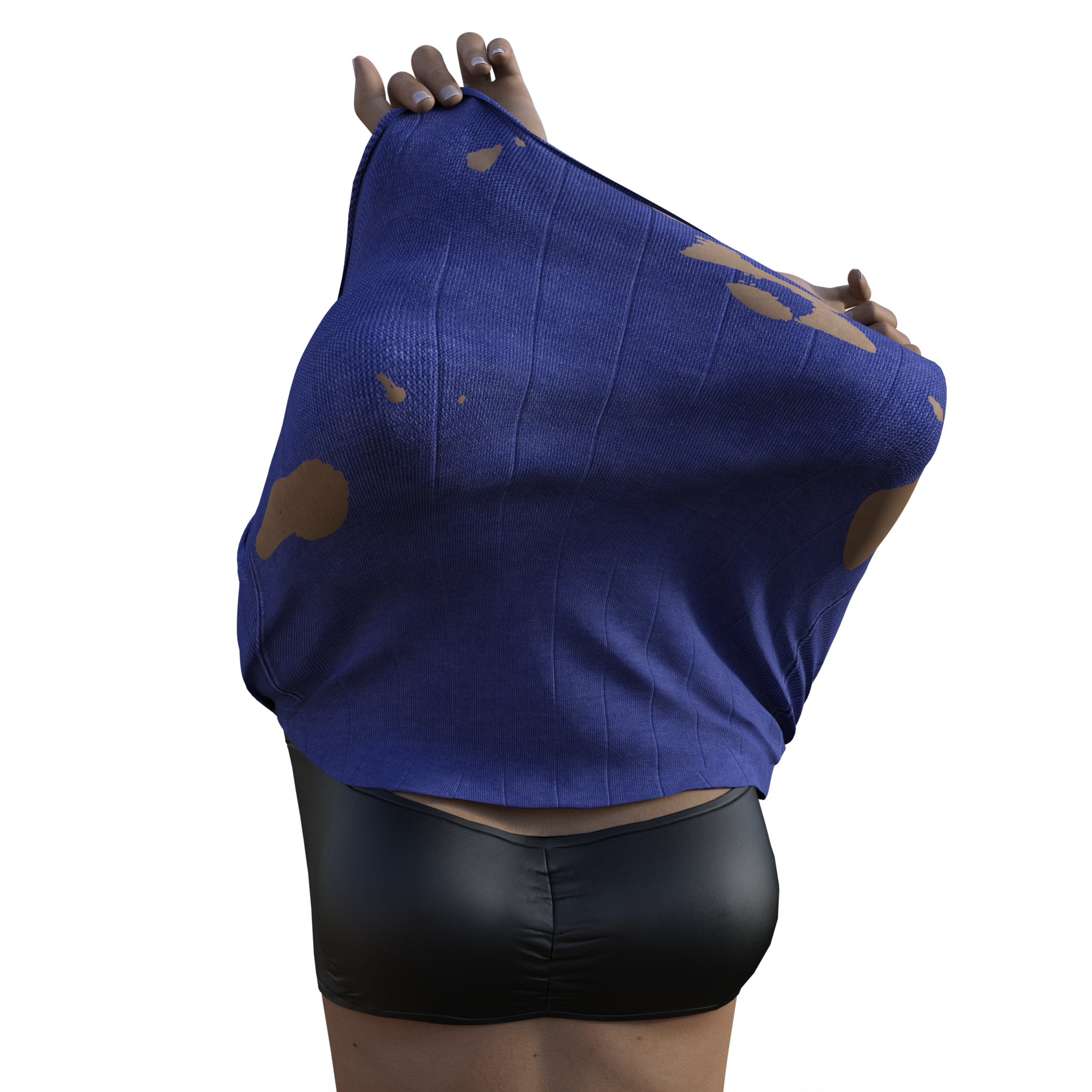
This is a displacement problem, we just managed to replicate this.
We'll check this out, but meanwhile you can just set the displ at 0 value or try fine-tuning the min/max displacement values. The Enlarge/Shrink morph should also help, but you have to set the min/max displacement values at the same value (say -0.3 /+0.3).
We'll fix any that have this problem on our end asap, thanks for posting about this!
Aeon Soul Undress/Dress poses/clothesThank you for sharing this. A couple questions.
In "2". Does it mean that a lot of what is seen in the video comes from this addon or there may be too much overlapping/duplicates?
You also say a couple times "pose morph" body pose has morph too or only presets? does it mean this can animated? Or is a big leap between stages?
Hi,
the "2" only refers to the clothes name "Everyday 2". We had a similar set for G3, Everyday, and this is its successor.
The Morphs + is an add-on for Everyday 2 clothes: https://www.daz3d.com/everyday-2-for-genesis-8-females and includes a few clothing items with special morphs. It is unrelated to the Dress/Undress poses + clothes in terms of sharing any morphs etc., but it can certainly be complimentary.I'm not sure I understand the other question about the poses, let me know :D.
- Are there plans for a male version of these morphs? And if so, will You take care of males and females often undressing in a different way (= just check how most men take off a t-shirt compared to how most females do it
 )
) - Is there a chance that we might get trousers with long legs instead of the capri pants, which are so.. '70s ?
Apart from that, these sets (and the other Everyday Clothes Sets) are on my wishlist until price and my available money are on an even level... But I look forward to that moment
Hi! We are not working on a male version of poses+clothes morphs at the moment, mostly because the get dressed / undressed sets and another couple of sets with more everyday kind of poses were all created before the male version existed.
We have considered it, but until we do start working on it I can't say neither yes nor maybe.
If we do, yes, we will use male references for the poses. I know what you mean, like grabbing your shirt from the back rather than the hips and stuff like that, yep, we'd do that for sure!I went ahead and purchased it (and the Cyberpunk Add-On, plus the Sporty one). Haven't tried with the shirt but for the capris, you can get more varied looks if you mix up the morphs for the same pose.
I do have one additional question. Are the UVs from Everyday 2 and the Everyday for G3F compatible?
No, they are completely different items, they only share the idea of shirt+capri pants, hence the n.2 in the name.
We run a few tests yesterday and we may be able to do something in terms of length and/or style. We need to take into consideration texture stretching, because something like making the capri long pants would be taxing on the UVs. The tests we did yesterday looked pretty good though, so we're willing to look into this.
KHImage studio does it again, now for GENESIS 8!Old thread, but...
I've been testing this product vs. the Victoria 8 version, and it doesn't seem like the Collar Fwd / Back morph is doing anything.
The first is the Vicky 8 version, the second is the general G8.
Also, when I move the master controller, nothing happens in that area when I'm using the G8 slider, but does for the Vicky version.
I have the same issue, but also with the arms/shoulders. If I use Victoria 8, then the Victoria 8 Ultimate Bend morphs work perfectly. However, if I use say Gia 8, then the Genesis 8 Ultimate Bend morphs do nothing from the waist up. I only use pre-made poses and/or bones to pose. It has caused me to uninstall the product, sadly, as I have passed my refund window.
Rendering questiona. I know that Daz products are stored locally and cannot be moved from one machine to another just by sending a scene like in Maya for instance, but is there a way to transfer a render job to a remote server or render farm in some way?
You could share the daz product library between computers (at least on local network) by putting them somewhere accessible via a network.
For example, my laptop gpu have more vram so i use it for render. so I make the partition that my Daz library is installed on shared with the local network, (i think the process goes something like: desktop: this pc->right click on partition->property->sharing->advanced sharing->share this folder, also permissions->allow read and write, then on my laptop (this pc->network ->find desktop->find partition->right click->map network drive and add the folder in daz). Then you can open any file saved on the shared drive.
There is also iray server that is the professional product for remote rendering, but that cost money.Rendering questionHi friends.
Few questions about rendering:
a. I know that Daz products are stored locally and cannot be moved from one machine to another just by sending a scene like in Maya for instance, but is there a way to transfer a render job to a remote server or render farm in some way?
b. If the answer to the above is "No" - what would be an optimal render solution for large animation sequences? I guess that I am not the first one to produce such sequences and I find it hard to believe that all Daz users use only their local machine and nothing more for this purpose.
If there is a solution to my needs, please let me know about relevant documtation.
Thanks in advance!
Editing "S8 Suit for Genesis 8 Female(s)"It looks like it is not an actual suit, but a morph.
So you would need to load the same character twice, in the same position, one with the suit and one without, and then you could apply holes in the character with the suit.
But honestly, I think it would be a mess, and I am annoyed that it isn't listed in the description, if that is the case.
Yeah, a little hint in the description would have been nice.
This is just the way midnight_stories constructs the suits. They are geografts? Something like that. It eliminates poke-through, so there's a benefit when you're working with skin-tight clothing/suits and a variety of body shapes. Like, I was able to put the Mercury Ranger suit onto JoeQuick's Teddy Bear without trouble - a very non-standard G8M morph.
There are other artists who do the same with their clothing/outfits.
Seems I'll have to do some more testing to see which figures - and I got quite a few non-standard G8M ones - brings it to it's limits then
 Editing "S8 Suit for Genesis 8 Female(s)"
This is just the way midnight_stories constructs the suits. They are geografts? Something like that. It eliminates poke-through, so there's a benefit when you're working with skin-tight clothing/suits and a variety of body shapes. Like, I was able to put the Mercury Ranger suit onto JoeQuick's Teddy Bear without trouble - a very non-standard G8M morph.
There are other artists who do the same with their clothing/outfits.
Editing "S8 Suit for Genesis 8 Female(s)"It looks like it is not an actual suit, but a morph.
So you would need to load the same character twice, in the same position, one with the suit and one without, and then you could apply holes in the character with the suit.
But honestly, I think it would be a mess, and I am annoyed that it isn't listed in the description, if that is the case.
Shaping Model Face - no shortcutsIn a tutorial I watched they had shortcuts in the parameters section which allowed them to modify the mouth size, width... everything in the face. But I don't have this. Instead I have to go to scene, expand all for the Genesis 8 model and have to modify every detail such as mouth corners etc. How do I get the shortcuts to make changing the shape of things easier?
As pointed out, you will need to purchase additional morph packages to get more options to change the shape of a figure
for genesis 8 these are the base morphs
https://www.daz3d.com/genesis-8-female-head-morphs
https://www.daz3d.com/genesis-8-female-body-morphs
Aeon Soul Undress/Dress poses/clothesLove the concept, just wish some character or body morphs were included
huh? Why? That would just jack up the price needlessly. There are hundreds or even thousands of character morphs in the store already that can be purchased.
Or was it that particular promo girl that you were interested in? If that's the case, I think that she's Aeon Soul's personal character, Alice. And as far as I know, they've never released her morph for anything other than V4.
Two simple questions and I'm sorry I asked one of themThanks for the information so far. That's a very good point that I didn't really make clear; it's not that we (the users) need to agree on a base lighting setup, it's that we need the texture creators to so that there's some consistency when we use multiple characters in a scene. I've really noticed it when trying to use black and white characters together, one often gets completely blown out and the other is way too dark.
Good examples Redz, thanks for those. I did a bunch of testing of different subdivisons a while back and noticed almost no differences between 3 and 4 except with certain monster textures. Seems the HD morphs do affect both morph and texture detail, which is what I wanted to know.
Those are also good examples Marcus and they do show how much lighting affects a texture. The problem is that if a texture creator uses the Sunflowers HDRI when setting up their surface settings, those of us using the default Ruins or pure white lighting are going to be making adjustments and wondering why that particular texture looks so different than that of the other similar white G8F texture in the same scene. Even I now regret starting off those mugshot threads with a slightly colored HDRI setup, I feel like I should have used the pure white HDR/single spotlight setup I mentioned above for better accuracy.
To be fair this is historically a problem with photography in the real world too. especially historically when cameras had fewer stops
I like your white lighting I'd love something like that for promos. when I'm messing with skin settings my go tos are the sun-sky but with the saturation turned all the way down or rendering in a grey cylinder
...Also folks. the "R" in HDR stands for "range" the advantage of HDRs is that they can have a greater range of values than other images. However for a pure plain color there is no range, as it is, as mentioned, a single color. so there is zero difference between the jpeg and some theoretical hdr version.
JoeQuick appreciation - simply the best.Joe's half (more like 7/8ths) of a "craft trade" from waaay back, during the 00s, a morph that turns Michael 3 into the Michael Wisher version of Davros from "Doctor Who". I still wound up tweaking it a bit, spinning dials to enlarge the cranium, , furrow and cock the brows, widen the cheeks and mouth, "crook" the nose, etc.
For the DW purists, yes, that's the 2008 chair design (Sam Therapy's great freebie) rather than the one from "Genesis of the Daleks"when Michael Wisher introduced the creator of the Daleks.
Sincerely,
Bill
I don't remember ever seeing this particular morph or its release!It was a "private" craft exchange, though I thought I said Joe could do with the morph as he wished. Besides, I thought most members here consider Michael 3 "passe".
Sincerely,
Bill
Very good job on the morph...I am back and forth between Daz and Poser because some of my favorite things are Poser Native like Schell's Earth/Alien Mechs! So I still run some of the 3rd gen figures.Chris Schell's stuff works fine in Daz Iray with simple conversion. At least, the VanishingPoint incarnation of it is just fine.
No JoeQuick in this image, though. Maybe I can cram Felton or Toon Mom in there instead of G8F... or I can SAY that it's actually Toon Mom, LOL.
 The Shadow Knows... But I don't
https://www.daz3d.com/dm-suit-for-genesis-2-male-s-and-michael-6
here's the forum that talked about it.
https://www.daz3d.com/forums/discussion/94376/who-knows-what-evil
Thank you, thank you, thank you! I bought this when it came out, but could not find it in my Library because I had no idea what it was named!
Now, I need to find the nose morph!
JoeQuick appreciation - simply the best.
Very good job on the morph...I am back and forth between Daz and Poser because some of my favorite things are Poser Native like Schell's Earth/Alien Mechs! So I still run some of the 3rd gen figures.
Joe's half (more like 7/8ths) of a "craft trade" from waaay back, during the 00s, a morph that turns Michael 3 into the Michael Wisher version of Davros from "Doctor Who". I still wound up tweaking it a bit, spinning dials to enlarge the cranium, , furrow and cock the brows, widen the cheeks and mouth, "crook" the nose, etc.
For the DW purists, yes, that's the 2008 chair design (Sam Therapy's great freebie) rather than the one from "Genesis of the Daleks"when Michael Wisher introduced the creator of the Daleks.
Sincerely,
Bill
I don't remember ever seeing this particular morph or its release!It was a "private" craft exchange, though I thought I said Joe could do with the morph as he wished. Besides, I thought most members here consider Michael 3 "passe".
Sincerely,
Bill
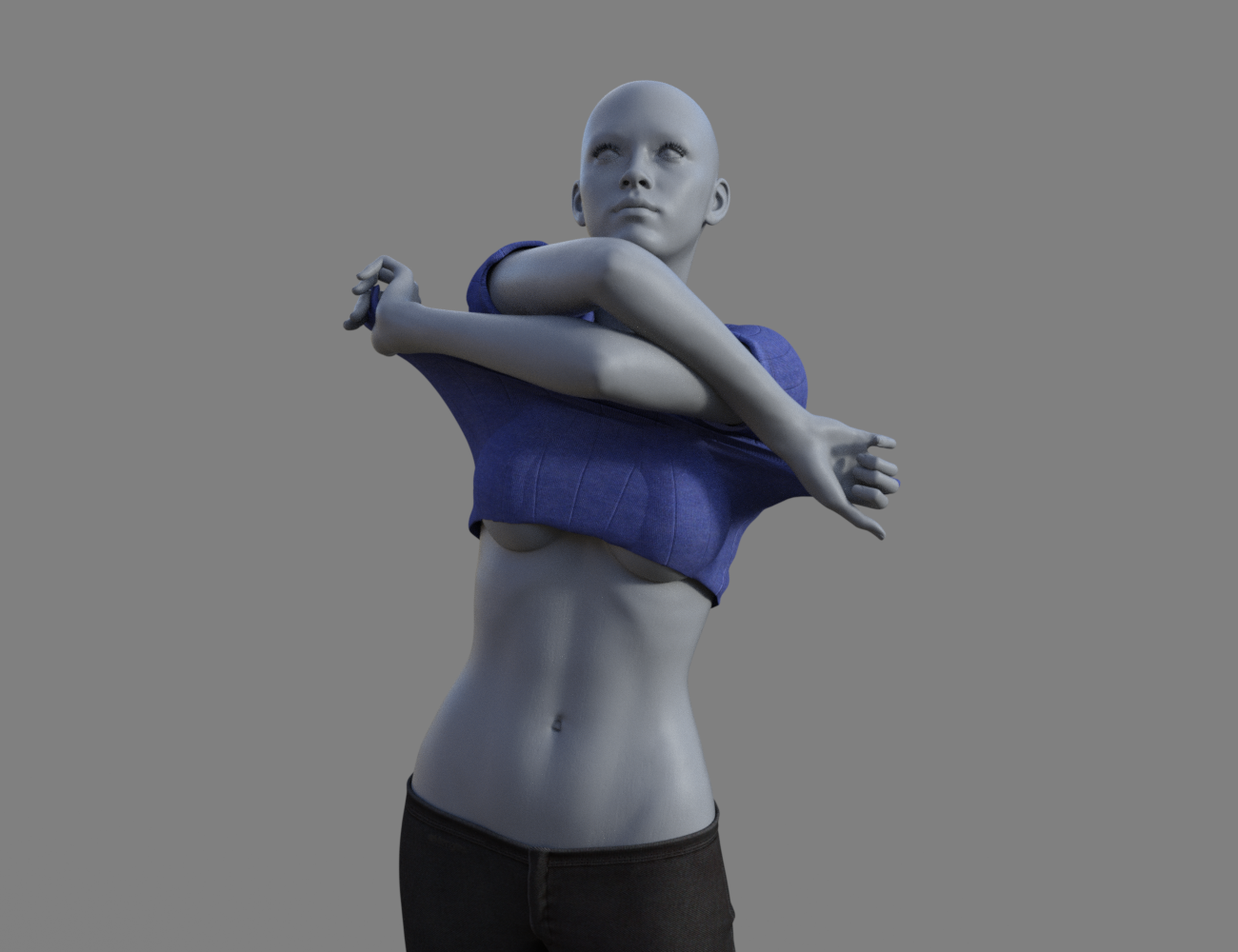
Aeon Soul Undress/Dress poses/clothesIn comparison, here's a quick test of bluejaunte's Murphy with the same morph:
 Aeon Soul Undress/Dress poses/clothes
Here is iSourceTextures Caprice (https://www.daz3d.com/caprice-hd-for-genesis-8-female) with the Remove Shirt 1 morph. It's not perfect, but I can adjust the pose to correct for the mismatch. Aeon Soul includes around 5 morphs per pose that should fit many characters, but I can imagine some will require more tweaking than others.
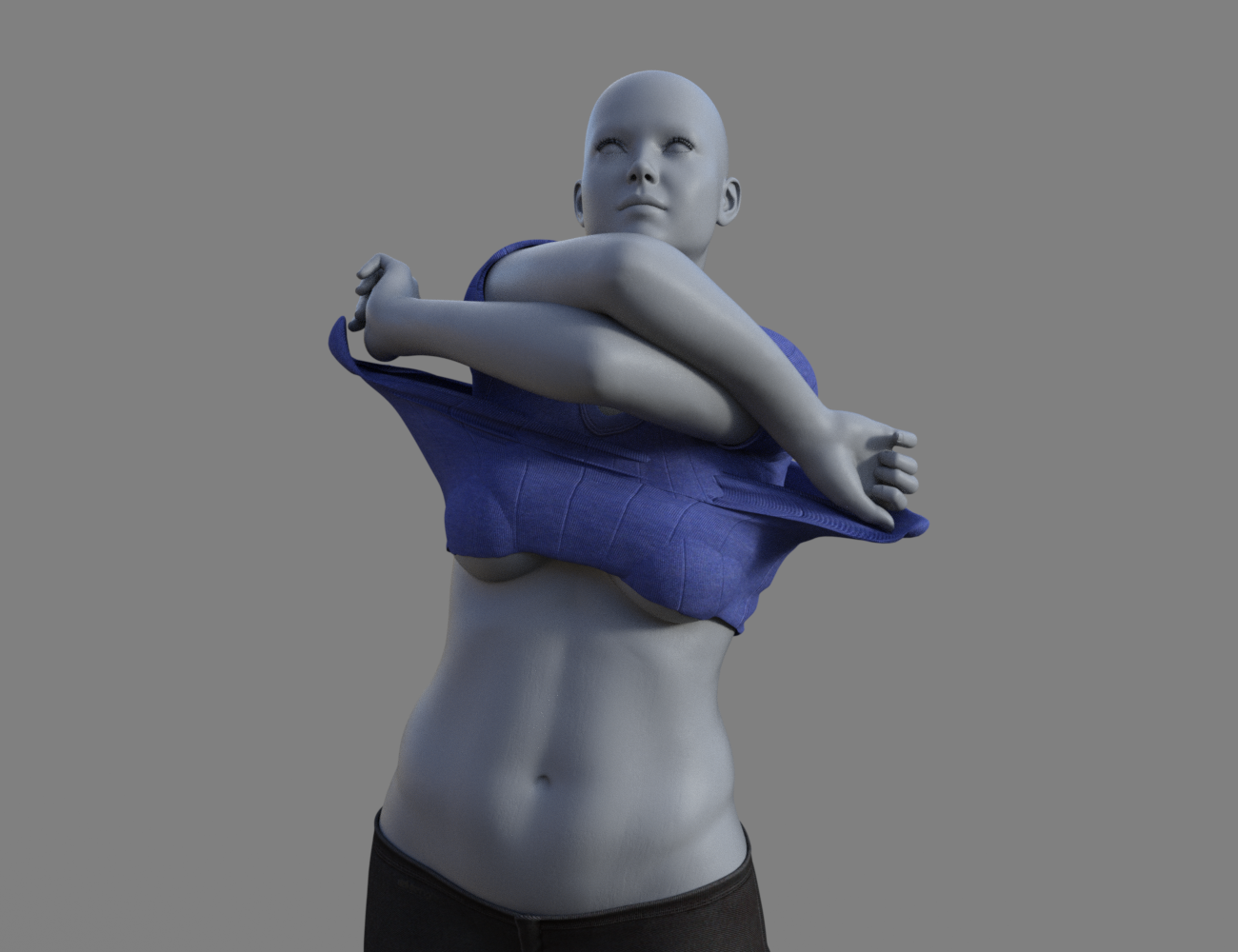 Aeon Soul Undress/Dress poses/clothes
Thank you for sharing this. A couple questions.
In "2". Does it mean that a lot of what is seen in the video comes from this addon or there may be too much overlapping/duplicates?
You also say a couple times "pose morph" body pose has morph too or only presets? does it mean this can animated? Or is a big leap between stages?
Sorry, I did not watch the videos. All included morphs are listed on the page (and a few additional ones are in AeonSoul's post above). If there is anything else in the video, that would be from the other sets.
With "pose morph" I am referring to the morph in the clothes that matches a specific pose. There are numerous in between poses, so I guess animating might possible with use of dForce and some effort, but I have no tried.
Ciao
TD
Edit to add: The Add-on to Everyday 2 has a few dress/undress type morphs, but there is no real overlap. I have all the sets and it is one of my favorites clothing combos.
Introducing the Daz to Blender Bridge & native Blender File FormatsThis would be a lot better if it worked both ways. That being said I have a few questions.
If you pose the figure in DAZ than transfer over, is the pose maintained or do you have to do it again in Blender.
Does D-force work in Blender?
Does the bridge work with Blender for Artists?
Has anyone done a toon/comicbook render in Blender using DAZ models?
Both ways? Meh. I think that would result in too many discontinuties at the boundary layer. Each transfer would introduce unavoidable irregularities that would degrade the final product after several round trips.
Does the pose remain? Not in my testing, and that is a serious flaw (assuming it's not something I'm doing wrong). I can easily see myself using Daz as my figure modeling and posing solution, and Blender as my environment and props solution, with the final render happening there as well. But the posing assets in Daz are wonderful, and not enjoying the benefit of using them as a result of the transfer through the bridge is disappointing.
D-force? Nope. But it doesn't need to. Blender has its own cloth simulation. A note about that. The clothes get transferred with their own armatures and shape keys. You'll want to delete those if you want to use the cloth simulation. The shape keys in particular, since they get in the way of editing the mesh (and when you get rid of the armature, you'll get some poke through and need to edit before running the simulation). But the results look good.
Blender for Artists -- haven't a clue.
Toon render? Haven't tried it but sounds interesting. Fact is, once the model is transfered, it's just a Blender model. If you have a workflow in Blender to toon-ify a render, it should just work.
When I say both ways, I mean transfering Bender models into DAZ that are posable. From what I've read, "Blender for Artists" has everythink Belnder 2.8 has, just a simplified UI. I'll have to find some time to try it. Thanks for your answers.
Aeon Soul Undress/Dress poses/clothesI played with it for a bit. Here are some impressions.
1. It's advedrtised as a pose set with clothes included. As such it is found in "Poses". Not in clothing.
2. The included versions of the Everyday 2 Outfit are rigged but only have the pose morphs included unless you also have the original Everyday 2 (and add on).
3. They "work" fine on the base figure, and use auto-follow for all morphed figures. As such they work as well as any outfit without dedicated shape morphs. That is they are good for not too extreme shapes in combo with smoothing modifier and collision.
4. The poses are obviously optimized for the base G8F and will require adjustments for any shape that deviates from that. Mostly positioning of the hands.
5. You can autofit it G8M and it works if you must. The poses and pose morphs will of course be way off. No point in my opinion.
6. Great set of versatile dress/undress poses. I see it as a wonderful toolbox. Very happy with it.
Ciao
TD
Thank you for sharing this. A couple questions.
In "2". Does it mean that a lot of what is seen in the video comes from this addon or there may be too much overlapping/duplicates?
You also say a couple times "pose morph" body pose has morph too or only presets? does it mean this can animated? Or is a big leap between stages?
I'm trying to decide if i purchase one of these now or wait a couple month and a sale. It does look fantastic and I'm definitely buying something from Aeon Soul today, but unlike other addons this one looks a bit pricey and also is one item to dress, another to undress and is only for female. If it was only one item maybe i would not hesitate and just grab this and the textures. Sadly my wallet is very limited and today's promo (while really good) do not offer any benefit for purchasing more than 2 items (and we also have midnight stories today).
Introducing the Daz to Blender Bridge & native Blender File FormatsThis would be a lot better if it worked both ways. That being said I have a few questions.
If you pose the figure in DAZ than transfer over, is the pose maintained or do you have to do it again in Blender.
Does D-force work in Blender?
Does the bridge work with Blender for Artists?
Has anyone done a toon/comicbook render in Blender using DAZ models?
Both ways? Meh. I think that would result in too many discontinuties at the boundary layer. Each transfer would introduce unavoidable irregularities that would degrade the final product after several round trips.
Does the pose remain? Not in my testing, and that is a serious flaw (assuming it's not something I'm doing wrong). I can easily see myself using Daz as my figure modeling and posing solution, and Blender as my environment and props solution, with the final render happening there as well. But the posing assets in Daz are wonderful, and not enjoying the benefit of using them as a result of the transfer through the bridge is disappointing.
D-force? Nope. But it doesn't need to. Blender has its own cloth simulation. A note about that. The clothes get transferred with their own armatures and shape keys. You'll want to delete those if you want to use the cloth simulation. The shape keys in particular, since they get in the way of editing the mesh (and when you get rid of the armature, you'll get some poke through and need to edit before running the simulation). But the results look good.
Blender for Artists -- haven't a clue.
Toon render? Haven't tried it but sounds interesting. Fact is, once the model is transfered, it's just a Blender model. If you have a workflow in Blender to toon-ify a render, it should just work.
Daz 3D is part of

Connect
DAZ Productions, Inc.
7533 S Center View Ct #4664
West Jordan, UT 84084Licensing Agreement | Terms of Service | Privacy Policy | EULA
© 2026 Daz Productions Inc. All Rights Reserved.