-
I'm trying to make a budget for an animation project. I may need experienced Dazzlers!
Ha, yes I know "Dazzlers" is pretty cheezy, but you know what I mean. Anyway...
I am making a budget for an animated project that uses Daz as the base animation program. Thus, I might need about 30 people that would be available to work 6-12 months, 40 hours a week, and that are knowledgeable in the following areas:
1. Aniblocks, Puppeteer, Morphs, the new IK system, and all things related to animating bones and morphs in Daz3d.
2. Face Transfer, Head Shop, LipSync, Anilip.
3. Anisound
4. Costume/Clothing expert, D-Force, character and asset transfers via GenX and similar programs
5. Modellers, expert in modifying assets in Hexagon, Cinema 4d, Modo and Lightwave especially.
6. Set builders/Environment builders/Prop experts
7. Iray Lighting Expert
8. Networking and Asset management across computers, platforms, render-nodes, familiarity with SceneOptimizer.
9. Special effects Wiz: Particles, Texture Animator, Sweat and water, magic spells, dirt and a great working knowledge of After Effects/Compositing and various plug-ins.
10. Familiarity with mCasual's plug-ins
Please send me a private message with some links to your work, what you did on the clips/images, your experience, jobs and what your compensation requirements would be. Most everyone will be working remotely, but let me know if you would be available to move if necessary. If you are comfortable posting all this publicly in this thread that is fine, too.
This is not an official job offering or call at this point. But I need to discern the available talent pool to construct the budget whilst compiling a list of leads to contact if the project makes it to the next phase of development.
Best regards,
Joel Bevacqua
Hmmm. I'm not a contender but for those who are here, I thought I'd share this. When authors send query letters to agents/publishing houses, they do their homework and see what type of books or what genre the agent/publishers represent because sending a type of story such as nonfiction when they only publish fantasy or vice versa is a waste of everyone's time. Even though animation does not have a specific genre, some artists are simply better at storytelling certain subjects and others enjoy stop-motion like South Park ... so I thought I'd share these links for those interested in biting at your hook ... there is this updated Nov 2019 and this. Also this and this.
 Genesis 8 figures STILL not transfering through Bridge
Yes, the plug in installed fine. I can transfer Genesis 7 figures and props through the bridge without any issues (give or take a few glitches). I can NOT get it to work with ANY Genesis 8 figures. It loads to the temp folder... then each respective 3D program reads it, but then does nothing.
Daz bridge to Blender can't import pose?Yes I covered that problem in a tutorial [in the freebies section in my tutorial thread] ... I made a morph of the poses, then port out the morphed figure.
Thanks, @Catherine3678ab, so you confirmed that exporting pose is not available yet, but the workaround is to make the post a giant morph? Can we also not export all the pose options like eyes open and close, mouth open and close, if we don't need them?
So, you posted 2300+ posts, which post is the one you were talking about? Thanks.
Daz bridge to Blender can't import pose?Yes I covered that problem in a tutorial [in the freebies section in my tutorial thread] ... I made a morph of the poses, then port out the morphed figure.
Celebrity Look-a-Likes for 3D figures Part 2Okay guys and gals. Need some help here. Looking for a model that at least resembles if not down right looks like a young Lauren Bacall. We are talking late 40's/early 50's Bacall here when she was maried to Bogie. I already have a hair that is dead on and have a figure in mind for the body, just need a face that is killer Bacall with "The Look" {Bacall fans will know what I mean by The Look}. Preferrably G8 or G8
There's this 'http://www.beammeup.net/blog/3d-celebrities/poser-celebrities.php?keywords=lauren&active=2';
WERTS Lauren Bacall for GN.zip
https://drive.google.com/file/d/0BzDtVNPJsjCRMzdRX3pfUlpHNlk/view
Says it's for Genesis, I'll have a look in the zip...
S.
Later...
It's a head morph for Genesis, would need to be converted to G8 or G8
 Quick-loading G8F and (G3F?) when you own half the damn store
P.P.S.: Just thinking out loud here: Has anyone considered, or already coded, a plugin or setting where you can tell DS: "Look, I know I own 8,012 different characters and morph sets for G8F, but today I just want you to pull up the base figure, all facial expressions, these two full body morphs, these three faces, and these custom leg morphs"? That would be a sweet way to speed up a workflow from a large library, if it could be made to work.
Getting rid of the timelineI think you're looking for Richard Haseltine answer.
Here the process is explained very well: https://thinkdrawart.com/how-to-save-a-daz-studio-dforce-frame-as-a-morphDuplicate formulas found. . .Whenever I load a new base figure I get this flag. How do I fix this problem?
here's what i do:
launch studio. load your base figure in an empty scene. generate those errors.
then go to Troubleshooting/View Log in the rightmost studio dropdown menu--i think it's Help.
the log should open in your text editor of choice. quit studio, then, but keep your log file open.
search for 'duplicate', and the log will show you the full paths and names of the files that are generating the errors. go into your studio library's base data folder and find 'em in the appropriate Morphs folder for the figure you're working with.
i transfer them into a new folder in the base figure directory named Morphs-Disabled then, rather than deleting them. you never know...
you may have to work through quite a few 'duplicate' results in your log file to find them all.
(if you've only started having this problem recently, the culprit is likely either a product you've just installed, or a g3-to-g8 type morph conversion you've done recently.)
once those morph files are all cleared out of your base figure's Morph folder, restart studio, and try loading your figure again.
good luck!
If you would design a core character and bundle, what would it be?Latonya 8 is no Bethany 7 in terms of body shape, IMO. Bethany is almost lightning in a bottle. The shape is just about perfect. I just go directly to the morph transfer utility because I don't think any new incarnation could come close.
If there was a creative alien or monster like Zelara/Nix, that would be great. Bullwarg should've been Bullwarg 8. A real weird addition or a classic monster (Gnome/Goblin/wee folk, for instance) would be a better extension for Genesis 8 rather than yet another same figure, although I'll basically always buy a pretty young figure.
With the trajectory of the store's outfits, Lilith 8 would be a single Mom, with a Turtleneck/Capri Pants, dForce Something Random with a Cape, a Fantasy Outfit (high heels, corset, and floppy sleeves). She'll have a Mohawk-style haircut, dForce waist-length hair, Soccer Mom pose set. "Lilith 8, the edgy soccer mom!"

The "real" Lilith 8 would work better in another store, sadly. I don't think we're ever getting anything like Lilith 6 ever again. Lilith 7 was a step down in attitude and presentation, IMO.
Noobie Question... Why?I have an old, underpowered Linux box that can now GPU render using Blender that Iray cannot touch. The included clip was done on this box. Sure, it took nearly 30 hours to render at full HD and 24 fps, but this is a straight Diffeomorphic transfer and I haven't reduced any of the materials yet. This old box is just an Intel Q6600 with 4 GB RAM and an Nvidia 960 GTX with 4GB RAM running Mint 20. If this was Windows, Iray wouldn't let me even try. On my iMac, I could let it run for days and it wouldn't finish. Since Reality and LuxRender are no longer viable, these bridges let me get out of the Iray/Windows jail.
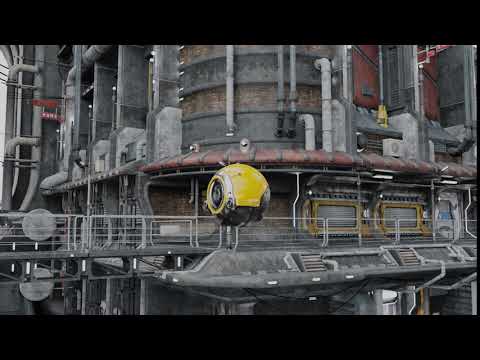 Hylas' corner
Aiko 7! ...mostly. I never use A7's skin because she comes with no sensible makeup options and because of her non-standard UV, I can't apply any other makeup. I also never bothered transferring A7's body morph to G8. So this is A7's head morph combined with A8's body morph and skin.
Freebie credits:
Outfit by SquarePeg3D: https://www.renderosity.com/mod/freestuff/the-major-for-g8f---100-free/79495
HDRI by zbyg: https://www.deviantart.com/zbyg/art/HDRi-Pack-1-97402522Request to Panda regarding Lin dForce HairI have been trying out the Lin dForce hair by Panda and I have a couple of requests:
1) After simulation the tails still do not fall down straight as they would under gravity, could you please adjust the dForce settings to allow the tails to fall straight (see attached image for comparison).
2) Could you perhaps provide a morph to shorten the side bangs.
Many thanks.[Solved] A Script for to morph models to their UV maps :-)Blender can do it too (and that's free so within your budget (though there's a learning curve as with everything)). I believe it's in these tools: https://blender-addons.org/textools-addon/ - one of the tools is called 'mesh texture' and creates a mesh that can morph from flat (uv-map-shaped) to shape (normal shape).
Disclaimer: I haven't tried it.
As for Daz Studio - it might be possible to script but I'm not sure if it wouldn't need more functionality within DS (you could always import the one from Blender as a morph for DS). Edit: That is unless it changes the vertex order as noted above - again, I haven't tried this). Depending on what you want to use it for, exporting both the flat and shaped versions and using one as a morph for the other might work (as the uv-mapping would be the same so it'd take the same textures in DS).
That looks to be very interesting, thank you :-)
[Solved] A Script for to morph models to their UV maps :-)Blender can do it too (and that's free so within your budget (though there's a learning curve as with everything)). I believe it's in these tools: https://blender-addons.org/textools-addon/ - one of the tools is called 'mesh texture' and creates a mesh that can morph from flat (uv-map-shaped) to shape (normal shape).
Disclaimer: I haven't tried it.
As for Daz Studio - it might be possible to script but I'm not sure if it wouldn't need more functionality within DS (you could always import the one from Blender as a morph for DS). Edit: That is unless it changes the vertex order as noted above - again, I haven't tried this). Depending on what you want to use it for, exporting both the flat and shaped versions and using one as a morph for the other might work (as the uv-mapping would be the same so it'd take the same textures in DS).
[Solved] A Script for to morph models to their UV maps :-)That's nice [says she who doesn't own Zbrush either].
Maybe somebody with Zbrush would like to morph all the figures to their uvmaps and let loose the morphs in the freebies section?
Think I'd still like the ability in D/S for there are lots of items it could be very useful for :-)
does not seem to keep the vertex order sadly
neither does Ultimate Unwrap 3D that also does it
[Solved] A Script for to morph models to their UV maps :-)That's nice [says she who doesn't own Zbrush either].
Maybe somebody with Zbrush would like to morph all the figures to their uvmaps and let loose the morphs in the freebies section?
Think I'd still like the ability in D/S for there are lots of items it could be very useful for :-)
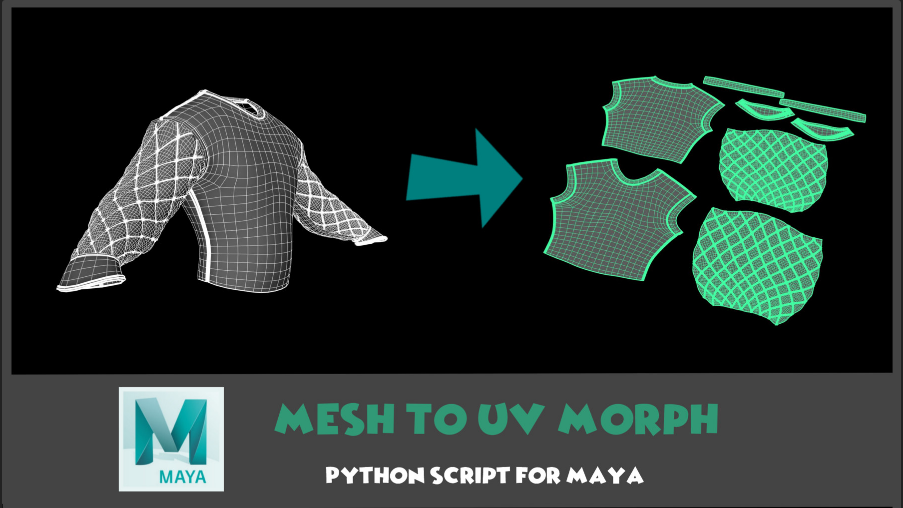
[Solved] A Script for to morph models to their UV maps :-)Having ever tried to do this for a few items [without a script] this item I came across over at ArtStation [and it's only $2] really got my attention. Unfortunately it's for Maya which is nowhere near that price range [by a mile or 3] so ...
pretty please, could somebody write a script that would do this for Daz Studio? Thank you :-)
 Daz bridge to Blender can't import pose?
Hello guys, I checked a few youtube video tutorials and searched posts here but can't seem to find anything related.
Question 1:
Every time when I pose the character in Daz Studio, and port it into blender, the character went back to T pose. But I don't see any relevant export options.ButQuestion 2:
I only ported Subdiv=0 model, it seems very lowpoly in blender. You can even see the crease here. But it still dramatically slows down my pretty beefy computer. Moving a box is slightly slower than usual. Moving the arm of the character is slow. Even undo the move action is extremely slow, it can take up to 2 seconds with every ctrl+z.Question 3:
During exporting from Daz Studio, the screen asks you what morph targets you want to export. At the end, still tons of shapes are exported. If I just want a still pose with no morph or shape, what should I do?Question 4:
Some materials still don't look correct, such as the eyelashes here, which looks grayish. Did you find any other wrong materials too?Question 5:
Where is the directory of the temp exchange files?Thanks a lot guys!
That's NOT a "realistic" Police Woman Outfithttps://www.daz3d.com/fg-police-woman-outfit-for-genesis-8-females
It started so well, then BAM! buttoned down shirt. I'm pretty sure every police department in the country has regulations that the shirt must be buttoned up.
What's the point? It's not sexy enough to be a Halloween police woman costume but completely unusable to anyone who wants an actually realistic one.
You're expecting something realistic from DAZ? But yeah, a morph to close the top buttons and a tie option would have made this a lot better. My big disappointment, though, is that it looks like the badge is part of the shirt mesh, so it'll probably distort noticeably.
Totally agree, it is very hard to find a half decent police officer uniform or any uniform for that matter.. That does not make the character look like they came from one of those services that are used for bucks nights or bacherlorette parties..
The only decent police officer uniform here is the https://www.daz3d.com/h-c-police-uniform-for-genesis-3-male-s..
It does get really annoying when looking for proper uniforms, only to be met with clothing that no fire fighter, nurse, doctor or police officer would wear..
Yeah, it's sad that IH Kang seems to have stopped releasing new products, as they were one of the few vendors who could really nail uniforms. That said, there are some older V4 ones that aren't bad, like https://www.daz3d.com/real-world-heroes-police-officer-v4-a4-g4 ; and Sickleyield's Security/Police set is the only thing I've seen that actually has a jacket.
The image below is what most police officers wear now a days..
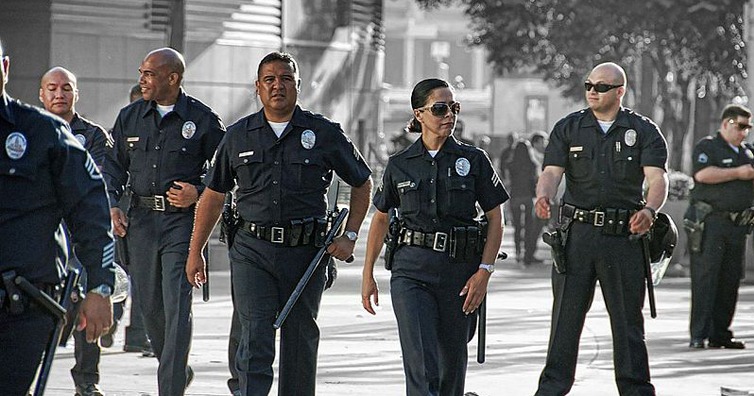
Those are pretty good examples of standard type uniforms pictured above...
Obviously some sort of work was done to the picture (the B&W background)... but what's going on with the guy with the sunglasses on the right...? Looks like he is holding an invisible hero sandwich or something was edited out of his hands.
2nd of nine lives Cat Girrrl render thread prrrIs Cerinian Vixen a renamed Krystal Starfox or is it a morph?
Iust Little Dragon being "silly" with naming conventions. It's the stand-alone Krystal figure using a different name.
Daz 3D is part of

Connect
DAZ Productions, Inc.
7533 S Center View Ct #4664
West Jordan, UT 84084Licensing Agreement | Terms of Service | Privacy Policy | EULA
© 2026 Daz Productions Inc. All Rights Reserved.