-
Old Dog New Tricks
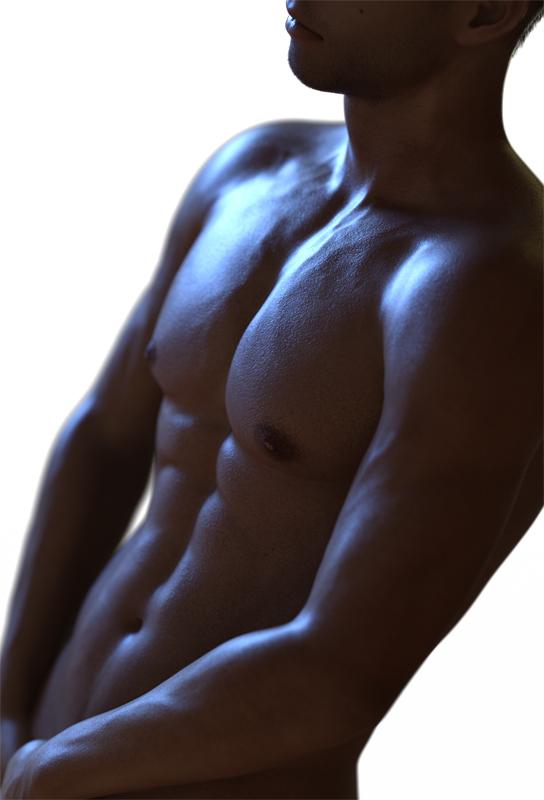
I have had a lot of questions about my figure study piece. When we got the request to do the pec promo I remembered a photo I had seen earlier in the week and knew I wanted to attempt that same photo in daz3d, so a photo reference was used, and I challenged myself to see how close I could get my 3d man body to looking as real as the inspiration photo. I started out as just the base G8M. I added the body morphs like fitness and bodybuilder, the spectacular morphs (which is the pecs and also the nipples), & Vascularity HD. I did just the head morph of Asier for G8M by bu_es to change the jaw line, and used the skin of Kaleb for Edward 8. I just added a simple gradient for teh background. I used Nik's Silver Effect Pro 2 for the B&W, and Color Effects Pro 4 to give it more tint.....and I MIGHT have ran detail extractor in color effects to bring out more detail... I don't remember and some of the black and white options in Silver Effects already have this effect. However when I do use color effects detail extractor I pull the contrast slider up so I don't loose my shadows, it's an awesome feature for detail but can really cause you to loose depth.Then I think I did some dodge and burn to accent some of the highlights and hide areas I wanted darker, like the highlight along his back, had he actually been leaning on something that would probably not be there at all, so I darkened that area, especially closer to where he would have been in contact with whatever he is leaning on, like his back shoulder and neck. Anyway here is the before and after images, and HERE is the link to the photo I used as a reference/inspiration.
Daz Iray After Postwork

Daz Iray Before Postwork
 A Tip to Make Deforce Much Faster
I discoverd a little Dforce trick. If you save your outfit as a wearable preset. Then delete all the cloths and hair and accessories but the one you want to Deforce. Deforce runs WAY faster. Then once it deforced, turn Genesis off in veiwport, export the deforce item as OBJ, alone in the scene as Base Res. Then delete it, and load the outfit onto the character, then use morph loader pro, inject the morph into the clotthing item. Make sure to Reverse deformations is set to "YES". and Tada! Its a lot faster then waiting 11 minutes for it to deforce to do its thing, just to explode on you at the last minute.
Celebrity Look-a-Likes for 3D figures Part 2G3 or G8. I don't have add ons to convert earlier characters to G3 or G8.
I have GenX, I've never had much success with it converting V4 but if you think that morph is what you want I can give converting it to G3 a go...
Regards
Steve.I have found it necessary for some generation 3 and 4 characters to save them within Poser as a .CR2 file, which GenX can import
Haydina hair shapes not working.Thanks for posting the information. I've never tried Daz Central. I use DIM. Daz Central is designed for new users, so since you are new, it might be the right choice for you.
Haydina is a really nice looking hair, so we need to get this fixed!
It sure looks like the shaping presets got installed, but the morphs that those presets use, did not get installed (or did not get installed correcty to the right place, or Daz Studio isn't looking in the right place for them). Let's go look and see if they are installed at all:
- In your OS file explorer, open your content library folder.
- If you are in the right place, you should see subfolders like data, People, Props, Runtime, among others.
- Open the data folder.
- You should see a WinField folder (the name of the PA that created Haydina Hair). Open the WinField folder.
- You should see a Haydina Hair folder. Open the Haydina Hair folder.
- You should see a Haydina Hair Genesis 8 Female folder. Open the Haydina Hair Genesis 8 Female folder.
- You should see a Morphs folder (among other things). Open the Morphs folder.
- You should see a WinField folder. Open the WinField folder.
- You should see a Base folder. Open the Base folder.
- Now finally you have drilled down to the level where the morphs should be stored. You should see over 100 files with the dsf extension. Those are the actual morph files that define the way the hair vertices should move when one of the shaping presets is applied.
Do you have those files? If not, we have to figure out why not. If you do have them, we have to figure out why Daz Studio doesn't see them.
By the way, what operating system are you using? What version of Daz Studio are you using (go to Help>About Daz Studio to get the exact version)?
Do you own any other hair products with shaping presets? Do those work?
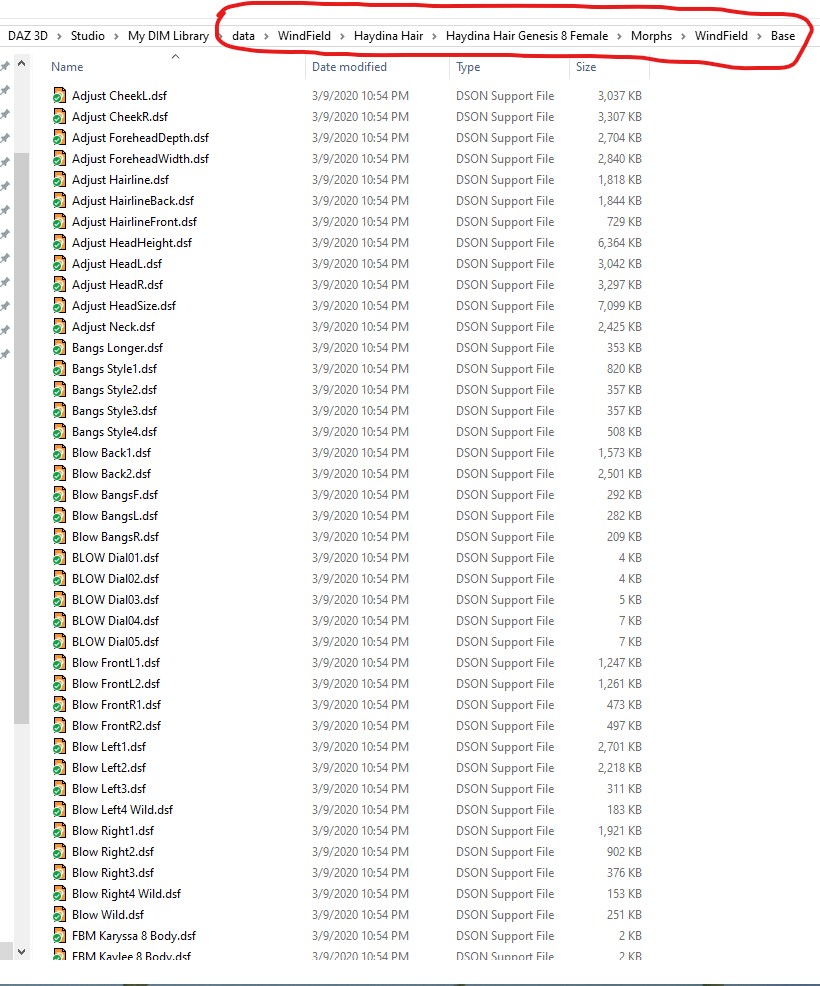
Okay, so I found all of the .dsf files just like they're displayed in your screenshot, I think we're getting somewhere. I've also found the morph preset files that are displayed in my content library, but they're in a different directory (E:\Program Files\DAZ 3D\Applications\Data\DAZ 3D\My DAZ 3D Library\People) than where the actual morph files are (E:\Program Files\DAZ 3D\Applications\Data\DAZ 3D\My DAZ 3D Library\data\WindField etc). I'm not sure if this is what's causing the issue.
OS is Win 10 build 17763.1339 and my DAZ Studio version is 4.12.1.118.
So the morphs files are installed and seem to be in the right place.
It is correct for the presets to be in the People folder (People\Genesis 8 Female\Hair\WF Haydina Hair\Presets) and the morphs to be in the Data folder. So that is not the issue. Since you can see the presets and the material presets even work, it seems like your content library is properly mapped in Daz Studio. This is a puzzle!
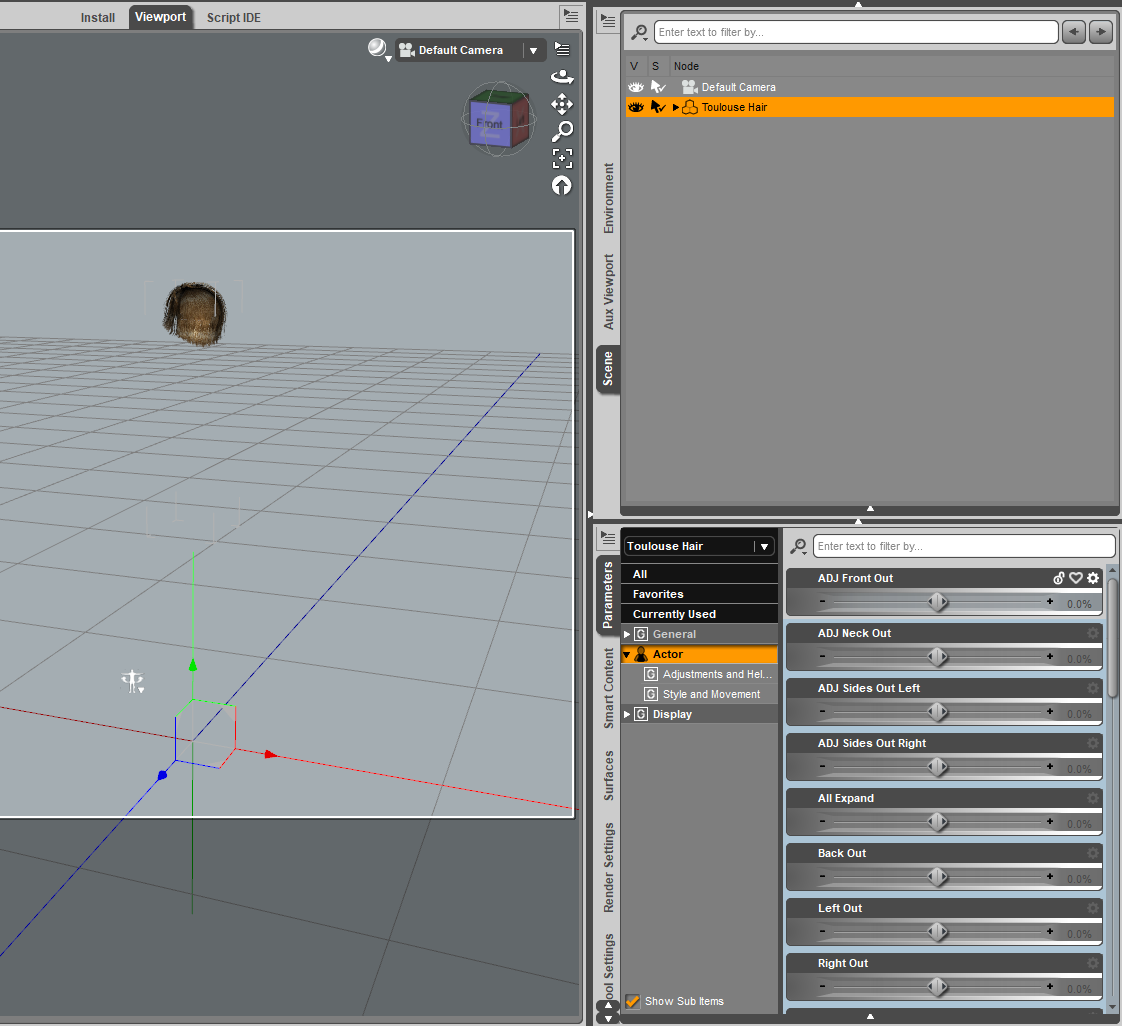
Let's see if it is only Haydina hair that is the problem or if it is a broader problem. If you load the Toulouse Hair from Genesis Starter Essentials, do those morph show up in the Parameters pane? They would be in the Actor section.
 Haydina hair shapes not working.
Thanks for posting the information. I've never tried Daz Central. I use DIM. Daz Central is designed for new users, so since you are new, it might be the right choice for you.
Haydina is a really nice looking hair, so we need to get this fixed!
It sure looks like the shaping presets got installed, but the morphs that those presets use, did not get installed (or did not get installed correcty to the right place, or Daz Studio isn't looking in the right place for them). Let's go look and see if they are installed at all:
- In your OS file explorer, open your content library folder.
- If you are in the right place, you should see subfolders like data, People, Props, Runtime, among others.
- Open the data folder.
- You should see a WinField folder (the name of the PA that created Haydina Hair). Open the WinField folder.
- You should see a Haydina Hair folder. Open the Haydina Hair folder.
- You should see a Haydina Hair Genesis 8 Female folder. Open the Haydina Hair Genesis 8 Female folder.
- You should see a Morphs folder (among other things). Open the Morphs folder.
- You should see a WinField folder. Open the WinField folder.
- You should see a Base folder. Open the Base folder.
- Now finally you have drilled down to the level where the morphs should be stored. You should see over 100 files with the dsf extension. Those are the actual morph files that define the way the hair vertices should move when one of the shaping presets is applied.
Do you have those files? If not, we have to figure out why not. If you do have them, we have to figure out why Daz Studio doesn't see them.
By the way, what operating system are you using? What version of Daz Studio are you using (go to Help>About Daz Studio to get the exact version)?
Do you own any other hair products with shaping presets? Do those work?
Okay, so I found all of the .dsf files just like they're displayed in your screenshot, I think we're getting somewhere. I've also found the morph preset files that are displayed in my content library, but they're in a different directory (E:\Program Files\DAZ 3D\Applications\Data\DAZ 3D\My DAZ 3D Library\People) than where the actual morph files are (E:\Program Files\DAZ 3D\Applications\Data\DAZ 3D\My DAZ 3D Library\data\WindField etc). I'm not sure if this is what's causing the issue.
OS is Win 10 build 17763.1339 and my DAZ Studio version is 4.12.1.118.
Haydina hair shapes not working.Thanks for posting the information. I've never tried Daz Central. I use DIM. Daz Central is designed for new users, so since you are new, it might be the right choice for you.
Haydina is a really nice looking hair, so we need to get this fixed!
It sure looks like the shaping presets got installed, but the morphs that those presets use, did not get installed (or did not get installed correcty to the right place, or Daz Studio isn't looking in the right place for them). Let's go look and see if they are installed at all:
- In your OS file explorer, open your content library folder.
- If you are in the right place, you should see subfolders like data, People, Props, Runtime, among others.
- Open the data folder.
- You should see a WinField folder (the name of the PA that created Haydina Hair). Open the WinField folder.
- You should see a Haydina Hair folder. Open the Haydina Hair folder.
- You should see a Haydina Hair Genesis 8 Female folder. Open the Haydina Hair Genesis 8 Female folder.
- You should see a Morphs folder (among other things). Open the Morphs folder.
- You should see a WinField folder. Open the WinField folder.
- You should see a Base folder. Open the Base folder.
- Now finally you have drilled down to the level where the morphs should be stored. You should see over 100 files with the dsf extension. Those are the actual morph files that define the way the hair vertices should move when one of the shaping presets is applied.
Do you have those files? If not, we have to figure out why not. If you do have them, we have to figure out why Daz Studio doesn't see them.
By the way, what operating system are you using? What version of Daz Studio are you using (go to Help>About Daz Studio to get the exact version)?
Do you own any other hair products with shaping presets? Do those work?
Reviving old Daz/poser content with Diffeo and Blender.Nice Wolf! Good to see that older products transfer well.
A bit OT, but isn't setting up camera movements in Blender great? Did you use tracks or key frames for your animations? I've used both. With paths I can get really smooth movements, but I like key frame animations to make it feel like a hand held camera, or a shot from a helicopter/drone.
Can clothing be caused to conform not just to a body but to a shape parented to the body?You’d have to create a projection morph. Without that, your best bet would be to increase the size of the shirt and dForce it around the both of them.
Error with Fancy Cocktails Wearable Poses for Genesis 8 FemaleI got it to work on my Lara character by loading G8f base, dialing in my Lara, and then the pose. All todays work for nothing, chosing the outfit, adjusting the outfit that wasn't made to fit together, moving the earings made for g3 in place, adjusting the hair, I worked all day on this, and then I have to start over
 . I have to plan ahead if I want to use this pose set, start with a fresh G8f . I tried merging the scen I had made today with my G8f with Lara dialed in that did work, to easier fit the clothes and hair to the figure the poses works on and my G8 Lara from that scene loaded warped, with a different older Lara morph dialed in, not the one I used. This is not a convenient way to work . C4D Deformer-Rig to Daz3D
Thanks for your reply. I had to look up Keyed ERC, because i havn't used that yet and found the following yt-vid: https://www.youtube.com/watch?v=hdOiTBurBJc
What i see i could create morphs in short distance steps, and put each morph after another in the timeline and save it as keyed propertie. Downside, would take a while to do.
Can i export the animation i created for the gif and directly import it as keyed propertie?
C4D Deformer-Rig to Daz3DHi,
i've created a simple rig in c4d where i slide a thin cuboid through a bend morph like in the following gif:
It should resemble a curved slide door.
Is there a way to export this to Daz3D? A linear morph wouldn't work. I would like to have a slider for this like other morphs have.
Kind regards.
Daz to Blender bridge - Environments ?Save yourself some time
Use diffeo for environment transfer to Blender kids 4 creating issue
The clothes do not parent themselves like they do with Genesis 1-8 figures, but if you choose a cloth you have loaded in the scene and select "Fit", it will fit (and parent) itself to the figure, although these are over 10 year old figures and technology that predates any and all Genesis figures -> they do not function the way Genesis figures do.
The problems in fitting clothes to generation 4 figures (Victoria 4, Michael 4, ... Kids 4) were a constant headache as the clothes do not autofit -> If you created a morph for the base character, you had to make the same morph also for each and every piece of clothing you were going to use with that figure+morph.
African Elephant Updated questionI really want to get this if just for the updated textures snce I have been wanting a new African elephant for ages. this version just looks to 'droopy" and not majestic as I have seen in documentaries
I have been waiting on an African Elephant, and a realistic house cat, for a while now.
I'll settle for this elephant. It's not perfect but none of the animals on DAZ are perfect. With lighting and atmosphere you might get some realistic results.
I've also been waiting for a G8M Skeleton. The Midnight Skeleton looks like a circus clown. I would really love to get something like M4 Skeleton that works with G8M or G8F poses.
Is that too much to ask for? LOL
I hear ya. to me this this is what i have been wanting, but I can't justify the price https://www.turbosquid.com/3d-models/3d-realistic-elephant-model/1036112
Wow! That is an amazing elephant on TurboSquid!
Do those models have the pose library resources that DAZ typically has for all its models?
I am not after the renders as finished products per se. I only use DAZ3D as reference for my paintings. ... To avoid copyright issues with using photos for reference.
However, the amount of money I've spent on DAZ could have easily allowed me to hire live models. Going on a safari to get pictures of an Elephant would be even more expensive though, so I think in the long run the DAZ content is cheaper. And I can make things look believable in the paintings.
Nope, they are usually just the HD model with quality PBR textures. some of the time they are actually rigged, but that doesn't transfer over to DS since DS has it's own way of rigging. so it would have to be re-rigged in DS. In many cases the cost includes the license to resell it as a commercial product, kinda like a merchant resource. I worked for a company that did this for flightsim aircraft since just having the model was only the first step in getting it into flightsim. If I knew how to rig well, then getting it and then rifgging it as a product for DS would justify the cost since I could probably get it back and then some.
the big problem with DS addons and it being such a small, niche market is while I am grateful for this new version at DAZ, it also means that another PA will probably not even attempt another elephant any time soon if at all, so my hopes for another one that fits my needs more are all but gone.
Scene Subset can't find morphs despite them being downloadedLately I've completely deleted DAZ and redownloaded it through Daz Central to start fresh and now I'm having trouble loading in characters I saved as scene subsets. The morph set in question is the SY 200 free morphs by SickleYield and even though they are present in the side bar, when I try to load in my custom characters, I get this message saying that they couldn't find the related sliders. Is there a way I can tell Daz where they are - similar to how you can locate textures if those go missing?

Silly question, but did you actually reinstall that SY 200 free morph set? It's not a DAZ Product, so DAZ Central would not have reinstalled it for you. If you did reinstall it, then where did you put it and is it in a content library known to Daz Studio?
The versions available to download no longer have the morphs in the "morphs/daz 3d/sy200" folder, instead they are in the "morphs/sickleyield2018/sy200" folder.
When you save a scene etc any active morphs get added to the DUF file, which just so happens to include the pathway to where DS found the morph.
I'm trying to make a budget for an animation project. I may need experienced Dazzlers!
Thanks Ivy!!Oh I might mentioned to y'all . you might send Deadly Buda a email . Because projects like this also require other artist besides animators, he may need concept artist, lighting experts, sound engineers, Texture artist, background & HDRi artist. Iray Render master, .script coders people who can use Photoshop etc. and so on. there are more to a animated project than just animation part. in reality that is why its so hard for one person using any one software to make a full length animated film and I only know of one person who is even capable of it here at daz and it isn't me.
So even if you don't think you have animation skills, you may have something to offer with other skills I'd give him a PM & ask him at least see what its about .
And I would definately include Tim Vining Creator of the "Star Trek Aurora" fan film and OP of the "Animators Assemble" Thread here.
I was planning to do a "making of " ,after finishing "Galactus Rising" but I had already begun My migration away from C4D & Daz studio and was not really interested in making a video about my old,defunct pipeline.
You are correct of course, that there are alot of tasks involved in a feature length movie that people here may be able to get hired to perform by the OP of this thread.
However only some of them involve actually using Daz studio itself.
To make the particular film I did, required a Mid to Expert level knowledge of the following:
Iclone pro pipeline versions 5.5-6.5
Natural motion Endorphin(Discontinued)
Daz studio Animate 2
Daz studio graphmate & Keymate
Multiple Mcasual animation scripts for Daz Studio
Daz studio's MDD exporter for animate 2
Daz studio'transfer utility for converting custom clothing meshes for genesis.
Facegen artist pro for Daz genesis
Daz mimic pro3 (Discontinued)
Daz studio mimic Live
Maxon Cinema4D's Lighting,camera,modeling, material,animation,mograph module,particle,rendering with alpha channels(for VFX compositing) And many third party C4D plugins such as the MDD importer& interposer pro.(Discontinued)
Adobe photoshop CS (texture editing)
Adobe illustrator CS for custom spline profiles to create uniques shaped 3D models in C4D and the Official movie poster design.
Adobe After effects CS For compositing C4D layers, particle and other energy effects and Space/planet shots as well as color grading, Custom animated Scifi interface designs for Sci fi video screen displays in the film
Knowledge of third party After Effects plugins For lense flare and holographics effects.
Knowledge of sound editing and environmental sound design ( Foley work) and the ability to harvest free sound resources online and convert them for use in a nonlinear video editor.
Multi-lingual ,both gender, voice acting ,(English ,Arabic ,Russian) with passably Authentic Dialects.
Knowledge of a pro level nonlinear video editor(not windows movie maker!!) ex. Apple Final cut, Davinci Resolve,Sony,vegas etc.
And ALOT of patience!!!!! Removing old morphs from saved scenes
The attached image is a small part of a scene file, it shows the morph data for one of my custom morphs, if the morph has been saved to the data folder correctly, then those ten lines are all the morph data you will find in a scene/subset/character/shaping file. Different story if someone has made a total ass out of saving the morph, then you might just have the whole thing in the DUF file.
Long load times mean one of three things
One - to much crap in the data folder for DS to cope with, the more files your scene is loading the worse it gets, and I'm not just talking about character morphs here either.
Two - to much poorly done crap in the data folder, the more errors DS has to deal with the longer it takes, one example - bad parent data in one file sometimes causes DS to stall for a couple of minutes during loading.
Three - a mix of the other two, so dealing with the errors might not dramatically reduce load times.
Only way to find out which is with the log file, a huge list of "Warning" messages in there should give enough of a hint, but checking time stamps on each error for jumps in time of 30 seconds or more, will point to the problem products.
Load the scene and save again.
That's only going to work if they are getting the "missing file" popup in DS when they are loading the scene files.
If the morphs were indeed uninstalled, the "missing file" popup should show itself - If it doesn't, the morphs were not uninstalled for real.
Checking the effect on load times vs. the amount of morphs/characters uninstalled is best done with loading the base figure or the developer version into an empty scene and by clearing the logfile before doing so.
For G8F the files that matter are located in;
...\Data\DAZ 3D\Genesis 8\Female\Morphs\...
...\Data\DAZ 3D\Genesis 8\Female\Projection Morphs\...
...\Data\DAZ 3D\Genesis 8\Female Eyelashes\...The total number of files and the total number of folders seems to have a bigger effect than the overall size of the files, but the biggest effect comes from the warnings for duplicate formulas, missing files and unsuccesful attempts of creating aliases.
Scene Subset can't find morphs despite them being downloadedLately I've completely deleted DAZ and redownloaded it through Daz Central to start fresh and now I'm having trouble loading in characters I saved as scene subsets. The morph set in question is the SY 200 free morphs by SickleYield and even though they are present in the side bar, when I try to load in my custom characters, I get this message saying that they couldn't find the related sliders. Is there a way I can tell Daz where they are - similar to how you can locate textures if those go missing?
Silly question, but did you actually reinstall that SY 200 free morph set? It's not a DAZ Product, so DAZ Central would not have reinstalled it for you. If you did reinstall it, then where did you put it and is it in a content library known to Daz Studio?
Content DB Editor/ManagerI do get frustrated at times. My Blender preset for exporting morphs is the same as it's always been. What has changed is the Daz version, so the problem isn't with the Blender export (although I did check just to be sure I was in the real world, lol). I reinstalled DS again, and now my tags show up with new content, but moving items to a subfolder from within the content library still drops the tag and the metadata. Morphs are still problematic although they're beginning to behave a little better (I still get scrambling sometimes, and in those cases I end up having to delete things from the data folder for the project I'm on and then, usually, I have to import the mesh as an object and re-export it using Daz Studio scale, then load it with the morph loader. This happens about 40% of the time, I would say. There seems to be nothing I can correlate that with. It just decides that it doesn't like Blender sometimes. Very temperamental, although as I said, not as bad as it was. I had gotten comfortable with importing morph meshes and having them work unless I made a mistake. That had been pretty reliable as of 4.10 for me, and I was still happy with the first 4.12. This one that came along with DazCentral is where some of these ghosts reappeared. I'm using version 4.12.1.118 Pro 64 bit.
Question about DazCentral: I uninstalled it because I felt that it wasn't giving me a feeling of control -- I know that sounds goofy, but it's true. Sometimes I just don't "feel" right about a software. Could these issues have anything to do with the fact that I initially installed this version via DazCentral and then tossed it?
Hair not showing in Iray Preview only renderThanks for replying so quickly (and appologies for getting your name misspelled). Will try and look forward to put this most gorgeous hair to even better use with imüproved skills of mine. So, thanks for this excellent product! If I had one wish (doesn't neccessarily to be a "free" one) it would be a braided morph/option for the tails....
Daz 3D is part of

Connect
DAZ Productions, Inc.
7533 S Center View Ct #4664
West Jordan, UT 84084Licensing Agreement | Terms of Service | Privacy Policy | EULA
© 2026 Daz Productions Inc. All Rights Reserved.