-
I'm having problem with Importing obj from Marvelous Desginer as Morph
James said:
There's got to be something else going on on my side..
The export settings are the same.How about the import settings? Both Daz Studio and Blender can make adjustments on import/export.
Problem with a clothing asset.Yes, most of the metadata is missing. I've already opened a ticket with customer support to report it.
Problem with a clothing asset.So the case seems even worse, which means there's no any metadata (content type, category...) on each asset item... You have to define these information yourself... with Content DB Editor, and Categorize action.
Poser >>> DS " Article "Daz Studio can't be without Poser and poser cant be without Daz Studio for a good evolution and a long lasting future…….
For the DS staff this could be a hint for the future allowing external Rigged import in a more flexible way,
@Summoner
You seem to be under a very common misconception that people still have about the Daz business model.Daz’s primary product is content for the Genesis models
Daz studio is the FREE loss leader platform that secured an environment for it’s content buyers to create high quality renders
of the products they purchased from the Daz content storeDaz used to exclusively create Poser native content but eventually Daz
(wisely) realized that Poser was the single point of failure in their business model thus after some very concerning instability in poser’s ownership Daz inc decided to create their own “figure posing and rendering” program called “Daz studio”Your figures look interesting but you must understand that Daz has ZERO business incentive to enable Daz Studio to fully support external figure import that does not foment the sale of Daz store content for the figure.
It makes no economic sense for them to do so.
Nothing will stop you from offering variations ,morphs , clothings etc yourself of course.Blender is a much better FREE option for those who want to import figure from various sources as blender has a different business model being open source and primarily supported by a Foundation
along with the Blender marketplace and Donations.
Today in 2024 Daz is self sustaining ,uses it own native formats for figures and has Zero need for the existence of poser…ZERONote that Daz has dedicated Bridge plugins for sending Genesis figures out to the major 3DCC’s & game engines but nothing to send genesis figures over to poser.
https://www.daz3d.com/daz-bridges
while ironicaly The Renderosity marketplace is heavily subsidized by the sales of Daz Genesis figure morphs and content if you look at the top selling items over there.Diffeo - Problem with ERC and G9, both new and old methodYou need to update to importer 4.1 then select "ERC by armature all" in the global settings, this way "proportion head size" works fine. Another way is to use "ERC by translation" with "import dbz morphs" in advanced setup.
https://bitbucket.org/Diffeomorphic/import_daz/wiki/Advanced/Morphs/Import DBZ Morphs
Problem with a clothing asset.I ever bought these items from Rendo site and had them installed with Content Wizard, so I did not see any issue of metadata or loading it to the figure. But I've seen that some folks complained about getting wrong metadata and/or wrong thumbnails from these products in Daz store...
As for the product thumbnail, go to runtime\support folder in your Daz Library, search by SKU number (94737, 95669), see if you can three files like the ones shown in below screenshot. A jpg or png image is the thumbnail of the product, if you get no image or the file name of the image is not as same as the DSX file, you have to correct them by yourself.
And you always can send a ticket to Daz asking for a fix or refund...
Problem with a clothing asset.https://www.daz3d.com/dforce-side-cut-dress-g8g8-1f
https://www.daz3d.com/dforce-bodycon-tank-dress-g8g8-1f
Hi, I bought these two assets, and for some reason, they are failing. First, I get an error with "metadata," so they appear without an image in smart content, and when I try to load them onto the compatible figure, nothing happens. I've tried reinstalling them, installing them manually, and trying to load them from the library, but nothing works. It doesn't give any errors or warnings, it just doesn't show anything.
Any idea? Thx
 How to change the way a texture is applied on a prop / surface ?
Hoho ~ I just noticed all the issues you mentioned above, 'cause I just caught a glimpse of the room after I bought and load the product at that time. And you're right, the desk was made with wrongly settings at least on Z Scale. Setting it to -100 is a straight-forward way.
Well done for splitting the props as well as "remaking" the photo stand !
As for removing the baked rotations / translations, though you always can manually move / rotate it to the Origin... there's still a quick and most accurate way: Let's cut the lamp from that desk, then:
- Create a primitive plane, a size of 10 cm is fine enough. Open: Windows - Pane - Align, or click the Align icon on the toolbar. (ss1)
- Hold Ctrl key to first select the Plane, then the lamp. Choose the options in X, Y, Z Axis dropdown list as shown in ss2. Click Apply. Now the lamp is 100% correctly at World Center. But if its Rotation was not originally set properly, you have to rotate it yourself.
- Now export it to OBJ with the settings in ss3. Import the OBJ. Now its Center/End points are reset and aligned.
- Done ~ (ss4)How to change the way a texture is applied on a prop / surface ?richardandtracy said:
One way may be to set the "Horizontal Tiles" in the cover material to -1 and then adjust the "Horizontal Offset' to line it up properly.
I didn't know it was possible and doing solve the problem nicely: I played a bit with the offset to get a sligthly better look on the spine of each book, but the geometry is not compatible with the front cover being visible with this trick.
But your suggestion made me 'remember' the -100% scale trick and it solve the problem at the price of reversing everything on the desk. I said 'remember' because when I loaded the desk preset I created (just two days ago…
 ) after extracting all props from the "Desk item" I saw that I did use the -100% X Scale trick on the two books but didn't think of using it on the "Desk item" itself.
crosswind said:
I even didn't notice this issue before...
Did you see that the lamp is a second away from falling on the floor, with its third feet not placed on the table ?

Less visible, the leg of the photo stand is something like a couple of millimeters (to be fair, I only saw this when I was moving the lamp in Hexagon to create a morph fixing its position, so I created a morph for the photo stand in the process but I don't know if I'm allowed to share them).
And on the wall with the painting, for a reason I don't understand, there is a layer of glass a couple of centimers away from the wall (maybe it's supposed to be the glass over the painting ? but from what I can see, the whole wall is covered).
I like the product, but some decisions during its creation are a bit strange: why are the desk and the props on it merged when the shelf and the props on it are not ?
As Richard said, you just set -1 to Horizontal Tiles on the surface of "desk_Book_B" of the Desk prop, but the book is still "flipped". To flip it... if you own Mesh Grabber, firstly select the "desk_Book_B" surface with Geometry Editor, swith to Mesh Grabber, with Normal orientation, zero Falloff Radius, then rotate and translate the book to the right position.
I have Mesh Grabber, but didn't think of using it like you suggested.
If you don't have Mesh Grabber, you also can "cut" the book surface from Desk with Geometry Editor, export / import it as a single book Prop...then rotate and translate it. However, making it with the prop "FE Book_D" will be much easier.
I spent an hour listening to a podcast to extract every prop from the desk to create a preset for each of them
Well, almost every prop to be honest: I didn't get as far as getting the pen in the three glass holders as independant props but I modified the magnifier to get a lens made of glass, added surfaces here and there. I also did the same with the wall and windows item, to get an independant ceiling and backdrop from the former and an independant painting and window from the latter.Regarding this process, do you know if there is a (hopefully easy) way to remove the baked rotations and translations and get these props at world center in a more neutral position ?
crosswind said:
As for the "photo issue", it results from its UV layout. If you check the UV layout, you'll find where the photo should be (in ss1). Then you use that layout to place your photo in the right place with an Image Editor (ss2). Save it as a PNG file with transparent background. Then add it to the Base Color slot with Layered Image editor. (ss3)... Finally set Horizontal Tiles and Vertical Tiles to 1.
Or directly use another photo stand Prop...

I don't think I have another photo stand prop like that, but after creating a surface for the photo in Daz Studio, I fumbled my way through Hexagon and I was able to change the UV map of that surface in Hexagon to at least remove the rotation (as best as I can)
I still had to play with the tilling and the ofsets to get the whole photo centered on the surface but I suppose it's fixable somewhere in the UV map (and one day I'll learn how to do it), but it does look good enough right now:
 "Suitable for Work" or "Suitable for Kids" tags?
Theoretically and technically it could've been done to add this sort of tags... There's a data field named "audience" in product metadata, which is even defined at asset item level. It means it's even possible to give a "Teen" tag for a Skirt, or a "NSWF" tag for a Pose Preset... Then enable such a filtering criteria in the store..
However, nobody from Daz and/or Vendors has ever done so, which might turn out to be a thankless thing...I think. Ho ~~
How to change the way a texture is applied on a prop / surface ?I even didn't notice this issue before...
As Richard said, you just set -1 to Horizontal Tiles on the surface of "desk_Book_B" of the Desk prop, but the book is still "flipped". To flip it... if you own Mesh Grabber, firstly select the "desk_Book_B" surface with Geometry Editor, swith to Mesh Grabber, with Normal orientation, zero Falloff Radius, then rotate and translate the book to the right position.
If you don't have Mesh Grabber, you also can "cut" the book surface from Desk with Geometry Editor, export / import it as a single book Prop...then rotate and translate it. However, making it with the prop "FE Book_D" will be much easier.
Custom ThumbnailsI only use Content Wizard which never fails me. Not 100% sure of Content Package Assistant, but I think it should use the same mechanics of writing metadata.
The XML file you mentioned should be just the DSX file, pls check the file extention... (in Properties of the file or tick show extentions in settings if you use Windows File Browser).
And try opening the DSX file with Notepad++, scroll down to check if there's a section of Support Assets...(like the one in the attached screenshot). If there is, try using the below script to re-import that DSX file.
https://www.daz3d.com/forums/discussion/618456/add-to-smart-content
Add to Smart ContentI have time to try the script today but it didn't work on my side with any dsx file, like the below screenshot... I'm with latest 4.22 GR.
After adding "Runtime/Support/" prior to the array value of dsx file string into the line of processing metadata, it worked. I'm a script newbie so I wonder how it worked on your side without the string of runtime path. Pls help to check...
PS: I found that after selecting dsx files, the line item in the list can be deleted (this is good...) but then it still processes metadata of the originally-selected dsx files... So the remaining items in the list should've been added to array list before processing metadata.
Poser >>> DS " Article "Torquinox said:
I'm aware of your work. You always struck me as a creative fellow. There are stand-alone creatures and such for DS in the Daz store. There is sometimes some discussion of rigging and there are tutorials on the topic. For clarification, it seems you wanted to bring your stand-alone figures modelled in Blender from Poser into DS. You are using skinning tools found in Poser to make your figures and exporting them to DS. You've apparently found a way to make complex figures work in DS without spending time painting weight maps? I'd be interested to learn more about your process. While Daz supports export to Blender and other programs, I don't think Poser will end up on the list. I don't get the feelng that many DS folk are that excited about using Poser.
As well as in Poser there is no more need to Paint Weights just minimal corrections, as a sample , you can just use a tool like Auto Rig Pro in Blender from there you go to poser, a bridge lets you work in both directions almost live.
Intention is not at all bringing any users back to Poser, the Intention is offering these posibilities ( Models ) also to DS, the enduser desides him self what application suits him best, every application has there advantages. Some prefere Blender some Daz others Poser. For a creator it is more common not being picky this would cause a restriction and a loss of versality in the market, even I that I am a Poser user do not restrict my self on just one, both together are stronger for endresults, especially for development. DS it self is not capable brigging a Application like Blender life transporting the articulated figures back and forth ( As far as I know ), as a creator you will need to choose the application that will allow this feature and in this case it is Poser until Ds fully supports Imports of rigged figures from external applications like Blender. If a Creator would realize this fact he sure would be exited about it and might decide integrating poser into he's workflow just like I integrate DS into mine :) I was sure exited getting a solution for my problem from a member yesterday, making me exited using both Poser and DS now.
The project is just on a basic stage about 24h old and there are still some little things to clear out and I am a DS user just since these 24h , had to learn setting it up, Blew it up and had to rearange all the tabs. So will sure need some time to get a suitable setup with a smooth workflow.
For the DS staff this could be a hint for the future allowing external Rigged import in a more flexible way, for those who have a little less experience, my way might not be the usual and pretty complex, not at all logical.
DAZ, Where's My Metadata?! (Answered Though not Solved)Thank you
I'll look into how having a second store, because I don't think I set one when I started to make some changes here and there on products' metadata
Ultrascatter not scattering helpedward said:
Many thanks!
But once I start rotating, positioning and scaling the landscape to get over the strange import orentation between daz and blender it goes all wonky. It's the grouping/parenting and reorientating of the landscape thats causing the issue. If I reorientate each section of landscape individually it works. Once I group them and move as one it throws off the scatter completely.
I've run into this problem a couple of times. The only real fix is to scatter before rotating, as you mention. I solved this by leaving the object I scatter onto in its original orientation on one frame of the timeline and doing the scattering on this frame, then rotating the object as needed on another frame.
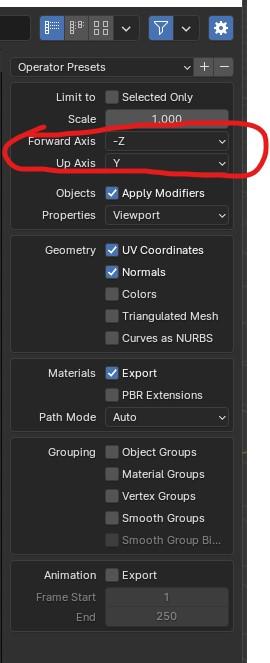
Ultrascatter not scattering help@edward You shouldn't have to deal with "strange import orientation between daz and blender". Have you configured the Blender export with Daz axis orientation? Forward Axis should be -Z and Up Axis should be Y for exporting OBJ to be used in Daz Studio.
 DAZ, Where's My Metadata?! (Answered Though not Solved)
Elor said:
Hello,
I have a question regarding metadata: what does happen if I created metadata to one of these products if Daz later provides its own metadata ? Will DIM simply replace mines or will they be conflict or problems ?
As far as I know they will coexist, especially if you don't use the Daz Store as the store option - it is already possible for a single file to belong to multiple products, so theer shouldn't be any inherent conflict in having official product metadata claim the same items as your custom metadata. If you just expand the default product metadata from Daz then yes, I would expect that to be overwritten by any kind of update.
Smart Content Library and "Now Selling" itemsI will amend my statement, there is one so far that actually does have metadata for their stuff: Pamawo. Which is good, becuase his transferred items also included updates to textures and G9 conversions for some, so it's an added value to buy a second time around.
Ultrascatter not scattering helpMany thanks!
It doesn't seem to be the origin point of the object i'm scattering as that is at the bottom centre point. If I create a new primative plane and scatter the same object than it works fine. I think it must be something to do with my landscape imported from blender. Looking into your suggestion did make me stumble upon a workaround though.
I created a landscape which i have sliced into upper hill / mid hill / lower hill / sand bar / creek. So it consists of 5 sections. The problem arises when i import all 5 pieces into daz. If i scatter at that point it's all ok. But once I start rotating, positioning and scaling the landscape to get over the strange import orentation between daz and blender it goes all wonky. It's the grouping/parenting and reorientating of the landscape thats causing the issue. If I reorientate each section of landscape individually it works. Once I group them and move as one it throws off the scatter completely.
This a labourious workaround but I think it may work!
Daz 3D is part of

Connect
DAZ Productions, Inc.
7533 S Center View Ct #4664
West Jordan, UT 84084Licensing Agreement | Terms of Service | Privacy Policy | EULA
© 2026 Daz Productions Inc. All Rights Reserved.