-
Daz Studio Pro BETA - version 4.15.0.30! (*UPDATED*)
I can't disable casting shadow in filament so i hope there is gonna be an option for this.
and Bloom/Glare/Emissive Lights effects should be added too.Rendering issue with Natty HairIs that a render or preview? If preview, is it the Filament Drawstyle? That often makes hair look thin.
asset identificationThis goes in "Product Suggestions." A mod will move it there eventually.
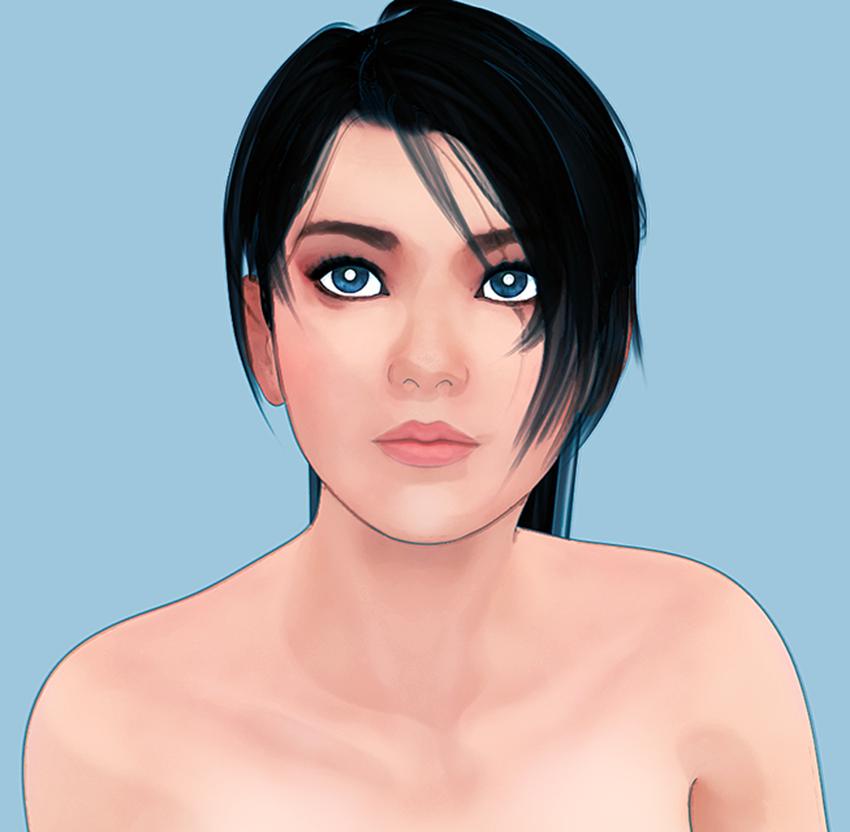
Where is this picture from?
Based on the wonky straps and barebones texturing of the bikini top, it looks like something the artist made themselves in Marvelous Designer or something.
The face doesn't ring any bells, but it looks like a Filament render and those always come out looking weird.
Can barely see the hair, so I can't help you there.
Turn Off Fake Contrast?margrave said:
lilweep said:
i wish the Purple clay pre-render of the Filament viewport mode was an option.
I keep forgetting Filament even exists, honestly.
Filament was such a disappointment that I have ignored it since I first tried it out. But yes, I totally agree with your OP - some way of seeing the actual contact instead of total shadow would be a big help.
Turn Off Fake Contrast?lilweep said:
i wish the Purple clay pre-render of the Filament viewport mode was an option.
I keep forgetting Filament even exists, honestly.
Turn Off Fake Contrast?i wish the Purple clay pre-render of the Filament viewport mode was an option.
How to turn off Shadows?actually its being problem when you use clothes that have transparency like stockings.
in filament there is no shadow bias option of the lights, stocking itself casting shadow to the body. There has to be a way to disable casting shadow.The Complete Guide to DAZ Studio 4 by Paolo Cicconecontedesfees said:
This book was published in 2013 and 350 pages long and claims to be comprehensive, although it's obviously dated. Never the less, it's the most recent volume I can find. Is any one familiar with it? Can someone please give me a frank review, favourable or otherwise? I really would like to develop competence with DAZ Studio and I'm working in the dark. Thanks to all.
It it was released in 2013 then it was written for DS 4.5 or 4.6, which means before DS included features like Iray render engine (added in 4.8), dForce clothes (4.10), strand-based hair and dForce hair (4.11), Filament (4.14) and probably many more things.
Iray Section Plane Caps artifacting bug - is this fixed in 4.15?ebergerly said:
It renders fine (section caps disabled) on my GTX-1080ti plus RTX-2070 Super. No weird memory spikes. BTW, did you check your log file to see what it says? Also, keep in mind it may be scene-dependent, so just because it works in my scene doesn't mean you don't have some other issues going on that might cause even an upgrade to 4.15 to go bad...
Also, I'm trying to figure how you can use the section cap feature and still get the HDR lighting inside the capped object(s)? When it does the orange cap does it still admit light as if the cap didn't exist? These cap thingy's really have me scratching my head.
Many thanks for the info, I'll update to 4.15 and see what I get :)
As for HDRI's - simply place the section planes just outside of your camera shot (so they're not visible) - on the sides and on the top (so three in total, you could also do the bottom one) - this way you'll get a 3-way HDRI light coverage. The planes are going to cut elements of your scene that are not visible in the camera shot, thus unblocking the way for HDRI light. This can be done by hand, but there also is a product for this:
https://www.daz3d.com/interior-light-pro-for-filament-and-iray
"The Iray culling camera has a slider attached to the camera that allows you to choose how much of your scene is culled. Once your scene around the camera is invisible, ambient light from the chosen HDRI can cast inwards and illuminate your scene."
Blender and/or DAZ Studio?marble said:
Just a sideline comment about comparing render quality.
A few years ago my render options were restricted because I had an iMac and was not willing to wait for IRay to chug along on my poor old Mac CPU. So I got quite good at using the alternatives - either 3Delight or Reality/Luxrender. With the latter, I had to spend a lot of time tweaking the materials because, despite the claims of the Reality developer, the results of the automatic conversion were less than satisfactory. So I made the adjustments myself and I can honestly say that the renders were pretty close to what can be achieved in IRay. The problem was that Luxrender was also slow but it did have advantages: (1) I could let it render while I was working on the next scene, (2) I could adjust any of the Luxrender settings while it was rendering and (3) I could network render so I set up a Linux system that I had at the time to share the render load. I couldn't get GPU speeds but it was much faster than IRay on my old CPU.
The point is that I am not averse to learning how to tweak materials but the results I am seeing in that Blender Render thread here suggest that (a) Cycles can't match IRay for quality with Imported DAZ content and (b) Cycles is not that much quicker than IRay. My experiments with Eevee have not been encouraging either but it is way ahead of the DAZ implementation of Filament.
Reality was the first plug in for Studio that I bought at once, even at $80. I really liked the physical light engine and being able to make lighting changes on the fly. Eventually the material conversions people made got quite good. I too put up some older hardware running Linux to have network renders going. I still miss many of features of LuxRender and still have an iMac as my machine Studio machine, so no Iray GPU for me either. This is what has lead me down this Blender path as my other workstation is a Linux box.
A Roadmap for Daz Studio Would be HelpfulNotAnArtist said:
I will NEVER condemn the Daz 3d folks for not telling me what's coming in the future! I need help with the present!
Let me repeat, I do condemn them for not providing that Filament help...The past has taught us that Daz is not going to document their new features. They might sell you a tutorial that explains it for you though.
More Non-photorealisitic Renders (NPR II)mindsong said:
juvesatriani said:
Another combo PwToon and Pshop
I'm really enjoying your inspiring results and appreciating your exploration and generous workflow sharing.
It was mentioned above, but it bears further comment and some additional detail - the line-render-9000 (LR9K) package from the DAZ store has some features that I don't believe are well-understood and therefore seldom used. Your workflow might really benefit from this tool:
- all DS 3DL line generation is based on contrasting/color edges in a given render. LR9K includes a series of presets that will let you 'force' those colors and contrast to get *just the lines* that can be overlayed on your 'normal' render (of any kind: pwtoon, visual-style, DS-toon, etc.). This is powerful in the right hands, and can be tweaked for a variety of very different scene-types, using color-ids, fresnel, lighting and ambient tricks, etc. - all in 3DL).
But more important, and I believe less appreciated/understood:
- LR9K also includes a control-panel that lets you configure, generate, and overlay multiple renders, using multiple render engines (3DL/Iray/filament/?) in a single "shot" context - like multi-pass on steroids.
e.g. you can configure up to four independent renders in a LR9K session/shot, where the first is an IRAY background, maybe using Oso3d's IRAY toon tools, then in layer 2, you can do a 3DL pwtoon pass, and in layer 3, a LR9K line pass - and LR9K will layer them into a single final image. I believe the rendered layers are also available in the DS render caches if you wish to dig them up, or you can simply do traditional renders of a given layer in the traditional way.
You can also use all four layers to consolidate four different line-styles in your scene (e.g. trees/leaves, vs figure edges, vs landscapes of some texture, and then perhaps some cloud edging (not all lines are black, etc.). This 'super-line' render can be layered over any other render of the scene, etc. Or you can mix/match to taste.
Of course you have to keep track of the alpha channels in your layers as with any composite sequence you already do, etc. but once setup, your LR9K 'formula' can be saved as a preset for your continued general use.
Note that the tool *seems* to sell itself as a toon/line engine, which it can be, but you can use the autorender tool with any compositing goal, using any of the render techniques available to you, all with a single click once setup (which is no less complex than your manual compositing planning and workflows).
The tutorials that are for sale aren't that great for this compositing function (they're more line/toon generation oriented), but the author has always been responsive in the commercial product forums, so a review of those threads might be worth your time if you are trying to understand what I'm describing and how users see and use the tool in general.
Kind of a hidden gem. I assume it still works in DS 4.15 (I'm 'stuck' at 4.11 for the most part).
I get no commision :), I simply like the tool and respect the author greatly.
Thanks again for your generous information sharing. Your work is simply stunning, and a great inspiration.
best,
--ms
(eta: line-render detail comment)
Thanks a lot for nice words and give me detail insight about Line render 9000 , Every tools and techniques which have possibility to enhance end result, always worth to check . So yeah I`ll be hanging out iin there and read the manual first ( if public available) before decide to get a copy of it
Last year I`ve finally bought copy of poser 11 . Overall, I like realtime Comic Book Preview features , but still struggle with navigate bigger scenes or when dealling with imported complex prop assets from DAZ which have lots of texture. Blender maybe the obvious altrenative , since its also offer Multipass in the box . But less export- import process will be great for me . For now I`m still have no idea how to optimize Blender Freeestyle render time so maybe LR9K the missing piece in my workflow
Thanks again for information , I hope someday we ( DAZ NPR regular users) will working together to produce several short stories in sequential image medium and sponsored by DAZ itself . LOL
Blender and/or DAZ Studio?Just a sideline comment about comparing render quality.
A few years ago my render options were restricted because I had an iMac and was not willing to wait for IRay to chug along on my poor old Mac CPU. So I got quite good at using the alternatives - either 3Delight or Reality/Luxrender. With the latter, I had to spend a lot of time tweaking the materials because, despite the claims of the Reality developer, the results of the automatic conversion were less than satisfactory. So I made the adjustments myself and I can honestly say that the renders were pretty close to what can be achieved in IRay. The problem was that Luxrender was also slow but it did have advantages: (1) I could let it render while I was working on the next scene, (2) I could adjust any of the Luxrender settings while it was rendering and (3) I could network render so I set up a Linux system that I had at the time to share the render load. I couldn't get GPU speeds but it was much faster than IRay on my old CPU.
The point is that I am not averse to learning how to tweak materials but the results I am seeing in that Blender Render thread here suggest that (a) Cycles can't match IRay for quality with Imported DAZ content and (b) Cycles is not that much quicker than IRay. My experiments with Eevee have not been encouraging either but it is way ahead of the DAZ implementation of Filament.
More Non-photorealisitic Renders (NPR II)juvesatriani said:
Another combo PwToon and Pshop
I'm really enjoying your inspiring results and appreciating your exploration and generous workflow sharing.
It was mentioned above, but it bears further comment and some additional detail - the line-render-9000 (LR9K) package from the DAZ store has some features that I don't believe are well-understood and therefore seldom used. Your workflow might really benefit from this tool:
- all DS 3DL line generation is based on contrasting/color edges in a given render. LR9K includes a series of presets that will let you 'force' those colors and contrast to get *just the lines* that can be overlayed on your 'normal' render (of any kind: pwtoon, visual-style, DS-toon, etc.). This is powerful in the right hands, and can be tweaked for a variety of very different scene-types, using color-ids, fresnel, lighting and ambient tricks, etc. - all in 3DL).
But more important, and I believe less appreciated/understood:
- LR9K also includes a control-panel that lets you configure, generate, and overlay multiple renders, using multiple render engines (3DL/Iray/filament/?) in a single "shot" context - like multi-pass on steroids.
e.g. you can configure up to four independent renders in a LR9K session/shot, where the first is an IRAY background, maybe using Oso3d's IRAY toon tools, then in layer 2, you can do a 3DL pwtoon pass, and in layer 3, a LR9K line pass - and LR9K will layer them into a single final image. I believe the rendered layers are also available in the DS render caches if you wish to dig them up, or you can simply do traditional renders of a given layer in the traditional way.
You can also use all four layers to consolidate four different line-styles in your scene (e.g. trees/leaves, vs figure edges, vs landscapes of some texture, and then perhaps some cloud edging (not all lines are black, etc.). This 'super-line' render can be layered over any other render of the scene, etc. Or you can mix/match to taste.
Of course you have to keep track of the alpha channels in your layers as with any composite sequence you already do, etc. but once setup, your LR9K 'formula' can be saved as a preset for your continued general use.
Note that the tool *seems* to sell itself as a toon/line engine, which it can be, but you can use the autorender tool with any compositing goal, using any of the render techniques available to you, all with a single click once setup (which is no less complex than your manual compositing planning and workflows).
The tutorials that are for sale aren't that great for this compositing function (they're more line/toon generation oriented), but the author has always been responsive in the commercial product forums, so a review of those threads might be worth your time if you are trying to understand what I'm describing and how users see and use the tool in general.
Kind of a hidden gem. I assume it still works in DS 4.15 (I'm 'stuck' at 4.11 for the most part).
I get no commision :), I simply like the tool and respect the author greatly.
Thanks again for your generous information sharing. Your work is simply stunning, and a great inspiration.
best,
--ms
(eta: line-render detail comment)
Storytelling Feedback for It's Raining Men Contest 2020 (Updated May 30)vwrangler said:
Thank you for the detailed feedback! I hadn't thought of using framing and color in quite those ways.
It was rendered in Iray, not Filament; I haven't done anything with that yet.
Ah, interesting! Then perhaps make sure you don't have the headlight in the camera active, as that can give that even light (like when you take a photo with the camera's flash and everything is lit so evenly, it destroys any sense of depth).
Storytelling Feedback for It's Raining Men Contest 2020 (Updated May 30)Thank you for the detailed feedback! I hadn't thought of using framing and color in quite those ways.
It was rendered in Iray, not Filament; I haven't done anything with that yet.
Storytelling Feedback for It's Raining Men Contest 2020 (Updated May 30)Feedback for @vwrangler
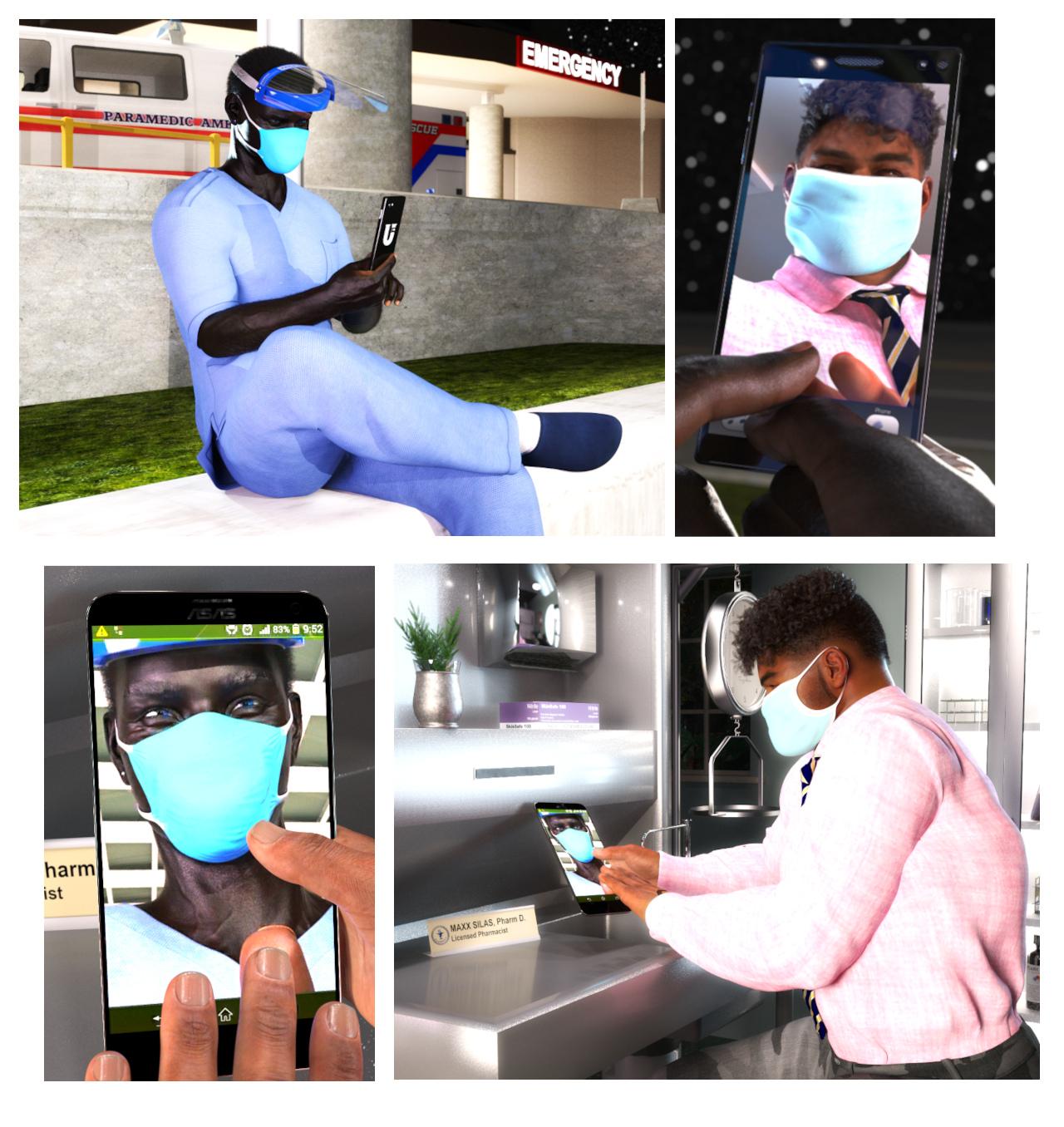
I love this sweet story which does a great job of capturing a glimpse of our new reality. Was this rendered using filament?
Your biggest areas of opportunity are composition and lighting. If this is rendered using filament, then lightning might be more difficult to deal with (I haven't experimented a lot with it myself), so that leaves composition as something to explore. I think the first and last frames, which basically act as establishing shots, can have a more interesting composition by creating leading lines and having them draw our eyes towards the figures. So in the case of the first frame, you can use the lines of the wall to set those leading lines. While in the last frame, you can use the table to create those leading lines. That will also give you some interesting mirroring as well. You might also want to throw some depth of field to separate objects as well.
Here are some resources that you may find helpful:
"Leading Lines" in Popular Films
- This gives a great overview of leading lines and how to set them up.
5 Tips For Filming Cinematic Compositions
- This video goes over building depth (1:43) & focal points (10:00) which you may find interesting.
Depth of Field Explained: Ultimate Guide to Camera Focus
- An excellent explanation of all the types of focuses a scene/image can use and what they convey. Shallow Focus (3:31) is the one that may work the best for your story.
Composition + Framing - Storytelling with Cinematography
- Quick, basic explanations of things to keep in mind when composing.
- An overview of the importance of color when designing and some basic explanations regarding color theory.
Camera Framing: Shot Composition & Cinematography Techniques Explained
- Explanation of shot composition based on the number of characters who are framed. It might be worth exploring to use an "Ove the Shoulder" (3:29) type of framing instead of the close-shot of the cellphone.
These are some handy references that may also be helpful:
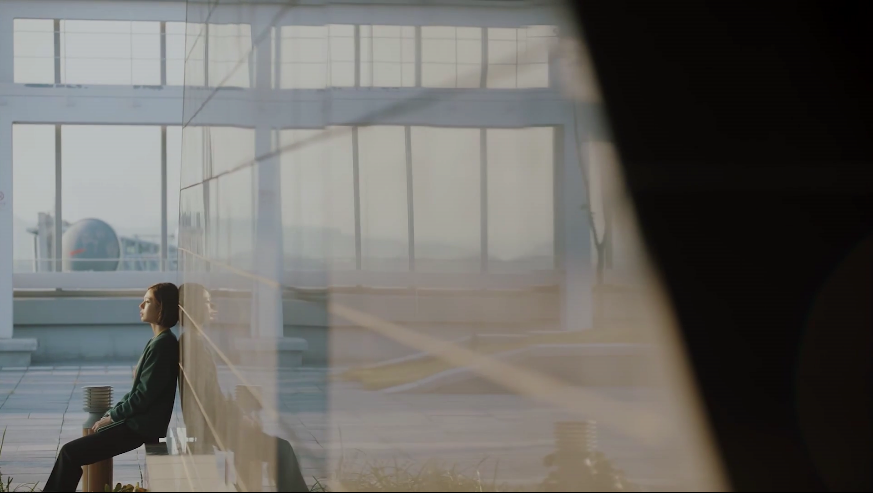
This is an example from "Feel Good to Die" of using the wall as a leading line to draw our eyes to the figure. The smaller the character is showin in the frame, the "smaller" (worthless, alone, isolated, frustrated, etc) he/she feels.
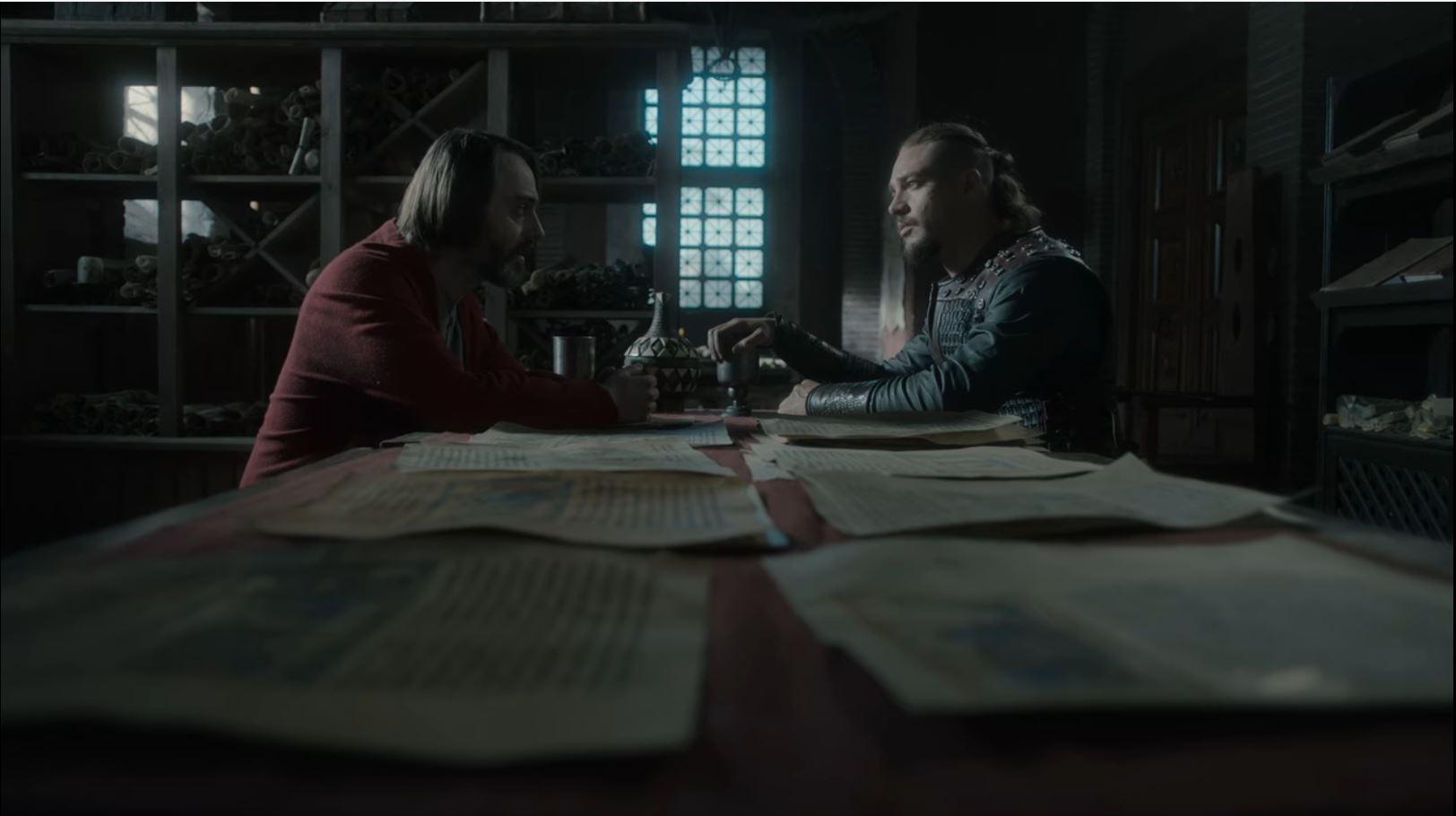
This is one example of using a table as a leading line to draw your eyes towards the character. Notice here as well that the mood is quite somber and sad. (This is a screenshot of "The Last Kingdom" which I highly recommend. It has superb lighting).
Keep in mind that you can also use the edge of the table instead (similar to the way the wall above has been used), such as in this example of Vincenzo:
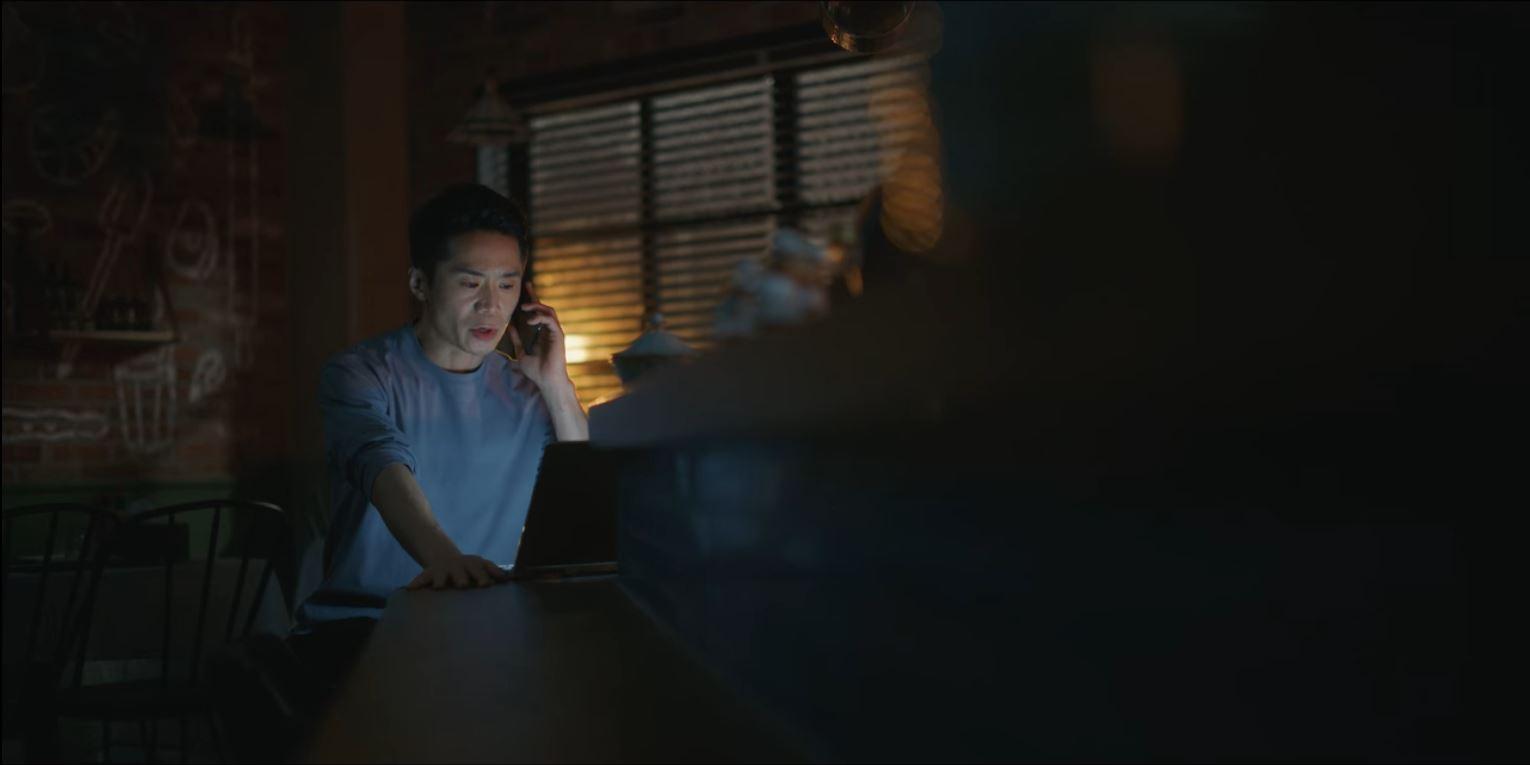
The following two examples from "Flower of Evil" and "365: Repeat the Year" show other ways to create leading lines and combine them with a shallow focus.
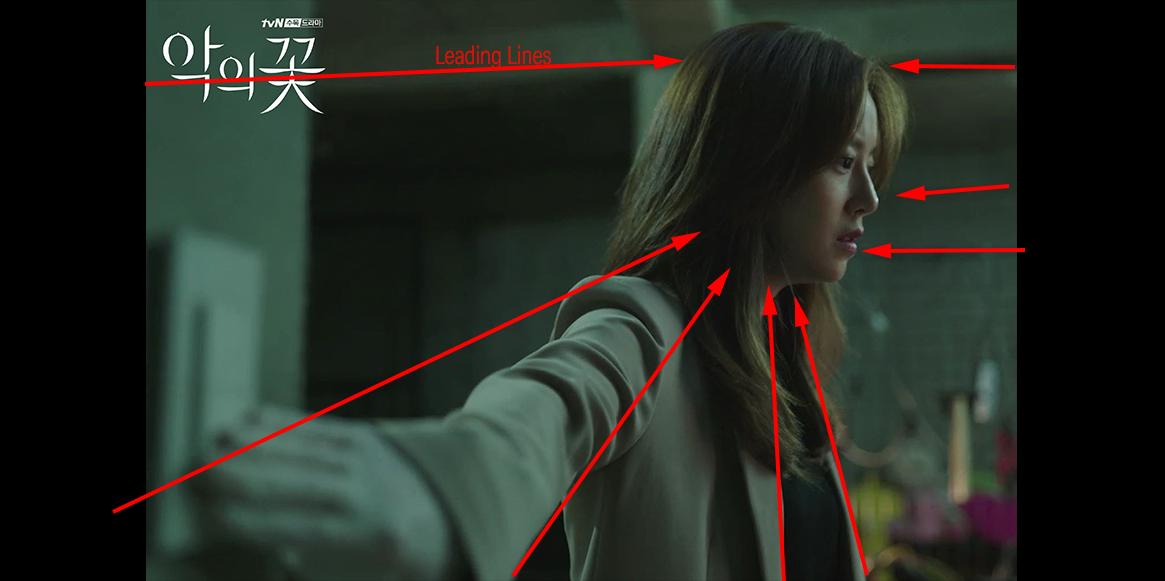
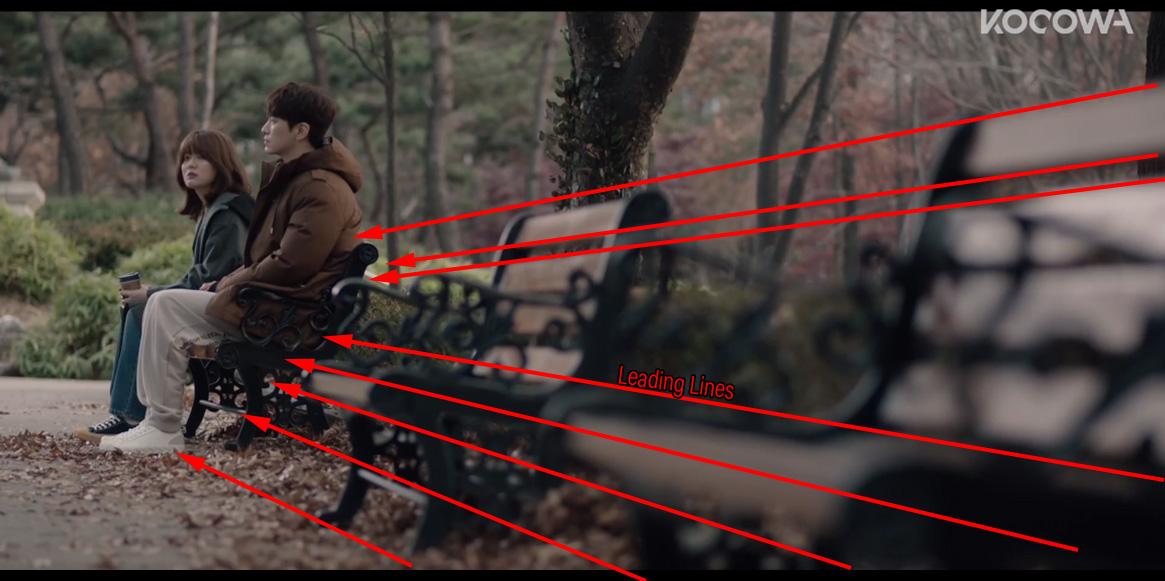
And this example from "Itaewon Class" shows how you can create mood and focus on the character's emotions by using a shallow focus to isolate him from the background, allowing the colors, light and, more importantly, the character's expression to tell us what's happening. In this case, to sell us how frustrated and alone he feels.
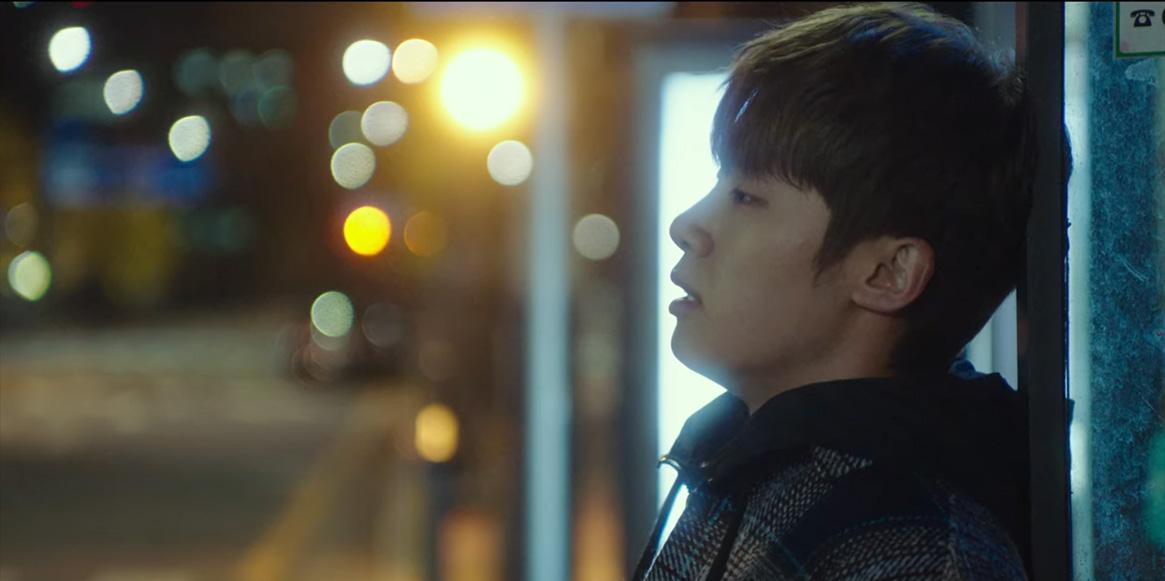
Hulu's "The Handmaid's Tale" (also highly recommend) uses the shallow focus extensively to nail it home that the main character (and the rest of the women) is trapped by the new society she lives in.
 SOLVED Does Studio by Any Other CPU Run as Slowly?
Taoz said:
xyer0 said:
Thanks Sevrin & Taoz for the heads up! I only connect my Daz computer to the internet when I'm downloading from DIM, and I exit Daz Studio (using Task Manager) BEFORE I turn on the internet. I have a Headlamp Blocker that I use instead of headlamps in Texture Shaded, but I mostly use Filament [whenever possible] for my Viewport. I'll be mindful of the backdrops.
Guess I should point out that it's the built-in Backdrop in DS (on the Environment tab) that I'm talking about, not backdrops in general (I'm not sure if/how they affect Iray update speed).
Ah so desu ka
SOLVED Does Studio by Any Other CPU Run as Slowly?xyer0 said:
Thanks Sevrin & Taoz for the heads up! I only connect my Daz computer to the internet when I'm downloading from DIM, and I exit Daz Studio (using Task Manager) BEFORE I turn on the internet. I have a Headlamp Blocker that I use instead of headlamps in Texture Shaded, but I mostly use Filament [whenever possible] for my Viewport. I'll be mindful of the backdrops.
Guess I should point out that it's the built-in Backdrop in DS (on the Environment tab) that I'm talking about, not backdrops in general (I'm not sure if/how they affect Iray update speed).
SOLVED Does Studio by Any Other CPU Run as Slowly?Thanks Sevrin & Taoz for the heads up! I only connect my Daz computer to the internet when I'm downloading from DIM, and I exit Daz Studio (using Task Manager) BEFORE I turn on the internet. I have a Headlamp Blocker that I use instead of headlamps in Texture Shaded, but I mostly use Filament [whenever possible] for my Viewport. I'll be mindful of the backdrops.
Daz 3D is part of

Connect
DAZ Productions, Inc.
7533 S Center View Ct #4664
West Jordan, UT 84084Licensing Agreement | Terms of Service | Privacy Policy | EULA
© 2026 Daz Productions Inc. All Rights Reserved.