-
"Blade Runner's" Rachael head INJ files. See page 3. Face texture added.
Yes, D/S = Daz Studio in here.
Will be sending you a PM when I find a few things and get them together.
Yes I'm trying to create that file ... but it's been awhile. Anyways I made some tutorials, I should read them ;-)
But more importantly I'm hoping to be able to help you do these things too.
Keep in mind though, that whether or not all this works out, you can certainly morph and use yourself any of the figures you morph!
Diffeomorphic DAZ-to-Blender@nicstt Should work now. I recently changed to a new computer because my old one died, and on my new system I don’t have the clothes-specific jcms installed. Therefore the plugin always does auto-transfer of jcms, and the bug did not bite me. However, I do have custom body morphs for the clothes installed. The same problem arose when I tried to transfer the pear figure from body to shorts, and that bug is gone now.
Mr. Thomas, you who are almost a God for creating the best way to get things out of Daz Studio and who makes available for free what even the Daz developers are not capable of doing, I need you to help me urgently with a problem.
Since I am using google translator to translate this message, maybe some things are not understood very well since I don't speak English.Mister Thomas (or someone else who has experienced a similar problem), when using even a Genesis8Female + Sakura8 + Hotaru base when importing or loading any morphs (even the default ones with genesis 8 female) that completely close the eyelids and tabs, unfortunately only They close halfway to the eye in Blender, but in Daz they close completely.
I have tried with many morphs, also both in version 1.4 and in version 1.5 of its plugin (I am in daz studio 4.12 and in blender 2.81) but nothing works. I've reviewed their official plugin site, this forum, and more, and nowhere have I seen anyone who had something similar happen to them. I followed their tutorials and explanations to the letter on the complement site, both version 1.4 and 1.5
Is there any way to fix this?
Attached images of the problemDid you load in Sakura's custom JCMs? Super stylized morphs typically need extra jcms particularly for the eyes
Yes.
I tried all the shapes and several times (both importing them as a group and separately, both as "CUSTOM MORPHS" and "CUSTOM JCMS")Diffeomorphic DAZ-to-Blender@nicstt Should work now. I recently changed to a new computer because my old one died, and on my new system I don’t have the clothes-specific jcms installed. Therefore the plugin always does auto-transfer of jcms, and the bug did not bite me. However, I do have custom body morphs for the clothes installed. The same problem arose when I tried to transfer the pear figure from body to shorts, and that bug is gone now.
Mr. Thomas, you who are almost a God for creating the best way to get things out of Daz Studio and who makes available for free what even the Daz developers are not capable of doing, I need you to help me urgently with a problem.
Since I am using google translator to translate this message, maybe some things are not understood very well since I don't speak English.Mister Thomas (or someone else who has experienced a similar problem), when using even a Genesis8Female + Sakura8 + Hotaru base when importing or loading any morphs (even the default ones with genesis 8 female) that completely close the eyelids and tabs, unfortunately only They close halfway to the eye in Blender, but in Daz they close completely.
I have tried with many morphs, also both in version 1.4 and in version 1.5 of its plugin (I am in daz studio 4.12 and in blender 2.81) but nothing works. I've reviewed their official plugin site, this forum, and more, and nowhere have I seen anyone who had something similar happen to them. I followed their tutorials and explanations to the letter on the complement site, both version 1.4 and 1.5
Is there any way to fix this?
Attached images of the problemDid you load in Sakura's custom JCMs? Super stylized morphs typically need extra jcms particularly for the eyes
Feedback for the C4D BridgeIf anyone is interested, I can put together a tutorial for how to convert pose morph target meshes into simple vertex delta morphs in the pose morph tag. Again, this is much more performance friendly and in my opinion much more versatile.
How much more friendly?
Think about it, every single morph is a duplicate of your entire figure mesh, times how ever many morphs you have, times how ever many meshes you have. Point coordinates are just a few numbers in memory.
I tried a mesh with hair, shirt, pants, shoes, and jewelry and went from 3.3GB to 229MB. That's over 90% reduction.
DIM Installers missing tags - are you missing content?Part 2
Product Name Product ID
M3 Sci-Fi Outfit 1541
M4 Enhanced / Mina for M4 8371
Magic Falls DS 2318
Make It FUZZY!!! 20704
Makoa for Kimo 7 32201
Man Down Man Down 9070
Marauders 13312
Martial Arts Hand Pose For Genesis 2 Male M6 Set 1 27562
Meara for V5 16327
Medieval Hall and Garden DS 32467
Medieval Matt & Maddie DS 4644
Medieval Storage Room 22265
Mediterranean Passageway 37561
Men of Action for David 2679
Merlin's Oak, Plants and Props Set DS 17817
Michael 1.0 Map 76
Michael 2.0 Character Pack 1 516
Michael 2.0 Character Pack 2 524
Michael 2.0 Morphing Clothing Pack 1 & 2 687
Michael 2.0 Reduced Resolution Figure 880
Michael 2.0 Texture Maps (high res) 121
Michael 2.0 Texture Maps (standard res) 391
Michael Clothing Pack 1 211
Michael Clothing Pack 2 210
Michael Fantasy Maps 80
Michael Football Gear 863
Michael Suit Coat Pack 599
Michael's Conforming Long Hair 575
Michael's Face Morphs & Textures 704
Michael's Morphing Trenchcoat 641
Michael's Wedge Cut Hairstyle 163
Michiko for Aiko 3.0 2877
Millennium Baby 561
Millennium Beard for Michael 2 799
Millennium Boys Clothing Pack 122
Millennium Dragon Animations 815
Millennium Girls Anime Hair 459
Millennium Girls Clothing Pack 1 369
Millennium Girls Clothing Pack 1 Mappak 371
Millennium Girls' Morphing Clothing Pack 1 372
Millennium Horse Unicorn 2122
Miriam for V4 7575
Mishka Hair G2 30603
Mitsu Hair for Genesis 13521
Mixamo Animation Sampler Pack for M4 and V4.2 11443
Moler Hive Berserker Warrior 3650
Monstrosity Weapons 16300
MoochTail_Basic 3583
MoochTail_Extra 3597
Morphing Boot Pack 628
Morphing Rocks And Formations DS 20778
Multi-Sword Pack 877
Musculature HD Morphs for Genesis 3 Female(s) 22745
Musculature HD Morphs for Genesis 3 Male(s) 23916
My Best Friend 15357
MyLilAlien 3058
Mystical Touch DS 12923
Nadia 17758
Nadia V4 Ps 17758
Nagase Hiro 4 8537
naiar ar' edana character pack 1813
naiar ar' edana clothing pack 1806
naiar ar' edana texture pack 1808
Nana Hair 5653
Natalie 7870
Native Cheyenne Village DS 10848
Natural Curls 5420
Nature - Forest Flowers DS 20386
Navarre DS 8332
Nazar 12902
NeanderMan Action 15052
Need a Lift - Poses for M4 and V4 10826
Neo Station DS 5893
Neoclassical Gown and Robe Accessories 9148
Neoclassical Gown and Robe DS 9148
Nerd3D Soggy Bottom 9827
Nerd3D Thunder River DS 9497
Neve for Genesis 16309
Neve for V4 10193
Neve for Victoria 4 16309
New Groove DS 11238
Niara for Victoria 5 14086
Nick 12331
Nifty Poses for David 5 and Gianni 6 16387
Nigel for Genesis 13308
Nigel for M4 13308
Nigel for M5 DS 4.5 14966
Night Guardians 13628
Night World Lone Wolf Michael 3 5794
Night World Lone Wolf Michael 3 StudioCF 5794
Nighthawk for V4 11932
NightHawkTextureExp 12289
NightHeart Outfit Textures 17334
NightOut for NightLife V4 12466
Nimos Thorns- DS version 11313
Nindo for Mei Lin 7 30809
Nine to Five 4993
NinjaSuit 1058
Now-Crowd Billboards - Medieval City Life (01of16) 50397
Now-Crowd Billboards - Medieval City Life (02of16) 50397
Now-Crowd Billboards - Medieval City Life (03of16) 50397
Now-Crowd Billboards - Medieval City Life (04of16) 50397
Now-Crowd Billboards - Medieval City Life (05of16) 50397
Now-Crowd Billboards - Medieval City Life (06of16) 50397
Now-Crowd Billboards - Medieval City Life (07of16) 50397
Now-Crowd Billboards - Medieval City Life (08of16) 50397
Now-Crowd Billboards - Medieval City Life (09of16) 50397
Now-Crowd Billboards - Medieval City Life (10of16) 50397
Now-Crowd Billboards - Medieval City Life (11of16) 50397
Now-Crowd Billboards - Medieval City Life (12of16) 50397
Now-Crowd Billboards - Medieval City Life (13of16) 50397
Now-Crowd Billboards - Medieval City Life (14of16) 50397
Now-Crowd Billboards - Medieval City Life (15of16) 50397
Now-Crowd Billboards - Medieval City Life (16of16) 50397
NRH Vulcan DS 9546
Nybras 3866
Nyoko Pigtail Hair 2874
Nyssa 16408
Ogre 229
Ola 29220
Old West Undertakers Ps 8236
Old World Knight for Genesis 2 Males 23252
Oneiros DS 8949
Opus Magnum DS 13631
Oriental Seasons 4555
Outland Marauder for Genesis 13559
Outlander for Michael 5004
Outlander for Michael 688
Outlander for Michael Texture Pack 5003
Outlander for Michael Texture Pack 689
Outlander for Victoria & Stephanie Texture Pack 5001
Outlander for Victoria & Stephanie Texture Pack 701
Padded Armor for David 4681
Paper Dress for Genesis 2 Female(s) 20676
Paradise Pavilion Texture Bundle 1213
Pharos Fantasy for V4 DS 4833
Pharos Fantasy for V4 Ps 4833
Pheobe for V3 4335
Phoebe for Aiko 5224
Phoebe for Aiko 805
Picaro for Michael 4 DS 8294
Picnic Area Exterior 38667
Pier View Ps 5744
Piggy Bank 618
Pirate Pack 630
Pirate Pack for M3 1529
Places Of Summer DS 5784
Planetarium DS 11717
Pocket Filler 9453
Pocket Filler StudioCF 9453
Police Accessories Pack 446
PoseMaster for DAZ Studio 13968
Precious Petals for Morphing Face Masks 2285
Precious Petals for Morphing Face Masks 5045
Prep Gear Textures 15437
Preschooler Ultra Bodysuits 3105
Props Pack - Fantasy Banquet Set 28644
PS-Tia 28169
Queens Court 2 DS 5385
Queens Court 3 DS 5386
R.O.1 4456
Rag-Erator for DAZ Studio 10541
Ragnarok 27369
Rain Tool 6931
Ranch Pavilion 35503
Rays of Dreams for Enchanted Forest 12130
RDNA Egyptine Bast Statues 28307
RDNA Egyptine Peacock Feather Fans 28300
RDNA Mushrooms Vol 3 28460
RDNA Mushroomz SmClusters and Rings 2 28380
Real Curls 759
Real Emotions for M4 8022
Real Emotions for Michael 3 1620
Real Emotions for Victoria 3 1523
Real Emotions For Victoria 4 4845
Real Fur for DAZ Big Cat 2 17843
Red Fox by AM DS 21745
Red Sands Temple DS 14043
Regency for M4 Expansion DS StudioCF 10159
Regency for M4 Expansion Ps 10159
Robot 244
Rock Demon 15894
Rodent Base by AM 38537
Rolf 27366
Roman Tunic for Genesis 14937
Ronin for Genesis 13694
Ronin for M4 Ps 13694
Rowan 7748
Royal Eastern - The Asian Dragon 19471
Rust Icator for DAZ Studio 10550
Ryuu International Genesis 13693
Sacred Barge DS 4201
Santa for David 3891
Santa Hair and Beard 3903
Santa's Elf 272
Sci Fi Quantum 3000 977
Sci-fi Outpost DS 21151
Scuba Gear 314
Sensation for Hiro 3200
Sentinels Texture Pack 1 for the Gargoyle Hound 1344
Seraphnia Dark Elf for V4 6924
SGM Explorer DS 3805
Shadow Dancer for Victoria 3 4303
Shadow Kin for Michael 5 and Genesis 14412
Shape Presets for Genesis 2 Male(s) 20794
Short Curls Hairstyle 598
Short Style Cut 165
Simple Living - Fireplace 20712
Skate Clothing Pack 737
Skating Snowman 3896
Skin Builder Basic for Genesis and Genesis 2 Female(s) 18900
Smoking Room Poses 10982
Smoking Room Poses StudioCF 10982
Smugglers Keep StudioCF 9573
Songbird ReMix: Corvus Corvus 16223
Sosie V4V5 13771
Space Dweller V4 Unimesh Fits 11437
Space Dweller V4 Unimesh Fits StudioCF 11437
Spanish Rose Jardin de Sevilla DS 3580
Spanish Tack for the Millennium Horse 3549
Sports Pack 48
Spring Garden DS 4112
Springy 23615
Spuggles Special Edition 23065
SS Hooded Cloak MAP Pack Vol. 1 1331
SS Marcoor Corridor 2 Addon DS 21400
Stalker Girl Pants for Genesis 14680
Steamworks Interior Ps 3778
Stefan for Genesis 14111
Stefan for M4 14111
Stephanie 531
Stephanie African American Maps (high res) 619
Stephanie African American Maps (standard res) 620
Stephanie Texture Maps (high res) 592
Stephanie Texture Maps (standard res) 593
Stolz 15498
Stolz Michael 4 Ps 15498
Stolz the Younger for Genesis 15503
Stolz the Younger for M4 15503
Stormguards 1159
Storybook Dragon 212
Storybook Dragon Poses 420
Strike Long Hair 3801
Style Magic for Ultimate Changing Ponytail 2458
Stylized Business Man & Woman 125
Summertime Grill 14716
Superhero Training Gear 13016
SY Christmas Lights 20672
T-Shirt Dress for Genesis 17700
Table Props 29
Tanky 20660
Tanya for V3 4314
Teahouse Treasures 1989
Tech Staves 15888
Technophilia Arcane: Quantum Eye 28645
Temple Ruins 1812
Texture Map - Knight 128
The Alchemist's Apothecary 2155
The Artemesia Gown for Genesis 2 Female(s) 20833
The Bearded Lady 38699
The Bedchamber DS 37365
The Bridge Collection 16572
The Conservatory Ps 18047
The Darkness 2358
The Drop Box DS 17047
The Duelist for David 2689
The Dungeon Gallows 15493
The Forest Whispers DS 13477
The FREAK 4 Weapons Ps 9111
The Gargantual 16335
The Graveyard 2717
The Heart of the Matter DS 12996
The Hidden Waterfalls DS 11362
The Igigi 15986
The Legendary Griffin 3491
The Master for Wolf King PoserCF 15919
The Old Waterhole DS 10497
The Pit 18548
The Pit - Iray Edition 18548
The Rattler 1060
The Ray Sled 3488
The Ray Sled 4988
The RHS Stagecoach DS 5783
The Round Table 2078
The Rulers of Egypt 746
The Sorceress Ps 9388
The Sorceress StudioCF 9388
The Spray Tool DS 8597
The Steamboat Machine Legacy 3732
The Steamboat Machine Ps 3732
The Tavern of Mog Ruith DS 7934
The Tomb 1528
The Village 1 - Houses 27276
The Water Fall Tool DS 9482
The Whispering Wall 2540
Thomas for M4 Ps 15001
Thomas for M5 15001
Tiny Tim 3943
Tommasina for V3 3842
ToolGirl 10157
Toon Furniture 17712
Totally Bazaar 1 14447
Totally Bazaar 2 14449
Toy Soldier and Train Set 4861
Tra La La Hair for Genesis 3 Female(s) 31701
Trey for M4 9414
Tribal Trogs 1790
Troubadour for Genesis 2 Male(s) 22292
Troubadour Textures 22293
Tru Ceremonial 3527
Tudor Living 2 DS 48731
Tudor Living 2 Ps 48731
Tulip Garden DS 4174
Twister TT Ps 10350
Ultimate Morphing* Hi-Res Millennium Cube 1287
UltraGenesis: Expressive 30702
ULTRAGENESIS: Faces of G 30713
Urban Fae for V4 12208
Urban Fae for V4 StudioCF 12208
Urban Fae V4 Unimesh Fits 12209
Urban Fae V4 Unimesh Fits StudioCF 12209
V3 Bikini 1110
V3 Fantasy Collar Set 1274
V3 Male Clothing Pack 1454
V4 Buccaneer 8465
V4 Buccaneer StudioCF 8465
V4 Creature Wings 9771
V4 Male Millennium Ultimate Madness Fit Bundle Pak 6602
Vega for V3 4336
VI Circus - Decoder 25691
Vicki's Gel Cut 155
Vicki's Subdividing Material Poses: Hosiery & Gloves 705
Victoria 2.0 Character Pack 1 8
Victoria 2.0 Character Pack 2 9
Victoria 2.0 Fantasy Sci-Fi Uniform & Mappak 1070
Victoria 2.0 Fantasy Wrap 188
Victoria 2.0 Light Texture Maps (high res) 95
Victoria 2.0 Light Texture Maps (standard res) 98
Victoria 2.0 Medium Texture Maps (high res) 96
Victoria 2.0 Medium Texture Maps (standard res) 97
Victoria 2.0 Morph-Mapped Fantasy Wrap 477
Victoria 2.0 Morphing Clothing Pack 1 169
Victoria 2.0 Reduced Resolution Figure 659
Victoria 4 for Genesis 2 Female 16559
Victoria 7 Attitude Expressions 22162
Victoria and Michael Sweaters 189
Victoria Clothing Pack 1 168
Victoria Gladiator 180
Victoria Stephanies Morphing Trenchcoat 695
Victoria Suit Coat Pack 698
Victoria Up-Do 152
Victoria's Changing Ponytail Collection 734
Victoria's Changing Ponytail Expansion Maps/Poses 706
Victoria's Changing Ponytail Expansion Pack 730
Victoria's Layered Flip Hairstyle 154
Viking Longship 27365
Viking Male Hair for Genesis and Genesis 2 Males 19280
Vintage Boy 10251
Warrior DL DS 11132
Water Spring DS 33097
Waves on the Beach DS 7400
Wedding Day DS 5808
Wheely 17880
Whispering Wall -Amplified- 2541
White Tiger for DAZ Big Cat 2 18043
Willow Creek 38095
Wolf 2.0 by AM 23354
Wood Chipper 9439
Wooden Rocking Horse 3893
Woodland Props - Tree Trunk and Ivy 2125
World of Fantasy V4 Poses 7598
Wound Makeup Artist 3Delight for Genesis 3 Female(s) 32745
Wyvern Inactive 1598
Young Teens Morph Pack 2768
Young Teens Ultra Bodysuits 2772
Youthful Diversity 3084
Yukimi (Stone Lantern) DS 9567
Yuletide Joy Ornaments 35531
Zac Hair for Gen4 14287
Zavia Red Martian Princess for V4 7473
Zebra 340
Zed Hair 8684
Zen 1809
Zena V4 7325
Zendal DS 9659
Zenia for Victoria 4 5303
Zere for Vittorio 4 7332
Zoey for Victoria 5 13512
Zombie for Genesis 15100
Zombie for Michael 4 15100
Zuri for Genesis 3 Female 36199
Zweihanders DS 22218Feedback for the C4D BridgeIf anyone is interested, I can put together a tutorial for how to convert pose morph target meshes into simple vertex delta morphs in the pose morph tag. Again, this is much more performance friendly and in my opinion much more versatile.
How much more friendly?
Feedback for the C4D BridgeHaving done all this manually before bridge was released - this bridge is a really good start but needs more work - like mapping the corrective morphs via python tag.
This is of course just half the battle.There is no execuse for the slow bog that is Cinema4D pose morph system. I have exported hundreds of morphs to Blender and thousands to UE4, and there is no visible performance hit.
Here is a script I've started to apply all the corrective morphs, if anyone is interested. feel free to use for your projects, just make new python tag and paste it in there. You have to change line 110 to point to your daz mesh. Add the user data as in pic below to the python tag.
This is easier than messing with xpresso imho.https://gist.github.com/maxenko/10a8472aafe8adc1b3be96f8090700fb
Here is preview of it in action.
Diffeomorphic DAZ-to-Blender@nicstt Should work now. I recently changed to a new computer because my old one died, and on my new system I don’t have the clothes-specific jcms installed. Therefore the plugin always does auto-transfer of jcms, and the bug did not bite me. However, I do have custom body morphs for the clothes installed. The same problem arose when I tried to transfer the pear figure from body to shorts, and that bug is gone now.
Mr. Thomas, you who are almost a God for creating the best way to get things out of Daz Studio and who makes available for free what even the Daz developers are not capable of doing, I need you to help me urgently with a problem.
Since I am using google translator to translate this message, maybe some things are not understood very well since I don't speak English.Mister Thomas (or someone else who has experienced a similar problem), when using even a Genesis8Female + Sakura8 + Hotaru base when importing or loading any morphs (even the default ones with genesis 8 female) that completely close the eyelids and tabs, unfortunately only They close halfway to the eye in Blender, but in Daz they close completely.
I have tried with many morphs, also both in version 1.4 and in version 1.5 of its plugin (I am in daz studio 4.12 and in blender 2.81) but nothing works. I've reviewed their official plugin site, this forum, and more, and nowhere have I seen anyone who had something similar happen to them. I followed their tutorials and explanations to the letter on the complement site, both version 1.4 and 1.5
Is there any way to fix this?
Attached images of the problem"Blade Runner's" Rachael head INJ files. See page 3. Face texture added.Hi, dropping back in ... see Richard has been here okay. Was going to say that yeah, those would need to come down. I FOUND the old files for D/S3 :-)
Working on getting the program to read all the files. At the moment I'm not sure if you actually made a morph or made a new figure. But plan to get back with more information after I check one more thing.
Oh yes, the blanks I was referring to are not necessary for morphs ... those were necessary for legacy rigging. {and please - if anybody is wanting to make clothes do consider Genesis, SO much easier}
A very blank .cr2 file is made using a program like Notepad. In it the readscript is put to call for the original .cr2 plus the inj/rem morphs.
The example from one of my ancient tuts is:
{
version
{
number 4.01
}readScript ":Runtime:Libraries:Character:3D Universe - Dennis:!Dennis.cr2"
readScript ":Runtime:Libraries:Pose:Catherine3678a:morphs:Dennis:VBrows INJ.pz2"
}eta: it's a morph ... got the inj/rem made but not polished yet. Only thing is, as I found with the .obj files but said nothing 'cause nobody else mentioned it so I figured I must have been not doing something right [rare I know but it can happen lol ... ] - the eyeballs don't move with the morph.
Planning to polish and test and we'll see what happens.
Feedback for the C4D BridgeIf anyone is interested, I can put together a tutorial for how to convert pose morph target meshes into simple vertex delta morphs in the pose morph tag. Again, this is much more performance friendly and in my opinion much more versatile.
I would be interested in that.
"Scooby" Daphne outfitHere's a front and profile render of my current Daphne WIP:
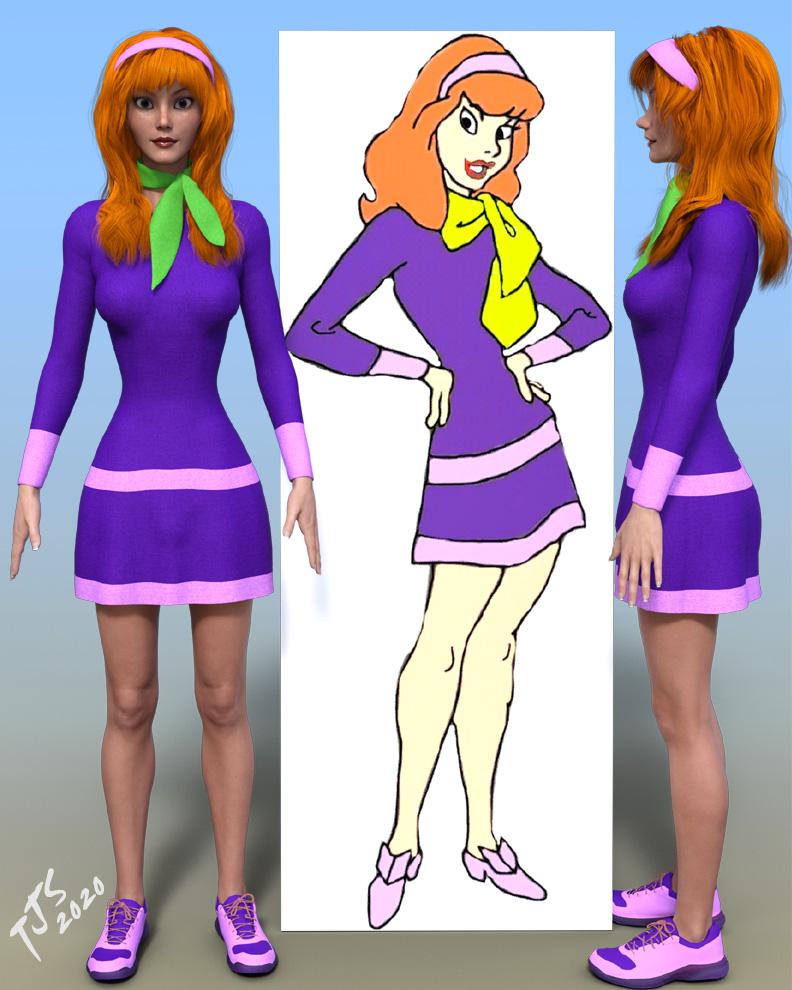
I punted on the shoes and put some sneakers on her for now. I've had no luck finding suitable shoes that'll match the source art that'll fit G3F without issues...
As promised, here's the morphs and character packs that you may need and my settings for my current take on Daphne:
- https://www.daz3d.com/fwsa-finley-hd-for-victoria-7-and-her-jewelry
- https://www.daz3d.com/victoria-7
- https://www.daz3d.com/teen-josie-7 (*not absolutely needed)
- https://www.daz3d.com/genesis-3-female-head-morphs
- https://www.daz3d.com/genesis-3-female-body-morphs
- https://www.daz3d.com/200-plus-head-face-morphs-for-genesis-3-female-s
- https://www.daz3d.com/genesis-3-female-body-morph-resource-kit-2
- https://www.daz3d.com/genesis-3-female-body-morph-resource-kit-4
- https://www.daz3d.com/sf-anime-character-builder
- https://www.daz3d.com/aiko-7-head-morph-resource-kit-1
- https://www.daz3d.com/growing-up-for-genesis-3-female-s
My morph pack list is pretty extensive, but you may be able to 'make do' with other morphs if you don't have one or more of the morphs listed below. FWSA Finley and Victoria 7 are pretty much essential, though...
This should give you a decent starting point, and you are of course free to make your own adjustments. I'm sure that others may be able to improve on this formula - Please share with the class if you are so inclined!
I used Finley's skin textures as well, so it's probably easiest to just load Finley and then start dialing/adjusting from there.
- Finley Head 100%
- Victoria 7 Head 0% (Dial her out)
- Finley Body 100%
- Victoria 7 Body: 50% (may need to adjust this dial to 50%)
- Teen Josie 7 Slim (Face, Body) 100% (this one is optional)
- Nipples: 0% (zero them out if they aren't already, otherwise you may notice them standing at attention underneath the dress...)
- Youth Weight: -25%
- Youth Shape Narrow: 100%
- Face Angle: -10%
- Face Flat: -25%
- Face Center Depth: 25%
- Face Middle Depth: 50%
- Face Lower Depth: -50%
- Face Depth: -50%
- Eyes Width: -25%
- Eyes Iris Size: -75%
- Eyes Height: -25%
- Eyes Angled: 50%
- Eyes Angle: 1.00
- Eyes Lower Middle A: 75%
- Eyes Lower Middle B: 50%
- Eyes Lower inner: 100%
- Chin Width: 25%
- Nose Tip Depth: 25%
- Nose Size: -25%
- Nose Height: -25%
- Nose Depth: -25%
- Nose Bridge Slope: 50%
- Nose Angle Up: 10%
- Mouth Height: -25%
- Cheek Shape young: -50%
- Head Width Narrow: 100%
- Cranium Size Larger: 50% (makes hair at the top back part of the head more prominent)
- Anime Character Eye round 01 Stylized: 25%
- Anime Character Face Stylized: 25%
- Waist Hourglass: 50%
- Figure Hourglass: 25%
- Hip Size: 5%
- Thighs Size: 10%
- Calves Size: 10%
- Ribcage Shape: 100%
Note that some morph dials control other morph dials, so if you see 'extra' values, this shouldn't be a problem. Just make sure the ones listed above are set to the right values once you are done.
It might not hurt to do an Edit > Figure > Rigging > Adjust Rigging To Shape... when you are done.
I think that's it. As for skin adjustments (all of them, plus the lips)...
Translucency Weight 0.15
Translucency Color: 0.65 - 0.00 - 0.00
SSS Reflectance Tint 1.00 - 0.93 - 0.87
Again, adjust to taste!
For the face makeup, I swapped out the default 'Base Color' map with FACEMU09_1001.jpg for the purple eye shadow. Note that if you don't assign this manually, you'll need to go back and change the translucency color, weight, and reflectance tint again, hence why I suggest assigning this manually. You could also change the Translucency Weight, Color, and Reflectance for the Skin and Lips after you've picked your makeup and lip options...
For the lips, I went with FWSAFinleyFaceLips02-10001.jpg (base) and FSWAFinleyFaceLipsSSS_1001.jpg for the Translucency map. Use whichever ones you like of course!
For the eye color, I went with FWSAFinleyEyes03_1007.jpg (purple color)
Again, consider this a baseline. Feel free to adjust to taste! Also, as I noted above, if you are missing a few of these morphs, there may be other morphs in your collection that might get you to where you want to go with the face and body shape, if the results aren't quite where you want them...
Best of luck to y'all! Happy morphing!
 Why Are my Genesis1 Legs Becomming Distorted
SUCCESS! This is what I learned. It may not apply to anybody else, it may have been something I did that was unique.
When I used Generation X or GenX2, and I added the Beautiful Bends morphs or controllers or whatever you want to call them - and transferred this package of morphs using GenX2 to my Source Figure - GenX2 made a copy of the Beautiful Bends morphs files, YES IT MADE COPIES OF THE FILES, and they became part of the figure conglomerate created when you transfer different generations of morphs onto one figure using GenX2. And GenX2 not only copied the BB files, GenX2 gave the files DIFFERENT NAMES from the original BB files.
So, eventhough I DELETED ALL THE BEAUTIFUL BENDS FILES from my computer, these GenX2 auto-generated auto-renamed BB morphs remained on the computer. I will post screenshots.
Among these hundreds of copied and renamed files from Beautiful Bends, there is one slider, named Disable All
Not BB Disable All, not Beautiful Bends Disable All, not Bends Disable All ---------just----- Disable All. With no indication whatsoever what it is used to disable.
Also, [see the screenshot] in the settings pane for this "Disable All" slider, I found that this slider controls FIVE different sliders which exist for FIVE DIFFERENT things, only ONE of which has BB in the name. But I had to reset the limits for this main slider so that I could go to -5 [minus 5] since there were 5 sliders listed. So.....I had to set the slider to minus 3 to disable Beautiful Bends.
Anyone else with a similar problem - A WORD OF CAUTION
GenX2 mixes the BB files in with hundreds of other files it converted and renamed. So DON'T just delete all the files. And DON'T delete just the files with the letters "BB", because there are non-Beautiful Bends files that use "BB" in their names.
To disable the Beautiful Bends files, use the slider in you Parameters Panel WHICH YOU HAVE TO SEARCH FOR USING ONLY THE WORDS DISABLE ALL
You can't search your Parameters using the GenX2 generated new name for the slider because it WON'T SHOW UP.
Then, BE AWARE
that if there is a number in brackets next to the DISABLE ALL slider, then it is used to disable more than just Beautiful Bends. You have to go into the settings for that one slider and click on the drop down arrow for the NAME field to see what the other products are that you are disableing.
Logically there should be FIVE sliders with the name Disable All among my sliders for this one figure - but I can't find them. Theoretically it would allow me to dissable only the GenX2 renamed Beautiful Bends files, and leave the others un-disabled.
Why I got GenX2 files incorporated into all my G1, G2, G3 base figures and all their derrivatives - I DON'T KNOW.
I think I deserve the Nobel Prize for figuring most of this out.
Now I have to figure out why GenX2 won't work.
Feedback for the C4D BridgeIf anyone is interested, I can put together a tutorial for how to convert pose morph target meshes into simple vertex delta morphs in the pose morph tag. Again, this is much more performance friendly and in my opinion much more versatile.
Z High Impact - Morphs, Poses and Expressions.... Missing the morph presets?I don't have this product, but this is where I would expect to find the morph presets:
Load a G8F figure. Select top node for the figure in the feature tree.
In the 'Parameters' tab, scroll down past the X/Y/Z positioning for the figure and carry on down the list of morph parameter dials until you find the right one. Alternatively, type 'Nose' or something similar into the search filter.
Regards,
Richard.
"Blade Runner's" Rachael head INJ files. See page 3. Face texture added.A .pmd file - of just the rachel head morph - would work for Poser users as it is, as far as I know, just the morph deltas. Perhaps soemone else could then help with making an INJ pose (which is possible just by cutting sections out of the CR2, with External Binary Morph targets off, but I can't recall the steps and searching wasn't being helpful).
Last I recall [and it's been awhile since I made any], the process requires D/S3 Advanced and some additional files which only work in D/S3.
One requires a blank .cr2 file of the desired figure [no other morphs in it]. The third party script [which while I had permissions to share it, it has been tucked away now for a long time so ? where I put it].
Several of us tried years ago to make inj/rem with D/S4 - no satisfactory end results happened.
BUT - wow, save some hair! Genesis [free] plus the V4/M4 legacy shapes [not so free but old enough to have good sale prices now and then] make life a LOT easier. Can morph Genesis and easily make and share those morphs :-) If other shapes [i.e. V4] are dialed in as well, then the morph to share has to NOT include those shapes. It is possible to make a morph dial in other morphs when dialed in. Although such does not have to be necessary as one could simply morph Genesis to look like anybody else in the first place. With all of the gene pool, a great variety of variations are possible.
There is also a whole series of additional products available in the store [the entire list of which I never got straight so never bought them as they would never all be on sale on the same day - I didn't want 1/2 a package you know] which folk can use to transfer morphs from V4/M4 to Genesis [and/or possibly the additional members of the Genesis clans].
can you share a video how to export animation to cinema 4d using DAZ to C4D bridge?https://helpdaz.zendesk.com/hc/en-us/articles/360046243772-FAQs-for-Cinema-4D-Bridge
Should I pose/add textures in Studio, or in Cinema 4D?
- It’s advised that you pose in Cinema 4D — poses in Studio may transfer successfully to Cinema 4D, but rigging may reset the pose and be detrimental to animation. For Textures, it’s up to you and your preference. You can add textures textures in Studio before transfer, or pose and texture your character in Cinema 4D after the transfer.
Why Are my Genesis1 Legs Becomming DistortedAll the morphs for Genesis 2-8 figures are installed and stored following the same logic ...\Data\DAZ 3D\[Genesis generation]\[Gender]\Morphs\...
The morph for Genesis 2 Female can be found in ...\Data\DAZ 3D\Genesis 2\Female\Morphs\... Do a search for *bends and it should give you short enough list to locate the sub-folder which is used for storing the files for "Beautiful Bends" and delete those files = Problem solved for all Genesis 2 Female figures
Genesis 3 Female morphs can be found in ...\Data\DAZ 3D\Genesis 3\Female\Morphs\...
Genesis 8 Female morphs can be found in ...\Data\DAZ 3D\Genesis 8\Female\Morphs\...
As Genesis 1 is the same base figure for both genders, the morphs for them are located in ...\Data\DAZ 3D\Genesis\Base\Morphs\...
Ok, I'll try it. You would think UNINSTALL would remove them, but like I said, no matter how many times I get rid of them, they come back.
"Scooby" Daphne outfitYes I do like that also, the only thing I see that I might change is the tip of her nose could be turned up a little to give it the perky look, IMO. I don't know if that would change the look much. Yesss, Please do list your dial settings so that we all can get a Daphne as good as yours is. I am going to try to put together a Sooby themed MMD vid with Velma and Daphne using the Jinkies Van as a backdrop. But...................I gotta get a Daphne first. Thanks TJ.
I found out that my Velma doesn't have a spare tire, but the sweater bulges around her belly so I need adjust it.
BTW, did anybody know they just released a new 3D movie called "Scoob!" Looks really cool.
The nose thing should be easy enough to adjust on your end. The beauty of morph sliders is that you can adjust to taste...
The 'baggy sweater' thing, yeah I can see that happening.
Anyways, a few other people around here seem to like what I spun up. Give me a short bit - I'd like to do a couple of 'profile' renders so that people can see how the character looks from the front and side views, so that I can include those with the formula. Working on it now, be patient!
"Scooby" Daphne outfitOOPS............hit the wrong button, didn't mean to post that so I'll finish the thaught.............
"OK, I have tried dialing all manner of combinations, and I cannot nail down the Daphne look. She seems to have a fairly simple face but getting her to look right in 3D just might be impossible. Tj I'm not having any luck replicating what you did either...........*sigh.
No worries! I wasn't very happy with my 'stand in' so I took a more serious stab at Daphne. What do you think of this one?
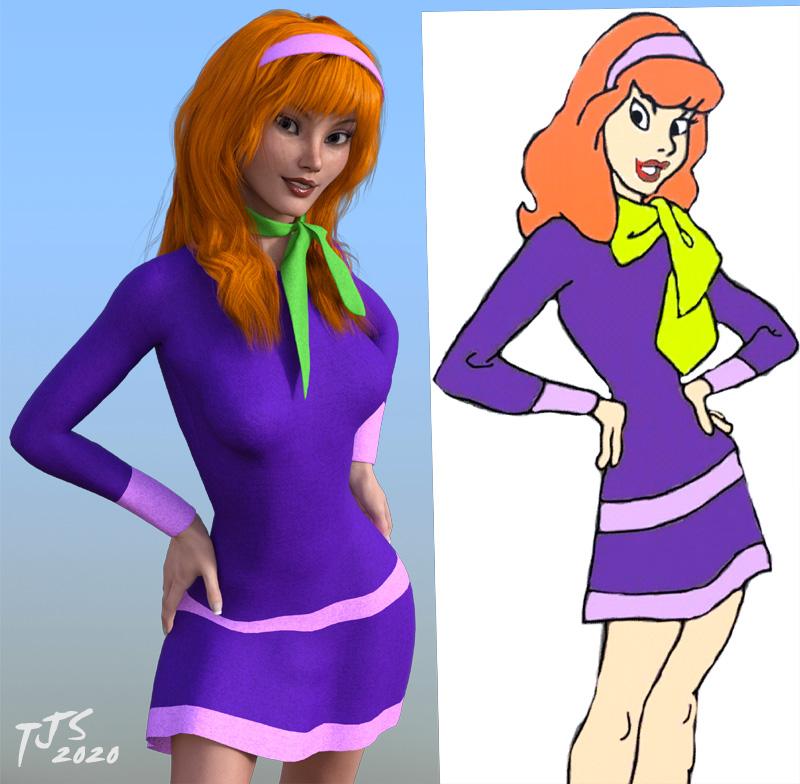
She's based on FWSA Finley for Victoria 7, with some additional morphs. I was trying to keep the angled eyes without her looking Asian, if that makes sense...
If you like this version, let me know and I can post up my morph dial settings. I have a number of different morph kits in my collection, so hopefully you have some/most of them...
Also, I used the mesh grabber tool to adjust the hair so some of it draped over the head band better, while pushing in other parts of the hair underneath the headband, in an attempt to clean up the headband area so that I wouldn't need to do a lot of post work/edit out a bunch of strands that were poking thru the headband. I didn't do any post work to this image, other than to apply the gradient background behind the render after resizing the image and adding my sig.
super
Z High Impact - Morphs, Poses and Expressions.... Missing the morph presets?Hi everyone.
I recently acquired the product listed here at https://www.daz3d.com/z-high-impact--morphs-poses-and-expressions-for-genesis-8 which provides a set of morphs, expressions, and poses for fights. I've been able to locate the expressions and poses just fine for my figures but the actual morph presets like 'Stomach Middle' and 'Nose Punch' are nowhere to be found in daz studio.
Has anyone who has used this product been able to locate the morph presets for genesis 8 figures? I've been stuck on this for a few days now and it's holding up my renders.
Thanks!
Daz 3D is part of

Connect
DAZ Productions, Inc.
7533 S Center View Ct #4664
West Jordan, UT 84084Licensing Agreement | Terms of Service | Privacy Policy | EULA
© 2026 Daz Productions Inc. All Rights Reserved.