-
Transfer Utility Problem
The mesh you rig has to be in the right position on load, you can't reposition it before using transfer utility.
So you need to export your repositioned mesh as obj and then load and rig that version.
Edit: for the record, you're not allowed to post images with textured nude figures. Please set the viewport to smooth shaded before taking screenshots.
Transfer Utility ProblemHi all,
I try to apply a shirt, exported from marvelous designer as obj, but after I run transfer utility the shirt is rotated.
Have I missed to apply a setting before? I just imported it and positioned it a little so that it fits to the model.
Any idea what could be causing this issue?data/daz 3d/genesis2/base/genesis2.dsf?
the character is Genesis
with
Easy Tail for Genesis
cat girl genesis for paws and ears
saide and sam for genesis
Justin for genesis
and some morphs but they have to be genesis morphs because there aren't any programs to take morphs backwards are the
plus I think these characters were created in 2013
---
the characters in this scene are the original figure created in 2013 and the little kit is the up to date version for 2020. (iray etc)
but they both loaded looking for genesis2.dsf
---
so this will just be one of those weird ones.
---
oh, I did load a genesis base into a new screen .. it's says can't locate file genesis2.dsf
so it's right there in the genesis figure. Which also insists on loading with the julie shaping morph on. (second picture)
--
Bone TransfersHi guys,
I have an M4 pants that I have modified by adding bones attached to the hip bones for extra movements. Using autofit to G3, these bones disappear and so do my modifications. Can I manually transfer these bones from M4 pants hip bones to the pelvis bones of the same pants that's already been autofitted to G3?
Thanks.
It's Here! First Live Product! [Commercial]OK, I bought it. Why do the pants and watch load with keyframes on the timeline frame 30? Aren't there any FBMs for Daz characters? I tried loading the garments on Dasan 8 but the clothes didn't fit well enough to start a simulation, because of clothing intersecting with the body. I wasn't able to find a combination of adjustments to overcome the collarbone intersection problem. Do you have a suggestion?
That's strange, there shouldn't be any key frames on F30. You can remove the frames on F30. I will need to check and see why it's loading those key frame on 30.
As said before. You'll have to play with the morphs sliders that comes with the shirt and pants to fix that. You can also extend the morphs sliders as well if desired for more control. I don't have Dasan, but an example with Dain again.
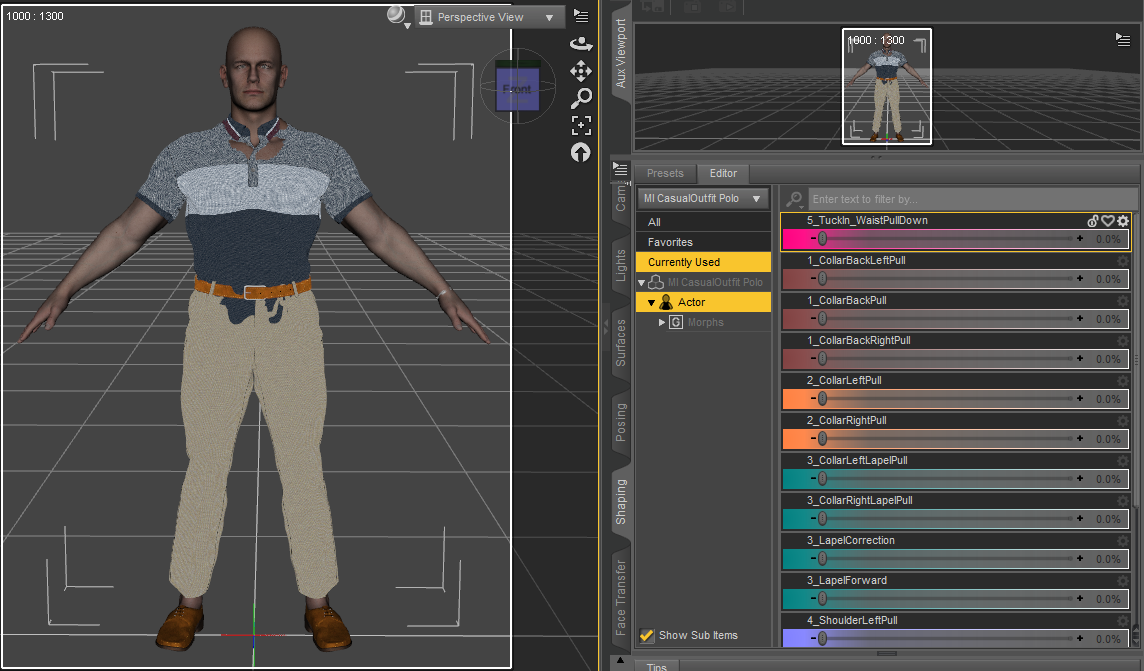
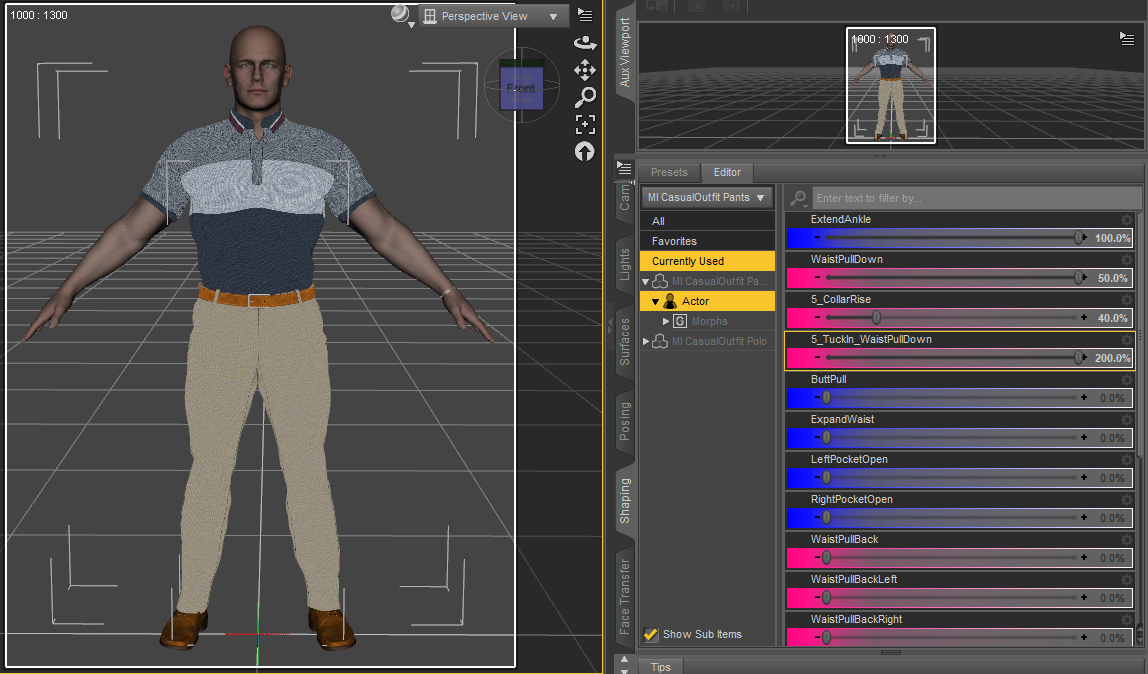
I also think everyone is still expecting conform clothing to fit on the character when loaded. However the way I approached this was that if a new G8M character arrived, third party morphs or really fit/musclar morphs are used it should still look good in the long run. Traditionally you'll have to create many correction morphs to try and combat the clingy / distortion look on the new models / morphs. It's very tedious when you have to create a lot of correction morphs. Say there was 5 G8M currently, and clothing set was made for just those 5 G8M. 20 new G8M comes in. No one wants to go back and update their product to fit those new 20 G8M.
Here's example of some G3M clothing. It looks great on zero shape figure, however any morph introduced will create distortion. Same example in Correction and No Correction pic previous post above.
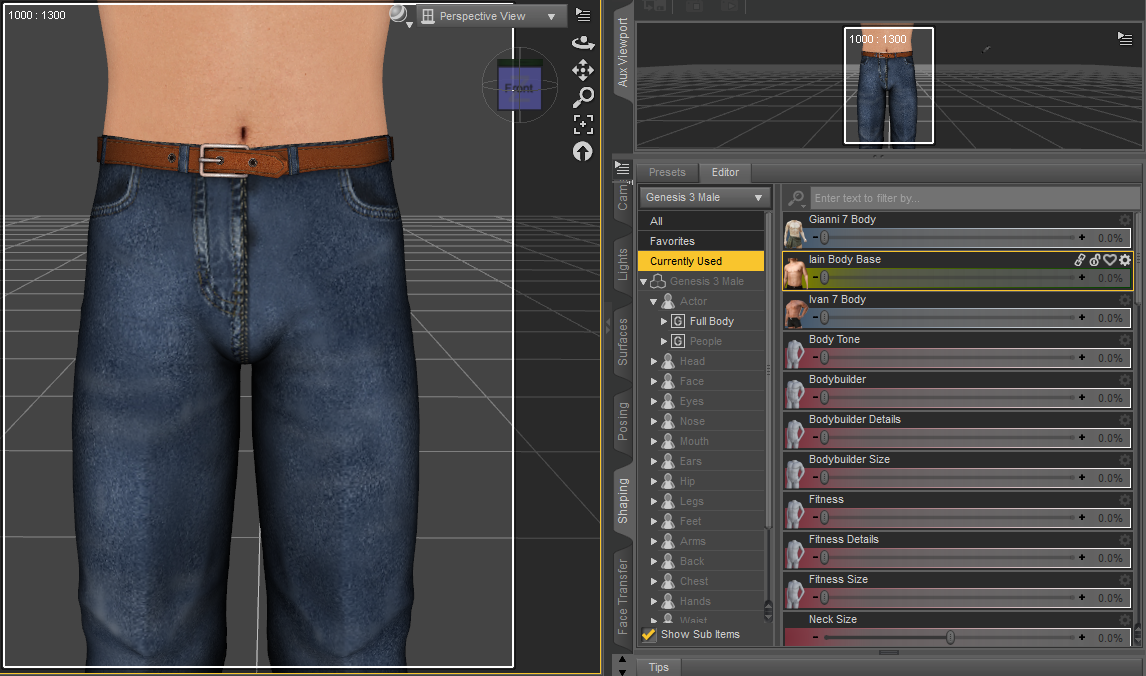
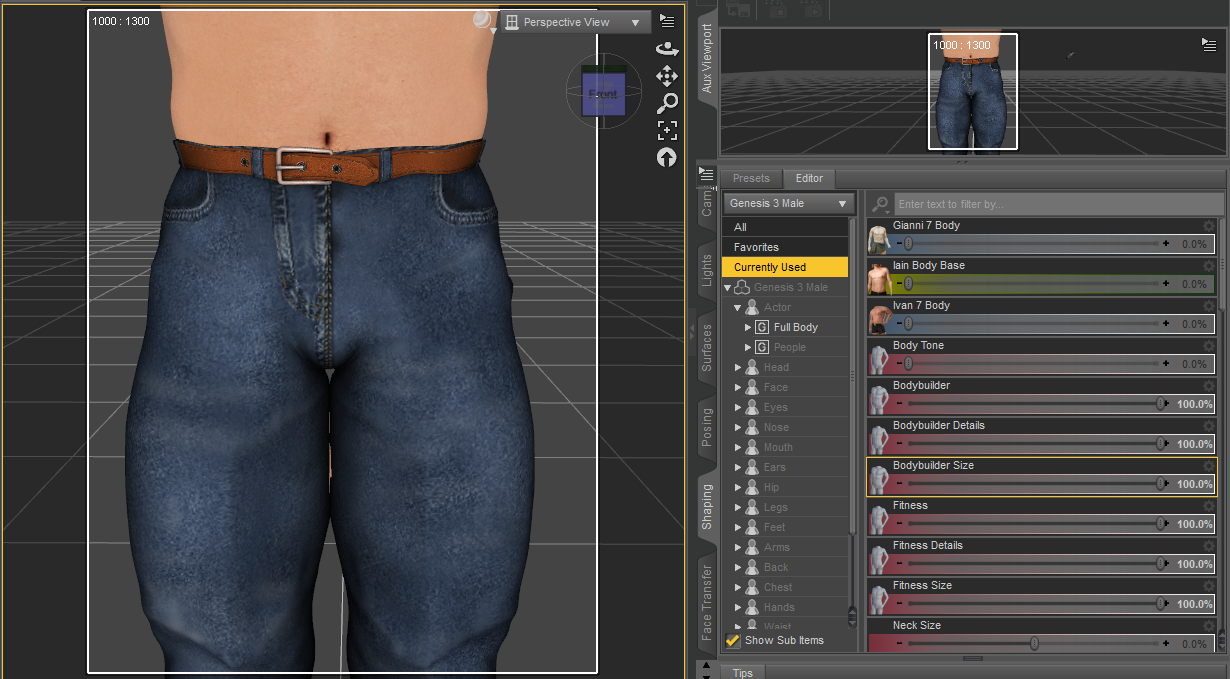 Face Transfer
Can you save the face out as a morph and apply it to a figure already posed in the scene? I don't want to add it to anything other than the base genesis 8 as a morph, it's just I created it for a scene I already have that is dressed, posed etc, and I don't want to start over with the new figure. I thought maybe I needed to save scene subset as shape, but that didn't seem to load anything. Also, is there a way to save just the face texture? I'm really not great at the surface tabs knowing what to change, but I'd in the end like to load whatever body texture I want and then use just the face texture I created.
SereneNight's Sci-Fi Fun Thread 2I picked up X-Transfer, Genesis 3 to genesis 8 morph converter. Now that I purged my runtime of morphs, of course I seem to want to fill it back up again. Don't ask me why, I don't know, it is a compulsion

But anyway, the Cairo Gifts coupon still seems to be working so I picked up Xtansfer-Genesis 7 to Genesis 8 Male converter.
For kicks, I loaded up some Genesis 3 Male expressions: https://www.daz3d.com/grimaces-dialable-one-click-expressions-for-genesis-3-male
These are somewhat goofy set of male expressions, but I thought some of them were cute, so I'd see how they transferred.
The utility seemed to freeze up at 72 percent, but transferred the expressions mostly anyway.
It's Here! First Live Product! [Commercial]
Oh. See, I was REALLY confused! Thanks for the explanation."Levator Scapulae" isn't a morph in this product, that's a morph applied to the figure. I do agree about making sure "Extend Ankle" being added to the product page, it looks like that's the only one that was left off? Maybe it was added late in the process.
It's Here! First Live Product! [Commercial]So I been seeing people saying the waist is too wide or the polo looks kinda funny.
Please understand it was design liked this so you use on a wide range of characters size. PLEASE use the morphs that were provided.
If it wasn't built like this you'll get really clingy look.
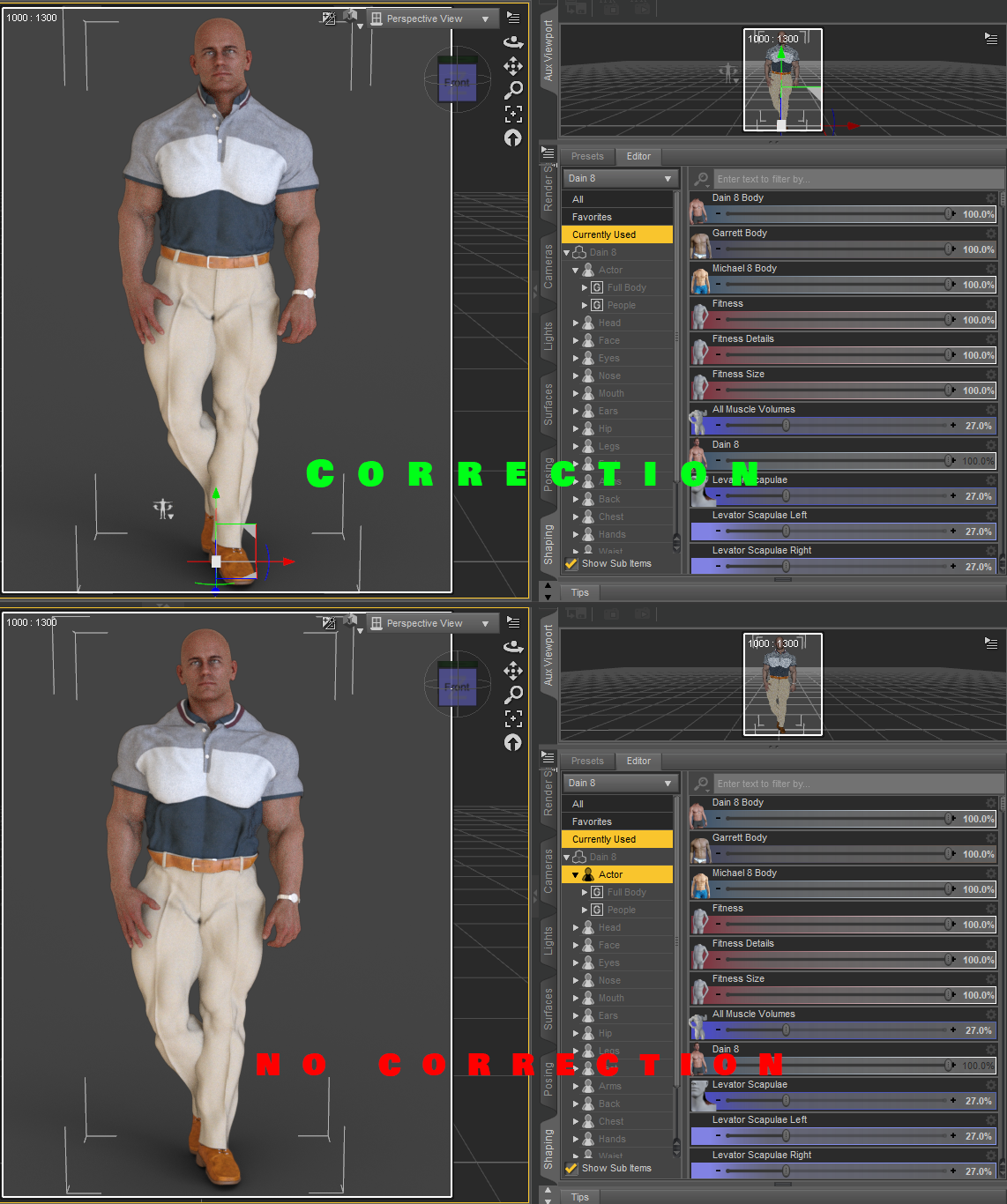
I'm confused by the morph names shown in your example. "Levator Scapulae??? I had to Google that one. I see now how it corresponds to the little image you have next to the slider. That image is helpful. This morph is not listed on the product page, though, just like the morph to lengthen the pants is not listed. There seems to be a disconnect between what is advertised on the product page and what is actually provided. I think if you update the product page to accurately represent everything you are providing, it could help sales. For example, I saw the short "high water" pants in the promos and decided I wasn't interested. It may be a modern style, but did not appeal to me. If I hadn't stumbled upon the forum post, I never would have known about the option to make the pants longer.
The image is just to show the character morphs not the outfit morphs. I'm just demonstrating in the image that if you use really fine detail morphs / HD it causes nasty distortion without the proper design choice I decided upon.
I agree with you on the disconnect of what was not advertised on the product page 100%. I must have overlooked it when I was writing the description up, so that's on me. That's why I created this post just incase stuff like this happens so I can see what I can approve on since this was my first release. I expected bumps on the way, so this is a good learning experience for me so I can get a better understanding and better plan next time on the next attire. I appreciate the criticism.
It's Here! First Live Product! [Commercial]"Levator Scapulae" isn't a morph in this product, that's a morph applied to the figure. I do agree about making sure "Extend Ankle" being added to the product page, it looks like that's the only one that was left off? Maybe it was added late in the process.
Unique issue ?Kind of depends.
If the issue is only appearing at render, but doesn't appear in the preview, it's more than likely a Smoothing modifier error.
Try turning off Smoothing modifier in the parameters tab and see if the issue is there in the preview.
If so, as perttia points out, turn on Show Hidden in the preferences section of the parameters tab, and adjust the Nipple, or other associated morph to bring the mesh of the clothing out to cover the issue, then reenable the smoothing modifier.
If that modifier, nipple, isn't present when Show Hidden is enabled, try adjusting the slider for the nipple on the base mesh, this will create the modifier in the blouse and you'll be able to adjust it then.
As an alternative, you can alway turn the nipple area off. Select the left or right pectoral(g8f) and simply click the eyeball in the scene tab for them.
Unless you're dealing with shear fabrics, or clothing that doesn't cover the entire pectoral area, this shouldn't cause an issue.
Be aware that not all morphs transfer correctly from character to clothing and some more extreme morphs will require the use of something like Fit control, or d-formers to fix.
It's Here! First Live Product! [Commercial]So I been seeing people saying the waist is too wide or the polo looks kinda funny.
Please understand it was design liked this so you use on a wide range of characters size. PLEASE use the morphs that were provided.
If it wasn't built like this you'll get really clingy look.
I'm confused by the morph names shown in your example. "Levator Scapulae??? I had to Google that one. I see now how it corresponds to the little image you have next to the slider. That image is helpful. This morph is not listed on the product page, though, just like the morph to lengthen the pants is not listed. There seems to be a disconnect between what is advertised on the product page and what is actually provided. I think if you update the product page to accurately represent everything you are providing, it could help sales. For example, I saw the short "high water" pants in the promos and decided I wasn't interested. It may be a modern style, but did not appeal to me. If I hadn't stumbled upon the forum post, I never would have known about the option to make the pants longer.
Deepsea Adam HD for Genesis through Genesis 8?"M4 Elite body shapes" is a set of morphs for M4. "M4 Elite" is simply M4 with those morphs.
A character "for M4 Elite" is a M4 character which uses those morphs.
Clothes labeled as "for M4 Elite" are simply clothes for M4 which include custom fit morphs for the M4 Elite body shapes. At the time they were created automatic morph following wasn't a thing, so custom fit morphs were a major selling point.
Imported Obj - tri to quadsI've made some progress - it seems the template I used was causing the de-tragulation error. My new problem is I load the obj and it loads just behind G8M - I can move the top forward or G8M backward and it fits, can run the transfer utility, save it as an asset. And it loads next time the same 3.0+ back. I'm guessing this was the position G8M was in whatever software it was created in.
Anyone have any suggestion how to work around this?
Re-save it after you reposition it, so the object actually has the position data you want.
Introducing the all-new Daz to Unreal Bridge & native Unreal File FormatsDid you set the retarget source on the animations?
David, about 'morph', can you do a tutorial about it on Unreal IF possible, of corse? Ty.
Khemsit 8...Khemsit's texture/hd morphs are REALLY nice! I like her morph, too, but I also really like to do my own, so I slapped on Khemsit's texture and just went to town.
She's on the right of the image, Twosret is on the left - both have custom morphs. And thanks @jakiblue for making me buy the Egyptian Fabrics shaders (I don't regret it lol)

What an adorable image! You really captured the feeling of two close friends posing for a photo. And you morphed the Khemsit 8-skinned character prettier than Twosret? She's very cute. But it looks like they have too much fluoride in their water.
Well, truth be told, the Khemsit one was a slightly altered version of a character I had already dial-spun a while ago for kind of an arabic shape, so there's significantly more work gone into that one, and honestly this whole scene came about when I loaded the Khemsit texture onto her and saw the results. Then I thought "I wonder what Twosret looks like...", so I quickly dial spun a head using the arabic/arabic-ish heads that I had. So yes, I agree, Khemsit ended up with the prettier one haha.
And yeah, lots of flouride there lol. This scene was so heavy on my machine that by the time I dialed in the expressions I didn't get a chance to do any test renders, as I'm pretty sure everything was hanging on by a thread.
Thanks for the comment! I really tried to hammer in those kinds of expressions like they were 'besties' (major props to Bluejaunte's morphs for that).
Khemsit 8...Khemsit's texture/hd morphs are REALLY nice! I like her morph, too, but I also really like to do my own, so I slapped on Khemsit's texture and just went to town.
She's on the right of the image, Twosret is on the left - both have custom morphs. And thanks @jakiblue for making me buy the Egyptian Fabrics shaders (I don't regret it lol)
What an adorable image! You really captured the feeling of two close friends posing for a photo. And you morphed the Khemsit 8-skinned character prettier than Twosret? She's very cute. But it looks like they have too much fluoride in their water.
Imported Obj - tri to quadsI've made some progress - it seems the template I used was causing the de-tragulation error. My new problem is I load the obj and it loads just behind G8M - I can move the top forward or G8M backward and it fits, can run the transfer utility, save it as an asset. And it loads next time the same 3.0+ back. I'm guessing this was the position G8M was in whatever software it was created in.
Anyone have any suggestion how to work around this?
GenX2 and Genesis 2 AddOn released! [Commercial]Open M4 in Daz Studio. Load all the morphs you want but dialed to zero. Export from Daz Studio as a Poser cr2 into your Runtime/Libraries/Character folder. Then load that M4 cr2 into GenX2. You should have the body morphs. I had a similar issue recently.@andolaurina THANK YOU! Your tip worked to "reveal" the body morphs and after further fudging the transfer options I think that I managed to get GenX2 to create an M4-G1 morph (I found that it wasn't a 100% clone but more like 92%... the eye-area and cheekbones are a tad different and more beautiful on original M4). I had to select options: Transfer All-On, Smooth and Shape: M4 Clone in order for the transfer to work, as opposed to the options recommended in the GenX2 user guide. Had I selected Shape: M4 and Edges, I would have gotten a morph which did absolutely nothing to the Genesis figure when dialed up to the max. Now I am so inspired to purchase the G2 add-on after which I would attempt to transfer G2 to G8 using the other script I had purchased in the Daz store. Fingers crossed! And THANK YOU so much for the tip!!
 Hair Makers - in what you create?
I'm interested which software (and methods) use those, who create hair (currently, i ask more about non-dforce, non-strand).
Is that polymodelling? Or you sculpt in zbrush?
-
On a side note, i m also interested what is optimal approach to do a morph for an existing hair, idk, some very hard pose (pre-dforce, you have to do it manually? like if char lying on the floor)
Daz 3D is part of

Connect
DAZ Productions, Inc.
7533 S Center View Ct #4664
West Jordan, UT 84084Licensing Agreement | Terms of Service | Privacy Policy | EULA
© 2026 Daz Productions Inc. All Rights Reserved.