-
Freebie Challenge May 2025 - "To Be Beautiful" - Main Thread
Payat Parin said:
Anorexia Beauty
Ivhankha is obsessed of having a beautiful body. She constantly controls her diet and weighs herself on a daily basis. Now look what happened to her.
Postwork:
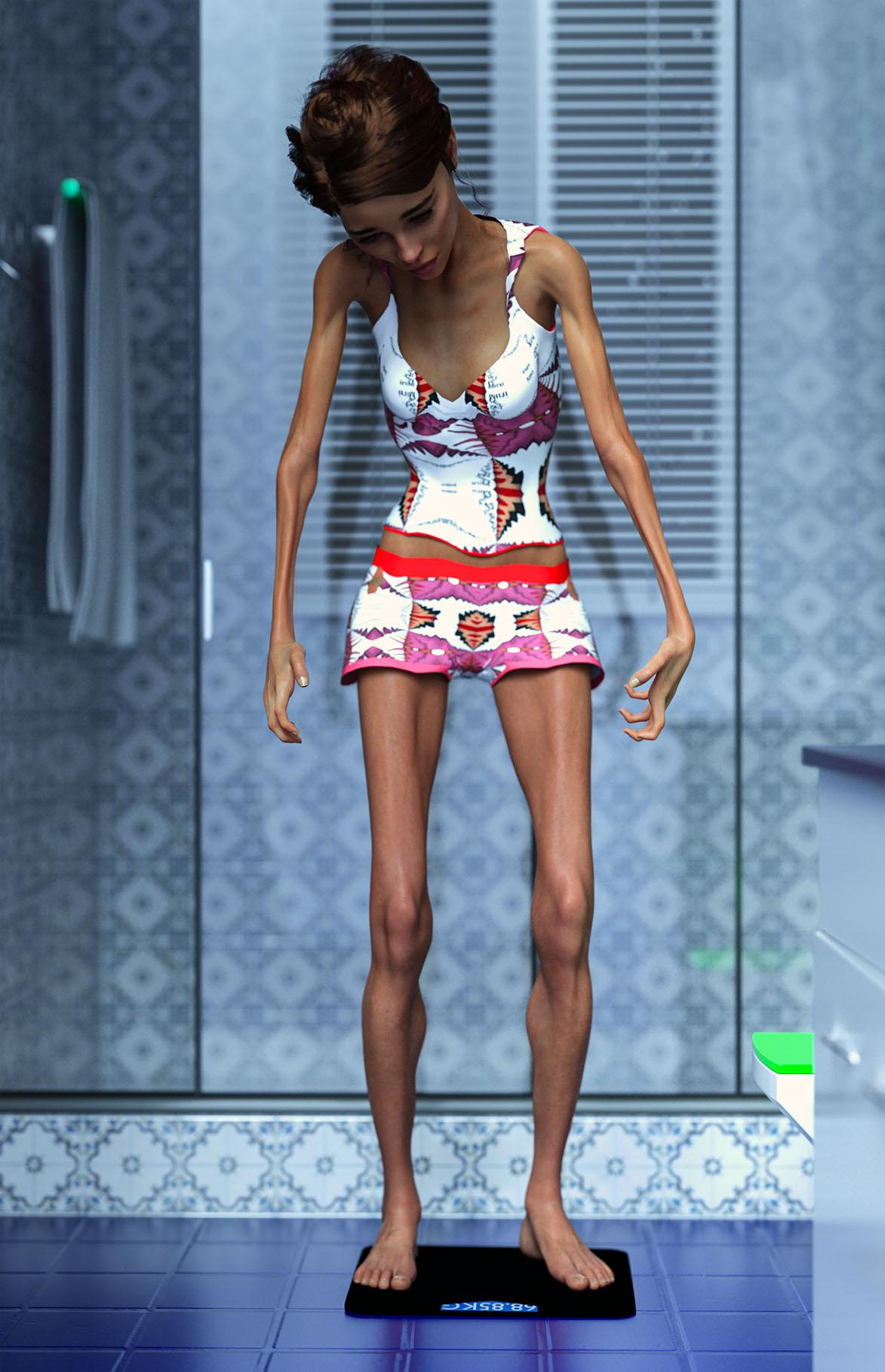
Raw Render:
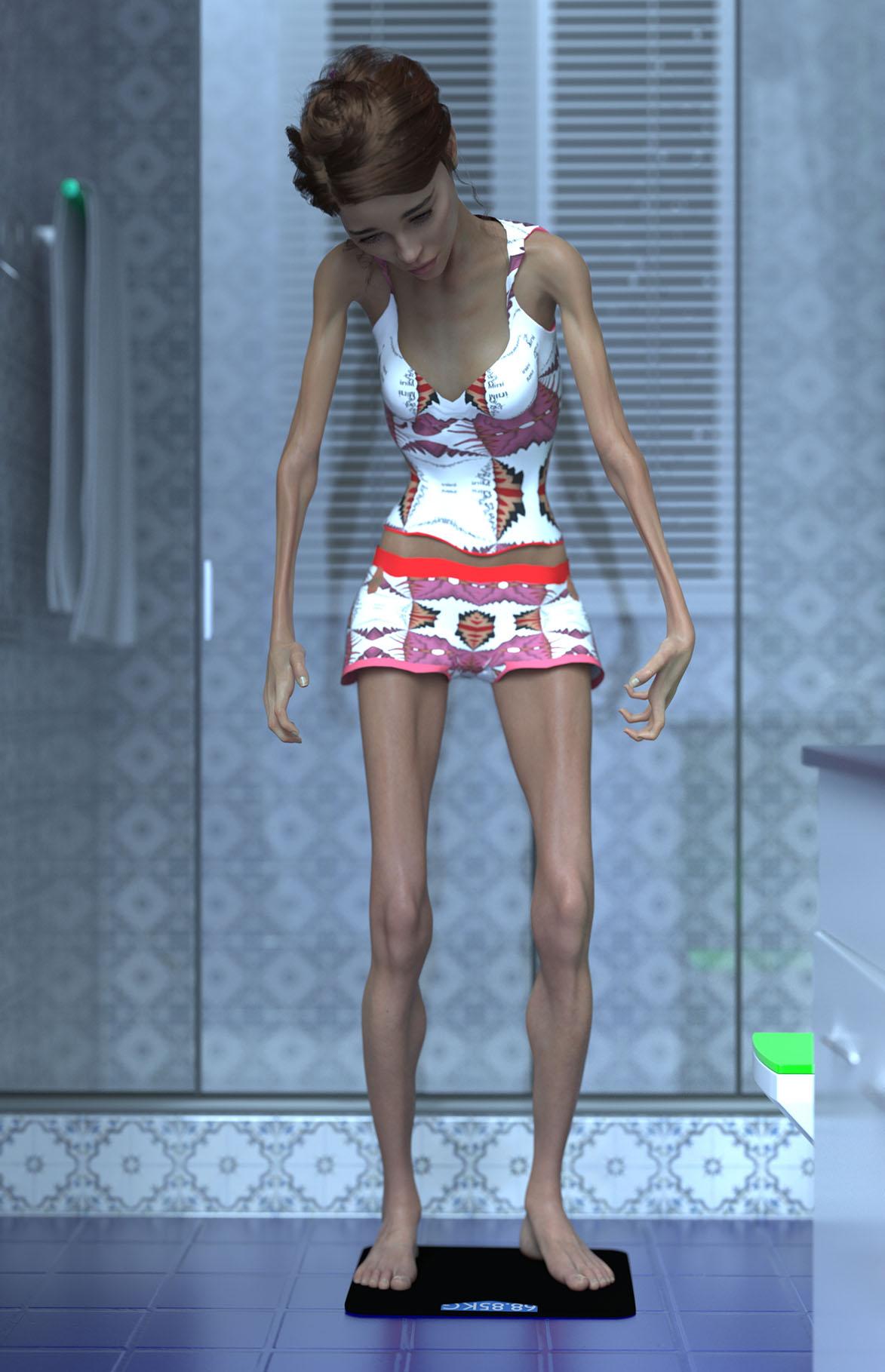
Freebies:
G8 Female Clothes: https://www.renderosity.com/freestuff/items/77914/ensemble39-for-g8f
G8 Female Hair: https://www.renderosity.com/freestuff/items/81937/dforce-french-twist-hair-for-genesis-8-females
G8 Female Pose: https://www.renderosity.com/freestuff/items/93661/genesis-1239-pose-converter-for-genesis-8
Prop (Weighing Scale): https://www.cgtrader.com/free-3d-models/interior/bathroom/body-weight-scale
Environment (Bathroom): https://www.renderosity.com/freestuff/items/76739/small-bath
Paid:
G8 Character: https://www.daz3d.com/miah-hd-for-genesis-8-female
Not Counted: G8 morph/s
Entry is approved! Please move to Entries Thread
DForce Hair Simulation Bug?Thanks, very useful. Even a video too! I guess my first mistake was trying to use AutoFit at all. If I just load the hair and attach it to the head bone without using AutoFit, then DForce simulation works. Hierarchical materials are a headache, but manageable.
But, your tutorial is improvement over that, creating a fitting morph too. Very helpful.
DForce Hair Simulation Bug?If a Daz creator wants to create DForce hair for both G8 and G9, is there a workflow that lets them transfer DForce properties from one generation to another without breaking their work?
So, say I have both G9 and G8 figures loaded in the scene, both fitted with the same G9 hair. What DForce properties can be copied from G9 to G8?
If I can't copy DForce properties, then what can I do to reset the DForce system so G8 fitted hair simulation will at least work again, but with default values?
Is anyone having troubles with an SSD Drive?Ron Knights said:
I recently decided to place my main DAZ Studio content onto a 2TB SSD drive.
I've been moving thousands of files. Sometimes the process slows down to a crawl. And I swear sometimes some files and folders go missing.
Maybe the SSD drives aren't meant for massively moving files?
I've moved my main content back over to a regular 3TB hard drive.
When the cache fills up performance with some drives drops off a cliff. I've had this happen on my less expensive SSD when trying to do exactly what you're doing.
The good news is that if you wait for it to do the transfer then performance will be in line with what you'd expect from an ssd when installing, loading and saving stuff.
Akhelloos character ID - (ALO Kasia Hair for Genesis 9, 8 and 8.1 Females)Hi !
This is my first post here so, let me know if this is not the correct Category (didn't know if this is a "General - The Commons" or "Daz Discussion" topic).
I recently came across this product from Akhelloos and absolutely love the hair and character morph. However, I'm unsure whether the character is an original mix or an existing one.
Did ask about it on Reddit, and some users suggested posting here, since Akhelloos has previously shared the "recipes" in past aswers. So, if any one you have some sort of ID, or better yet, if you ever come across this post, A. : it would mean the world to know who's that queen!
Thank you :] Search for a character similar to Captain Future
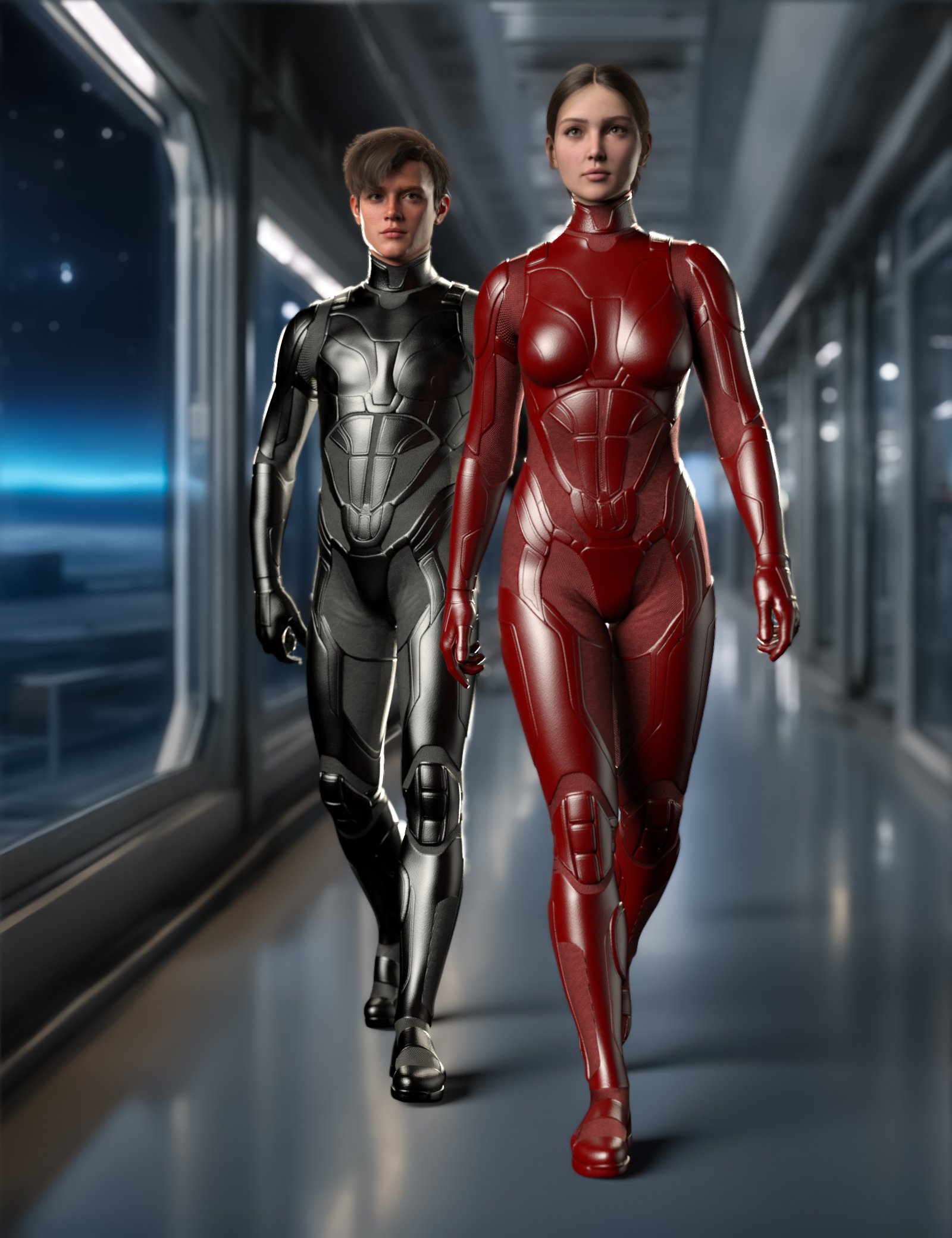
I'm currently looking for Captain Future and his team, unfortunately there's not much.
Perhaps you have a tip on which figure and suit would suit?
In an emergency, I would have to resort to face transfer.I already have the Professor and the Spaceship.
The team is available as a 3D print and in the STL file, but without texture nodes and in millions of tris. It would be a lot of work to edit this.
This is what I found that would fit.
 Freebie Challenge May 2025 - "To Be Beautiful" - Main Thread
Anorexia Beauty
Ivhankha is obsessed of having a beautiful body. She constantly controls her diet and weighs herself on a daily basis. Now look what happened to her.
Postwork:
Raw Render:
Freebies:
G8 Female Clothes: https://www.renderosity.com/freestuff/items/77914/ensemble39-for-g8f
G8 Female Hair: https://www.renderosity.com/freestuff/items/81937/dforce-french-twist-hair-for-genesis-8-females
G8 Female Pose: https://www.renderosity.com/freestuff/items/93661/genesis-1239-pose-converter-for-genesis-8
Prop (Weighing Scale): https://www.cgtrader.com/free-3d-models/interior/bathroom/body-weight-scale
Environment (Bathroom): https://www.renderosity.com/freestuff/items/76739/small-bath
Paid:
G8 Character: https://www.daz3d.com/miah-hd-for-genesis-8-female
Not Counted: G8 morph/s
* Closed* RRRR Good Intentions / Mixed up Mythology Render ContestThank you All!!!
Here's my pull:
2094 - Barkley HD for Genesis 3 Male
987 - Sunday Casuals: Cozies
488 - Genesis Head Morph Resource Kit 3
1209 - P3D Mia HD for Genesis 9
Reorganizing entire content library for product packagingAfternoon folks,
I had never intended to sell my content, but I'm considering it lately. Problem is I organized my hundreds of morphs, characters, outfits, props etc in a way that makes sense for me to putz around with hobby-wise but is absolutely not conducive to Daz's library structure lol.
For instance, in my Wearables Presets folder, I have a Brows subfolder with say "Able Brows, Baker Brows, Charlie Brows" etc and an Eyelashes folder with "Able Eyelashes---". Not great, when a product catalog would be organized by all of Able's things together, all of Baker's etc.
Now I know presets are different than assets, but the concept of my question is pretty much the same -- since cutting/pasting assets, even with the content library's built-in command, destroys their metadata, what would be the best way to transfer such things from their current, type-grouped folders to new, product-grouped folders?
Darius 7 for Genesis 9 request
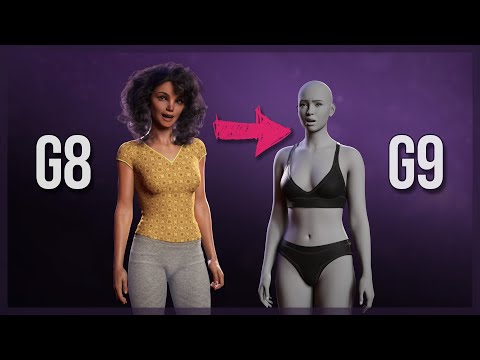
This is a very easy to follow video for how you can transfer shapes from one generation to another. It won't copy the texture, you'd need to purchase a different product for that.tisixox103 said:Hello everyone,
I wanted to make a request for a conversion of Darius 7 to Genesis 9, i think it's the best version Darius ever made and he would be an amazing addition to the Genesis 9 lineup.
If anyone has any insight into whether such a conversion is in the works or if it could be suggested as a future product, I would love to hear more. Thanks so much for considering this!
 M2/V2 still avalible?
That's good, will have to add V1/V2. Also, as M3 is a morph of the same unimesh, and as the 'M3 to M2 CR2' is in the M3 base download, it should be possible to add M1 & M2 clothing compatibility to TriAx V3. Not that I actually have any M1/M2 clothing as I didn't drop 'The Dork' until after getting M3 in Jan 2005 - 'The Dork' fulfilled the only male role I wanted perfectly with both his name and look. Bewildered Male characters have long had rings run around them by the female characters in my images - just as happens in real life.
Regards,
Richard
Edited to add: If you start using the Generation 3 or earlier characters, it would be fantastic to see more renders added to the The older generation: Victoria 2/3, Michael 2/3 and their children renders thread.
Render your buys! ALL TIME ChallengesHot Extraction

This one features:
https://www.daz3d.com/chthonic-arkouda-hd-for-genesis-8-male
https://www.daz3d.com/atve-warhawke-gunship
https://www.daz3d.com/ironmech-bravo (considerably scaled down)
https://www.daz3d.com/dforce-brenn-sci-fi-outfit-for-genesis-9-and-81-females~~~~~
I'm going to take the opportunity to review the Brenn outfit here. While the G8F version seems functional, the G9 version is supplied with an non-standard base pose, as evident if you load it without fitting it.
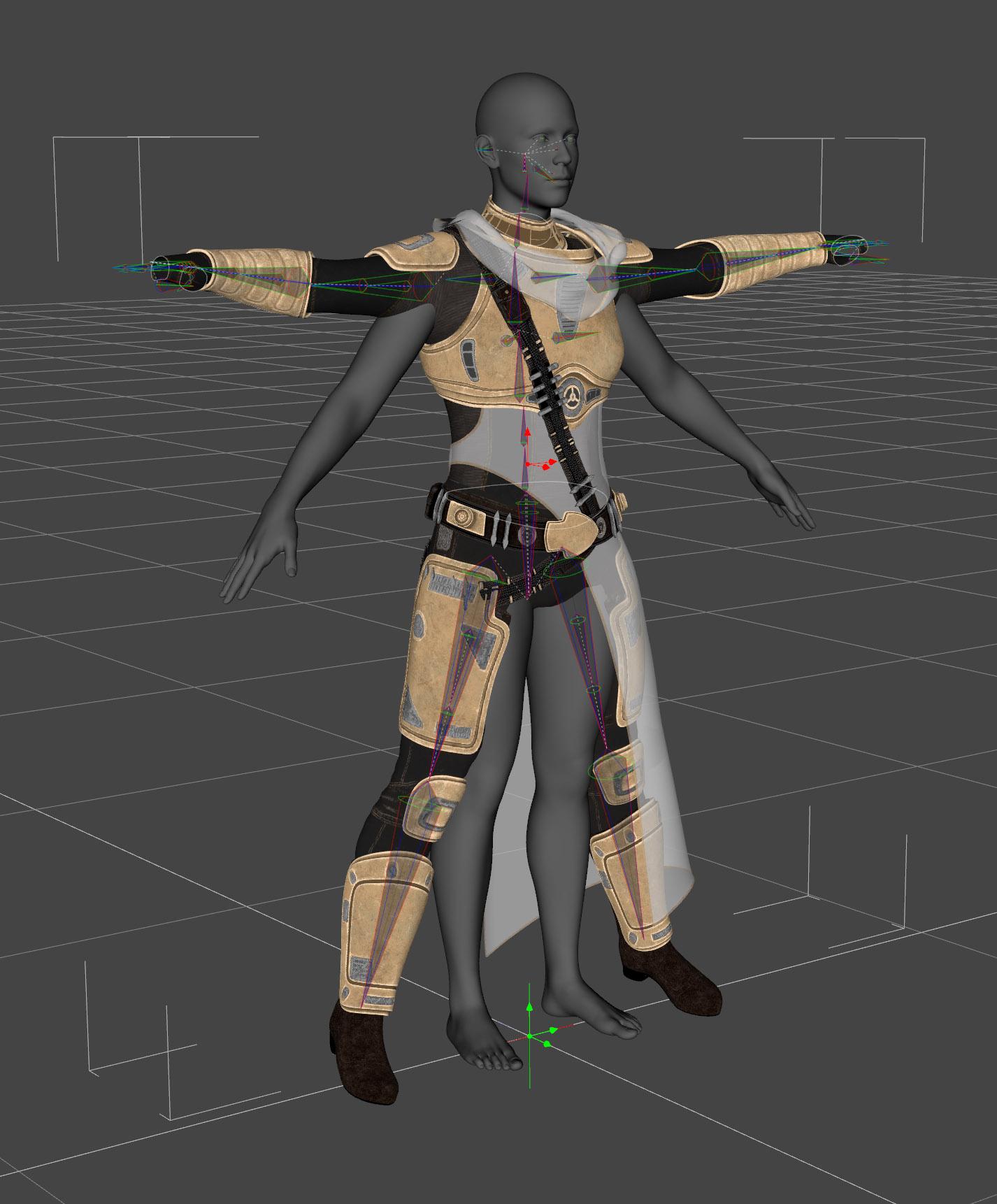
While it correctly follows poses if fitted, the fact that its default pose does not correctly match G9's silhouette means that DS's morph auto-transfer will attempt to copy morph shapes from the wrong parts of character shapes, and the resulting fits can be really poor (as demonstrated here on a standard version of Beverly for G9) for any morphs that aren't explicitly supported on it:

This particular problem is something I have a tool kit extremely well tailored to fix; adapting things to shapes they weren't originally intended for is what I do. Nonetheless, it still took me some time to correctly adapt the clothing and all of its morphs back to work on the correct G9 base pose (at which point it does then correctly follow non-standard morphs).
This has been reported as an issue to Customer Support, although it's been a few weeks since my initial report and nothing has been heard back yet.
I will note that this does not appear to be a consistent issue with the vendor's outfits (I've looked at others I have, and they do not have the same error), so I believe this is probably an error from early on in G9 and trying to adapt the same mesh to support two generations. However, still one I think should be rectified.
(I would offer CS my modified version to save the need for the vendor to redo all the same steps to fix it, but I'm doubtful the offer would be accepted).
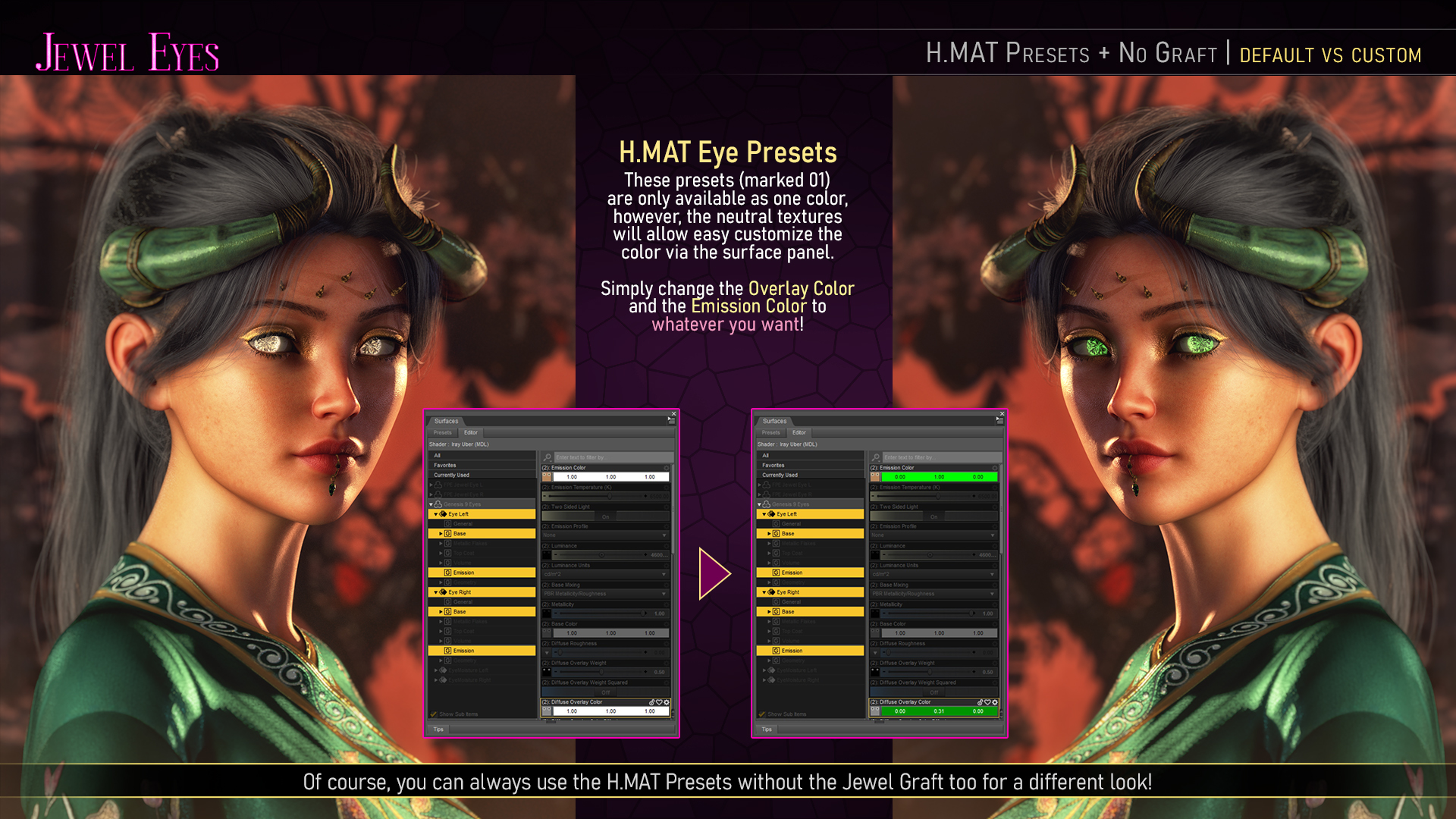
Is it possible to use the FPE Jewel Eyes for Genesis 9 on a G8 character?Hi, Yuyu. Atem, unfortunately, you would not be able to use the geo-grafted part of the product on a G8. That said, you could use the texture underneath by copy-pasting to Genesis 8.1 Eyes (Copy the surface of a G9 Eye Surface to a G8.1 Iris and Pupil Surfaces). The texture underneath the gems is sort of like a gem too. It has an overlay weight mask which you can use to color the eye. You will need to also change the emission color.
Basically you would be using the part covered in this promo, except you would manually copy it to the G8.1 eyes. Keep in mind that this also shows the morph to get rid of the iris in use, which you would not have on Genesis 8.1 unless you find one in another product.
 MimicMolly's Renders & WIPs
This is an example of what I want to do in DS now. The regular humans rendered in Viewport + Filament, with a colored toon outline and what looks like "drawn in" eyes and eyebrows. Mostly because I want to further edit the rendered results by hand with post work. And my more cartoony style can blend in better. (Pic shown has no hand edited parts. It is the render with an opaque, colored background.)
The character used is SOFT3D's Briana Morph for Genesis 9 at Renderhub. I think the skin is the default "Victoria 8.1" skin that G9 uses, with the Anime LIE makeup. I think these eyebrows are #7. She has 3DUniverse's Eden Hat and Hair for G9.
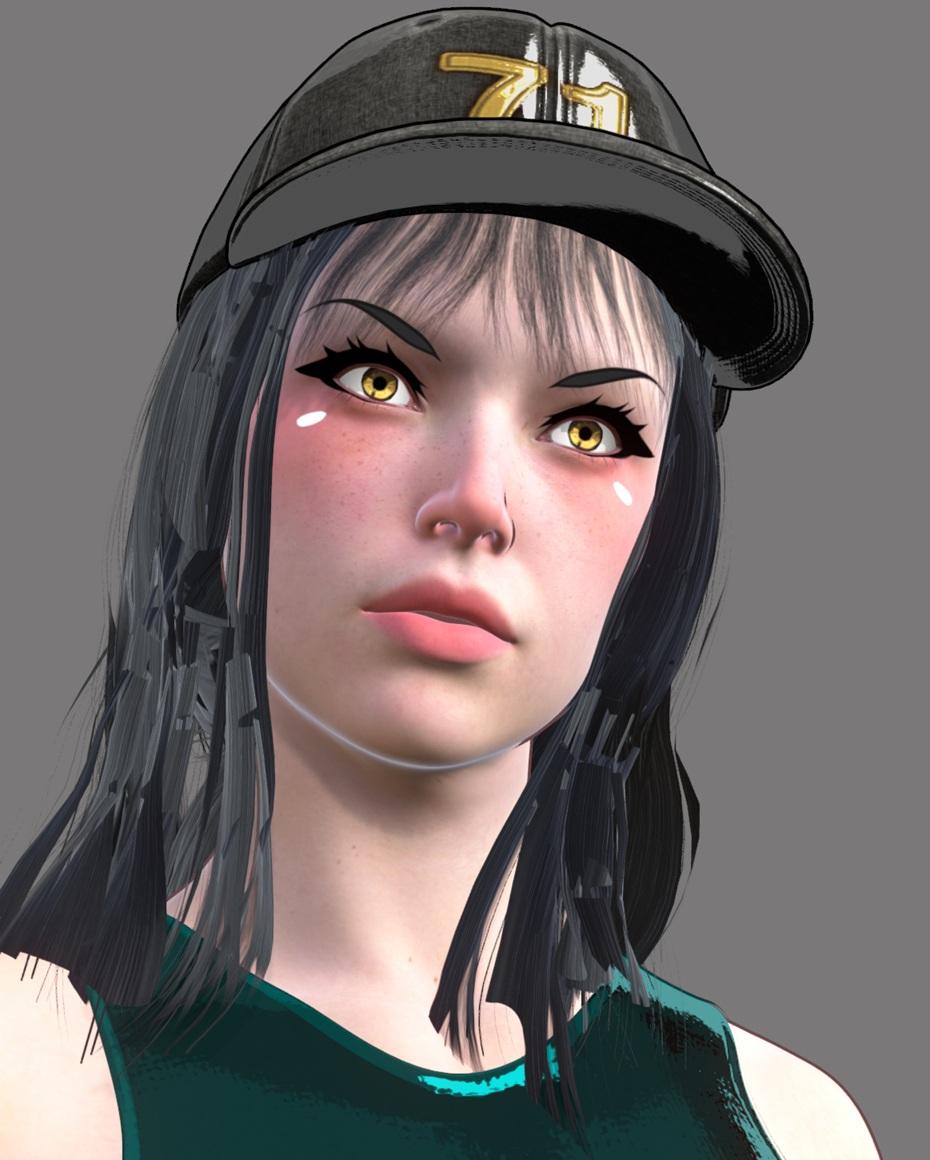
I originally made this scene with Briana to make a quick AI image edit. But I like how she looked, so now I'm trying to change it to be its own original render. I need more LIE makeups and more toon eyebrows.
Freebie Challenge May 2025 - "To Be Beautiful" - Entries ThreadTo Be Beautiful II
Inspired by the iconic image of Ursula in the Disney animated Little Mermaid putting on cosmetics and using a clamshell for a compact!
--
No count:
Genesis 2 Female, G2F body morphs
--
Freebies:
--Tail and shell props from Lil Mermaid for Callie 6 by DemonicaEvilius nd Jessaii [Daz biweekly freebie] https://www.daz3d.com/lil-mermaid-for-callie-6
--Style Eyes: 17 Stylized Irises for G3F and G3M by ModernWizard for irises https://www.renderosity.com/freestuff/items/76086/style-eyes-17-stylized-irises-for-g3f-and-g3m
--Shaping Morphs to Bulk Up G2F Lil Mermaid Tail by ModernWizard https://www.renderhub.com/modernwizard/shaping-morphs-to-bulk-up-g2f-lil-mermaid-tail
--Reupload Swimsuit for G2F by dadga https://www.renderosity.com/freestuff/items/75079/re-upload-swimsuit-for-g2f
--M4 Short Dreads by SickleYield https://www.renderosity.com/freestuff/items/57044/m4-short-dreads
--Lipstick 3D Model by Javidan https://www.renderhub.com/javidan/lipstick-model
--Underwater Lights by Lunas20 https://www.renderosity.com/freestuff/items/81278/underwater-lights
--Underwater Background Images by Anthony Appleyard https://www.renderosity.com/freestuff/items/26057/underwater-background-images
Paid:
--Mahala for Genesis 2 Female by Saiyaness for head morph and texture https://www.daz3d.com/mahala-for-genesis-2-female-s
Legal questionAZDigitalArtist said:
Need some advice. Let's say you create an art piece, post it, enter it into competitions, it wins a few awards, and a few years later, a major company does a commercial that seems really, really similar. The theme is the same, the colors, even props. What would you do?
Before you drag that company to court, check the rules of the competitions in which You entered Your piece of art. Sometimes they say, that by entering their art the artist gives them the right to use those works commercially and/or even to transfer that right to a third party.
Freebie Challenge May 2025 - "To Be Beautiful" - Main ThreadModernWizard said:
Let's try that again...
To Be Beautiful II
Inspired by the iconic image of Ursula in the Disney animated Little Mermaid putting on cosmetics and using a clamshell for a compact!
--
No count:
Genesis 2 Female, G2F body morphs
--
Freebies:
--Tail and shell props from Lil Mermaid for Callie 6 by DemonicaEvilius nd Jessaii [Daz biweekly freebie] https://www.daz3d.com/lil-mermaid-for-callie-6
--Style Eyes: 17 Stylized Irises for G3F and G3M by ModernWizard for irises https://www.renderosity.com/freestuff/items/76086/style-eyes-17-stylized-irises-for-g3f-and-g3m
--Shaping Morphs to Bulk Up G2F Lil Mermaid Tail by ModernWizard https://www.renderhub.com/modernwizard/shaping-morphs-to-bulk-up-g2f-lil-mermaid-tail
--Reupload Swimsuit for G2F by dadga https://www.renderosity.com/freestuff/items/75079/re-upload-swimsuit-for-g2f
--M4 Short Dreads by SickleYield https://www.renderosity.com/freestuff/items/57044/m4-short-dreads
--Lipstick 3D Model by Javidan https://www.renderhub.com/javidan/lipstick-model
--Underwater Lights by Lunas20 https://www.renderosity.com/freestuff/items/81278/underwater-lights
--Underwater Background Images by Anthony Appleyard https://www.renderosity.com/freestuff/items/26057/underwater-background-images
Paid:
--Mahala for Genesis 2 Female by Saiyaness for head morph and texture https://www.daz3d.com/mahala-for-genesis-2-female-s
Entry is approved! Please move to Entries Thread
Mocap Online - Victoria 8 walking - Anybody has this?Also of note, these translate beautifully to Genesis 9 using Bone Minion or other method of converting animated poses.
Bone Minion Rocks in that I can load aniBlocks directly to the Bone Minion, then transfer the whole animation to the selected generation - I go back and fourth through many Daz 3D generations, so I have most of the Bone Minion products and will eventually own them all.
In the case of Havanalibere animations that come with Breast motions, those transfer nicely using Bone Minion as well.
If you try it and it doesn't work, it's likely because the breast motions are Torso pose control morphs instead of the Pectoral bones on the rig. When this is the case, load the Heavyweight Bone Minion instead - it transfers morph values in addition to the rig's joint roatations, etc.,
Hope this helps
Freebie Challenge May 2025 - "To Be Beautiful" - Main ThreadLet's try that again...
To Be Beautiful II
Inspired by the iconic image of Ursula in the Disney animated Little Mermaid putting on cosmetics and using a clamshell for a compact!
--
No count:
Genesis 2 Female, G2F body morphs
--
Freebies:
--Tail and shell props from Lil Mermaid for Callie 6 by DemonicaEvilius nd Jessaii [Daz biweekly freebie] https://www.daz3d.com/lil-mermaid-for-callie-6
--Style Eyes: 17 Stylized Irises for G3F and G3M by ModernWizard for irises https://www.renderosity.com/freestuff/items/76086/style-eyes-17-stylized-irises-for-g3f-and-g3m
--Shaping Morphs to Bulk Up G2F Lil Mermaid Tail by ModernWizard https://www.renderhub.com/modernwizard/shaping-morphs-to-bulk-up-g2f-lil-mermaid-tail
--Reupload Swimsuit for G2F by dadga https://www.renderosity.com/freestuff/items/75079/re-upload-swimsuit-for-g2f
--M4 Short Dreads by SickleYield https://www.renderosity.com/freestuff/items/57044/m4-short-dreads
--Lipstick 3D Model by Javidan https://www.renderhub.com/javidan/lipstick-model
--Underwater Lights by Lunas20 https://www.renderosity.com/freestuff/items/81278/underwater-lights
--Underwater Background Images by Anthony Appleyard https://www.renderosity.com/freestuff/items/26057/underwater-background-images
Paid:
--Mahala for Genesis 2 Female by Saiyaness for head morph and texture https://www.daz3d.com/mahala-for-genesis-2-female-s
Freebie Challenge May 2025 - "To Be Beautiful" - Main ThreadTo Be Beautiful II
Inspired by the iconic image of Ursula in the Disney animated Little Mermaid putting on cosmetics and using a clamshell for a compact!
--
No count:
Genesis 2 Female, G2F body morphs
--
Freebies:
--Tail and shell props from Lil Mermaid for Callie 6 by DemonicaEvilius nd Jessaii [Daz biweekly freebie] https://www.daz3d.com/lil-mermaid-for-callie-6
--Style Eyes: 17 Stylized Irises for G3F and G3M by ModernWizard for irises https://www.renderosity.com/freestuff/items/76086/style-eyes-17-stylized-irises-for-g3f-and-g3m
--Shaping Morphs to Bulk Up G2F Lil Mermaid Tail by ModernWizard https://www.renderhub.com/modernwizard/shaping-morphs-to-bulk-up-g2f-lil-mermaid-tail
--Reupload Swimsuit for G2F by dadga https://www.renderosity.com/freestuff/items/75079/re-upload-swimsuit-for-g2f
--M4 Short Dreads by SickleYield https://www.renderosity.com/freestuff/items/57044/m4-short-dreads
--Lipstick 3D Model by Javidan https://www.renderhub.com/javidan/lipstick-model
--Underwater Lights by Lunas20 https://www.renderosity.com/freestuff/items/81278/underwater-lights
--Underwater Backgrounds by bellu https://www.renderosity.com/freestuff/items/96688/underwater-backgrounds
Paid:
--Mahala for Genesis 2 Female by Saiyaness for head morph and texture https://www.daz3d.com/mahala-for-genesis-2-female-s
Daz 3D is part of

Connect
DAZ Productions, Inc.
7533 S Center View Ct #4664
West Jordan, UT 84084Licensing Agreement | Terms of Service | Privacy Policy | EULA
© 2026 Daz Productions Inc. All Rights Reserved.