-
CC#54 WiPs ~ What is it that you truly desire? after party Chit Chat
Some tips for correcting poorly rigged and badly weightmapped figures like the DioMonster
The DioMonster comes with some BLANK morphs for the body. To improve a pose, you have several choices that can be found in the modeling wrench room under in animation mode (looks like a torso, arms, and head middle option at top right).
1) After posed, in modeling room animation mode, under bone tab, can select individual vertex, or groups of polygons, and use sliders to adjust bone weights.
2) After posed, in modeling room animation mode, select the weight brush from the top menu, and select the bone from properties tray on right to increase or decrease weights on figure
3) After posed, in modeling room animation mode, under morph tab, select morph area and specific morph, click EDIT and the morph area turns green, use modeling selection and translation/rotation tools to adjust model as desired. Click validate when finished. Morph is set to zero, return to assemble room and slide morph as desired up to one for fix.
4) Like (3), except use the Displacement Brush tool from the top menu to do the correction. The displacement brush has a SMOOTH options which is very useful.
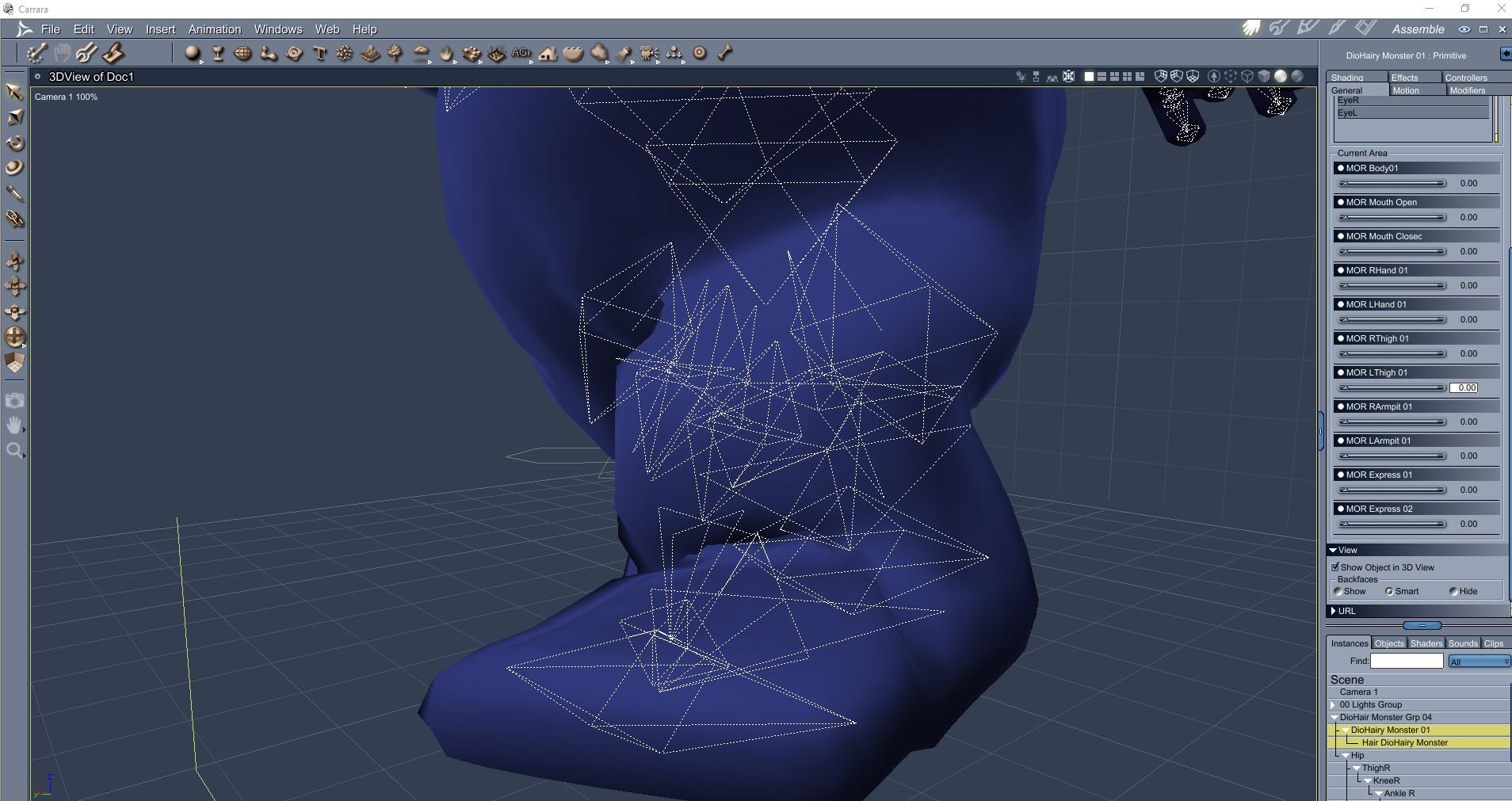
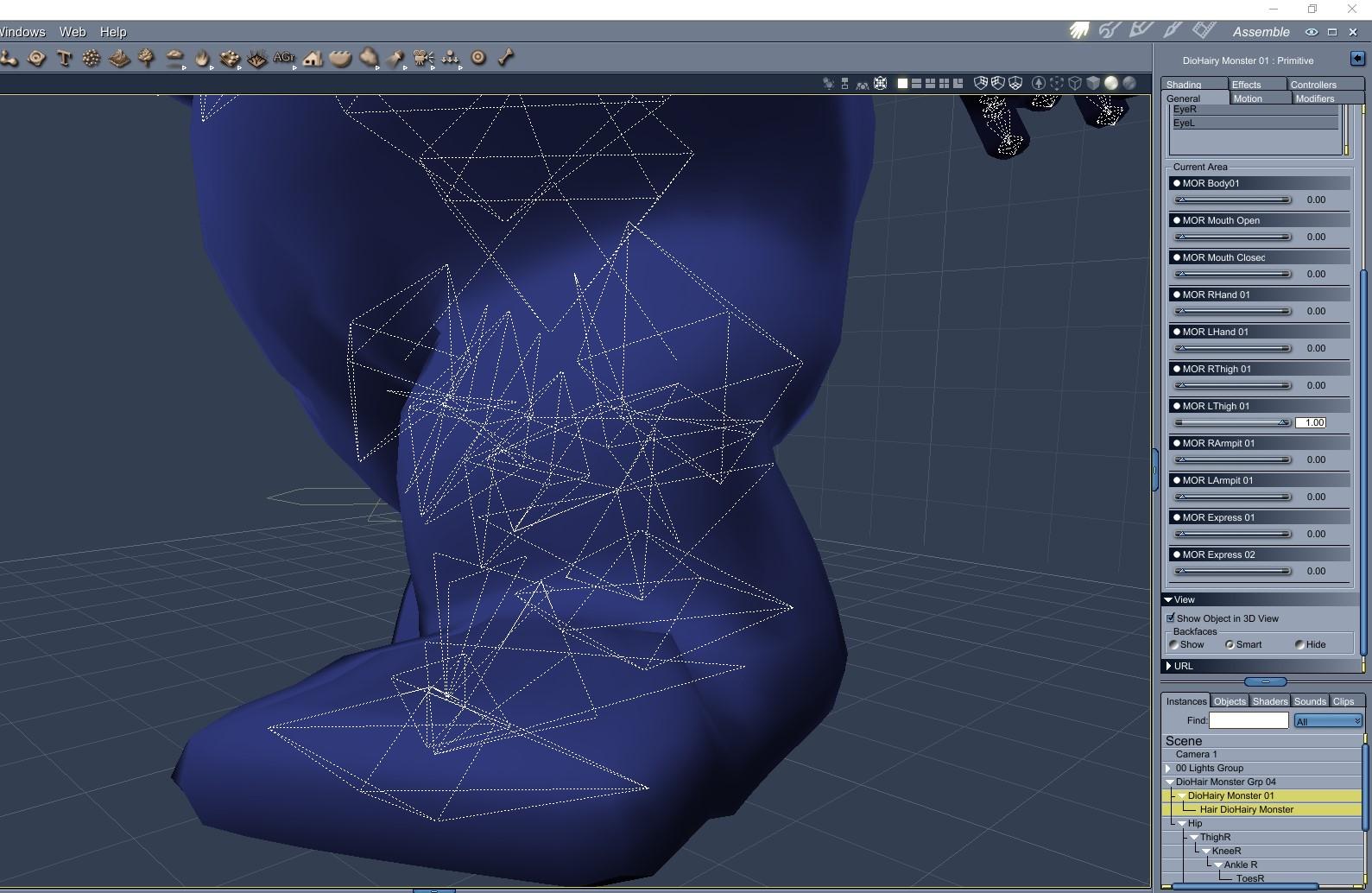
With left thigh bone rotated forward up and knee bent, the left leg crumples undesireably. I used the tips above to edit the MOR LThigh 01 morph to smooth the crumples.
Correction morph at 0
........................................................................
Correction morph at 1
 How do I repair the rigging on fingers that are morphed out of alignment?
With the joint editor tool selected, right click in the window and click "Adjust rigging to shape".
Then ERC-Freeze the rigging to the new shape
Are we supposed to do this everytime we morph a character?
Ideally, yes.
for very tiny adjustments it may not be required. It is essential when changing the hight or width of a character (or depth). It your morph moves the face parts, or where the feet and hands are in particular, then yes, the rig needs to know.
I don't like changing the height; I'd rather make small adjustments with the scale option, for the character as a whole.
EDIT
When you've done a morph, apply a couple of poses to test. Some basic ones that just change the standing pose, but also apply a sitting and lieing pose. then find the hands and feet and have a close look.
If nothing is wrong then ERC/adjust are probably not required, but if you see something wrong then you'll need to apply.
I would also recommend adjusting and freezing the head/face and body separately. I found it more reliable, although as I always do it that way now - maybe there was a bug and it's fine to do all at once now?
CC#54 WiPs ~ What is it that you truly desire? after party Chit ChatVarsel
- let me guess, the content looking guy in the chair would like goodies served by an Aiko-bot. Who wouldn't? Excellent.
- my monster WIP does look like the cookie monster. Hopefully, looks enough like some generic monster from Monsters Inc to avoid issues with either.
...
Freebie Attached
- Now each of you can be gluttons for cookies, or come out of closets to scare kiddies (or make them laugh), or sing songs about the alphabet. See attached. I did only minimal weightmapping and no joint constraints or IK chains at all. It does have rotation morphs for the eyes and a morph to open and close the mouth. The other morphs are intentionally left blank to be available for corrections after posing. The hair visibility is unchecked. I don't know if that saves file size or not but I am trying to make it a habit.
How do I repair the rigging on fingers that are morphed out of alignment?With the joint editor tool selected, right click in the window and click "Adjust rigging to shape".
Then ERC-Freeze the rigging to the new shape
Are we supposed to do this everytime we morph a character?
It depends what you mean by "morph a character".
If you mean "create a custom morph" then yes, rigging may need to be adjusted, especially if the morphed shape is very different from the default shape. You would do it once and then resave the morph with the adjustments, not every time you use the morph.
If you mean "create a character by combining existing morphs" then usually it's not needed as rigging adjustments should already be included in the morphs you used.
By morph i meant use morphs from the Daz store.
Using DAZ Store bought morphs is no insurance against this, especially if the character is changed significantly by the morphs.
k well now im getting mixed messages
Basically, the message is "if you see a problem when posing then try adjusting the rigging".
Individually each morph sold by Daz should include needed rigging adjustments for that morph used at 100%, but when using a morph at partial strength or combining multiple morphs for example you can sometimes end up with a shape which requires further adjustments.
I have seen it happen when a morph scales some of the bones unevenly, for example the ones attached to the torso have been scaled only in Y-direction to make the torso longer or shorter.
Wacky Modelling ~ In Carrara ~a wacky Carrara lightsaber with an on off morph!
how wacky is that!
it's in the zip file for you to experiment with

Very nice, many thanks. I can use that in an animation.
I was about to say there's some mistake, its only 71K ... but no, that's it. Smallest 3D file ever?
GUIDE - What To Buy On The Daz Store?I just made a restore head pose to remove expressions. It sort of depends on how it is made.
There is also Ultimate Zero, which has the ability to restore lots of things back to default... .Although you may find some unpleasant suprirses. Such as I found someones's character imbedded in one of mine, even though I had none of his elements dialed in. werid.
I haven't asked for a refund for Ultimate Zero, because it can be useful for some stuff, but I wouldn't suggest it for that purpose: it's slower than "restore default pose" and, at least in my tests, it leaves the expressions sliders on.
FYI, it zeroes the expression sliders if you have "Zero Properties" checked.
If you try that freebie I've linked (that sadly doesn't work on expressions), it's instantaneous!
Restore default pose, on the other hand, is crazy slow on big libraries.Now, that's VERY useful, thank you RiverSoftArt! :D
Yes, like this is fast, and that's what I hoped to achieve in the first place!
It could be faster in the script loading phase, but it's probably faster than manually zeroing the sliders in the end.
It's been almost 3 years since I started using Daz Studio, and almost 2 years since my first purchase on the Daz Store.
During this time, I've spent maybe too much money there, sometimes with smart purchases, sometimes with dumb ones.
I've checked every single product of the last years, and I check the new releases every day.So, I thought it would have bee nice, both for new and for older users, to write this guide.
I hope it'll help you to spend your money in a wiser way, to see a real improvement in your workflow and in the quality of your art.If you're just starting to use Daz, my suggestion is to check freebies all around the web: you can learn with those, then choose if you'd like to make more with Daz!
This guide is about Iray, Genesis 8 and static renders, because that's what I've done thousands of times, while there surely are better users than me to talk about previous generations, 3Delight and animations.
Furthermore, I use Daz Studio to create stories set in a contemporary setting: that explains my focus on workflow and reusability of assets. I think that people interested in making a few artistic renders every once in a while may have a different opinion about some parts of the guide.It's hard to write such a long guide, and I've tried to keep it organized.
Sometimes I've stated my opinion as facts, and that was to not repeat every time that everything I've said is subjective and based on my personal experience.I've written a brief description of most products, because this is not a list of things to buy: read the description, and choose for yourself what you need and what you don't!
I hope you'll find this guide useful, and feel free to contribute in the comments if you think there are some great products I haven't listed here!
I care about your feedback and opinion, and I've already changed some parts of the guide based on that.INDEX
- General Tips
- Daz Deals
- Gift Cards
- Platinum Club
- Store Sales
- What Would I Avoid?
- Too Many Figures And Morph Packages
- Textures
- Too Heavy Products
- Bundles
- What Would I Buy?
- Utilities
- Shader Presets
- Figures
- Morphs
- Expressions
- Poses
- Environments
- HDRIs
- Lights
- Hair
- Wardrobe
- Accessories
- Props
GENERAL TIPS
Daz Deals
If you're interested in spending money on the Daz Store, the first thing you should do is to install the Daz Deals browser extension.
It will allow you to see if the current price is a good one (like Keepa or CamelCamelCamel for Amazon), and you can even set email notifications to be alerted when a specific product has reached the price you wanted, or when it's at his 1/3/6/12-months best price.
Keep in mind, that the price you could have reached special sales is not shown there. Indeed, to see those prices, you have to put some specific products in your cart at the same time.And one of its most useful features is that you can filter the store by wishlisted items, or by PC coupons.
You can also receive mails for flash sales (Daz doesn't send them).
Furthermore, you'll be notified about daily Daz sales hours before Daz will do it. To me, that means I can check new releases when I wake up, instead of maybe losing sight of them throughout the day.Plus, with Daz Deals you'll find, on every product page, links to gallery renders that have used it, and to forum threads where it has been mentioned. That will help you to clarify what the promos and description are not specifying.
It's free, so there's no reason not to install it!
Gift Cards
When I see a 10-20% gift card sale, I always buy some store credit, even if I'm not going to purchase anything in the near future.
This allows me to combine that discount with other sales.
Sometimes you'll be even able to purchase gift cards at a 30% discount: that's when you really want to stack up store credit.Gift card sales often need a new release in the cart.
To find the best item, just search for "new" in the store, and it'll show you every product considered new.
Then, you can filter it by wishlisted items, or just find one that you like. If they cost too much, just grab a 2$ texture set, and it'll probably be worth it thanks to the store credit discount.Platinum Club
If you regularly purchase products from the Daz Store, this is the best purchase you can make.
Every month, you'll get
- 6$ coupon to use on many products
- 6$ coupon to use on even more products, but only if you're spending at least 18$
- Freebies. Sometimes they're great (like an electronic store), other times it's stuff you don't have a use for. But it's always free stuff.
- A lot of relevant discounts on most products in the store.
- Often, there are specific sales for PC+ members.
Now that you want to join the PC club, what membership should you aim for?
The 3-months one makes little sense, unless you just want to try it out, because it's 8$/month, while the annual membership is 5.8$/month.
On top of that, there are sales when you can purchase the memberships with a 30-50% discount.
They're more frequent for people who don't currently have the PC+ membership, but sometimes (maybe every 6 months) there are also flash sales for already members.In the best-case scenario (50% discount on the annual PC+ membership, 30% gift card), that means you can get 12$ worth of coupons, freebies and a ton of sales and discounts for 2.04$/month.
Store Sales
Chance is you probably need a specific plugin ASAP, but you can wait to get that new hair.
Daz marketing stuff is seriously great: every day a new sale is on, with wonderful graphics etc.
But most of the sales are just not good in practice.If you can wait, it's best to wait for huge Store Sales, which usually happen 2/3 times per year.
On those occasions, the whole store can go on sale.
Some premium products won't be discounted by more than 50% in a small window of time, but that's still better than full price.
Other products, like i13's huge library, often reach something like 90-95% discount.Be aware when you spot a great gift card sale: a store sale is probably coming.
WHAT WOULD I AVOID?
Too Many Figures And Morph Packages
Something I've recently discovered is that, with Genesis 8, the more morphs you have installed in your library, the longer loading and clearing times will be.
It doesn't matter if you're not using them on a specific figure: it will take longer both to load it, and close Daz Studio (very important fact, now that we need a script to open more than a single instance)/clear the scene afterward.It's very sad to say, but I'm currently not using 2/3 of the figures and of the morph packages I had bought.
And I'd uninstall even more of them, if I hadn't already used them in story characters I still need.So, avoid figures who look very alike, and absolutely avoid morph packages you're not planning on using.
Textures
There are a lot of awesome texture packages around, but the chance is, you can apply shaders yourself for a fraction of the price.
Furthermore, you can use shaders everywhere, but you can only apply textures to the relative products. And you don't even see them, unless you're in Smart Content->Files. And trust me, as your library gets bigger, you'll forget about most products you have in it.Please note, this is a controversial thesis: some people have different opinions about textures for specific products, and they have expressed them in the comments.
Too Heavy Products
I'm a huge fan of SSDs, and I don't have a single HDD installed in my build. I've discussed this choice in other threads, and since this one is already going to be pretty long, I'm not going to discuss it further.
The problem is that SSDs cost a lot. Especially if you have your Daz library installed on an NVME one, like I do.
So, I have to think about storage space too.
In particular, this is one more reason why I'm not fond of texture packages.
And I'm not fond of dForce hair too, in general: they look great in the final renders, but sometimes they make my whole interface sluggish, they are not viewable in the Texture Shaded viewport, and, first of all, they sometimes can occupy more than 1GB of storage.Bundles
Almost every day there's a new bundle, both in its "Pro" and "Basic" version.
Honestly, since most products in those bundles are not useful to me, there was never a time when I've thought "this is a good purchase".
Plus, if you have already purchased a few products from that bundle, you'll still have to pay for the whole thing, differently to how bundles work on other platforms like Steam.The only bundles I've purchased are those for charity, and one with a male and one with a female figure, because it's the only way to receive the relative Anatomical Elements.
I've also purchased bundles that contained all products I needed, and I've regretted doing otherwise when, for example, I've purchased separately the male and female versions of the same addon: it would have been wiser to save for the relative bundle in that case.So, in the end, just wishlist the specific products you'd use, and don't let that majestic marketing techniques go to your mind.
For example, you need some specific figures to use other figures in the store.
The most important ones are Victoria, for females, and Michael, for Males.Please note, this is a controversial thesis: some people love to purchase pro/basic bundles.
Thank you very much for the effort and explanations, I agree with most of it.
I am using Daz since 2015, and these are some things I would add as useful (i.e. I use them a lot):
Bone doctor for converting poses
https://www.daz3d.com/bone-doctor-pose-control
My favorite G8 female character
https://www.daz3d.com/ly-zara-hd-for-genesis-8-female
My favorite G8 male character
https://www.daz3d.com/dylan-for-michael-8
My favorite jungle
https://www.daz3d.com/jungle-construction-kit
My favorite HDRI
You're welcome @alienarea! :D
I've wishlisted the HDRI!
Transfer rigging to a scaled objectSo I have the figure zero'd out morph set to 0
I want to apply the morph, adjust rigging to shape then ERC freeze?
*edit* That seems to work thank you. I thought I had already tried that order of steps. I guess I hadn't.
what do I do to get lip lines to be more prominent?on Gen8 I see promos of products where lip lines are defined, making the mouth look more human
it seems when I render Gen8, V8, Mie8, etc I dont see them. the lips look good, but no definition in the lines. I tried putting bump map in the displacement and upping the sub division, and looked to shee if there is an HD morph paramter I'm missing somewhere.
Anyone know what I'm doing wrong?
Transfer rigging to a scaled objectAfter you apply the morph for the first time, did you go into the Joint Editor and adjust the rigging to shape?If you don't do that, the bone locations don't follow the morph. Once you do that, you have to do an ERC freeze with the changes to the morph and re-save the figure. Then when you do the morph, the joint locations should adjust with it.
Transfer rigging to a scaled objectThank you very much. I do have to make some simulation edits when shrinking the size through the morph, but it does work and doesn't distort :)
I am having some issues with the rigging though, I can't seem to keep the rigging lined up. In my first try rigging was fine at 0% but dialing in the morph then posing the figure distorted the mesh.
On my second try it was the opposit. 100% morph would pose fine, but dialing it back down and trying to pose distorted the mesh.
I restarted and I am at the point Where I created the morph. The figure is in zero'd pose and morph is at 0%. What are my next steps for the bones so that the mesh doesn't distort?
Again, thank you for your help.
Morphs are not saving in 4.12I'm having a similar issue, but it only applies to animation - the frame that I save the scene on keeps the morph I applied (usually a facial expression), but all other frames are dropped.
> Use the version where morphs work for you until Daz gets another update.
As far as I know, Daz don't make older versions available for rolling back, do they?
A preset will save all frames, as a workaround, but you can also use a ticket to ask support for an older version of DS that doesn't have the bug.
[Released] Character Converter from Genesis 2 Female to Genesis 8 Female [Commercial]I've been trying to convert Giselle 6. I've messed with the tolerance (moved it up and down) but I keep getting these hour glass eyes. Kind of warped.
Any thoughts?
I find the best results are using the 2020 method in options. Make sure Hide Eyes is UNCHECKED. Turn down the tolerance (0.0005). Close DS, delete the FHM morph for Giselle, restart DS and the script and immediately convert.
How do I repair the rigging on fingers that are morphed out of alignment?With the joint editor tool selected, right click in the window and click "Adjust rigging to shape".
Then ERC-Freeze the rigging to the new shape
Are we supposed to do this everytime we morph a character?
It depends what you mean by "morph a character".
If you mean "create a custom morph" then yes, rigging may need to be adjusted, especially if the morphed shape is very different from the default shape. You would do it once and then resave the morph with the adjustments, not every time you use the morph.
If you mean "create a character by combining existing morphs" then usually it's not needed as rigging adjustments should already be included in the morphs you used.
By morph i meant use morphs from the Daz store.
Using DAZ Store bought morphs is no insurance against this, especially if the character is changed significantly by the morphs.
k well now im getting mixed messages
Basically, the message is "if you see a problem when posing then try adjusting the rigging".
Individually each morph sold by Daz should include needed rigging adjustments for that morph used at 100%, but when using a morph at partial strength or combining multiple morphs for example you can sometimes end up with a shape which requires further adjustments.
Morphs not transferring in Merge fitted FiguresHi I saw people mention that this was broken but cant see any fuirther comments on if it is likely to be fixed.
If not does anyone have a work around I am trying to transfer into unity with genetials and morphs but currently only get partial morphs that arent very helpful.
Thanks for any assistance you can give
g8+morphs to FBXedit morph export rules.
Add a rule and in the match column put in something like genesis8 or anything that matches all the morphs you want to include. it works as a search function. It is case sensitive.
also right click and change it to export.
if you cant get all of them in one rule do a couple but you wont need to add ech individually.
How do I repair the rigging on fingers that are morphed out of alignment?With the joint editor tool selected, right click in the window and click "Adjust rigging to shape".
Then ERC-Freeze the rigging to the new shape
Are we supposed to do this everytime we morph a character?
It depends what you mean by "morph a character".
If you mean "create a custom morph" then yes, rigging may need to be adjusted, especially if the morphed shape is very different from the default shape. You would do it once and then resave the morph with the adjustments, not every time you use the morph.
If you mean "create a character by combining existing morphs" then usually it's not needed as rigging adjustments should already be included in the morphs you used.
By morph i meant use morphs from the Daz store.
Using DAZ Store bought morphs is no insurance against this, especially if the character is changed significantly by the morphs.
k well now im getting mixed messages
When someone says they haven't seen or experienced something, that is no proof against it happening, it just means the one writing the message hasn't seen it...
Zbrush alternatives? (maybe "light weighted")...but neither are compatible with Daz/GOZ.
Probably moot anyway as if a tablet is pretty much required for sculpting, I'll have to cross that off the list.
You mean, no "instant bridge" when both applications are on? because otherwise, i thought, you export from daz as obj, do things, then re-import back in DS modified obj as "morph"... not that?
j cade, thanks for input :)
Morphs are not saving in 4.12I'm having a similar issue, but it only applies to animation - the frame that I save the scene on keeps the morph I applied (usually a facial expression), but all other frames are dropped.
> Use the version where morphs work for you until Daz gets another update.
As far as I know, Daz don't make older versions available for rolling back, do they?
j.cade is Back! And brought the adorable Bette!While I have seen more than a few Bette Davis films the one that was the biggest influence I actually haven't either, but this is just such a look
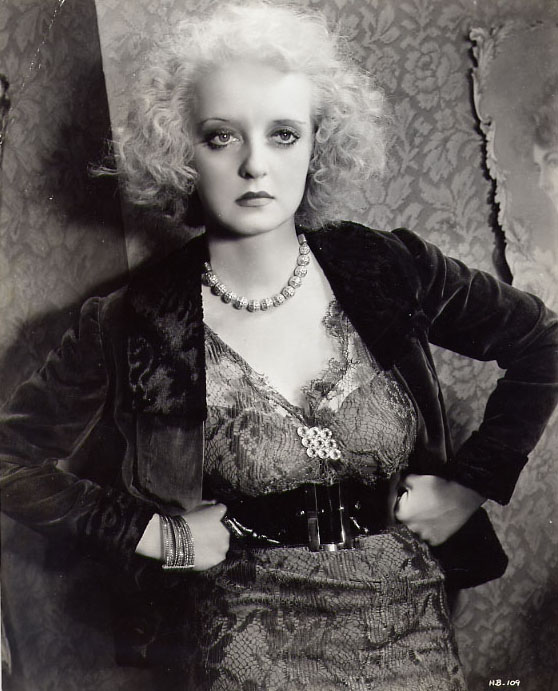
I am 100% comfortable admitting it played some major influence on my cover promo (also the makeups with the smokey eyeshadow)
Oh my gosh oh my gosh I'll be able to make Elsa

I actually made a Elsa morph for the Girl 6 way back in the day - In a way shes sort of the spiritual great grandmother of this lady - although oddly I was never a big Frozen fan. Croods was 100% the better animated movie that year and I will defend this take with my life. (hey disney did you know you could have a character and their mother and not give them the same exact face? and also have the mother not be dead? amazing)
OMG all your renders are so flipping adorable!!!
I really love this one

(it does a better job at showing off the bump map than any of my promos. :O I handpaint some nifty knuckles into the bump map and then don't do any promos showing them off)
also that tux by protozoon is just glorious isnt it?
re bette vs toon generations Idk if its me but Bette reads as a bit older, which is sort of weird as Bette's eyes are a smidge bigger and face is more round w. curvier obviously, but also the ratio of the head hands and eyes to the body and the thighs to the shin. I'd say toon generations is more cutsey wheras Bette is a bit more glamourous (but in a value neutral way)
also I agree that 50/50 blend is super adorable (and with that hair there are some major Merida vibes)
Help Identifying characterMy guess would be Babina 8 with the HD morph.
Very similar! I saw the promo of this character, but did not recognize! Thank you so much!!

Yes. I was also looking for a character from the promo picture. Nobody knows what this character is. Very strange. We put a picture in the promo, but did not indicate the character.
Daz 3D is part of

Connect
DAZ Productions, Inc.
7533 S Center View Ct #4664
West Jordan, UT 84084Licensing Agreement | Terms of Service | Privacy Policy | EULA
© 2026 Daz Productions Inc. All Rights Reserved.














