-
Daz to Unreal guide for "newcomers"(The famous "before your buy" or Limitations)
I am new to daz, I had already downloaded it but it was incompatible with the programs I use the most which is Blender and Unreal, my focus is stylized games for mobile and PC.
But now that I have the bridges, I intend to transfer my original characters into the daz.
But I didn't understand how to create a mesh base. Is Daz Geneses 8 for example an algorithm that generates the base mesh or is it a standard mesh created in 3d software?
How do you create Products? I want to create one with Mannequin Unreal ...
Do you have an API to create scripts and plugins?
I think there should be more video tutorials on how to design and import different skeletons.i'm a little confused about your questions
it is about "exporting a character which you created in blender to daz????, then to do that i don't know because i never did that, now if you talking about exporting a character which you created in daz to unreal then you use the bridge
all the characters in daz for what i know are "regular mesh", the only "algorithm i know are the "dforce hair and fur and maybe strand based hairs not too sure about that, but the characters and cloths in general are "regular generated meshs, the only issue here would be the "geo shell stuffs which i'v talked in this thread basically anything
agian if you are talking about create products for daz then i'm really not that good, maybe someone more experienced can help with that but asfar i remember to create characters for daz and it's not for 'free" you need talk with daz and get your hands on the daz creator app, talking with daz, i really don't know those things works.
and a tip if you are "looking" to use daz for "mobile" i would advise to forget, daz characters and stuffs are not "optmized" for mobile, they are in general too high poly for mobile, you would need to use only the character and make your own outftis because none outfit from daz will work for mobile, neither the hairs, again most of the stuffs on daz are too high for mobile, maybe some "cartoon characters" are fine but "realistic none.
The base mesh Daz has 16556 vertices, it even runs on a calculator. Characters that I use in Moblie have an average of 36000 in LOD0, 16000 LOD1, 6000 LOD2. Unreal was made to work with millions of vertices, in PC games or LOD0 I use 3 million vertices.
For me the mesh base of Daz is very clean. That's why I want to get a blender with 5 million vertices to put in the daz and use the Morfs tools, modifiers, I don't want to sell in the store, I want to use only on my PC in my projects.3 millions in a single character???? omg, i don't recall any even triple AAA game having a single character with 3 millions vertices.
that is why i say which it can only be good for mobile if you use only the base character and create yourself the hairs, outifts and all stuffs, unreal can support billions of "polygons and huge open world but this don't means which you gonna have " that "billions or millions" being redenrized at the same time being able to hold millions or billions or even trillions don't means which it will handle all of the vertices at the sametime, the engine only render what is in your screen or inside the cam, not the whole world at the same time.
First I make a character thinking about the cinematic, then I reduce and test it.
For example, this LOL cinematic should have at least about 30 million vertices per scene. Artists have done it with millions and developers have reduced it to work on the PC.that is the "thing per the scene" not character, and again as i told you are only rendering in realtime what is on the cam anything else will not be rendered, this is why sometimes in games you have things "appearing in the scene outof nowhere, because the engine could not render the stuff in time then it get a delay in render and only appear later, because the stuffs already in the scene are too much, another thing is which in the past and even today many of the "cinematics are "pre- rendered" which means no realtime render this is why you can have "millions and billions of polygons in a scene in the cinematic, in order to do that for "realtime you have to reduce the poly count, ofcourse the unreal engine 5 is coming to "try to remove it by allowing you to be able to throw objects with "high poly count" without need to "reduce it or make lods", but for that you would need a "next generation consoles and pcs, with strong ssds and many memory, which for now many developers will avoid to go that high at last for pc in indie comunity to make sure as much people will be buying they games, because not everyone gonna be able to pay for a "top pc" to run those crazy games".
I am new to daz, I had already downloaded it but it was incompatible with the programs I use the most which is Blender and Unreal, my focus is stylized games for mobile and PC.
But now that I have the bridges, I intend to transfer my original characters into the daz.
But I didn't understand how to create a mesh base. Is Daz Geneses 8 for example an algorithm that generates the base mesh or is it a standard mesh created in 3d software?
How do you create Products? I want to create one with Mannequin Unreal ...
Do you have an API to create scripts and plugins?
I think there should be more video tutorials on how to design and import different skeletons.i'm a little confused about your questions
it is about "exporting a character which you created in blender to daz????, then to do that i don't know because i never did that, now if you talking about exporting a character which you created in daz to unreal then you use the bridge
all the characters in daz for what i know are "regular mesh", the only "algorithm i know are the "dforce hair and fur and maybe strand based hairs not too sure about that, but the characters and cloths in general are "regular generated meshs, the only issue here would be the "geo shell stuffs which i'v talked in this thread basically anything
agian if you are talking about create products for daz then i'm really not that good, maybe someone more experienced can help with that but asfar i remember to create characters for daz and it's not for 'free" you need talk with daz and get your hands on the daz creator app, talking with daz, i really don't know those things works.
and a tip if you are "looking" to use daz for "mobile" i would advise to forget, daz characters and stuffs are not "optmized" for mobile, they are in general too high poly for mobile, you would need to use only the character and make your own outftis because none outfit from daz will work for mobile, neither the hairs, again most of the stuffs on daz are too high for mobile, maybe some "cartoon characters" are fine but "realistic none.
The base mesh Daz has 16556 vertices, it even runs on a calculator. Characters that I use in Moblie have an average of 36000 in LOD0, 16000 LOD1, 6000 LOD2. Unreal was made to work with millions of vertices, in PC games or LOD0 I use 3 million vertices.
For me the mesh base of Daz is very clean. That's why I want to get a blender with 5 million vertices to put in the daz and use the Morfs tools, modifiers, I don't want to sell in the store, I want to use only on my PC in my projects.3 millions in a single character???? omg, i don't recall any even triple AAA game having a single character with 3 millions vertices.
that is why i say which it can only be good for mobile if you use only the base character and create yourself the hairs, outifts and all stuffs, unreal can support billions of "polygons and huge open world but this don't means which you gonna have " that "billions or millions" being redenrized at the same time being able to hold millions or billions or even trillions don't means which it will handle all of the vertices at the sametime, the engine only render what is in your screen or inside the cam, not the whole world at the same time.
First I make a character thinking about the cinematic, then I reduce and test it.
For example, this LOL cinematic should have at least about 30 million vertices per scene. Artists have done it with millions and developers have reduced it to work on the PC.that is the "thing per the scene" not character, and again as i told you are only rendering in realtime what is on the cam anything else will not be rendered, this is why sometimes in games you have things "appearing in the scene outof nowhere, because the engine could not render the stuff in time then it get a delay in render and only appear later, because the stuffs already in the scene are too much, another thing is which in the past and even today many of the "cinematics are "pre- rendered" which means no realtime render this is why you can have "millions and billions of polygons in a scene in the cinematic, in order to do that for "realtime you have to reduce the poly count, ofcourse the unreal engine 5 is coming to "try to remove it by allowing you to be able to throw objects with "high poly count" without need to "reduce it or make lods", but for that you would need a "next generation consoles and pcs, with strong ssds and many memory, which for now many developers will avoid to go that high at last for pc in indie comunity to make sure as much people will be buying they games, because not everyone gonna be able to pay for a "top pc" to run those crazy games".
This LOL Cinematc is already old.
I want millions of vertices to deform the mesh using Normal Map, this will speed up my work.
Example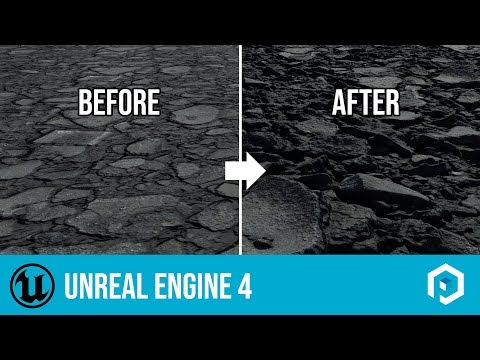
To use this option in pernures I use C ++, I don't know if you can do it through the interface in the released section.i'm getting a little confuse about what you really want...
let's go back to the start, you was asking about how to import stuffs from blender to daz??? then go to unreal??, not could be more simple go blender to unreal??, you are talking about create stuffs for daz to sell???, i'm really confuse now about what you really asking for.
At Daz, clothes and morphs are very organized to manage a team, for example. Organizing the library at Daz by creating products would be much better.
The more organized it is, the lower the production cost, it is not a matter of importing, it is a matter of reusing and modifying and saving time.When you work with 3 or 10 characters it is simple, but when we are talking about 500, 1000, 3000 characters, there it is more complex.
Daz to Unreal guide for "newcomers"(The famous "before your buy" or Limitations)I am new to daz, I had already downloaded it but it was incompatible with the programs I use the most which is Blender and Unreal, my focus is stylized games for mobile and PC.
But now that I have the bridges, I intend to transfer my original characters into the daz.
But I didn't understand how to create a mesh base. Is Daz Geneses 8 for example an algorithm that generates the base mesh or is it a standard mesh created in 3d software?
How do you create Products? I want to create one with Mannequin Unreal ...
Do you have an API to create scripts and plugins?
I think there should be more video tutorials on how to design and import different skeletons.i'm a little confused about your questions
it is about "exporting a character which you created in blender to daz????, then to do that i don't know because i never did that, now if you talking about exporting a character which you created in daz to unreal then you use the bridge
all the characters in daz for what i know are "regular mesh", the only "algorithm i know are the "dforce hair and fur and maybe strand based hairs not too sure about that, but the characters and cloths in general are "regular generated meshs, the only issue here would be the "geo shell stuffs which i'v talked in this thread basically anything
agian if you are talking about create products for daz then i'm really not that good, maybe someone more experienced can help with that but asfar i remember to create characters for daz and it's not for 'free" you need talk with daz and get your hands on the daz creator app, talking with daz, i really don't know those things works.
and a tip if you are "looking" to use daz for "mobile" i would advise to forget, daz characters and stuffs are not "optmized" for mobile, they are in general too high poly for mobile, you would need to use only the character and make your own outftis because none outfit from daz will work for mobile, neither the hairs, again most of the stuffs on daz are too high for mobile, maybe some "cartoon characters" are fine but "realistic none.
The base mesh Daz has 16556 vertices, it even runs on a calculator. Characters that I use in Moblie have an average of 36000 in LOD0, 16000 LOD1, 6000 LOD2. Unreal was made to work with millions of vertices, in PC games or LOD0 I use 3 million vertices.
For me the mesh base of Daz is very clean. That's why I want to get a blender with 5 million vertices to put in the daz and use the Morfs tools, modifiers, I don't want to sell in the store, I want to use only on my PC in my projects.3 millions in a single character???? omg, i don't recall any even triple AAA game having a single character with 3 millions vertices.
that is why i say which it can only be good for mobile if you use only the base character and create yourself the hairs, outifts and all stuffs, unreal can support billions of "polygons and huge open world but this don't means which you gonna have " that "billions or millions" being redenrized at the same time being able to hold millions or billions or even trillions don't means which it will handle all of the vertices at the sametime, the engine only render what is in your screen or inside the cam, not the whole world at the same time.
First I make a character thinking about the cinematic, then I reduce and test it.
For example, this LOL cinematic should have at least about 30 million vertices per scene. Artists have done it with millions and developers have reduced it to work on the PC.that is the "thing per the scene" not character, and again as i told you are only rendering in realtime what is on the cam anything else will not be rendered, this is why sometimes in games you have things "appearing in the scene outof nowhere, because the engine could not render the stuff in time then it get a delay in render and only appear later, because the stuffs already in the scene are too much, another thing is which in the past and even today many of the "cinematics are "pre- rendered" which means no realtime render this is why you can have "millions and billions of polygons in a scene in the cinematic, in order to do that for "realtime you have to reduce the poly count, ofcourse the unreal engine 5 is coming to "try to remove it by allowing you to be able to throw objects with "high poly count" without need to "reduce it or make lods", but for that you would need a "next generation consoles and pcs, with strong ssds and many memory, which for now many developers will avoid to go that high at last for pc in indie comunity to make sure as much people will be buying they games, because not everyone gonna be able to pay for a "top pc" to run those crazy games".
I am new to daz, I had already downloaded it but it was incompatible with the programs I use the most which is Blender and Unreal, my focus is stylized games for mobile and PC.
But now that I have the bridges, I intend to transfer my original characters into the daz.
But I didn't understand how to create a mesh base. Is Daz Geneses 8 for example an algorithm that generates the base mesh or is it a standard mesh created in 3d software?
How do you create Products? I want to create one with Mannequin Unreal ...
Do you have an API to create scripts and plugins?
I think there should be more video tutorials on how to design and import different skeletons.i'm a little confused about your questions
it is about "exporting a character which you created in blender to daz????, then to do that i don't know because i never did that, now if you talking about exporting a character which you created in daz to unreal then you use the bridge
all the characters in daz for what i know are "regular mesh", the only "algorithm i know are the "dforce hair and fur and maybe strand based hairs not too sure about that, but the characters and cloths in general are "regular generated meshs, the only issue here would be the "geo shell stuffs which i'v talked in this thread basically anything
agian if you are talking about create products for daz then i'm really not that good, maybe someone more experienced can help with that but asfar i remember to create characters for daz and it's not for 'free" you need talk with daz and get your hands on the daz creator app, talking with daz, i really don't know those things works.
and a tip if you are "looking" to use daz for "mobile" i would advise to forget, daz characters and stuffs are not "optmized" for mobile, they are in general too high poly for mobile, you would need to use only the character and make your own outftis because none outfit from daz will work for mobile, neither the hairs, again most of the stuffs on daz are too high for mobile, maybe some "cartoon characters" are fine but "realistic none.
The base mesh Daz has 16556 vertices, it even runs on a calculator. Characters that I use in Moblie have an average of 36000 in LOD0, 16000 LOD1, 6000 LOD2. Unreal was made to work with millions of vertices, in PC games or LOD0 I use 3 million vertices.
For me the mesh base of Daz is very clean. That's why I want to get a blender with 5 million vertices to put in the daz and use the Morfs tools, modifiers, I don't want to sell in the store, I want to use only on my PC in my projects.3 millions in a single character???? omg, i don't recall any even triple AAA game having a single character with 3 millions vertices.
that is why i say which it can only be good for mobile if you use only the base character and create yourself the hairs, outifts and all stuffs, unreal can support billions of "polygons and huge open world but this don't means which you gonna have " that "billions or millions" being redenrized at the same time being able to hold millions or billions or even trillions don't means which it will handle all of the vertices at the sametime, the engine only render what is in your screen or inside the cam, not the whole world at the same time.
First I make a character thinking about the cinematic, then I reduce and test it.
For example, this LOL cinematic should have at least about 30 million vertices per scene. Artists have done it with millions and developers have reduced it to work on the PC.that is the "thing per the scene" not character, and again as i told you are only rendering in realtime what is on the cam anything else will not be rendered, this is why sometimes in games you have things "appearing in the scene outof nowhere, because the engine could not render the stuff in time then it get a delay in render and only appear later, because the stuffs already in the scene are too much, another thing is which in the past and even today many of the "cinematics are "pre- rendered" which means no realtime render this is why you can have "millions and billions of polygons in a scene in the cinematic, in order to do that for "realtime you have to reduce the poly count, ofcourse the unreal engine 5 is coming to "try to remove it by allowing you to be able to throw objects with "high poly count" without need to "reduce it or make lods", but for that you would need a "next generation consoles and pcs, with strong ssds and many memory, which for now many developers will avoid to go that high at last for pc in indie comunity to make sure as much people will be buying they games, because not everyone gonna be able to pay for a "top pc" to run those crazy games".
This LOL Cinematc is already old.
I want millions of vertices to deform the mesh using Normal Map, this will speed up my work.
Example
To use this option in pernures I use C ++, I don't know if you can do it through the interface in the released section.i'm getting a little confuse about what you really want...
let's go back to the start, you was asking about how to import stuffs from blender to daz??? then go to unreal??, not could be more simple go blender to unreal??, you are talking about create stuffs for daz to sell???, i'm really confuse now about what you really asking for.
Daz to Unreal guide for "newcomers"(The famous "before your buy" or Limitations)I am new to daz, I had already downloaded it but it was incompatible with the programs I use the most which is Blender and Unreal, my focus is stylized games for mobile and PC.
But now that I have the bridges, I intend to transfer my original characters into the daz.
But I didn't understand how to create a mesh base. Is Daz Geneses 8 for example an algorithm that generates the base mesh or is it a standard mesh created in 3d software?
How do you create Products? I want to create one with Mannequin Unreal ...
Do you have an API to create scripts and plugins?
I think there should be more video tutorials on how to design and import different skeletons.i'm a little confused about your questions
it is about "exporting a character which you created in blender to daz????, then to do that i don't know because i never did that, now if you talking about exporting a character which you created in daz to unreal then you use the bridge
all the characters in daz for what i know are "regular mesh", the only "algorithm i know are the "dforce hair and fur and maybe strand based hairs not too sure about that, but the characters and cloths in general are "regular generated meshs, the only issue here would be the "geo shell stuffs which i'v talked in this thread basically anything
agian if you are talking about create products for daz then i'm really not that good, maybe someone more experienced can help with that but asfar i remember to create characters for daz and it's not for 'free" you need talk with daz and get your hands on the daz creator app, talking with daz, i really don't know those things works.
and a tip if you are "looking" to use daz for "mobile" i would advise to forget, daz characters and stuffs are not "optmized" for mobile, they are in general too high poly for mobile, you would need to use only the character and make your own outftis because none outfit from daz will work for mobile, neither the hairs, again most of the stuffs on daz are too high for mobile, maybe some "cartoon characters" are fine but "realistic none.
The base mesh Daz has 16556 vertices, it even runs on a calculator. Characters that I use in Moblie have an average of 36000 in LOD0, 16000 LOD1, 6000 LOD2. Unreal was made to work with millions of vertices, in PC games or LOD0 I use 3 million vertices.
For me the mesh base of Daz is very clean. That's why I want to get a blender with 5 million vertices to put in the daz and use the Morfs tools, modifiers, I don't want to sell in the store, I want to use only on my PC in my projects.3 millions in a single character???? omg, i don't recall any even triple AAA game having a single character with 3 millions vertices.
that is why i say which it can only be good for mobile if you use only the base character and create yourself the hairs, outifts and all stuffs, unreal can support billions of "polygons and huge open world but this don't means which you gonna have " that "billions or millions" being redenrized at the same time being able to hold millions or billions or even trillions don't means which it will handle all of the vertices at the sametime, the engine only render what is in your screen or inside the cam, not the whole world at the same time.
First I make a character thinking about the cinematic, then I reduce and test it.
For example, this LOL cinematic should have at least about 30 million vertices per scene. Artists have done it with millions and developers have reduced it to work on the PC.that is the "thing per the scene" not character, and again as i told you are only rendering in realtime what is on the cam anything else will not be rendered, this is why sometimes in games you have things "appearing in the scene outof nowhere, because the engine could not render the stuff in time then it get a delay in render and only appear later, because the stuffs already in the scene are too much, another thing is which in the past and even today many of the "cinematics are "pre- rendered" which means no realtime render this is why you can have "millions and billions of polygons in a scene in the cinematic, in order to do that for "realtime you have to reduce the poly count, ofcourse the unreal engine 5 is coming to "try to remove it by allowing you to be able to throw objects with "high poly count" without need to "reduce it or make lods", but for that you would need a "next generation consoles and pcs, with strong ssds and many memory, which for now many developers will avoid to go that high at last for pc in indie comunity to make sure as much people will be buying they games, because not everyone gonna be able to pay for a "top pc" to run those crazy games".
I am new to daz, I had already downloaded it but it was incompatible with the programs I use the most which is Blender and Unreal, my focus is stylized games for mobile and PC.
But now that I have the bridges, I intend to transfer my original characters into the daz.
But I didn't understand how to create a mesh base. Is Daz Geneses 8 for example an algorithm that generates the base mesh or is it a standard mesh created in 3d software?
How do you create Products? I want to create one with Mannequin Unreal ...
Do you have an API to create scripts and plugins?
I think there should be more video tutorials on how to design and import different skeletons.i'm a little confused about your questions
it is about "exporting a character which you created in blender to daz????, then to do that i don't know because i never did that, now if you talking about exporting a character which you created in daz to unreal then you use the bridge
all the characters in daz for what i know are "regular mesh", the only "algorithm i know are the "dforce hair and fur and maybe strand based hairs not too sure about that, but the characters and cloths in general are "regular generated meshs, the only issue here would be the "geo shell stuffs which i'v talked in this thread basically anything
agian if you are talking about create products for daz then i'm really not that good, maybe someone more experienced can help with that but asfar i remember to create characters for daz and it's not for 'free" you need talk with daz and get your hands on the daz creator app, talking with daz, i really don't know those things works.
and a tip if you are "looking" to use daz for "mobile" i would advise to forget, daz characters and stuffs are not "optmized" for mobile, they are in general too high poly for mobile, you would need to use only the character and make your own outftis because none outfit from daz will work for mobile, neither the hairs, again most of the stuffs on daz are too high for mobile, maybe some "cartoon characters" are fine but "realistic none.
The base mesh Daz has 16556 vertices, it even runs on a calculator. Characters that I use in Moblie have an average of 36000 in LOD0, 16000 LOD1, 6000 LOD2. Unreal was made to work with millions of vertices, in PC games or LOD0 I use 3 million vertices.
For me the mesh base of Daz is very clean. That's why I want to get a blender with 5 million vertices to put in the daz and use the Morfs tools, modifiers, I don't want to sell in the store, I want to use only on my PC in my projects.3 millions in a single character???? omg, i don't recall any even triple AAA game having a single character with 3 millions vertices.
that is why i say which it can only be good for mobile if you use only the base character and create yourself the hairs, outifts and all stuffs, unreal can support billions of "polygons and huge open world but this don't means which you gonna have " that "billions or millions" being redenrized at the same time being able to hold millions or billions or even trillions don't means which it will handle all of the vertices at the sametime, the engine only render what is in your screen or inside the cam, not the whole world at the same time.
First I make a character thinking about the cinematic, then I reduce and test it.
For example, this LOL cinematic should have at least about 30 million vertices per scene. Artists have done it with millions and developers have reduced it to work on the PC.that is the "thing per the scene" not character, and again as i told you are only rendering in realtime what is on the cam anything else will not be rendered, this is why sometimes in games you have things "appearing in the scene outof nowhere, because the engine could not render the stuff in time then it get a delay in render and only appear later, because the stuffs already in the scene are too much, another thing is which in the past and even today many of the "cinematics are "pre- rendered" which means no realtime render this is why you can have "millions and billions of polygons in a scene in the cinematic, in order to do that for "realtime you have to reduce the poly count, ofcourse the unreal engine 5 is coming to "try to remove it by allowing you to be able to throw objects with "high poly count" without need to "reduce it or make lods", but for that you would need a "next generation consoles and pcs, with strong ssds and many memory, which for now many developers will avoid to go that high at last for pc in indie comunity to make sure as much people will be buying they games, because not everyone gonna be able to pay for a "top pc" to run those crazy games".
This LOL Cinematc is already old.
I want millions of vertices to deform the mesh using Normal Map, this will speed up my work.
Example
To use this option in pernures I use C ++, I don't know if you can do it through the interface in the released section.Daz to Unreal guide for "newcomers"(The famous "before your buy" or Limitations)I am new to daz, I had already downloaded it but it was incompatible with the programs I use the most which is Blender and Unreal, my focus is stylized games for mobile and PC.
But now that I have the bridges, I intend to transfer my original characters into the daz.
But I didn't understand how to create a mesh base. Is Daz Geneses 8 for example an algorithm that generates the base mesh or is it a standard mesh created in 3d software?
How do you create Products? I want to create one with Mannequin Unreal ...
Do you have an API to create scripts and plugins?
I think there should be more video tutorials on how to design and import different skeletons.i'm a little confused about your questions
it is about "exporting a character which you created in blender to daz????, then to do that i don't know because i never did that, now if you talking about exporting a character which you created in daz to unreal then you use the bridge
all the characters in daz for what i know are "regular mesh", the only "algorithm i know are the "dforce hair and fur and maybe strand based hairs not too sure about that, but the characters and cloths in general are "regular generated meshs, the only issue here would be the "geo shell stuffs which i'v talked in this thread basically anything
agian if you are talking about create products for daz then i'm really not that good, maybe someone more experienced can help with that but asfar i remember to create characters for daz and it's not for 'free" you need talk with daz and get your hands on the daz creator app, talking with daz, i really don't know those things works.
and a tip if you are "looking" to use daz for "mobile" i would advise to forget, daz characters and stuffs are not "optmized" for mobile, they are in general too high poly for mobile, you would need to use only the character and make your own outftis because none outfit from daz will work for mobile, neither the hairs, again most of the stuffs on daz are too high for mobile, maybe some "cartoon characters" are fine but "realistic none.
The base mesh Daz has 16556 vertices, it even runs on a calculator. Characters that I use in Moblie have an average of 36000 in LOD0, 16000 LOD1, 6000 LOD2. Unreal was made to work with millions of vertices, in PC games or LOD0 I use 3 million vertices.
For me the mesh base of Daz is very clean. That's why I want to get a blender with 5 million vertices to put in the daz and use the Morfs tools, modifiers, I don't want to sell in the store, I want to use only on my PC in my projects.3 millions in a single character???? omg, i don't recall any even triple AAA game having a single character with 3 millions vertices.
that is why i say which it can only be good for mobile if you use only the base character and create yourself the hairs, outifts and all stuffs, unreal can support billions of "polygons and huge open world but this don't means which you gonna have " that "billions or millions" being redenrized at the same time being able to hold millions or billions or even trillions don't means which it will handle all of the vertices at the sametime, the engine only render what is in your screen or inside the cam, not the whole world at the same time.
First I make a character thinking about the cinematic, then I reduce and test it.
For example, this LOL cinematic should have at least about 30 million vertices per scene. Artists have done it with millions and developers have reduced it to work on the PC.that is the "thing per the scene" not character, and again as i told you are only rendering in realtime what is on the cam anything else will not be rendered, this is why sometimes in games you have things "appearing in the scene outof nowhere, because the engine could not render the stuff in time then it get a delay in render and only appear later, because the stuffs already in the scene are too much, another thing is which in the past and even today many of the "cinematics are "pre- rendered" which means no realtime render this is why you can have "millions and billions of polygons in a scene in the cinematic, in order to do that for "realtime you have to reduce the poly count, ofcourse the unreal engine 5 is coming to "try to remove it by allowing you to be able to throw objects with "high poly count" without need to "reduce it or make lods", but for that you would need a "next generation consoles and pcs, with strong ssds and many memory, which for now many developers will avoid to go that high at last for pc in indie comunity to make sure as much people will be buying they games, because not everyone gonna be able to pay for a "top pc" to run those crazy games".
Daz to Unreal guide for "newcomers"(The famous "before your buy" or Limitations)I am new to daz, I had already downloaded it but it was incompatible with the programs I use the most which is Blender and Unreal, my focus is stylized games for mobile and PC.
But now that I have the bridges, I intend to transfer my original characters into the daz.
But I didn't understand how to create a mesh base. Is Daz Geneses 8 for example an algorithm that generates the base mesh or is it a standard mesh created in 3d software?
How do you create Products? I want to create one with Mannequin Unreal ...
Do you have an API to create scripts and plugins?
I think there should be more video tutorials on how to design and import different skeletons.i'm a little confused about your questions
it is about "exporting a character which you created in blender to daz????, then to do that i don't know because i never did that, now if you talking about exporting a character which you created in daz to unreal then you use the bridge
all the characters in daz for what i know are "regular mesh", the only "algorithm i know are the "dforce hair and fur and maybe strand based hairs not too sure about that, but the characters and cloths in general are "regular generated meshs, the only issue here would be the "geo shell stuffs which i'v talked in this thread basically anything
agian if you are talking about create products for daz then i'm really not that good, maybe someone more experienced can help with that but asfar i remember to create characters for daz and it's not for 'free" you need talk with daz and get your hands on the daz creator app, talking with daz, i really don't know those things works.
and a tip if you are "looking" to use daz for "mobile" i would advise to forget, daz characters and stuffs are not "optmized" for mobile, they are in general too high poly for mobile, you would need to use only the character and make your own outftis because none outfit from daz will work for mobile, neither the hairs, again most of the stuffs on daz are too high for mobile, maybe some "cartoon characters" are fine but "realistic none.
The base mesh Daz has 16556 vertices, it even runs on a calculator. Characters that I use in Moblie have an average of 36000 in LOD0, 16000 LOD1, 6000 LOD2. Unreal was made to work with millions of vertices, in PC games or LOD0 I use 3 million vertices.
For me the mesh base of Daz is very clean. That's why I want to get a blender with 5 million vertices to put in the daz and use the Morfs tools, modifiers, I don't want to sell in the store, I want to use only on my PC in my projects.3 millions in a single character???? omg, i don't recall any even triple AAA game having a single character with 3 millions vertices.
that is why i say which it can only be good for mobile if you use only the base character and create yourself the hairs, outifts and all stuffs, unreal can support billions of "polygons and huge open world but this don't means which you gonna have " that "billions or millions" being redenrized at the same time being able to hold millions or billions or even trillions don't means which it will handle all of the vertices at the sametime, the engine only render what is in your screen or inside the cam, not the whole world at the same time.
First I make a character thinking about the cinematic, then I reduce and test it.
For example, this LOL cinematic should have at least about 30 million vertices per scene. Artists have done it with millions and developers have reduced it to work on the PC.Daz to Unreal guide for "newcomers"(The famous "before your buy" or Limitations)I am new to daz, I had already downloaded it but it was incompatible with the programs I use the most which is Blender and Unreal, my focus is stylized games for mobile and PC.
But now that I have the bridges, I intend to transfer my original characters into the daz.
But I didn't understand how to create a mesh base. Is Daz Geneses 8 for example an algorithm that generates the base mesh or is it a standard mesh created in 3d software?
How do you create Products? I want to create one with Mannequin Unreal ...
Do you have an API to create scripts and plugins?
I think there should be more video tutorials on how to design and import different skeletons.i'm a little confused about your questions
it is about "exporting a character which you created in blender to daz????, then to do that i don't know because i never did that, now if you talking about exporting a character which you created in daz to unreal then you use the bridge
all the characters in daz for what i know are "regular mesh", the only "algorithm i know are the "dforce hair and fur and maybe strand based hairs not too sure about that, but the characters and cloths in general are "regular generated meshs, the only issue here would be the "geo shell stuffs which i'v talked in this thread basically anything
agian if you are talking about create products for daz then i'm really not that good, maybe someone more experienced can help with that but asfar i remember to create characters for daz and it's not for 'free" you need talk with daz and get your hands on the daz creator app, talking with daz, i really don't know those things works.
and a tip if you are "looking" to use daz for "mobile" i would advise to forget, daz characters and stuffs are not "optmized" for mobile, they are in general too high poly for mobile, you would need to use only the character and make your own outftis because none outfit from daz will work for mobile, neither the hairs, again most of the stuffs on daz are too high for mobile, maybe some "cartoon characters" are fine but "realistic none.
The base mesh Daz has 16556 vertices, it even runs on a calculator. Characters that I use in Moblie have an average of 36000 in LOD0, 16000 LOD1, 6000 LOD2. Unreal was made to work with millions of vertices, in PC games or LOD0 I use 3 million vertices.
For me the mesh base of Daz is very clean. That's why I want to get a blender with 5 million vertices to put in the daz and use the Morfs tools, modifiers, I don't want to sell in the store, I want to use only on my PC in my projects.3 millions in a single character???? omg, i don't recall any even triple AAA game having a single character with 3 millions vertices.
that is why i say which it can only be good for mobile if you use only the base character and create yourself the hairs, outifts and all stuffs, unreal can support billions of "polygons and huge open world but this don't means which you gonna have " that "billions or millions" being redenrized at the same time being able to hold millions or billions or even trillions don't means which it will handle all of the vertices at the sametime, the engine only render what is in your screen or inside the cam, not the whole world at the same time.
Daz to Unreal guide for "newcomers"(The famous "before your buy" or Limitations)I am new to daz, I had already downloaded it but it was incompatible with the programs I use the most which is Blender and Unreal, my focus is stylized games for mobile and PC.
But now that I have the bridges, I intend to transfer my original characters into the daz.
But I didn't understand how to create a mesh base. Is Daz Geneses 8 for example an algorithm that generates the base mesh or is it a standard mesh created in 3d software?
How do you create Products? I want to create one with Mannequin Unreal ...
Do you have an API to create scripts and plugins?
I think there should be more video tutorials on how to design and import different skeletons.i'm a little confused about your questions
it is about "exporting a character which you created in blender to daz????, then to do that i don't know because i never did that, now if you talking about exporting a character which you created in daz to unreal then you use the bridge
all the characters in daz for what i know are "regular mesh", the only "algorithm i know are the "dforce hair and fur and maybe strand based hairs not too sure about that, but the characters and cloths in general are "regular generated meshs, the only issue here would be the "geo shell stuffs which i'v talked in this thread basically anything
agian if you are talking about create products for daz then i'm really not that good, maybe someone more experienced can help with that but asfar i remember to create characters for daz and it's not for 'free" you need talk with daz and get your hands on the daz creator app, talking with daz, i really don't know those things works.
and a tip if you are "looking" to use daz for "mobile" i would advise to forget, daz characters and stuffs are not "optmized" for mobile, they are in general too high poly for mobile, you would need to use only the character and make your own outftis because none outfit from daz will work for mobile, neither the hairs, again most of the stuffs on daz are too high for mobile, maybe some "cartoon characters" are fine but "realistic none.
The base mesh Daz has 16556 vertices, it even runs on a calculator. Characters that I use in Moblie have an average of 36000 in LOD0, 16000 LOD1, 6000 LOD2. Unreal was made to work with millions of vertices, in PC games or LOD0 I use 3 million vertices.
For me the mesh base of Daz is very clean. That's why I want to get a blender with 5 million vertices to put in the daz and use the Morfs tools, modifiers, I don't want to sell in the store, I want to use only on my PC in my projects.How to create your own Head/Face without using FaceTransferYou can use Blender [lots of community support in their forums, some in these forums], Hexagon [dated but still useful and at times priceless for that bridge], ZBrush, and/or whichever modeler you like to work with.
Years back there was a skilled artist who make decent morphs using DForms in D/S ... so it is possible although not the route most would choose.
Once a shape is made, it needs to be an .obj to be brought into the default base resolution figure to make the morph. [and for G8, no eyelashes]
eta: oh yes, recently HeadShop 13 came out for use on a Mac. Might want to check that plugin. stand alone program.
New Updates: the Daz to Blender Bridge 2.0!Though I agree with you in principle, I do remember the Paolo days, so I'm not sure how well that would go.
That's even one more reason for daz to work with Thomas. If Thomas will eventually drop diffeo there's nothing stopping daz from taking it over. And working together with Thomas they can learn the code better meanwhile, so to make the takeover possible if needed.
Then when I say the bridge will never reach diffeo I don't mean it by accident. I mean it because it is by design, so they can't fix it. The way the bridge exports content is slow because they use intermediate fbx obj data instead of reading the duf file. The larger the scene the more impossible is to transfer content. Then there's the G3-G8 rig and shader customizations that's targeted at G3-G8 specifically, indeed 2.0 exports G1-G2 and daz animals as props and again there's a design flaw for that. Then there's the ton of things that the bridge just doesn't deal with, such as materials, lights, cameras, shells, geografts, hair, animations and I feel I can go on forever here.
Then again I do appreciate the daz efforts and the new direction daz is taking with the bridges. This brings daz content to professional platforms and I believe this is a clever move to expand the daz market. Again a big thank you daz for the content and the bridges this is really nice news.
CC#54 WiPs ~ What is it that you truly desire? after party Chit ChatVarsel
- let me guess, the content looking guy in the chair would like goodies served by an Aiko-bot. Who wouldn't? Excellent.
- my monster WIP does look like the cookie monster. Hopefully, looks enough like some generic monster from Monsters Inc to avoid issues with either.
...
Freebie Attached
- Now each of you can be gluttons for cookies, or come out of closets to scare kiddies (or make them laugh), or sing songs about the alphabet. See attached. I did only minimal weightmapping and no joint constraints or IK chains at all. It does have rotation morphs for the eyes and a morph to open and close the mouth. The other morphs are intentionally left blank to be available for corrections after posing. The hair visibility is unchecked. I don't know if that saves file size or not but I am trying to make it a habit.
Thanks for the Freebie - Doughnut Monster - not an entry
 Daz to Unreal guide for "newcomers"(The famous "before your buy" or Limitations)
I am new to daz, I had already downloaded it but it was incompatible with the programs I use the most which is Blender and Unreal, my focus is stylized games for mobile and PC.
But now that I have the bridges, I intend to transfer my original characters into the daz.
But I didn't understand how to create a mesh base. Is Daz Geneses 8 for example an algorithm that generates the base mesh or is it a standard mesh created in 3d software?
How do you create Products? I want to create one with Mannequin Unreal ...
Do you have an API to create scripts and plugins?
I think there should be more video tutorials on how to design and import different skeletons.i'm a little confused about your questions
it is about "exporting a character which you created in blender to daz????, then to do that i don't know because i never did that, now if you talking about exporting a character which you created in daz to unreal then you use the bridge
all the characters in daz for what i know are "regular mesh", the only "algorithm i know are the "dforce hair and fur and maybe strand based hairs not too sure about that, but the characters and cloths in general are "regular generated meshs, the only issue here would be the "geo shell stuffs which i'v talked in this thread basically anything
agian if you are talking about create products for daz then i'm really not that good, maybe someone more experienced can help with that but asfar i remember to create characters for daz and it's not for 'free" you need talk with daz and get your hands on the daz creator app, talking with daz, i really don't know those things works.
and a tip if you are "looking" to use daz for "mobile" i would advise to forget, daz characters and stuffs are not "optmized" for mobile, they are in general too high poly for mobile, you would need to use only the character and make your own outftis because none outfit from daz will work for mobile, neither the hairs, again most of the stuffs on daz are too high for mobile, maybe some "cartoon characters" are fine but "realistic none.
Wacky Modelling ~ In Carrara ~a wacky Carrara lightsaber with an on off morph!
how wacky is that!
it's in the zip file for you to experiment with

Very nice, many thanks. I can use that in an animation.
I was about to say there's some mistake, its only 71K ... but no, that's it. Smallest 3D file ever?
sweet.. look forward to seeing your animation as I do with all your animations

yeah, file size can throw you off a bit can't it, especially when most everything in Poser Verse is 5MB ++++++
 Is it just me or does the DAZ 2.0 Blender bridge seem Unusable?
I just downloaded the latest update to DAZ Bridge. I don't know what the developers had in mind when updating, but this seemingly dreamy Script/addon is a nightmare. I loaded a character I own with minimal clothing and Valeria Hair. I chose sub div 0 and checked EXPORT minimal morphs. It took about 5 minutes to get the file ready.... Holy Cow 800MB FBX????? WTH
The import took about 10 minutes Then I typed in the command area #clear morph, to see if it would optimize the character and it did something.....not sure what.... But let's put it this way. My Vram is Clocking at 8.9GB!!!!!!!!!!!!!
My Rig is an intel 7 4960.
Two video cards a 1080ti and a 970 GTX
32 GB RAM
This should not be happening. So unless I am missing something this bridge is a waste of time (for now hopefully). Can anyone point to a cause for why the models come in so large and slow even at subdiv 0? Why do the models have such tremendous overhead when bringing them in? What's the point of using this beyond morphs, something I can do in Zbrush quickly?
Someone tell me please @_@
How is this realistic?
**EDIT
I just tried it without the hair and it is significantly lower in size but still sluggish as heck. Eating up 4GB Vram... this is rediculous. This is not something you can use in animations.Maybe it's the size of the textures? For the record I am using Blender 2.83.6 and 2.9 same UX.
Genesis 8 - EyelashesHi everybody!
I am meeting a difficulty I cannot figure it out.
I am using Genesis 8 model, Alawa. And I made an animation.
BUT when I export this animation as FBX for C4D the eyelashes and the eyebrows doesn't follow the animation.
~
I guess it's an issue with morph, or also I found that weird that eyelashes and eyebrows seem considerate as a figure in the panel.
~
Anybody here knows a way to export properly an animation from daz to C4D and keeping eyelashes animation?
Daz to Unreal guide for "newcomers"(The famous "before your buy" or Limitations)I am new to daz, I had already downloaded it but it was incompatible with the programs I use the most which is Blender and Unreal, my focus is stylized games for mobile and PC.
But now that I have the bridges, I intend to transfer my original characters into the daz.
But I didn't understand how to create a mesh base. Is Daz Geneses 8 for example an algorithm that generates the base mesh or is it a standard mesh created in 3d software?
How do you create Products? I want to create one with Mannequin Unreal ...
Do you have an API to create scripts and plugins?
I think there should be more video tutorials on how to design and import different skeletons.The completely gratuitous complaint threadi cant cross the street by myself, cant see the cars coming. ice cream is beyond my reach

...even with being able to see, crossing the street here has become rather scary again as more and more people have taken to the road in their vehicles and my walking pace has become slower. Even so it is still quicker to walk to the market where I shop than to take transit as the trip requires a transfer in each direction and some out of the way travel since there is no direct route.
Maybe I need to see about being certified for our Lift service.
How to create your own Head/Face without using FaceTransferDS doesn't have modeling capabilities, so within DS, a plugin like Face Transfer is the only way to do what you're wanting without simply dial-spinning morphs until you get the look you want. If you import your chosen figure (Genesis 8 male, for example) into C4D or other modeling program and sculpt the morph there, you can import it to DS.
help whit character from different gameWhat are you wanting to do? Convert game clothing to work in Daz Studio, ot take Daz Studio clothing into a game? Check the license terms for the game if you are trying to extract clothing, if you want to use DS content in a game then - if it's not just for your own, local, use - you need Interactive Licenses for the content. If you want to fit game clothing to a Genesis figure then you need to adjust it to fit the figure - most easily in a 3D modelling application, but you could use dForms and other tools in DS then export as OBJ and reimport (to bake the chnages into the model) before using the Transfer Utlity (Edit>Figure>Transfer Utility) to do the basic rigging.
Morphs are not saving in 4.12Thank you for the replies!!
Ahh, good to know its a bug that will hopefully be fixed soon. I was afraid it might because it was 3rd party morphs.
What do you mean by preset? Is that saving a each morph, or pose? Saving an pose animation?Save a Pose preset and/or a Shaping preset or a Properties Preset with both shaping and posing for each figure/prop, then apply that on reloading the scene.
Morphs are not saving in 4.12Thank you for the replies!!
Ahh, good to know its a bug that will hopefully be fixed soon. I was afraid it might because it was 3rd party morphs.
What do you mean by preset? Is that saving a each morph, or pose? Saving an pose animation?Daz 3D is part of

Connect
DAZ Productions, Inc.
7533 S Center View Ct #4664
West Jordan, UT 84084Licensing Agreement | Terms of Service | Privacy Policy | EULA
© 2026 Daz Productions Inc. All Rights Reserved.