-
Importing Daz model to Blender at specific scale (1/12 and 1/18)
In blender you can import expressions in the resize or transform panels, for example 1/12 is ok.
[Diffeo] Problem exporting FBX in BlenderFBX doesn't support dual quaternion, so the deformations can't be the same as daz. Once you import FBX in another app you have to activate dual quaternion. For blender it's "preserve volume" in the armature modifier. For maya I don't know. For unity and other game engines I'm afraid there's no dual quaternion, because it is too slow for game engines.
p.s. FBX bakes the drivers when you export, including jcms, but you can't apply subdivision or other modifiers for this to work. Then again it can't bake dual quaternion.
p.p.s. Another option is to export as alembic instead of FBX, that will bake everything, if the target application supports alembic.
CB Aycroft Sandals don't adjust for Victoria 8 and Victoria 8.1Yes, that's a flawed morph... But have you noticed that the sandal on the right foot is correct if you use Victoria8.1? I guess that the vendor might've imported the fixed morph with wrong Mirroring setting in MLP... but a final check can usually prevent these sort of faults.... You can just request for a fix.
But, actually, you can easily fix it yourself with using Mirroring option as well.
- Export the sandals, with Resolution Level set as Base, to an OBJ file with the name of FBMVictoria8_1.obj
- Import OBJ with Morph Loader Pro to update the AutoFollow FBM on the sandals, by using the option of Morph Mirroring, as shown in ss1.
- With the sandals selected. File - Save As - Support Asset - Save Modified Assets... Done ~Unfortunately, with Victoria8 dialed, both sandals are wrong... While waiting for the fix from the vendor, you may fix them with external application, like Blender. It'll be easy as well. A Grab brush will do.
Poser >>> DS " Article "TheMysteryIsThePoint said:
Gordig said:
Summoner said:
Nathrai said:
The models themselves I find fairly uninteresting, the more interesting part would be the import scripts.
I might consider sending the dll and converting script to a Blender extention creator and see if they can compile it into a PY for blender so that the models can be exported correctly from Blender to DS
Sounds like a job for @TheMysteryIsThePoint
@Gordig Between fiverr.com or upwork.com and ChatGPT, this could probably be done. ChatGPT does not understand DS very well, but it'd probably work if you told it certain things like "this is the member function you call to add a face to a mesh..." etc. The Blender side would be much, much easier, and ChatGPT has gotten better at writing Blender Python over the versions. I will never try to get content into DS, but I still find myself wishing someone who is hungry enough would try this :) ChatGPT is amazing.
This is very interesting, I have never looked into this, actually just use my cellphone to make calls and sometimes write a message. Do not even carry it with me allot ! I now looked at a Video tutorial about ChatGPT and it sounds quiet impressive. Since having the right Informations in a other format then PY it might be worth a try translating it into a PY command with ChatGPT, Ok you just threw me onto a new learning curve. Thank you for your help it sure is appriciated :)
Poser >>> DS " Article "Gordig said:
Summoner said:
Nathrai said:
The models themselves I find fairly uninteresting, the more interesting part would be the import scripts.
I might consider sending the dll and converting script to a Blender extention creator and see if they can compile it into a PY for blender so that the models can be exported correctly from Blender to DS
Sounds like a job for @TheMysteryIsThePoint
@Gordig Between fiverr.com or upwork.com and ChatGPT, this could probably be done. ChatGPT does not understand DS very well, but it'd probably work if you told it certain things like "this is the member function you call to add a face to a mesh..." etc. The Blender side would be much, much easier, and ChatGPT has gotten better at writing Blender Python over the versions. I will never try to get content into DS, but I still find myself wishing someone who is hungry enough would try this :) ChatGPT is amazing.
Poser >>> DS " Article "Summoner said:
Nathrai said:
The models themselves I find fairly uninteresting, the more interesting part would be the import scripts.
I might consider sending the dll and converting script to a Blender extention creator and see if they can compile it into a PY for blender so that the models can be exported correctly from Blender to DS
Sounds like a job for @TheMysteryIsThePoint
Poser >>> DS " Article "Nathrai said:
The models themselves I find fairly uninteresting, the more interesting part would be the import scripts.
I might consider sending the dll and converting script to a Blender extention creator and see if they can compile it into a PY for blender so that the models can be exported correctly from Blender to DS
Poser >>> DS " Article "You can find stand-alone figures in the Daz store. I bought one yesterday
@Torquinox
What other Daz store content have you bought for that standalone figure?To be honest I am probably more looking at this from a high quality humanoid figure perspective not these bizzarre creature/mechs
shown in this thread.
if somone from say… Artstation was to create a very high quality FEMALE model that could import into Daz studio via some advanced FBX/conversion system like we have In Reallusion CC4.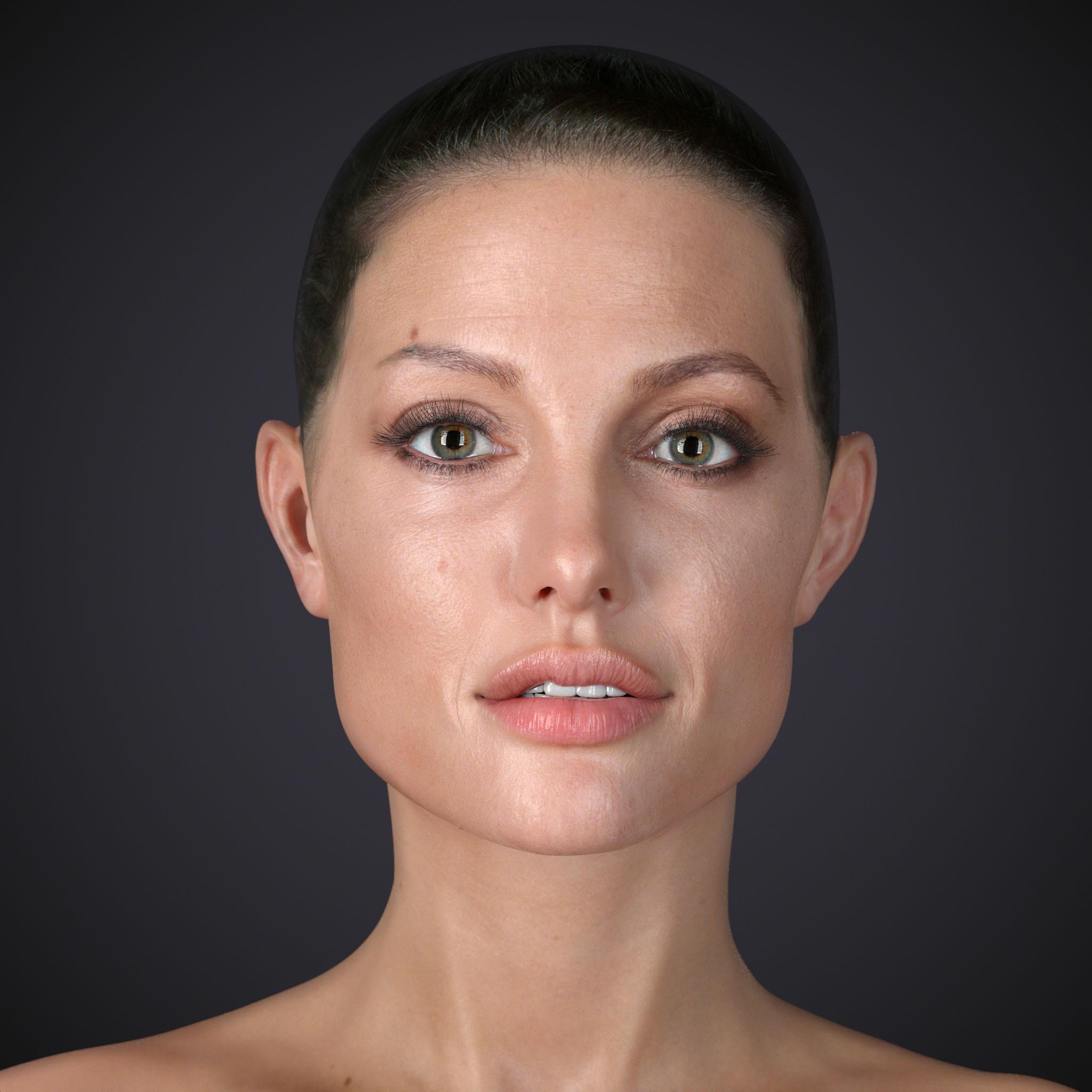
She would not be compatible with any Daz store content.
But then he provides support for her in the forms of clothings ,hairs, shapes etc on his Patreon or some other competing offsite commercial location like Renderhub.You can see how this might be a “problem”
Not asserting that Daz inc is nerfing the FBX importer but
I certainly understand why they would not make external character import as advanced as the Reallusion software has become which operates under a completely different business model.
Importing Daz model to Blender at specific scale (1/12 and 1/18)I've been using Daz 3D models (with the 3D printing license) to work as the base for personal 3D printable models. So far, I've been doing models at 1/12 and 1/18 scale, and have had to manually rescale the objects in Blender whilst eyeballing the size by using a cube set to the size of a 1/12 (or 1/18) head to match up with the model head. However I was wondering if there's a more precise way of doing this? Blender lets you import models at different scales- what would be the right scales to use for a Daz model to be 1/12 and 1/18 respectively? Bearing in mind 1 Blender unit = 1MM
Thanks!
Let's appreciate/discuss today's new releases - ongoing thread@brainmuffin no, not that one. I don't think I can link it here, but if you google Fix: Import Mixamo Animations with Genesis 9 - DAZ Studio, that's the one you want.
Poser >>> DS " Article "Torquinox said:
That would be way a lot better if we were talking about an original model. That's a Wolfenstein Panzerhund. I don't know the provenance of your model. Did you make it? The markings are spot-on for markings I've seen on the web. It makes me wonder, what is your Orcus, actually? Historically, Orcus is a major demon known widely in D&D lore. That's not what you've got there. Is it an original creation? I guess my inquiring mind would like to know.
According to Google that would be Belloc from Lost Ark.
The models themselves I find fairly uninteresting, the more interesting part would be the import scripts.
Let's appreciate/discuss today's new releases - ongoing thread
This one by any chance?benniewoodell said:
Gordig said:
I'm a little confused by the Mixamo Rigged G9. G9 and Mixamo have very different rigs, so did HL just subtract all the joints from G9 that threw up errors when uploading to Mixamo? I've done that with a G8 a few times.
If you google G9 to Mixamo, you'll find a youtube video that shows exactly how to do it. I did it about three months ago, it took roughly a half hour, and have been using Mixamo in Daz without a hitch. It's just a matter of going into the joint editor and deleting certain bones. And then if I want to use it on G8, I just save it as a pose preset from G9, open up a G8 character in Blender via the diffeo plug-in, import action and convert it from G9 or to G8, I forget (there's a convert option when you import action), save that as a pose preset, merge it to your character in Daz and then it'll work on a G8 in Daz.
 Poser >>> DS " Article "
Lets look at this model that I just finished for DS, it has a high complex articulation structure and rigging having a pretty individual Hierachy for to make the movements realistic, a load of Interactive pistons that are as well weight mapped as have a fallow function when moving Legs and bodyparts. Allot of parts have to be rigged below the armor parts, still keeping the hard shell of the Armor to avoid any distortions. I am really not sure if it would be possible rigging it manually in Daz Studio. But sure either way you need some experience in Rigging. In the case of this model I had a few polygons on the front leg Piston not assigned, can happen when mesh parts are overlapping, causing them to pull on the floor In the Fbx Import. But after the conversion these got automatically fixed.


For a end user it actually does not matter how it was done, he would not really care about all the technical stuff, he just wants to have the woow effect when loading the mesh. But for the creator it sure is a satisfaction being able to bring in such in Poser or Daz Studio, making him want to make even more complex structures and figures.
Poser >>> DS " Article "Keeping importing custom figures the hassle it is right now does not keep people loyal to Daz, on the contrary. The more hassle it is to get what you want, the more likely it is people will instead move on to other apps - especially with all those recent Blender plugins that allow for easy creation, posing and clothing of human figures.
So I'ld say an easy way to import rigged characters into DS would rather benefit than hinder Daz and the willingness to stick with DS.
Right now, FBX support for DS is abysmal (files that work with any application I can throw them at load into DS fragmented and all over the place), so I'ld say an actually usable importer would be great!
Diffeo - problem with thigh bending bulgeAh... I've checked the 4 corrective morph from Z Leggy Goddnes, they're set correctly. So only if you dialed the morph: Z Leggy Goddess Shape, those 4 corrective morph would be triggered. So, in general, if you still need Z Leggy Goddess Shape, you need to import this morph and the 4 corrective morphs into Bender.
And ha ~ that Pose comes from G9 Starter Essentials product, as attached.
BTW, thanks to Padone,he has already reported the above issue and Thomas confirmed it. Well, let's see if he is willing to fix it... hoho ~~ https://bitbucket.org/Diffeomorphic/import_daz/issues/2073/jcms-are-wrong
To me, I personally don't really care if they're 100% same or not (even though technically they could've been the same...), because I rarely rarely compare them after importing the figure assets in to Blender for work.
 Let's appreciate/discuss today's new releases - ongoing thread
Gordig said:
I'm a little confused by the Mixamo Rigged G9. G9 and Mixamo have very different rigs, so did HL just subtract all the joints from G9 that threw up errors when uploading to Mixamo? I've done that with a G8 a few times.
If you google G9 to Mixamo, you'll find a youtube video that shows exactly how to do it. I did it about three months ago, it took roughly a half hour, and have been using Mixamo in Daz without a hitch. It's just a matter of going into the joint editor and deleting certain bones. And then if I want to use it on G8, I just save it as a pose preset from G9, open up a G8 character in Blender via the diffeo plug-in, import action and convert it from G9 or to G8, I forget (there's a convert option when you import action), save that as a pose preset, merge it to your character in Daz and then it'll work on a G8 in Daz.
Poser >>> DS " Article "if you google " Importing a fully rigged figure into daz studio " you might understand my point
I understand you desire however I see no actual benefit for Daz as Again, figures imported from other Apps will not foment the sales of Daz studio Store content and put Daz in direct competition with another FREE application that can import FBX figures from many sources yet does not have to rely on figure specific Content sales as it is supported by a Foundation…. BlenderDiffeomorphic Add-ons Version 5.0.0 ReleasedVersion 5.0.0 of the DAZ Importer, MHX Runtime System and BVH and FBX Retargeter have been released. They can be downloaded from
DAZ Importer:
https://www.dropbox.com/scl/fi/8b5z3cy6kd9pcxeo17bh1/import_daz-5.0.0.zip?rlkey=udvj5mbw4f1psmvrnt8949ed5
MHX Runtime System:
https://www.dropbox.com/scl/fi/0nf018loxjpy0nbe26zpr/mhx_rts-5.0.0.zip?rlkey=dd33350oazwagkund3puqt7up
BVH and FBX Retargeter:
https://www.dropbox.com/scl/fi/0ftrenp005ub78ov5fek0/retarget_bvh-5.0.0.zip?rlkey=c27jhf4pxc3scpu0ffmil197d
The add-ons have been tested on Blender 3.6, 4.5 and 5.0. They should run on Blender versions from 3.0 onwards.
The main reason for this release is compatibility with Blender 5.0. Several other bugs have also been fixed.------------------------------------------------------
Version 4.5.0 of the DAZ Importer, MHX Runtime System and BVH and FBX Retargeter have been released. They can be downloaded from
DAZ Importer: https://www.dropbox.com/scl/fi/hp422s4cibjtofs0w41v0/import_daz-4.5.0.zip?rlkey=48iudwd2yea9y1vw51hixzxpw
MHX Runtime System: https://www.dropbox.com/scl/fi/y4foq3hjg8i23qozdcuyo/mhx_rts-4.5.0.zip?rlkey=n15uyij9ouoclmaqqmpe5tq92
BVH and FBX Retargeter: https://www.dropbox.com/scl/fi/z140z8ai58zw89zv1cl2e/retarget_bvh-4.5.0.zip?rlkey=1cs5th0jau8tm12dc1a6ofhb3
The add-ons have been tested on Blender 4.5 and 3.0, and should run on intermediate Blender versions as well.
This is mainly a bugfix release in order to keep in sync with Blender versions. However, there are some new features:- Better support for UTF-16 (Chinese and Japanese characters)
- The Retarger editing functions have been replaced by animation layers.
--------------------------------------------------------------------------------------------------------------------------------------------------------------
Version 4.4.0 of the DAZ Importer, MHX Runtime System, and FBX and BVH Retargeter have been released. They can be downloaded from
- DAZ Importer: https://www.dropbox.com/scl/fi/ikl7ewt2vyry4yokmexee/import_daz-4.4.0.zip?rlkey=6icungsgz5e2jf1xrfp4tu6a1
- MHX Runtime System: https://www.dropbox.com/scl/fi/wr5pe0azugvoqwx071uy1/mhx_rts-4.4.0.zip?rlkey=yj839xajudf5rzeuln9l4u1vi
- BVH and FBX Retargeter: https://www.dropbox.com/scl/fi/jp7t4j6q9r00y0b7ufhxx/retarget_bvh-4.4.0.zip?rlkey=aecabc76pafykzqh54m9d6y1v&st=ap5ywyda
The previous stable version 4.3.0 does not work with Blender 4.4 due to an API change.
Apart from working with Blender 4.4, there are also many bugfixes and some other changes.- Internal data used by the DAZ Importer have been moved to a single complex property, to avoid unnecessary cluttering of the custom properties (http://diffeomorphic.blogspot.com/2025/01/custom-properties-cleanup.html).
- Improvements to Rigify, both for animals (https://bitbucket.org/Diffeomorphic/import_daz/issues/2350/implement-rigify-conversion-for-daz-dog) and adding extra Rigify bones (http://diffeomorphic.blogspot.com/2025/02/adding-extra-bones-to-rigify.html)
- Scripting improvements (http://diffeomorphic.blogspot.com/2025/03/scripting-improvements.html)
--------------------------------------------------------------------------------
Version 4.3.0 of the DAZ Importer and MHX Runtime System have been released. They can be downloaded from
- DAZ Importer: https://www.dropbox.com/scl/fi/uraafocct3c6384yc17rw/import_daz-4.3.0.zip?rlkey=juujj59alt459xumopzn3xmz2
- MHX Runtime System: https://www.dropbox.com/scl/fi/law40jz2q8qvr8okruhdx/mhx_rts-4.3.0.zip?rlkey=sk6t6zafaoqdoxdwwz956yljp
The previous stable version 4.2.1 does not work with Blender 4.3 due to an API change. The new version has also been tested with Blender 4.4 alpha, so there is a reasonable chance that it will work with the future Blender 4.4.
The previous release contained two more add-ons, DAZ Rigging and Shell Editor, which depended on the DAZ Importer. Because dependencies between add-ons lead to lots of complications, they have been reintegrated into the main add-on. Instead the DAZ Importer has been modularized. Many tools are not loaded by default, to keep down the complexity of the add-on for the casual user, cf the posts on Modularization and Modularization Complete.
Support has been added for Filatoon, a new shader in DAZ Studio 4.23 to draw toon style figures.Import of morphed characters without first exporting a dbz file has been improved, even if it does not work quite as well as the dbz pipeline. I will write something about that later.
------------------------------------------------
Diffeomorphic Add-ons Version 4.2.1 Released
It is time for a new stable release of the DAZ Importer and the other Diffeomorphic add-ons. The main novelty is that the add-ons have been converted to Blender extensions in Blender 4.2, cf the posts on Blender Extensions and GPL and Addon Scripting and Blender Extensions. The add-ons can also be installed in earlier versions of Blender. As usual, several bugs have also been fixed.
The DAZ Studio export script (export_to_blender.dsa) has also been updated and should be copied to the Scripts folder in a DAZ Studio directory. The specialized HD export script (export_highdef_to_blender.dsa) has been merged with the main export script and is now obsolete. Old versions of the script still work in most situations.DAZ Importer
The DAZ Importer is a Blender add-on for importing native DAZ Studio files (.duf, .dsf) into Blender. It also contains some tools to make the assets more animation friendly.
Download:
https://www.dropbox.com/scl/fi/hka5ej1dv65gk04p1pn5x/import_daz-4.2.1.zip?rlkey=9ukju1y5zai4pryp5atblcbe9
Documentation:
https://bitbucket.org/Diffeomorphic/import_daz/wiki/Home
MHX Runtime System
The MHX Runtime System is a Blender add-on for posing the MHX rig, that can be generated by the DAZ Importer.
Download:
https://www.dropbox.com/scl/fi/ry8nwojh62s3y23w4g5bp/mhx_rts-4.2.1.zip?rlkey=mx0worrq46afetxumvmo8yhg8
Documentation:
https://bitbucket.org/Diffeomorphic/mhx_rts/wiki/Home
BVH and FBX Retargeter
The purpose of the BVH and FBX Retargeter is loading animations from BVH or FBX files to a given armature, and editing these animations in various useful ways. It can also import facial animations in FaceCap, LiveLink, VMD and FBX formats.
Download:
https://www.dropbox.com/scl/fi/qh6czqobslto9q0ea6kh6/retarget_bvh-4.2.1.zip?rlkey=g9xpumgp6xzh94frzromb8psy
Documentation:
https://bitbucket.org/Diffeomorphic/retarget_bvh/wiki/Home
The next two add-ons were recently spawned from the DAZ Importer in order to keep down its size somewhat. They contain rather specialized tools that are probably not of interest to most users. They are also poorly documented and result in warnings about policy errors. The the previous release there was a third add-on for exporting pose presets back to DAZ Studio, but that has been merged with the main DAZ Importer add-on again.
Important: The DAZ Importer must be enabled first, before any of these two add-ons can be used.
DAZ Rigging
Some specialized tools for rigging certain types of figures, link chains and tails.
Download:
https://www.dropbox.com/scl/fi/xqgb698891hlwqr3bon7z/rig_daz-4.2.1.zip?rlkey=k5mhdxlwi7civx5uzrozk6svz
Documentation:
https://bitbucket.org/Diffeomorphic/rig_daz/wiki/Home
Shell Editor
Contains some tools for manipulating shells imported from DAZ Studio.Download:
https://www.dropbox.com/scl/fi/bqh6cu4o33jdpwr4nspct/shell_edit-4.2.1.zip?rlkey=09ls8m6em95dicc4kvk54r000
Documentation:
https://bitbucket.org/Diffeomorphic/shell_edit/wiki/HomeLet's appreciate/discuss today's new releases - ongoing thread
Wondering the same things myself. How well does it work? Is it Windows only? Does it require a recognized GPU? Can the animation be exported?emanuela1 said:
Has anyone tried Mixamo Rigged G9? Sounds interesting, but does it works? Usually the compatibility between mixamo and DAZ characters reaches up to g2, to transfer Mixamo movements to DAZ for g8 you need to import them with g2 and then transfer the movement from g2 to g8 with the appropriate scripts (this is the only method I know) . Also, is there anything similar for g8?
Let's appreciate/discuss today's new releases - ongoing threadHas anyone tried Mixamo Rigged G9? Sounds interesting, but does it works? Usually the compatibility between mixamo and DAZ characters reaches up to g2, to transfer Mixamo movements to DAZ for g8 you need to import them with g2 and then transfer the movement from g2 to g8 with the appropriate scripts (this is the only method I know) . Also, is there anything similar for g8?
Daz 3D is part of

Connect
DAZ Productions, Inc.
7533 S Center View Ct #4664
West Jordan, UT 84084Licensing Agreement | Terms of Service | Privacy Policy | EULA
© 2026 Daz Productions Inc. All Rights Reserved.